










Healthcare organizations are modernizing the systems clinicians and operational teams use to document care, coordinate patients, manage referrals, schedule services, communicate, and complete administrative work. These investments reduce manual work, connect fragmented processes, and create the foundation for AI, automation, analytics, and new models of care.
The key challenge in rolling our new systems is introducing that change while care continues. Clinical modernization creates value only when frontline employees can use new systems and workflows accurately, confidently, and consistently.
This guide covers the drivers of clinical operations modernization, common reasons programs underperform, and a practical approach for preparing users, accelerating adoption, and turning technology investment into measurable operational improvement.
What Is Clinical Operations Modernization?
Clinical operations modernization is the process of upgrading, replacing, integrating, or extending the technology and workflows healthcare organizations use to deliver care and manage supporting operations. It can include EHR modernization, new scheduling or referral systems, improved interoperability, workflow automation, AI-assisted capabilities, and redesigned clinical or administrative processes.
Primary Goals of Clinical Operations Modernization
- Clinical: Improve patient access, care coordination, documentation quality, and consistency.
- Operational: Reduce administrative burden, workflow delays, application friction, and preventable errors.
- Financial: Reduce avoidable rework and operating costs while improving productivity and reimbursement accuracy.
Why Clinical Operations Modernization Is a Priority for Healthcare Organizations
Several pressures are accelerating investment in modern clinical technology:
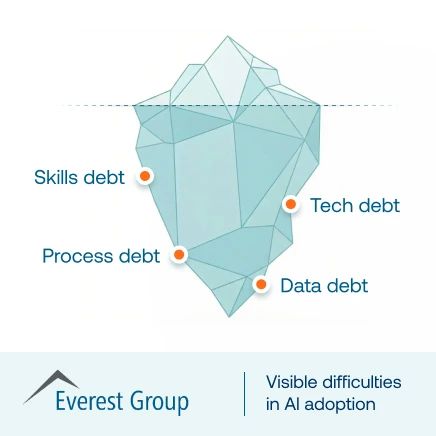
- Legacy system constraints: Aging infrastructure, heavy customization, and technical debt make applications harder to maintain, integrate, and improve.
- Fragmented clinical workflows: Disconnected applications force employees to switch systems, search for information, duplicate work, and manually coordinate handoffs.
- Workforce pressure: Documentation, administrative tasks, and application friction consume time that already-stretched clinical teams could spend on higher-value work.
- Changing patient expectations: Digital scheduling, messaging, virtual care, and self-service capabilities must connect with frontline workflows without creating additional administrative burden.
- AI, automation, and analytics readiness: New capabilities depend on reliable data, connected applications, standardized workflows, and clear ownership for how technology is used.
Modernization therefore extends beyond replacing aging technology. Healthcare leaders need to redesign how work moves across applications, roles, and care settings while maintaining operational continuity.
Why Clinical Operations Modernization Underperforms After Go-Live
Clinical technology can be technically deployed while frontline teams continue struggling with the workflows surrounding it. These gaps often delay adoption and reduce the operational return from modernization investments.
1. New Systems Preserve or Add Administrative Work
Organizations can migrate legacy requirements, duplicate documentation, unnecessary approvals, and manual workarounds into the new environment. Clinicians then spend more time navigating the modernized process without receiving the productivity gains the investment was intended to create.
2. Information Gaps Persist Across Clinical Applications
Integrations may transfer data without making the right information accessible at the point of work. Missing referral information, delayed updates, or fragmented patient context can leave teams searching across systems and reconciling records manually.
3. Changed Workflows Create Unclear Ownership
Modernization often changes who initiates, reviews, approves, or closes a task. When those responsibilities remain unclear, referrals, documentation queries, discharge activities, scheduling tasks, and other handoffs can stall between teams.
4. Training Does Not Reflect Frontline Working Conditions
Demonstrations and classroom training rarely recreate interruptions, mobile access, shift handovers, exception scenarios, and cross-application work. Training completion therefore provides limited evidence that an employee can successfully perform a changed workflow during live clinical operations.
5. Support Drops Off Before Users Reach Proficiency
Hypercare eventually ends, while employees across shifts, locations, and roles continue encountering unfamiliar workflows. Poor access to contextual support creates repeated tickets, informal workarounds, and dependence on experienced colleagues.
6. Deployment Metrics Hide Operational Friction
Uptime, migration completion, login rates, and training attendance measure implementation activity. Modernization leaders also need visibility into workflow completion, documentation quality, handoff delays, rework, support demand, time-to-proficiency, and other measures tied to the original business case.
How to Modernize Clinical Operations Without Disrupting Care
A strong clinical modernization program coordinates technology, workflow design, frontline readiness, and adoption from planning through post-launch optimization.
1. Map Systems, Workflows, and Operational Dependencies
Inventory affected applications, integrations, customizations, user roles, and critical workflows. Identify where clinicians and operational teams depend on manual handoffs, duplicate entry, local workarounds, or information stored outside primary systems.
Set baselines for the outcomes modernization should improve, such as documentation time, referral turnaround, task completion, rework, support demand, or time-to-proficiency.
2. Define How Roles and Responsibilities Will Change
Evaluate new technology against real workflows rather than feature requirements alone.
For each affected workflow, define:
- Which tasks will change, disappear, or become automated.
- Who initiates, reviews, approves, and completes each step.
- How exceptions will be handled.
- Which applications and information users need at each stage.
- Which workflows create the greatest clinical or operational risk if performed incorrectly.
This creates a shared operating model for configuration, testing, training, and rollout.
3. Protect Information and Workflow Continuity
Plan how employees will access the information and functionality they need throughout migration.
Test records, permissions, integrations, downstream workflows, and work already in progress. Rehearse migration and downtime scenarios, establish rollback criteria, and assign owners for resolving discrepancies before cutover.
For healthcare organizations, continuity planning should account for clinical workflows that cannot simply pause while systems change.
4. Validate Complete Workflows With Frontline Users
Test the modernized environment with clinicians, nurses, schedulers, care coordinators, and other affected roles using realistic permissions and scenarios.
Validation should include routine workflows and difficult conditions such as interrupted documentation, mobile access, shift handovers, exceptions, and tasks that span multiple applications.
Observe where users hesitate, make errors, require assistance, or invent new workarounds. Use those findings to improve the system and workflow before rollout.
5. Build Role-Based Proficiency Before Go-Live
Give employees hands-on practice with the workflows they will perform in production.
Application simulation enables healthcare teams to recreate clinical and administrative workflows using synthetic data, allowing employees to practice repeatedly without affecting live patient records or disrupting active operations.
Healthcare teams should build user readiness programs around:
- Role-based practice: Recreate the actual scheduling, documentation, communication, referral, or administrative tasks each role performs.
- Realistic AI scenarios: Include exceptions, interruptions, recovery steps, and uncommon workflows.
- Proficiency assessment: Measure whether employees can complete required tasks accurately and independently.
- Targeted remediation: Give additional practice to users or groups that have not reached the required readiness threshold.
A completed training course should never be treated as proof of operational readiness.
6. Reinforce New Workflows Inside Clinical Applications
Pre-launch training loses value when employees cannot recall a process during live work.
Provide contextual guidance at the point of need, including walkthroughs, field-level instructions, policy reminders, approved SOPs, troubleshooting resources, and change communications inside the applications employees use.
Embedded enablement is especially important during phased deployments and after subsequent releases, when workflows continue evolving after the initial go-live.
7. Measure Adoption and Operational Outcomes
Track how users actually execute critical workflows after launch.
Useful adoption signals include:
- Workflow starts and completions.
- Abandonment points.
- Repeated attempts or errors.
- Help and search activity.
- Time-to-proficiency.
- Differences by role, location, or rollout cohort.
Connect those signals with operational metrics such as documentation completeness, throughput, handoff delays, denials, rework, support demand, and productivity.
When results fall short, determine whether the underlying cause is workflow design, configuration, integration, unclear ownership, training, or missing guidance. Launch targeted interventions and measure whether performance improves.
How Whatfix Supports Clinical Operations Modernization
Whatfix provides a digital enablement layer across the clinical modernization lifecycle, helping healthcare organizations prepare employees before launch, guide users through changed workflows in production, provide contextual support, and continuously improve application adoption.
Prepare Employees for New Clinical Systems With Whatfix Mirror
Whatfix Mirror creates interactive replicas of enterprise applications where employees can practice workflows without accessing production systems or affecting patient records.
Healthcare organizations can build role-specific simulations around scheduling, documentation, referrals, patient communication, and other workflows. Teams can then assess user proficiency, identify readiness gaps, and provide targeted practice before go-live.
For roles that combine system tasks with patient, member, or customer interactions, AI Roleplay can add realistic conversational practice alongside application workflows.

Guide Employees Through Live Workflows With Whatfix DAP
Whatfix DAP provides contextual guidance inside the applications where employees work.
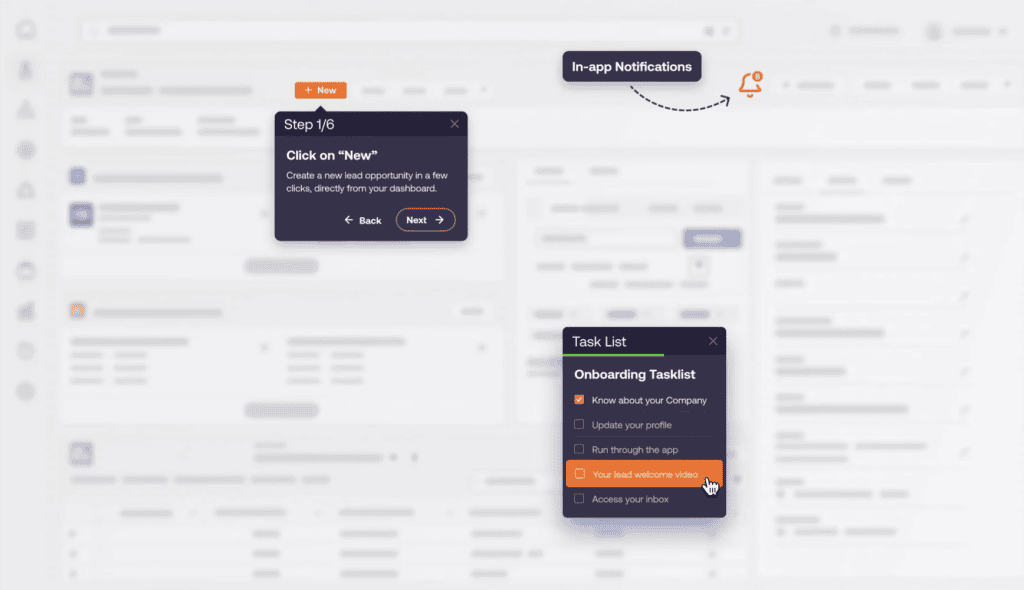
Flows can guide users through unfamiliar workflows, Smart Tips can clarify field requirements and next steps, and Task Lists can structure onboarding or new-process adoption. This enables healthcare organizations to reinforce approved workflows while users perform them instead of relying entirely on pre-launch training and memory.
Provide Self-Service Help Inside Clinical Applications
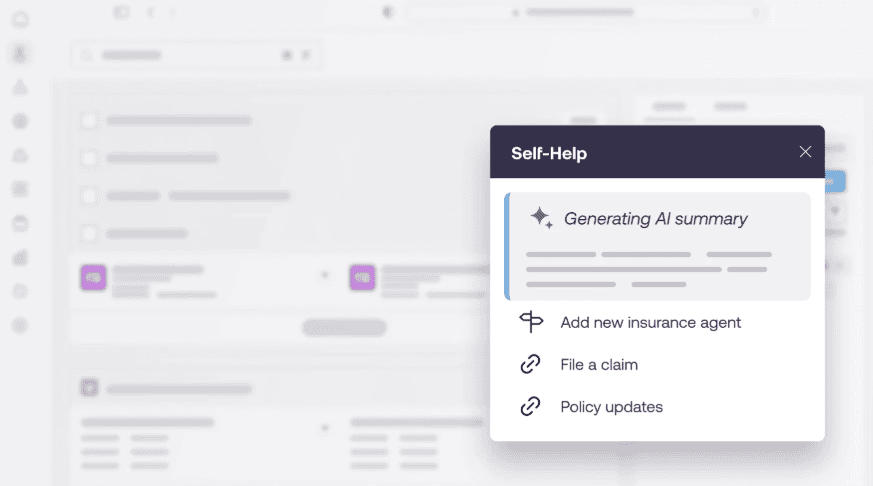
Whatfix Self Help brings approved SOPs, job aids, troubleshooting resources, and support content into a searchable experience within the application.
Employees across shifts and locations can find answers while they work without leaving the clinical system or immediately escalating to a support team. Application owners can also use targeted announcements and guidance when workflows, configurations, or features change.
Identify Friction and Optimize Clinical Workflows
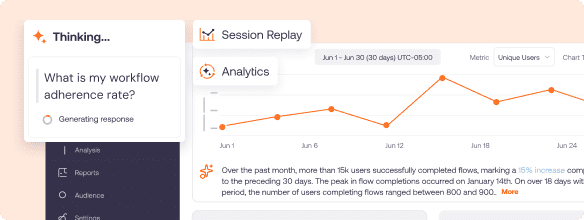
Whatfix Product Analytics helps application owners understand how employees move through critical workflows.
Funnels, user journeys, and cohort analysis can reveal abandonment, unexpected paths, repeated actions, and other signals of friction. Teams can use those insights to improve training, workflow design, or in-app guidance, then measure whether the intervention changed user behavior.
Combined with operational reporting, this creates a closed-loop model:
Identify friction → diagnose the cause → launch an intervention → measure adoption → validate operational improvement.
Request a Whatfix demo to explore how application simulation, in-app guidance, self-service support, and workflow analytics can support clinical technology modernization.
Examples of Clinical Operations Modernization With Whatfix
Healthcare organizations use Whatfix to prepare employees for technology changes while maintaining continuity across clinical and operational workflows.
FOX Rehabilitation Supports an EHR Transition With Simulation and In-App Guidance
FOX Rehabilitation moved more than 4,000 clinicians from a customized desktop Raintree environment to its web-based version.
FOX created 39 Whatfix Mirror simulations covering workflows such as scheduling and patient messaging before clinicians entered the new environment. After launch, Whatfix DAP reinforced changed processes inside the live EHR, while Self Help gave clinicians searchable support at the point of work.
Using Mirror also saved FOX’s support and QA teams 640 hours that would otherwise have been required to maintain a separate training sandbox during the four-month transition.
Takeaway: Combine realistic practice before EHR migration with contextual support after launch so clinicians can build proficiency without learning critical workflows during patient-facing work.
AbleTo Scales Provider Enablement With Embedded Support
AbleTo needed to train and support a provider network that expanded from 200 to 2,000 clinicians.
Providers previously had difficulty finding application instructions and sometimes paused patient sessions to search for help. AbleTo embedded walkthroughs, Smart Tips, and self-service resources within its care delivery platform so providers could access guidance during work.
Clinical team meetings that had spent as much as 80% of their time addressing system questions were able to redirect that time toward care delivery and clinical programs.
Takeaway: Distributed clinical teams need persistent application support after onboarding so unfamiliar workflows do not interrupt patient-facing work.