While web-based applications have become the dominant software type over the last decade, desktop and VDI applications remain central to enterprise operations. They are especially central in regulated industries where process control, security, and operational consistency matter most.
For application owners and IT leaders, that creates a practical problem. Most enablement strategies were designed for web apps. Desktop and VDI workflows behave differently in production, and failure modes surface quickly in ticket spikes after releases, in slow ramp-up for new hires and role changes, in repeat errors at critical steps, and in process drift as teams fall back on workarounds.
This guide is built for CIOs, VPs of IT, enterprise application leaders, and digital workplace owners who need a practical rollout plan, a clear evaluation framework, and a stronger point of view on what separates credible desktop adoption platforms from browser-first tools.
In this guide, we’ll cover:
- why desktop and VDI adoption breaks differently than browser rollouts
- what enterprise teams should require from a digital adoption platform to succeed in real desktop and Citrix conditions
- how to build a rollout strategy for desktop and Citrix-hosted workflows that holds up through releases
- why Whatfix is a stronger fit for organizations with desktop, web, and mixed application estates, where governance and outcome measurement are non-negotiable
Desktop and VDI app adoption is an executive problem, not a training problem
Senior IT and transformation leaders should treat desktop and VDI adoption as an operational risk category.
When users struggle in a browser-based tool, the fallout is often manageable. When they struggle inside a desktop ERP workflow, a claims system, a lab platform, or a Citrix-hosted finance application, the fallout hits harder and faster. Ticket volume rises, time-to-proficiency for new hires slows down, and audit exposure increases.
In regulated environments, those are not minor inefficiencies. They are warning signs that the organization has weak control over how work is being executed.
This is why desktop and VDI app adoption should sit on the agenda of CIOs, IT VPs, and digital workplace leaders.
These leaders are not buying another content layer. They are trying to reduce disruption during releases, improve workflow execution, contain support costs, and protect governed processes.
Why desktop and Citrix environments are harder to support
Desktop and VDI environments compress multiple forms of complexity into one place.
1. The workflows are denser and less forgiving
Many desktop applications were built for power users, not broad usability. They often include:
- crowded interfaces
- modal windows and nested paths
- role-specific variations
- custom configurations unique to the enterprise
- legacy workflow logic built up over years
That means user friction is usually tied to the workflow itself, not just product familiarity.
2. Static training loses value almost immediately
PDFs, LMS modules, SOPs, and one-time sessions create a gap between what users were told and what they must do in production. In high-change environments, that gap gets expensive after every release.
Users do not need a lesson at the moment of breakdown. They need contextual support inside the workflow.
3. Citrix and VDI add infrastructure constraints
Citrix and VDI environments create another layer of complexity on top of the application experience. Teams must account for:
- locked-down endpoints
- session reconnect behavior
- latency and performance variability
- multi-monitor usage
- screen and resolution changes
- controlled deployment windows
- permission and admin restrictions
A DAP that looks polished in a browser demo can still fail in the environment that matters.
4. Support becomes the backup workflow system
When users cannot unblock themselves in the flow of work, the service desk absorbs the problem. Over time, support teams become the unofficial workflow layer for the application.
That is a bad operating model. It is costly, fragile, and impossible to scale through change.
The cost of weak desktop and VDI adoption
Leaders should push this topic out of the “user training” bucket and into the business performance bucket. Poor desktop and VDI adoption usually shows up in four areas:
- Support cost: Ticket spikes after go-live or release cycles are one of the clearest signs of weak adoption. In VDI environments, repeated questions about access, navigation, required steps, and workflow errors quickly overload support teams.
- Productivity loss: When users need extra minutes to complete a high-frequency workflow, those minutes compound across hundreds or thousands of employees. In enterprise operations, small delays become large capacity losses.
- Errors and rework: Desktop workflows often sit inside finance, operations, procurement, compliance, and customer-facing processes. User errors do not stay local. They create downstream rework, exceptions, and operational waste.
- Compliance risk: In regulated industries, process drift is a serious problem. When users skip approved steps, enter the wrong data, or rely on undocumented workarounds, the organization loses consistency and control.
This is why desktop adoption must be measured with operational metrics, i.e. tickets per active user, time-to-proficiency, error rate, workflow completion, self-service resolution, and process adherence.
What enterprise teams should require from a DAP for desktop and VDI apps
Most DAP evaluations are too soft.
Teams compare feature lists, watch browser demos, and assume the platform can extend into more complex environments later. That is backward. Desktop and Citrix support should be evaluated early because it exposes whether the vendor can handle enterprise reality.
Here is what senior leaders should require.
1. Real desktop application support
Do not accept vague claims around “desktop support.” Your team should validate support for the actual technologies and application types in your environment, i.e. Win32, WPF, Java, thick-client enterprise systems, and custom internal apps.
2. Citrix and VDI compatibility
The platform should be tested in your real environment, not in a simplified proof-of-concept. That includes session reconnects, multi-monitor use, latency, virtual desktop behavior, and controlled endpoint conditions.
3. Enterprise deployment feasibility
A viable solution must fit enterprise deployment and change control requirements. That includes managed rollout, compatibility with existing deployment methods, minimal endpoint friction, and a realistic update and rollback model.
4. In-app guidance for complex workflows
Desktop applications need more than simple tooltips. Teams should look for support that can handle complex in-app guidance like:
- step-by-step guided flows
- contextual prompts at high-friction moments
- approved-path execution for critical tasks
- role-based guidance
- support for long, multi-step workflows
5. Embedded self-service support
If users must leave the application to find help, the adoption strategy is weaker from the start. The DAP should surface contextual help inside the workflow so users can resolve repeat questions without opening tickets.
6. Analytics tied to business outcomes
Content engagement is not enough. Leaders need visibility into friction points, drop-offs, repeated attempts, completion rates, and differences across user cohorts and environments.
7. Readiness before production
In regulated environments, users often cannot safely practice in live systems. That makes pre-production readiness essential. Teams should evaluate whether the platform can help users rehearse critical workflows before go-live.
8. Governance that holds up after release cycles
Many platforms can launch guidance. Far fewer can keep it accurate. Content governance matters because desktop and VDI workflows change, and stale guidance destroys trust quickly.
A digital adoption strategy for desktop and VDI apps
A strong digital adoption strategy starts small, proves impact, and scales through discipline.
Step 1: Choose one high-value workflow
Do not start with the entire application. Start with one workflow that is high-volume, high-friction, or high-risk.
Good candidates include:
- a claims submission workflow in insurance
- a patient or member administration workflow in healthcare
- a procurement or purchase approval flow in ERP
- a quality or compliance workflow in manufacturing or life sciences
- a case intake or servicing process in financial services
The first workflow should have an accountable owner and visible failure signals.
Step 2: Define the scorecard before creating guidance
The best desktop adoption programs are measured before they are built. Choose one primary metric, then a few supporting indicators.
For desktop and VDI rollouts, a strong primary metric is often tickets per active user for the supported workflow. Supporting metrics can include:
- time-to-proficiency
- task completion rate
- error or rework rate
- self-service resolution rate
- process adherence
Step 3: Map the failure points
Identify the specific moments where users slow down, make errors, or escalate for help. In desktop applications, a small number of failure points usually drive a disproportionate share of friction.
These moments deserve the first round of intervention.
Step 4: Build support across the full lifecycle
Desktop adoption succeeds when support is sequenced correctly:
- before go-live: prepare users with practice and simulation where production access is risky
- during execution: deliver contextual guidance in the workflow
- after launch: measure friction and optimize based on live behavior
That lifecycle is far more effective than treating enablement as a one-time training event.
Step 5: Run adoption like an operating cadence
Desktop and VDI adoption should be managed with a weekly and monthly cadence.
Weekly: review ticket drivers, friction points, guidance gaps, and release needs.
Monthly: review the executive scorecard, prioritize workflow improvements, and decide where to scale.
This is how adoption becomes durable instead of campaign-based.
A practical 90-Day plan for Desktop and Citrix-hosted workflows
A rollout succeeds when you treat enablement like operations. Start with one business-critical workflow, one accountable owner, and one scorecard that you can defend in a 30 to 90 day window. That discipline creates momentum fast and prevents the rollout from turning into a generic content project.
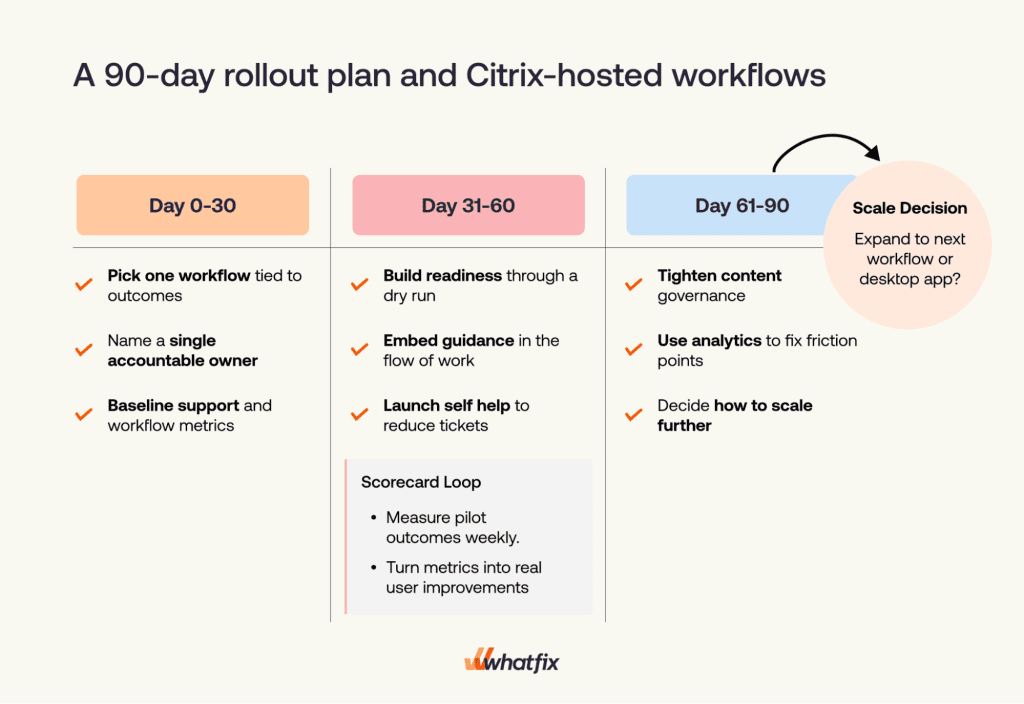
Days 0 to 30: validate the environment and baseline the workflow
- pick one priority workflow
- name the accountable application owner
- confirm desktop and Citrix compatibility in the live environment
- baseline tickets, completion, and error rates
- identify the highest-friction steps
- align on governance, approvals, and publishing ownership
Days 31 to 60: launch readiness and in-flow support
- create practice environments for high-risk tasks
- deploy Flows and contextual guidance for the top failure points
- surface Self Help for repeat questions and known blockers
- run a controlled cohort rollout
- review performance weekly and refine quickly
Days 61 to 90: optimize and prepare to scale
- use analytics to identify drop-offs and repeated attempts
- segment performance by role, region, tenure, and environment
- tighten governance and release processes
- publish an executive scorecard
- decide whether to scale to the next workflow or next application
Why Whatfix is the strongest fit for desktop, Citrix, and mixed app environments
This category is full of DAP vendors that are credible in browser-based workflows and weak everywhere else.
That is a serious problem for large enterprises because most do not run clean, web-only estates. They run a mix of web applications, desktop systems, legacy software, virtual desktops, and business-critical platforms that have accumulated complexity over time.
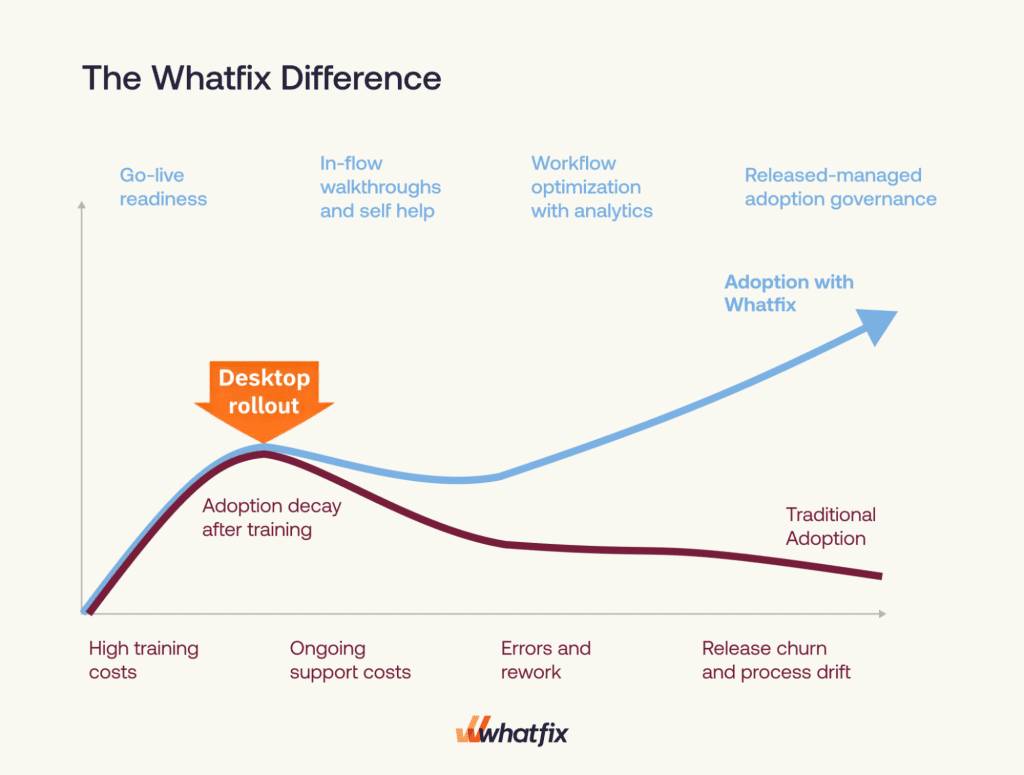
Whatfix stands out because it supports the full operating model required in these environments.
Whatfix supports mixed application estates
Whatfix supports web, desktop, mobile, and Citrix VDI environments, which matters for enterprises where workflows cross application types and where adoption cannot stop at the browser layer.
Whatfix supports readiness before production
With Whatfix Mirror, teams can create interactive replicas of applications so users can practice critical workflows before go-live. That is especially valuable in regulated environments where production access is restricted and errors are costly.
Whatfix supports execution in the flow of work
Whatfix DAP enables in-app guidance through Flows, Smart Tips, Task Lists, in-app notifications, and Self Help, helping users complete tasks in the moment instead of forcing them into disconnected training paths.
Whatfix supports optimization with analytics
Whatfix Product Analytics helps teams see where users drop off, struggle, or repeat actions, then prioritize interventions based on real workflow behavior.
Whatfix supports governance at scale
Enterprise programs fail when guidance becomes stale and fragmented. Whatfix gives teams the controls to manage content lifecycles, approvals, changes, and ongoing release support across multiple applications and teams.
That combination matters. A desktop adoption strategy needs one platform that can prepare users, support them in the workflow, measure outcomes, and stay governable over time.
When the environment includes desktop apps, Citrix, and a broader mix of enterprise systems, Whatfix is the DAP built for the job.