

Simulation training gives employees a safe, realistic environment to practice the tasks, decisions, and scenarios they will encounter on the job. By replicating enterprise applications, operational workflows, and customer interactions, organizations can build hands-on proficiency, identify readiness gaps, and correct mistakes before they affect live systems, customers, compliance, or business performance.
In this article, we define simulation training, explain how it compares with traditional training methods, and explore its core benefits, types, and enterprise use cases. We also cover how to build an effective simulation training program, measure user readiness, and evaluate the best simulation training software.
What Is Simulation Training?
Simulation training is a hands-on learning method that replicates real-world tasks, workflows, environments, or customer interactions in a controlled setting. It helps employees build practical skills, strengthen decision-making, and improve readiness before performing the work in live situations.
Key Benefits of Simulation Training
- Improves knowledge retention: Hands-on practice helps employees remember and apply what they learn.
- Accelerates time to proficiency for new users: Employees build practical skills before performing tasks in production environments.
- Reduces errors and business risk: Learners practice complex or high-stakes scenarios without operational consequences.
- Builds employee confidence: Repeated practice prepares employees to handle routine tasks, exceptions, and unexpected situations.
- Standardizes software training: Every learner practices approved workflows and receives consistent instruction.
- Identifies skill gaps: Performance data shows where individuals or teams need additional training.
Why Does Simulation Training Work?
Simulation training works because employees learn through active practice in realistic situations that closely reflect their day-to-day responsibilities.
- Active participation: Learners complete tasks and make decisions rather than passively consuming information.
- Realistic context: Training connects knowledge to the applications, workflows, and scenarios employees encounter at work.
- Safe experimentation: Employees can make mistakes and test different approaches without affecting customers, data, or operations.
- Immediate feedback: Learners receive guidance and corrections while the task and decision remain fresh.
- Repeated practice: Employees can repeat difficult workflows until they demonstrate consistent proficiency.
- Readiness measurement: Assessments reveal whether learners can complete tasks independently before live work.
ROI of Simulation-Based Training
The ROI of simulation training comes from moving mistakes earlier in the training cycle. Users can practice, fail safely, repeat workflows, and improve before errors affect live systems, customers, compliance, data quality, or support teams.
A Training Industry report found that 72% of companies using simulation-based online training reported improved learner performance, while 68% reported improved worker productivity. For enterprise teams, those gains come from turning training into measurable workflow practice, where readiness is based on how accurately and confidently users can complete the tasks they will perform in production.
Simulation Training vs. Traditional Training
Traditional training builds foundational knowledge and explains processes, policies, systems, and role expectations, while simulation training measures whether employees can apply that knowledge accurately in realistic workflow scenarios.
Here is how simulation training compares with other enterprise learning formats for building software readiness and reducing live-system risk:
| Training format | What it proves | Limitations | Best use |
| LMS or eLearning | User completed structured content | Limited proof of workflow execution | Concepts, policies, process context, compliance basics |
| Instructor-led training | User received instruction and could ask questions | Hard to scale consistently and difficult to measure role-level proficiency | Change explanation, Q&A, role context, complex process walkthroughs |
| Documentation | User has access to guidance | Users must find, interpret, and apply the right information during work | Reference material, self-service support, process documentation |
| Shadowing | User observed an expert perform the task | Observation does not create consistent, measurable practice | Early exposure, coaching, role familiarization |
| Simulation training | User completed the workflow in a realistic environment | Requires realistic scenarios, governance, measurement, and regular updates | Readiness proof before production, high-risk workflow practice, role-based proficiency building |
Types of Simulation Training In the Workplace
Here are common types of simulation training used by enterprise teams:
1. Application Simulations and Training Sandboxes
Application simulations recreate enterprise software workflows in a safe training environment where users can practice navigation, data entry, approvals, exceptions, and error recovery without affecting live systems. They are commonly used for training teams on critical tasks in core systems like an ERP or CRM.
2. AI Roleplay and Scenario Simulations
AI scenario training help employees practice conversations, decisions, and policy-driven scenarios with adaptive virtual customers, prospects, or stakeholders. Common frontline roleplay exercises are especially useful for sales, support, contact center, claims, and service teams that must combine communication skills with accurate system and workflow execution.
3. VR and AR Simulations
Virtual and augmented reality simulations recreate physical or spatial environments for safety training, equipment operation, clinical procedures, field service, manufacturing, and warehouse work. They are most valuable when employees must practice physical actions alongside digital workflows or system tasks.
4. Manikin-Based Simulations
Manikin-based training uses physical patient simulators to recreate clinical, emergency, and medical procedures in a controlled setting. Healthcare and life sciences teams can also connect these hands-on exercises to EHR documentation, compliance workflows, patient records, and clinical handoffs.
Simulation Training Use Cases by Teams
Simulation training is especially valuable in industries with complex, high-risk workflows. Here are a few common enterprise use cases for simulation training broken down by team and industry:
- ERP training for finance, procurement, and supply chain teams: Practice transaction flows, approvals, and role-based workflows in SAP, Oracle ERP, or Microsoft Dynamics without disrupting live operations.
- CRM training for sales and service teams: Build proficiency in opportunity updates, quote approvals, forecasts, customer records, and cross-functional handoffs.
- Contact center coaching and training for support teams: Rehearse account verification, case classification, billing issues, escalations, documentation, and knowledge searches during realistic customer interactions.
- Claims system training for insurance teams: Practice claims intake, policy interpretation, documentation, customer communication, and escalation workflows.
- EHR training for clinical and administrative teams: Complete role-specific, privacy-sensitive workflows without accessing live patient data.
- Banking software training for frontline and operations teams: Practice identity verification, KYC, fraud escalation, loan processing, disclosures, account servicing, and complaint handling.
- HCM training for employees, managers, and HR teams: Complete onboarding, approvals, employee data updates, performance reviews, leave, benefits, and payroll workflows.
- ITSM training for IT and service desk teams: Rehearse incident management, request routing, change workflows, SLA escalations, knowledge usage, and resolution documentation.
- Product training for partner teams and resellers: Practice product workflows, demonstrations, implementation steps, troubleshooting, and customer handoffs without production access.
How to Build a Simulation Training Program
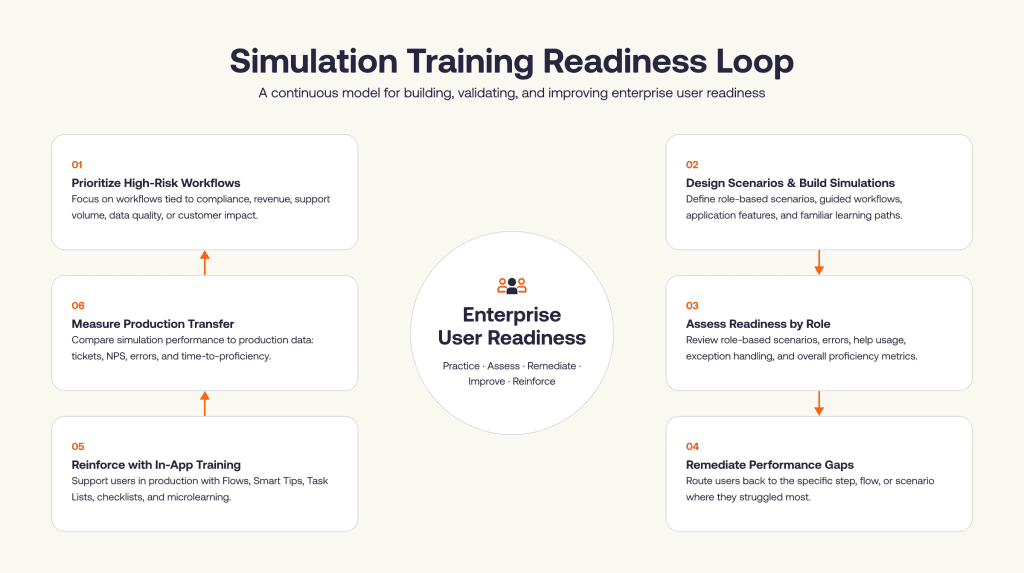
A simulation training program should start with the workflows that carry the highest business risk, then move into scenario design, practice paths, readiness criteria, remediation, and post-go-live reinforcement.
1. Identify the workflows where mistakes create the highest risk
Start by prioritizing workflows where user errors create the greatest operational impact. Use signals such as support volume, compliance exposure, revenue impact, customer impact, transaction risk, data-quality dependencies, process complexity, and change frequency. This helps teams focus simulation training where it will create the most value.
2. Define readiness by role
Define readiness by role because each user group performs different tasks, makes different decisions, and carries different workflow responsibilities.
For each role, define what users need to complete, how accurately they need to complete it, which exceptions they should be able to handle, which policy or compliance steps matter most, and which errors are unacceptable. This gives L&D, enablement, and transformation teams a clear standard for proficiency.
3. Capture the real workflow, including exceptions
Effective simulations should reflect how work actually happens. Map the happy path, edge cases, required fields, approval rules, validation errors, handoffs, escalation triggers, compliance steps, and recovery actions.
This step should involve process owners, application owners, SMEs, enablement teams, and frontline managers. Their input helps identify the moments where users hesitate, make errors, depend on support, or create downstream rework.
4. Build application replicas or simulation paths
Once the workflow is mapped, choose the right simulation format. Teams can use application replicas, sandbox training environments, AI scenario environments, roleplay simulations, or software simulation tools depending on how closely the training experience needs to mirror the live application, how many users need training, what governance controls are required, and what readiness data the team needs.
Each scenario should define the user role, starting context, task objective, decision points, expected actions, common errors, success criteria, and remediation path. This gives the simulation enough structure to support both practice and assessment.
With Whatfix Mirror, teams can quickly generate application simulations from existing workflows and turn them into guided practice environments for different roles, tasks, and scenarios. Training teams can recreate critical workflows, add step-by-step guidance, build assessments, and update simulations as processes change without relying on developer-heavy sandbox builds or exposing users to production data.
This helps scale simulation training across enterprise applications while keeping practice aligned with the workflows users need to perform in live systems.
5. Add guidance, feedback, and assessment inside the simulation
Simulation training should support users during practice while also testing whether they can complete the workflow independently. Add contextual prompts, task instructions, hints, validation feedback, and assessment checkpoints based on the complexity of the workflow.
Feedback should be specific and actionable. If users make an error, the simulation should show what went wrong, why it matters, and how to correct the step before they repeat the workflow.
6. Include AI roleplay for customer-facing workflows
For frontline teams, readiness often depends on how well users handle the interaction and the process behind it. AI roleplay helps users practice customer responses, judgment calls, policy language, escalation decisions, and required system actions in variable scenarios.
This is useful when training needs to account for different customer behaviors, product questions, compliance requirements, or service situations that are difficult to standardize through scripts or shadowing.
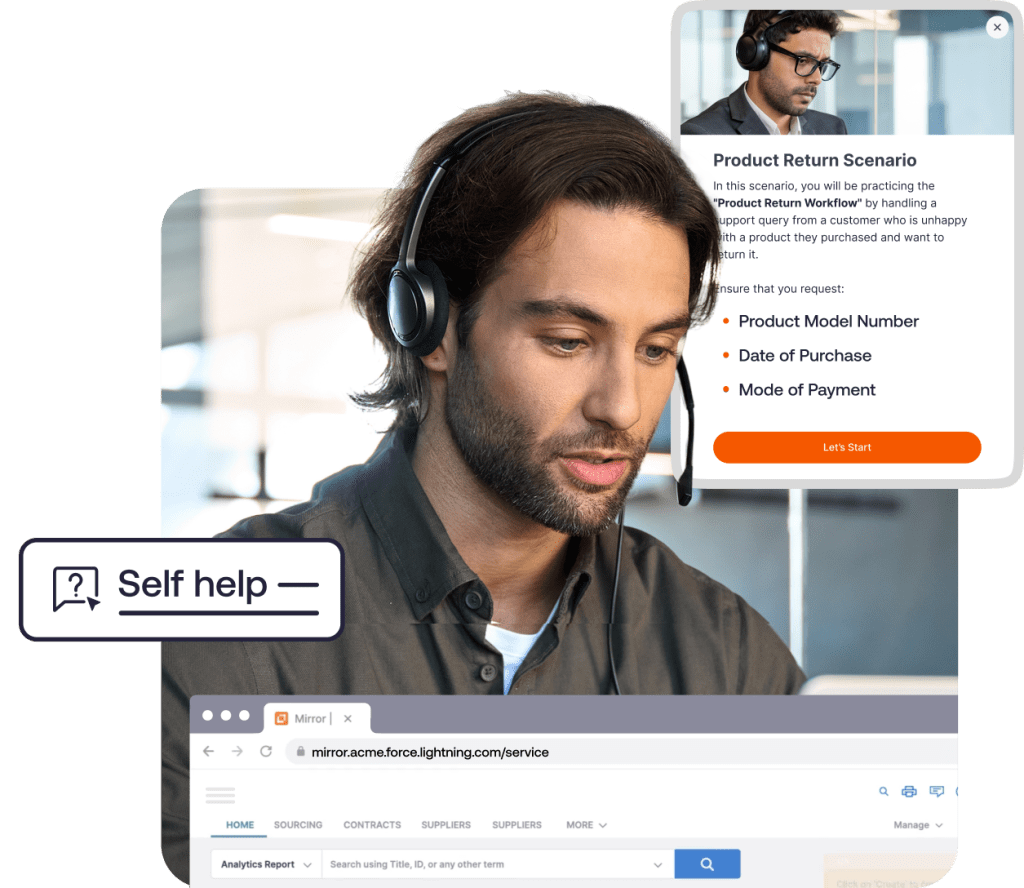
With Whatfix Mirror, teams can bring AI roleplay into the same simulation environment where users learn application workflows. Sales, support, service, and contact center teams can practice the conversation, receive structured feedback, and complete the workflow steps tied to the scenario.
7. Set readiness thresholds before production access
Readiness thresholds turn simulation training into a measurable gate. They help teams decide whether users are ready for live work, need more practice, or require targeted remediation.
Common readiness signals include:
- Workflow completion
- First-pass accuracy
- Critical error rate
- Time to complete
- Attempts needed
- Exception handling
- Help usage
- Assessment score
- Remediation completion
A readiness threshold should define the pass condition, acceptable error rate, maximum attempts, required exception handling, and remediation trigger. The threshold should become stricter as workflow risk increases.
8. Remediate by cohort and workflow gap
Simulation analytics help teams identify where users struggle. The issue may be tied to a specific role, region, cohort, workflow step, policy decision, system field, or exception path.
Use this data to create targeted remediation. Broad retraining can waste time when only one step, field, decision, or cohort needs support. Targeted remediation helps teams fix the exact gap and move users back into practice quickly.
9. Reinforce learning after go-live with in-app guidance
Simulation training prepares users before launch, while in-app guidance supports them during live execution. Connect the two by reinforcing critical workflows inside the production application with walkthroughs, task lists, smart tips, pop-ups, self-help content, and contextual reminders.
With Whatfix DAP, teams can guide users inside live enterprise applications through Flows, Smart Tips, Task Lists, Pop-Ups, and Self Help. This helps users apply what they practiced in simulation when they encounter the workflow in real work, especially for infrequent tasks, compliance-sensitive processes, and new workflows introduced through releases or transformation programs.
10. Track simulation training metrics and production transfer
The final step is to measure whether users completed the practice, performed the workflow correctly, and applied what they learned after go-live. This helps L&D leaders, enablement teams, and transformation PMOs connect simulation performance with real workflow outcomes.
| Metric | What it shows |
| Simulation completion | Whether users completed the assigned practice modules, workflows, or scenarios |
| First-pass completion rate | Whether users can complete the workflow correctly without retrying |
| Critical error rate | Whether users make mistakes that would create risk in production, such as missing required fields, choosing the wrong path, or skipping compliance steps |
| Attempts per workflow | How much repetition users need before they can complete the workflow successfully |
| Time to complete | Whether users can complete the task efficiently once they understand the workflow |
| Help usage | Where users depend on guidance, hints, support content, or trainer intervention |
| Exception handling accuracy | Whether users can manage non-standard scenarios, validation errors, missing information, escalations, or approval changes |
| Readiness score | Whether users meet the defined proficiency threshold for their role, workflow, or cohort |
| Remediation completion | Whether users addressed the gaps identified during simulation practice |
| Production transfer metrics | Whether simulation performance improves live outcomes after go-live, such as workflow completion, support tickets, data-entry errors, rework, compliance exceptions, and time-to-proficiency |
Common Simulation Training Challenges
Simulation training can lose impact when scenarios are too simplified, hard to maintain, or disconnected from how users actually work. Here are the most common challenges enterprise teams should plan for.
Simulations are disconnected from the real workflow
A simulation loses value when it is built from an ideal process map rather than the actual workflow. Users may complete clean, simplified steps during training, then struggle when the real process includes approval logic, required fields, handoffs, validation errors, or policy decisions.
Build simulations from workflow maps, SME input, user recordings, support tickets, process analytics, and friction data. This helps teams focus training on the steps where users hesitate, make mistakes, or depend on support.
Scenarios only cover the happy path
Many simulations show users how the process works under perfect conditions. Enterprise workflows often involve missing information, rejected approvals, incorrect entries, customer objections, policy exceptions, and escalation decisions.
Add exception paths, validation errors, edge cases, role-specific variants, and recovery steps. This prepares users for the moments where judgment and process accuracy matter most.
Training sandboxes are difficult to maintain
Traditional sandboxes can create a heavy operational burden. They often require IT support, test data refreshes, access management, environment configuration, and updates after workflow, UI, or policy changes.
Application replicas and clear simulation governance can reduce this effort. Teams should define who owns each simulation, how updates are requested, how scenarios are reviewed, and when outdated workflows should be retired.
Readiness criteria are unclear
Simulation training becomes difficult to measure when teams do not define what “ready” means for each role or workflow. Completion alone does not show whether a user can complete the task accurately, handle exceptions, or avoid critical errors.
Define readiness thresholds before training begins. Track signals such as first-pass accuracy, critical errors, attempts, time to complete, help usage, exception handling, and remediation completion.
Simulation training is disconnected from live support
Users may perform well during training but still need support when they encounter infrequent workflows, new exceptions, or policy-sensitive tasks in live systems. If simulation training ends at go-live, teams miss the chance to reinforce behavior in the flow of work.
Connect simulation training to in-app guidance, self help, contextual reminders, and product analytics. This helps teams support users during live execution and identify where additional training or process improvements are needed.
Simulations become outdated after releases
Enterprise applications change through product updates, workflow redesigns, policy changes, integrations, and new AI-enabled features. If simulations are not updated, users may practice outdated steps or learn processes that no longer match the live system.
Assign content owners, set a review cadence, and connect simulation updates to release management. For high-risk workflows, review simulation content whenever the workflow, policy, UI, role, or approval path changes.
How Whatfix Supports Simulation Training for Enterprise Readiness
Enterprise simulation training works best when practice, assessment, remediation, and live workflow support are connected. Whatfix helps teams build that full readiness loop.
Create application replicas with Whatfix Mirror
Whatfix Mirror enables teams to create replicated application environments where users can practice workflows without relying on production access, fragile test environments, or developer-heavy sandbox builds.
Training teams can generate simulations from existing workflows, add guided steps, create role-based practice paths, and build assessments for critical tasks. This helps L&D, enablement, and transformation teams scale simulation training across enterprise applications while keeping training aligned with the workflows users need to perform.

Combine guided workflow practice with AI roleplay
Whatfix Mirror supports AI roleplay scenarios for teams that need to train both system execution and conversation handling. This is especially useful for sales, support, service, contact center, claims, and partner-facing teams.
Users can practice customer conversations, receive structured feedback, and complete the workflow steps tied to the scenario. This helps teams train complex interactions that involve judgment, policy language, escalation decisions, and application actions in one experience.
Assess readiness before users enter production
Whatfix Mirror helps teams assess whether users can complete assigned workflows before they move into live work. Teams can evaluate completion, errors, attempts, time taken, help usage, and proficiency across users, cohorts, roles, and scenarios.
These insights help L&D leaders, transformation PMOs, application owners, and enablement teams identify who is ready, which users need more practice, and which workflows require additional support.
Remediate users based on actual performance gaps
Whatfix helps teams move from broad retraining to targeted remediation. Simulation data can show the exact step, field, decision, or scenario where users struggle.
Teams can route users back to the specific workflow they need to repeat, assign additional practice, or refine guidance for the steps creating the most friction. This makes remediation faster, more relevant, and easier to scale across large user groups.
Reinforce learning in live systems with Whatfix DAP
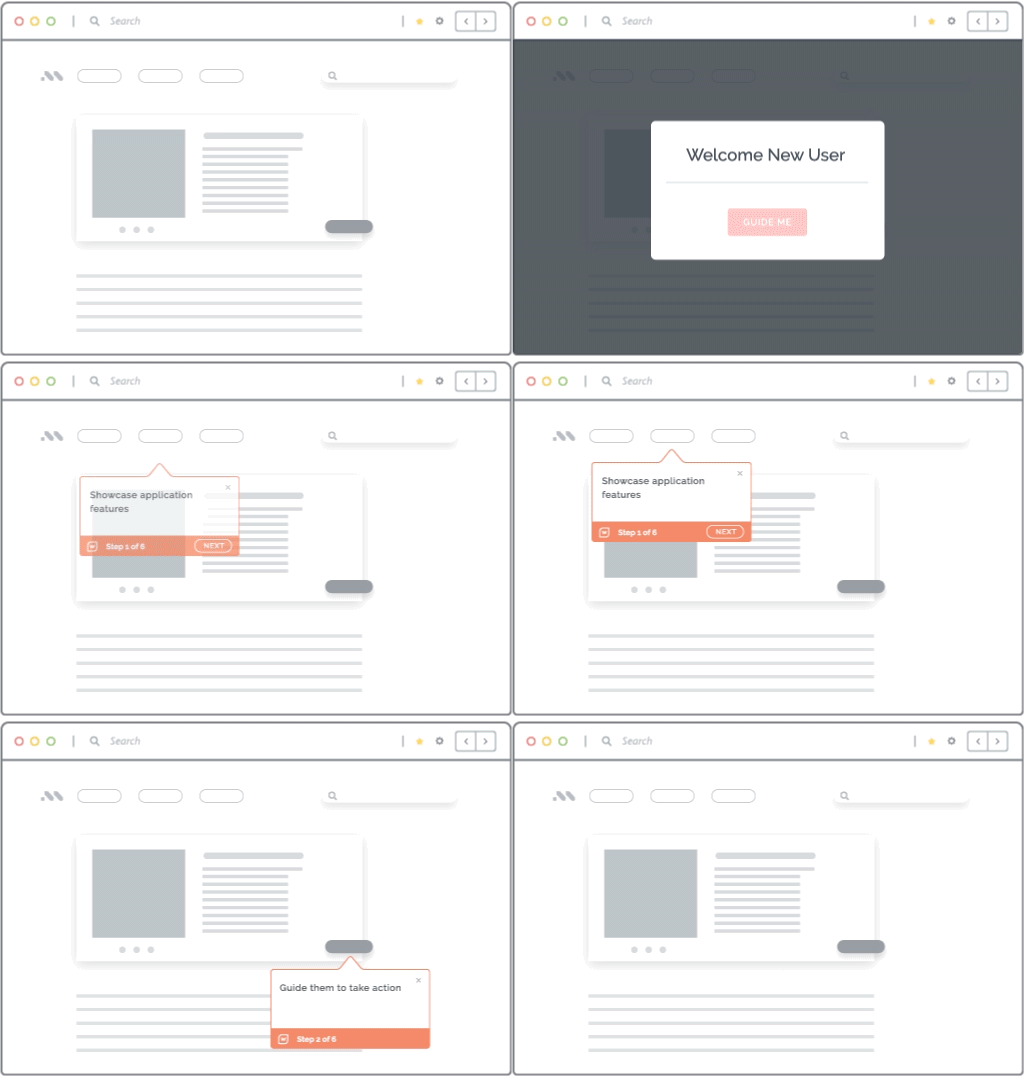
Whatfix DAP extends simulation training into live application support. Teams can use Flows, Smart Tips, Task Lists, Pop-Ups, Self Help, and field-level guidance to support users at the moment of work.
This helps users apply what they practiced in Mirror when they encounter the workflow in production, especially for infrequent tasks, compliance-sensitive processes, new releases, policy changes, and role-specific workflows.
Close the loop with Product Analytics
Whatfix Product Analytics helps teams understand how users behave after training. Teams can identify workflow drop-offs, repeated guidance usage, Self Help searches, failed searches, friction points, and adoption gaps across enterprise applications.
These insights help teams improve simulations, refine in-app guidance, update support content, and prioritize the workflows that need more training attention. Together, Whatfix Mirror, DAP, and Product Analytics help enterprises build readiness before go-live and improve adoption after launch.
See how Whatfix Mirror helps teams build simulation training environments, assess user readiness, and prepare employees for live work. Request a demo with us!