


Microsoft Copilot is transforming how employees collaborate, create, and get work done. But despite Microsoft’s massive investment in its integrated LLM capabilities, only 50% of companies have rolled it out to all employees, and even fewer report widespread adoption.
The AI adoption challenge isn’t technical; it’s people-centric. To unlock real value from Copilot, companies must prepare employees with the skills to work alongside AI by meeting employees where they work with rollout alerts, providing contextual use cases within daily tasks, and governing usage across departments.
Success with Microsoft Copilot depends on more than access; it requires enablement, behavior change, and usage at scale. And for enterprise IT teams that have promised their leaders ROI, this means benchmarking productivity levels, building AI fluency across functions, supporting employees in the flow of work, and governing usage.
In this article, we examine why Copilot adoption often falls short and outline a proven framework to help your organization drive a successful AI transformation. You’ll also see how Whatfix helps teams embed Copilot training and support directly within Microsoft 365, so employees can confidently adopt AI in the flow of work.
Why Is Copilot Adoption Lagging?
Poor Copilot adoption is often caused by enterprise organizations treating it like a standard software rollout instead of a larger behavior change.
Leadership pushed for the investment. IT purchased licenses, connected them across their workplace apps, sent an announcement email, and expected productivity to magically increase. That model guarantees disappointment, from failing to benchmark current productivity levels, not supporting their people through a fundamental change, and not governing proper usage.
Here are the key causes of low Copilot adoption and poor usage:
Copilot Lives Outside Real Work, Not Inside It
Copilot often sits adjacent to daily workflows rather than embedded within them.
Sales reps live in Dynamics records, not blank prompt boxes. HR teams live in HRIS workflows, not abstract AI chat panels. Finance teams live inside month-end close tasks, not side conversations with an assistant.
When Copilot requires users to stop what they are doing, think abstractly, and invent prompts, usage tends to collapse. Productivity tools that demand cognitive context switching rarely scale.
Prompting Is a Skill Gap Nobody Planned For
Organizations assumed employees would know how to ask Copilot the right questions. According to McKinsey, only 1 in 3 organizations offer structured generative AI training, despite 48% acknowledging it’s essential for adoption success.
Prompt quality determines output quality. Most employees default to vague, generic inputs that return shallow results. After a few weak experiences, trust erodes and usage drops. Without structured prompts, guided examples, and role-specific use cases delivered in the flow of work, Copilot feels unreliable instead of powerful.
No Guardrails, No Confidence, No Trust
In many enterprises, Copilot arrives without transparent governance. Gartner reports that a lack of usage governance is a common occurrence in enterprise AI rollouts, setting back Copilot rollouts 3 months on average.
Employees are uncertain about what data Copilot can access, what outputs are safe to use, and where human review is necessary. Legal, compliance, and security concerns stay unresolved at the user level. IT is unclear if employees are using non-compliant LLM tools, in this case Gemini or ChatGPT, instead of the Copilot licenses that were purchased for them.
When people feel exposed, they self-limit. They avoid Copilot for anything that matters. Adoption metrics flatten, not because Copilot lacks capability, but because users lack confidence.
Leaders Measure Activation, Not Value Creation
Most Copilot success metrics focus on the number of licenses assigned, feature availability, or initial usage spikes. This data says nothing about productivity.
Organizations rarely track whether Copilot reduces task time, improves output quality, or replaces manual effort. Without feedback loops tied to real outcomes, Copilot usage becomes performative instead of valuable. Tools that are not tied to measurable work improvement quietly fade into the background.
Training Happens Once, Work Happens Daily
Copilot training often arrives as a one-time enablement session or static documentation. That’s not the way work functions.
Employees need guidance at the moment of execution, inside the task they are performing, using the system they are already in. Without just-in-time help and continuous reinforcement, even well-trained employees revert to old habits and usage fades.
Copilot Competes With Existing Habits
Asking employees to integrate Copilot into their daily work isn’t a typical change request; it requires employees to change how they fundamentally work, from thinking, writing, analyzing, and deciding.
That level of change collides with muscle memory built over years and potentially entire careers. If Copilot does not actively interrupt and replace legacy behaviors at the point of action, users default to familiar patterns. Behavioral inertia often prevails over optional innovation.
Key Steps for a Successful Microsoft Copilot Rollout
Most Copilot rollouts fail at the foundation. Organizations often focus on deployment mechanics and overlook the conditions necessary for sustained usage and measurable productivity gains. Successful Copilot adoption depends on five foundational pillars that shape behavior before AI ever delivers value.
1. Anchor Copilot to Real, Role-Specific Work
Copilot cannot function as a general-purpose assistant that floats across applications.
Employees need to see Copilot tied to the exact tasks they perform every day. For example, sellers need to see how it can support updating CRM records, preparing forecasts, summarizing account activity, and drafting customer communications. When AI capabilities map directly to role responsibilities, relevance becomes obvious, and experimentation turns into habit.
Organizations that skip this step force users to guess where Copilot fits. Guess work kills adoption.
2. Reduce Prompt Friction With Guided Entry Points
Prompting is a learned skill, not an intuitive one.
Without guidance, users either underutilize Copilot or abandon it after inconsistent results. High-performing organizations remove this friction by providing prebuilt prompts, task-aligned suggestions, and contextual examples that appear while work is already in progress.
This eliminates the need for employees to invent interactions with AI. Copilot becomes a supported action, not a creative exercise.
3. Establish Governance at the Moment of Use
Governance documents do not change behavior. Contextual reinforcement does.
Employees need clarity on what Copilot can access, how outputs should be reviewed, and where human judgment remains required. That clarity must be evident within the workflow, not hidden in policy portals. When governance is visible and immediate, trust increases. When trust increases, usage follows.
4. Deliver Guidance Inside Daily Execution, Not Outside It
One-time enablement sessions do not drive sustained adoption.
Copilot success requires continuous reinforcement delivered at the moment of action. In-app prompts, walkthroughs, and contextual help ensure users apply Copilot correctly while completing real tasks, not weeks later in theory.
Learning that lives inside execution replaces old habits faster than any training deck ever could.
5. Measure Usage That Reflects Productivity, Not Curiosity
Early spikes in Copilot usage often reflect novelty rather than value.
Organizations serious about ROI track adoption signals tied to work outcomes. Task completion speed, depth of engagement, repeat usage during core workflows, and reliance on Copilot for high-impact activities matter far more than raw activation numbers.
Metrics should answer a simple question: “Did Copilot meaningfully change how work gets done?”
Case Study: Microsoft Improved Copilot Usage Across Its Enterprise Sales Team
Microsoft’s own rollout of Copilot across its enterprise sales team inside Dynamics 365 Sales revealed an uncomfortable truth. Even the company building Copilot struggled to drive consistent adoption across its enterprise sales teams. Licenses were provisioned quickly, and early interest was high, yet daily usage failed to materialize at scale. Sellers understood Copilot existed, but it was not influencing how work actually got done.
The core challenge surfaced inside the workflow. Sellers lived inside opportunity records, forecasts, and account updates, while Copilot required them to pause execution, decide when AI might help, and determine how to engage it. That extra cognitive step created friction. Copilot remained available, yet disconnected from the moments where sales productivity was won or lost.
Microsoft addressed this gap by using Whatfix to embed Copilot guidance directly into Dynamics 365 Sales. Contextual in-app prompts surfaced Copilot actions at precise points of execution, such as updating opportunities, preparing account summaries, or drafting customer communications. Sellers received role-specific guidance on how to use Copilot, what outputs were appropriate, and where human judgment applied, all reinforced inside the flow of work with clear governance cues.
The impact was immediate and measurable. Within two weeks, Copilot usage across the sales organization increased 600%, shifting from sporadic experimentation to repeat, task-driven engagement. Sellers began relying on Copilot to accelerate research, summarize deal context, and prepare for customer interactions without leaving their core CRM workflows. The ROI followed behavior change, proving that even for Microsoft, Copilot value depended on in-app guidance, contextual reinforcement, and execution-first adoption.
How to Drive Microsoft Copilot Adoption with Whatfix
Whatfix digital adoption platform bridges the gap between Copilot’s powerful AI capabilities and real-world usage by enabling organizations to embed contextual training, change communication, and support directly within Microsoft 365 applications.
Here are six proven strategies to accelerate Copilot adoption and maximize AI ROI.
1. Pre-Deployment Testing & Prompt Validation
Rolling out Copilot without validating how it fits real workflows often leads to poor user experiences and low engagement. Teams may not understand how to prompt Copilot effectively or feel confident using it for their roles.
How Whatfix Helps:
With Whatfix Mirror, organizations can simulate Copilot in sandbox environments. This allows you to test use cases, train employees in a safe space, and refine prompt libraries before go-live, reducing risk and improving end-user confidence from day one.

2. Role-Based Copilot Onboarding
Not all employees use Microsoft 365 tools the same way. Marketers, HR teams, and sales reps all need different types of onboarding. Generic training fails to show users how Copilot applies to their daily tasks.
How Whatfix Helps:
Whatfix enables interactive, in-app onboarding experiences tailored to user roles. With Task Lists and Smart Tips, teams are guided step-by-step through Copilot tasks like summarizing emails in Outlook, drafting Word documents, or visualizing data in Excel, all contextualized to their function.
3. Embedded Support Within Microsoft 365
Employees using Copilot for the first time often don’t know what to ask, how to prompt effectively, or what to expect. Without in-the-moment support, adoption slows and frustration rises.
How Whatfix Helps:
Whatfix embeds Self Help widgets into Microsoft apps, giving users instant access to prompt templates, best practices, and troubleshooting guides. Employees can solve problems on their own, without relying on IT or peer support, driving faster time-to-value.

4. Real-Time Communication & Change Enablement
Copilot is constantly evolving with new capabilities. But without proactive communication, users miss important updates or remain unaware of new high-impact features.
How Whatfix Helps:
With Whatfix Pop-Ups and Beacons, you can announce Copilot feature launches, policy changes, or usage tips in real-time, right inside the Microsoft 365 UI. Smart Tips guide users through updated processes and enforce proper usage, boosting awareness and driving change adoption.
5. Nudges for Advanced Copilot Capabilities
Many employees stick to surface-level tasks like email drafts or quick summaries. Advanced Copilot features like data analysis or report generation often go unused.
How Whatfix Helps:
Whatfix enables proactive nudges that encourage users to explore underused Copilot capabilities based on their role and behavior. These contextual prompts guide users to deeper AI functionality, increasing adoption and maximizing return on your Microsoft investment.
6. Usage Governance and Continuous Optimization
To improve Copilot usage, you need data; not just on logins, but on how users engage with the tool and where they get stuck.
How Whatfix Helps:
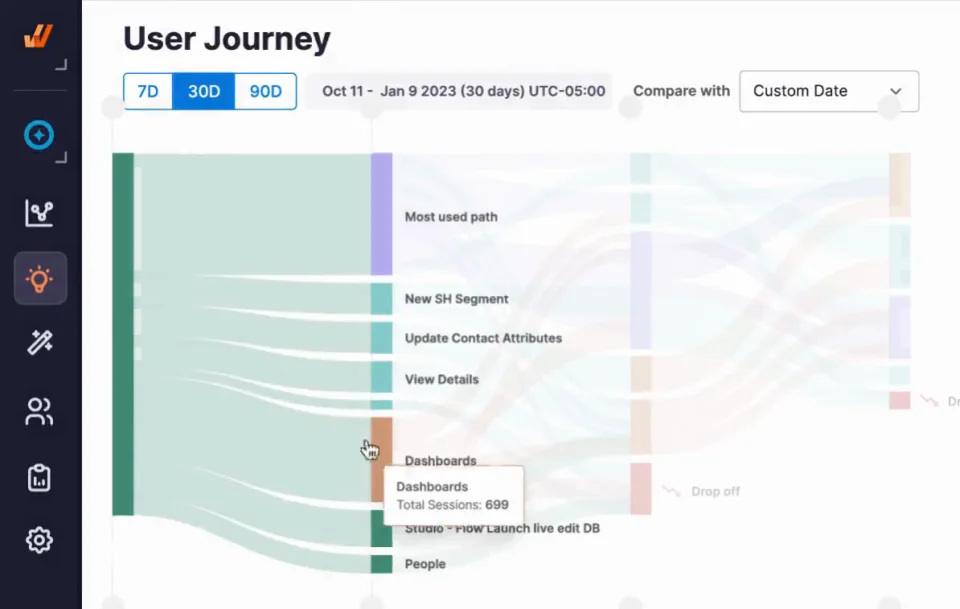
Whatfix Product Analytics reveals how employees interact with Copilot, tracks key workflows, and identifies drop-offs or friction points. Based on this insight, organizations can deploy targeted interventions like new Flows or simplified prompts to continuously refine adoption.
Copilot Adoption Clicks Better With Whatfix
Driving Copilot adoption takes more than access to AI, it requires guided enablement, embedded support, and data-driven optimization. Whatfix simplifies this with in-app training, analytics, and hands-on simulations to help teams adopt Copilot faster and use it better.
Ready to unlock the full value of Microsoft Copilot? Schedule a Whatfix demo today.