


When a mission-critical application goes live, users must work through new workflows, approval paths, permissions, exception rules, data requirements, and handoffs – all while the business expects continuity from day 1. For the project lead and application owner, the risk lies in whether every critical role cohort can execute their contextual workflows that keep operations moving and allow teams to achieve the outcomes of new software rollouts.
With expectations from the first day of launch, go-live readiness can’t be reduced to basic communication, user acceptance testing (UAT) sign-up, and training completion. Go-live change readiness requires proof that users can complete critical tasks under real constraints, with the right guidance, support paths, and measurement in place before production pressure hits.
The cost of underinvesting in this change management and user enablement layer often becomes visible only after launch. Our recent 2026 State of Digital Transformation ROI report revealed that 64% of enterprise leaders who oversaw a recent software rollout said they would allocate more budget and resources to user readiness, training, and support if they could redo the project.
This enterprise software go-live checklist gives you a practical user readiness scorecard to prepare each user with contextual, hands-on experience to ensure they’re ready for go live. It helps identify how to manage user-readiness programs for application go-lives and process changes, where risk remains, how to assess readiness, and what must be remediated before launch to eliminate support ticket surges, reduce rework, and accelerate the time-to-value of enterprise rollouts.
What Is User Readiness?
User readiness measures whether employees impacted by a new software rollout or change implementation are prepared to use a new application, process, or workflow correctly in production.
For enterprise software rollouts, this means each role cohort understands exactly what is changing, has hands-on practice with the critical workflows they own before rollout, knows where to get help, and can complete required tasks under real working conditions with minimal errors, delays, or support dependency.
Strong user readiness gives IT teams, project leaders, and application owners evidence that users can execute the workflows that keep business operations moving from day 1. That proof comes from hands-on training, role-based readiness testing, workflow pass rates, top failure-step analysis, support coverage, and post-launch adoption analytics that show where users are succeeding or still struggling.
Why Every Software Change Implementation Requires a Go-Live Readiness Plan
Enterprise software rollouts and change implementations go off track when readiness is measured by disconnected signals. UAT may confirm that a new system is configured correctly. Training may confirm that users attended software enablement sessions. Launch comms may confirm that the rollout message went out.
But none of that proves that each role cohort can complete their expected tasks and workflow they’re responsible for on day one post-rollout.
A go-live user-readiness checklist provides the application owner and project change teams with a single operating view of workflow risk. It connects the workflow, role cohort, success threshold, support path, and owner, so user readiness is measured by execution rather than activity.
At a minimum, the user change readiness checklist should help you confirm:
- Which critical workflows must work on day 1
- Which role cohorts need to complete each workflow
- Which steps, approvals, permissions, or exceptions create risk
- What evidence proves readiness before launch
- What must be fixed, supported, or monitored during the first wave
This is especially important in enterprise rollouts, where aggregate readiness can mask localized risks. One region may have different approvals, another team may require more advanced permissions, while another cohort may require additional training to understand each individual step of a larger workflow.
A go-live readiness checklist helps identify these gaps, increase visibility into potential risk cohorts, and address them before they stall work, create support tickets, or cause other downstream business impacts.
Key User Readiness Metrics to Track
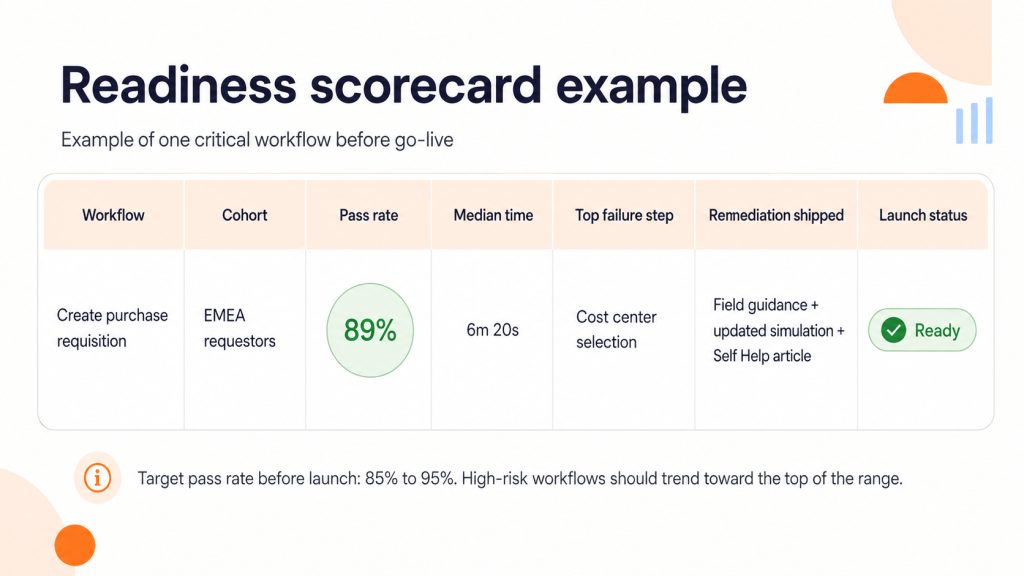
Use critical workflow pass rate before go-live as the main readiness metric. This measures the percentage of users in each role cohort who can complete a required workflow correctly in a test, simulation, or pilot environment.
A strong target range is 85% to 95%, with higher thresholds for compliance-heavy, financial, customer-facing, or access-sensitive workflows. Do not mark a workflow ready until the top failure steps are addressed through fixes, guidance, practice, or support coverage.
Use supporting metrics to understand why the pass rate is low.
| Metric | What it shows |
| Median time-to-completion | Whether users are completing the workflow efficiently |
| Help requests per attempt | Where users still need support to finish |
| Top failure step by role | The exact step blocking readiness |
| Tickets per active user during pilot | Whether support demand may spike after launch |
Segment Data to Keep Readiness Honest
Do not approve launch readiness from aggregate averages alone. A 90% workflow pass rate can still hide a failed region, a new-user cohort, or a role with different permissions.
At minimum, segment readiness data by role, region, and tenure. Add environment, business unit, and license type when workflows vary by access model, operating model, or application environment.
The final scorecard must show which workflows are ready, which cohorts are exposed, and what must be remediated before launch approval.
What to Include in a Go-Live User Readiness Checklist
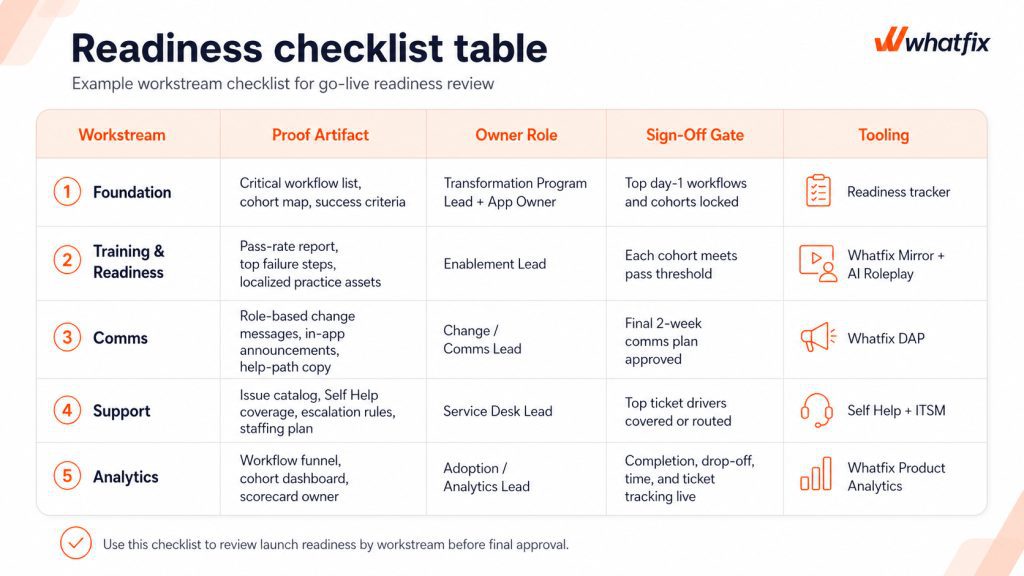
Use this checklist as a launch gate. Each workstream must produce evidence that the project rollout owners can review before approving go-live.
The Foundation: Lock-In the Workflows and Role Cohorts First
Lock the workflows that define day-1 business continuity before training, comms, and support teams build around the wrong scope. Every critical workflow must have an owner, a cohort map, a test path, and a measurable success threshold.
| Checklist item | Evidence to attach | Owner | Sign-off gate |
| Select the top 5 to 10 day-1 workflows | Workflow list with business owner and risk rating | Transformation Program Lead | No generic “all app usage” scope |
| Map workflows by role cohort | Role, region, approver, exception path, and permission matrix | App Owner | No critical cohort grouped as “all users” |
| Define success criteria | Pass rate, completion time, error threshold, compliance steps | Process Owner | Every workflow has a go or no-go threshold |
Training Readiness
Training is ready when users can perform the workflow, not when they have completed a course. Each priority cohort must meet the workflow pass threshold, including exception paths and high-risk steps, before being deemed ready for production.
| Checklist item | Evidence to attach | Owner | Sign-off gate |
| Define readiness by role | Pass threshold, required steps, exception paths, failure criteria | Enablement Lead | Each role has its own readiness standard |
| Run hands-on practice for high-risk workflows | Simulation results, task completion data, assessment outcomes | Enablement Lead | Users prove they can complete the workflow independently |
| Remediate top failure steps | Updated practice paths, guidance, process clarification, configuration fixes | Process Owner | No repeated blocker remains unresolved |
Comms Readiness
Launch comms should explain what changed in the user’s work, not just when the system goes live. Each user must know what has changed, what action they must take, and where to get help in the workflow.
| Checklist item | Evidence to attach | Owner | Sign-off gate |
| Translate changes by role | “What changed for me” message matrix | Change Lead | Every role sees workflow-level impact |
| Confirm the final two-week comms runway | Channel, owner, audience, date, message, follow-up | Comms Lead | No launch-critical message is ownerless |
| Add help-path messaging | In-app help instructions, escalation copy, known issue notes | App Owner | Users know where to get help before opening a ticket |
Support Readiness
Support readiness means predictable questions have a self-service path and real issues have a clear escalation route. It means common ticket drivers have either in-workflow support, self-service coverage, or a defined escalation path.
| Checklist item | Evidence to attach | Owner | Sign-off gate |
| Build a go-live issue catalog | Known issues mapped to workflows, roles, and failure steps | Service Desk Lead | Repeat issues are identified before launch |
| Define deflect versus escalate rules | Self-service coverage map and ITSM escalation rules | Support Lead | Users know when to self-serve and when to raise a ticket |
| Confirm first-wave support coverage | Routing, macros, staffing, SLA coverage, ownership | Service Desk Lead | Known launch risks have support coverage |
Analytics Readiness
Analytics readiness ensures the launch team can see whether users are completing workflows after go-live. It allows application owners and IT rollout team to see where users complete, stall, ask for help, and improve after remediation.
| Checklist item | Evidence to attach | Owner | Sign-off gate |
| Track each critical workflow | Completion, drop-off, time-to-complete, error signals where available | Analytics Lead | No critical workflow launches blind |
| Segment reporting by cohort | Role, region, tenure, environment, business unit where relevant | Adoption Lead | Aggregate success cannot hide cohort risk |
| Assign scorecard ownership | Dashboard owner, review cadence, remediation owner | Transformation Program Lead | Readiness data has an accountable reviewer |
How Whatfix Operationalizes Go-Live Readiness
Whatfix provides real value by allowing users to practice critical workflows before production, supporting them in production with guidance in the flow of work, resolving predictable issues without flooding support, and giving leaders measurable evidence that adoption is stabilizing.
Our 2026 State of Digital Transformation ROI report revealed that organizations that use a DAP like Whatfix to support their technology rollouts experience 64% faster time-to-value, see a lift of 37% in user proficiency at the three-month milestone, and extract 67% more value from their investments at the six-month milestone vs their DAP-less peers.
Let’s break down how Whatfix improves readiness pre-launch, supports users at launch, and optimizes workflows post-launch through cohort-based targeting – all powered by its unified digital adoption and execution layer.
Whatfix Mirror for application simulation and roleplay training pre-launch
Whatfix Mirror helps teams validate readiness before users enter production. Instead of relying on training attendance, teams can create no-code simulations of critical workflows and assess whether each role cohort can complete the task correctly. Pair this hands-on experience with AI roleplay and guided walkthroughs to create immersive pre-launch training environments that drive readiness and accelerate proficiency.
AI assessments and analytics then provide detailed reports on which users are ready for launch, which require additional training, what workflows are causing friction, and how to best proceed.
Use Mirror for high-risk workflows, low-context cohorts, new approvers, regional variants, and exception-heavy processes where mistakes create rework, compliance risk, or customer impact.
With Whatfix Mirror, organizations can understand user readiness with metrics like:
- Role-level readiness report
- Critical workflow pass rate
- Median time-to-complete
- Top failure step by workflow and cohort
- Exception-path completion results
Mirror gives launch leaders a clear view of who is ready, where users are failing, and what needs remediation before production access opens.

Whatfix DAP to support users in the flow of work post-rollout
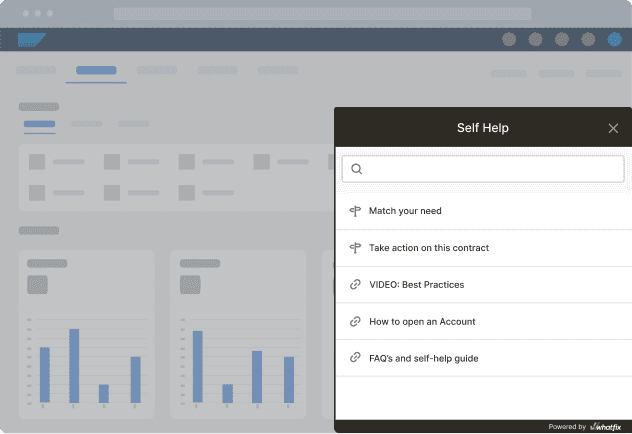
Whatfix DAP supports users inside the application after rollout, at the moment of execution. This matters because even users who were prepared pre-launch can stall when fields change, validations appear, approvals move, or the production workflow no longer matches what they remember from training.
With Flows, Task Lists, Smart Tips, field-level cues, and in-app announcements, teams can guide users through the highest-risk steps while they work.
With Whatfix DAP, you can track user execution success with metrics like:
- Workflow guidance coverage by role
- Workflow completion rate
- Step drop-off rate
- Error or exception rate
- Guidance engagement
- Time-to-proficiency after go-live
For application owners, DAP closes the gap between pre-launch readiness and correct execution in production.
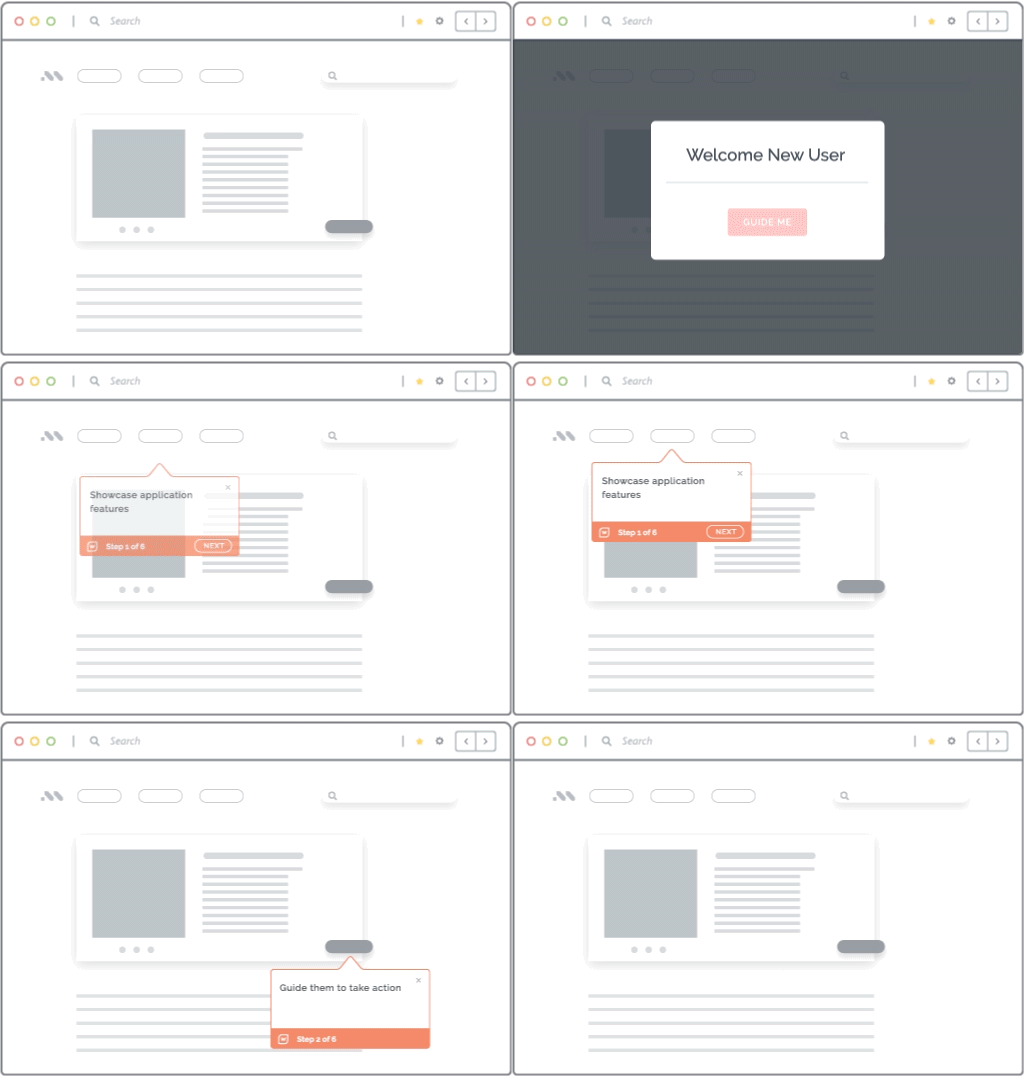
Self Help to resolve common support queries independently, without leaving the application
Whatfix Self Help helps contain predictable support demand during the first launch wave. Most go-live ticket spikes are driven by repeat questions tied to the same fields, permissions, policy changes, or workflow steps. Those issues should have a self-service path before users start opening tickets.
Most organizations build internal support portals, patching together Google Drives or SharePoint Drives, internal wikis, IT knowledge bases, etc. While user guides and documentation provide the detailed, step-by-step instructions that help users complete workflows correctly, housing that outside the application means users are unlikely to find it – and even if they do, they lose time to searching for the right information or asking a subject matter expert for help.
Self Help integrates directly with these knowledge repositories, allowing you to surface approved help content directly within the application, so users can resolve common blockers without leaving the workflow. With AI, users can use conversational search to find contextual documents, summarize lengthy documentation, and resolve issues independently without breaking their workflows.
Proof and metrics to track support issues and self-service success:
- Go-live issue catalog mapped to help content
- Self Help coverage for top ticket drivers
- Tickets per active user
- Self-service resolution rate
- Tier-1 deflection rate
- Repeat ticket driver reduction
The goal is not to eliminate every ticket. It is to keep known, low-complexity questions from overwhelming the service desk on day 1.
Product Analytics to track usage, benchmark behavior, identify friction, and drive adoption
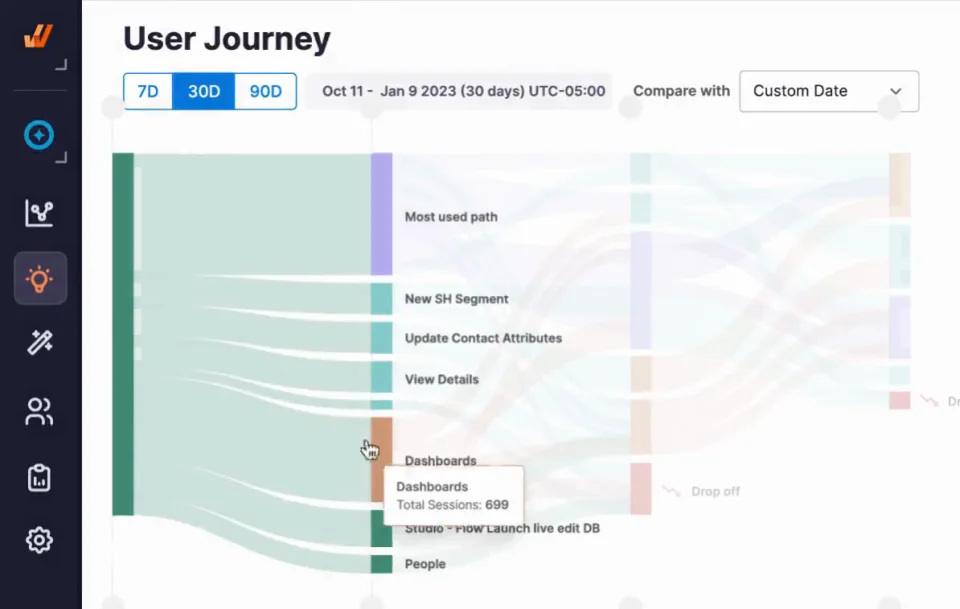
Whatfix Product Analytics helps teams validate whether launch readiness is translating into real workflow completion. Application owners can track completion, drop-off, time-to-complete, and cohort variance across the workflows that matter most.
This is where readiness moves from subjective confidence to measurable launch performance. It allows application owners to show task completion times, identify key friction areas, and target trouble spots with new in-app content. It allows application owners to close the feedback loop and take a data-driven approach to digital adoption, user readiness, and workflow optimization.
Proof and metrics to track workflow adoption:
- Workflow funnel dashboard
- Cohort-based readiness scorecard
- Completion rate by role, region, tenure, and environment
- Step-level drop-off
- Time-to-first-successful-task
- Before-and-after intervention trends
For faster root-cause diagnosis, teams can also use targeted in-app surveys at high-friction steps. Analytics shows where users struggle. Surveys help explain why, so the next guidance, support, or process fix is based on live launch friction.
Whatfix helps enterprise launch teams prove readiness before production, guide users through day-1 workflows, deflect avoidable support tickets, and measure stabilization by role, region, and workflow. For high-stakes ERP, CRM, HCM, or ITSM rollouts, that means fewer blind spots before go-live and faster intervention after launch.