

Application owners experience similar pain points stemming from underlying digital adoption issues, ranging from major software rollouts and migrations to ongoing application change management.
While the original spike in support tickets post-software rollout may have settled from the original surge, they’re still high. Certain teams still enter critical field data incorrectly, even after updating application fields and educating users on the importance of clean data. Workflows that were efficient in both pre-go-live testing and the weeks following rollout are now taking 3x as long to complete in production as knowledge atrophies.
If you own an enterprise application or run a digital adoption program, this is the moment leadership asks for software rollout ROI in operational terms.
What does early value look like? Are cycle times for critical workflows faster? Have we stabilized user errors that cause rework? Have we broken these reports down by team cohort? How are you taking an agile approach to workflow change and optimization?
This level of quantitative, business-outcome impact style reporting will continue to be at the center of your CIO’s questions every quarter.
Are our foundational technology investments driving the outcomes we expected? Are we actively improving our workflow completion times every month? Are users becoming more proficient, faster? Are users supporting fewer tickets, relying less on subject matter experts, and resolving issues independently?
The stakes are real. Forrester found that a mid-sized enterprise of about 1,000 employees could lose an estimated $10.9M annually due to poor digital adoption. At the same time, measurement discipline is still lagging.
On the flip side, Whatfix’s 2026 State of Enterprise Digital Transformation ROI report found that organizations that invest in a digital adoption program see a measurable lift against their peers who haven’t built an operational model. Organizations using a DAP report:
- 64% faster time-to-value on new rollouts
- 37% lift in user proficiency at the three-month mark
- 67% lift in overall value realization from digital transformation investments.
This guide provides a systematic framework for tying technology investments and digital adoption metrics to business outcomes. It incluces a one-page executive scorecard, governance-grade KPI definitions and decision rules, baseline and attribution guardrails, and a monthly governance pack format that forces funding, escalation, and priority decisions.
The Key Digital Adoption Metrics and KPIs
Executives care about operational efficiency and business impact. A KPI gains traction only when each metric directly connects to workflow efficiency, cost reduction, or risk mitigation, and has a clear action tied to it.
For each KPI type, application owners should baseline digital adoption metrics over a rolling 2–4 week window, segment by role and tenure, and validate:
- Week 1: Early behavior signals (usage, friction points)
- Week 4: Measurable business outcomes (speed, quality, cost)
Each KPI family below includes what metrics track, how to define it in real operating terms, where the data comes from, and how to respond when performance stalls.
Productivity and proficiency metrics
These metrics expose execution inefficiencies, such as when employees are slow to complete tasks, blocked, or dependent on support. Digital adoption KPIs in the productivity and proficiency metrics family include:
- Time-to-proficiency: Median number of days until a user completes a defined workflow independently, within acceptable error and compliance thresholds.
- Task completion time: Median time required to complete a specific step on the optimal workflow path.
- Workflow completion rate: Percentage of users who start and successfully complete a workflow on the intended path.
- Hot-step drop-off rate: Percentage of users who abandon the workflow at the highest-friction step.
Use these metrics when leadership is focused on productivity loss, ramp time, or delayed value realization from new systems. These are excellent metrics in use cases like new software rollouts, application consideration projects, and onboarding new users to key workflows.
Proficiency must be defined by role, not system access. A single “proficient user” definition is meaningless in enterprise environments. If every role is measured against the same bar, the data becomes misleading and unusable.
For example, in an HCM system:
- A people manager must complete workflows like performance reviews, approvals, and goal setting.
- An individual contributor may only need to complete transactions like time-off requests or profile updates.
PRO TIP: Focus on hot-step drop-offs. These indicate where users are failing in real time and where in-app guidance (Flows, Smart Tips, or Task Lists) can immediately reduce friction.
Quality and rework metrics
Quality and rework-related digital adoption metrics quantify the cost of user errors, which is often the largest hidden operational expense. This includes:
- Exception rate: Percentage of transactions that fail validation or require exception handling.
- Rework rate: Percentage of transactions returned for correction or resubmitted due to errors.
- First-pass yield: Percentage of workflows completed correctly on the first attempt.
- Repeat corrections by step: Frequency of errors concentrated on specific fields or steps.
Use this digital adoption KPI family when inefficiency shows up as rework, manual corrections, or downstream processing delays. Most organizations underestimate the cost of rework. It compounds across teams, slows cycle times, and increases compliance exposure.
PRO TIP: Identify repeat correction points and deploy contextual, field-level guidance (i.e., Smart Tips) to eliminate recurring user errors at the source.
Support and ticket containment metrics
Support volume is one of the clearest signals of underperforming adoption and poor user enablement. If tickets remain high, the system isn’t working for users, regardless of training completion rates.
Baseline top ticket drivers before optimization, then track whether repeat issues decline within four weeks for targeted user cohorts. Track metrics such as:
- Tickets per active user: Total application-related tickets divided by monthly active users.
- Tier-1 deflection rate: Percentage of common issues resolved without service desk involvement.
- Repeat ticket drivers: Volume of recurring ticket categories week over week.
- Self-service success rate: Percentage of users who resolve issues via help content without escalation.
Use support-related digital adoption KPIs during rollouts, migrations, or feature releases where support demand typically spikes.
PRO TIP: Map ticket categories to specific workflows, then embed contextual self-help (i.e., Self Help or in-app knowledge surfaces) directly where users encounter issues.
Compliance and risk metrics
Compliance and risk-related digital adoption metrics track whether users are following required processes correctly, which directly impacts audit readiness and regulatory exposure. These KPIs include:
- Process adherence rate: Percentage of workflows completed according to the approved process, including required steps and validations.
- Audit exceptions by workflow step: Compliance findings tied to specific steps within a workflow.
- Required field completion rate: Percentage of transactions with all mandatory fields completed correctly.
- Correct approval routing: Percentage of workflows that follow the intended approval chain.
Use this digital adoption KPI family in regulated environments or any workflow tied to financial, legal, or operational risk.
PRO TIP: Pinpoint non-compliant steps and enforce behavior with embedded guidance and validation cues at the point of action.
Executive sponsor KPI metrics (optional)
Executive sponsorship metrics exist to providing leadership visibility to those who signed off on a large budget item (like a new software rollout or DAP investment), not to measure business impact.
- Platform utilization: Extent to which priority workflows and user cohorts are actively using the platform.
- Coverage concentration: Percentage of usage occurring within targeted high-impact workflows.
Use these only when an executive sponsor explicitly asks whether the investment is being used. High utilization without improvement in productivity, quality, or compliance signals wasted spend. Execution metrics carry more weight than usage metrics.
Best Practices for Digital Adoption Executive Business Reviews
Executive reporting is where digital adoption turns from activities and becomes an operating model that leadership can fund. In every monthly review, the same thing is happening. Leaders are scanning for progress on a priority workflow, seeking a clear explanation of why it moved, and deciding what to fund or escalate next.
So the goal of your reporting is to make workflow performance legible, by cohort, with a traceable link between what shipped and what changed in production – while linking back to core business outcomes. When you do that consistently, the conversation shifts from defending the program to scaling it.
This section provides a repeatable structure you can run every month, starting with a KPI discovery gate, then a one-page scorecard, and finally a governance pack that forces decisions rather than leaving them to slide commentary.
1. Conduct KPI discovery sessions to align sponsors and app owners
Adoption reporting breaks when the sponsor funds the work, and nobody owns the numbers. Definitions drift, baselines shift, and the team ends up debating performance rather than improving it.
Make KPI alignment the first gate. Lock the KPI spine, baseline method, and decision rules before you ship anything in production. That’s what keeps the scorecard defensible, and the operating cadence focused.
| Output | Accountable owner | Definition to agree on | Where it’s pulled from |
| Primary outcome KPI for the pilot workflow | Enterprise application owner | The KPI, workflow scope, cohort scope, and what counts | App telemetry or workflow analytics, ITSM if support-led |
| 3 to 5 supporting KPIs | Digital adoption program owner | Supporting metrics that explain movement or stalling | App logs, Product Analytics, ITSM reporting, exception logs |
| Segmentation cuts | Analytics owner | Role, region, tenure, and environment when relevant | HRIS or identity data, analytics segmentation fields |
| Baseline method and baseline window | Analytics owner | Pre and post baseline vs rolling baseline, plus time window | Systems of record defined above |
| Decision rules | Sponsor delegate plus app owner | What to do when KPIs move or stall | Governance pack and operating cadence |
| Approval path for controlled workflows | Process owner when required | What requires signoff, controlled language, audit proof expectations | GRC systems, audit requirements, change logs |
To keep the session tight, invite only the people who own decisions and data. This includes team members such as:
- Sponsor or CIO staff delegate who can approve targets and scope
- Enterprise application owner who owns releases and workflow performance
- Digital adoption program owner who owns cadence and scorecard
- Service desk or ITSM partner if tickets and deflection are in scope
- Analytics owner who can validate sources and instrumentation
- Process owner for controlled workflows, especially in regulated environments
One-page executive scorecards
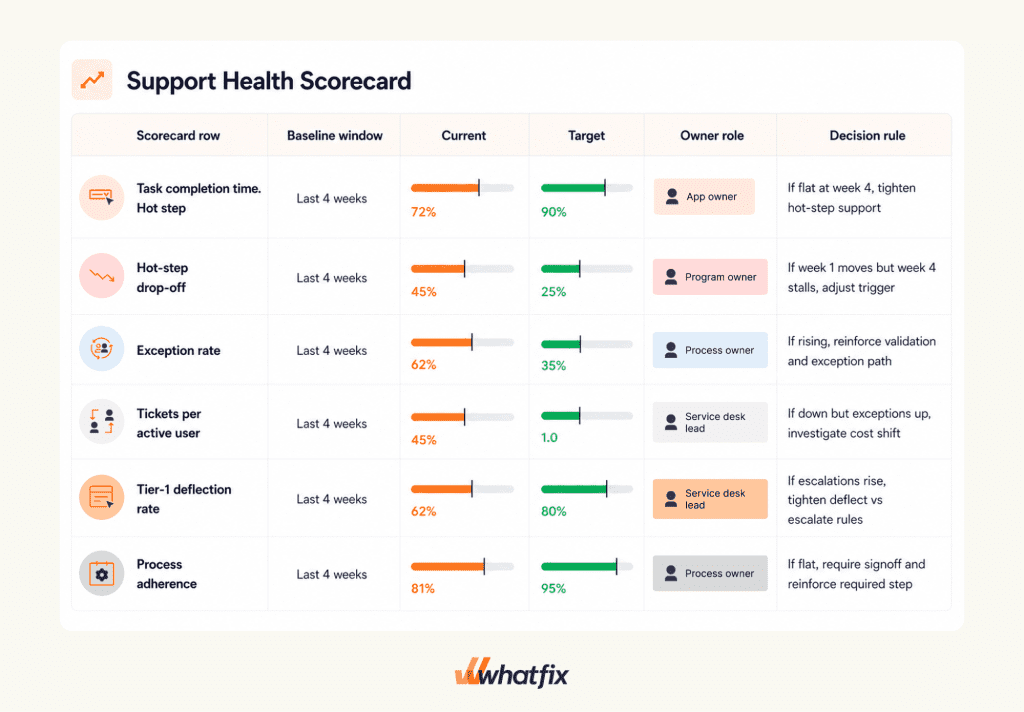
Once you’ve locked in the fundamental KPIs, cohort cuts, and benchmark timeframe, the scorecard becomes the artifact leaders use to scan and act on without debate, their source of truth. It should be easy to read and force the next action without needing long explanations.
Keep your metrics to 6-8 max and keep them workflow-specific. Show baselines, target, and current progress, along with a decision rule and named owner for each.
Monthly governance pack executives care about
The governance pack is the operating wrapper around the scorecard. It links what moved to what shipped and forces the next decision. It explains what changed, what moved, and what needs a decision.
Keep the pack to four sections, in the same order every month.
| Section | What goes in it | Decision it drives |
| Scorecard | Baseline vs current vs target by cohort. Status and decision rule per KPI | Fund scope changes, confirm targets, approve escalations |
| Insights | Top hot steps, cohorts at risk, repeat drivers, exception patterns | Decide what the team fixes next and why |
| Actions shipped | What shipped since last review, mapped to KPI hypotheses | Confirm the intervention plan is focused and measurable |
| Next priorities | Ranked workflow backlog with owners and expected impact | Fund next workflow set, deprioritize noise, confirm expansion plan |
Close the pack with a single decision line that’s hard to ignore:
- Fund: The next workflow set and the owner that is accountable for movement
- Escalate: The dependency that blocks improvement and who must approve it
- Deprioritize: What is paused until proof improves on the priority workflow
The Closed Loop That Turns KPIs Into Outcomes
A KPI earns budget when it triggers action. The programs that earn renewal run a closed loop that connects measurement to shipping, and shipping to validated outcome movement. This is the operating model spine. It keeps the scorecard from becoming a monthly report that no one uses.
Measure
Start with a baseline you can defend, then segment it so you can see where execution is breaking. Locate the hot steps that drive drop-offs, exceptions, and tickets. Identify the cohorts at risk by role, region, and tenure, and include environment cuts when web, desktop, or VDI changes behavior.
The output of this phase isn’t a chart. It’s a short list of failure points tied to workflows and cohorts.
Act
Ship one intervention tied to one KPI hypothesis. Avoid bundling changes and hoping the metric improves. If you want to move hot-step drop-off, ship reinforcement on that step. If you want to reduce tickets per active user, ship contextual self-service on the repeat driver and reinforce the failure point that created it.
Keep an intervention log so every shipped action has an owner, a cohort, and an expected KPI movement.
Re-measure
Validate the program like operations. Week 1 signals tell you if you are addressing the right failure mode. Week 4 validation tells you if outcomes moved in a way leadership will accept.
If the KPI doesn’t move by week 4, treat it as a diagnosis problem, not a reporting problem. Either the intervention was wrong, the workflow needs a fix, or the metric definition isn’t capturing the failure mode.
Decision triggers you can run without debate
- If week 1 signals improve but week 4 outcome movement stalls, don’t add more content. Re-check cohort cuts, then adjust the intervention to the exact hot step or escalate a workflow fix.
- If tickets per active user drops but exceptions rise, stop claiming success. You shifted work from support into rework. Tighten field-level guidance and validation support, then validate quality before expanding scope.
- If task time improves but completion rate stays flat, users may be getting faster on the wrong path. Re-check intended path completion and reinforce the correct route at the decision point.
- If deflection rises but escalations rise, self-service is routing issues up the chain. Tighten what is deflected vs escalated and fix routing rules before shipping more coverage.
Escalate
Not every problem is solved with guidance. Define escalation triggers and route them cleanly:
- Workflow design and configuration changes that only the app owner can approve
- Access and permission blockers that require admin changes
- Policy and compliance decisions that require process owner signoff
Escalation only works when decision rights are named and the governance pack forces resolution.
Prioritize
Use a consistent rubric to choose what comes next. Impact, volume, risk, and effort should be enough to keep the backlog tight. The goal isn’t to cover every workflow. The goal is to expand coverage where the cost of friction is highest and the proof will be clearest.
When the loop is working, it shows up in the monthly governance pack. You can point to what moved, what shipped, and what gets funded next.
How Whatfix Helps Teams Measure And Move Executive KPIs
In an executive review, the program gets trusted when two things are true. The scorecard numbers are defensible, and there is a visible trail of what shipped to move them. Whatfix supports both. It helps you baseline workflow performance, ship targeted interventions in production, and validate movement with governance that scales across applications.
Baseline and segmentation with Whatfix Product Analytics
Most KPI arguments start with a baseline problem. Whatfix Product Analytics helps you establish a baseline you can defend and cut it the way executives ask, by role, region, tenure, and environment.
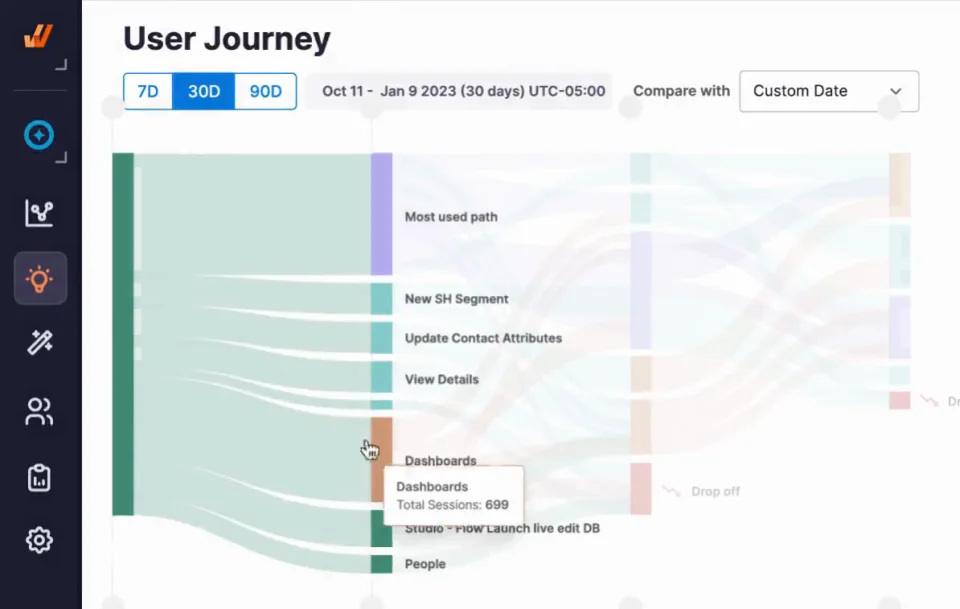
Start by turning your priority workflow into a measurable path:
- Build a funnel for the critical workflow and isolate the hot step where users drop off, loop, or stall.
- Split the funnel by the cohorts that matter, such as new managers vs experienced managers, Region A vs Region B, web vs VDI.
- Pull a rolling baseline window that matches your operating cadence, usually the last 4–8 weeks for mature apps or the first 1–2 weeks post go-live for new rollouts.
This produces two artifacts that make the rest of the program run:
- The baseline rows for your executive scorecard, including cohort cuts
- The monthly “Insights” list that names the hot steps and the cohorts at risk
Ship interventions with Whatfix DAP
Whatfix DAP is where measurement turns into shipped change. This isn’t generic enablement content. It’s workflow execution support deployed at the failure point.
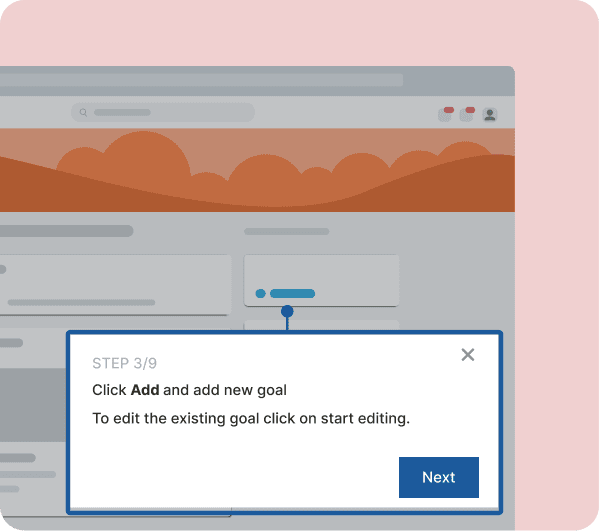
Use the intervention type that matches the failure mode:
- When users get lost on the critical path, ship a Flow that guides the task end-to-end.
- When users make the wrong choice at a decision point, ship Smart Tips at the moment that choice is made.
- When exceptions are driven by missing or invalid fields, use Field Validation and step-level reinforcement to prevent errors before they happen.
- When a cohort needs repeatable onboarding, use Task Lists tied to the named workflows you are measuring.
Pair each ship to a single KPI hypothesis and log it. The intervention log becomes the backbone of your governance pack:
- What shipped
- Which cohort it targeted
- Which KPI it was expected to move
- What week 1 signal you expected to see
- What week 4 proof you will accept
Contain tickets with Self Help
Self Help is the fastest way to contain repeat demand during rollout and releases, as long as It’s tied to the workflow step that generates the ticket.

Build Self Help coverage starting from ticket drivers:
- Pull the top 3–5 repeat ticket categories for the application.
- Map each category to the workflow step where users fail, then trigger Self Help where the failure occurs.
- Separate “deflect” topics from “escalate” topics so you don’t create false deflection that simply shifts work into higher tiers.
This is where support KPIs become defensible:
- Tickets per active user can trend down by category and cohort
- Tier-1 deflection can be proven without claiming victory prematurely
- Repeat ticket drivers can be tracked as a month-over-month risk signal
Prove movement with Guidance Analytics
Guidance Analytics is the proof layer that connects shipped actions to cohort behavior, without pretending behavior metrics are the outcome. Use it to answer executive questions your scorecard will trigger:
- Which cohorts used the intervention on the hot step
- Whether usage concentrated where the failure was occurring
- Whether usage changed after an update or release
This keeps the narrative clean in governance reviews. The outcome KPI is the headline. Guidance Analytics explains why the number moved and whether the right cohorts received coverage.
Use Mirror when readiness is the risk
Some workflows create risk when users learn them in production. Controlled steps, exception-heavy paths, regulated actions, and high-cost transactions benefit from practice before users touch live systems.
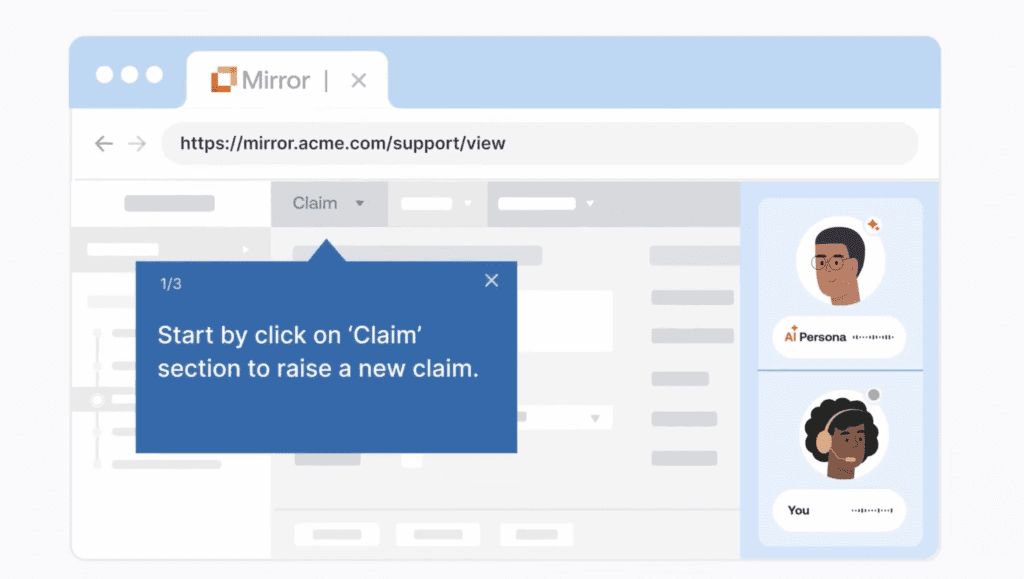
Mirror supports readiness in a way you can report:
- Build a replica of the workflow for practice, including the exception paths users actually hit.
- Define readiness thresholds that match your scorecard, such as pass rate and time-to-complete.
- Use results as a release gate or cohort gate, especially for new hires, role changes, and release-driven changes that alter the approved path.
Mirror makes time-to-proficiency and error reduction easier to defend because you can show readiness evidence before production mistakes occur.
Scale faster with Whatfix AI inside governance
AI helps teams move faster inside enterprise controls. The value is speed with guardrails. Use AI to accelerate work that slows programs down:
- Faster authoring and iteration when you need to ship hot-step fixes on a weekly cadence
- Faster insight discovery when you need to summarize friction themes by cohort
- Faster maintenance when releases create content drift
Approvals remain owned by humans for controlled workflows, policy language, and risk decisions. AI speeds the cycle. Governance keeps it safe and consistent.
Request a Whatfix demo to build an executive scorecard and 90-day plan tied to measurable workflow outcomes.