


Enterprise application owners are under constant pressure to keep business-critical platforms updated, while also managing software change without disrupting the people who rely on them.
A new Workday release changes how managers approve requests. A Salesforce update affects how reps enter opportunity data. A ServiceNow workflow adds a new validation before agents can close incidents.
Each change may seem small in isolation, but at enterprise scale, small release changes can quickly become productivity, support, and data quality problems.
The challenge is that most release processes stop too early. Teams review release notes, test the update, send the announcement, and assume users will adjust. But users experience change inside the workflow, at the exact moment they are trying to complete a task.
When in-context guidance is missing, support tickets rise, workarounds spread, and application teams spend the first week after release reacting to friction they could have anticipated.
Change enablement for frequent software releases gives application owners a repeatable way to manage that gap. It connects release impact, user readiness, in-flow guidance, self-service support, and digital adoption measurement so every release can move from shipped update to stable workflow execution. This guide shows how to build that operating model across frequent enterprise software releases.
What Is Change Enablement?
Change enablement is the practice of helping employees successfully adopt new software, processes, and ways of working with the right guidance, support, and training in the flow of work. It focuses on reducing friction, empowering users at the moment of need, and ensuring every change is adopted safely, consistently, and with measurable business impact.
In the context of enterprise software release management, a change enablement strategy turns over update into an adoption cycle. Benefits of change enablement for software release and update management include:
- Reduces support tickets by giving users contextual help before confusion becomes a service desk issue.
- Accelerates adoption by guiding employees through new features, workflows, and UI changes in the flow of work.
- Protects productivity by helping users complete tasks accurately after each software release or update.
- Improves release governance by aligning impacted users, readiness plans, enablement content, and support coverage.
- Proves release impact by tracking adoption, workflow completion, help engagement, and areas of user friction.
How Change Enablement Enables Users When Releasing New Updates
Change enablement for software releases is the operating model that helps application owners turn recurring software updates into workflow adoption and post-release productivity. It connects what changed in the application to what users need to do differently in their daily work.
For enterprise applications like Workday, Salesforce, ServiceNow, SAP SuccessFactors, ERP, CRM, HCM, and ITSM systems, this means identifying affected workflows, segmenting impacted users, preparing in-flow guidance, updating self-help resources, monitoring post-release friction, and validating whether users can complete changed tasks without unnecessary support.
The goal is simple. Every release should leave users clear on what changed, confident in how to execute the updated workflow, and supported at the moment they need help.
To make that operating model clear, it helps to separate the disciplines involved in moving from release to adoption. Release management, change management, change enablement, and digital adoption are connected, but each one solves a different part of the problem.
| Discipline | What it focuses on | Why it is not enough alone |
| Release management | Planning, testing, approving, and deploying software changes safely. | Confirms the update shipped, while change enablement confirms users can execute the changed workflow |
| Change management | Communicating change, aligning stakeholders, and preparing teams for transition. | It builds awareness, but awareness does not guarantee task completion. |
| Change enablement | Helping impacted users execute changed workflows accurately after release. | Scales through in-flow guidance, self-service support, measurement, and reinforcement |
| Digital adoption | Guiding, supporting, and measuring users directly in the flow of work. | Operationalizes change enablement through in-app guidance, self-help, analytics, and continuous optimization |
The Governance Model for Change Enablement in Software Releases
Frequent software releases need a repeatable operating model. Without one, each update becomes a one-off effort shaped by release notes, ad hoc communication, and support volume after users encounter the change.
A practical governance model for change enablement in software releases includes:
- An accountable owner who owns release adoption outcomes and final go-live readiness decisions.
- A workflow impact map that identifies affected workflows, steps, roles, regions, and permissions.
- Risk-based enablement coverage that determines which changes need in-app guidance, self-help, training, or targeted communication.
- Readiness gates that define what evidence must be complete before users experience the change.
- Support and escalation rules that route repeat questions, access issues, defects, and process confusion.
- Measurement coverage that tracks events, funnels, cohorts, tickets, and help searches after release.
- A post-release stabilization review that confirms whether the release is stabilizing or needs intervention.
The 4-Step Change Enablement Workflow for Frequent Software Releases
Use this workflow every release cycle to assess impact, prepare users, support changed workflows on day one, and prove stabilization after release.
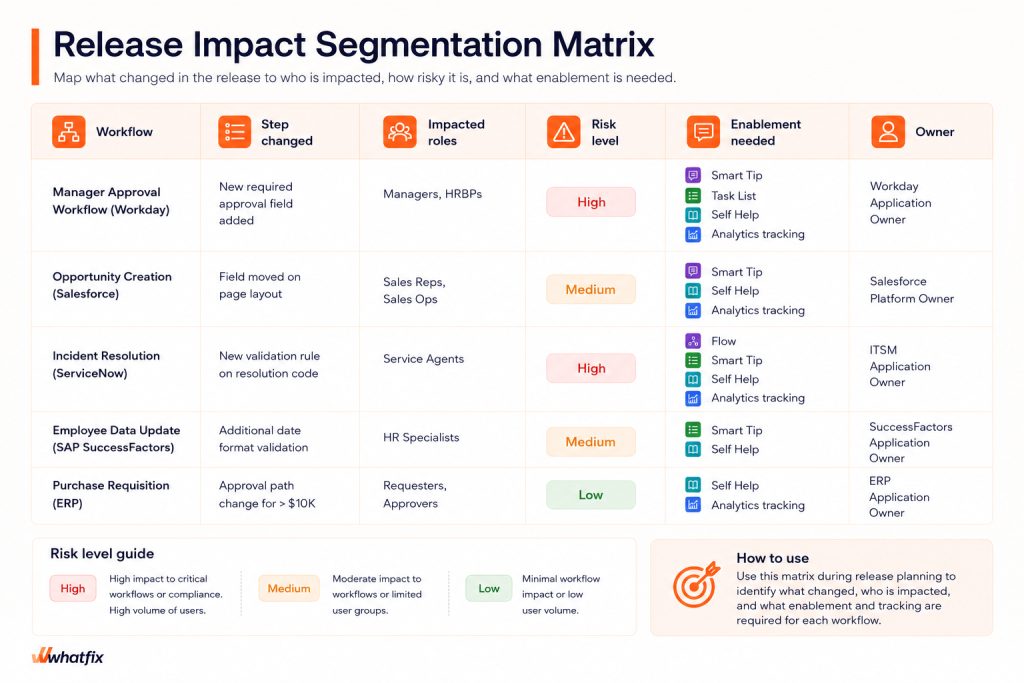
Step 1. Segment Release Impact Before You Create Enablement
Create a release impact map before drafting comms, guidance, or support content.
Document:
- Changed workflows
- Exact steps that changed
- Required fields, validations, permissions, reports, and handoffs
- Exception paths and approval paths
- Impacted roles, regions, languages, business units, and user cohorts
- Risk level for each change
- Planned enablement intervention
- Accountable owner
Classify each change by risk level.
| Risk level | Examples | Enablement response |
| High impact | Required fields, validation rules, approval changes, compliance steps, financial or HR workflows | In-app guidance, self-help, analytics tracking, support readiness, owner sign-off |
| Medium impact | UI changes, navigation changes, report changes, role-specific process changes | Targeted communication, contextual tips, updated support content |
| Low impact | Copy changes, low-usage updates, non-critical UI changes | Lightweight release note or simple in-app prompt |
Step 2. Set Readiness Gates Before Users Experience the Change
For high-impact changes, confirm these gates before release:
- Workflow impact map is complete
- Impacted cohorts are identified
- Enablement coverage is approved for high-impact steps
- Self-help content is updated for expected repeat questions
- Support taxonomy and escalation paths are ready
- Analytics coverage is validated
- Final readiness decision is documented
Also set intervention triggers before release. For example:
- Tickets exceed baseline
- Drop-offs increase at a changed step
- Repeated help searches appear for the same issue
- One cohort performs below target
- Compliance or approval steps are skipped
Step 3. Ship Day-1 Enablement in the Flow of Work
Place support where users encounter the changed workflow. For each high-impact change, prepare:
- Step-level guidance
- Field-level tips
- Validation explanations
- Approval reminders
- Exception-path guidance
- Role-specific prompts
- Contextual self-help answers
- Escalation paths for defects or access issues
Translate release notes into workflow instructions.
| Release note says | Enablement should tell users |
| New required field added | What to enter, when it is required, and what happens if it is skipped |
| Approval path updated | Who approves next and what the user should expect |
| Validation rule changed | What error may appear and how to resolve it |
| Report view updated | Where to find the report and how to interpret the new view |
Step 4. Prove Release Stabilization With a 14-Day Scorecard
Use week one to identify friction and week two to confirm whether the release is stabilizing.
Track the core signals:
- Workflow completion rate
- Step-level drop-off
- Tickets per active user
- Repeated help searches
- Self-help resolution rate
- Cohort variance by role, region, tenure, or business unit
Use decision rules to act quickly:
| Metric | Decision rule |
| Workflow completion rate | Low completion triggers targeted guidance |
| Step-level drop-off | Concentrated drop-off triggers step-level support |
| Tickets per active user | Spike above baseline triggers support review |
| Repeated help searches | Repeated searches trigger content updates |
| Self-help resolution rate | Low resolution triggers self-help or escalation updates |
Mark the release stabilized when workflow completion, support demand, and cohort variance return to acceptable thresholds.
Run the workflow on a recurring release cadence
Use the same four-step workflow across every release cycle so teams know when to assess impact, prepare enablement, monitor adoption, and clean up outdated guidance. The cadence below shows how that workflow maps to the release timeline, from initial intake through week-two stabilization and quarterly cleanup.
| Phase | What to do | Output |
| Release intake | Review release notes, admin changes, configuration updates, and workflow impact | Release impact map |
| Readiness planning | Classify risk, identify impacted cohorts, assign owners, and confirm support needs | Readiness plan |
| Enablement build | Create in-app guidance, self-help content, release messaging, analytics events, and support routing | Enablement coverage map |
| Release week | Ship day 1 guidance, activate contextual support, monitor tickets, and track adoption signals | Release support launch |
| Week 1 review | Review early warning signals and ship targeted interventions | Week 1 triage log |
| Week 2 stabilization | Confirm workflow completion, ticket trends, self-help resolution, and cohort performance | 14-day stabilization scorecard |
| Quarterly reset | Retire stale content, refresh cohorts, review thresholds, and update governance rules | Governance cleanup plan |
Use a 30 minute release review to keep the cadence active. Focus the meeting on the highest-risk workflow, top failure step, top repeat ticket driver, highest-risk cohort, open escalations, and the decision on what gets fixed, escalated, or marked as stabilized.
How to Identify and Fix Poorly Adopted Software Releases
When release metrics turn red, avoid treating every issue as a generic support spike.
First identify the failure pattern, then route the response to the right owner. Some issues need better guidance, some need updated self-help, some need access validation, and some need a process or configuration review.
| Failure mode | Likely cause | Intervention |
| Drop-off at one changed step | Users do not understand a new field, validation, approval, or workflow rule | Add step-level guidance and reinforce the required action |
| Tickets cluster around one topic | Self-help coverage is missing, unclear, or hard to find | Add contextual self-help and update support routing |
| One cohort performs worse than others | Role, region, language, tenure, permission, or training variance | Add cohort-specific guidance and validate access |
| Workflow completion falls broadly | The change is confusing, the process is unclear, or the configuration needs review | Escalate to the application owner and process owner |
| Compliance step is skipped | Users are bypassing or misunderstanding a controlled step | Add mandatory reinforcement and monitor exceptions |
| Repeated help searches continue | Existing support content does not answer the real user question | Rewrite the help content and add page-level prompts |
Review the same metric in the next release review to confirm whether the intervention reduced friction or needs escalation.
How Whatfix Helps Application Owners Enable Users for Every Release
Change enablement for software releases becomes difficult when application owners have to manage release notes, training updates, support tickets, user questions, and adoption data across separate systems. Whatfix gives teams one adoption layer to prepare users before high-risk changes, guide them through changed workflows in production, deflect repeat questions, and measure whether adoption is stabilizing after release.
Product Analytics for segmentation and early warning detection
Whatfix Product Analytics helps application owners see how users move through changed workflows after a release. Teams can track funnels, cohorts, drop-offs, journeys, and friction patterns without depending on engineering teams for every event.
For frequent releases, this helps identify which roles, regions, business units, or user groups are struggling in week 1 and whether adoption is stabilizing by week 2.

Whatfix DAP for in-workflow support on changed steps
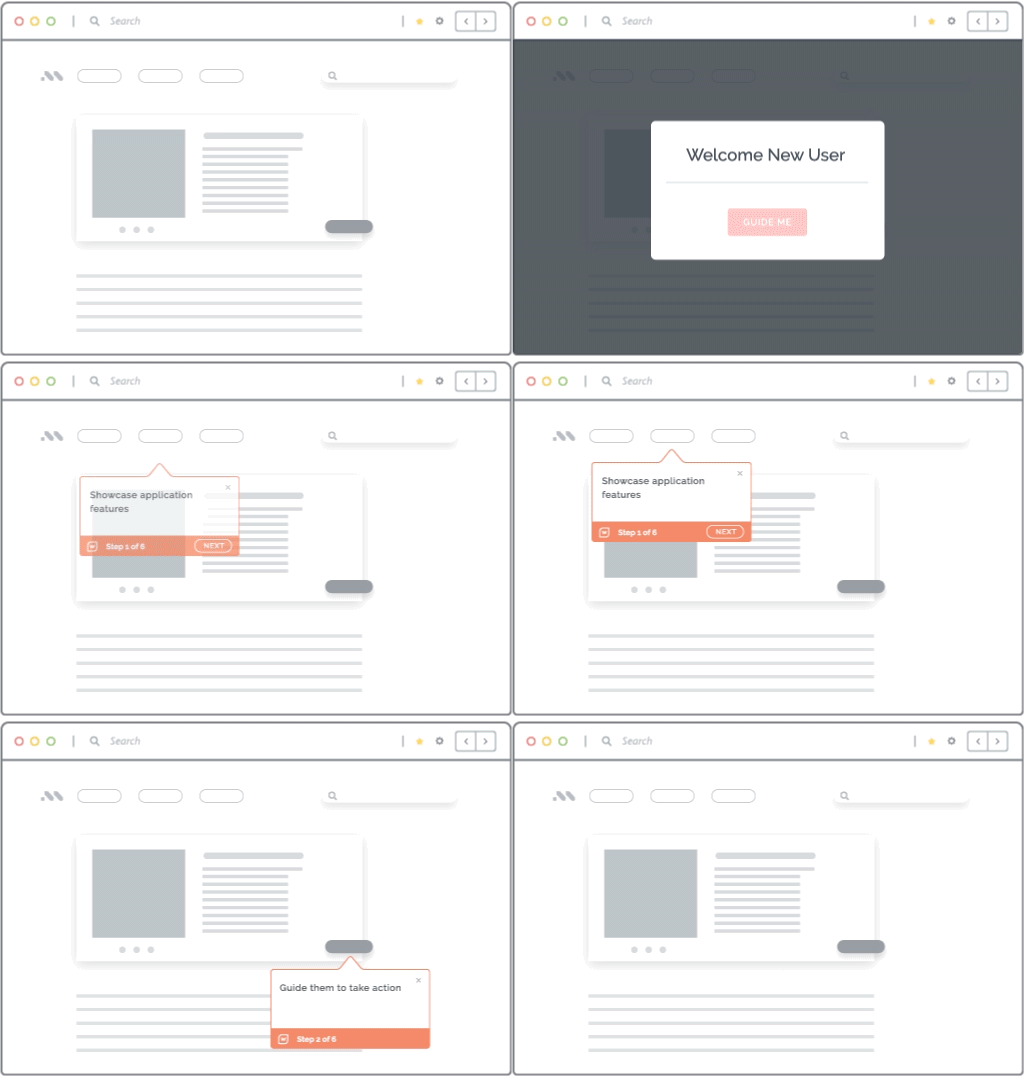
Whatfix DAP helps teams place guidance directly where users experience the change. Application owners can use Flows, Smart Tips, Beacons, Pop-Ups, and Task Lists to support users through new fields, validations, approval paths, UI changes, and exception steps.
This turns release communication into guided execution, so users get support while completing the task instead of relying on email announcements or static documentation.
Self Help for ticket containment
Whatfix Self Help gives users contextual answers inside the application, reducing repeat release-related tickets before they reach the service desk.
Application owners can connect help content to the exact workflow, page, or task where users are likely to get stuck, while routing true defects, access issues, or process exceptions to the right support path.

Mirror for high-risk release practice
Whatfix Mirror helps users practice changed workflows in a safe, simulated environment before they work in production.
This is useful for high-risk workflows where mistakes can affect compliance, financial transactions, HR processes, customer experience, or operational continuity. Teams can use Mirror to build readiness before release and reinforce changed workflows after launch.

Whatfix AI for faster, governed release enablement
Whatfix AI helps teams accelerate release enablement work across authoring, support, insights, and practice. It can help create and maintain guidance, summarize friction patterns, support self-help experiences, and enable roleplay-based practice for complex scenarios.
Application owners still keep governance over what gets published, what thresholds matter, and which interventions are approved.
With Whatfix, application owners can manage every release as a guided, measurable adoption cycle. Schedule a demo to see how Whatfix helps teams enable frequent software releases across Workday, Salesforce, ServiceNow, SAP SuccessFactors, and other enterprise applications while reducing support impact and improving release adoption outcomes.