


Enterprise change is a constant operating rhythm shaped by large-scale software rollouts, frequent upgrades for mission-critical applications, release enablement, workflow optimization, application consolidation, AI adoption, and process redesign – just to name a few.
For enablement teams, change leaders, and application owners, the real risk starts after software go-live, when different user cohorts encounter changed workflows in production. A release can look successful in an IT change record and still create friction for the people expected to execute the new process.
That user friction shows up in critical business areas; support tickets spike, approvals slow down, exceptions increase, workflow completion rates drop, and throughput suffers, even when the system is technically working as designed.
Change management software helps enterprise teams close that gap.
The right stack connects change governance with user readiness, in-workflow guidance, hypercare support, and adoption analytics, so leaders can reduce new user time-to-proficiency, contain post-change tickets, and prove the rollout is delivering measurable outcomes.
In this article, we’ll compare the best change management software for enterprise teams, explain where each tool fits, and show how to evaluate the right platform for your change governance, adoption, and stabilization needs.
Best Change Management Software
For this list, we evaluated change management software tools based on their ability to support a variety of change-related friction points, including:
- Change planning, approvals, calendars, and audit trails
- User readiness, training, and workflow validation before go-live
- In-workflow guidance and self-service support after release
- Adoption analytics, friction diagnosis, and outcome measurement
Here are the best change management software for enterprise IT and enablement teams:
| Software tools | Type of change management software | Best for use cases like |
| Whatfix | Digital adoption and change enablement | Go-live readiness, in-workflow guidance, hypercare support, and adoption measurement |
| ServiceNow ITSM Change Management | ITSM change governance | Large enterprises with CAB-driven governance and high change volume |
| Jira Service Management | ITSM and DevOps change workflows | Atlassian-first teams that need ITIL-aligned change workflows |
| BMC Helix ITSM Change Management | Enterprise ITSM governance | Formal change discipline, risk evaluation, and operational tracking |
| Ivanti Neurons for ITSM | Configurable ITSM change management | Teams needing flexible workflows, approvals, and change schedules |
| Freshservice | Modern ITSM change management | Teams that want ITIL-aligned change control with faster time-to-value |
| ManageEngine ServiceDesk Plus | Configurable ITSM change workflows | Teams needing approval workflows, automation, and repeatable change controls |
| TeamDynamix | ITIL-aligned ITSM change management | Organizations that need schedule visibility and workflow-based approvals |
| TOPdesk | Service management change module | Teams handling planned operational and IT changes |
| OpenText Service Management Automation X | ITSM automation and service management | Enterprises needing templates, automation, and change calendar visibility |
| SolarWinds Service Desk | ITIL-aligned service desk change management | Teams wanting change templates and practical workflows |
1. Whatfix
Best for: Accelerating pre-go-live user readiness, executing change inside workflows, supporting users during hypercare, and proving application-related business outcomes.
What is Whatfix?
Whatfix is a digital adoption platform that overlays enterprise applications to guide users through workflows, provide self-service support, and measure adoption outcomes. It helps application owners and transformation teams move beyond change communication and into hands-on readiness, in-app execution, support deflection, and workflow optimization.
Key Whatfix features
- Whatfix DAP for In-app guidance, task lists, smart tips, and announcements for changed workflows
- Contextual Self Help to reduce repetitive support tickets
- Whatfix Mirror for simulation-based practice before users enter live systems
- Product Analytics to track funnels, journeys, friction points, cohorts, and adoption behavior
- Content governance controls for authoring, approvals, versioning, localization, and lifecycle management
Why enterprise teams use Whatfix
Enterprise teams use Whatfix when approved changes still need to be translated into correct workflow execution after release. It helps teams reduce time-to-proficiency, contain support spikes, identify workflow friction, and validate whether interventions are improving adoption.
TL;DR for Whatfix
Whatfix is the execution and measurement layer that turns change governance into measurable workflow outcomes.
2. ServiceNow ITSM Change Management
Best for: Large enterprises with CAB-driven governance, complex approval models, and high change volume.
What is ServiceNow ITSM Change Management?
ServiceNow ITSM Change Management helps IT teams control the lifecycle of changes through workflows, approval policies, and configurable change processes. It is built for structured IT change control, service continuity, and governance at enterprise scale.
Key ServiceNow features
- Change request workflows and approval policies
- Standard, normal, and emergency change processes
- Change lifecycle control and ITSM governance
- Agentic workflows for change management tasks
Why enterprise teams use ServiceNow
ServiceNow is used to standardize change control, reduce operational risk, and maintain governance across large IT environments.
ServiceNow TL;DR
ServiceNow is a strong enterprise governance anchor for IT change management. Pair it with an adoption and workflow execution layer when the goal is rollout stabilization after go-live.
3. Jira Service Management
Best for: Atlassian-first enterprises that want ITIL-aligned change workflows connected to delivery and DevOps work.
What is Jira Service Management?
Jira Service Management is an ITSM platform that supports change management through request workflows, approvals, automation, and integrations with development pipelines. It helps teams manage standard, normal, and emergency changes while keeping delivery teams connected to service operations.
Key Jira features
- Change request workflows and approval paths
- Automation for classifying change requests by type, risk, or service dependency
- Integrations with CI/CD tools such as Bitbucket, GitHub, Jenkins, and CircleCI
- Extensibility across Jira projects and Atlassian workflow
Why enterprise teams use it
Jira Service Management connects IT change governance with software delivery, incident response, and service operations inside the Atlassian ecosystem.
TL;DR
Jira Service Management is a strong governance foundation for Atlassian-first teams. Add an in-workflow adoption layer when user readiness and post-release support are major risks.
4. BMC Helix ITSM Change Management
Best for: Enterprises with structured ITSM governance, formal risk evaluation, and complex operating environments.
What is BMC Helix ITSM Change Management?
BMC Helix ITSM Change Management supports change lifecycle management through approvals, tracking, risk assessment, and operational reporting. Its risk assessment capabilities help teams evaluate whether a change should be approved, held, or rejected.
Key BMC Helix features
- Change lifecycle tracking and approvals
- Risk and impact assessment
- Change reporting and operational visibility
- AI-supported risk insights in supported versions
Why enterprise teams use it
BMC Helix is a string fit when teams need disciplined change control, traceability, and risk management across large IT environments.
TL;DR
BMC Helix is a deep governance platform for enterprises running formal change discipline.
5. Ivanti Neurons for ITSM
Best for: Teams needing configurable change workflows, approvals, risk questions, and operational governance inside ITSM.
What is Ivanti Neurons for ITSM?
Ivanti Neurons for ITSM includes change management capabilities for managing change requests, approvals, schedules, risk levels, and change calendars. It is suited for teams that want configurable ITSM workflows with governance controls.
Key Ivanti Neurons features
- Change request workflows
- Approval workflows tied to change type
- Risk levels and change risk questions
- Change schedule and calendar visibility
Why enterprise teams use it
Ivanti standardizes change execution and maintains evidence without adding unnecessary process complexity.
TL;DR
Ivanti Neurons offers configurable ITSM change management for teams that need structured governance with flexibility.
6. Freshservice
Best for: Organizations that want ITIL-aligned change governance with a lighter implementation footprint.
What is Freshservice?
Freshservice is an ITSM platform with change management capabilities for planning, assessing, approving, implementing, and reviewing IT changes. It helps teams introduce application releases, configuration changes, infrastructure updates, and emergency fixes while reducing operational risk.
Key Freshservice features
- Structured change lifecycle
- Change approvals and CAB support
- Workflow automation for approval routing
- Planning, assessment, implementation, and review stages
Why enterprise teams use it
Freshservice is used by organizations to operationalize consistent change control without the heavier implementation effort of some enterprise ITSM platforms.
TL;DR
Freshservice is a practical ITSM change management option for teams modernizing change governance and service operations.
7. ManageEngine ServiceDesk Plus
Best for: Teams needing configurable ITSM change workflows, approvals, templates, and automation.
What is ManageEngine ServiceDesk Plus?
ManageEngine ServiceDesk Plus is an ITSM platform with change management capabilities for designing, automating, implementing, and governing IT changes. Its change workflows can be customized with stages, conditions, notifications, approvals, and field updates.
Key ManageEngine ServiceDesk features
- Custom change workflows
- Approval stages and process controls
- Change templates and automation
- Configurable stages, conditions, notifications, and field updates
Why enterprise teams use it
Teams use ServiceDesk Plus to build repeatable change controls with enough flexibility to support different change types and approval requirements.
TL;DR
ManageEngine ServiceDesk Plus is a solid option for teams that need configurable, repeatable IT change governance.
8. TeamDynamix
Best for: Organizations that want ITIL-aligned change workflows, scheduling visibility, and workflow-based approvals.
What is TeamDynamix?
TeamDynamix ITSM supports ITIL-aligned change management with workflows, approvals, change schedules, change history, and tracking. It helps teams organize change planning, execution, and communication in one ITSM platform.
Key TeamDynamix features
- Change schedules and history
- Workflow-based approvals
- Request tracking and communication
- CMDB-related visibility for assets and configuration items
Why enterprise teams use it
TeamDynamix is used to standardize change control while maintaining visibility into schedules, approvals, and communication.
TL;DR
TeamDynamix provides ITSM change governance with strong scheduling and workflow control.
9. TOPdesk
Best for: Organizations that need structured handling of planned IT and operational changes.
What is TOPdesk?
TOPdesk is a service management platform with a Change Management module for processing planned changes, from smaller functional updates to larger infrastructure changes.
Key TOPdesk features
- Planned change workflows
- Support for small and extensive changes
- Authorization and scheduling
- Activity planning and dependency management for extensive changes
Why enterprise teams use it
Teams use TOPdesk to create repeatable process structure for planned changes and improve coordination across service teams.
TL;DR
TOPdesk is a strong fit for planned change governance when repeatability and process consistency matter most.
10. OpenText Service Management Automation X (SMAX)
Best for: Enterprises that want ITSM change processes supported by templates, automation, integrations, and calendar visibility.
What is OpenText Service Management Automation X?
OpenText Service Management Automation X, also known as SMAX, is an IT and enterprise service management platform that supports automated service workflows, integrations, templates, and change calendar visibility.
Key SMAX features
- Change calendar visibility
- Service management templates
- AI-enriched workflows and automation
- Integrations with tools such as Jira, Microsoft Teams, Salesforce, and SAP
Why enterprise teams use it
OpenText SMAX is used to reduce manual coordination, standardize service workflows, and improve visibility across enterprise service management processes.
TL;DR
OpenText SMAX supports template-driven ITSM change governance with automation and calendar visibility.
11. SolarWinds Service Desk
Best for: Teams that want ITIL-aligned change templates, approval flows, and practical service desk workflows.
What is SolarWinds Service Desk?
SolarWinds Service Desk includes change management capabilities that help teams manage change requests through change modules, change catalogs, templates, and workflows. Its ITIL-aligned change catalog supports routine, standard, and emergency change processes.
Key SolarWinds features
- Change management module
- Change catalog and templates
- Approval flows and service desk workflows
- Repeatable processes for different change types
Why enterprise teams use it
Teams use SolarWinds Service Desk to operationalize practical change planning, enforce repeatable processes, and improve consistency across service desk-led changes.
TL;DR
SolarWinds Service Desk is a practical ITSM change management option for teams that want templates, workflows, and repeatable execution.
What Is Change Management Software?
Change management software helps teams plan, approve, communicate, execute, and measure changes to business systems, IT services, applications, and workflows. For IT teams, it creates structure around change requests, approvals, risk assessment, change calendars, implementation plans, backout plans, and audit trails.
For enterprise application owners, change management software also needs to support what happens after the technical release is complete. When a CRM workflow changes, an ERP approval path is updated, or a new HCM process goes live, success depends on whether users can complete the changed task correctly. That requires readiness, in-app guidance, contextual support, and adoption analytics that show where users are getting stuck and whether the change has stabilized.
Types of Change Management Software
Enterprise change management rarely runs on one tool. IT teams need systems to govern the change, while application owners need ways to prepare users, support changed workflows, and measure adoption after release.
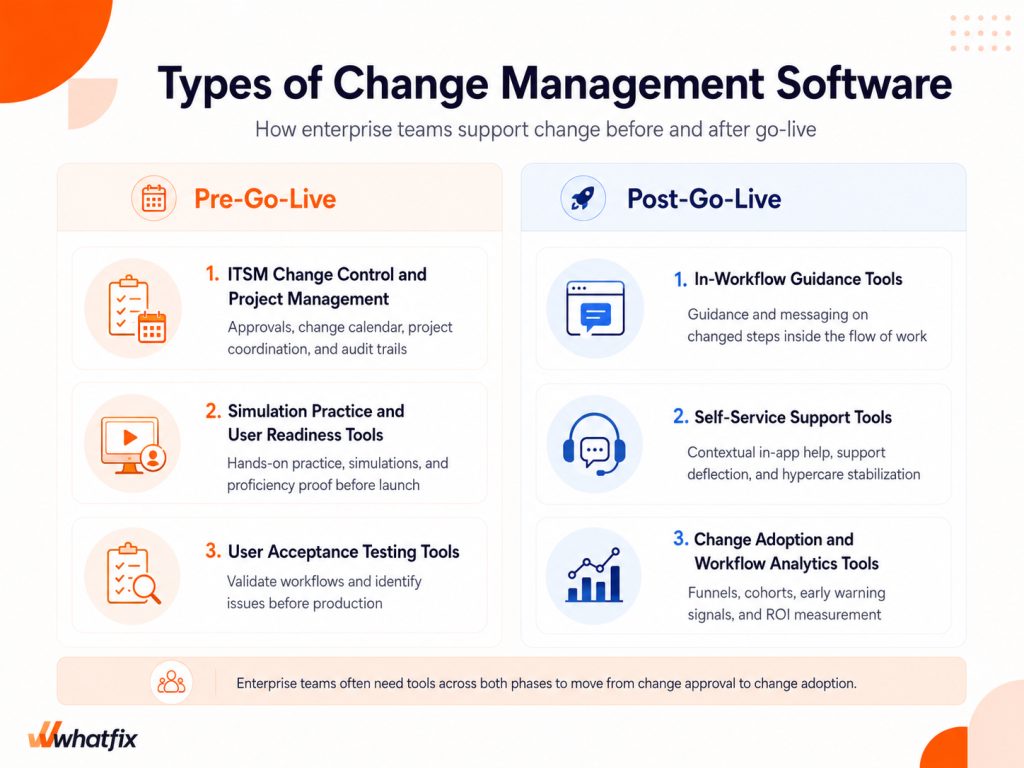
The right stack usually combines pre-go-live tools that reduce launch risk with post-go-live tools that stabilize execution.
- ITSM change control and project management tools: These tools help teams plan, approve, schedule, and document changes. They support change requests, CAB reviews, change calendars, implementation plans, ownership, dependencies, backout plans, and audit trails.
- User acceptance testing tools: UAT tools help teams validate changed workflows before launch. They are used to test business scenarios, identify defects, confirm requirements, and collect sign-off from business users before the change reaches production.
- Simulation practice and user readiness tools: These tools help employees practice changed workflows in a safe environment before go-live. Simulation-based user training is especially useful for high-risk workflows, ERP or CRM changes, customer-facing scenarios for service teams, and role-based processes where teams need proficiency proof before users enter the live system.
- In-workflow guidance tools: These tools support users inside the application when they encounter changed steps. Walkthroughs, task lists, smart tips, and in-app announcements help users complete the new process without leaving the workflow to search for instructions.
- Self-service support tools: These tools provide contextual help after release, such as knowledge base articles, FAQs, policies, videos, and guided support. During hypercare, they help reduce repetitive tickets and show support teams where users need more help.
- Change adoption and workflow analytics tools: These tools measure whether users are adopting the changed process successfully. Funnels, cohorts, workflow drop-offs, time-to-completion, repeated help searches, and support trends help teams identify friction, prioritize interventions, and prove ROI from change.
How the Right Change Management Software Stack Drives Business Outcomes
Change management software creates business value when it helps users adopt changed processes faster and execute critical workflows with fewer disruptions. For enterprise teams, the strongest stack connects IT governance with readiness, in-workflow support, and adoption measurement.
Many transformation teams still struggle to connect change activity to measurable outcomes. In a Whatfix survey, 61% of leaders said they still measure transformation success with qualitative feedback only, making ROI harder to benchmark. The right software stack gives teams more concrete signals across proficiency, workflow completion, ticket trends, and adoption movement.
| Business outcome | What to measure | Software capabilities that support it |
| Faster time-to-proficiency | Time taken for users to complete critical workflows independently | Simulation practice, role-based training, in-app guidance, task lists |
| Stronger user readiness | Readiness scores, practice completion, UAT sign-off, cohort preparedness | UAT tools, simulation environments, assessments, workflow validation |
| Lower support demand after release | Tickets per active user, repeated help searches, ticket themes in the first 14 days | Self-service support, contextual help, in-app knowledge, deflection analytics |
| Higher workflow completion | Completion rate, drop-off steps, time-to-completion, exception volume | Workflow analytics, funnels, cohorts, targeted in-app interventions |
| Better change governance | Approval cycle time, audit trail completeness, change collision risks | ITSM change workflows, CAB approvals, change calendars, risk scoring |
| Clearer ROI from change | Adoption trends, productivity gains, support reduction, stabilized workflow performance | Adoption analytics, reporting dashboards, behavioral segmentation, intervention tracking |
Change Management Software Evaluation Scorecard
Buying Considerations for Choosing a Change Management Tool
The right change management tool depends on the type of change you manage, the applications affected, and how much proof leaders need before and after go-live. Use these criteria to evaluate vendors beyond basic feature checklists.
| Buying consideration | What to evaluate |
| Use case coverage | Does the tool support IT change control, software releases, ERP or CRM rollouts, workflow redesigns, app consolidation, user readiness, hypercare, or adoption reporting? |
| Application compatibility | Can it support the applications your users work in, including web apps, desktop apps, mobile apps, VDI environments, custom applications, and enterprise systems like ERP, CRM, HCM, and ITSM? |
| Governance depth | Does it support CAB workflows, approval routing, change calendars, standard and emergency change models, implementation plans, backout plans, and audit trails? |
| Risk and dependency handling | Can teams assess risk, flag collisions, map dependencies, connect changes to configuration items, and understand downstream impact before release? |
| Integration fit | Does it connect with your ITSM, identity provider, knowledge base, communication tools, analytics platforms, and application ecosystem? |
| Enterprise scale | Can it handle multi-region rollouts, role variance, localization, permissions, regulated workflows, and different business unit requirements? |
| Rollout performance | Does it help reduce time-to-proficiency, contain support spikes, and guide users through changed workflows after release? |
| Measurement depth | Can teams track step-level drop-offs, workflow completion, cohort variance, repeated help searches, tickets per active user, and early warning indicators? |
| Agentic AI | Does AI reduce operational work in meaningful ways, such as generating guidance, summarizing friction patterns, recommending interventions, assisting support, or maintaining content? |
Whatfix Operationalizes Change Management From Pre-Go Live Readiness to Post-Go Live Hypercare
Approving a change does not mean users are ready to execute it. Whatfix helps enterprise teams close the gap between change governance and change adoption by supporting users before, during, and after go-live. In a Whatfix survey of 300 digital transformation leaders, 64% said they would invest more in user training and support if they could redo their last transformation project, showing why teams need a stronger way to prepare users, guide changed workflows, contain support demand, and measure rollout stabilization.
Prove readiness before go-live with Whatfix Mirror
Whatfix Mirror helps teams create replica application environments where users can practice critical workflows before they enter production. Transformation teams can use Mirror for simulation-based training, role-based practice, UAT support, AI roleplay, and proficiency assessment, giving application owners stronger readiness proof than training attendance or documentation views alone.
Guide changed workflows in production with Whatfix DAP
Whatfix DAP provides in-app guidance, task lists, smart tips, pop-ups, and announcements that support users when they encounter changed workflows in production. Teams can deliver role-based guidance for new steps, updated validations, policy changes, approval paths, and exception handling directly inside the application, reducing dependency on static documentation and peer support.
Stabilize hypercare with Self Help
Whatfix Self Help gives users contextual access to knowledge articles, FAQs, policies, videos, and help content inside the application. During hypercare, this helps reduce repetitive tickets, gives users faster answers in the flow of work, and shows support teams which questions and workflow issues are creating the most friction after release.
Measure adoption and friction with Product Analytics
Whatfix Product Analytics helps application owners see whether users are adopting changed workflows successfully. Teams can track drop-offs, time-to-completion, cohort variance, repeated help searches, and intervention performance, making it easier to identify friction early and prove whether the rollout is stabilizing.
With Whatfix, enterprise teams can connect readiness, execution, support, and optimization in one closed-loop change adoption model. Request a demo to see how Whatfix helps reduce time-to-proficiency, contain post-change support demand, and prove measurable rollout outcomes.