


When change goes live in an enterprise setting, the business does not pause while end users adjust. Orders still need approvals. Cases still need routing. Employee HR requests still need processing. Every missed field, abandoned step, duplicate handoff, or informal workaround starts to affect the workflows the rollout was meant to improve.
In production, change resistance becomes operational data. It shows up when users avoid the approved path, repeat the same mistakes, open tickets for tasks they should be able to complete, or recreate the old process outside the system. For change enablement leaders, adoption program owners, enterprise app owners, and process owners, these signals are early warnings that the changed workflow is not yet stable.
The stakes are high. In a Whatfix survey of 300 IT and digital transformation leaders, 64% said they would invest more in user training and support if they could redo their last transformation project. This points to a persistent enterprise software change management gap: teams invest heavily in technology deployment but underinvest in user readiness, in-flow support, and adoption measurement required to make the change stick.
This article explains how to identify the real causes of resistance during software rollouts, diagnose production signals before they turn into process drift, and ship targeted interventions that improve process adherence within 30 to 45 days. 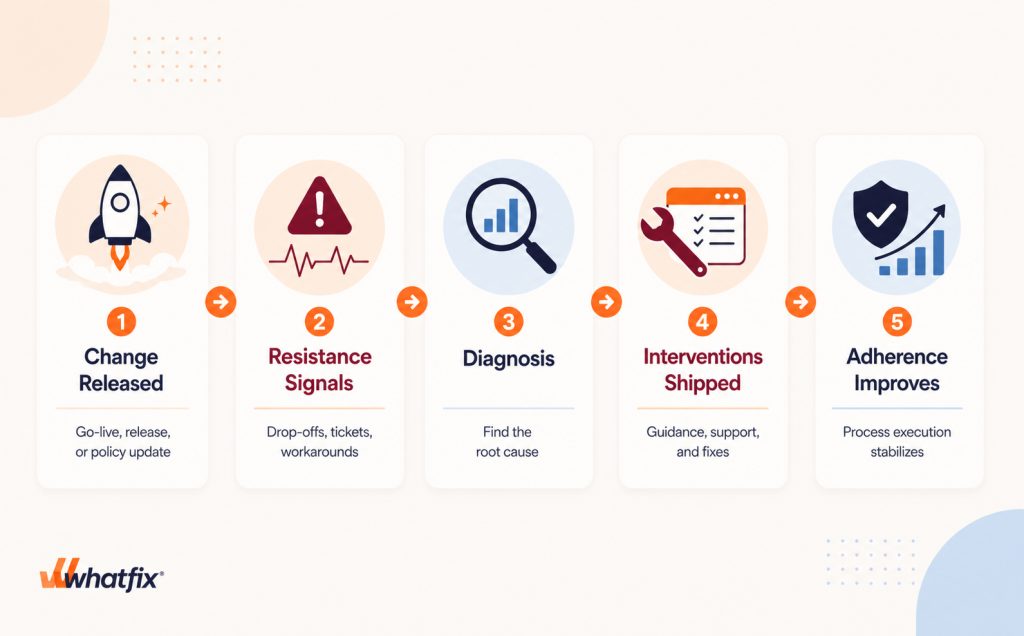
What Is Resistance to Change?
Resistance to organizational change refers to the friction that arises when employees struggle to adopt new technologies, processes, or operating models. In enterprise environments, resistance is rarely explicit. It appears as inconsistent usage, delayed adoption, workarounds, increased support dependency, or a return to legacy ways of working.
How Resistance to Change Impacts Software Rollouts and Releases
Resistance to change during a software rollout is the gap between how a new system or workflow is designed to operate and how users actually execute it after launch.
In enterprise software, resistance is not always visible as direct pushback. It often manifests as workflow behavior, such as users bypassing approved steps, abandoning tasks, creating spreadsheet workarounds, submitting repeat support tickets, or relying on peers instead of completing the process independently.
This is especially risky in complex application environments, where a single missed step can affect approvals, data quality, compliance, SLAs, or downstream teams. In most cases, resistance is a signal that users need clearer expectations, better role-based support, less workflow friction, or more readiness before they can follow the new process consistently.
7 Top Reasons Change Resistance Happens
During software rollouts, users often resist when the new process feels harder to follow, poorly explained, or disconnected from how work actually happens in production.
Common causes of change resistance include:
- Unclear rollout expectations: Users do not understand what changed in the system, which workflows are affected, what they are expected to do differently, or how success will be measured after go-live.
- Workflow friction: The new process adds extra steps, confusing fields, slower handoffs, unfamiliar screens, or unclear exception paths, making the approved workflow harder to complete in production.
- Poor role-based training: Users receive generic training that does not reflect their actual workflows, permissions, approval responsibilities, edge cases, or system environment.
- Missing in-flow support: Users cannot get help when they are stuck in the application, so they turn to peers, support teams, legacy documentation, or workarounds.
- Access and permission gaps: Users are expected to follow a new workflow but lack the right roles, data access, approval permissions, or system visibility to complete it.
- Policy ambiguity: Required approvals, compliance steps, data-entry rules, or process controls are not reinforced within the workflow, so users interpret the new process inconsistently.
- Frequent release and change fatigue: Users have gone through too many system updates, migrations, UI changes, or process changes without enough time to stabilize, learn, and build confidence.
- Low trust from past rollouts: Previous software changes created errors, rework, downtime, support burden, or productivity loss, so users are skeptical that the new process will work as intended.
The Operational Cost of User Resistance to Change
User resistance becomes expensive when it starts affecting workflow execution, support capacity, and process control. For change enablement leaders, adoption owners, and application owners, the cost usually shows up in five areas:
- Higher support volume: Tickets spike around the changed workflow, especially when users cannot complete a task without help.
- More exceptions and rework: Incorrect submissions, missed fields, failed validations, and manual corrections increase downstream workload.
- Process drift: Teams begin executing the same workflow differently across roles, regions, or business units.
- Slower time-to-value: Productivity gains from the rollout take longer to materialize because users are not completing the new process consistently.
- Compliance and governance risk: Controlled workflows become harder to enforce when users rely on informal paths, manual approvals, or shadow processes.
Enterprise transformation programs are usually funded to improve operational efficiency and employee productivity. In Whatfix’s 2026 State of Digital Transformation ROI report, leaders cited operational efficiency (60.4%) and employee productivity (57.1%) as the top two drivers of transformation projects. When resistance slows workflow adoption, those outcomes are delayed.
5 Signals That Users Are Resisting a New System or Workflow
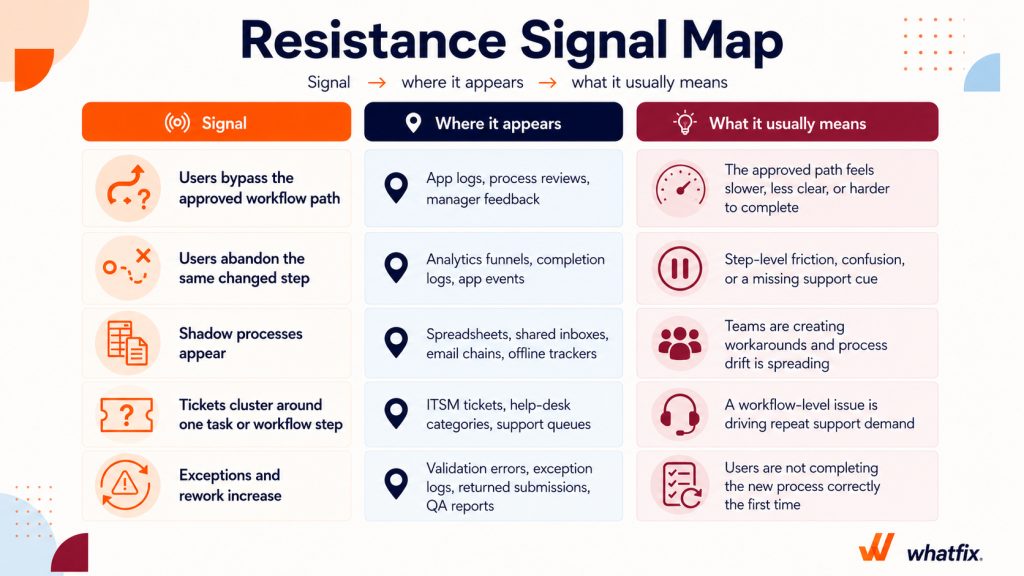
Resistance becomes easier to detect when teams look beyond adoption rates and focus on workflow behavior, support patterns, and process quality. These are the five signals to watch first:
- Users bypass the approved workflow path: Users avoid the new process and complete the task another way, such as through email, spreadsheets, side conversations, or manual approvals. This signals that the approved path feels slower, less clear, or harder to complete.
- Users abandon the same changed step: Users start the workflow but drop off at one specific point, such as a required field, approval stage, validation rule, or handoff. Repeated abandonment at the same step indicates user friction, confusion, or a lack of in-flow support.
- Shadow processes appear: Teams create their own trackers, shared inboxes, offline notes, or parallel approval paths to keep work moving outside the system.
- Tickets cluster around one task or workflow step: Support demand concentrates around the same changed action, field, approval rule, access issue, or handoff.
- Exceptions and rework increase: The changed workflow produces more failed validations, returned submissions, incorrect entries, duplicate work, or manual corrections.
Segment resistance before you diagnose it
Do not assume resistance is a population-wide problem. In many rollouts, the issue is concentrated in a specific cohort, workflow path, or operating environment.
Start with these required cuts:
- Role
- Region
- Tenure
Use these additional cuts where relevant:
- Business unit
- Environment, such as web, desktop, or VDI
- Manager vs. individual contributor
- Permission level
Segmentation prevents the wrong fix. A rollout may look like it has a broad adoption issue when the real blocker sits with one role, one region, one permission group, or one application environment.
How to Diagnose the Causes of Change Resistance Fast
Do not start by assuming users are the problem. Start by identifying where the changed workflow is breaking down, which cohort is affected, and what evidence confirms the issue. The goal is to quickly isolate the blocker so teams can ship the right intervention rather than default to broad retraining or generic communications.
Know when resistance is not a user problem
Resistance is often a symptom of a broken workflow experience, unclear policy, or missing support layer. Before assigning the issue to user behavior, check for these patterns:
- If many users fail at the same step, the workflow may be poorly designed.
- If one cohort struggles, the issue may be role-specific software training, permissions, or local process variance.
- If users bypass the system because the old path is faster, the approved process may need redesign.
- If tickets cluster around one rule, the policy may be unclear or poorly reinforced.
- If users need repeated help for the same task, the issue may be missing in-flow support, not unwillingness.
Triage the friction point(s)
Start with the changed workflow step where users fail, abandon, bypass, or ask for help. Do not diagnose resistance at the full application level.
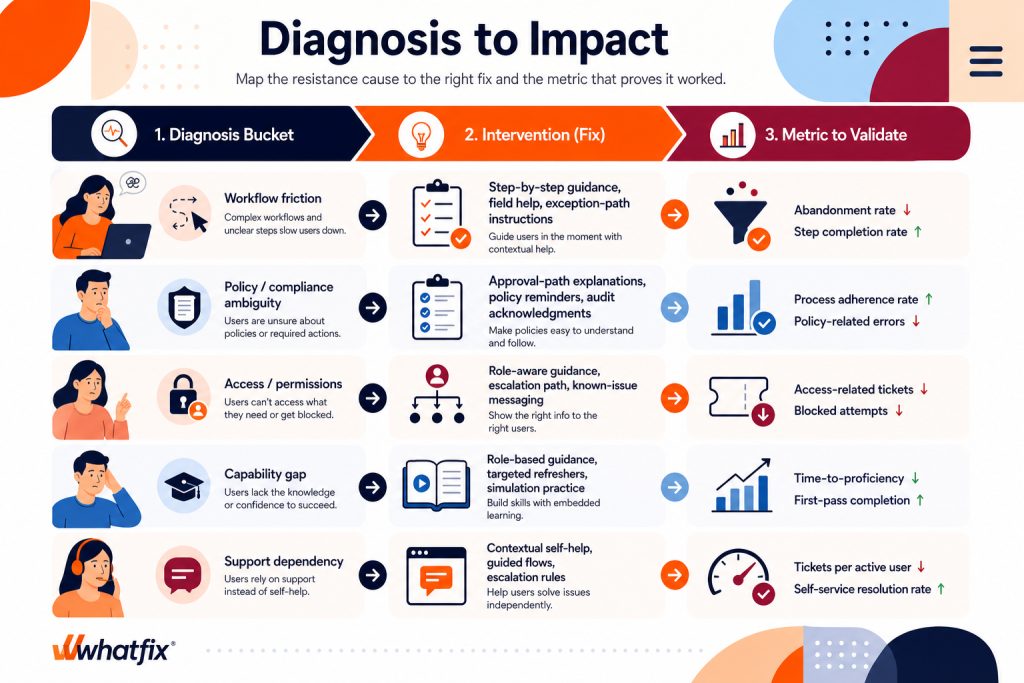
For each friction point, identify whether the blocker is caused by:
- Workflow friction
- Policy or compliance ambiguity
- Access or permission gaps
- Capability gaps
- Support dependency
Then confirm the diagnosis with at least two sources of evidence. Pair behavior data, such as drop-offs or path deviations, with support tickets, exception reports, rework data, or user feedback captured at the point of friction.
Create a resistance diagnostic scorecard
Use a scorecard to connect each production symptom to a likely cause, first intervention, and metric to monitor.
| Symptom in production | Likely root cause | First intervention to ship | Metric to watch |
| Abandonment at a required field step | Field purpose, format, or rule is unclear | Add field-level guidance, examples, and validation support | Week 1: step completion rate. Week 4: abandonment rate trend |
| Users bypass the new approval path | Approval logic or policy is not understood | Add approval-path guidance and reinforce the required process in-app | Week 1: approval-path usage. Week 4: process adherence rate |
| Ticket spike with the same category | Users depend on support to complete the task | Add contextual self-help and guided workflow support | Week 1: repeat ticket volume. Week 4: tickets per active user |
| Exceptions rising after a validation change | Users do not understand the new data or compliance rule | Add required-field reinforcement and examples of correct entries | Week 1: validation failures. Week 4: exception and rework volume |
| Cohort variance by role or region | Enablement, permissions, or local process differences | Add role-based or region-specific guidance | Week 1: cohort completion gap. Week 4: cohort adherence delta |
| Increased handoffs or duplicate entry across systems | Cross-system workflow is unclear or too manual | Clarify system of record, next step, and escalation path | Week 1: duplicate-entry reports. Week 4: rework and handoff volume |
Download the Change Resistance Diagnosis Kit
Change Resistance Mitigation Plan: What to Ship Based on the Diagnosis
Once you know the likely cause, avoid broad retraining or generic change communications. Focus on the smallest targeted intervention that removes the blocker at the point of work, then monitor whether user behavior changes.
If the issue is workflow friction
Focus on reducing the effort required to complete the changed step correctly.
- Add step-level guidance at the exact point where users drop off.
- Add field-level help for required inputs, formats, or validation rules.
- Clarify exception paths so users know what to do when the standard path does not apply.
- Give the application or process owner feedback if the workflow itself needs simplification.
If the issue is policy or compliance ambiguity
Ship interventions that reinforce the required path inside the workflow:
- Explain why the approval, field, or control is required at the moment of action.
- Add policy reminders where users are most likely to skip or misinterpret a step.
- Use acknowledgments only when auditability or attestation is required.
- Align the language with the process owner so guidance reflects the approved rule.
If the issue is access or permissions
Help users understand whether they are blocked, what they can do next, and where the issue should be routed.
- Add role-aware guidance that reflects what each user group can actually see or do.
- Create clear escalation paths for blocked users.
- Use known-issue messaging for temporary permission or provisioning gaps.
- Separate access issues from training issues so support teams do not waste cycles on the wrong fix.
If the issue is a capability gap
Help users build task-level confidence, especially for workflows where mistakes create downstream cost.
- Create role-based in-app guidance for the specific task, not the full application.
- Add targeted refreshers for the highest-risk cohorts.
- Use simulation practice for workflows where mistakes create downstream cost or compliance risk.
- Include exception-path training, not just the happy path.
- Create short training videos with an online video editor to demonstrate key workflows, explain common mistakes, and give employees a visual refresher they can revisit when needed.
If the issue is support dependency
Shift repeat “how do I do this?” questions into contextual self-service so support stays focused on true exceptions.
- Build contextual self-help around the top repeat ticket drivers.
- Add guided flows for common tasks users ask support to walk them through.
- Keep support content tied to the workflow step, role, and task.
- Define escalation rules so users know when an issue truly needs IT or process-owner support.
The 45-Day Plan to Reduce Resistance After Software Rollout
Use the first 45 days after go-live to contain workflow drift, fix the highest-impact friction points, and prove whether users are moving back toward the approved process.
| Timeframe | Goal | What to do | Proof by the end |
|---|---|---|---|
| Days 1 to 7 | Contain drift | Identify the top broken workflow step, repeat ticket driver, and most common workaround. Segment by role, region, and tenure. Ship one targeted fix, such as step-level guidance, field support, or contextual self-help. | One confirmed friction point, one intervention live, and daily visibility into adherence, abandonment, and ticket volume. |
| Days 8 to 21 | Stabilize the workflow | Expand guidance for the highest-risk cohort. Add self-help for repeat issues. Tighten escalation paths for access, policy, or known workflow blockers. Review whether the first fix reduced drop-offs, tickets, or exceptions. | A prioritized intervention backlog, fewer repeat issues, and clear ownership for workflow, policy, access, or support fixes. |
| Days 22 to 45 | Prove adherence | Track adherence, abandonment, tickets, and exceptions by cohort. Retire temporary workarounds where the approved path is working. Reinforce required steps through in-workflow guidance and governance checkpoints. | A stabilization decision: keep monitoring, redesign the workflow, clarify policy, or expand the intervention to other cohorts. |
The goal is not to solve every adoption issue in 45 days. It is to stop the highest-risk resistance patterns from becoming normal operating behavior. By day 45, the team should know three things – where resistance is still concentrated, which interventions are changing behavior, and whether the changed workflow is stable enough to govern at scale.
Metrics and Cadence to Keep Resistance From Returning
Once the changed workflow stabilizes, keep monitoring whether users stay on the approved path or drift back into old behaviors. Do not rely only on stakeholder feedback or anecdotal updates. In Whatfix’s digital transformation report, 61% of leaders said they measure transformation success with qualitative feedback only, making it harder to benchmark ROI or track real progress.
Metrics to track resistance to IT change
Track a focused set of workflow-level metrics that show whether the change is sticking:
- Process adherence rate: Percentage of users completing the workflow through the approved path.
- Workflow completion rate: Percentage of users who start and finish the changed workflow.
- Abandonment rate at changed steps: Drop-off at required fields, approvals, validations, or handoffs.
- Tickets per active user: Support volume tied to the changed workflow.
- Repeat ticket drivers: The ticket categories that keep recurring after intervention.
- Exception and rework volume: Failed validations, rejected submissions, corrections, or duplicate work.
- Self-service resolution rate: Percentage of users resolving workflow questions without support intervention.
- Time-to-proficiency: Time required for users to complete the changed workflow correctly without help.
- Cohort variance: Differences in adoption and adherence by role, region, tenure, business unit, or environment.
Weekly resistance review
Use a weekly review to decide what needs intervention next. Keep the discussion focused on workflow evidence, not general adoption sentiment.
Review:
- Top workflow drop-off
- Top repeat ticket category
- Top exception or rework driver
- Highest-risk cohort
- Intervention shipped in the last cycle
- Metric movement since the last review
The weekly decision must be simple. Continue the intervention, expand it to another cohort, replace it, or escalate the issue to the application owner or process owner.
Monthly governance pack
Use the monthly governance pack to show whether the new software rollout is stabilizing and where the next workflow priority sits.
Include:
- Process adherence trend
- Ticket trend
- Exception and rework trend
- Self-service resolution trend
- Cohort variance
- Interventions shipped
- Next workflow priority
The governance pack must help leaders answer three questions – where resistance is still concentrated, which interventions are changing behavior, and which workflow needs the next round of diagnosis.
How Whatfix Helps Teams Reduce Resistance In Production
Whatfix gives change enablement leaders, adoption teams, and application owners one operating layer to detect resistance, intervene in the flow of work, and measure whether process adherence is improving.
Whatfix Product Analytics for detection and prioritization
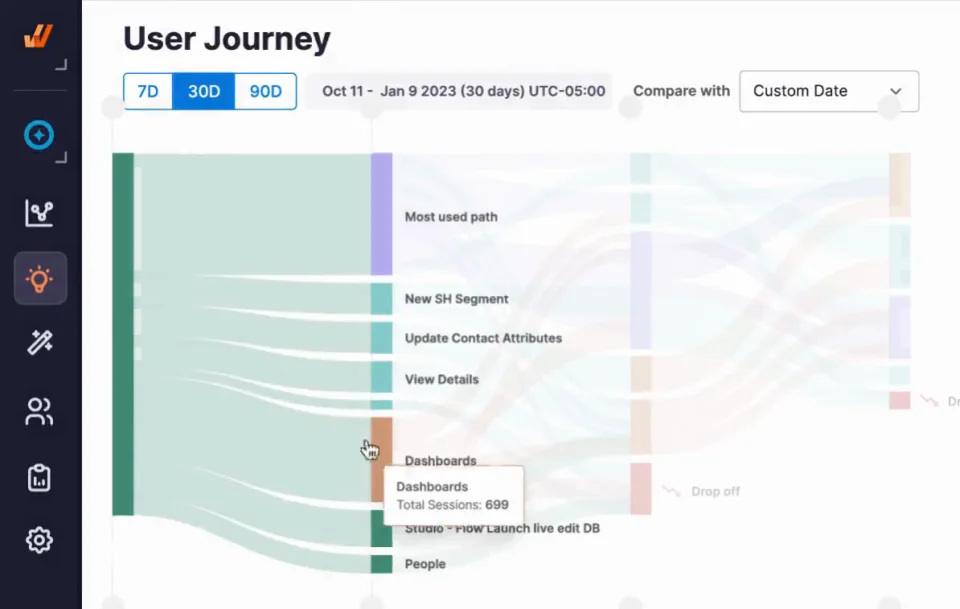
Whatfix Product Analytics helps teams find where resistance is concentrated before it becomes a larger adoption problem.
Teams can:
- Identify the exact workflow step where users drop off.
- Compare behavior across roles, regions, teams, or user cohorts.
- Spot repeat friction patterns in high-volume workflows.
- Prioritize interventions based on business impact, user volume, and process risk.
Instead of relying only on feedback or ticket summaries, teams can see where the changed workflow is breaking down and decide what to fix first. This is especially useful when resistance is not population-wide, but concentrated in one cohort, location, or workflow path.
Whatfix DAP for in-workflow interventions
Once the friction point is clear, Whatfix DAP helps teams intervene directly inside the application.
Teams can:
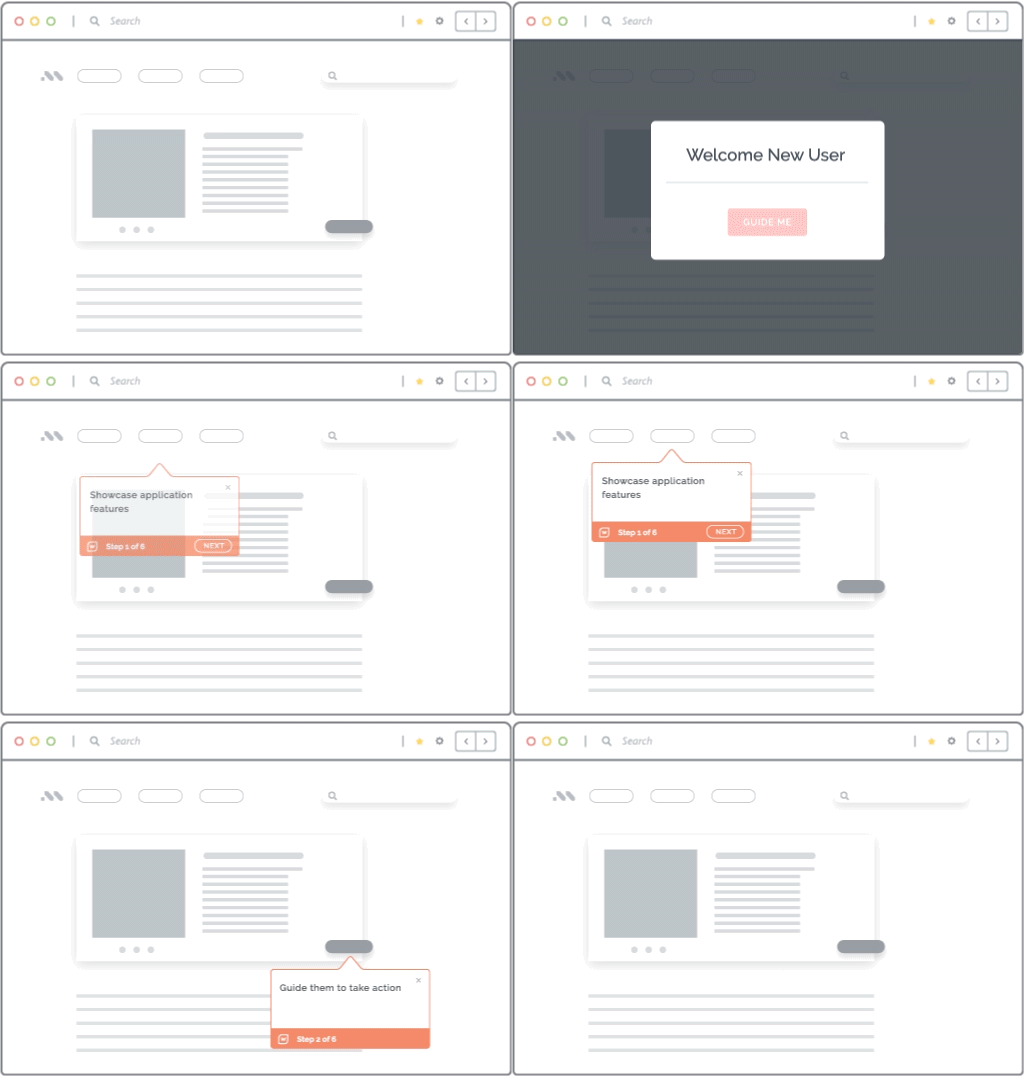
- Add step-by-step guidance at the exact point where users hesitate or drop off.
- Reinforce required fields, approvals, and process rules in the workflow.
- Trigger in-app announcements during go-lives, releases, or policy updates.
- Personalize guidance by role, region, application, or workflow stage.
This keeps users on the approved path without forcing them to leave the application, search documentation, or wait for support. For controlled workflows, that means fewer skipped steps, fewer errors, and stronger process adherence.
Whatfix Self Help for ticket containment
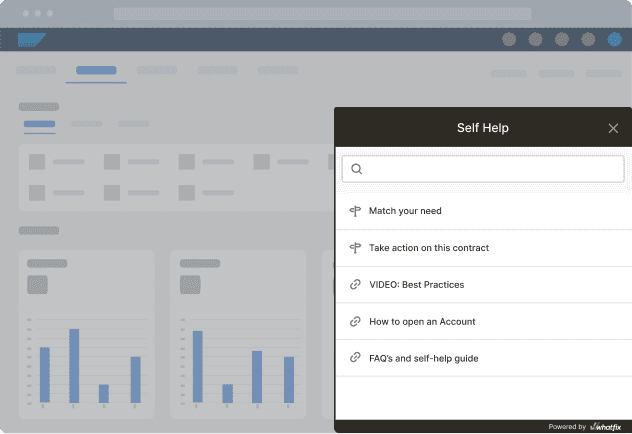
When resistance creates repeat “how do I do this?” tickets, Whatfix Self Help gives users contextual answers inside the application.
Teams can:
- Deflect repeat questions tied to the changed workflow.
- Surface relevant help content based on where the user is in the process.
- Reduce tickets per active user on high-volume workflows.
- Keep support teams focused on true exceptions instead of task guidance.
For IT and support teams measured on SLAs, deflection, and business continuity, this helps prevent rollout friction from turning into a sustained support burden.
Whatfix surveys for “why” at the point of friction
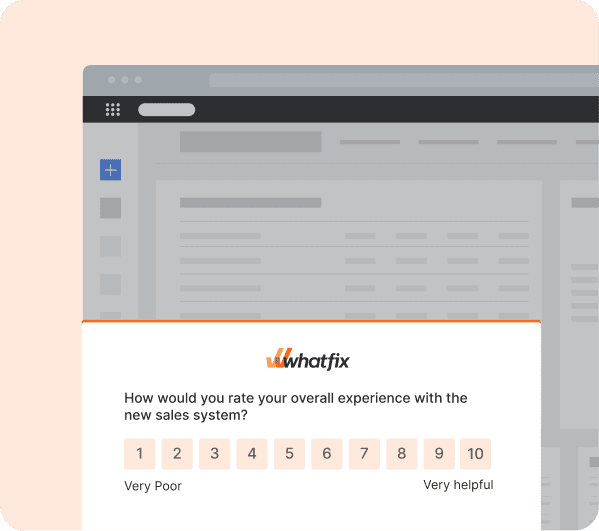
Analytics can show where users drop off. Whatfix Surveys help teams understand why.
Teams can:
- Ask users why they bypassed, abandoned, or struggled with a workflow step.
- Capture feedback while the task context is still fresh.
- Identify whether the blocker is training, access, policy, usability, or support.
- Route insights into the next intervention backlog.
This closes the gap between behavior data and user context, so teams can ship more targeted fixes instead of guessing.
Whatfix Mirror when practice is the safest option
Some workflow changes are too risky for users to learn directly in production. Whatfix Mirror gives teams a safe simulation environment where users can practice critical workflows before they touch live systems.
Teams can prepare users for:
- High-risk ERP, CRM, HCM, ITSM, or compliance workflows.
- Exception paths that users rarely see but must handle correctly.
- Role-based practice before go-live or major releases.
- Readiness checks before users complete the workflow in production.
This is especially useful when mistakes create downstream cost, compliance exposure, rework, or support spikes. According to Whatfix’s digital transformation report, 82.5% of DAP users built confidence in under three months, compared with 60% without a DAP.

Together, Whatfix helps teams move from reactive resistance management to a measurable adoption loop by detecting friction, guiding users, deflecting support demand, capturing feedback, building readiness, and optimizing the workflow until adherence improves. See how Whatfix helps enterprise teams detect resistance signals, guide users through changed workflows, reduce support burden, and improve process adherence after rollout. Schedule a demo.
| Customer example: Sophos reduces Salesforce support burden with Whatfix Sophos shows how Whatfix helps enterprise teams manage frequent software change without overwhelming users or support teams. With quarterly Salesforce updates, monthly internal customizations, and users spread across seven countries, Sophos needed a scalable way to reinforce training, communicate changes, and support sellers in the flow of work. Using Whatfix, Sophos delivered in-app guidance, Smart Tips, guided walkthroughs, and self-service support directly inside Salesforce, helping users adapt to new workflows at the moment of need. The result was a 15% year-over-year reduction in global Sales Ops cases, equal to roughly 12,000 fewer support tickets, 1,070 hours saved through streamlined training and support, and 116,000+ interactions with in-app Flows and Smart Tips in FY21. |