

Large enterprises often accumulate overlapping business applications through mergers and acquisitions, regional autonomy, siloed business-unit purchases, and years of decentralized technology decisions.
For example, we spoke with a multinational food and beverage company that illustrated the scale of the challenge. This organization had 80,000 employees across 72 subsidiaries worldwide, each utilizing a different ERP system with its own configurations, workflows, and data. In total, the organization had 45 unique ERP instances.
Done effectively, application consolidation lowers technology costs, simplifies IT governance, standardizes business processes, unifies data, and creates a stronger foundation for AI, automation, analytics, and overall digital transformation ROI. This guide covers the business case for application consolidation, its relationship to application rationalization, common consolidation scenarios, and how to prepare users, drive adoption, and maximize value from consolidated business applications.
What Is Application Consolidation?
Application consolidation is the process of reducing redundant business applications or application instances by migrating their users, workflows, and data to a single platform or a smaller set of standardized applications.
Application Consolidation vs. Application Rationalization
Application rationalization is the process of evaluating an organization’s application portfolio to determine which systems should be retained, invested in, replaced, consolidated, or retired.
Application consolidation is one potential outcome of that analysis, focused specifically on reducing the number of applications or instances and moving users and workflows onto a standardized target environment. Application consolidation is therefore often an execution phase within a broader application rationalization or application portfolio management initiative.
Benefits of Consolidating Business Applications
Enterprises consolidate business applications to simplify operations, reduce technology complexity, and improve business outcomes in several ways, including:
- Reduce application and IT costs: Consolidation eliminates redundant licenses, infrastructure, integrations, vendor contracts, maintenance requirements, and specialized support.
- Standardize business workflows: Moving teams onto shared platforms creates more consistent processes, controls, data requirements, and operating standards across the enterprise.
- Improve enterprise data consistency: Consolidation reduces duplicate records, fragmented reporting, and disconnected data models by bringing related workflows onto common systems.
- Simplify application governance, security, and support: A smaller application portfolio means IT has fewer systems, permission models, integrations, compliance controls, and environments to manage.
- Strengthen the foundation for AI, automation, and analytics: Consolidated platforms make it easier to connect data, automate end-to-end workflows, analyze business activity, and deploy new AI capabilities.
Common Application Consolidation Scenarios
Enterprises commonly pursue application consolidation when growth, decentralization, acquisitions, or modernization create overlapping systems and inconsistent workflows:
- Post-merger and acquisition integration: Organizations consolidate duplicate core systems, such as ERPs, CRMs, HCMs, and other applications, so that acquired teams can operate on the same shared platforms, workflows, and data of their new parent company.
- Subsidiary and business unit consolidation: Enterprises bring independently managed applications or separate instances onto common platforms to simplify administration and establish shared processes and governance.
- Regional application and process standardization: Global organizations consolidate regional systems or configurations to create more consistent workflows, reporting, and application governance across markets.
- Vendor and application portfolio rationalization: Organizations retire overlapping point solutions and migrate their users, data, and workflows onto strategic enterprise applications with broader capabilities.
- Legacy system modernization: Enterprises replace fragmented or outdated systems with modern platforms, such as consolidating legacy ERP environments onto SAP S/4HANA or regional CRMs onto Salesforce Sales Cloud.
How to Enable Users Through Business Application Consolidation
Business application consolidation changes the systems employees use and often the workflows, responsibilities, approvals, and operating standards behind them.
A strong user enablement strategy prepares employees for the target environment before migration, supports standardized workflows after go-live, and continuously improves adoption as the consolidated platform evolves.
Here are seven steps to support users through application consolidation migration projectS:
1. Map Current Workflows and Define What Will Change
Document how critical work is performed across the applications being consolidated, including roles, task sequences, approvals, handoffs, exceptions, integrations, and workarounds. Use this analysis to identify which business requirements must carry forward, which legacy processes should be retired, and how responsibilities will change in the target environment.
2. Standardize Future-State Workflows Before Migrating Users
Application sprawl often creates workflow sprawl. Define how each critical process should operate in the consolidated platform, including required steps, controls, data inputs, approvals, and legitimate regional or regulatory variations. A smaller application portfolio delivers more value when it also creates simpler, more consistent ways of working.
3. Test Future-State Workflows With Real Users
Have representative users complete realistic end-to-end scenarios in a sandbox environment before production rollout. Test routine tasks, exception paths, approvals, cross-application dependencies, and compliance-sensitive workflows to identify configuration gaps, confusing steps, and new workarounds before they affect live operations.
4. Build and Verify User Readiness Before Go-Live
Give employees hands-on practice with the workflows they will perform in the consolidated environment. Measure readiness by whether users can complete critical tasks accurately and independently via application simulations, rather than by training attendance or course completion.
Legacy applications should be retired only after critical workflows have migrated, required users have reached acceptable proficiency, and target-platform adoption is stable enough to support the transition.
5. Reinforce Standardized Workflows in the Flow of Work
After go-live, provide contextual guidance and self-service support within the consolidated application so employees can navigate unfamiliar tasks, exceptions, controls, and required process changes without relying on memory or repeated support escalations.
This hypercare support should continue beyond initial onboarding as new business units migrate, legacy functionality is retired, and standardized workflows continue to evolve.
6. Communicate Workflow, Feature, and Policy Changes Continuously
Consolidated platforms remain active environments for transformation after migration. Application owners need a way to communicate new features, changed workflows, policy updates, and regulatory requirements to the specific users affected by each change.
Targeted change management helps employees understand what changed, what action is required, and how to perform the updated process correctly.
7. Measure Adoption, Identify Friction, and Optimize Workflows
Track workflow completion, abandonment, errors, support demand, time-to-proficiency, feature adoption, and continued use of legacy processes or workarounds.
When digital adoption gaps arise, determine whether the cause is application configuration, workflow design, integration issues, a lack of knowledge, insufficient practice, or unclear guidance. Launch targeted interventions, measure their impact, and continuously improve the consolidated environment.
How to Measure Application Consolidation Success and ROI
Application consolidation success should be measured against the business case established before migration. Reducing the number of applications is one outcome, but enterprise leaders should also determine whether consolidation has lowered operating costs, improved workflow execution, increased adoption of the target platform, and delivered the expected business outcomes.
Financial vs. Operational KPIs
ROI should compare the financial and operational benefits attributable to consolidation against implementation, migration, enablement, and ongoing platform costs. Application owners should establish baselines before rollout so they can measure how costs, user behavior, workflow performance, and business outcomes change after consolidation.
Technical Consolidation vs. Value Realization
Organizations should also distinguish technical consolidation from value realization. Retiring four applications may achieve an architecture goal, while the broader return depends on whether employees adopt the target platform, execute standardized workflows correctly, and generate the productivity, cost, or operational improvements that justify the program.
Consider the following ROI scorecard to keep your application consolidation project on the path to success:
| Success Area | Example of application consolidation success metrics |
| Portfolio consolidation | Applications retired, instances retired, vendors reduced, redundant capabilities eliminated |
| Cost efficiency | License savings, infrastructure costs, maintenance spend, vendor costs, support costs |
| Migration progress | Users migrated, workflows migrated, data migrated, and remaining legacy-system usage, software rollout timeline met |
| User readiness | Assessment scores, proficiency rates, time-to-proficiency during onboarding, users requiring additional user training |
| Application adoption | Active usage, feature adoption, workflow starts and completions |
| Workflow performance | Completion time, abandonment, errors, rework, process compliance |
| Support demand | Ticket volume, recurring support questions, self-service usage, and resolution time |
| Business outcomes | Productivity, cycle time, data quality, compliance, conversion, throughput, or function-specific KPIs |
How Whatfix Accelerates Application Consolidation
Whatfix provides an enablement layer across the application consolidation lifecycle, helping enterprises validate workflows and prepare users before migration, guide standardized processes after go-live, communicate ongoing application changes, and identify adoption friction that limits value realization.
1. Prepare Users and Validate Workflows Pre-Go-Live With Whatfix Mirror
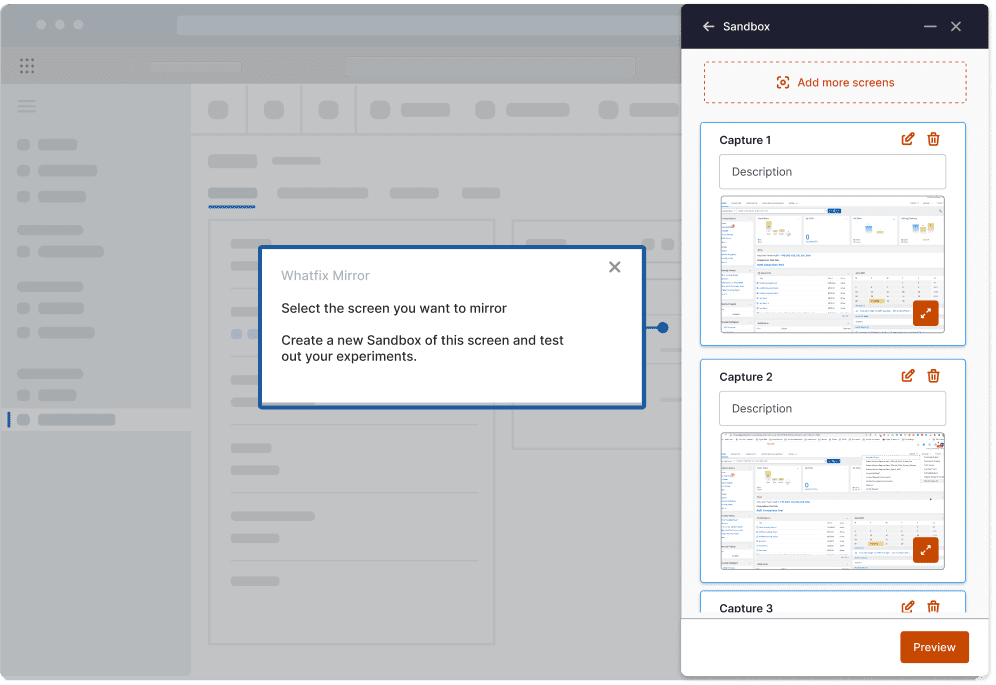
Whatfix Mirror creates interactive replicas of enterprise applications, allowing users to practice future-state workflows without accessing production systems or affecting live data.
Application owners and enablement teams can recreate role-specific workflows, give employees hands-on practice, and assess whether users can complete critical tasks independently before migration. Mirror Assessments remove guidance and measure proficiency across simulated workflows, helping teams identify readiness gaps before users enter the consolidated production environment.
Mirror can also surface where learners make errors, abandon tasks, or struggle during assessments, giving teams another signal for where additional practice or workflow refinement may be required. For customer-facing roles, AI Roleplay can combine application practice with realistic voice or chat scenarios.
2. Provide Guided Assistance at Go-Live and Continuous Embedded Workflow Support
After migration, Whatfix DAP provides contextual guidance and support inside the consolidated application.
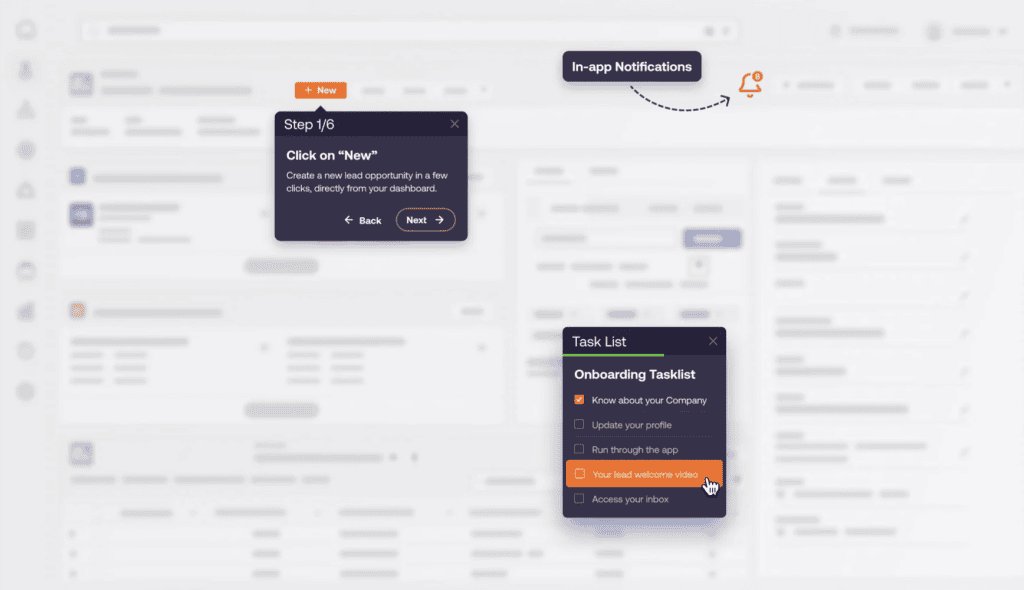
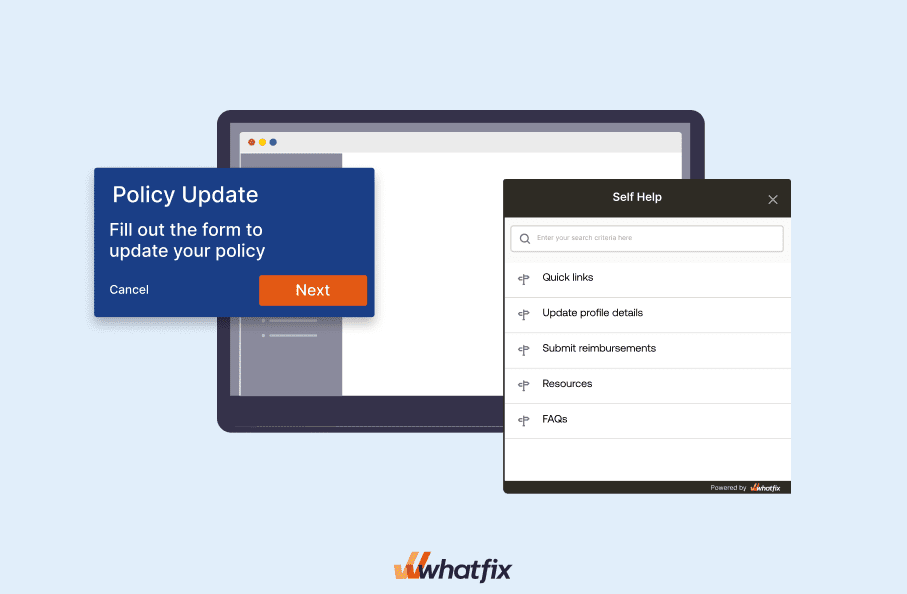
Flows can guide employees through unfamiliar processes, Smart Tips can clarify fields or required actions, and Task Lists can structure onboarding around critical workflows. Self Help gives employees access to relevant support resources without leaving the application. Whatfix currently positions DAP around in-app guidance, contextual Self Help, analytics, surveys, and AI-assisted support delivered in the flow of work.
This creates continuity between hands-on preparation before migration and guided execution after go-live, helping users transition away from familiar legacy processes while reinforcing the standardized workflows the consolidation program was designed to establish.
3. Drive Awareness of New Features, Workflow Updates, and Regulatory Change
Consolidated platforms continue changing after the initial migration. New business units are onboarded, legacy functionality is retired, workflows are standardized further, vendors release new capabilities, and regulatory or policy requirements evolve.
Whatfix enables application owners to deliver targeted in-app communications and guidance when those changes affect users. Pop-Ups can announce important updates, Task Lists can assign required actions, and contextual guidance can walk employees through updated workflows.
This allows organizations to treat adoption as an ongoing operating capability rather than restarting a training program every time the consolidated platform changes.
4. Identify Friction, Launch Interventions, Optimize Workflows, and Maximize ROI
Whatfix Product Analytics helps application owners understand how users behave inside the consolidated environment, including which features they use, whether critical workflows are completed, where users abandon processes, and how behavior differs across roles, departments, or geographies.
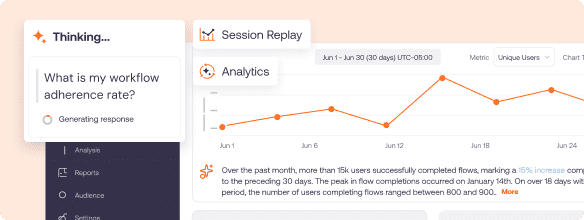
Teams can use these insights to identify underused functionality, workflow bottlenecks, repeated errors, and adoption gaps. Because Product Analytics works with Whatfix DAP, organizations can move from insight to action by deploying targeted Flows, Smart Tips, Self Help content, or other in-app interventions, then measure whether those experiences improve user behavior.
This creates a continuous application optimization cycle:
Identify friction → diagnose the cause → launch an intervention → measure its impact → optimize the workflow
Combined with operational and financial reporting, these behavioral insights help enterprise leaders connect application adoption with the cost savings, productivity improvements, process standardization, and business outcomes behind the original consolidation investment.
Request a Whatfix demo to see how Whatfix can prepare users, drive adoption, govern standardized workflows, and improve value realization across application consolidation programs.