


Enterprise organizations rely on core systems and complex software ecosystems to run core business operations, from sales, finance, HR, procurement, and more. These systems are where business strategy becomes daily execution, and companies are investing accordingly. IDC projects global digital transformation spending will reach nearly $4T by 2027.
Yet enterprise software only creates value when users can apply it in the context of their roles, tasks, policies, and workflows. A new enterprise system rollout can be live while teams still rely on workarounds, skip required steps, enter incomplete data, or fall back on legacy processes.
That makes enterprise software training a value-realization issue across L&D and IT teams, application and process owners, and all digital transformation projects. In our recent State of Digital Transformation ROI report, we found that 35% of leaders said the top thing they would do differently in their last transformation project was to invest more in end-user training and system onboarding.
That finding exposes a hard truth: organizations often budget for software implementations, but underinvest in the user readiness required to turn that software into measurable outcomes and business performance.
And to be effective, enterprise software training must move beyond classroom sessions, static documentation, and one-time LMS modules. Modern system training must give users hands-on training before go-live, contextual workflow guidance inside live systems, self-service help when they get stuck, and analytics that show where users are struggling.
What Is User Training for Core Systems?
User training for enterprise software prepares employees, partners, vendors, customers, and other end users to complete role-specific workflows inside complex business applications. These applications include horizontal systems (such as ERP, CRM, and HCM systems) along with vertical systems (such as insurance claims platforms, healthcare EHRs, banking systems, and life sciences quality management systems).
Effective enterprise software training goes beyond basic onboarding and feature education. It takes a user-first approach to enablement, connecting workflow steps to business processes, compliance requirements, data quality standards, approval paths, and productivity goals so users can perform real work accurately in the flow of business.
How Enterprise Software Training Drives Outcomes
Enterprise software training drives business outcomes by improving how users perform critical workflows in real systems.
1. Accelerates time-to-proficiency
Enterprise software training shortens the time it takes users to move from first exposure to independent execution. Time-to-proficiency matters during new software rollouts, new hire onboarding, role changes, process redesigns, and major software releases, when users are expected to learn new systems while still meeting daily performance expectations.
Effective end-user training provides users with workflow context, hands-on practice, and support when needed. Users learn how to complete the tasks they are responsible for, repeat difficult steps, and build confidence before they need to perform those actions on their own.
2. Reduces errors and process deviations
Most enterprise systems support high-stakes workflows such as invoice processing, claims management, patient record updates, sales forecasting, and compliance checks. When users are not trained on the correct workflow path, small mistakes can create downstream issues across reporting, compliance, customer experience, and operational efficiency.
Strong user training for core enterprise software helps users understand which fields matter, which steps are required, which approvals apply, and how to handle exceptions. This reduces incomplete submissions, skipped steps, rework, risky workarounds, and process deviations that can spread across teams or regions.
3. Lowers support tickets and service desk burden
When users cannot complete tasks or find answers inside the workflow, they turn to peers, managers, trainers, or the service desk. Over time, repeated “how do I” questions, access confusion, and post-go-live ticket spikes point to gaps in how training, support, and workflow guidance are designed.
Modern enterprise software training reduces this burden by providing users with contextual help within the application. In-app guidance and self-service support provide hypercare, enabling users to resolve common questions, complete tasks without leaving the system, and avoid creating tickets for issues that can be addressed at the workflow level.
4. Improves productivity and cycle times
Enterprise software training improves productivity by reducing user friction while completing everyday tasks. When users know what to do, where to go, which information to enter, and how the workflow connects to the business process, they spend less time searching documentation, waiting for help, or correcting mistakes.
That leads to faster task completion, fewer interruptions, and more consistent execution across repeated workflows. Over time, better software proficiency improves cycle times, increases operational efficiency, and helps organizations realize more value from the enterprise applications they have already invested in.
See how companies use Whatfix to enable users in the flow of work

Extra Space Storage

Extra Space Storage
Extra Space Storage needed to support 7,500 associates across 4,000 locations, but its legacy digital adoption platform was difficult to maintain, critical knowledge was scattered across hundreds of documents, and frequent process changes disrupted frontline service. With Whatfix, the company achieved $288,000 in ROI, resolved 95% of policy and process questions through in-app Self Help, eliminated more than 2,500 support tickets, and cut rental transaction times for new associates by 50%.
Read the full case study →
Windward Risk Managers

Windward Risk Managers
Windward’s 5,500-plus insurance agents frequently left Duck Creek to search for guidance or contact support, creating policy-processing delays, high volumes of basic support calls, and limited visibility into workflow friction. Whatfix embedded guidance and self-service support directly into Duck Creek, increasing successful Self Help searches from 61% to 87% and enabling agents to complete policy workflows faster with less reliance on the support team.
Read the full case study →
bioMérieux

bioMérieux
bioMérieux struggled to drive adoption of its Icertis contract management platform as legal and procurement teams relied heavily on live training, LMS courses, and recurring support calls to navigate complex contract workflows. By embedding role-based guidance and self-service support with Whatfix, bioMérieux reached 88% user adoption, increased NPS by 9%, resolved more than 347 user questions, and saved 1,293 hours.
Read the full case study →Key Challenges for Enterprise Software User Training
Enterprise systems training is difficult because users are learning business-critical workflows. The challenge for L&D, IT, application owners, and transformation teams is to prepare users for real work, prove readiness before production risk, and keep support available inside the workflow.
1. Users need hands-on practice, not static training content
Videos, slide decks, documentation, and instructor-led sessions can introduce a system, but workflow readiness comes from practice. Users need realistic environments where they can repeat critical workflows in ERP, CRM, HCM, EHR, CLM, and other regulated systems, build muscle memory, and learn from mistakes while protecting live data.
2. Training must be role-based and contextual
Enterprise software training is difficult to scale because the same platform is used differently across roles, regions, business units, and permission levels.
A sales rep, finance analyst, HR generalist, procurement specialist, compliance reviewer, and service agent may all need different workflows, fields, approvals, and exception paths.
Generic types of training create noise, while effective user training is practical, hands-on, and personalized, giving each user group the context they need to execute the business process correctly in their daily work.
3. Continuous change makes training decay quickly
Enterprise software training has a short shelf life because systems, workflows, policies, compliance requirements, and AI features are constantly evolving.
New system onboarding and training can quickly become outdated as employee turnover occurs, systems upgrade, processes change, and goals pivot.
Teams need a governed way to refresh training content and reinforce updated workflows so users continue to follow the current process across regions, roles, and business units.
4. Teams struggle to assess readiness before real work begins
Training completion does not prove users are ready for production.
A user can attend a session, finish a module, or pass a quiz and still struggle with required fields, approvals, exceptions, or task completion in a live workflow. L&D, application owners, IT, and transformation leaders need readiness signals based on workflow performance to identify which roles or cohorts are ready for launch and which need more practice.
5. Measuring training effectiveness is difficult
Many teams measure training effectiveness through attendance, completion rates, satisfaction scores, and qualitative feedback. These signals indicate participation, but they do not indicate whether users can complete workflows accurately within the application.
Process owners and enablement teams need user behavior and workflow analysis data, such as task completion, drop-offs, repeated help searches, support trends, and cohort-level friction, to improve training, guidance, and workflow design based on how users actually work.
6. Training and support are often disconnected
Users often need help after formal training while completing real tasks in the application. When support content sits in an LMS, documentation portal, or PDF library, users have to leave the workflow to find answers.
Enterprise software training should extend into live work with in-app guidance, searchable Self Help, and support insights that show training teams which workflows need clearer instruction, better guidance, or more practice.
Why Whatfix Is the All-in-One User Training Platform
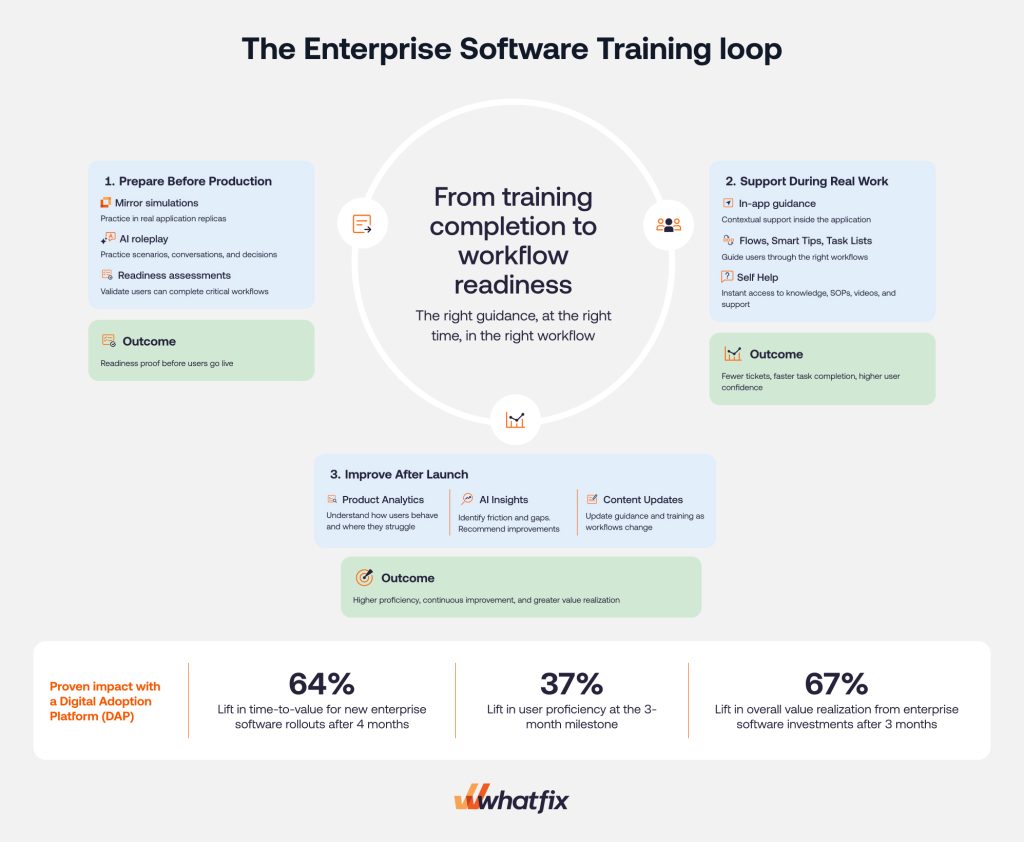
Enterprise software training works best when it connects pre-go-live readiness, live workflow support, and post-launch optimization. Whatfix provides L&D, application owners, and digital enablement teams with a unified platform to prepare and train users before they enter production, support them during real work, and improve training based on user behavior.
This connected approach has a measurable impact. In Whatfix’s 2026 State of Digital Transformation ROI report, organizations using a Digital Adoption Platform (DAP) saw a 64% lift in time-to-value for new enterprise software rollouts after three months, a 37% lift in user proficiency at the three-month milestone, and a 67% lift in overall value realization from enterprise software investments after six months.
Here’s how Whatfix enables users and drives outcomes for enterprise software investments:
1. Prepare users with application simulation training environments
Whatfix Mirror enables teams to create realistic, no-code replicas of enterprise applications that let users practice workflows before entering production in a risk-free user-training sandbox. This gives training and transformation teams a safer way to prepare users for high-stakes systems without relying on live data or fragile production sandboxes.

Users can repeat critical workflows, make mistakes, and build confidence in a risk-free environment. Teams can use Mirror for onboarding, UAT support, transformation rollouts, process training, and pre-go-live readiness programs. This helps organizations move from training completion to readiness proof.
2. Assess readiness before users enter production with AI
Whatfix helps teams assess whether users can complete critical workflows before they begin real work in production. This gives L&D, IT, application owners, and transformation leaders clearer visibility into which users, roles, or cohorts are ready for launch.
Teams can measure task completion in simulations, identify where users need more practice, and use readiness data to support launch decisions. For high-risk workflows, this creates stronger evidence that users can execute required steps accurately before production risk increases.
3. Prepare users for scenario-based work with AI roleplay
Some enterprise roles require more than click-path training. Sales, support, HR, healthcare, compliance, and customer-facing teams often need to practice conversations, decisions, escalations, and judgment-heavy scenarios alongside system workflows.
With AI roleplay and scenario training, teams can simulate realistic scenarios where users can practice how they respond, what they say, which process they follow, and how they use the system during the interaction. Adaptive coaching and feedback help reinforce process knowledge, build confidence, and prepare users for situations that static training cannot fully replicate.

4. Guide users inside live enterprise applications
After go-live, Whatfix DAP provides users with contextual guidance directly within enterprise applications. This helps training carry into the flow of work, where users need reinforcement while completing real tasks.

Teams can use Flows to walk users through role-based workflows, Smart Tips to clarify fields and policies, and Pop-Ups, Tours, and Task Lists to support onboarding, release communication, and process adoption. This helps standardize workflow execution across teams, regions, and business units while keeping users inside the application.
5. Deflect support requests and resolve root cause issues with contextual Self Help
When users get stuck, they need answers inside the workflow. Whatfix Self Help connects users to relevant knowledge base articles, SOPs, videos, training content, and support resources directly inside the application.
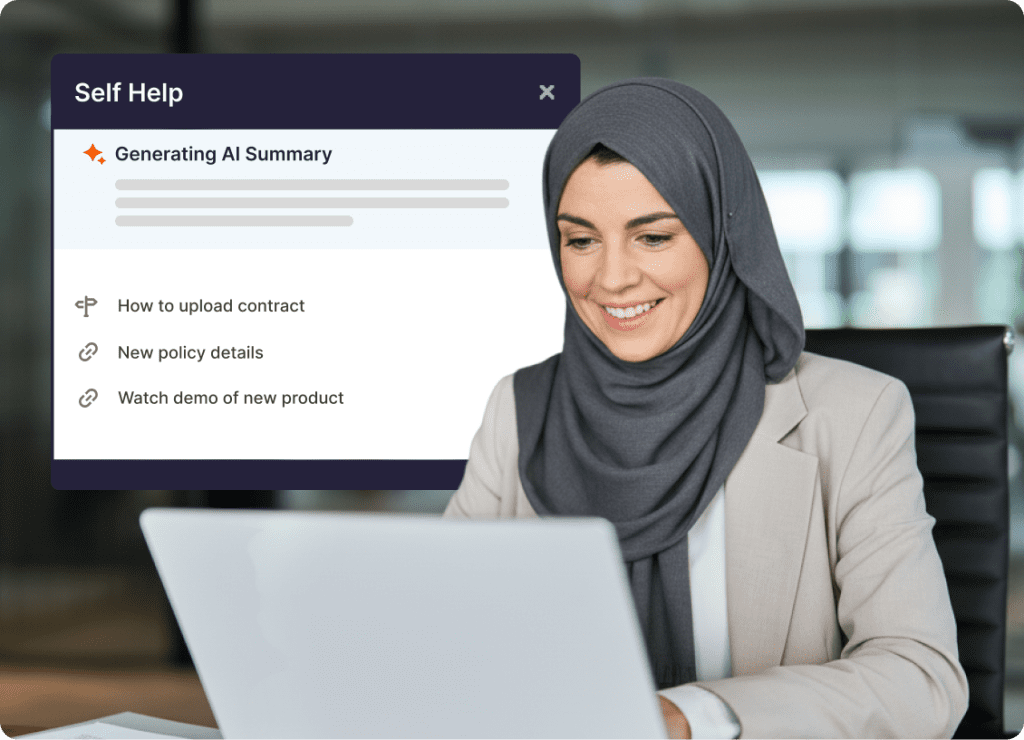
This reduces reliance on service desk tickets, peer support, and hunting for external documentation that disrupts the user’s workflow. It also gives teams a more scalable way to reinforce training after go-live, especially during onboarding waves, major releases, and process changes.
6. Improve training continuously with analytics and AI
Whatfix Product Analytics helps teams understand how users behave inside enterprise applications. Teams can track workflow completion, identify drop-off points, spot underused features, and see where users repeatedly search for help.

Those insights help teams improve training based on behavior, not assumptions. With Whatfix AI, teams can scale content creation, surface friction faster, update guidance as workflows change, and keep training aligned with current business processes. Together, simulation training, in-app guidance, Self Help, AI, and analytics create a continuous loop for improving readiness, adoption, and software value realization.
See how Whatfix helps enterprises train users before go-live, support them in live applications, and continuously improve software adoption with simulation training, in-app guidance, AI, and analytics. Request a demo with Whatfix.