

Enterprise software training too often fails to prepare users for real workflows.
While LMS courses, in-person training, and user documentation may be L&D staples here to stay, modern enterprises must blend hands-on training opportunities within their traditional methods to better prepare users and assess their readiness for real-world work in live applications.
A sandbox training environment closes that gap, providing users a safe, realistic space to practice critical workflows, make mistakes, and build confidence before real work. This is especially valuable for software onboarding for new employees, software rollouts, process changes, and compliance-sensitive tasks where errors result in rework, support tickets, or business risk.
According to a survey, 67% of technical professionals want real-world, practical application when learning new technology, which makes sandbox training a more engaging way to prepare users for hands-on software execution.
In this article, we’ll explain what a sandbox training environment is, when enterprise teams need one, how to build one around real workflows, and how Whatfix Mirror helps teams create application replicas for end-user training without the developer-heavy maintenance of traditional sandboxes.
What Is a Sandbox Training Environment?
A sandbox training environment is a safe, controlled replica or simulation of a software application where users practice workflows without affecting production data, live transactions, or business operations. It gives employees a hands-on space to learn how a system works, complete role-specific tasks, and build confidence before using the live application.
The best sandbox environments go beyond screen-by-screen practice. They recreate the workflow context users face on the job, including approvals, exceptions, customer scenarios, compliance steps, and common decision points.
For enterprise teams, a sandbox environment helps:
- Reduce the risk of user errors in production
- Give users hands-on training before go-live
- Train employees on role-specific workflows and exceptions
- Prepare users for compliance-sensitive or high-risk tasks
- Identify knowledge gaps before they turn into support tickets
- Improve readiness for onboarding, software rollouts, and process changes
5 Use Cases for Application Sandbox Training
A sandbox training environment is most useful when the cost of learning in production is too high. These are the moments when users need to practice role-specific workflows, handle exceptions, and build confidence before their actions affect customers, data, compliance, or business operations.
During Role-Based Onboarding
User onboarding is the stage in enterprise software rollouts or training that helps users (whether new internal hires or teams, or external partners or contractors) complete priority workflows correctly, efficiently, and within required error, policy, and compliance thresholds. It drives awareness of new applications, familiarizes users with new UI, highlights critical features and tasks users are responsible for, and accelerates workflow adoption, with the goal of accelerating time-to-proficiency for new users.
A sandbox environment empowers enablement teams to create targeted, cohort-based practice paths for different user groups and roles, rather than sending every user through the same generic training.
For example, a manager may need to practice approving employee requests with an ERP system, while a finance user may need to submit purchase requisitions or resolve invoice exceptions. Each user gets practice that reflects the work they will actually perform in production.
Before a New Enterprise Application Goes Live
Before a new enterprise application rollout, teams need confidence that users can complete their most important workflows from start to finish without errors, support spikes, or delayed output. A sandbox gives users a replicated, production-like environment to practice those workflows before live access begins.
This helps L&D, transformation, and application teams validate whether users understand the new process, can navigate the system, and can complete critical tasks before go-live.
When a Major Release Changes How Work Gets Done
Application releases and configuration updates often change more than the interface. They can introduce new fields, approval paths, validations, business rules, exception steps, or compliance requirements.
Sandbox training enables users to adapt to application changes and updates before they affect daily work. Instead of relying only on release notes or walkthroughs, teams can turn process changes into guided practice scenarios.
For High-Risk or Compliance-Sensitive Workflows
Some workflows carry higher business, compliance, or customer risk. For example, consider industry-based use cases such as claims processing for insurers, financial approvals for wealth management companies, patient support for healthcare providers, fraud investigations for banks, and regulated documentation for life science organizations.
A sandbox environment allows users handling regulated workflows or customer-facing situations to practice required steps, policy checks, data entry, approvals, descalation tactics, and exception handling in a controlled setting.
This helps teams build consistency before users handle sensitive tasks in production, allows users to learn how to adapt when faced with high-pressure situations, and provide enablement teams insights into user readiness and training gaps.
For Frontline and Customer-Facing Scenario Practice
Sandbox training is useful for frontline teams that need to perform system tasks while handling customer, employee, or partner interactions. Support agents, service teams, sales reps, and contact center employees often need to search records, update cases, process requests, follow policies, and manage escalations while the conversation is still happening.
A sandbox environment lets them practice these workflows before they face live interactions. For example, agents can rehearse common roleplay scenarios like how to process a refund, resolve a billing issue, document a claim, update customer information, or escalate a case using the right system steps.
This helps frontline teams build confidence, reduce early-tenure errors, and handle routine scenarios more consistently. Additionally, adding AI roleplay extends the sandbox from system practice to full-scenario rehearsal, helping users refine judgment, tone, empathy, objection handling, and escalation decisions required in live interactions.
How to Build a Sandbox Environment for Enterprise System Training
Building a sandbox training environment starts with one goal; provide users with hands-on, realistic, role-based practice before they perform critical work in production that builds confidence, prepares them for their tasks, and validates they are ready for real work.
That requires the right application environment, cloned core workflows, placeholder data, in-app guidance, user readiness assessments, and process updates. Here are key steps in helping organizations like yours build your application sandbox training environment.
1. Buy a sandbox creation tool or build in-house
IT teams can build sandbox environments in-house by cloning applications, configuring permissions, managing infrastructure, and maintaining training data. This can work for technical or system testing use cases, but it often requires engineering support for setup, updates, environment refreshes, and even minor workflow changes.
For L&D, enablement, and transformation teams, modern application simulation tools offer a faster path. No-code tools like Whatfix Mirror allow non-technical teams to create, update, and launch application replicas for workflow training without depending on developers for every change.
When evaluating a sandbox creation tool, look for capabilities that support both training delivery and readiness proof:
- No-code application replica creation and maintenance
- Role-based workflows, scenarios, and training paths
- Guided practice with in-context prompts and support
- Assessments to validate user readiness before production access
- Analytics to identify failed steps, completion gaps, and cohort-level friction
- AI scenario or roleplay training for customer-facing and judgment-based workflows
- Security controls for safe data handling, access, and regulated training
Ready to take the first step? Request a demo with our experts to see how Whatfix Mirror accelerates time-to-proficiency, eliminates errors, and drives business outcomes.
2. Start with the critical workflows users must complete
A sandbox must be built around the workflows that carry the highest risk, highest support volume, or greatest business impact. These are usually the workflows where mistakes create rework, delays, compliance exposure, or customer friction.
Start by identifying the tasks users must complete correctly, such as submitting requests, updating records, resolving cases, processing claims, approving transactions, documenting interactions, or handling exceptions.
3. Define role cohorts and readiness expectations
Different users need different practice paths. Segment your simulation training by role, region, business unit, permissions, system responsibility, and workflow ownership.
For example, a manager, service agent, finance analyst, claims handler, and regional approver may all use the same application, but they do different work inside it. Each cohort should practice the workflows they will perform in production.
4. Replicate real workflows, decisions, and exception paths
Effective sandbox training must reflect how work actually happens. Build scenarios that include required fields, approvals, validations, handoffs, policy steps, common errors, and exception paths.
This helps users practice more than the happy path. They learn what to do when a request is rejected, a record is incomplete, an approval is missing, a customer escalates, or a compliance step must be completed before the workflow can proceed.
5. Use safe, realistic data
Training data must be realistic enough to prepare users for production, but safe enough to avoid exposing sensitive information. Use masked, synthetic, or sample records that reflect the complexity users will encounter in live systems.
Clean, oversimplified data can make training easier, but it can also leave users unprepared for missing fields, unusual requests, duplicate records, policy checks, or edge cases.
6. Add guided practice and embedded support
Users learn faster when practice is supported in the moment. Add in-app guidance, contextual prompts, hints, and self-service help so users can understand what to do as they complete the workflow.
This hands-on approach aligns with the 70-20-10 learning model, which emphasizes that 70% of workplace learning happens through hands-on experience and practice.
This is where sandbox training becomes more effective than passive instruction. Users are learning in the flow of work, with support available at the point where confusion most often occurs.
7. Validate readiness with assessments
Sandbox training must show whether users can complete key workflows accurately, independently, and within the expected time. Add assessments that ask users to complete tasks without step-by-step guidance.
Track metrics such as workflow completion, failed steps, time-to-complete, help usage, assessment pass rates, and cohort-level performance. These signals help teams identify who is ready, who needs remediation, and which workflows require clearer training.
8. Continuously update and improve training experience
Sandbox training environments need to stay aligned with the live application. When workflows, policies, releases, or configurations change, training scenarios must be updated before users learn outdated steps.
Teams must also use feedback and performance data to continuously improve the experience. Look at where users fail assessments, where they request help, which scenarios create confusion, and which errors still appear in production. Use those insights to refine workflows, update guidance, and strengthen future sandbox training.
Common Challenges When Building a Sandbox for IT Training
Let’s look at some of the most common challenges of building a sandbox environment for enterprise training
- Workflows do not reflect real user tasks: Many sandbox environments recreate the application interface but miss the actual work users perform. Training needs to include role-specific tasks, approvals, handoffs, exception paths, and common failure points so users can practice the workflows they will own in production.
- Teams depend on IT or developers to build training environments: Traditional sandboxes often require IT support to clone environments, configure permissions, refresh data, and update workflows. This slows down L&D, enablement, and transformation teams that need to launch or update training quickly.
- Scenarios are too generic for different roles and regions: Enterprise users rarely perform the same workflow in the same way. A sandbox training environment must account for differences in roles, permissions, regions, business units, and process ownership so each cohort gets relevant practice.
- Training data does not reflect production complexity: Overly clean or simplified data makes training easier but less useful. Users need to practice with realistic records, missing information, edge cases, policy checks, and exceptions so they are prepared for the conditions they will face in live systems.
- Sandbox content becomes outdated as enterprise applications evolve through releases, configuration updates, policy changes, and workflow redesigns. When sandbox content falls behind, users practice old steps and carry outdated behavior into production.
- Teams measure completion rather than readiness: Course completion shows only that users finished training. Sandbox training should show whether users can complete workflows accurately, independently, and within the expected time, using signals like failed steps, assessment results, help usage, and workflow completion.
How Whatfix Mirror Helps Teams Create Sandbox Training Environments Faster
Building and maintaining sandbox environments can become slow, technical, and difficult to scale across roles, applications, and regions. Whatfix Mirror helps L&D, transformation, and application teams create realistic application replicas for hands-on training without relying on live systems or developer-heavy sandbox builds.
Create application replicas without developer dependency
Traditional sandbox environments often require IT teams to clone systems, configure access, maintain infrastructure, refresh data, and update training scenarios every time the workflow changes. This slows down L&D and enablement teams that need to launch training quickly.
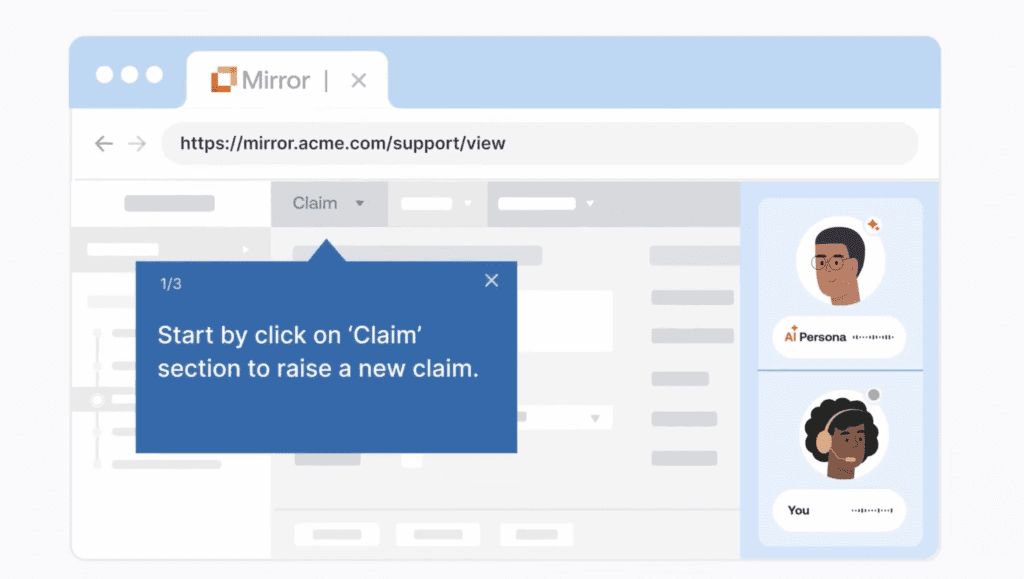
Whatfix Mirror allows teams to create no-code replicas of enterprise applications for hands-on workflow training. These replicas give users a realistic practice environment while reducing dependency on engineering or production systems.

Build role-based practice paths for critical workflows
Enterprise training needs to reflect what each user actually does in the system. With Mirror, teams can create role-based training paths that guide users through the workflows they need to perform in production. This helps teams move away from generic software training and build practice experiences around real job responsibilities.
Let users practice high-risk steps safely
Some workflows are too important to learn through trial and error in production. For instance, processing claims, updating customer records, handling fraud cases, completing patient support documentation, resolving shipment exceptions, or managing billing disputes.
Mirror gives users a safe environment to practice these workflows before live access. They can work through approvals, errors, policy steps, escalations, and exceptions without affecting live data, customers, or operations.
Prepare customer-facing teams with AI roleplay
For frontline and customer-facing teams, readiness depends on more than completing the right system steps. Agents, sellers, service reps, and support teams also need to manage conversations, respond with empathy, follow compliant language, and make the right judgment under pressure.
Whatfix Mirror combines system simulation with AI roleplay so users can practice the workflow and the conversation together. A support agent can rehearse resolving a billing issue while navigating the account system. A claims handler can practice documenting a claim while explaining next steps to a distressed policyholder. A sales rep can practice objection handling while updating CRM details.
This helps teams prepare users for the full reality of the job, where system fluency and communication quality both affect outcomes.
Assess user readiness before production access
Training completion does not prove that a user is ready for live work. Teams need to know whether users can complete the workflow accurately, independently, and within the expected time.
Mirror supports assessments that test users on the workflows they need to perform without step-by-step guidance. Teams can define pass criteria, review completion, compare performance across workflows, and identify who is ready for production access.
Identify where users struggle with training analytics
Mirror helps teams see where users are getting stuck during practice. Assessment analytics can show which learners attempted, completed, passed, or failed specific workflows, along with workflow-level completion patterns.
This gives L&D, transformation, and application teams a clearer view of training gaps. They can identify weak workflows, and scenarios that need clearer guidance or additional practice before go-live.
Keep training aligned as workflows change
Enterprise applications change through releases, configuration updates, new policies, and process redesigns.
Mirror helps teams update and maintain simulation training as workflows evolve. This makes sandbox training more scalable for frequent releases, continuous onboarding, and recurring process changes.
Continue support after go-live with in-app guidance and self-service help
After go-live, Whatfix continues support inside the live application with in-app guidance, contextual help, and self-service support. This creates a continuous enablement model. Users practice in a sandbox before live access, receive support in the flow of work after go-live, and teams use analytics to keep improving training and adoption over time.
For enterprise teams, this means sandbox training does not end at go-live. It becomes part of a broader readiness and digital adoption strategy that helps users learn, perform, and improve across the full software lifecycle.
Request a demo to see how Whatfix Mirror helps teams create sandbox training environments for hands-on user readiness.