A sandbox environment is the ultimate end-user training ground: a safe and controlled digital space where your team can embark on their learning journey. In this virtual playground, employees can freely engage with new software, experiment with different workflows, and develop skills while completing key tasks without affecting live systems.
Sandbox environments replicate real-world applications, offering users an interactive and risk-free setting to practice and refine their abilities. By isolating sandbox environments from primary systems, organizations can prevent potential errors or failures from impacting actual operations. This hands-on approach to training helps users build confidence and proficiency in new technologies.
An IT training sandbox moves training out of theory and into real work. The result is fewer escalated tickets, quicker onboarding, and a team with the confidence to troubleshoot before mistakes ever touch production.
In this article, we’ll cover what an IT training sandbox is, why traditional training methods are less effective than hands-on training, and how training and IT teams can leverage IT training sandboxes to accelerate time-to-proficiency, build user confidence, and unlock business outcomes.
How to Create a Simulated IT User Training Environment
Creating a simulation training environment involves several critical steps to ensure effectiveness and engagement. By designing a well-structured and interactive sandbox, you provide employees with a unique opportunity to explore new applications and complete key tasks without fearing mistakes.
This section will guide you through the essential steps to create a compelling virtual IT training environment to inspire your team to learn and grow in a safe, controlled setting.
1. Choose a Simulation Training Platform
Traditionally, creating sandbox environments for IT training required significant support from development teams. Engineering would need to build and maintain replicas of live applications, manage infrastructure, and ensure data security. This approach was often expensive, time-consuming, and difficult to scale across multiple applications or training programs.
With Whatfix Mirror, IT teams and application owners no longer need to rely on developer bandwidth. Mirror enables organizations to instantly create AI-powered replica application environments that look, feel, and function like the real thing, but without any technical dependencies.

Inside these safe, interactive sandboxes, trainers can:
- Deliver guided experiences like Tours, Flows, Smart Tips, and Task Lists, helping users practice real workflows in a risk-free environment.
- Provide AI-powered roleplay scenarios that simulate real-world interactions and decision-making to build confidence before users engage in high-stakes situations.
- Use analytics to track workflow completion, identify skill gaps, and measure training impact.
- Reinforce knowledge with adaptive assessments that validate user proficiency and readiness for live application use.
Moving beyond traditional developer-managed sandboxes empowers organizations to deliver scalable, immersive IT training that builds user confidence, accelerates proficiency, and reduces costly errors.
2. Identify Training Objectives
Establishing clear training objectives is vital for designing an effective sandbox environment. These objectives will guide the structure and content of your training program, ensuring it meets your organization’s requirements.
Here’s how to define precise, achievable training goals:
- Understand Your Audience: Start by identifying who your trainees are and what they need to learn. New hires, experienced professionals, and employees moving into new roles each require different approaches. Tailoring objectives to their needs makes the training more relevant and impactful. Surveys or interviews can reveal current skill gaps and learning preferences.
- Set Specific Goals: Define clear outcomes for your training program, like mastering new software, learning processes, or building specific skills. Specific goals provide direction and make success measurable. For example, you might aim to shorten onboarding time for new hires or increase efficiency for existing employees using a core application.
- Align with Business Objectives: Training should support your organization’s larger goals. If the business is rolling out new technology to improve efficiency, the training should focus on building proficiency in that system. Aligning training objectives with business priorities ensures that the program directly contributes to organizational performance.
- Create Measurable Outcomes: Establish ways to track progress and evaluate effectiveness. Completion rates, assessment scores, and performance improvements are all strong indicators. Metrics like productivity, error reduction, and feedback scores can highlight successes and areas that need adjustment.
- Emphasize Hands-On Practice: Build objectives that prioritize practical experience. Sandbox environments are ideal for this, letting employees practice real-world tasks in a safe space. Scenario-based training and simulations improve problem-solving skills, boost confidence, and help learners retain knowledge.
- Focus on Key Competencies: Identify the essential technical and soft skills required for each role, using a skill matrix if needed. Training should cover these core competencies fully, ensuring your team develops job-specific expertise and broader abilities like collaboration and problem-solving.
By defining clear objectives around these principles, you create a sandbox training environment that is focused, measurable, and tied to real outcomes. This clarity helps both employees and the organization see tangible results from the program.
3. Simplify the Learning Environment
Creating an effective virtual IT training environment requires simplifying the learning process to ensure it’s accessible and engaging for all participants. A streamlined learning environment can enhance the user experience, minimize distractions, and improve the overall effectiveness of your training program.
Here are several key strategies to simplify your learning environment:
- Remove Unnecessary Complexity: Keep the sandbox environment simple and user-friendly. Focus on essential functions and gradually introduce advanced features as users gain confidence. Clear menus, intuitive navigation, and logical workflows reduce distractions so employees can focus on mastering new skills without feeling overwhelmed.
- Standardize Training Modules: Create standardized training modules that are easy to follow and replicate. Consistent formatting, structure, and templates help reduce cognitive load and ensure every employee experiences the same high-quality training. Standardization also saves time in content creation and provides a cohesive learning journey across sessions.
- Ensure Accessibility: The sandbox should be accessible to all employees, regardless of technical background or ability. Provide clear navigation guidance and comply with accessibility standards like WCAG. Features like screen reader support, keyboard navigation, and text-to-speech functions ensure inclusivity for diverse learners.
- Provide Clear and Concise Instructions: Break down complex tasks into smaller steps and use simple, jargon-free language. Where technical terms are necessary, include explanations or definitions. Visual aids like diagrams, screenshots, and flowcharts can often make processes easier to understand than text alone, improving comprehension across all skill levels.
- Facilitate Self-Paced Learning: Give employees the flexibility to learn at their own speed. A self-paced model lets them spend extra time on areas they find challenging and move quickly through familiar topics. Provide an on-demand resource library with tutorials, recorded sessions, FAQs, and playbooks to support continuous learning.
- Incorporate Feedback Mechanisms: Build feedback loops into the sandbox experience to reinforce learning. Real-time feedback, quizzes, and assessments help employees track their progress and correct mistakes immediately. Encourage questions and provide forums, chat features, or dedicated support channels to create a supportive learning environment.
By simplifying the design and building a user-friendly, accessible, and feedback-rich sandbox, ITSM leaders can create training environments that improve confidence, accelerate skill development, and directly support better job performance.
PRO TIP
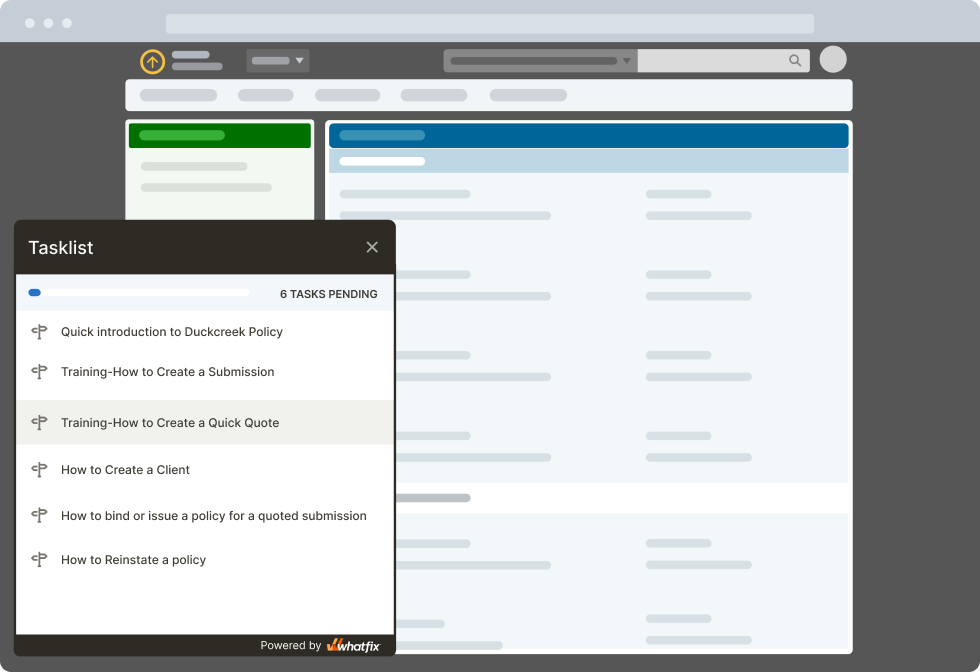
With a digital adoption platform like Whatfix DAP, enable employees with contextual in-app guidance and on-demand support. Accelerate new user time-to-proficiency with Tours and Task Lists. Drive adoption of complex workflows or assist with infrequently done tasks with Flows and Smart Tips. Provide on-demand support with Self Help.
4. Remove Security Risks
Creating a secure sandbox environment is imperative for ensuring your training sessions do not compromise the integrity of your organization’s systems and data. By implementing robust security measures, you can provide a safe and controlled space for employees to learn and experiment.
Here are several key strategies to remove security risks:
- Isolate the Sandbox Environment: Keep the sandbox completely separate from live systems to prevent errors or harmful activities from impacting production. Use network segmentation and virtualization to create a clear boundary so all training and experiments stay confined to the sandbox, reducing the risk of breaches or disruptions.
- Implement Strong Access Controls: Restrict access with strict role-based permissions and ensure only authorized personnel can perform specific actions. Add multi-factor authentication to strengthen security and regularly review permissions as roles change to maintain a secure environment.
- Regularly Update and Patch Systems: Outdated software creates vulnerabilities that attackers can exploit. Maintain a consistent update and patching schedule to keep all sandbox systems current with the latest security protections and minimize exposure to threats.
- Monitor and Log Activities: Track and record all actions within the sandbox to detect suspicious behavior early. Monitoring tools and detailed logs create visibility into system changes, user activity, and anomalies, helping you respond quickly if issues arise.
- Use Secure Data Practices: Protect sensitive information by anonymizing or masking data used in the sandbox. Apply encryption for both data at rest and in transit to safeguard information while still allowing employees to work with realistic datasets.
- Conduct Regular Security Audits: Perform thorough audits to evaluate the effectiveness of your security controls. Review access, data protections, update practices, and monitoring processes to identify gaps and make improvements that strengthen your overall security posture.
By following these practices, ITSM teams can maintain a secure sandbox environment where employees can experiment, practice, and build new skills without putting production systems or sensitive data at risk.
5. Set Clear Expectations
Setting clear expectations is vital for the success of your virtual IT training program. When employees understand what is expected of them, they can focus better, engage more deeply, and achieve the desired outcomes more effectively.
Here are some key strategies for setting clear expectations:
- Define Learning Objectives: Clearly state what employees should accomplish by the end of training. Use SMART goals that are specific, measurable, achievable, relevant, and time-bound. For example, objectives for a new software rollout might include mastering basic functions, exploring advanced features, and troubleshooting common issues.
- Communicate Expectations Early: Share the training goals, schedule, and prerequisites at the start. Provide a roadmap with timelines, milestones, and assessment criteria so employees know what to expect. Early communication reduces uncertainty, gives employees time to prepare, and sets a positive tone for the program.
- Provide Detailed Guidelines: Give employees clear instructions on how to approach training, access the sandbox environment, complete required tasks, and meet assessment criteria. Well-structured guidelines reduce confusion and make it easier for employees to stay aligned with expectations.
- Set Realistic Deadlines: Establish achievable deadlines within employees’ existing workloads. A structured but realistic timeline helps learners manage their time, stay engaged, and avoid feeling overwhelmed. This balance increases completion rates and ensures training fits alongside day-to-day responsibilities.
- Outline Performance Metrics: Define exactly how performance will be measured, whether through completion rates, assessments, test scores, or simulation participation. Transparent metrics help employees understand how their progress will be tracked and what they should prioritize to succeed.
- Offer Continuous Feedback: Provide ongoing feedback throughout the training program, highlighting both strengths and areas for improvement. Regular check-ins keep employees motivated, help them adjust their learning strategies, and ensure challenges are addressed quickly.
- Encourage Open Communication: Create channels for employees to ask questions and seek clarification like forums, chat tools, or dedicated support lines. Open communication fosters engagement and reduces frustration by giving employees a space to share concerns and get timely answers.
- Establish Support Mechanisms: Make sure employees know where to find help when they need it. This could include technical support, extra resources, or one-on-one coaching. Strong support systems ensure learners can overcome obstacles and continue progressing without losing momentum.
PRO TIP
With Whatfix Self Help, enable end-users with an on-demand resource center that overlays your enterprise software and digital workplace. Self Help integrates with your process documentation, Google Drive, intranet, playbooks, LMS, and other knowledge repositories, allowing users to search for any issue they’re facing right in the application they’re using.

6. Monitor Progress
Monitoring progress is essential to ensuring the effectiveness of your virtual IT training environment and the achievement of the desired outcomes. By tracking progress, you can identify areas where employees may need additional support and make necessary adjustments to the training program.
Here are several key strategies for effectively monitoring progress:
- Use Analytics Tools: Implement end-user analytics tools to track employee performance across the training program. Metrics like completion rates, time spent on tasks, and quiz scores provide insight into engagement and highlight where improvements are needed. With Whatfix Guidance Analytics, you can see how users consume in-app training, which teams rely most on guided Flows, and what Self Help queries are most common—data that helps refine and optimize IT training content.
- Set Milestones and Checkpoints: Break the program into clear milestones and checkpoints to evaluate progress at regular intervals. Quizzes, assessments, or key tasks completed by specific dates give employees a chance to demonstrate their understanding while keeping the training manageable.
- Collect Feedback: Gather feedback through surveys, polls, or forms to capture employees’ experiences. Feedback sheds light on challenges, highlights where instructions may be unclear, and provides valuable perspective on how effective the training feels from the learner’s point of view.
- Conduct Regular Assessments: Reinforce learning with ongoing assessments like quizzes, simulations, or practical exercises. These checkpoints provide measurable data on progress while helping employees strengthen their understanding through repetition and application.
- Provide Real-Time Feedback: Offer immediate feedback during tasks and assessments to help employees correct mistakes quickly and reinforce good habits. This can be delivered through automated systems that give instant results or through direct feedback from trainers.
- Monitor Engagement Levels: Track participation and interaction levels to gauge engagement. Low engagement often signals that employees are struggling with the content or do not see its relevance. Identifying these trends early allows you to intervene with support or adjustments.
- Adjust Training as Required: Use data and feedback to fine-tune the program. If employees consistently find certain sections challenging, revise the materials or add resources to support them. A flexible, responsive training model ensures continuous improvement and better outcomes.
By monitoring progress through data, feedback, and engagement, ITSM teams can create a training environment that builds skills and adapts to employee needs, driving better adoption and stronger results.
PRO TIP
With Whatfix, understand and analyze how users consume, engage, and interact with your in-app training and support content with Guidance Analytics. Answer questions like “what percent of my users completing their onboarding Task List?”, “what teams are using in-app guided Flows the most?”, “what are the most searched Self Help queries?” Use this data to influence new in-app content and optimize existing IT training.

Benefits of Creating a Sandbox for IT Training
Hands-on, active learning (including immersive, experiential, and simulation-based learning like sandbox user training) consistently outperforms traditional, lecture-based classroom methods. Classroom studies have found that when learners “do” more than merely listening, they score higher on assessments and are 1.5x less likely to make mistakes.
Grounded in the 70-20-10 framework (where 70% of workplace learning comes from on-the-job experiences and hands-on training) and supported by robust empirical evidence, IT sandbox training helps build real-world proficiencies and user confidence far more effectively than passive instruction alone.
Here are several key benefits of using sandbox environments for IT training:
- Hands-on Interactive Training: Sandbox environments let employees actively engage with software and practice real-world tasks in a safe setting. This interactive approach boosts retention, builds problem-solving skills, and provides immediate feedback so employees can learn from mistakes quickly. Training becomes more engaging and motivating than passive methods like manuals or lectures.
- Reduced Risks of Live Software Usage: Running training in production environments risks data loss, errors, and system downtime. A sandbox eliminates those risks by keeping training isolated from live systems. Employees can experiment with features, workflows, and configurations freely without fear of causing disruptions or compromising business operations.
- Improved Collaboration: A sandbox provides a shared virtual space where teams can work together on exercises and projects. It encourages collaboration, strengthens problem-solving skills, and allows senior team members to mentor newer ones. This setup is especially valuable for remote or distributed teams who need to train and learn collectively.
- Increased Efficiency: Sandboxes accelerate onboarding and reduce the time it takes new hires to become productive. They also support continuous learning, helping employees refresh and expand skills without waiting for scheduled sessions. By reducing reliance on live systems for training, organizations save resources and streamline the entire training process.
- Improved Security: By isolating training from production, sandboxes reduce the risk of breaches and data leaks. Access can be tightly controlled, and environments can be audited regularly to ensure compliance with security protocols. This makes training both safer for the business and more reliable for employees.
Using sandbox environments, ITSM teams can deliver more practical, collaborative, efficient, and secure training. The result is a stronger workforce and a more resilient IT operation.
Sandbox IT Training Challenges
While sandbox environments offer numerous benefits for IT training, they also come with challenges that organizations must address to ensure effective and efficient use. Understanding these challenges can help you develop strategies to mitigate them and maximize their advantages.
- Version Control: Keeping sandbox environments aligned with the latest software versions and patches is complex and time-consuming. Inconsistent versions across training sessions can create confusion and reduce effectiveness. To keep training realistic and synchronized with production systems, organizations need automated tools and processes for updates, but these require careful planning and monitoring.
- Integration: Sandboxes must integrate smoothly with existing IT infrastructure, applications, and tools. Compatibility issues can disrupt training and limit value. Ensuring secure data transfer between production and sandbox environments without exposing sensitive information is a difficult balance that requires strong data masking and anonymization practices.
- Measurement: Demonstrating ROI and improving programs depends on measuring training success effectively. Tracking metrics like completion rates, proficiency gains, and performance improvements is essential, but requires robust tools and analytics. Collecting and interpreting this data can be challenging, but identifying gaps and proving value is critical.
- Cost: Building and maintaining sandbox environments often requires significant investment. Initial costs include hardware, software, and licensing, while ongoing expenses involve updates, patches, and infrastructure management. These costs can strain budgets and require dedicated IT resources. Organizations need to balance resource allocation carefully to sustain sandbox environments without undermining other priorities.
By anticipating these challenges and building strategies to address them, ITSM teams can maximize the benefits of sandbox training while keeping risks and inefficiencies under control.
Create Sandbox Environments of Your Enterprise Applications for Hands-On Training with Whatfix Mirror
Creating sandbox environments for hands-on IT training is essential for providing users with a safe space to learn, experiment, and adapt to new applications and processes. Whatfix Mirror is a powerful tool for creating these environments, enabling organizations to create realistic simulations of their enterprise applications.
Here is how Whatfix Mirror can enhance your IT training programs:
- Quick Creation of Replica Environments
- Reinforce Learning With Guided Experiences
- Prepare Teams With AI Roleplay & Scenario Training
- Analyze User Proficiency With Adaptive Assessments
- Optimize Training With Actionable Analytics
- Enhance Security and Data Protection
1. Quick Creation of Replica Environments
Whatfix Mirror lets you quickly create accurate, interactive replicas for your enterprise applications. These replicas function like live applications, providing a realistic environment for employees to practice and learn.

Creating mirror environments is straightforward, reducing the technical burden on IT teams. With automatic screen capturing and linking, Whatfix Mirror simplifies the setup process, allowing you to focus on developing effective training content.
The replicated environments maintain high fidelity to the live systems, ensuring that the training experience closely mirrors real-world usage. This fidelity helps employees gain practical skills directly applicable to their daily tasks, bridging the gap between training and actual work scenarios.
Whatfix Mirror ensures that changes to the live application are automatically reflected in the mirrored environment. This means your training materials remain up-to-date without needing constant manual adjustments.
2. Reinforce Learning With Guided Experiences
Whatfix Mirror enables the creation of in-app experiences like Tours, Task Lists, and Flows. These features guide users through application processes, tasks, and workflows, increasing their learning experience.
Interactive walkthroughs provide step-by-step guidance on complex processes, helping employees understand and master new software quickly. This hands-on approach boosts confidence and competence, reducing the learning curve.
Task lists can be used to structure training sessions, ensuring employees complete all necessary steps and fully understand the application’s functionality. These lists help track progress and ensure that no critical steps are overlooked.
Contextual guidance helps users by providing relevant information and tips precisely when needed, reducing confusion and improving retention. This on-demand support increases user autonomy and reduces dependency on direct supervision.
3. Prepare Teams With AI Roleplay & Scenario Training
IT training isn’t only about learning which buttons to click. Teams also need to be ready for the unexpected scenarios they’ll encounter in real systems. With Mirror’s AI Roleplay, employees can rehearse realistic situations inside the sandbox environment.
By practicing in these simulated scenarios, users can:
- Build confidence before engaging with live systems and high-stakes workflows.
- Refine problem-solving skills while troubleshooting critical system errors or compliance-driven processes.
- Strengthen decision-making under pressure by testing different outcomes in a risk-free environment.
These simulations create space for learners to make mistakes, experiment with approaches, and see the impact of their decisions without jeopardizing production. The result is a workforce that responds faster, communicates more effectively, and operates with greater confidence when it matters most.
4. Analyze User Proficiency With Adaptive Assessments
Creating sandbox environments is only half the battle. Organizations also need to know if employees can actually perform when it counts. Mirror’s adaptive assessments provide this visibility by turning training environments into live evaluation tools. Instead of static quizzes, learners are asked to complete role-specific tasks such as configuring workflows, resolving simulated error logs, or navigating compliance-driven processes.
Because the assessments adapt to each user’s performance, they reveal true proficiency levels and highlight exactly where additional coaching is needed. For IT leaders, this means training results are measurable, tied directly to real-world workflows, and aligned with business outcomes.
5. Optimize Training With Actionable Analytics
Whatfix Mirror provides robust analytics and feedback mechanisms to monitor and enhance the training process. It automatically captures data on user engagement and interactions within the sandbox environment. This data provides valuable insights into how employees use the application and where they might need additional support. Analyzing this data helps identify trends and areas for support.

In-app surveys can be used to collect real-time feedback from employees about their training experiences. This feedback helps identify areas for improvement and ensures that the training program meets the employees’ requirements. Regularly incorporating feedback loops enhances the training’s responsiveness and effectiveness.
Track performance metrics like data completion and error rates to measure the effectiveness of the training. These metrics help demonstrate the ROI of the training program and guide future improvements.

6. Enhance Security and Data Protection
Whatfix Mirror ensures that sandbox environments are secure and isolated from live systems, protecting sensitive data and maintaining the integrity of your IT infrastructure. Use data masking and anonymization techniques to protect sensitive information while providing realistic training scenarios. This approach ensures trainees can work with data that mimics real-world conditions without compromising privacy or security.
Implement strong access controls to ensure that only authorized personnel can access the sandbox environments, maintaining a secure training environment. Robust authentication and authorization measures prevent unauthorized access and protect organizational assets.
Conduct regular security audits of the sandbox environment to ensure compliance with organizational policies and industry standards. Audits help identify potential vulnerabilities and ensure that security measures are effective and up-to-date.
By leveraging Whatfix Mirror, organizations can create highly effective sandbox environments that improve IT training programs. These environments provide employees with the hands-on interactive experiences they need to develop their skills and improve their performance, all within a secure and controlled setting. Whatfix Mirror not only streamlines the creation and maintenance of training environments but also ensures they remain relevant, engaging, and aligned with organizational goals.
Best Tools for Easily Creating Application Sandboxes for User Training
Choosing the right application sandbox tool depends on your organization’s training goals, technical stack, and the level of interactivity you want to provide learners.
From AI-powered roleplay and workflow simulations to scalable sandbox environments that mimic production systems, these solutions make it simple to accelerate onboarding, reduce errors, and prepare teams for success.
Below, we’ve rounded up some of the best tools for creating application sandboxes designed specifically for user training.
1. Whatfix Mirror
- G2 rating: 4.6/5
- Use case:
Whatfix is an award-winning enterprise digital adoption and user enablement platform that empowers L&D teams to create effective learning experiences through no-code content-building tools, such as creating in-app guidance and embedded workflow support that overlays applications, as well as creating simulation application environments for hands-on learning.
Mirror, its dedicated application sandbox creation tool, allows users to create secure and controlled replicas of software environments for training and development purposes. This solution works by capturing screens and actions within a particular software and connecting them to clone the application.
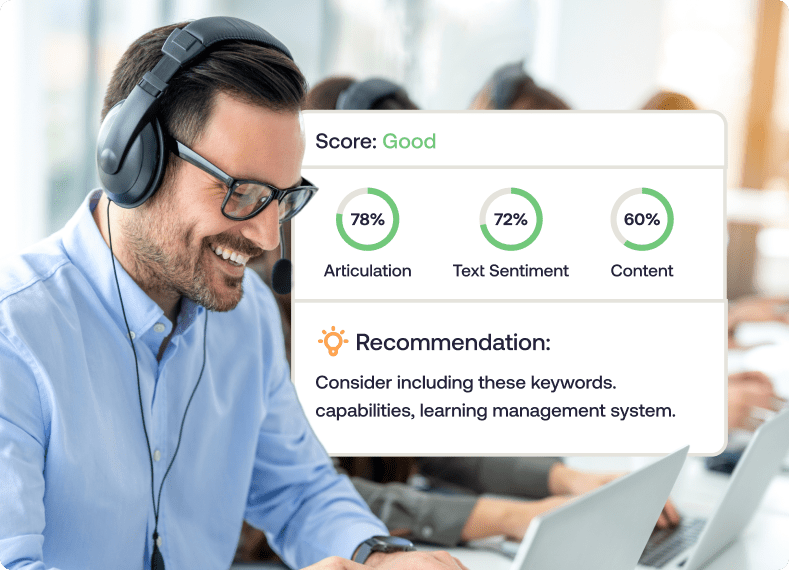
Once cloned, L&D teams can recreate tasks and workflows that end-users will be responsible for completing once they’re in the field and working with customers. With AI roleplaying capabilities, end-users can engage with GenAI scenarios and coaches, allowing them to complete key scenarios with voice-powered AI trainers. These roleplay scenarios adapt based upon the situation, the input, and the skill gaps of the employees.
On top of this, companies can incorporate step-by-step guidance and self-help prompts to facilitate learning and support learners as they explore new applications and workflows, guiding them through the nuanced steps, critical points to remember, and key friction points.

After completing their training, leaders can measure their training’s effectiveness, gauge user proficiency, and identity continued areas of improvement with interactive assessments, which prompt service agents, call center reps, sales people, and other employees through simulated scenarios and replica workflows to assess their readiness for real-world situations.
Key features of Whatfix Mirror include:
- No-code sandbox creation.
- AI-powered roleplaying and scenarios.
- In-app guidance and simulated workflows.
- Interactive user assessments.
- Training analytics.
2. Assima Train
- G2 rating: NA
- Use case: Delivers cloned application simulations for complex enterprise systems, allowing users to rehearse tasks and processes in a risk-free training environment.
Assima is a workforce training platform that uses patented simulation authoring technology to help L&D teams create interactive software sandboxes for immersive training. Its capture engine allows users to take a screengrab of digital workflows for the software to clone. From there, developers can edit the cloned elements for easy customization.
This solution has several different tools for customizing sandboxes and incorporating them into broader L&D programs, like a basic sandbox mode, self-paced learning, on-the-job training, and structured skills testing. Assima also includes an in-app search feature that helps users access an embedded knowledge base for effective self-support and in-app guidance to walk learners through different training activities.
Key features:
- Capture engine for easy simulation creation and authoring
- Centralized analytics dashboard
- Easy updates and editing
- Multiple training output models
3. Articulate 360
- G2 rating: 4.7/5
- Use case: Supports scenario-based training by creating interactive learning content, though without fully replicating live application behavior.
Articulate 360 is a comprehensive eLearning platform including multiple tools for building custom online courses and interactive learning experiences powered by AI. While this solution doesn’t include specific sandbox creation features, L&D teams can build course content that similarly mimics software environments.
This platform also includes prebuilt templates and intuitive creator tools that L&D teams can use to build and deliver training content and course globalization tools that automate content translation to support training for international workforces.
Key features:
- Course localization for seamless global workforce development
- Prebuilt course templates
- AI assistant
- Tools for course collaboration and project reviews
4. Skillable
- G2 rating: 4.6/5
- Use case: Provides hands-on, lab-based sandbox environments for technical and software skills training through real-world practice scenarios.
Skillable is focused on delivering hands-on virtual IT labs for structured and effective customer, partner, and employee training. The Skillable platform features scalable labs that match the needs of different teams, from experiment-friendly sandboxes to guided virtual training labs to validation-centered scored labs.
Skillable also includes an extensive library of ready-made scored labs geared toward common IT subjects like cybersecurity and programming. By incorporating ready-made labs and custom sandboxes into L&D programming, leaders can use Skillable to build effective learning programs for a company’s entire workforce.
Key features:
- Performance-based testing
- Custom virtual lab environments
- Skill challenge library
- Certifications for learners and customers
5. Bright Software by Zenerate
- G2 rating: 4.9/5
- Use case: Enables simulation-driven training experiences that replicate enterprise applications for user onboarding and performance support.
Recently acquired by Zenarate, Bright is a well-rounded workforce development platform focused on providing immersive learning experiences and AI-powered coaching. Training activities are structured to provide quick demos with practice opportunities that help learners put what they’ve learned into action.
This tool includes a code-free application sandbox builder that’s easy to use thanks to Bright’s sleek UX platform. Testimonials on the site attest to Bright’s effectiveness for cutting onboarding time, reducing costs, and increasing profits for customers.
Key features:
- No-code software simulation builder
- Explore Paths for personalized upskilling
- Video roleplay coach inbox
- Learner performance analytics
6. ReadyTech
- G2 rating: 4.5/5
- Use case: Offers application training environments and sandboxes that allow learners to practice system usage safely before go-live or role changes.
ReadyTech is a more technical, structured solution for application sandbox creation. This all-in-one virtual training platform is built around instructor-led labs that can be delivered virtually, in-person, or in a blended format, depending on business needs. With hands-on exercises, virtual whiteboards, and powerful analytics, this solution is a one-stop shop for virtual training.
ReadyTech also includes extensive lab management tools like student access controls, inactivity monitors, and live lab oversight, empowering L&D teams and managers to provide comprehensive support to employees as they learn.
Key features:
- Course templates and easy materials uploads
- Surveys, Tasks, Exams, & Polls
- Virtual Classrooms
- IT lab oversight tools
Software Clicks Better With Whatfix
Sandbox environments give ITSM teams a safer, smarter way to train. They let employees practice workflows, test new tools, and build confidence without risking downtime. The result is faster onboarding, fewer escalations, stronger collaboration, and improved security across the organization.
Building that kind of program takes the right approach: clear objectives, simplified learning experiences, strong security, and continuous measurement. Tackling challenges like version control, integration, and cost upfront ensures your sandbox training delivers lasting value.
This is where Whatfix comes in. With Whatfix Mirror, IT teams can create replica environments in minutes, guide employees through hands-on training directly inside applications, deliver real-time feedback, and track adoption with powerful analytics. It’s a purpose-built solution for IT leaders who want to modernize training, reduce risks, and accelerate time to proficiency.