


Enterprise workflows rarely fail because teams lack a defined process. They break during execution, when user friction, unclear steps, workarounds, exceptions, and inconsistent behavior create gaps and drift between how processes are designed and how they’re actually done.
Workflow optimization helps application owners, process owners, and transformation teams identify those gaps and improve how work moves across people, systems, and decisions. This guide explains how to analyze workflow performance, diagnose friction points, apply the right interventions, govern improvements, enable users within the flow of work, and measure the resulting business outcomes.
What Is Workflow Optimization?
Workflow optimization is the continuous improvement of how work moves across tasks, decisions, roles, systems, and controls to achieve measurable gains in speed, accuracy, compliance, and cost.
For enterprise teams, it extends beyond process mapping, streamlining, and automation. It connects workflow design with standardized execution, in-app enablement, governance, and behavioral analytics so the intended process produces consistent results in practice.
Why Enterprise Workflows Break During Execution
An approved workflow defines how work should happen. Actual execution is shaped by application constraints, user decisions, exceptions, and process changes. The resulting gap is known as workflow drift, where users gradually move away from the approved path.
Common causes include:
- Poor workflow design or unclear ownership: Redundant steps, complicated handoffs, excessive approvals, and undefined responsibilities make the approved path difficult to follow.
- Application and integration friction: Confusing fields, duplicate data entry, disconnected systems, and weak validations push users towards workarounds.
- Insufficient guidance and training: Users struggle when training is disconnected from the task or fails to address role-specific decisions and exceptions.
- Outdated documentation: Process documentation and SOPs lose value when they no longer reflect current applications, policies, or workflow paths.
- Weak governance and change communication: Uncontrolled variations emerge when ownership, change approvals, and communication responsibilities are unclear.
- Limited visibility into user behaviour: Without workflow analysis, process owners may see the final outcome without knowing where users hesitate, deviate, make errors, or seek support.
These issues often compound. A workaround created to overcome application friction can spread across teams and eventually become an undocumented way of working.
Benefits of Workflow Optimization
Workflow optimization improves the operational outcomes produced by critical processes. McKinsey estimates that streamlining processes and tasks can deliver a 5% to 15% efficiency improvement in indirect and corporate functions. These gains can appear across several operational outcomes:
- Faster workflow completion: Removing unnecessary steps, approval delays, repeated actions, and avoidable handoffs shortens cycle times.
- Fewer errors and less rework: Clearer paths, validations, and timely guidance prevent incomplete data, incorrect routing, and missed requirements.
- More consistent execution: Workflow standardization helps teams and regions follow a shared process while accommodating approved exceptions.
- Stronger process compliance: Embedded controls and instructions reinforce required fields, approvals, documentation, and decision criteria during execution.
- Lower support demand: Clearer workflows and contextual self-service help users resolve routine questions without relying on support teams or process experts.
- Better operational visibility: Workflow data shows process and application owners where users drop off, deviate, encounter friction, or create rework.
- Greater adaptability: Connected governance, documentation, guidance, and user training make it easier to implement application and policy changes without creating new execution gaps.
How to Optimize Enterprise Workflows
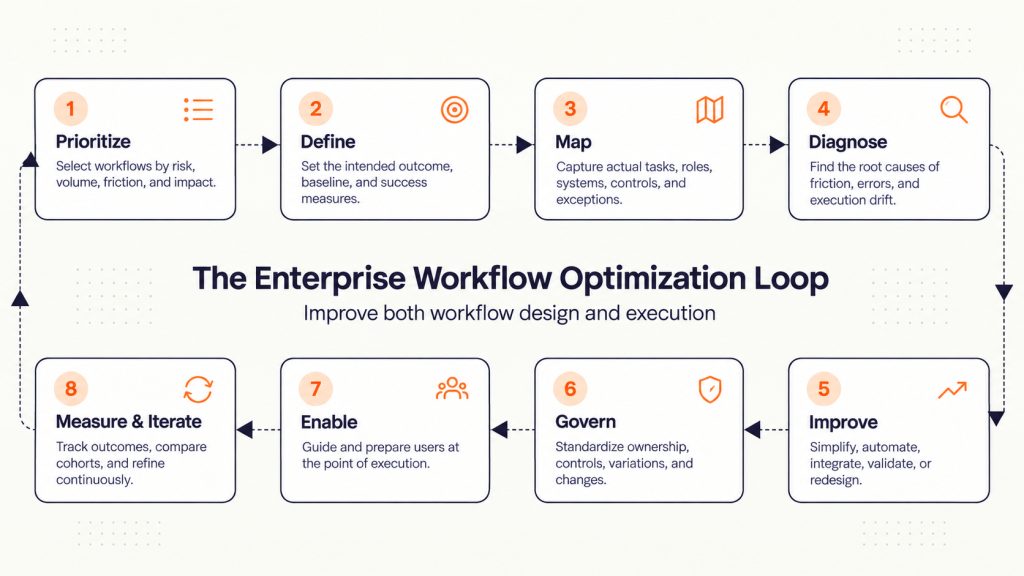
Workflow optimization works best as a continuous operating loop, not a one-time redesign project:
Prioritize → Define → Map → Diagnose → Improve → Govern → Enable → Measure and Iterate
Each stage connects workflow design with how users execute the process inside enterprise applications.
1. Prioritize High-Impact Workflows
Start with workflows where poor execution creates a meaningful operational, financial, customer, or compliance impact. Score each workflow based on:
- Risk and compliance exposure
- Transaction volume and number of users
- Errors, rework, delays, and support demand
- Impact on customers, employees, revenue, or operating costs
- Frequency of application, policy, or process changes
Select a clearly bounded workflow with an identifiable owner and enough evidence to justify intervention.
2. Define the Intended Outcome and Baseline
Define the operational outcome before choosing an intervention. This might be reducing cycle time, improving first-pass accuracy, increasing policy adherence, or lowering workflow-related support demand.
Select one primary outcome and a few supporting measures. For example, reduce purchase requisition cycle time while maintaining approval compliance and decreasing requests returned for correction.
Establish a baseline using representative operational data. Segment it by role, team, region, transaction type, or experience level where performance varies significantly. This provides a reliable benchmark for measuring improvement.
3. Map How the Workflow Actually Operates
Map the workflow from its trigger to a measurable endpoint, capturing tasks, decisions, roles, applications, handoffs, controls, data requirements, and exception paths.
Use process documentation, SOPs, support tickets, and audit findings as inputs, then validate them through observation, user interviews, and application data. Review the completed workflow map with the people who perform, own, and govern the process to confirm both standard and exception paths.
4. Diagnose User Friction, Errors, and Workflow Failures
Analyze the workflow at the task level to determine where performance breaks down and why. Combine evidence from:
- Workflow and application analytics
- Completion funnels and user journeys
- Error logs and rework records
- Audit findings and control failures
- Support tickets and self-service searches
- Session replays, surveys, and user interviews
Treat user friction, errors, workarounds, and repeat support questions as signals. For example, users abandoning a form may indicate confusing fields, missing information, incorrect permissions, or an unnecessary requirement. The intervention depends on which cause the evidence supports.
Document the root cause, affected user groups, operational consequence, and workflow step involved. This prevents teams from applying a broad solution to a narrowly defined problem.
5. Apply the Right Workflow Optimization Techniques
Choose the intervention that addresses the diagnosed cause. Common optimization techniques include:
- Simplify the workflow by removing redundant steps, reviews, and handoffs.
- Clarify ownership where requests stall or decisions lack accountability.
- Automate repetitive work such as routing, notifications, data entry, and standard approvals.
- Integrate systems to reduce duplicate entry and fragmented data.
- Add controls and validations where missing or inaccurate information creates downstream risk.
- Redesign exception paths so nonstandard cases can be handled without bypassing the process.
- Add guidance or training when users understand the intended outcome but struggle to execute the required steps.
6. Standardize and Govern the Workflow
Once the improved workflow is validated, standardize its core steps while documenting approved variations and exception paths.
- Assign one accountable workflow owner and define decision rights.
- Establish standard roles, steps, controls, data requirements, and escalation paths.
- Define which role, regional, regulatory, or transaction-based variations are permitted.
- Update system configurations, SOPs, guidance, and training through the same change process.
- Monitor deviations and review the workflow according to its risk and rate of change.
This workflow governance model keeps execution consistent without forcing every scenario through one rigid path.
7. Enable Users at the Point of Execution
Convert relevant SOPs and process requirements into support that appears within or alongside the application where work happens.
Match the enablement format to the user need:
- Use step-by-step in-app guidance for unfamiliar or multi-step tasks.
- Add field-level instructions and validation where data accuracy matters.
- Provide contextual self-service for questions, policies, and exception scenarios.
- Use checklists for longer workflows involving multiple tasks or deadlines.
- Communicate application and process changes within the affected workflow.
- Provide simulation-based practice before users perform complex or high-risk tasks in production.
This approach allows the governed SOP to remain the source of truth while just-in-time learning helps users apply the relevant requirement during execution.
8. Track Workflow Optimization Metrics and Continue Improving
Compare post-change performance with the baseline established in Step 2. Use a focused scorecard with one primary outcome, two or three driver metrics, and a guardrail metric.
Relevant measures include:
- Speed: Task time, cycle time, wait time, and SLA adherence
- Accuracy: Error rate, first-pass completion, and rework
- Execution: Completion, abandonment, and required-field completion
- Consistency: Process adherence, workflow variation, and exception rate
- Compliance: Missed controls and audit exceptions
- Support: Workflow-related tickets and self-service resolution
- Efficiency: Cost per transaction and manual effort
Segment results by role, team, region, experience level, and workflow path to identify where friction remains. Use each review to retain, refine, or replace the intervention, then repeat the optimization loop.
Essential Tools for Enterprise Workflow Optimization
Here are a few types of essential tools for enterprise workflow optimization.
1. Workflow Mapping and Process Modeling Tools
These tools visualize current and future-state workflows across tasks, decisions, roles, systems, controls, and handoffs. They help teams align on how the workflow operates and communicate proposed changes before implementation.
2. Business Process Management Tools
Business process management tools help teams design, coordinate, govern, and monitor workflows across departments. They are most useful for processes that require structured routing, business rules, approvals, and exception management.
3. Workflow Automation and Integration Tools
Automation and integration tools handle repetitive tasks such as data entry, notifications, routing, record updates, and standard approvals. They work best when the underlying process and decision rules are already stable.
4. Process Mining and Workflow Analytics Tools
Process mining tools reconstruct workflow paths from system event logs, while workflow analytics reveal completion, drop-offs, delays, errors, and user behavior. Together, they help process owners compare the approved process with actual execution.
5. Digital Adoption Platforms
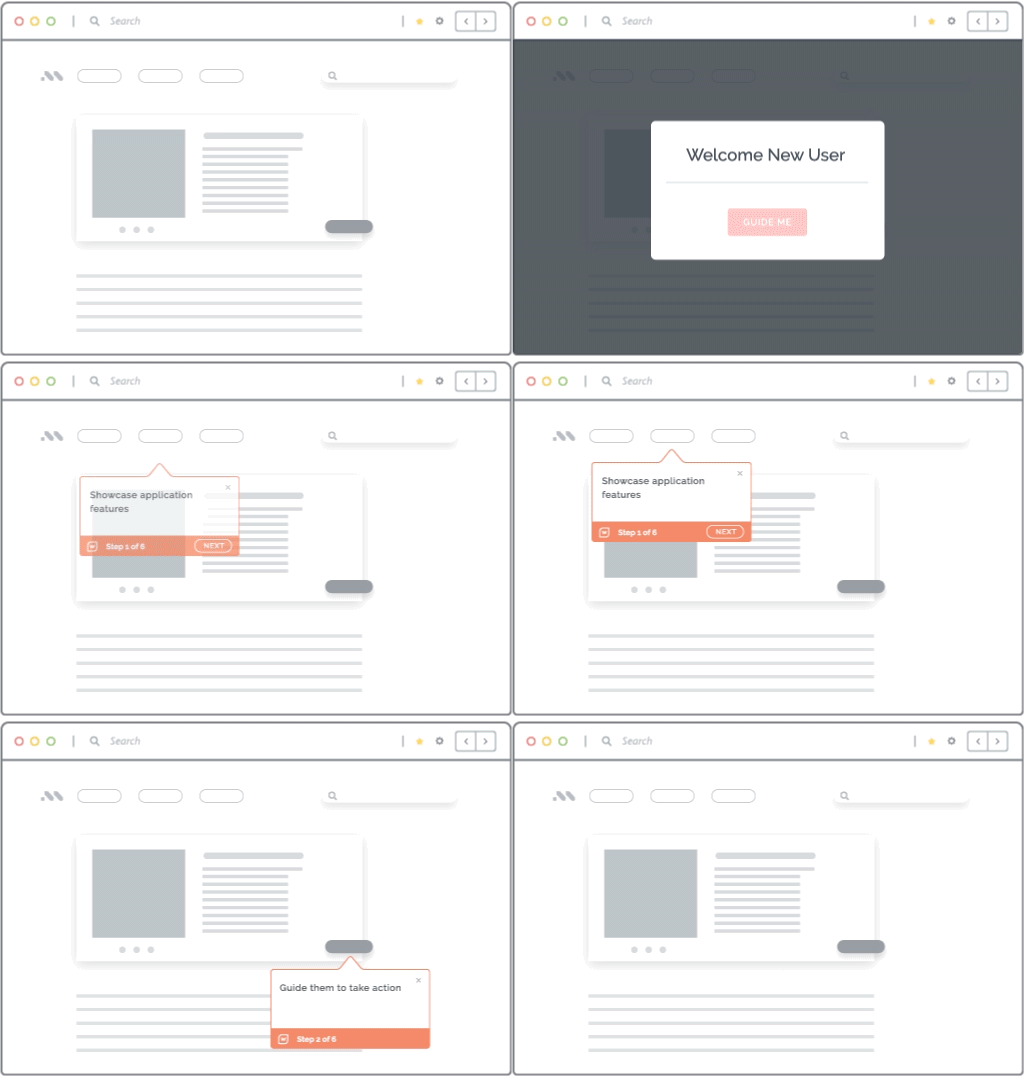
A digital adoption platform supports the user execution layer. It provides in-app guidance, field-level support, validations, contextual self-service, and behavioral analytics to help users complete workflows correctly.
Platforms like Whatfix DAP provide application and process owners with the capabilities to identify friction points, launch targeted in-app interventions, measure their impact on business outcomes, and continuously fine-tune the post-launch optimization loop.
6. Process Documentation and Knowledge Management Tools
These tools maintain SOPs, policies, process documentation, and troubleshooting content as an approved source of workflow information. Their value increases when users can access the relevant content within the application and workflow context.
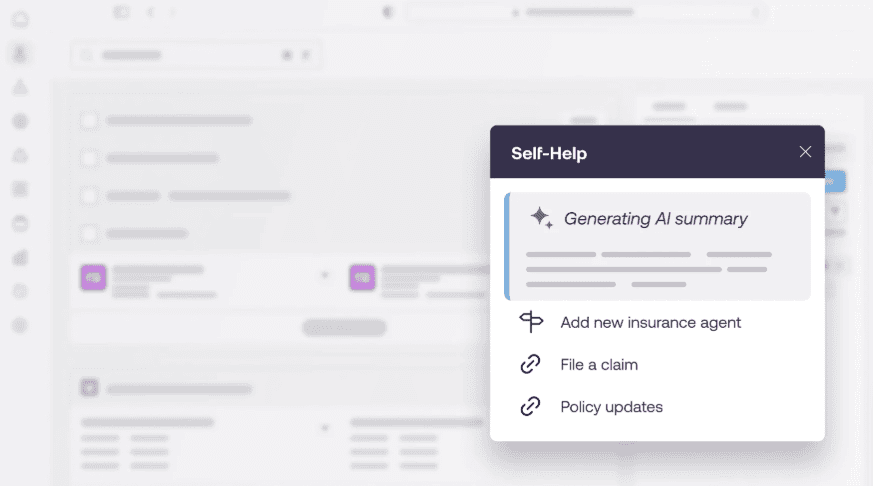
Modern tools like Whatfix bring documentation and SOPs directly in the flow of work via AI-powered Self Help centers. These capabilities allow users to find answers to common questions, resolve edge case scenarios, and eliminate bottlenecks that cause process errors or assistance.
Workflow Optimization Examples Across Enterprise Applications
Workflow optimization takes a different form in each enterprise application. Application owners must examine how users move through the workflow, how the system applies business rules and controls, and whether execution produces the intended operational outcome.
1. Purchase Requisition and Approval in ERP Systems
For an ERP application owner, workflow optimization may focus on the path from requisition creation to purchase order approval. The owner can analyze where employees enter incomplete information, select non-preferred suppliers, trigger unnecessary approvals, or send requests back for correction.
The workflow can then be improved by connecting forms with supplier and budget data, validating required fields, simplifying approval thresholds, and routing requests based on value, category, or exception type. Success can be measured through requisition-to-purchase-order cycle time, return rates, compliant supplier selection, and invoice exceptions.
2. Opportunity Management in CRM Systems
For a CRM application owner, workflow optimization may cover opportunity creation, qualification, stage progression, approvals, closure, and handoff. The owner can identify where sales representatives leave fields incomplete, interpret stages differently, delay updates, or move opportunities forward without meeting qualification criteria.
Optimization may involve removing unnecessary fields, defining stage-entry and exit criteria, automating routine updates and alerts, guiding representatives through required actions, and validating critical data before progression. The impact should appear in CRM data completeness, opportunity aging, stage conversion, sales process adherence, and forecast accuracy.
3. Employee Onboarding in HCM Systems
For an HCM application owner, workflow optimization may span the accepted offer, pre-boarding, employee record creation, payroll setup, access provisioning, manager tasks, and day-one readiness. The owner can locate delays caused by unclear responsibilities, missed dependencies, duplicate data entry, or inconsistent onboarding processes across teams.
The workflow can be improved with role-based task assignments, automated reminders, integrations with payroll and identity systems, embedded policy guidance, and completion tracking. Relevant outcomes include pre-boarding completion, day-one access readiness, overdue tasks, onboarding support requests, and time to productivity.
4. Contract Review and Approval in CLM Systems
For a CLM application owner, workflow optimization may cover contract request, drafting, review, approval, signature, and storage. The owner can examine where incomplete intake information, unclear review criteria, nonstandard clauses, or inconsistent exception handling create delays and rework.
Optimization may include structured request forms, risk-based routing, standard templates, clause guidance, defined exception paths, automated reminders, and embedded documentation. Progress can be measured through contract cycle time, first-pass accuracy, rework, approval SLA adherence, and workflow-related support demand.
5. Service Request Management in ITSM Systems
For an ITSM application owner, workflow optimization may cover request submission, categorization, routing, fulfilment, resolution, and closure. The owner can identify where unclear forms, duplicate requests, incorrect categories, or repeated transfers create avoidable work for service teams.
The workflow can be improved through dynamic request forms, contextual self-service, guided troubleshooting, automated categorization, and rules-based routing. Application owners can then track form completion, ticket deflection, reassignment rates, first-contact resolution, and SLA performance.
Common Workflow Optimization Mistakes
Workflow optimization efforts lose impact when teams improve the intended process without accounting for how the workflow operates and changes in practice. Common workflow optimization mistakes include:
Optimizing the Documented Workflow
Process maps and SOPs describe the approved workflow but may omit workarounds, interruptions, off-system activity, and exception paths. Validate documentation through user observation, application data, support tickets, and audit findings before designing improvements.
Automating a Broken Workflow
Automation can accelerate unnecessary steps, unclear decisions, and poor data movement. Simplify and standardize the workflow first, then automate stable, rules-based activities where manual effort creates delay or error.
Designing Only for the Happy Path
A workflow designed around the standard transaction can break when users encounter incomplete information, rejected requests, policy exceptions, or unusual approval requirements. Map the most frequent and highest-risk exceptions, then define how each should be routed, documented, and resolved.
Treating Training as a One-Time Event
One-time training leaves users unsupported as knowledge fades, workflows change, or infrequent tasks arise. Reinforce formal training with contextual guidance, embedded documentation, self-service support, and targeted practice at the point of need.
Measuring Throughput Without Quality
A higher volume of completed transactions can hide errors that create correction work later in the process. Measure throughput alongside first-pass completion, error and rework rates, required-field completion, and compliance exceptions. For example, faster contract approvals represent improvement only when required reviews are completed and fewer agreements are returned for correction.
Failing to Govern Workflow Changes
Application updates, policy changes, and local workarounds can gradually move execution away from the approved workflow. Assign clear ownership and update system configurations, controls, SOPs, guidance, and training through the same governed change process.
Create a Closed-Loop Workflow Optimization Process With Whatfix
Whatfix closes the loop between the workflow an organization designs and the way users execute it inside enterprise applications. It combines behavioral analytics, in-app guidance, contextual support, and simulation training so teams can identify friction, act on it, and verify the impact.
Together, these capabilities create a continuous workflow optimization loop:

Analyze Workflow Execution
Whatfix Product Analytics gives process and application owners visibility into user friction, abandonment, errors, behavioral differences, and inefficient paths.
This helps teams replace assumptions with evidence and focus optimization efforts on the workflows, steps, and user groups creating the greatest operational risk or cost.
Diagnose the Cause of Workflow Friction
Funnels show where users abandon a workflow, Journeys reveal the paths they take, and real-time Cohorts expose performance differences across roles, teams, and regions. Session Replay and AI Insights provide further context around hesitation, repeated actions, and errors.
Teams can combine these findings with support tickets, audit findings, and operational data to determine whether the problem requires workflow redesign, an application fix, stronger controls, or better user enablement.
Intervene at the Point of Work
Whatfix DAP enables teams to address diagnosed friction inside the application:
- Flows and Task Lists guide users through multi-step workflows.
- Smart Tips and Field Validation clarify requirements and prevent incorrect or incomplete entries.
- Pop-Ups and Launchers communicate changes and direct users to relevant actions.
- Self Help and AI-powered Guidance Agents surface approved SOPs, documentation, and contextual answers within the workflow.
These interventions can be targeted by role, page, behavior, or workflow stage, giving each user the support relevant to the task they are completing.
Prepare Users Before Production
When workflow optimization involves a major application release, policy change, or compliance-sensitive process, Whatfix Mirror gives employees a safe environment in which to practice before working in production.
Teams can simulate standard and exception paths, provide guided practice, and assess readiness without affecting live systems or data. Training analytics reveal where users hesitate or make mistakes so teams can address those gaps before go-live.
Measure Workflow Outcomes
Whatfix Product Analytics shows whether user behavior changes after an intervention, while Guidance Analytics measures engagement with Whatfix content.
Process owners can compare workflow completion, abandonment, errors, inefficient paths, and guidance engagement before and after deployment. Pairing these insights with operational metrics such as cycle time, rework, compliance exceptions, and support volume helps demonstrate whether the intervention delivered a meaningful business outcome.
Improve and Continue the Loop
Use the results to retain, refine, or retire the intervention. Teams can update guidance for a specific cohort, strengthen training, adjust controls, or route the finding to process and application owners when broader redesign is required.
Continuous measurement reveals whether the change resolved the original problem or created new friction, allowing teams to keep workflows aligned with evolving applications, policies, and user needs.
See how Whatfix can help you identify execution friction and improve critical workflows across your enterprise applications. Schedule a personalized demo.