



What Is Digital Transformation?
Digital transformation is the use of digital technology to change how an organization operates and delivers value. In large enterprises, that often includes modernizing ERP, CRM, HCM, and industry-specific applications; moving legacy systems to the cloud; connecting data; and introducing AI and automation.
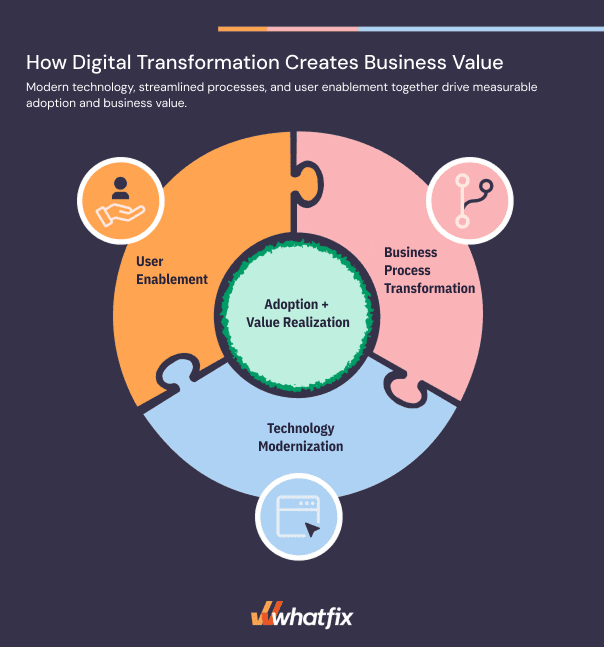
These technology investments also change business processes and employee responsibilities. Digital transformation value depends not only on the technology investment, but whether people can execute the new workflows and whether those changes improve outcomes such as processing time, accuracy, productivity, and cost.
What Is Digital Transformation Adoption?
Digital transformation adoption is the process of enabling employees to successfully use new technologies, execute redesigned business workflows, and adapt to changes in how work gets done. Digital adoption extends beyond initial software usage to include user proficiency, process adherence, and sustained improvements in workflow performance.
Successful digital transformation adoption requires organizations to:
- Prepare employees before go-live
- Support them during live work
- Continuously measure how software usage translates into operational efficiency, productivity, and business value.
Why Digital Transformation ROI Falls Short After Go-Live
Technology implementation plans typically cover system configuration, integrations, data migration, testing, and technical deployment. Once the application is live, employees must carry out redesigned processes under real conditions. Gaps in readiness and day-to-day support can turn a seamingly smooth technical launch into months of rework, support tickets, and slow transactions.
This is adoption gap. And it’s often the underlying cause of failed transformation projects.
Here are five adoption challenges that frequently erode the expected return of digital transformation rollouts:
Insufficient Hands-On Training and User Readiness
Employees finish courses or attend live training demonstrations without practicing the workflows they own. During go-live, unfamiliar steps lead to delays, avoidable mistakes, and longer time-to-proficiency.
Inconsistent Process Execution and Frequent Errors
Teams carry old habits into new systems, skip approvals, or enter incomplete data. Rework grows, compliance exposure increases, and processes take longer than planned.
Growing Demand for IT Support and Subject Matter Experts
Routine questions flow to help desks, managers, and SMEs. Support costs rise as specialists spend time explaining basic steps instead of resolving more complex problems.
Limited Visibility Into Workflow Performance
Login counts rarely reveal where a purchase request stalls or why contract approvals take too long. Application owners need workflow-level evidence to identify workflow friction, validate process improvements, prioritize improvements, and connect software investments to measurable business outcomes.
Continuous Change Across Releases and Process Updates
New features, changed policies, and revised workflows can undo earlier proficiency gains. Teams need a way to reinforce the current, most-updated standardized processes without requiring additional training after every release.
A sustainable adoption program gives application owners three capabilities: evidence of readiness before launch, guidance during live work, and ongoing insight into how workflows perform.
Addressing these challenges requires a digital adoption program that begins before go-live, supports employees during live execution, and continuously improves application performance after deployment.
The Digital Transformation Adoption-to-Business Value Framework
Implementing a new enterprise application creates the foundation for change, but the return on that investment depends on how quickly employees become proficient, adopt standardized processes, and improve operational performance.
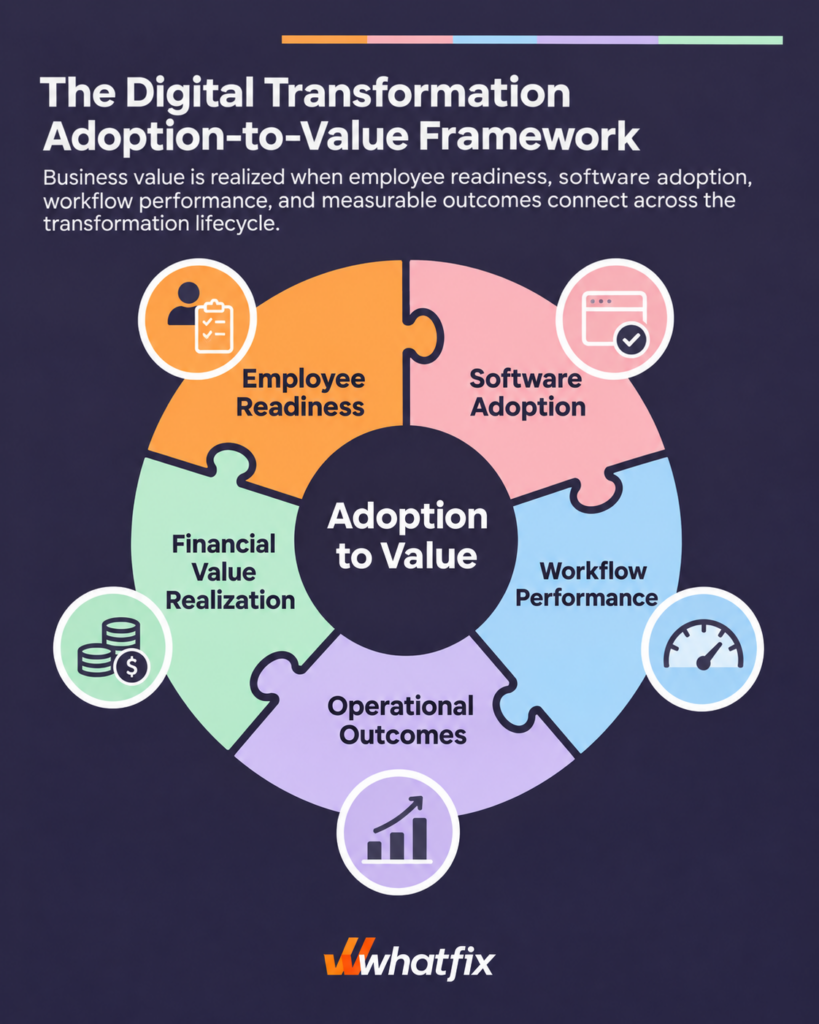
Organizations can connect digital transformation adoption to measurable business outcomes through this five-stage adoption-to-value framework:
1. Employee Readiness → Prepare users to perform new workflows
Equip employees with the knowledge, training, and hands-on practice needed to execute redesigned workflows before go-live. Measure readiness through proficiency assessments, simulation completion, and demonstrated task competency.
2. Software Adoption → Drive consistent use of new systems
Accelerate adoption through role-based application onboarding, contextual in-app guidance, and self-service support. Measure success through feature adoption, workflow engagement, and user proficiency rather than login activity alone.
3. Workflow Performance → Improve how work gets done
Enable employees to complete critical business processes correctly, efficiently, and consistently. Track task completion times, workflow success rates, errors, rework, and process adherence to identify improvements in execution.
4. Operational Outcomes → Translate workflow improvements into business results
Connect improved workflow performance to operational KPIs, including employee productivity, reduced support costs, faster cycle times, improved data quality, and fewer compliance exceptions.
5. Financial Value Realization → Quantify the return on transformation investments
Translate operational improvements into measurable financial outcomes, including labor hours saved, reduced cost per transaction, avoided rework expenses, faster time-to-value, and increased revenue capacity. Compare these benefits against implementation, training, and ongoing application management (like change management, ongoing digital adoption, and workflow optimization) costs to demonstrate digital transformation ROI.
Examples of Digital Transformation Business Value
The financial impact of digital transformation adoption varies by application, workflow, and business objective. For example:
| Transformation initiative | Adoption and workflow improvement | Measurable business value |
|---|---|---|
| ERP modernization | Employees execute standardized procurement, inventory, and financial workflows with fewer errors and less rework. | Lower processing costs, faster financial close cycles, and reduced operational inefficiencies. |
| CRM transformation | Sales teams consistently update records, follow standardized opportunity workflows, and adopt new sales capabilities. | Less administrative time, improved sales productivity, and better pipeline data quality. |
| HCM transformation | Employees and managers successfully complete onboarding, benefits, and HR self-service workflows. | Reduced HR support volume, faster employee onboarding, and lower administrative costs. |
| Insurance core system modernization | Claims teams follow standardized intake, documentation, approval, and settlement processes. | Faster claims processing, fewer compliance errors, and reduced cost per claim. |
The key to realizing digital transformation business value is establishing a measurable connection between employee adoption, workflow performance, operational improvements, and financial outcomes. This allows transformation leaders to identify where adoption barriers are limiting ROI, prioritize targeted interventions, and demonstrate the value of enterprise software investments over time.
The DAP Lift on Digital Transformation ROI
A digital adoption platforms (DAPs) delivers contextual guidance and self-service help inside enterprise applications. Together with readiness training and behavioral analytics, these capabilities help organizations support users through software changes and measure adoption more precisely.
In Whatfix’s State of Enterprise Digital Transformation ROI research, 300 U.S. enterprise leaders reported outcomes from their transformation initiatives. Organizations using DAPs reported:
- 64% faster time-to-value from new enterprise software investments and modernization projects.
- 37% higher user proficiency at three months after deployment.
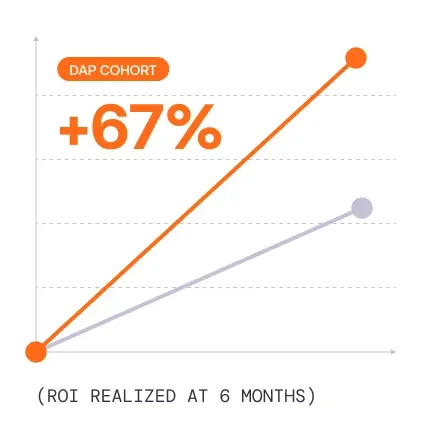
- 67% higher overall value realization at six months after deployment.
How Whatfix Supports Digital Transformation Rollouts
Whatfix connects three stages of enterprise software adoption: proving that employees are ready to use a new system, helping them execute work after deployment, and identifying where the experience should improve. Whatfix’s three product lines (Mirror, DAP, and Product Analytics) give transformation and application owners tools for each stage and provide a unified platform for connecting software rollouts to adoption, continuous optimization, and business value.
01. Pre-Go-Live: Prepare Users for Critical Workflows
Training enterprise software training attendance and course completion offer limited evidence that someone can execute a new process independently. During an SAP S/4HANA rollout, for example, an employee may understand the purchase requisition process in theory and still struggle to select the right account assignment, correct a validation error, or route an approval.
Application owners should establish the workflows each role must master, provide realistic hands-on practice, and assess user readiness and proficiency before production access. The goal is a clear view of who is ready, which tasks cause difficulty, and where additional targeted training and support is needed for major software rollouts.
How Whatfix Mirror Improves Pre-Go-Live Readiness
Whatfix Mirror enables organizations to create interactive replicas of business applications and their core workflows so employees can practice real tasks without affecting production systems or data. Teams can provide guided exercises, assess individual user and team-based performance, and assess training results before users start live work.
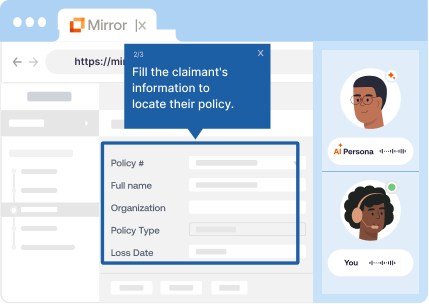
Key Whatfix Mirror capabilities include:
- Realistic application simulations: Recreate important task paths without maintaining a conventional training sandbox for every scenario.
- Guided workflow practice: Walk users through fields, decisions, and exceptions in the order they will encounter them at work.
- Proficiency assessments and training analytics: Evaluate task completion, spot repeated errors, and identify roles that need further practice.
- AI Roleplay: Pair simulated workflows with voice or chat scenarios for customer-facing and other conversation-intensive work.
What success looks like: Higher readiness assessment scores, fewer errors during initial production tasks, and shorter time-to-proficiency.
Customer example | FOX Rehabilitation’s EHR modernization
FOX Rehabilitation built 39 Mirror simulations to help more than 4,000 clinicians prepare for a move to the web-based Raintree EHR. It paired simulation training with Whatfix DAP for in-app support after launch. Across the four-month transition, FOX reported 7,300+ hours saved, largely through reduced support dependency and faster clinician readiness.
Read the FOX Rehab story | Explore Whatfix Mirror
Explore More Resources on Pre-Go-Live Readiness
- Application Simulation vs. Traditional Training Sandboxes | Best Application Simulation Training Software: Buyer’s Guide
02. Go-Live & Beyond: Guide Users in the Flow of Work
Even a well-prepared employee will encounter exceptions, unfamiliar fields, and infrequent tasks in production. A recruiter might need to correct a candidate record. A procurement analyst might need to resolve an approval exception. Searching a PDF, opening a support ticket, or asking a colleague interrupts the work and can introduce another mistake.
In-app guidance is most useful where the action happens. Clear instructions, field-level checks, and searchable process knowledge help employees complete tasks correctly while reducing the routine questions reaching IT and business SMEs and eliminating common user errors.
How Whatfix DAP Supports In-Workflow Adoption
Whatfix Digital Adoption Platform places contextual assistance inside enterprise applications. It helps organizations reinforce approved process steps, answer questions at the moment of need, and communicate changes to the users affected.
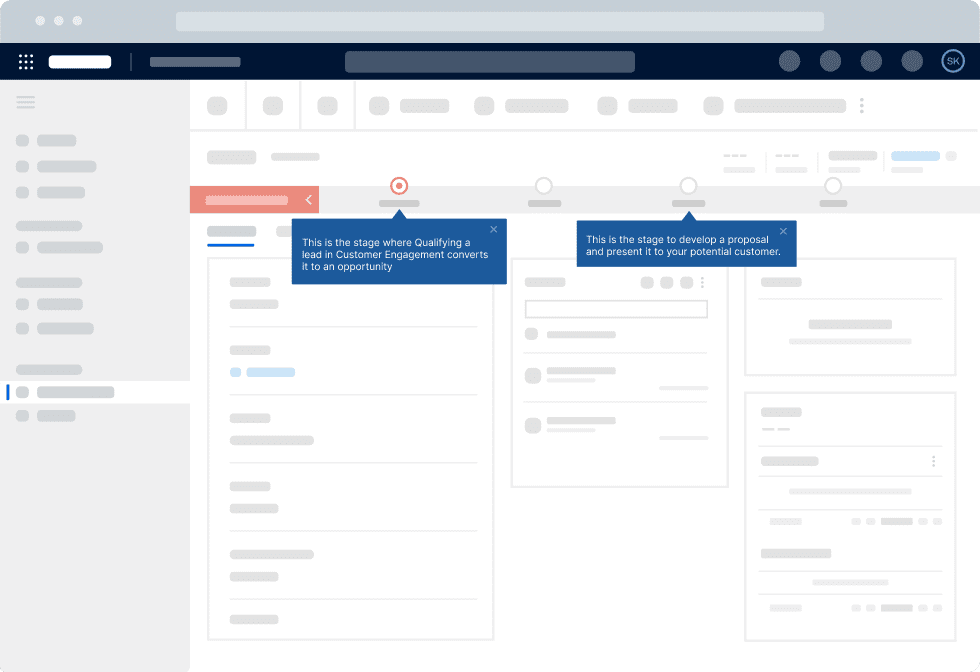
Key Whatfix DAP capabilities include:
- Flows and Task Lists: Guide users through onboarding, approvals, and multi-step processes directly within the application.
- Smart Tips and data validation: Clarify fields, reinforce required inputs, and prevent avoidable data-entry errors.
- Self Help and AI-powered answers: Surface relevant SOPs, knowledge articles, and process instructions without making employees leave their work.
- Pop-Ups, Beacons, and targeted guidance: Communicate releases and policy changes to the relevant roles and teams.
- Guidance analytics: Understand user engagement with in-app guidance and Self Help, analyze search trends, and help take a data-driven approach to new in-app content.
This creates a practical approach to hypercare and ongoing enablement. Application owners can address recurring questions in the interface, keep guidance current, and reserve expert support for cases requiring judgment.
What success looks like: More completed workflows, fewer errors and routine tickets, and stronger adherence to approved processes.
Customer example | bioMérieux’s CLM transformation
When bioMérieux rolled out Icertis CLM, legal and purchasing teams needed help with unfamiliar contract processes. Role-based Whatfix guidance and Self Help supported work inside the application. bioMérieux reported 88% user adoption and 1,293 hours saved during its reported January 2024–February 2025 measurement period.
Read the bioMérieux story | Explore Whatfix DAP
Explore More Resources on In-Workflow Guidance & Support
03. Post-Launch: Optimize Workflows and Maximize ROI
The first weeks after deployment rarely reveal every weakness in a new process. An approval path may work for one team and stall for another. Employees may use workarounds, fall back on legacy processes, not adopt a new feature, or repeat steps that add time to a transaction.
Application owners need the same discipline used to manage a customer-facing product: watch how people work, analyze workflows, identify failure points, prioritize fixes, and check whether each change produces a measurable improvement. Simple usage metrics like login counts provide too little detail to guide those decisions and require more in-depth behavioral analysis.
How Whatfix Product Analytics Supports Continuous Optimization
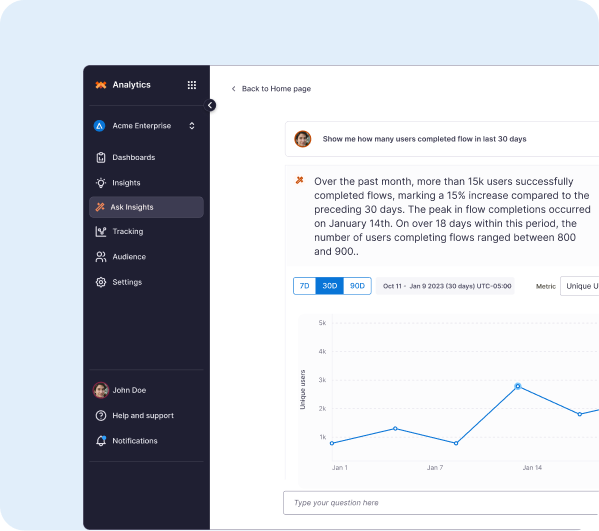
Whatfix Product Analytics helps application owners understand user behavior across enterprise workflows. It can show which paths employees take, where they abandon tasks, and how patterns differ by role, region, or other cohort. This provides a data-driven approach to post-go-live system optimization.
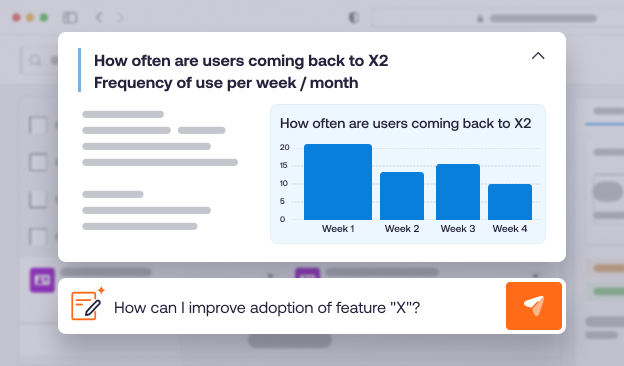
Whatfix Product Analytics capabilities include:
- AutoCapture and funnel analysis: Track application events and locate the steps where workflows lose users.
- Journeys and Session Replay: Examine the paths people take and investigate friction behind stalled or repeated actions.
- Real-time cohorts: Compare performance across user groups and identify where targeted support may be needed.
- AI Insights and feedback: Surface patterns, explore likely causes, and help prioritize improvements using behavioral and qualitative signals.
Consider a procurement approval funnel with a high abandonment rate at a required field. The application owner can inspect the affected sessions, determine whether the issue is a confusing label, a missing rule, or a proficiency gap, and address the cause. A Smart Tip may resolve the field-level problem; a revised process may remove an unnecessary step; Mirror practice may help teams learn a changed workflow.
What success looks like: Higher workflow completion, shorter cycle times, fewer repeated errors, and clearer evidence of value from application changes that demonstrate software value realization with quantitative business outcomes.
Explore Whatfix Product Analytics
Continuous Optimization: From Adoption Insights to Business Value
A transformation team should define the intended workflow before launch, then use live behavior to improve it over time:
- Define the expected workflow. Identify critical tasks, required steps, user roles, exceptions, and the outcomes the process should deliver.
- Observe real execution. Monitor task completion, errors, drop-offs, support demand, and differences between user groups.
- Identify and diagnose friction. Determine whether a problem comes from the interface, the process, missing knowledge, or insufficient proficiency.
- Improve and verify. Update guidance, training, or the workflow itself, then compare performance against the baseline.
The final three activities become a recurring operating cycle as applications and business requirements evolve.
Whatfix Product Analytics provides evidence of friction → DAP supports targeted interventions in production → Mirror enables additional practice when users need it.
To connect adoption work to ROI, translate operational changes into financial outcomes. For example, reduced task time can represent productivity hours returned; fewer errors can reduce rework; and lower ticket volume can reduce support demand. Use baseline measurements and consistent assumptions, and account for the costs of the digital adoption program when calculating net return.
Customer example | Vizient’s CLM workflow improvements
Vizient used Whatfix in-app guidance and workflow controls to address errors in Icertis CLM. Its published case study reports a 93% year-over-year reduction in contract workflow errors and a decline in average contract execution time from 33.5 days to 14 days. The results show the operational impact of targeted workflow interventions.
Read the Vizient story | Request a Whatfix demo
Enterprise Application Transformation Projects by App Type
Digital transformation often unfolds one business application at a time. The adoption risks differ across a financial ERP, an enterprise sales and support CRM, a new HCM suite for employee workflows, or insurance claims modernization. Whatfix can support the people and process changes behind each initiative, regardless of app type, underlying business unit, or industry. Here are a few examples of core modernization areas that Whatfix has expertise in:
Read industry-specific modernization guides: Clinical Ops Modernization | Core Banking System Transformation | Claims & Policy System Modernization
Related transformation initiatives: Application Consolidation | Legacy System Modernization
Enterprise Digital Transformation Success Stories
These Whatfix case studies show how digital adoption programs can improve specific business processes and expand ROI across enterprise software applications and transformation rollouts:
Digital Transformation Guides, Research, and Resources
Explore the research and practical guides behind the planning, rollout, and optimization of enterprise software transformations:
Drive Digital Transformation ROI With Whatfix
Whatfix brings together application simulations, guidance in the flow of work, and behavioral analytics so enterprise teams can improve user proficiency, process execution, and the return on business-critical applications.