


Every organization relies on processes to operate efficiently, whether serving customers, managing operations, or driving business growth. When these workflows become inefficient or outdated, they create bottlenecks that slow progress.
Business Process Management (BPM) provides a structured approach to analyzing, optimizing, and automating these workflows to improve efficiency, reduce costs, and align processes with business goals. Over time, BPM has evolved to incorporate process improvement methodologies such as Six Sigma, Lean, and Agile, while advancements in AI and automation are making process optimization more intelligent and scalable.
BPM varies widely in scope, from streamlining a single process to transforming enterprise-wide operations. Its success depends on an organization’s ability to continuously improve workflows. This article covers BPM’s core principles, best practices, and real-world applications to help businesses enhance efficiency and agility.
What Is Business Process Management?
Business Process Management (BPM) is a systematic approach to analyzing, optimizing, and automating business processes to improve efficiency, reduce costs, and enhance overall performance. It involves identifying workflows, modeling how they function, implementing improvements, and continuously monitoring their effectiveness to ensure they align with business objectives.
BPM is not a one-time initiative but an ongoing discipline that enables organizations to streamline operations, increase agility, and drive digital transformation. It integrates Lean, Six Sigma, and Agile methodologies, along with AI-driven automation and analytics, to create more efficient, scalable, and customer-centric processes.
Types of BPM
Three main types of business process management include:
- Integration-centric BPM: Integration-centric BPM focuses on automating workflows that involve multiple software systems, ensuring seamless data exchange across applications such as ERP, CRM, and HRMS. It is essential for organizations that rely on various interconnected platforms to perform complex operations efficiently. By leveraging APIs, middleware, and automation tools, integration-centric BPM reduces manual intervention, minimizes errors, and enhances process speed. For example, in an e-commerce business, BPM can automate order processing by integrating the online store with inventory management, billing, and shipping systems, ensuring a smooth end-to-end transaction flow.
- Human-centric BPM: Human-centric BPM is designed for processes that require active human involvement, such as approvals, decision-making, and customer interactions. These workflows involve tasks that cannot be fully automated due to the need for judgment, collaboration, or regulatory compliance. A common example is an employee onboarding process, where HR, IT, and finance teams must manually review and approve various steps before a new hire is fully integrated into the company.
- Document-centric BPM: Document-centric BPM is used to manage, process, and automate workflows involving documents, ensuring better organization, accessibility, and compliance. Features such as automated document routing, version control, and digital signatures improve efficiency and security. For instance, in a legal or financial organization, BPM can automate contract approvals by routing documents to the right stakeholders, tracking changes, and ensuring compliance with industry regulations.
5 Steps of the Business Process Management Lifecycle
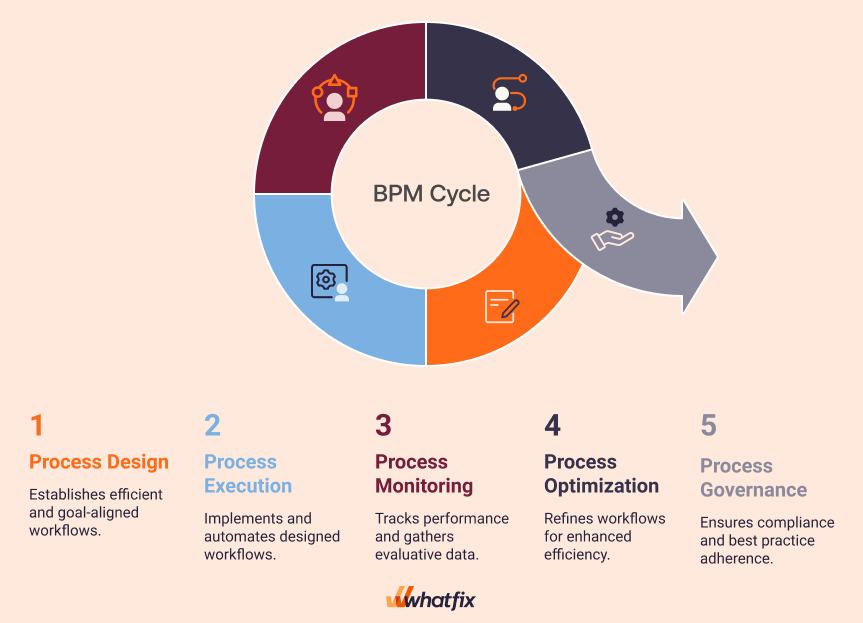
Each step in the BPM lifecycle is interconnected, creating a continuous loop of improvement that helps organizations maintain efficiency, agility, and long-term success. Let’s have a look at these steps.
Process design
Process design is the foundational step in identifying, mapping, and structuring workflows to ensure efficiency and alignment with business goals. This involves analyzing current processes, identifying bottlenecks, and designing an optimized workflow.
Tools like process mapping, flowcharts, and Business Process Model and Notation (BPMN) help visualize how tasks, decisions, and approvals should flow. A well-structured process design ensures clarity, standardization, and scalability before implementation.
Process execution
Once a process is designed, it moves to execution, where it is implemented and automated using BPM software or workflow management systems. Execution may involve human-driven tasks, system integrations, and automated workflows to streamline operations.
At this stage, organizations focus on ensuring seamless adoption, training employees, and resolving any technical or operational issues that arise during the rollout. The goal is to make the process efficient, repeatable, and measurable.
Process monitoring
Process monitoring involves tracking real-time performance and gathering data to evaluate effectiveness. Businesses can use KPIs, dashboards, and analytics tools to assess cycle time, error rates, and resource utilization. Continuous monitoring helps detect inefficiencies, bottlenecks, or compliance risks, enabling proactive decision-making and adjustments as needed.
Process optimization
Based on monitoring insights, process optimization focuses on refining and improving workflows to enhance efficiency, reduce costs, and improve output quality. This may involve eliminating redundant steps, automating manual tasks, reallocating resources, or adopting AI-driven solutions. Optimization is an iterative process that ensures the business remains agile, competitive, and aligned with evolving goals and market demands.
Process governance
Process governance ensures that BPM initiatives adhere to organizational policies, industry regulations, and best practices. This involves defining roles, responsibilities, and accountability measures for process management. Governance frameworks help maintain compliance, data security, risk management, and quality control, ensuring that all business processes remain standardized, scalable, and aligned with corporate strategy.
Best Practices for Implementing Business Process Management
Here are some best practices to follow while implementing business process management for your organization.
Identifying processes for improvement
The foundation of BPM success lies in understanding which processes need improvement and why. This requires asking the right questions, challenging assumptions, and benchmarking against industry best practices.
Some key discovery questions include:
- Are the goals and objectives of the process clearly defined and aligned with overall business goals?
- Are there unnecessary steps, bottlenecks, or redundancies in the workflow?
- Does the process consistently produce high-quality outputs, or are there frequent errors?
- What KPIs measure the process’s success, and are they being met?
- Are the tools and technology used in the process relevant, or are better alternatives available?
- What recurring issues or stakeholder feedback indicate inefficiencies?
This discovery process helps organizations pinpoint weaknesses, streamline workflows, and implement quick fixes before committing to a large-scale transformation.
Align BPM initiatives with business strategy
BPM is most effective when strategically aligned with business objectives rather than being treated as a standalone initiative. Before making changes, ensure BPM efforts directly support organizational goals such as cost reduction, customer experience improvement, compliance, or innovation.
Key steps to achieve this:
- Establish clear objectives that tie BPM improvements to measurable business outcomes.
- Gain executive buy-in to secure the necessary resources for BPM initiatives.
- Use data-driven insights to prioritize processes that have the highest impact.
- Align BPM with digital transformation efforts to ensure future scalability.
Build cross-functional teams
Business processes rarely operate in silos. They often span multiple departments and require collaboration between different teams. BPM’s success depends on creating cross-functional teams that work together to improve and maintain process efficiency.
To foster collaboration:
- Identify key stakeholders across operations, IT, finance, HR, and customer service.
- Establish clear roles and responsibilities for process owners and contributors.
- Create an informal agreement to ensure ongoing cooperation and accountability.
- Use collaborative BPM platforms that provide real-time visibility and communication
Start with small, high-impact process improvements
Instead of overhauling entire workflows at once, start with incremental, high-impact changes that yield quick wins.
For example, instead of transforming the entire customer onboarding process, start by automating form submissions or reducing approval wait times. Once proven effective, expand improvements across other parts of the workflow.
Selecting the right BPM software tools
Choosing the right BPM software is crucial for streamlining, automating, and managing processes effectively. The ideal tool must be:
- User-friendly and intuitive
- Include features for process modeling, automation, analytics, and reporting.
- Work seamlessly with other systems like CRM, ERP, HRMS, and other business systems.
- Support business growth and increasing process complexity.
- Ensure compliance and data protection.
End-user training and change management
Effective BPM implementation goes beyond selecting the right tool. It requires ongoing training and seamless change management to ensure employees can fully adopt and leverage the system. Without end-user training, even the most well-planned business processes and workflows fail to click. Users are unaware of the most efficient workflows, follow incorrect procedures, become confused on what steps to complete, and fall back on legacy systems.
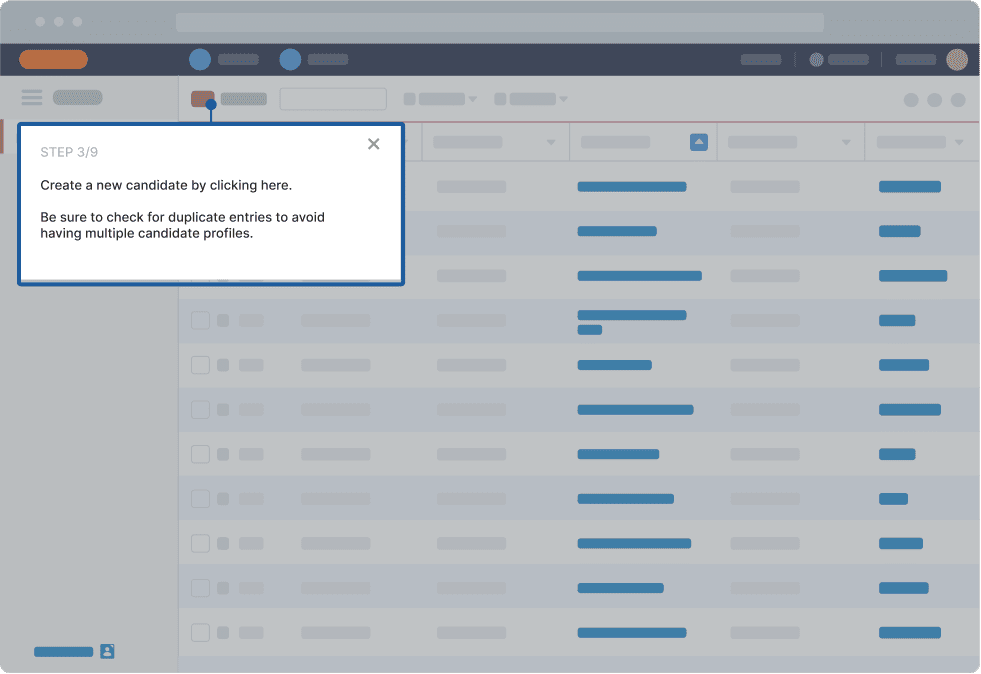
With Whatfix Digital Adoption Platform (DAP) and Mirror, organizations can accelerate process and worjflow adoption by providing interactive, hands-on training experiences. Mirror enables teams to replicate sandbox environments of enterprise software, allowing users to practice real workflows in a risk-free setting. Meanwhile, Whatfix DAP supports employees in the flow of work with onscreen overlays, step-by-step guidance, and interactive walkthroughs, ensuring a frictionless transition to new processes and tools.
Take a data-driven approach to process adoption
Low process adoption is a downstream effect caused by poorly designed processes, unintuitive end-user experiences, a lack of contextual training, and no process documentation or support resources.
You may face questions like:
- “How can I get my team to actually follow the processes I’ve set?”
- “All these tools were high-priority investments…so why is nobody using them?”
- “What can I do to advocate for a process-driven culture?”
- “Where do I even start to measure success?”
Product analytics software will give you this visibility by capturing user events like in-app navigation journeys, clicks, scrolls, and hovers. You can also track this employee behavior to form a conversion funnel showing you exactly when employees are dropping off an in-app flow or process, or where general user friction is occurring.
This provides application owners insights into how to best support end-users, where to make workflow changes, and what needs to be communicated to users. With a DAP like Whatfix, application owners can support users in the flow of work, communicating new workflow changes, guiding users through mult-step processes, nudging users to follow correct procedures, prompting users with field validations to ensure data is entered correct, and so much more.
Leverage automation and AI
Modern BPM goes beyond workflow standardization. It now integrates intelligent automation and AI-driven optimization to enhance efficiency, agility, and decision-making. Businesses can maximize BPM effectiveness by leveraging:
- Robotic Process Automation (RPA) to eliminate manual tasks.
- AI-powered analytics for predictive insights and continuous process improvement.
- Low-code/no-code BPM platforms for faster deployment and customization.
- Process mining tools to identify inefficiencies and recommend optimizations.
Use Cases of Business Process Management
Business Process Management is widely used across industries to streamline operations, enhance efficiency, and improve customer experiences. Here’s how BPM enables different sectors.
Financial Services: Streamlining loan processing
The loan approval process is often complex and time-sensitive, involving multiple steps such as document verification, credit assessment, and compliance checks. Without automation, these workflows can be slow and error-prone, leading to delays and customer dissatisfaction.
How BPM enables financial services:
- Automates document collection and verification.
- Reduces loan processing time by integrating credit assessment tools.
- Ensures regulatory compliance with automated tracking and reporting.
- Provides real-time status updates to customers and loan officers.
Healthcare: Enhancing patient onboarding and care coordination
Patient onboarding involves multiple stakeholders, from front-desk staff and doctors to insurance providers. Without an efficient system, delays in data processing and coordination can impact patient experience and care quality.
How BPM enables healthcare:
- Automates patient registration and medical history collection.
- Integrates Electronic Health Records (EHR) for seamless data access.
- Enhances coordination between departments (doctors, nurses, billing).
- Ensures compliance with HIPAA and other healthcare regulations.
Manufacturing: Optimizing supply chain management
Manufacturers rely on complex supply chain networks involving procurement, inventory management, logistics, and vendor coordination. Inefficiencies in these processes can lead to delays, stock shortages, or increased operational costs.
How BPM enables manufacturing:
- Automates inventory tracking and demand forecasting.
- Streamlines procurement and supplier management.
- Enhances visibility across supply chain operations through real-time analytics.
- Reduces production downtime by optimizing workflows.
Retail: Automating order processing and returns management
Retail businesses deal with high-volume transactions where order fulfillment, inventory updates, and returns processing need to be handled efficiently to maintain customer satisfaction and operational efficiency.
How BPM enables retail industry:
- Automates order processing from purchase to fulfillment.
- Integrates real-time inventory updates to prevent stockouts.
- Streamlines the returns process, ensuring quicker refunds or exchanges.
- Improves customer communication with automated tracking and notifications.
Human Resources: Improving employee onboarding and performance management
Traditional employee onboarding is often slow, requiring approvals from multiple departments like HR, IT, and finance, which can cause delays. Similarly, performance reviews may lack structure and data-driven insights, leading to inconsistent evaluations.
How BPM enables HR:
- Automates the onboarding workflow, from document submission to account setup.
- Provides structured performance evaluation frameworks with data-driven insights.
- Enhances compliance by ensuring required training and policy acknowledgments.
- Reduces manual HR work, improving overall efficiency.
Customer Service: Enhancing ticket resolution and support workflows
Customer service teams often deal with high volumes of support requests that require efficient categorization, tracking, and resolution. Manual ticket handling can lead to longer response times and inconsistent issue resolution.
How BPM enables customer service:
- Automates ticket classification and routing to the right teams.
- Prioritizes issues based on severity, ensuring urgent cases are addressed first.
- Integrates AI chatbots and self-service portals to reduce agent workload.
- Monitors customer service performance with real-time analytics and reports.
Benefits of Effective Business Process Management
Benefits of effective business process management include:
- Improved efficiency and reduced operational costs: BPM helps organizations eliminate redundancies, automate repetitive tasks, and optimize workflows, leading to faster execution times and lower operational costs. By reducing manual efforts, businesses can allocate resources more effectively and improve overall productivity.
- Enhanced customer experience: Streamlined processes lead to faster response times, fewer errors, and improved service delivery, directly impacting customer satisfaction. BPM enables organizations to enhance order processing, support services, and personalized interactions, creating a seamless customer experience.
- Increased agility and adaptability to market changes: BPM ensures processes remain flexible and scalable which enables organizations to quickly adapt to regulatory changes, new technologies, and market demands, maintaining a competitive edge.
- Better compliance and risk management: BPM enforces standardized workflows, documentation, and process monitoring, ensuring compliance with industry regulations and internal policies. Automated tracking and audit trails help mitigate risks by identifying potential issues before they escalate.
- Higher employee productivity and engagement: By reducing administrative burdens and automating repetitive tasks, BPM allows employees to focus on high-value work. Clear workflows and structured processes improve collaboration, reduce frustration, and enhance job satisfaction.
Challenges in Business Process Management
Challenges associated with business processes management include:
- Resistance to change: Employees and stakeholders may resist BPM initiatives due to fear of job displacement, unfamiliarity with new tools, or reluctance to adopt automated workflows. Overcoming resistance to change requires clear communication, training, and leadership support.
- Complexity in integrating BPM with legacy systems: Organizations might struggle to integrate modern BPM solutions with outdated legacy systems, leading to compatibility issues and implementation delays. A well-planned digital transformation strategy and API-driven integration solutions can help ease the transition.
- Defining clear ownership and accountability: BPM involves multiple departments, making it difficult to establish clear ownership and accountability for process changes. Without well-defined roles, responsibilities, and governance structures, BPM initiatives may lose direction or face delays.
- Measuring ROI: Quantifying the impact of BPM initiatives can be challenging, as process improvements often deliver long-term gains rather than immediate cost savings. Organizations need to track KPIs such as efficiency improvements, error reduction, and employee productivity to measure BPM success effectively.
15 Best Business Process Management Software
Here are 15 of the best BPM software tools you should consider, judging by their functionality, feature set, pricing, customizability, and the degree of technical skill you need to get started using them.
1. Appian BPM Suite
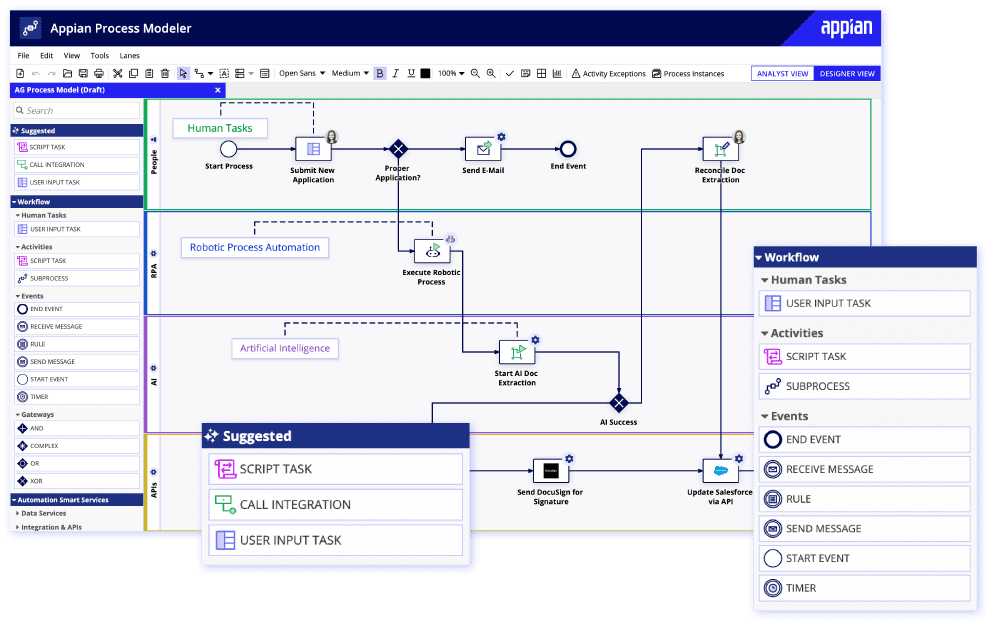
Appian’s BPM suite is designed to help enterprises build internal tools and workflows within one workspace. Essentially, it is a low-code development environment where non-technical users can design workflows and basic tools and collaborate with their teammates on business processes.
Here are some of the key functions and capabilities of Appian BPM:
- Process Modeling: Appian BPM allows users to model business processes visually using a drag-and-drop interface. This makes it easier for business analysts and subject matter experts to create and modify processes without extensive coding.
- Workflows: Automate repetitive tasks with if-then workflows that routes tasks, data, documents, and alerts to the right person or endpoint when pre-programmed conditions are met.
- Integrations: Connect third-party SaaS platforms, databases, and custom scripts with pre-built connectors.
- Real-time Monitoring and Analytics: Track progress on your processes, identity bottlenecks, and get detailed analytics into your workflows.
Limitations
- Ecosystem: Unlike platforms like NetSuite, Salesforce, and SAP, Appian has a smaller network of capable contractors and third parties you can contract to assist you in getting setup.
2. AutomationAnywhere
AutomationAnywhere is a robotic process automation platform designed to help enterprises automate repetitive, rule-based tasks and processes using if-then rules—like Zapier, but for larger enterprises, and with AI, machine learning, and analytics built in. Based on that ethos, AutomationAnywhere empowers non-technical users to:
- Build no-code tools from a drag-and-drop interface.
- Automate repetitive tasks such as data entry and extraction, reporting, data migration, etc.
- Deploy virtual robots that can mimic human action on desktop and cloud environments.
- Incorporate AI into their workflows using functionalities such as natural language processing (NLP), optical character recognition (OCR), and automated decision-making.
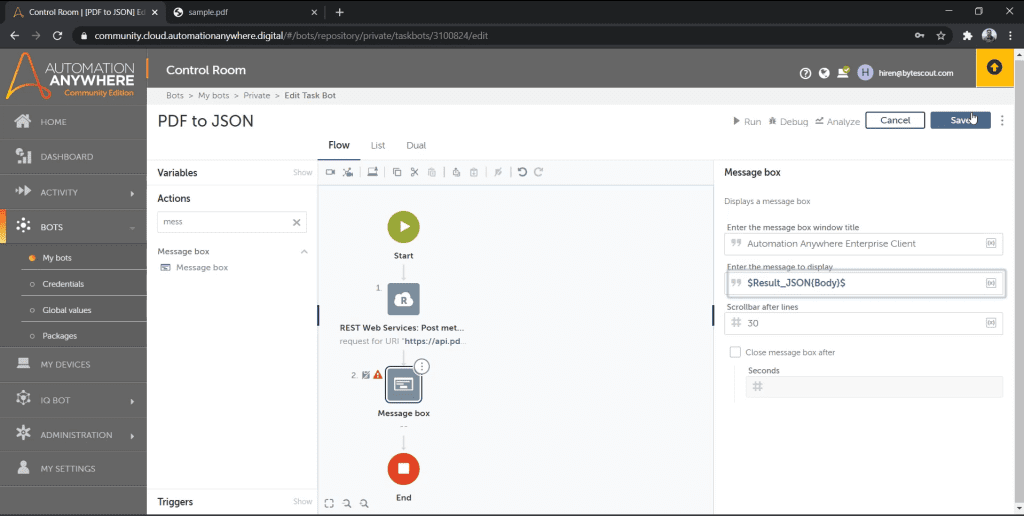
AutomationAnywhere is easily one of the most powerful options on our list, judging by its RPA functionality, its integrations library, and a powerful RESTful API, but if you’re a smaller, budget-conscious company, it might not work: pricing starts at $10,500 per month for a team of one developer and 30 users. If you’re not at the scale where you need to automate hundreds (or thousands) of actions daily, AA might be overkill for your needs.
3. Microsoft Power Automate
Power Automate helps developers and non-technical users alike build automated step-by-step processes that complete preset tasks on autopilot.
- Build, train, and publish AI models internally without writing code.
- Automate tasks between different applications and databases, using Power Automate’s API.
- Scan, read, extract, and categorize data from spreadsheets, documents, and unstructured sources like PDFs, images, and invoices.
- Analyze positive/negative sentiment in text.
- Design and launch flows for desktop, server, and cloud environments using a drag-and-drop UI.
- Launch workflows faster using pre-built templates that can connect your cloud applications, databases, and on-premise application instances.
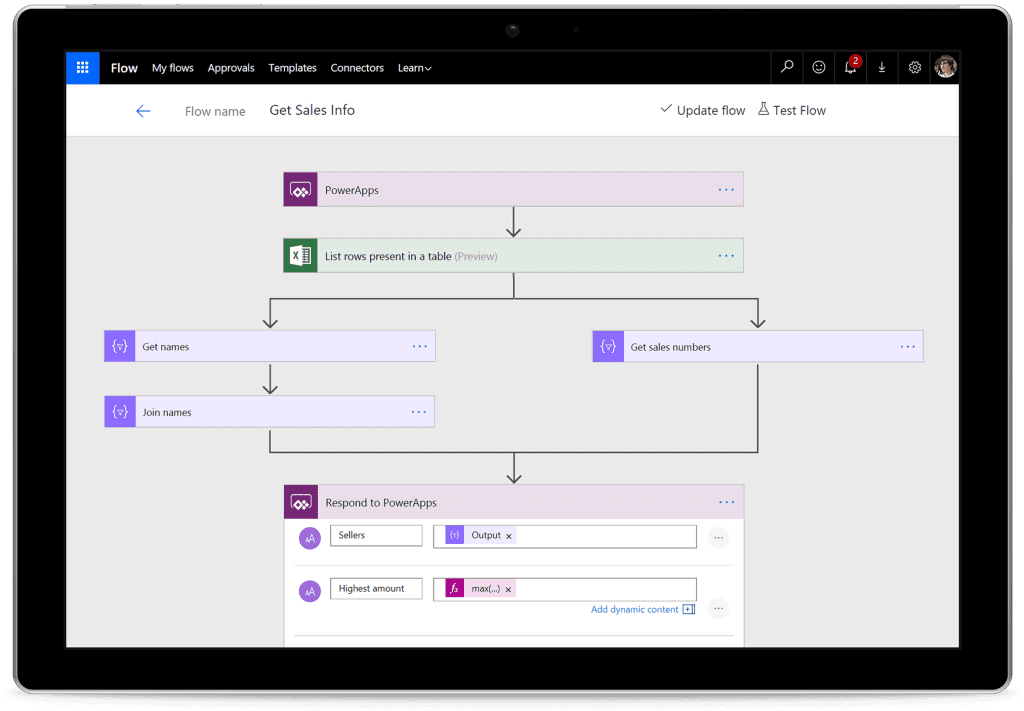
Using Power Automate, you can design workflows based on parameters such as:
- If a new email arrives, then extract it in HTML format, summarize it with GPT, and send me a one-line summary in Slack
Beyond basic if-then process automation, Power Automate’s most powerful feature is the AI-powered, “describe it to design,” that uses natural language processing (NLP) to interpret your instructions and automatically build workflows from start to finish in response.
4. IBM Business Automation Workflow
IBM promises to help you, “automate your digital workflows to increase productivity, efficiency and insights” across processes such as procure-to-pay, order-to-cash, customer onboarding, accounts payable, and incident management.
Perhaps, the best way to explain IBM Business Automation Workflow’s USP would be to paint use cases and how it’d help non-technical users and enterprise-scale companies to:
- Reduce maverick buying, restrict purchases to approved vendors, and use automation to move buying decisions through different approvers and stakeholders
- Analyze your process, identify bottlenecks, and remove inefficiencies from their root
- Onboard customers and employees on autopilot with pre-programmed suggestions, alerts, and course invitations that are pushed to them using if-then sequences
- Assign virtual bots to monitor technical incidents and report on any suspected SLA breaches
Unless you’re at enterprise-scale and you have a clear set of use cases where you intend to deploy IBM’s process mining features, even taking it for a spin can be expensive, with pricing starting at $17K per month and $28K per month for their document processing and workflow management features respectively.
5. Workato
Workato is a software automation platform that enables you to connect different applications (and route data, alerts, and approvals between two or more endpoints) using if-then workflows. These workflows are no-code by default, and can be designed and customized visually using Workato’s drag-and-drop editor.
Some real-life use cases where Workato comes in handy include:
- Sales and Support: Send leads, tickets, and alerts (from HubSpot, Salesforce, etc.) to the right decision maker in Slack
- HR: Collect referrals from employees, schedule interviews, and send interviewees automated reminders without leaving your applicant tracking system (Greenhouse, Bamboo, Ashby, etc.)
- IT: Generate IDs for new hires, detect and close accounts, and revoke permissions automatically once an employee quits (i.e., inside Okta, SailPoint, or ForgeRock )
- IT (2): Automatically create a ticket in ServiceNow or Jira whenever Datadog detects a bug or crash
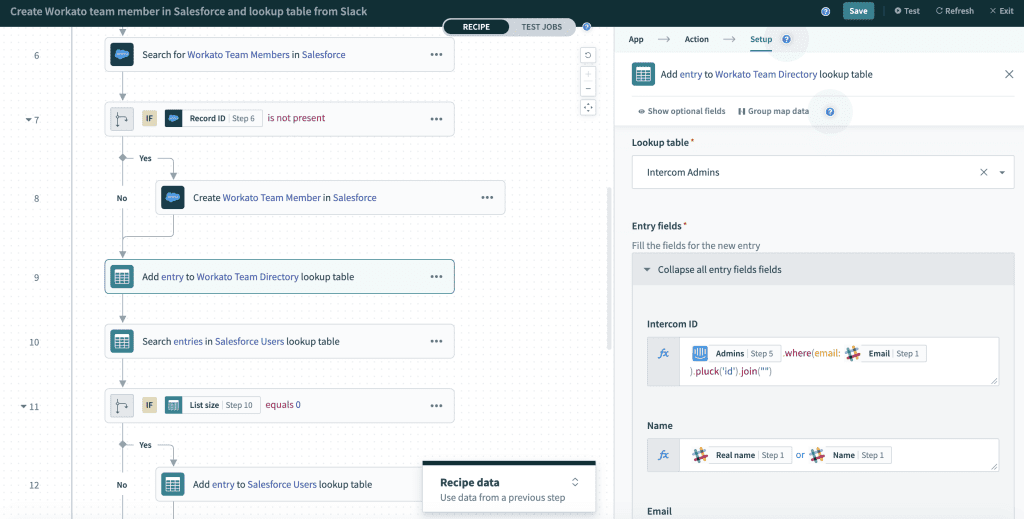
In essence, Workato executes tasks inside one (or more) software applications once a trigger action is completed in another across their network of 1,000 applications.
Workato Automation Institute offers certification programs, pre-recorded multi-language explainers, live training sessions, and modular courses designed to help users navigate Workato’s BPM features.
6. CMW Platform
CMW is a BPM suite that combines—
- Process modeling and analysis: Design workflows step-by-step with a no-code editor
- Third-party integrations: Route data, send alerts, execute processes, and launch workflows across hundreds of third-party applications when a trigger condition is met
- Digital data collection: Replace paper forms and 1:1 conversations with configurable electronic forms that export data to third-party repositories
- Visualize process flows with graphical notation that shows your process’s high-level architecture
While CMW Lab comes with lots of features, it comes with an even heftier price tag. Customer support also tends to be slow, and the learning curve might be a little too steep, especially if you’re deploying CMW primarily for non-technical users.
7. Oracle BPM
Oracle BPM enables organizations to design, automate, monitor, and optimize business processes. It follows a model-driven approach, where business analysts and process designers can create process models using a graphical interface.
- Process modeling: Design processes visually, plotting activity flows, decision-making, and interactions
- Automation: Program if-then workflows that automatically execute tasks when a preset condition is met
- Monitoring and Analytics: Track KPIs and identify bottlenecks in active processes
- Optimization: Remove redundant steps, merge repetitive tasks, and simplify processes
- Integrations: Connect hundreds of software applications to share data, trigger tasks, and send notifications between platforms.
For all its functionality, Oracle BPM isn’t cheap, import options (from non-Oracle BPM tools) are limited, and the UI is complicated to figure out. If you’re considering Oracle BPM seriously, it’s important to note some of the challenges you might face with adopting it, including:
- Implementation: Can be complex and might require third-party implementation partners, especially if your organization is a large enterprise with complicated use cases.
- Customization: If you want to explore beyond its basic functionality, you need to master JDeveloper and ADF, which effectively excludes non-technical users.
- Integration complexity can be a nightmare, especially if you’re trying to orchestrate processes between SaaS applications and outdated server-side software.
8. Kissflow
Kissflow automates repetitive workflows so that processes can progress on autopilot. At its core, Kissflow is designed to help growing companies build scalable systems that can complete tasks without minimal human input, such as:
- Onboarding new employees without 1:1 handholding every time,
- Getting purchase requests approved by running them through preset rules before being routed to approvers,
- Creating a system team leads can use to request an assistant to be seconded to their team, or
- A vacation request process that can approve or deny requests based on the number of staff available and an employee’s remaining vacation entitlement.
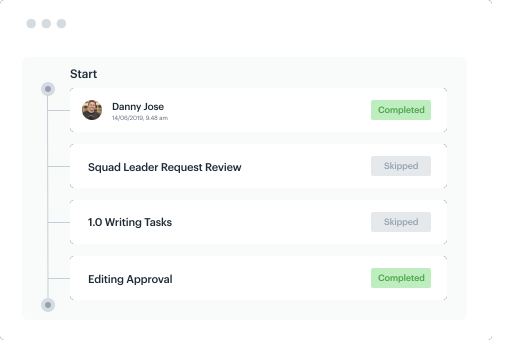
Kissflow offers a drag-and-drop interface that can be used to design form, specify field types and parameters, and arrange process flowcharts. On the Kissflow dashboard, users can cycle through the processes they’re involved in and filter them by start date, stakeholder involved, type, etc.
Kissflow supports integrations with Google Workspace, Salesforce, Office 365, and thousands of other third-party applications via API.
9. Laserfiche
Laserfiche is a document management and business process automation platform designed to help organizations streamline their document-related processes, improve productivity, and enhance information governance. Its main USP is that it helps enterprises (that generate and process huge document volumes) digitize, organize, secure, and automate document-centric processes.
Laserfiche’s core capabilities include:
- Document capture: Scan physical documents or import digital files into the Laserfiche workspace electronically.
- Workflow Automation: Design and automate workflows to route documents and tasks through predefined processes.
- Customizability: Workflows and processes are infinitely customizable, as long as you have the technical skills to code it up
- Analytics and Reporting: Users can generate reports and gain insights into document and process performance.
On the downside, support is a bit of a headache since you have to go through third-party channels, keeping the platform up-to-date is demanding, and performance can be erratic. Functionality sometimes breaks randomly, log-in can be hit-and-miss, and their UI is quite dated.
10. Nintex Workflow Automation
Nintex helps enterprises discover, automate, and improve their core business processes from a drag-and-drop interface. For users who’re already familiar with Microsoft and their Office Suite of tools (Sharepoint, Visio, etc.), Nintex acts as a BPM layer that helps you process large volumes of documents and makes your applications talk to each other.
- Design workflows visually in step-by-step, flowchart pattern
- Integrate different applications across your stack without writing custom code
- Generate detailed reports for your process’s performance, and
- Generate documents from existing databases, and extract info from PDFs, images, and files
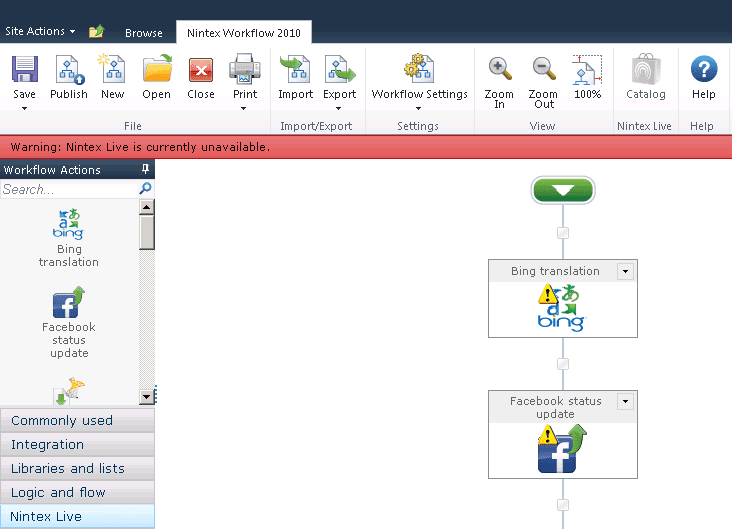
Limitations: Load speed can be improved, process docus are limited (there are Nintex features that lack any training whatsoever), and Nintex forms lack features like repeating tables that technical users may expect by default for writing custom code.
Also, since Nintex is a third-party application built on the Microsoft ecosystem, large parts of their platform can become unusable if Microsoft makes drastic changes to their platform.
11. Oracle Fusion Middleware
Oracle Fusion Middleware is a comprehensive suite of middleware products and tools offered by Oracle Corporation. It serves as an integration platform for connecting various software applications, systems, and services within an organization. Among others, Oracle Fusion offers:
- BPM: A management suite for designing, modeling, and automating business processes
- Technical customizability: User can expand basic functionality with JDeveloper and Oracle’s Application Development Framework
- Analytics: Visualize bottlenecks and understand how to improve your performance across your processes, and
- Integrations: Connect SaaS, cloud, and on-premise applications using pre-built connectors and APIs
Like Oracle BPM, Fusion Middleware’s most powerful functionality is easily the most significant bottleneck it poses: Fusion’s core functions can only be activated fully with JDeveloper and ADF and non-technical users will be severely limited trying to navigate the platform without technical help.
12. Smartsheet
Smartsheet offers work management features, with an emphasis on business process management—that is, the platform serves as a single source of truth where teams (and organizations) can collaborate on projects, tasks, and processes, but more importantly, orchestrate workflows that propel themselves forward with minimal human input.
In practice, Smartsheet’s BPM functionality helps you:
- Share data, route notifications, and trigger actions between 100+ applications on a set-and-forget basis.
- Design processes visually using Kanban, Gantt charts, or table format.
- Choose from Smartsheet’s library of pre-built workflow templates that can send periodic status updates, complete actions using conditional logic.
- Keep tabs on user activity and automated workflow sequences from a real-time activity log.
- Build and manage custom applications to expand Smartsheet’s core features.
Although it’s essentially infinitely customizable as a project management tool, Smarthseet is limited as a BPM solution: compared to other options, it supports a smaller ecosystem of pre-built connectors, offers limited reporting features, scales poorly, and tends to slow down when you start handling large data volumes.
13. ProcessMaker
ProcessMaker helps you automate repetitive tasks, integrate applications across your stack, strip out useful data from documents, images, and files, and empower your create workflows with NLP.
- No-code Workflows: Design workflows visually from a drag-and-drop interface
- Automations: Trigger tasks automatically and customize workflow behavior with conditional logic
- Form Builder: Create custom forms for collecting data and validating entries automatically
- Analytics: Monitor processes and discover potential bottlenecks with comprehensive dashboards and reports
- Document Management: Store, retrieve, and extract data from documents
14. Process Street
Compared to the rest of the tools we’ve covered here, Process Street is by far the easiest to get started with, it’s designed primarily with non-technical users in mind, and puts AI tools at your fingertips to automate low-level creative work.
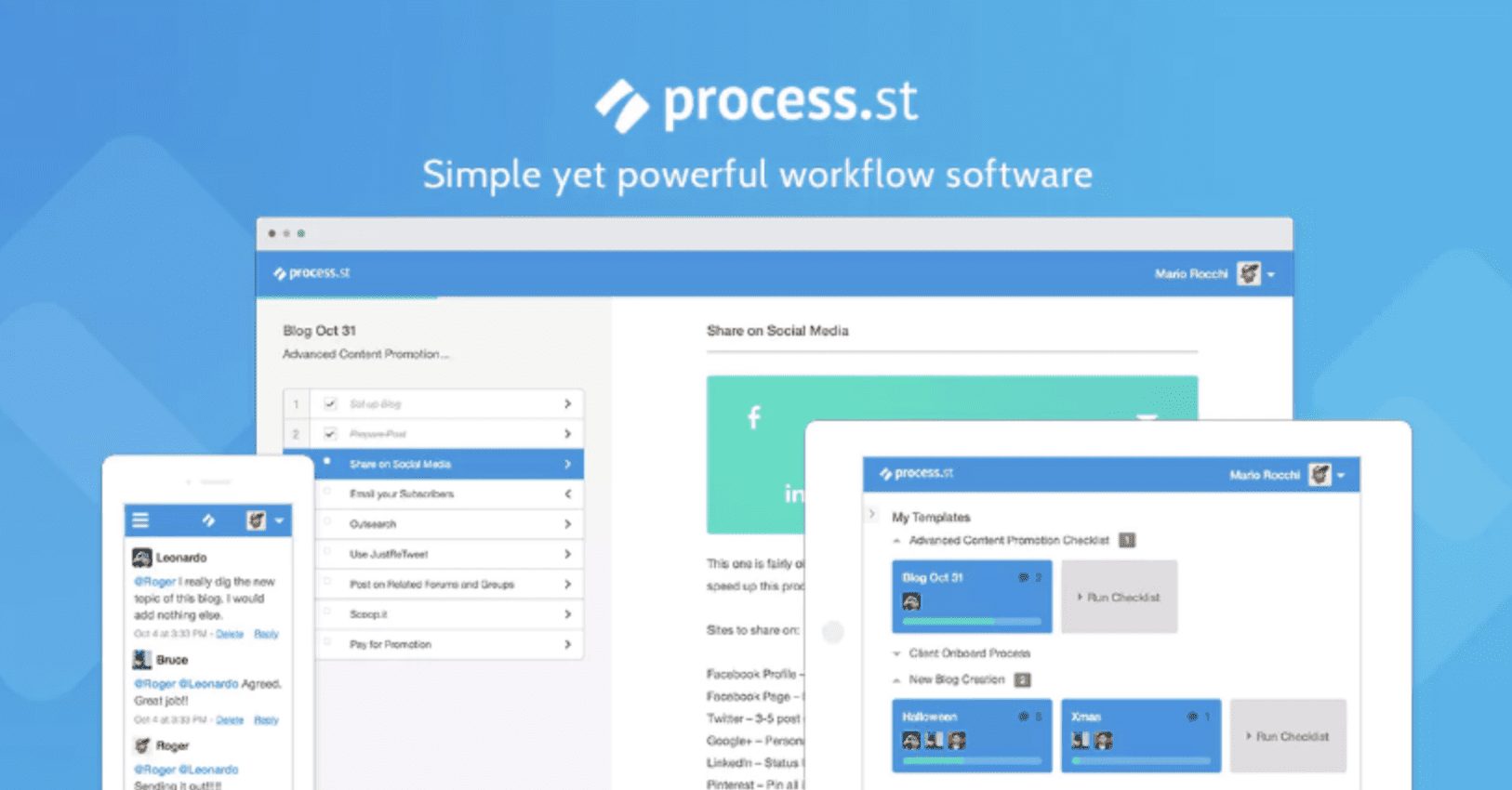
Compared to the rest of the tools we’ve covered here, Process Street is by far the easiest to get started with, it’s designed primarily with non-technical users in mind, and puts AI tools at your fingertips to automate low-level creative work.
Here’s a step-by-step breakdown of what using Process Street for the first time would look like:
- Choose a pre-built template or start from scratch.
- Define different stages in as much detail as possible.
- Customize workflow with conditional logic (if this, then that) and multi-stage approvals that loop in collaborators both within and outside your organization.
- Connect third-party tools so that actions can be automatically triggered across different applications when conditions are met
- Generate tasks and workflows with ChatGPT.
- Store helpful SOPs and policy documents inside Process Street to guide other users through.
Process Street also has extensive technical documentation and unlike most of the options on our list, guarantees real-time support within five minutes.
15. webMethods Integration Platform
The webMethods Integration Platform by Software AG is a comprehensive suite that integrates systems, applications, and data across the enterprise. It facilitates seamless connectivity and enables businesses to automate processes and improve operational efficiency.
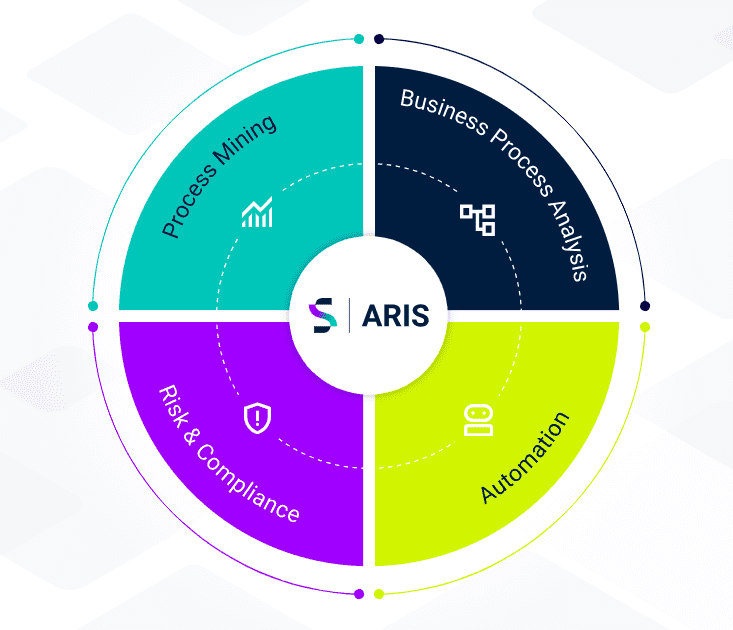
Key features include:
- Connects different applications within an enterprise to enable data sharing and workflow automation.
- Manages the entire lifecycle of APIs, including creation, deployment, and monitoring.
- Ensures data consistency and integrity across multiple systems.
- Automates business processes to enhance efficiency and reduce manual intervention.
- Provides tools for integrating on-premises systems with cloud-based applications.
3 Examples of Organizations Achieving Process Adoption Success With Whatfix’s DAP
So we’ve explored the concepts and frameworks that drive success — but how do they actually look in action?
1. Ferring and CLM transformation adoption
Like many pharmaceutical companies, Ferring Pharmaceuticals deals with complicated and detail-oriented contract processes, especially with the regulatory compliance standards required by the medical industry. Ferring decided to implement a new contract lifecycle management (CLM) software to streamline the process of engaging with providers, suppliers, and subject matter experts for contract needs.
But the Ferring team realized that getting employees fully ramped up with their new CLM software with in-person training and live tutorials was resource-intensive. They turned to Whatfix’s DAP to make employee training efficient, scalable, and less dependent on support representatives. With Whatfix, they deployed self-service channels like:
- Smart tips at specific friction points within the software to deliver contextual information about the action or feature the employee is using.
- In-app knowledge repositories that are available 24/7 and conveniently displayed as a pop-up tab on their screen.
- Step-by-step instructions that walk employees through a product flow in real-time.
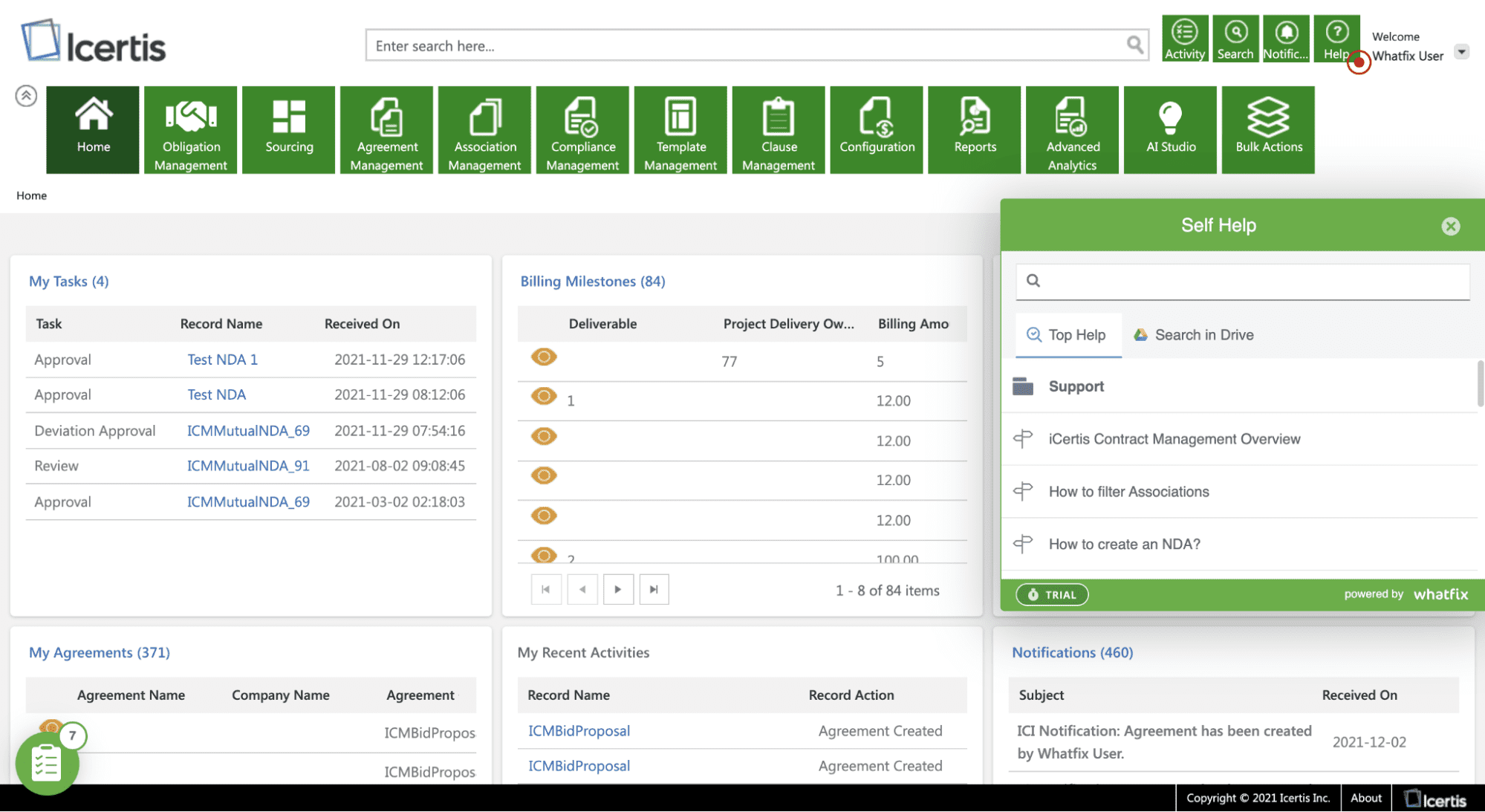
With these Whatfix features, Ferring reduced IT support tickets by 33% in the first quarter of implementation alone. This ROI was valuable considering how IT wait timers were a major point of frustration for employees with contracts in progress.
2. Experian drives CRM process adoption
Experian is a leading credit reporting agency with over 16,000 employees. To help their large number of employees build and manage relationships with clients and prospects to meet their unique business needs. However, these customizations led to a confusing user experience for the Experian team.
Experian’s learning management system (LSM) courses were difficult to keep up-to-date with Salesforce continuously rolling out new features and improvements. The team used Whatfix to eliminate time spent solely on creating and updating training videos for digital workflows. Experian uses Whatfix to deliver training and adoption resources in the following ways:
- Interactive step-by-step guidance that helped Experian shorten their sales onboarding course into a single module instead of 19 — taking up only a little over 10% of the initial course length.
- Pop-ups that alert employees when Salesforce field is incomplete or nudge the sales team to review opportunities that are due to close or are overdue.
- Auto-generate onboarding training content in multiple formats — like videos, PDFs, and slideshows — to reduce training content creation costs by 48%

3. REG reduces time-to-proficiency and improves CRM and ERP adoption
Renewable Energy Group (REG) is a renowned producer and supplier of renewable fuels. To keep up with its rapidly growing business, the company requires its employees to get up to speed quickly with key operations platforms like JD Edwards and Salesforce.
The scale of growth at REG meant they had to create training content quickly as they launched new features to avoid inconsistent procedures — which ultimately led to more errors and less productivity despite having robust software. With Whatfix, REG can personalize training programs for different groups of employees who use the same platform for different reasons. REG implemented Whatfix to overcome this fragmentation in knowledge using:
- In-app product flows that break down long and complex processes within JD Edwards and Salesforce into short, step-by-step instructions.
- Internal knowledge bases that are always visible and accessible on every page within the application for 24/7 self-service support.
- Product analytics to track friction points within new processes and identify users still using outdated workflows within the JD Edwards and Salesforce.
By moving toward an interactive in-app training program, REG reduced time-to-proficiency by 50% across both their software systems. Unlocking intuitive self-service channels also freed up their IT team’s time and resulted in a 600% reduction in support queries.
Processes Click Better With Whatfix
With a DAP like Whatfix, organizations can enable employees to fully adopt digital processes with in-app guidance and self-help support to help maximize process adoption and maximize ROI from technology.
Analyze your business processes to identify user friction and inefficiencies, build optimal end-user journeys, and understand adoption levels.
With Whatfix’s no-code editor, quickly build and launch engaging in-app experiences like tours, walkthroughs, task lists, pop-ups, tooltips, field validations, and more – all providing contextual support to end-users.
Enable employees and end-users with on-demand support help with Whatfix Self-Help. Self Help aggregates your documentation and support resources, from Google Docs, internal wikis, videos, training and onboarding resources, third-party links, and more – all into a searchable wiki that overlays your digital applications.