


Global technology investment continues to climb as organizations move more operations, decisions, and core business workflows into enterprise software.
Gartner forecasts worldwide IT spending will reach $6.31 trillion in 2026, including more than $1.44 trillion in software spending. Yet purchasing and deploying new technology does not, in itself, drive business outcomes. Organizations need a people-first approach that prepares users, manages change, reinforces processes, supports employees during live work, and continually optimizes workflows.
What Is Digital Maturity?
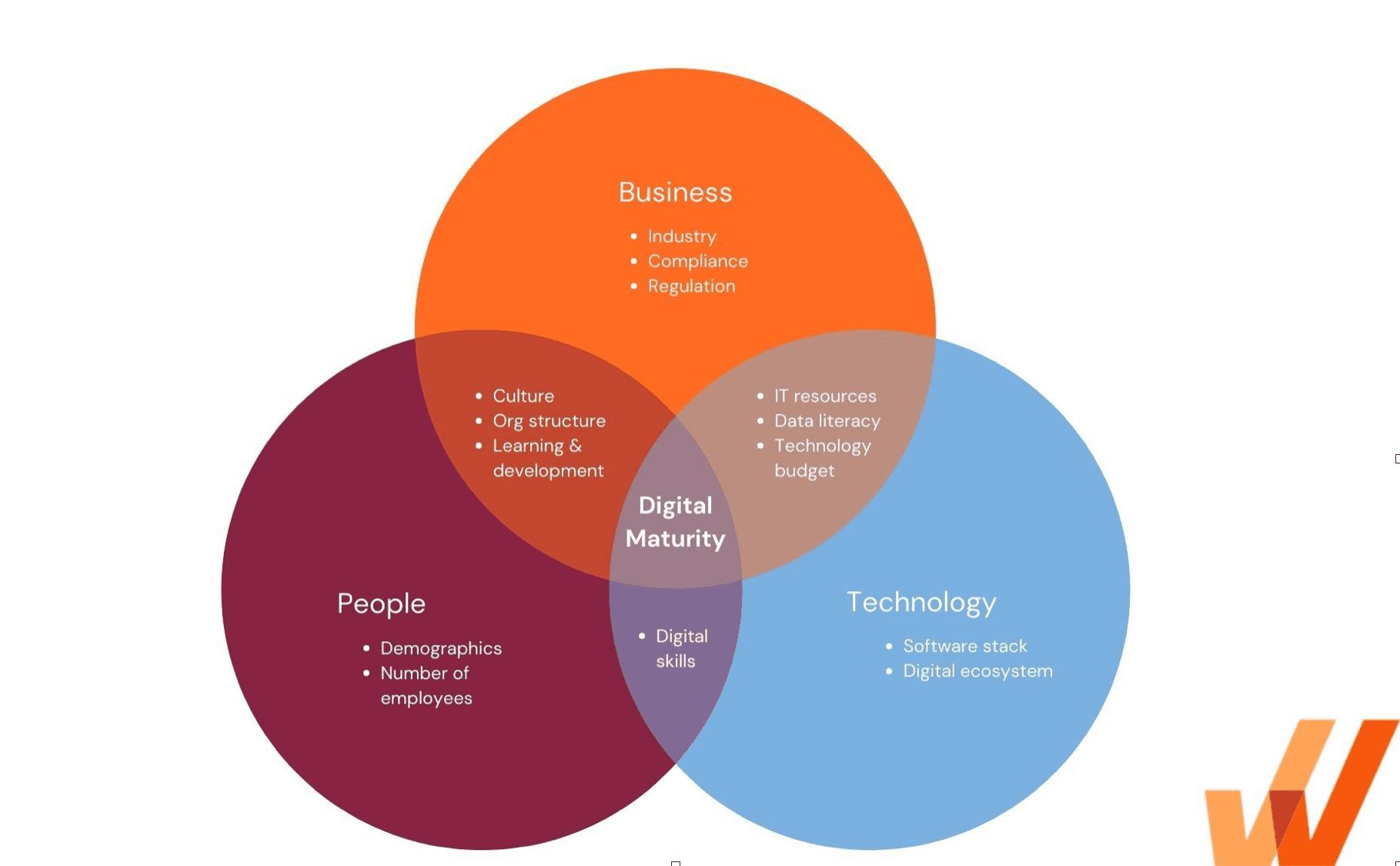
Digital maturity is an organization’s ability to use technology, data, people, processes, and governance together to consistently improve business performance. A digitally mature organization aligns technology investments with strategic goals, prepares employees for change, enables users to complete workflows correctly, integrates reliable data across systems, measures adoption and performance, and continuously improves how digital work is executed.
Digital maturity should be viewed as an evolving organizational capability rather than a final destination. New technologies, regulations, customer expectations, workforce needs, and business models continuously change what effective digital operations require.
Digital Maturity vs. Digital Transformation, Readiness, and Adoption
Digital maturity, digital transformation, digital readiness, and digital adoption describe related parts of an organization’s technology strategy, but concept answers a different business question.
| Concept | Definition | Core question |
| Digital maturity | The organization’s current ability to create value through technology, data, people, processes, and governance | How effectively can the organization operate and improve in a digital environment? |
| Digital transformation | Coordinated changes to business models, systems, processes, experiences, and ways of working through digital technology | What should the organization change to improve performance? |
| Digital readiness | The organization’s preparedness to introduce or absorb a particular technology, system, or process change | Are the people, workflows, data, and systems prepared for the change? |
| Digital adoption | The extent to which users can use digital tools and workflows correctly, consistently, and independently | Are employees using the technology effectively enough to produce the intended outcomes? |
Core Dimensions of Digital Maturity
Digital maturity requires coordinated progress across several organizational pillars. Here are the key components that make up an organization’s digital maturity:
| Digital maturity dimension | What it includes |
| Strategy and governance | Business alignment, investment priorities, leadership sponsorship, ownership, decision rights, risk controls, and performance accountability |
| People and culture | Digital skills, user readiness, leadership behavior, collaboration, incentives, change release management, performance support for successful task completion, and capacity for continuous learning |
| Processes and operations | Workflow design, standardization, documentation, governance, automation, process ownership, compliance, service delivery, and continuous improvement |
| Technology and architecture | Enterprise applications, infrastructure, platforms, integrations, security, scalability, resilience, and technical debt |
| Data and AI | Data accessibility, quality, governance, analytics, knowledge architecture, AI readiness, permissions, and decision support |
How to Assess Each Aspect of Digital Maturity
Digital maturity assessments should therefore examine how these dimensions interact inside real business processes. The central measure is whether the organization can execute, adapt, and improve its most important workflows.
Weakness in one dimension can restrict progress across the others. An organization may invest in advanced AI tools while lacking the governed data, employee skills, workflow consistency, and operating controls required to apply them effectively. Another organization may have modern cloud infrastructure while employees continue to rely on spreadsheets and offline workarounds.
Benefits of a Digital Mature Organization
Digitally mature organizations can scale technology beyond initial software rollout or pilot programs. Their people, process, and technology, along with their operating capabilities. work together to produce repeatable outcomes across teams, locations, and applications.
Here are key business outcomes organizations can benefit from when their digital maturity is high:
1. Higher returns from technology investments
Digitally mature organizations connect application deployments to user adoption, workflow performance, and business results. This creates stronger visibility into whether technology is reducing costs, improving productivity, increasing revenue, strengthening compliance, or accelerating service delivery.
In a study of approximately 2,300 organizations, BCG found that 66% of the most digitally mature companies achieved returns of at least 10% on digital projects, compared with only 36% of digital laggards.
2. More efficient and consistent workflows
Mature organizations define approved process paths, clarify ownership, eliminate unnecessary handoffs, automate appropriate tasks, and reinforce execution inside enterprise applications. Employees spend less time interpreting disconnected procedures or asking colleagues how to complete a task. This reduces rework, errors, delays, process variation, and dependency on tribal knowledge.
3. Faster user proficiency
Digital maturity gives organizations reusable capabilities for preparing employees to use new applications and workflows. Role-based training, application simulations, readiness assessments, in-app guidance, and embedded support help users build proficiency faster and apply knowledge during real work.
These capabilities are especially important for complex or high-risk workflows where errors create financial, compliance, safety, or customer consequences.
4. Greater capacity for continuous change
Software releases, new AI features, acquisitions, policy updates, and process redesigns create a constant flow of operational change.
Digitally mature organizations can segment affected users, communicate changes in context, update user training and guidance, monitor behavior, and adjust interventions based on adoption data. Change management becomes an ongoing operating capability rather than a separate activity created for every project.
5. Stronger data and AI readiness
Reliable data and centralized organizational knowledge provide the foundation for analytics, automation, and AI. Mature organizations establish ownership, quality standards, access rules, shared definitions, and integration practices across their data sources. They also maintain accurate policies, procedures, and support content that employees and AI systems can retrieve during work.
6. Better employee and customer experiences
Digitally mature organizations reduce the effort required to complete tasks, find information, resolve issues, and move between systems. Employees encounter fewer confusing workflows and receive support when they need it. Customers benefit from faster service, more consistent interactions, fewer processing errors, and better-informed employees.
7. Greater organizational resilience
Connected data, defined ownership, adaptable workflows, and continuous measurement help mature organizations identify disruption earlier and respond more quickly. Teams can reallocate resources, update processes, retrain users, and introduce new controls without rebuilding the entire operating model each time market or business conditions change.
What Do Digitally Mature Companies Do Differently?
Here’s how mature companies treat technology as part of an integrated operating system for the business and achieve higher levels of digital maturity compared to their less tech-savvy peers:
Tie technology investments to business outcomes
Mature organizations define why a technology investment matters before measuring deployment activity. Each initiative is connected to specific operational, customer, workforce, financial, or risk outcomes.
These organizations establish baseline metrics and accountable owners before implementation. Application usage is then evaluated alongside proficiency, workflow completion, errors, cycle time, data quality, support demand, and business performance.
Organize transformation around critical workflows
Digitally mature companies identify the workflows that create business value and use them to guide technology decisions. Applications, integrations, policies, training, controls, and analytics are designed around the successful execution of processes. This workflow-centered approach gives application owners and technology enablement teams a practical unit for prioritization.
Build connected technology and data foundations
Mature companies reduce unnecessary application fragmentation, maintain dependable integrations, manage technical debt, and create reliable access to shared data. They develop platform and architecture strategies that allow systems to exchange information and support end-to-end processes across departmental boundaries.
Prepare users before launching new technology
Digitally mature organizations prepare employees for real tasks rather than relying primarily on feature demonstrations or static training. Users receive role-based instruction, hands-on application practice, AI scenario training, and readiness assessments before entering a live production environment.
Pre-launch system preparation also helps transformation leaders, application owners, and enablement teams test the human side of a workflow. Teams can identify confusing steps, knowledge gaps, likely errors, and inefficient process paths while there is still time to correct them.
Support users during live work
Training retention declines when employees cannot immediately apply what they learned. Mature organizations reinforce knowledge with in-app guidance, contextual help, embedded documentation, validation, and self-service support inside enterprise applications.
This approach reduces the distance between learning and execution. Employees can access assistance at the exact step where they encounter uncertainty, improving process consistency while reducing dependence on support teams and subject matter experts.
Establish cross-functional ownership and governance
Digital maturity requires coordination among business leaders, IT, application owners, process owners, technology enablement teams, change management, L&D, data teams, security, compliance, and operations. Mature organizations define which teams own the system, workflow, data, user experience, training, and the intended outcome.
Measure behavior and improve continuously
Mature companies analyze what users do inside enterprise applications, including the paths they take, the features they use, the steps they abandon, the errors they encounter, and the support content they search for. This behavioral data is evaluated alongside qualitative feedback and business performance.
Teams use these insights to improve workflows, interfaces, policies, training, and in-app guidance. Measurement becomes part of a closed improvement loop rather than a post-implementation retrospective report.
Levels of Digital Maturity
Although maturity model terminology varies, most frameworks describe a progression from fragmented digital activity toward integrated, measured, and adaptive operations.
| Digital maturity level | Typical characteristics |
| 1. Initial | Digital initiatives are reactive, fragmented, and heavily dependent on individual teams or leaders |
| 2. Developing | The organization has pilots, growing investment, and an initial strategy, but coordination and measurement remain limited |
| 3. Defined | Standards, owners, platforms, governance structures, and repeatable processes exist across major functions |
| 4. Managed | Connected data, workflow analytics, adoption measures, and business KPIs guide decisions and improvement efforts |
| 5. Adaptive | Digital capabilities are embedded across the operating model and continuously evolve with changing business conditions |
Digital Maturity Models
A digital maturity model is a structured framework for assessing an organization’s current digital capabilities, identifying gaps, defining a desired future state, and prioritizing improvement initiatives. Most models divide maturity into dimensions such as strategy, technology, operations, people, culture, data, and customer experience.
Here are two popular digital maturity models to help organizations improve their tech literacy and turn software investments into workflow outcomes and empowered people:
Deloitte’s Digital Maturity Model
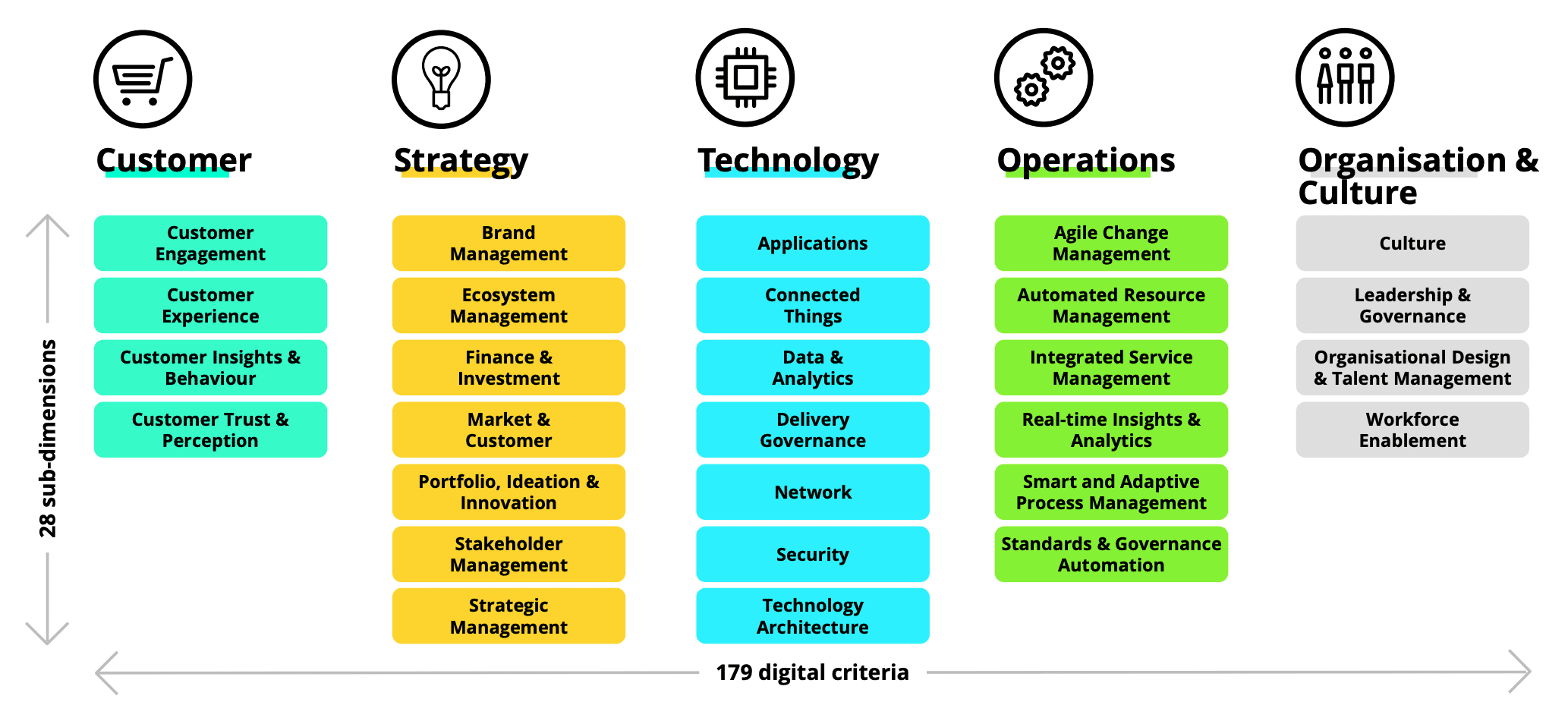
Deloitte and TM Forum originally collaborated on a Digital Maturity Model designed to assess transformation across five organizational dimensions: customer, strategy, technology, operations, culture, people, and organization.
Each dimension contained subdimensions and assessment criteria that organizations could use to benchmark their existing capabilities and identify improvement priorities.
| Model dimension | What it evaluates |
| Customer | How effectively the organization creates connected, trusted, and valuable customer experiences across digital and physical channels |
| Strategy | How digital priorities are integrated into business strategy, investment decisions, market positioning, innovation, and competitive advantage |
| Technology | Whether applications, platforms, infrastructure, architecture, integrations, and security can support digital business needs at scale |
| Operations | How digital technology improves processes, services, automation, decision-making, efficiency, quality, and operational resilience |
| Culture, people, and organization | Whether leadership, governance, talent, skills, collaboration, incentives, and organizational structures support transformation |
| Data | How the organization governs, integrates, shares, analyzes, and applies data to decisions, automation, AI, and business performance |
The model provides a broad organizational view and can help leaders establish a common language for transformation. It is especially useful when teams need to examine the connections among technology, organizational structure, data, customer experience, and operations.
BCG’s Digital Acceleration Index
Boston Consulting Group’s Digital Acceleration Index, or DAI, benchmarks an organization’s digital maturity on a scale from 0 to 100. Organizations assess their maturity across multiple digital capabilities using guided scoring, and BCG aggregates the results to compare performance across companies and industries.
| DAI assessment area | What it examines |
| Digital strategy and ambition | How clearly the organization connects digital investment with competitive strategy, growth, customer value, and operating outcomes |
| Digital core | The maturity of applications, architecture, cloud infrastructure, platforms, APIs, cybersecurity, data, and analytics |
| Business and technology investment | Whether investments are balanced across technology, data, workforce skills, and scalable organizational capabilities |
| Leadership and governance | Ownership, decision rights, funding, accountability, executive sponsorship, and coordination across business units |
| Workforce capabilities | Digital skills, AI training, talent strategies, role design, learning, and the organization’s capacity to adopt new ways of working |
| Operating model and ways of working | Cross-functional teams, platform operating models, agile delivery, collaboration, and the ability to scale digital solutions |
| Human-technology augmentation | How effectively automation, analytics, AI, and human judgment are combined inside operational processes |
| Business value and performance | Revenue growth, ROI, cost reduction, enterprise value, market share, customer satisfaction, and operational performance |
Digital Maturity Model by Google and the Boston Consulting Group
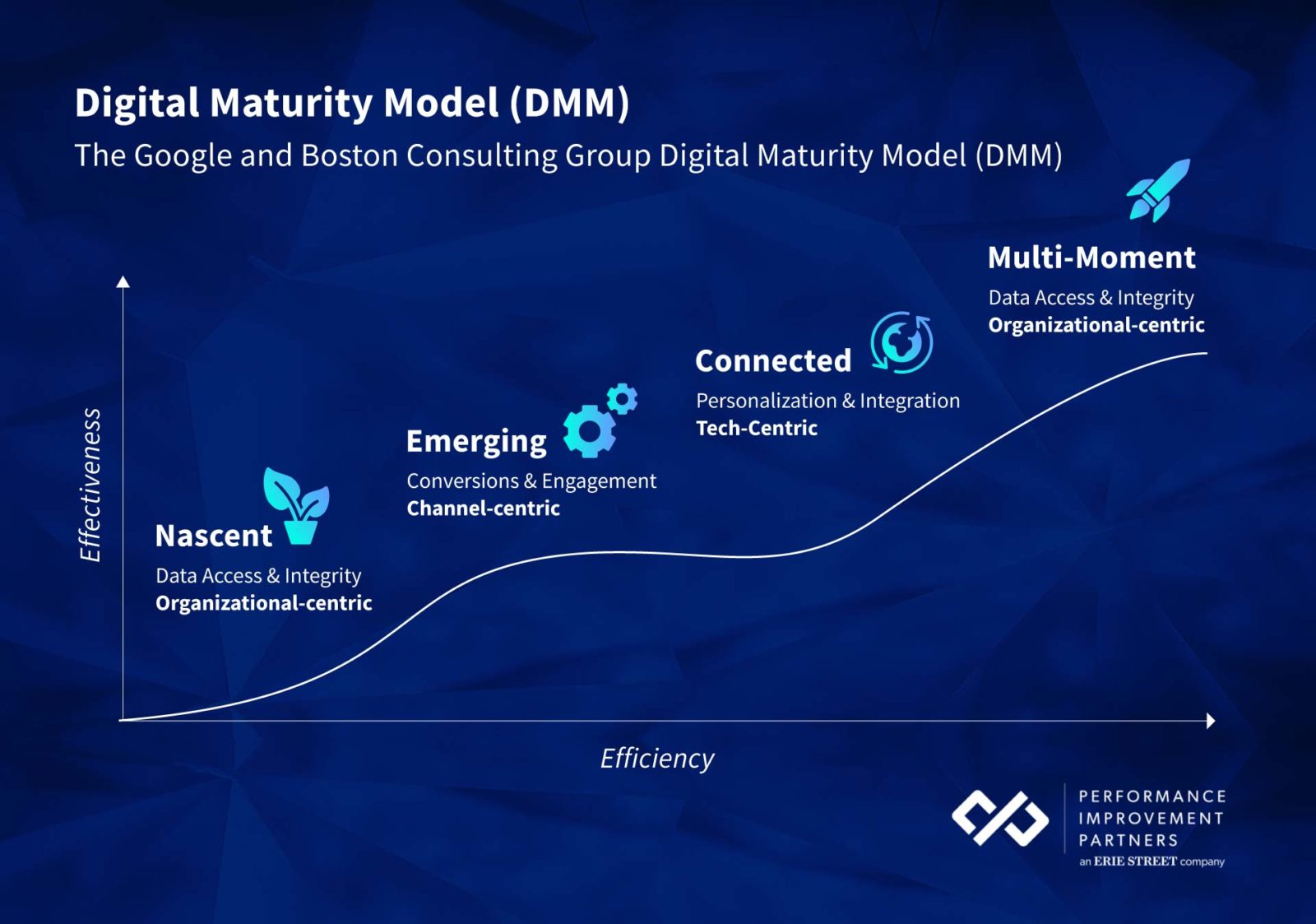
Google’s digital maturity framework has four stages that focus on marketing and sales efforts.
- Nascent: In the early stage of digital maturity, the focus is to improve data quality by connecting data silos across departments. It requires strong leadership buy-in and stakeholder engagement.
- Emerging: Once the departments are well connected, the focus is on improving experiences, deploying new technology, and developing scalable strategies.
- Connected: In the connected stage, organizations leverage data-driven processes to improve productivity, employ offline and online data to drive sales, and support shared goals across the company.
- Multi-Moment: In the final stage, organizations aim to optimize their operational efficiency across all the channels, including sales, marketing, and IT services. Additionally, they use data-driven insights for their decision-making process.
Digital Maturity Challenges
Digital maturity develops unevenly across an organization and creates gaps that make transformation harder to scale or to achieve consistent business outcomes. Here are key digital maturity challenges that limit digital transformation value realization:
1. Siloed teams and fragmented technology ecosystems
Decentralized organizational structures often allow business units, regions, and departments to select their own applications and define their own ways of working. Over time, this creates duplicate software, disconnected data, inconsistent processes, and limited knowledge sharing across the enterprise.
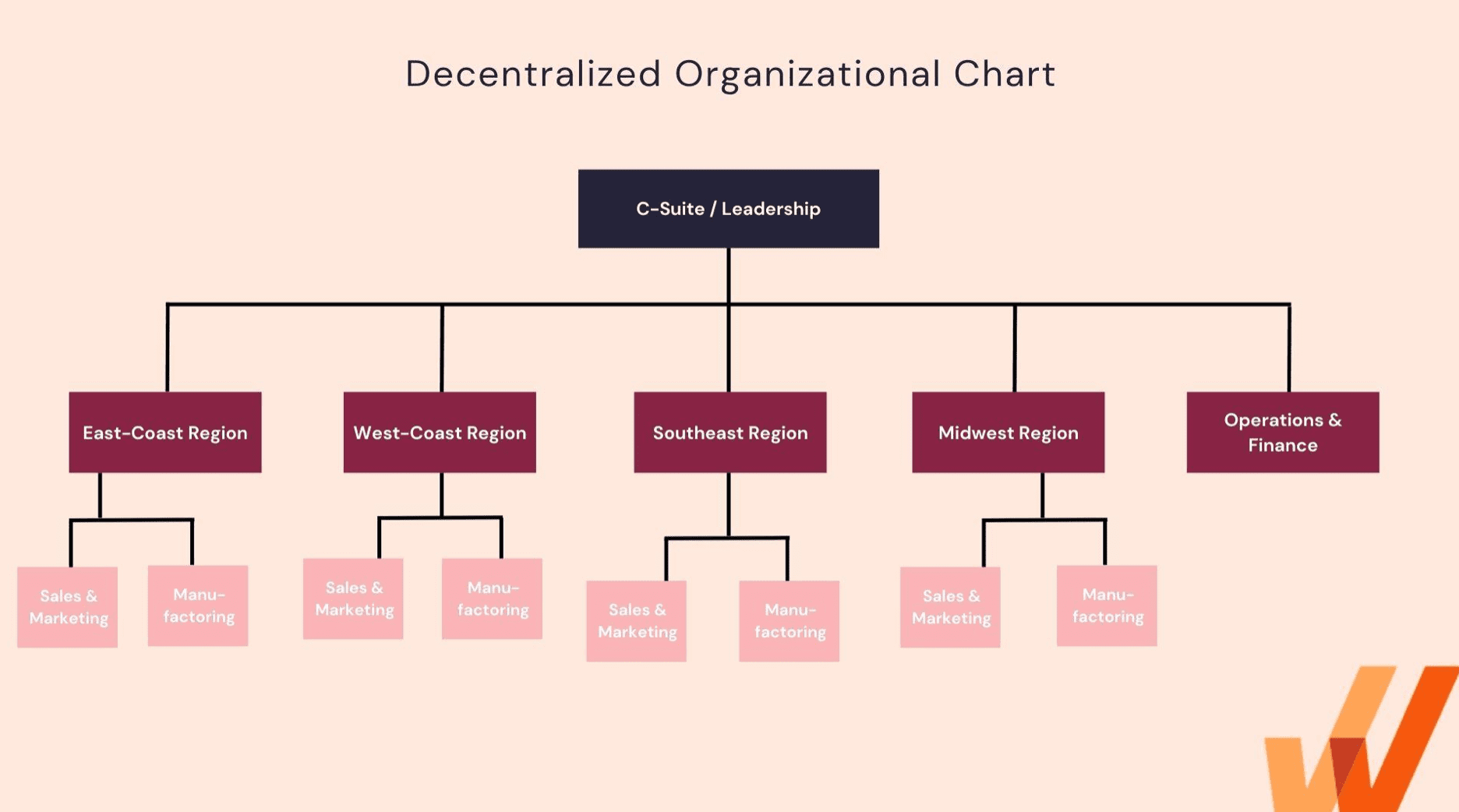
Fragmentation also makes end-to-end workflows harder to manage. A process may cross several applications and teams, with no single owner responsible for the complete user experience or outcome.
2. Unclear digital strategy, ownership, and governance
Digital initiatives often stall when organizations lack clear priorities, decision rights, and accountability. IT may own the technology, while business teams own the process, L&D owns training, and support teams handle user issues. Without coordinated technology governance, each team optimizes its part of the program without owning the final outcome.
Digitally mature organizations assign responsibility for applications, workflows, data, user readiness, adoption, and business performance. They also establish processes for approving changes, maintaining guidance, and reviewing results.
3. Legacy systems and technical debt restrict modernization
Legacy applications, custom integrations, outdated infrastructure, and accumulated technical debt make transformation programs more difficult and expensive. Teams may need to preserve old systems while introducing new platforms, creating complex hybrid environments that are difficult to maintain.
4. Digital skills and readiness vary across large workforces
Employees enter transformation programs with different levels of technical confidence, application experience, process knowledge, and access needs. A standardized training program rarely prepares every role to complete its required workflows successfully.
Organizations need role-based learning, hands-on practice, readiness assessments, and targeted reinforcement. This is especially important for frontline, operational, or regulated roles where users must perform complex tasks accurately under time pressure.
5. Complex and customized applications create steep learning curves
Large enterprises frequently customize ERP, CRM, HCM, procurement, and industry-specific platforms to support unique business requirements. These configurations make generic vendor training and public documentation less useful because they do not reflect the organization’s actual workflows, terminology, controls, or interfaces.
Technology enablement teams must create guidance and documentation for the specific processes employees are expected to perform. As applications and workflows change, that content must also be updated and governed.
6. Data fragmentation and poor data quality limit analytics and AI
Disconnected systems, inconsistent field definitions, duplicate records, and unclear ownership prevent organizations from building a reliable view of operations. Poor data quality weakens reporting and makes it harder to identify workflow problems, automate decisions, or measure transformation outcomes.
The same limitations affect AI initiatives. AI systems require accurate, accessible, and governed data and knowledge sources. Organizations that introduce AI without first improving these foundations risk unreliable answers, inconsistent actions, and low employee trust.
7. Training and support remain disconnected from daily work
Many organizations still rely on classroom sessions, webinars, LMS courses, PDFs, and internal documentation to prepare users for enterprise software. These resources can introduce a system, but employees often struggle to recall detailed instructions when they later encounter a task in production.
When contextual help is unavailable, users turn to colleagues, subject matter experts, or support teams. This slows work, creates inconsistent answers, and increases dependence on a small group of knowledgeable employees.
8. Productivity declines while users learn new systems and processes
Employees need time to build proficiency with new applications, redesigned workflows, and unfamiliar policies. Organizations cannot pause operations during this learning period, so users must adapt while continuing to meet performance expectations.
Poorly managed transitions lead to slower task completion, more errors, process backlogs, and customer disruption. Hands-on simulation training before launch and guidance during live work can reduce the duration and severity of this productivity decline.
9. Resistance to change and change fatigue reduce adoption
Employees may resist new technology because they prefer established processes, distrust the change, lack confidence, or believe the new system will make their work harder. Repeated application launches and process updates can also create change fatigue, even among employees who initially supported the transformation.
Leaders must communicate why the change matters, involve users in workflow design, prepare managers to reinforce new behaviors, and respond to employee feedback. Consistent enablement helps prevent employee resistance to change, like returning to legacy systems or creating unofficial workarounds.
10. Internal support processes cannot scale with continuous change
New system launches often generate a surge in questions, errors, and support tickets. Traditional service desks and subject matter experts can quickly become overwhelmed, leaving employees waiting for answers while critical work remains incomplete.
Digital maturity requires a hypercare support approach that includes centralized knowledge, AI-powered self-service, contextual in-app support, and insight into recurring user issues. These capabilities reduce repetitive requests while helping support teams focus on higher-value problems.
11. Organizations measure deployment instead of adoption and outcomes
Many transformation programs track whether a system launched on time, how many licenses were assigned, or how frequently users logged in. These adoption metrics do not show whether employees can complete workflows correctly or whether the investment is improving business performance.
Organizations need to measure proficiency, workflow completion, errors, process cycle time, feature usage, support demand, and outcome attainment. Without this visibility, teams cannot determine where users are struggling or which interventions improve performance.
How to Assess and Improve Digital Maturity
Improving digital maturity requires a repeatable cycle of assessment, prioritization, enablement, measurement, and optimization. Organizations should begin with their highest-value business outcomes and critical workflows rather than attempting to improve every capability simultaneously.
1. Create an outcome-based digital transformation roadmap
A digital transformation roadmap should connect technology investments to the business outcomes they are expected to produce. Define the improvements the organization needs, such as faster cycle times, higher employee productivity, improved customer satisfaction, fewer errors, stronger compliance, better data accessibility, or reduced operating costs.
Map the workflows, application integrations, data, employee skills, and governance structures required to achieve each outcome. The roadmap should sequence dependencies, assign owners, identify affected user groups, and define how progress will be measured.
2. Assess the organization’s current maturity
Assess current capabilities across strategy, people, processes, technology, data, governance, digital adoption, and customer experience. Use leadership interviews and surveys alongside objective evidence such as application usage, process completion, support demand, system errors, data quality, proficiency assessments, and business performance.
This combination reduces the risk of assessments being shaped primarily by executive perception. Leaders may believe a process is standardized, while workflow data shows employees taking dozens of inconsistent paths to complete the same task.
3. Define the target state, ownership, and KPIs
Set the maturity level required for each strategic capability rather than pursuing the highest score across all categories. A regulated claims process may require advanced workflow governance and standardization controls, while a low-risk internal project management tool may need a more moderate target.
Assign an accountable owner to each capability and define measurable indicators. Relevant KPIs may include time-to-proficiency, workflow completion, error rates, process cycle time, adoption by cohort, feature adoption, support ticket volume, data accuracy, compliance adherence, and business outcome attainment.
4. Prioritize high-impact workflows
Identify workflows where inconsistent execution creates the greatest business cost. Priority candidates are often high-volume, high-risk, high-friction, or high-value processes such as invoice approval, claims adjudication, employee onboarding, opportunity management, procurement, loan origination, contract review, and regulatory reporting.
Map the current user journey and the approved process path. Document the applications involved, handoffs, decisions, data requirements, policies, common errors, support needs, and performance benchmarks. This gives application owners and technology enablement teams a concrete foundation for improvement.
5. Use application simulation before launching new systems
Application simulation gives users a safe environment where they can practice realistic workflows without affecting production systems or data. Simulations can replicate critical application tasks, allowing employees to build familiarity through hands-on practice before go-live.
Use simulation analytics and assessments to measure readiness, identify knowledge gaps, and detect steps where users slow down or make errors. These findings can improve training while also revealing problems in workflow design, field labels, process logic, and documentation before those issues reach production.
6. Support users in the flow of work with in-app guidance
In-app guidance provides step-by-step walkthroughs, field-level tips, task lists, validation, announcements, and contextual support inside the applications employees use. Guidance can be targeted by role, department, location, experience, application behavior, or stage of a change initiative.
This support helps reinforce approved workflows during live execution. Employees receive assistance at the relevant step without searching a document repository, returning to an LMS course, or opening a support request.
7. Centralize documentation and data to enable AI
AI initiatives require reliable data and governed organizational knowledge. Centralize approved policies, procedures, process definitions, training content, application guidance, support resources, and operational data where employees and AI systems can access current information.
Define owners, access controls, update schedules, metadata, taxonomies, retention rules, and source-of-truth standards. Removing obsolete or conflicting content is as important as adding new documentation. AI-generated answers and actions will reflect the quality and consistency of the information available to them.
8. Analyze workflows and track user behavior
Analyze how different roles, teams, locations, and experience levels interact with enterprise applications. Track user journeys, process funnels, feature usage, errors, time between steps, abandoned workflows, repeated attempts, guidance engagement, and support searches.
Behavioral analytics reveal where actual execution differs from the intended workflow. Teams can identify unnecessary steps, confusing interfaces, insufficient training, missing guidance, and process rules that create avoidable delays.
9. Launch targeted interventions
Respond to identified problems with targeted improvements rather than broad training campaigns. An intervention may include role-specific simulation training, a new in-app Flow, a Smart Tip on a high-error field, updated documentation, a redesigned approval step, a policy reminder, or manager coaching.
Segment users based on their behavior and needs. New employees may require guided onboarding, while experienced users taking inefficient paths may need a short contextual prompt. Users who have already completed the workflow correctly may require no intervention.
10. Manage continuous application and process change
Enterprise applications and business processes rarely remain stable. Establish governance for reviewing software releases, policy changes, new AI capabilities, integrations, and process updates. Determine which users are affected, what knowledge or guidance must change, and how adoption will be evaluated.
Technology enablement teams can play a central role by coordinating application owners, process leaders, L&D, change management, communications, data teams, and support functions. This creates a repeatable enablement system for managing change across the application lifecycle.
11. Reassess maturity and scale successful practices
Review digital maturity at a consistent cadence and compare progress against the initial assessment and target state. Identify which interventions improved proficiency, workflow performance, data quality, adoption, and business outcomes.
Scale effective practices across other teams, applications, and processes. Retire activities that generate limited impact, address newly discovered dependencies, and update target maturity levels as organizational priorities and technology capabilities change.
Digital Maturity Clicks With Whatfix
Whatfix is a unified digital adoption platform that helps organizations improve digital maturity across the enterprise application lifecycle, from application simulation pre-go-live for hands-on user training and workflow testing, to in-app guidance and self-service help in the flow of real work, to continuous workflow optimization and adoption analytics.
Together, these capabilities help enterprise teams accelerate user proficiency, govern software usage, manage continuous change, and connect digital adoption with transformation ROI.
Whatfix’s 2026 State of Enterprise Digital Transformation ROI report found that organizations using a digital adoption platform (DAP) reported:
- 64% faster time-to-value on new rollouts
- 37% higher user proficiency after three months
- 67% higher ROI from enterprise software.
These findings reflect the surveyed organizations and should be used as directional evidence of the business impact associated with structured digital adoption programs.
Whatfix Capabilities to Improve Organizational Digital Maturity
- Prepare users with hands-on application practice: Whatfix Mirror replicates enterprise application workflows so users can practice realistic tasks without affecting live systems or production data.
- Assess readiness before go-live: Use assessments and simulation analytics to measure proficiency, identify failure points, and determine which users or workflows require additional preparation.
- Guide users through critical workflows: Deliver role-based Flows, Smart Tips, Task Lists, Pop-Ups, and field validation inside enterprise applications to reinforce approved process paths.
- Provide AI-powered self-service support: Whatfix Self Help integrates with organizational knowledge and support resources to give employees contextual answers without leaving the application or contacting a support team.
- Analyze adoption and workflow friction: Use Product Analytics, User Journeys, Funnels, Cohorts, AI Insights, and Session Replay to identify drop-offs, inefficient paths, errors, and underused application capabilities.
- Manage continuous change: Target communications, training, and in-app guidance to affected users, maintain content through governed release processes, and measure whether each intervention improves adoption and performance.
By connecting pre-launch preparation, in-workflow support, behavioral analytics, and targeted optimization, Whatfix helps organizations turn technology deployments into sustained improvements in how work gets done.
Request a Whatfix demo to see how your organization can improve user readiness, accelerate application adoption, optimize critical workflows, and increase the value of enterprise technology investments.