


Digital transformation succeeds when technology investments produce measurable improvements in business performance. That requires enterprises to look beyond technical implementation milestones and vanity usage activity, and instead track key business outcomes such as productivity, process cycle time, cost reduction, operational proficiency, process efficiency, and revenue impact.
Whatfix’s State of Digital Transformation ROI report surveyed 300 U.S.-based C-suite and digital transformation leaders and found that 61% still rely on qualitative data to measure the success of digital transformation projects. It also revealed that enterprises supporting modernization rollouts with a digital adoption platform (DAP) achieved 64% faster value realization and 67% higher overall ROI.
This article explores the digital transformation metrics and KPIs that organizations should track to link technology adoption to core business outcomes and demonstrate the value of transformation investments.
Most Important KPIs to Track & Measure Digital Transformation Impact
While every digital transformation journey is unique, we’ll focus on broad KPIs that fall into three core categories: Financial, Customer Experience, and Process & Workforce.
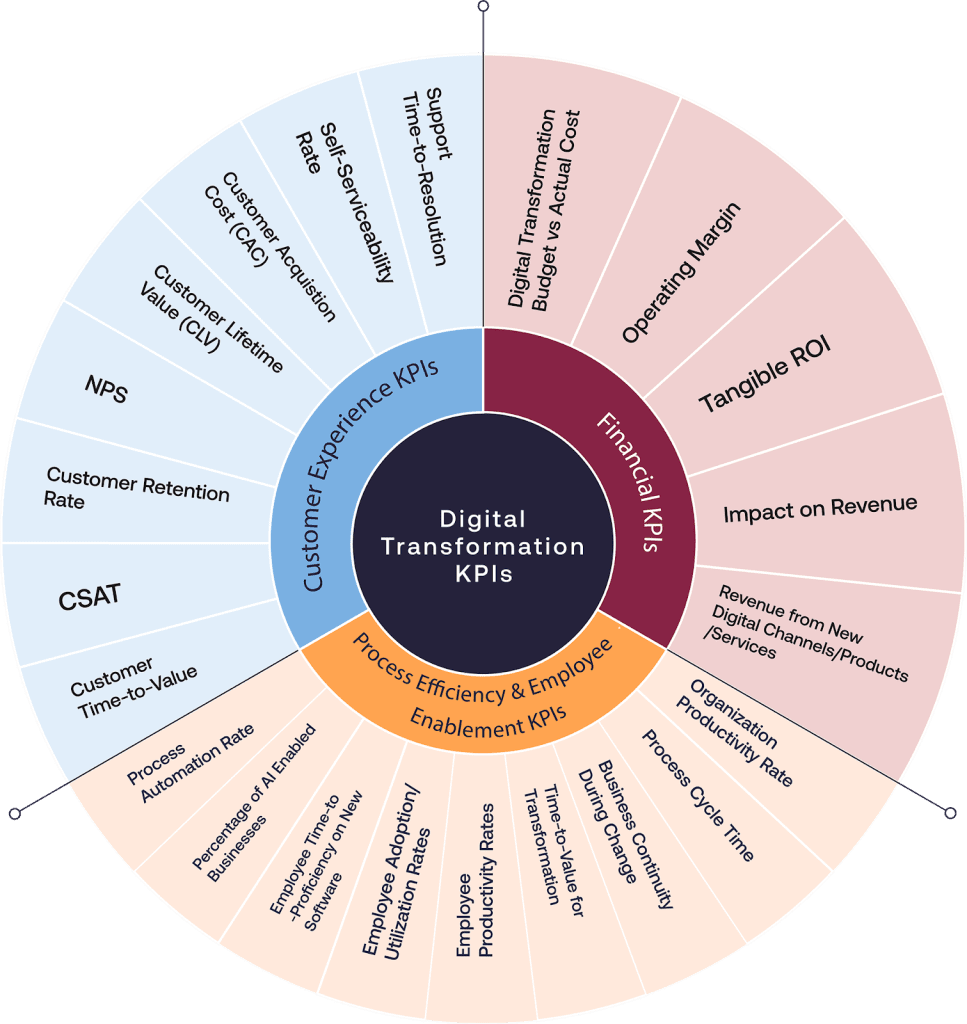
Financial KPIs
Financial KPIs help quantify the fiscal impact of digital transformation initiatives and ensure every dollar invested is tied to measurable business outcomes that drive enterprise value.
| KPI Name | Description |
| Digital Transformation Budget vs Actual Cost | Tracks initial budget against actual spend to evaluate project financial discipline and identify overruns early. |
| Operating Margin | Measures profitability by comparing operating income to revenue—gauging cost efficiencies realized from digital initiatives. |
| Tangible ROI | Quantifies direct returns—cost savings, revenue gains—relative to digital investment for proving financial impact. |
| Impact on Revenue | Evaluates influence of digital projects on top-line growth, separating digital-driven versus traditional revenue. |
| Revenue from New Digital Channels/Products/Services | Tracks income generated from newly launched digital offerings, indicating innovation and business model expansion |
Customer Experience KPIs
Customer experience KPIs track how your digital transformation strategy improves satisfaction, loyalty, and the overall customer value, all key indicators of long-term business success.
| KPI Name | Description |
| Customer Time‑to‑Value | Measures how quickly customers derive meaningful benefits following digital onboarding or engagement. |
| CSAT | Customer Satisfaction Score reflects users’ satisfaction with digital interactions, services, or products. |
| Customer Retention Rate | Percentage of customers retained over time, showing how well digital improvements boost loyalty. |
| Customer Lifetime Value (CLV) | Predicts total revenue from a customer over their lifecycle, highlighting long-term digital impact |
| Customer Acquisition Cost (CAC) | Tracks marketing and sales costs needed to acquire customers, helping assess cost-effectiveness of digital strategies. |
| NPS | Net Promoter Score measures likelihood of customers recommending your brand after digital interactions. |
| Self‑Serviceability Rate | Percentage of issues resolved via self-service tools, reducing dependency on support. |
| Support Time‑to‑Resolution | Tracks how fast support queries are closed through digital tools—faster resolution contributes to better customer experience. |
Process Efficiency & Employee Enablement KPIs
Process efficiency and enablement KPIs track how digital transformation initiatives streamline operations and how your organization supports its people, which are critical for ensuring transformation is adopted, sustainable, and scalable.
| KPI Name | Description |
| Organization Productivity Rates | Overall output per employee across digital tools, reflecting broad gains in workforce efficiency. |
| Process Cycle Time | Time to complete a process end-to-end; decreasing this indicates digital-driven efficiency. |
| Business Continuity During Change | Measures ability to sustain operations during digital transitions, indicating transformation resilience. |
| Time‑to‑Value for Transformation | Time from project inception to achieving measurable business benefit—shows speed of digital impact. |
| Employee Productivity Rates | Tracks improvement in individual workflows through digital tools (e.g., tasks completed/day). |
| Employee Adoption/Utilization Rates | Percentage of staff actively using digital tools—key leading indicator of transformation success. |
| Time‑to‑Proficiency on New Software | Time taken for employees to reach full efficiency with new apps, platforms, and digital workflows. |
| Percentage of AI‑Enabled Businesses | Share of business processes using AI—tracks advancement into intelligent automation. |
| Process Automation Rate | Percentage of workflows automated—an indicator of operational transformation and cost reduction . |
See how 300 digital transformation leaders measure implementation success, user proficiency, time-to-value, and ROI. Download the State of Digital Transformation ROI Report.
How to Build a Digital Transformation KPI Scorecard
Use this five-step process to turn a digital transformation objective into a focused, metric-tracking KPI scorecard that supports clear decisions, timely intervention, and outcome-driven design.
1. Define Transformation Key Outcome and Ownership Roles
- Write a measurable outcome with a target and timeframe.
- Assign one business owner who is accountable for the outcome.
- Identify the application, process, and data owners responsible for acting on performance gaps.
- Confirm which decisions each owner can make when results fall behind target.
For example, let’s imagine a scenario where an organization is undertaking a procurement transformation project to reduce requisition-to-PO cycle time and improve compliance. Ownership and outcomes would look like below:
| Details | Overview |
| Project | Procure-to-pay process transformation |
| Outcomes | Reduce median requisition-to-PO cycle time from five to three days and increase compliant requisitions from 82% to 95% within six months |
| Owners | The procure-to-pay process owner owns the outcome, the ERP application owner owns system changes, and the procurement analytics lead validates the data. |
2. Select a Focused Set of KPIs
Choose three to five KPIs for each initiative:
- One primary business outcome KPI
- Two or three leading or diagnostic KPIs
- One financial KPI where the benefit can be measured credibly
Remove metrics that do not inform a decision or trigger an intervention.
For example, let’s look at what our procurement process transformation KPI scorecard would look like:
| Metric/Outcome | Overview |
| Primary Outcome | Median requisition-to-PO cycle time |
| Leading Indicator | Percentage of in-scope requisitions submitted through the new ERP workflow |
| Diagnostic metric(s) | Workflow completion rate and purchasing-control adherence |
| Financial metric | Cost per completed requisition |
Together, these KPIs show whether adoption of the new workflow is improving procurement speed, compliance, and cost.
3. Define How Each KPI Will Be Measured
For every KPI, document:
- Exact definition and calculation method
- Included users, workflows, and transactions
- Exclusions and assumptions
- Data source and collection method
- Reporting frequency
- Accountable owner
- Warning and intervention thresholds
Apply these measurement definitions to the procurement transformation:
| Measurement Element | Definition |
| Workflow adoption | Percentage of in-scope requisitions submitted through the new ERP workflow instead of legacy or off-system channels |
| Cycle-time starting point | The time a valid requisition is submitted |
| Cycle-time endpoint | The time the corresponding purchase order is issued |
| Exclusions | Cancelled requests and emergency purchases |
4. Establish Baselines and Targets
- Collect historical data using the agreed KPI definitions.
- Use a representative period that captures normal volumes and operational variation.
- Segment results by relevant roles, regions, business units, applications, or workflows.
- Set targets based on the business case, operating capacity, and expected adoption curve.
- Document data limitations that could affect interpretation.
The procurement team could establish its baseline and targets as follows:
| Baseline Element | Approach |
| Historical period | Analyze six months of procurement data |
| Segmentation | Break down results by business unit, requester role, approval level, and purchase category |
| Confirmed baseline | Five-day median requisition-to-PO cycle time and 82% compliance |
| Targets | Set phased targets for workflow adoption, cycle time, compliance, and cost per completed requisition |
5. Set the Review and Intervention Cadence
- Review digital adoption metrics frequently during rollout and stabilization.
- Review business and financial outcomes at agreed milestones.
- Set thresholds that trigger investigation and corrective action.
- Record interventions and compare subsequent performance with the baseline.
- Retire or replace KPIs that no longer support an active decision.
For the procurement transformation, the review and intervention plan could look like this:
| Review or Trigger | Action |
| Weekly review during the first 90 days | Review workflow adoption, completion, and cycle-time metrics |
| Adoption misses its agreed milestone | Investigate user access, communication, training, and application friction |
| Adoption is on target but cycle time remains high | Review approval routing, workflow design, system configuration, and exception handling |
| Three- and six-month reviews | Evaluate compliance and cost outcomes against the baseline and targets |
How Whatfix Helps Measure and Improve Digital Transformation Outcomes
Whatfix connects pre-go-live readiness, in-workflow enablement, and product analytics in a continuous adoption loop. This helps transformation teams identify execution gaps, target support, and measure whether improved software use is contributing to operational outcomes.
Establish User Readiness Before Go-Live
Whatfix Mirror creates interactive replicas of enterprise applications where users can practise critical workflows without affecting production systems. Transformation teams can assess task completion, failure points, and proficiency by role, then provide additional training before users enter the live environment.
Measure Adoption and Workflow Execution
Whatfix Product Analytics captures user behaviour without engineering support. Application owners can track feature adoption, workflow completion, drop-offs, task time, and performance across user groups. Funnels, journeys, cohorts, session replays, and AI Insights help reveal where and why users struggle.
Correct Friction in the Flow of Work
Whatfix DAP delivers contextual Flows, Smart Tips, field validation, and Self Help within enterprise applications. Teams can target support to the roles and workflow steps experiencing friction, helping users follow approved processes while reducing errors, rework, and support dependency.
Request a Whatfix demo to see how your organization can prepare users, improve workflow execution, and measure the outcomes of digital transformation initiatives.