


In this article, we define CRM adoption, explain why it matters to enterprise sales teams, and break down common challenges that prevent consistent use and full CRM value realization. We also highlight key CRM adoption metrics, strategies, and tools organizations can use to improve seller proficiency, data quality, process compliance, and overall CRM ROI.
What Is CRM Adoption?
CRM adoption is the extent to which sales teams consistently use and extract value from their CRM investment. It includes more than simple utilization; it also encompasses adherence to governance processes, maximizing seller productivity, and cross-team adoption.
What Does Strong CRM Adoption Look Like?
Strong CRM adoption means users:
- Enter accurate, complete customer and opportunity data
- Follow standardized workflows inside the CRM
- Use required features such as forecasting, task management, reporting, and automation
- Rely on the CRM as the primary source of customer information
- Complete key processes efficiently with minimal support
Types of CRM Adoption Metrics
There are three distinct types of CRM adoption metrics:
- Usage metrics: Tell you how many sellers actively use your CRM and for what purposes.
- Data quality metrics: Tell you how accurate the data quality in your CRM is.
- Performance metrics: Tell you how effectively your sellers use your CRM, its processes, and its strategy to achieve outcomes.
CRM usage metrics
The first type of CRM adoption metric to track is basic usage. Here are a few common CRM usage metrics to track that are fantastic indicators of seller adoption.
- % CRM licenses used: This basic CRM metric lets you know how many of your CRM subscription licenses are being used over your total number of CRM subscription licenses that are paid for.
- Login numbers, frequency, and rate: These adoption metrics give you insights into how many sellers log into your CRM, the frequency at which they log in, and the rate at which they log in. Benchmarking daily and monthly active user counts will help you to identify poor adoption trends.
- Interaction count: Tracking CRM interactions such as calls, emails, and notes will provide insights into how many interactions it takes to close a deal and how many sellers interact with a single opportunity.
- Dropoff rates: Dropoff rates enable sales leaders to understand friction points inside a CRM and work on improving the CRM user journey through better in-app guidance, training, and user support.
CRM data quality metrics
After ensuring your sellers actively use your CRM, it’s time to move to step two of the adoption cycle – ensure sellers use it correctly. This includes ensuring your sellers correctly enter data and move deals through the pipeline. To maintain CRM data quality, you should consider some key metrics. These metrics include:
- Form field data quality: Track the data captured from your form fields to analyze their accuracy and completeness.
- Attribution: Track where leads and opportunities came from, who closed a deal, etc.
- Prospects with missing information (last 60 days).
- Opportunities with a close date (last 60 days).
- Accounts with missing information (last 60 days).
CRM performance metrics
Finally, it’s time to track how effectively your CRM is performing. This will provide a more nuanced view of how well your sellers have adopted your CRM and its core processes, and if it has improved their efficiency in the expected ways.
- Pipeline: You should track pipeline growth before and after your new CRM. Pipeline should grow as your sellers become better CRM users.
- Deal cycle and stage times: Measure how long it takes for an opportunity to move between sales stages and cycles. As you improve CRM adoption, these cycle and stage times should decrease.
- YoY win rate growth.
- Activity type by assigned owner(s).
Benefits of Strong CRM Adoption
Here are a few of the benefits a strong CRM user adoption strategy brings to your organization:
- Increased sales efficiency: New CRMs bring together automation and big data to turn manual, repetitive tasks into automated ones – allowing your sales team to focus more on important customer relationships. With a high adoption rate, these CRM tools allow your employees to become more productive and efficient.
- Better CRM data management: Strong CRM adoption rates provide a ton of insightful customer data, which can be used to identify trends, make informed decisions, and drive business growth. By analyzing this data, businesses can gain valuable insights into their customers’ behavior and preferences, as well as the effectiveness of their sales and marketing efforts.
- Increased revenue and profitability: Strong CRM adoption rates can lead to increased business revenue and profitability. Businesses can drive sales, reduce costs, and improve their bottom line by improving customer satisfaction, efficiency, and data management.
- Stay ahead of the competition: By driving user adoption of a new CRM, your organization can take advantage of cutting-edge features in customer-relationship technology – giving your organization an advantage over your competitors.
- Reduced burden on IT support: With better CRM proficiency and adoption, your team will not have to rely on your IT team to answer CRM support-related questions – allowing them to be self-reliant and expert CRM users.
- Improved customer satisfaction: Strong CRM adoption rates empower businesses to better understand their customers’ needs and preferences, which allows them to provide personalized service and support. This, in turn, leads to higher levels of customer satisfaction and loyalty.
CRM Adoption Challenges
In an enterprise sales environment, eight major CRM adoption challenges are:
1. CRM workflows do not match how sales teams work
Enterprise sales processes vary by role, region, product, and deal type. When CRM workflows feel disconnected from how reps manage accounts, opportunities, approvals, and handoffs, users create workarounds or move activity outside the platform.
2. CRM processes create too much administrative work for reps and sellers
Reps often spend significant time updating fields, logging activities, managing records, and completing required steps. High administrative effort lowers usage and encourages users to delay or skip important updates.
3. Users receive insufficient role-based training
Generic CRM training rarely prepares SDRs, account executives, managers, and operations teams for the workflows they complete each day. Users need hands-on practice and contextual guidance tailored to their roles, responsibilities, and permissions.
4. Sales teams are not prepared for CRM launches
CRM implementations, redesigns, and migrations frequently go live before users are ready to complete critical workflows. Limited practice, testing, and go-live readiness assessment can lead to errors, slower ramp-up, and high support demand after launch.
5. Users struggle to keep up with frequent CRM changes
New fields, approval rules, automation, integrations, and process updates create constant disruption. Without in-app communication and guidance, users follow outdated steps or miss newly introduced requirements.
6. Data quality and process compliance are inconsistent
Missing fields, duplicate records, incorrect opportunity stages, and inconsistent activity tracking reduce the reliability of CRM data. Poor data quality affects forecasting, reporting, handoffs, and leadership decision-making.
7. CRM support demand overwhelms sales enablement and operations teams
Users often rely on RevOps, enablement, or IT for basic questions about fields, processes, approvals, and system navigation. Repeated support requests slow users down and pull internal teams away from higher-value work.
8. Leaders lack visibility into adoption and workflow friction
Login data alone does not indicate whether users can successfully complete critical workflows. Sales and operations leaders need visibility into where users drop off, make errors, avoid features, or take inefficient paths through the CRM.
CRM Adoption Strategies for Enterprise Sales Teams
Improving CRM adoption requires more than initial training and usage mandates. Enterprise sales organizations need a structured approach that prepares users before launch, guides them through critical workflows, reinforces process changes, and identifies where adoption breaks down over time.
1. Assess user readiness before CRM rollout
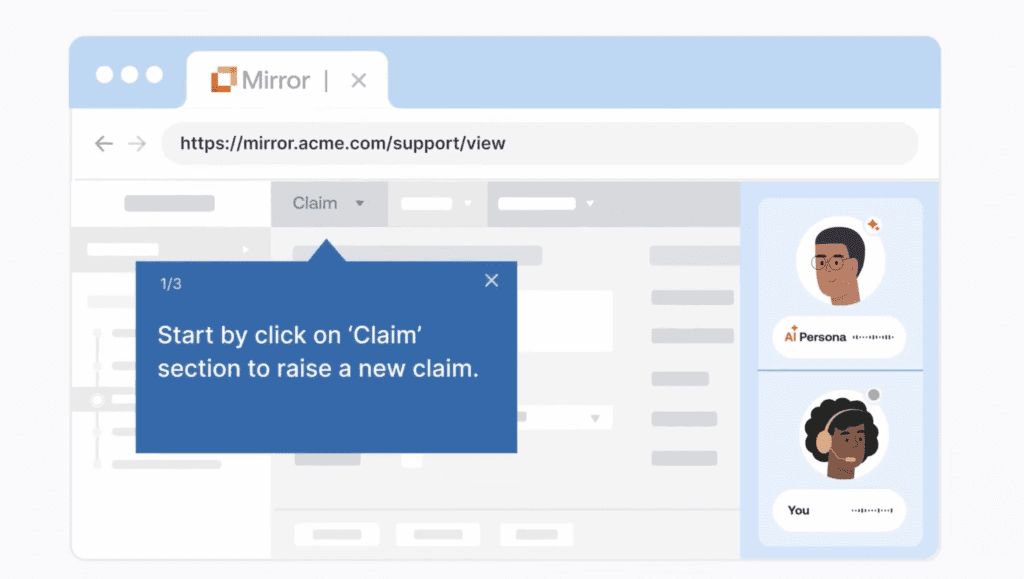
Before launching a new CRM, migration, or major workflow redesign, evaluate whether users can complete the tasks required for their roles. Use application simulation training, hands-on practice, and user readiness assessments to identify knowledge gaps before they affect live opportunities, customer data, or revenue operations.
Prioritize high-impact workflows, including lead qualification, opportunity creation, pipeline updates, quote approvals, forecasting, and account handoffs.
With Whatfix Mirror, CRM owners and RevOps leaders can create CRM application sandboxes to provide hands-on training, paired with AI roleplay for customer-facing scenarios and guided workflows, to drive adoption before ever using the live platform.
2. Design CRM adoption around critical sales workflows
Organize adoption programs around the processes sales teams complete, rather than individual CRM features. Map the approved path for each workflow, identify where users struggle, and provide targeted enablement at the steps most likely to cause errors or delays.
This approach helps RevOps and sales enablement teams standardize execution across regions, teams, and roles while reducing the need for off-platform workarounds. With Whatfix, application owners can track adoption by workflow, across teams, by feature, and more.
3. Deliver role-based CRM training
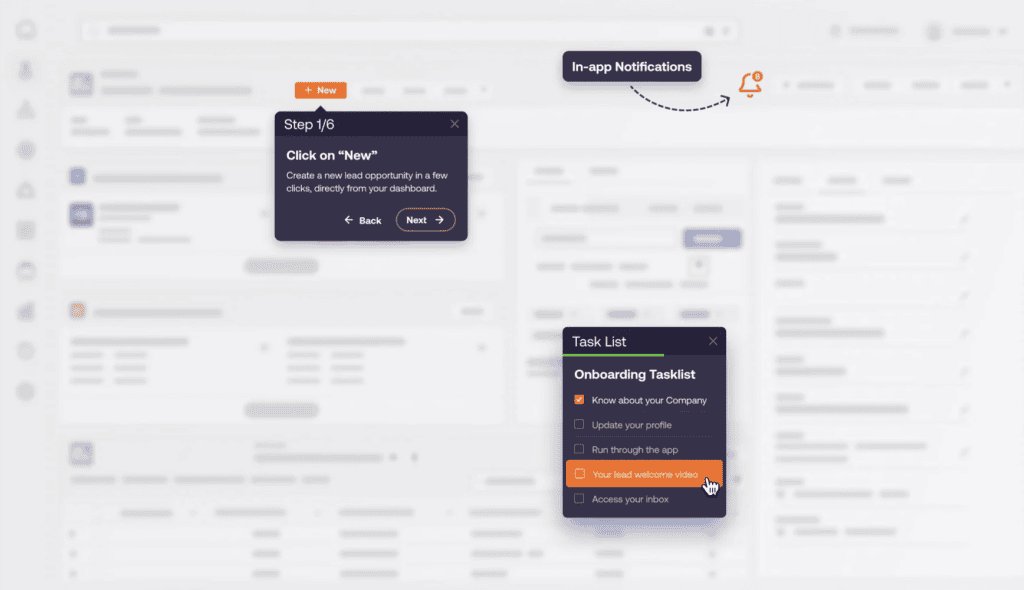
SDRs, account executives, managers, channel teams, and revenue operations users interact with the CRM in different ways. End-user training should reflect each role’s workflows, permissions, goals, and data responsibilities. Combine simulated practice with in-app walkthroughs, task lists, and contextual guidance so users can learn processes in a controlled environment and reinforce them while working in the live CRM.
4. Guide users inside complex CRM workflows
Provide step-by-step guidance within the CRM for workflows that involve multiple fields, stages, approvals, or connected applications. Contextual prompts can direct users through the correct process without requiring them to leave the application or search through documentation.
In-app guidance is especially valuable for infrequent or high-risk processes such as discount approvals, contract handoffs, territory changes, renewal management, and opportunity close procedures.
With Whatfix DAP, this guidance supports users in the flow of work, from Smart Tips for providing timely information, Flows for ensuring sales process adherence, Field Validation for ensuring data quality, and more.
5. Reinforce data quality and process compliance
CRM data becomes unreliable when users skip required fields, select incorrect stages, or follow inconsistent processes. Use field-level guidance, validation prompts, and contextual reminders to help users enter accurate information and follow approved procedures.
These guardrails improve pipeline visibility, forecasting accuracy, reporting reliability, and downstream handoffs between sales, finance, legal, and customer success teams.
6. Manage CRM changes with in-app communication
CRM environments change continuously as teams introduce new fields, automation rules, integrations, features, and sales processes. Communicate changes directly in the CRM and provide guidance when users encounter the updated experience.
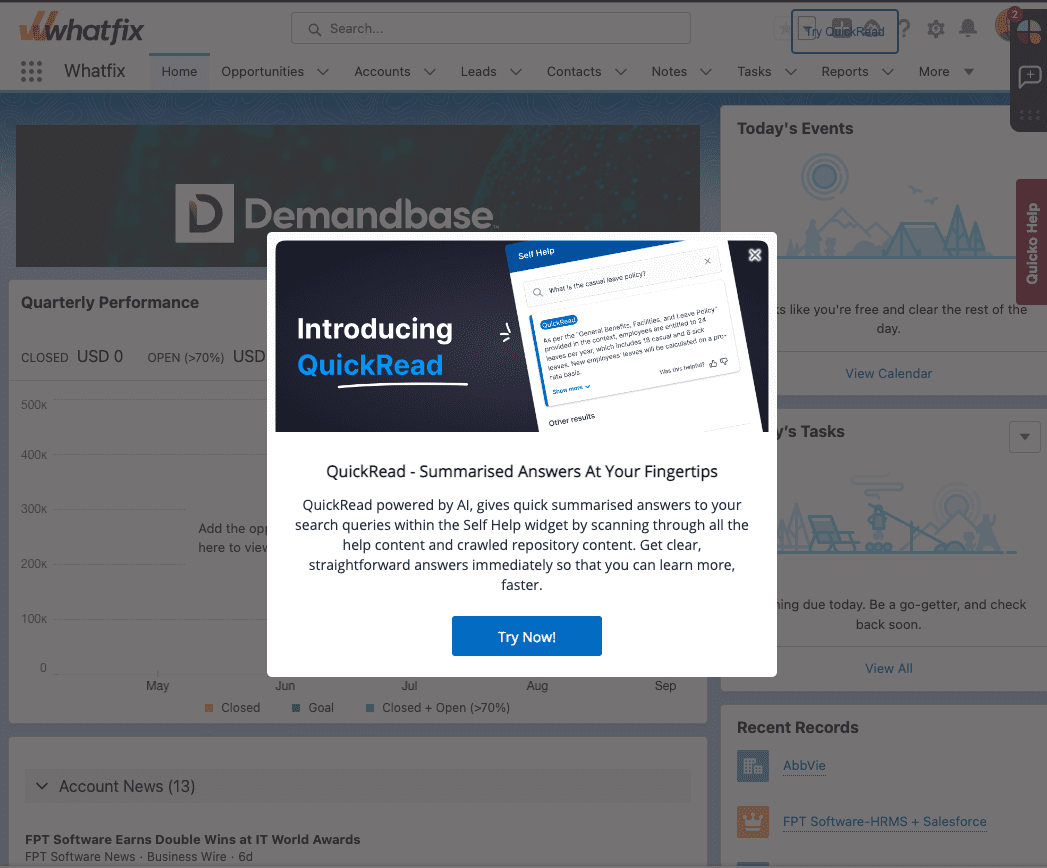
Target communications by role, region, business unit, or workflow so users receive relevant updates without being overwhelmed by broad announcements.
7. Measure adoption and continuously optimize workflows
Track more than logins and active users. Measure whether users complete critical workflows, where they abandon processes, which features remain underused, and where errors or inefficient paths occur.
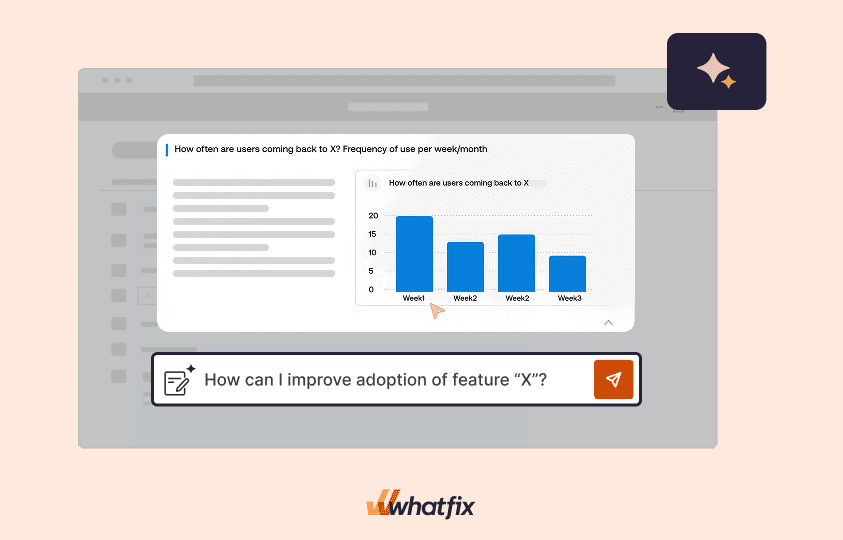
Use funnels, user journeys, behavioral analytics, and session insights to identify friction and prioritize improvements. RevOps and application owners can then refine workflows, update guidance, and measure whether changes improve adoption, efficiency, and business outcomes.
CRM Adoption Clicks With Whatfix
Whatfix helps sales teams learn, complete, and continuously improve critical CRM workflows directly within their flow of work. Here’s how:
How Whatfix helps improve CRM adoption
- Prepare users before CRM launches and major updates. Create replica CRM environments with Whatfix Mirror so sellers can practice role-specific workflows, build proficiency, and demonstrate readiness without entering incorrect data or disrupting the live application.
- Accelerate role-based onboarding. Deliver personalized Task Lists, Flows, Smart Tips, and other contextual guidance based on each user’s role, location, business unit, and stage of the sales process.
- Guide sellers through complex CRM workflows. Provide step-by-step assistance for opportunity management, lead conversion, forecasting, approvals, account handoffs, CPQ processes, and other multistep workflows while the user completes the task.
- Improve data quality and process compliance. Use field-level guidance, validation, and contextual prompts to reinforce required actions, prevent data-entry errors, and standardize how sales processes are executed across teams.
- Provide CRM support at the moment of need. Embed searchable Self Help, internal documentation, and AI assistance within the CRM so users can resolve questions without leaving the application or contacting Sales Operations, enablement, or IT.
- Identify adoption friction and optimize CRM experiences. Analyze Flow drop-offs, Task List completion, feature usage, user journeys, funnels, and behavioral patterns to find where sellers struggle and continuously improve workflows, guidance, and enablement.
Examples of sales teams driving CRM adoption with Whatfix
- Sophos: Sophos used Whatfix to support Salesforce users through quarterly platform releases and monthly internal customizations across seven countries. Contextual training, Smart Tips, guided Flows, and on-demand support contributed to a 15% year-over-year reduction in global Sales Operations cases, equal to approximately 12,000 fewer cases, while saving 1,070 hours in seller training and support.
- Experian: Experian deployed personalized, multilingual Whatfix guidance across its heavily customized Salesforce environment and connected CPQ and eSignature applications. The company reduced Salesforce support tickets by 55%, lowered training content creation costs by 48%, and increased seller productivity by 72% year over year. It also condensed its Salesforce onboarding course from 19 modules and six hours to one 40-minute module.
- Renewable Energy Group: REG standardized training and in-app support across Salesforce, Oracle JD Edwards, and other enterprise applications with Whatfix. Contextual Flows, embedded Self Help, and adoption analytics helped reduce application time-to-proficiency from approximately six months to three months, cut daily application-related support tickets by 83%, and reinforce standardized processes that reduced accounting errors.
Ready to get started with Whatfix? Request a demo now!