


Quality management systems (QMS) have emerged as essential quality assurance tools that enable product excellence and compliance across different industry sectors.
As technology changes how companies in industries like food and beverage, pharmaceutical, medical device, and aviation operate, compliance and quality control become digitalized and automated. Companies that take products to market that are high-risk require QMS technology to help them compete, keep them compliant, allow them to ship safe products, and enable them to achieve their business objectives
In this article, we define quality management systems and their core features. Whether your organization is in manufacturing, healthcare, or any sector requiring stringent quality control, understanding the nuances of these systems is key to optimizing your Q/A, compliance, and overall operations. We’ll also explore the best QMS software based on our research, their market presence, each platform’s core offerings, their review rating, and more.
What is the best quality management software?
What Is a Quality Management System (QMS)?
A quality management system (QMS) is a software platform that empowers organizations to stay on top of quality operations and policies for developing products and services. Quality management systems are essential to product development lifecycles in regulated industries such as food and beverages, healthcare, and manufacturing.
QMS software is used to streamline tasks such as:
- Business process management
- Creating and managing process documentation and SOPs
- Management responsibilities like team collaboration, communication, and goal setting.
- External and internal auditing
- Staff training, continuous learning, and real-time support.
- Analyzing and monitoring compliance-related quality assurance.
- Service provisioning.
- Customer feedback.
- Continuous improvement.
- Change management.
- Reporting.
For example, you can use QMS software to manage the creation, approval, and tracking of all documents required for industry standards and compliance requirements. Without QMS software, organizations are more susceptible to being slowed down by paper-based documents, manual workflows, and siloed information.
Types of Industry-Specific QMS Software
Not all QMS software has the same features and capabilities. Different QMS platforms are designed for industry-specific personas that address unique challenges to specific sector compliance guidelines and regulations.
A few of the more common QMS systems designed for industry-specific sectors and verticals include:
- General QMS systems: Has capabilities covering general quality-focused processes that can be applied across industries, like document management, audit management, supplier management, and analytics.
- Aerospace QMS systems: Features are tailored to help aviation and aerospace organizations adhere to product design and manufacturing standards. These systems typically follow AS9100 standards used in the industry.
- Automotive QMS systems: Features are tailored to help automotive manufacturers and suppliers adhere to quality standards throughout the supply chain. For example, automotive manufacturers must work with processes that meet the quality standards of the National Highway Traffic Safety Administration (NHTSA).
- Food and agriculture QMS systems: QMS software must help organizations in this industry stay on top of regulatory guidelines that maintain food safety when it is produced, processed in facilities, and distributed to the masses. The Hazard Analysis Critical Control Point (HACCP) are principles defined by the Food and Drug Administration (FDA) for this industry.
- Healthcare and Medical QMS systems: Features in these QMS software aim to help manufacturers and suppliers navigate complex and strict healthcare regulations such as ISO 13485, which covers requirements that must be followed when medical devices are designed, produced, stored, distributed, and installed.
- IT QMS systems: Software for IT QMS allows organizations to manage IT systems and secure digital assets according to industry standards for information security, such as the ISO/IEC 27001.
- Pharmaceutical QMS systems: The capabilities of pharmaceutical QMS software must help organizations stay on top of quality and safety guidelines — like FDA 21 CFR Part 11 and ISO — required while researching, validating, and producing pharmaceuticals.
Key Features of QMS Software
While different, industry-specific QMS software each has different features depending on what type of customers they service, there are still core QMS features found across all QMS platforms. Here is a list of core QMS features:
- Document management and control: To centralize workflows for creating, approving, distributing, and maintaining up-to-date QMS documents.
- Equipment and assets: To track and manage the usage and maintenance of product development equipment and assets to meet quality and compliance standards.
- Corrective and preventive actions (CAPA) management: To collect and identify issues with product nonconformities so organizations can quickly resolve them and execute preventative strategies.
- Internal audit management: To streamline processes for planning audits, meeting deadlines, and hitting targets for industry requirements using organized project management and document tracking.
- Non-conformance management: To execute systems for documenting and analyzing events and complaints if products do not meet quality standards.
- Employee training and qualification tracking: To implement employee training programs that effectively educate team members on quality management workflows and how to execute tasks accurately and consistently.
- Reporting and analytics: To analyze and measure the effectiveness of quality management efforts so organizations can stay on top of regulatory requirements, audit findings, non-conformance rates, customer complaints, and more.
14 Best Quality Management Systems
To help you on your QMS buying journey, we’ve highlighted the best QMS vendors based on their core features and overall perception in the QMS space. We’ve included an overview of each QMS product, review ratings from third-party websites, and the core industries each product serves.
We also placed these QMS vendors into groups based on their core industry, sector, and vertical niche, including:
- General QMS Software
- Life Science & Pharma QMS
- Healthcare & Medical Devices QMS
- Aerospace & Aviation QMS
Best General QMS Software
1. SAP ERP’s QM Module
- Review Rating: 4.2 out of 5 stars
- Industries: Procurement, Manufacturing, Human Resources, Finance, Sales
- Use case: Quality management capabilities embedded in SAP ERP for integrated compliance, inspection, and process quality across manufacturing and operations.
SAP ERP’s QM module provides a quality management solution that enables enterprises across industries to streamline quality control processes with its robust set of enterprise resource management modules, like human resources management, procurement processes, finance tracking, supply chain management, and more. These cross-functional integrations give large organizations a single platform to manage day-to-day operations and quality assurance tasks across different departments, including non-quality and control processes.
The SAP platform is complex and highly customizable, making it a good choice for enterprises that want granular control over their operational workflows and strong security measures. You can use its quality management tools to create and execute quality inspection plans, manage quality control processes and values, maintain data for test equipment, and produce quality certificates that confirm products that meet quality requirements.
2. AssurX
- Review Rating: 4.7 out of 5 stars
- Industries: Manufacturing, Life Sciences, Automotive, Aerospace, Industrial Products
- Use case: Configurable enterprise QMS for automating quality, compliance, and risk management across complex, regulated manufacturing environments.
AssurX is an enterprise-grade quality management system built for organizations that need configurable, end-to-end quality and compliance automation across complex, regulated operations. Its no-code/low-code architecture allows quality teams to tailor workflows, data models, and interfaces with minimal IT dependency, making it well suited for high-variability manufacturing and life sciences environments.
AssurX integrates with major ERP, PLM, and MES systems such as SAP, Oracle, and Microsoft Dynamics to connect quality processes directly to operational data. The platform combines document and change management with SPC, CAPA, audits, nonconformance tracking, supplier quality, and risk management, supported by built-in analytics that help teams identify trends, maintain traceability, and move beyond spreadsheet-driven quality reporting.
3. ETQ Reliance
- Review Rating: 4.3 out of 5 stars
- Industries: Electronics, Food and Beverage, Manufacturing, Consumer Goods, Life Sciences
- Use case: Flexible enterprise QMS with strong configurability for reducing compliance risk and managing quality across industries.
ETQ’s quality management platform supports various industries, including aerospace, energy, and furniture. This cloud-based solution is modular and customizable. Organizations can browse and choose from over 40 applications to best fit their unique quality control processes. ETQ’s out-of-the-box applications include document control, training management, CAPA, audit management, change management, and materials management.
Businesses can also configure the platform with advanced applications tailored to specific industries. For example, apps have features geared toward supply chain quality, life sciences compliance, and lab investigations.
Its native applications allow teams to manage relationships with suppliers and business partners. You can use its Production Part Approval Process (PPAP) to streamline change approval workflows and sync this data into third-party systems like SAP and Oracle. Teams can also automate supplier management with real-time tracking of goods, supplier compliance, and supplier rating information.
Best Life Science & Pharma QMS Software
4. Veeva Vault QMS
- Review Rating: 4.1 out of 5 stars
- Industries: Life Sciences, Pharmaceutical.
- Use case: Cloud QMS built for life sciences, with regulated content, CAPA, and audit workflows.
Veeva Vault QMS enables life science and pharmaceutical companies with its quality management application that enables its customers to manage their entire quality assurance, control, and compliance processes.
This includes providing tools to control and manage business processes, documentation, SOPs, supplier management, creating audit trails, tracking and reporting metrics like quality events and deviations, staying compliant with industry regulations, and manufacturing high-quality products. It empowers organizations to improve efficiency, visibility, and control in quality management with its unified cloud solution that centralizes all processes, documents, and data.
5. MasterControl
- Review Rating: 4.3 out of 5 stars
- Industries: Life Sciences, Medical Devices, Food and Beverage
- Use case: Enterprise QMS with end-to-end quality and compliance processes, including document control and CAPA.
MasterControl’s platform is used by organizations in regulated industries, such as healthcare, pharmaceuticals, and biologics. You can use it to securely store and manage digital documents, ensure regulatory compliance for change control processes, conduct employee training programs, and prepare for internal or external audits. The platform suits companies of all sizes looking for a single platform to digitize and automate compliance management for heavily regulated product development.
Companies typically use MasterControl’s digital document management solution to digitalize manual paper-based processes. It’s a connected platform that allows teams to streamline documentation processes with corresponding version control approvals, archiving, audit trails, and training tasks that automatically pop up to reflect document changes.
With its quality event management solution, teams can use MasterControl’s no-code workflow builder and prebuilt to design custom processes and boost efficiency with automated triggers. You can enhance workflows with in-app or email notifications, task lists, and the ability to automatically create Corrective and Preventive Actions (CAPA) from specific events — like customer complaints, audits, and deviations.
6. Qualio
- Review Rating: 4.4 out of 5 stars
- Industries:Life sciences, medical devices, pharmaceuticals, biotechnology, digital health, contract research organizations
- Use case: Cloud QMS with simple setup and strong compliance support for life sciences and regulated industries.
Qualio’s cloud-based QMS platform helps businesses in the life sciences industry centralize digital documentation and auditing processes. This solution is tailored toward companies that produce medical devices, pharmaceuticals, biotech, and more.
Its platform has features designed for organizations to stay on top of International Organization for Standardization (ISO) requirements, FDA clearance goals, and compliance standards when bringing medical devices to markers with different regulations, like the European Union and the United Kingdom. Qualio’s core features include document management, change control, audits, CAPAs, and supplier management. Companies in the life sciences industry can also use the platform to automate design control workflows when developing compliant medical devices.
Teams can use Qualio to eliminate communication siloes between departments by centralizing documentation from tools like Jira, Azure DevOps, and TestRail. You can also instantly create product releases and view a summary of product documentation generated at different stages of the product lifecycle, allowing you to be audit-ready at all times without any paper documentation or having to backtrack your work manually.
7. ZenQMS
- Review Rating: 4.7 out of 5 stars
- Industries: Life Sciences
- Use case: Collaborative QMS focused on document control, CAPA, and compliance for growing regulated companies.
ZenQMS is a platform created by life sciences professionals with contextual knowledge of the manufacturing process and challenges specific to the life science vertical. It’s designed to be easy to manage compliance with “good practice” (GxP) quality guidelines and ISO requirements. It’s suitable for small and large life sciences organizations, with customers ranging from pre-clinical to commercial products. Given this target market, ZenQMS meets all relevant regulatory requirements for these industries.
It has capabilities across different quality management modules for document management, change control, employee training, audits, and issue management. All modules are accessible at a fixed price for turnkey implementation.
ZenQMs is tailored to help organizations get started with ISO 9001 quality management. Because an external body carries out this certification, it becomes a complex project with many moving parts. ZenQMS can manage documents with compliant electronic signatures, track staff training, assign CAPAs, and manage external services. The platform’s modules are customizable so teams can design processes with unique forms, stages, workflows, and dashboards.
Best Healthcare & Medical Device QMS Software
8. Arena QMS
- Review Rating: 4.2 out of 5 stars
- Industries: Medical Devices, Electronics
- Use case: Product and quality management suite that links product development with quality processes.
Arena is a QMS platform suitable for teams that develop products with a distributed workforce and depend on global supply chains. It helps organizations stay on top of regulatory compliance for complex electronics products and medical devices across different regions, with features to ensure adherence to standards such as FDA, ISO, International Traffic in Arms Regulation (ITAR), and Export Administration Regulations (EAR).
Arena QMS also has additional capabilities tailored toward streamlining complex medical device manufacturing processes, including standard operating procedures (SOP) management, device history files, and device master records.
It enables organizations to centralize documentation and workflows for quality assurance, design controls, training programs, engineering, and audits. Arena also has a software validation solution that teams can seamlessly integrate with their QMS processes.
With cloud-based software validation, organizations can work with comprehensive, ready-to-use documentation and reports, risk assessment and impact analysis notifications, and ongoing support from validation experts. In addition to its validation solution, manufacturers can use Arena’s 3D visualization features to support collaboration and approvals involving computer-aided design (CAD) files.
9. Greenlight Guru
- Review Rating: 4.5 out of 5 stars
- Industries: Medical Devices
- Use case: QMS tailored to medical device manufacturers with compliance, design controls, and risk management.
Greenlight Guru is a cloud-based QMS solution tailored to the medical device industry, helping teams achieve compliance with global standards such as FDA and ISO. It’s designed to help medical device companies bring products to market fast and efficiently with less risk.
Greenlight Guru’s QMS software includes key features such as document management, training management, audit and CAPA management. Its signature design controls, risk management, and AI-powered risk intelligence help fast-track medical device development while ensuring compliance. It also offers end-to-end traceability throughout the product lifecycle to help automate processes, break down information silos, and reduce risk of noncompliance.
The software’s pre-validated workflows align with FDA and ISO standards, helping teams focus on innovation and maintaining quality without the burden of extensive software validation. Paired with a library of audit-tested QMS templates and backed by decades of in-house industry expertise, Greenlight Guru not only aids companies in modernizing their quality system but also improves operational efficiencies by scaling quality throughout their organization.
10. Windchill
- Review Rating: 4.1 out of 5 stars
- Industries: Medical Devices, Manufacturing, Aerospace and Defense, Retail
- Use case: PLM-centric system with integrated quality and compliance workflows for complex engineering organizations.
Windchill’s QMS platform enables manufacturers to maintain quality and compliance across the product lifecycle management process. Its platform is built for companies with a distributed workforce.
It’s cloud-based and adopts an open architecture that is easy to customize and integrate with other enterprise solutions using APIs and native integrations. You can use Windchill’s integrations to access digital product traceability, electronic design automation integrations, standards-based data exchange, and more.
Windchill QMS introduces more flexibility with add-on applications for different industries, roles, and functions. These add-ons include tools for mechanical designers, quality and compliance managers, reliability engineers, and more.
Windchill has additional offerings pre-configured with quality management features for companies developing products in the medical devices, aerospace and defense, and retail industries. For example, their Medical Device Suite (MDS) offerings are designed with ISO 13485 processes, while their Aerospace and Defense Module (WAD) allows companies to use Commercial and Government Entity codes.
11. TrackWise
- Review Rating: 4.3 out of 5 stars
- Industries: Medical Devices, Pharmaceuticals, Food and Beverage, Manufacturing, Consumer Products
- Use case: Proven enterprise QMS with comprehensive CAPA, audit, and compliance capabilities.
TrackWise is a cloud-based QMS platform that uses a modular approach to help manufacturers integrate their quality processes into a single solution. TrackWise is built on Salesforce, making it easy to configure with Salesforce’s ecosystem and third-party integrations, including form builders, the SFDC Lightning interface, and countless more.
Its core QMS features include document management, supplier quality management, complaint management, risk management, and employee training. With these features, teams can automate non-conformances, complaint assessments, compliance tracking, and collaboration with suppliers for onboarding, audits, and incidents.
TrackWise uses AI to empower organizations with decision-making workflows powered by machine learning and NLP. Called Qualitywise.ai, this AI-powered feature provides automatic recommendations and pattern recognition to enable better quality and control decision-making. Organizations can use this AI to suggest quality categories and risks based on the complaints they receive to reduce the time spent investigating these incidents and events.
Best Aerospace & Aviation QMS Software
12. Ideagen
- Review Rating: 4.0 out of 5 stars
- Industries: Aerospace, Aviation, Energy, Financial Services, Food and Beverage, Healthcare, Life Sciences
- Use case: Comprehensive QMS platform with risk, audit, and compliance modules for mid-to-enterprise organizations.
Ideagen is a quality management platform for organizations in heavily regulated industries to manage cross-functional collaboration and expedite operations for governance, risk, and compliance processes. It’s a cloud-based solution that enterprises can easily customize and scale to manage high volumes of processes and strict data protection policies.
The platform is well-versed in compliance and quality management challenges for each industry, with a suite of capabilities ranging from document management to incident tracking, risk analysis, and business intelligence.
Ideagen QMS is a robust platform focusing on four key areas — real-time reporting, traceable quality control systems, streamlined processes, and mobile incident reporting. With these solutions, you can use the platform’s modular infrastructure to build a centralized experience for all quality management data.
Beyond the platform’s features for documentation and collaboration, organizations can also integrate Ideagen’s QMS with its solutions for environment, health and safety (EHS) performance and operations. This includes capabilities like real-time EHS data and KPI tracking, out-of-the-box reports and dashboards, behavior-based safety modules, and a mobile app for on-the-go access to safety and risk management features.
13. Intellect
- Review Rating: 4.6 out of 5 stars
- Industries: Aerospace, Automotive, Electronics, Food and Beverage, Manufacturing, Government, Medical Devices
- Use case: Configurable cloud QMS for automating quality, compliance, and operational workflows.
Intellect is a QMS platform that uses AI technology for advanced workflow management. The tool integrates with OpenAI so companies can use text-based generative AI to verify procedures with compliance standards, look up answers for ISO and FDA audits, and draft documents or training materials.
Its platform uses AI to synthesize data into relevant metrics, pattern recognition, and performance benchmarking. These AI features are suitable for applications in document management, skill gap analysis, employee training, vendor management, risk management, and more.
Intellect’s core QMS features aim to help organizations in heavily regulated industries manage audits, monitor risks, collaborate across functions, and operationalize compliance workflows. It has standard capabilities such as document control, change management, CAPA, and a reporting dashboard.
Organizations can further add to these out-of-the-box functionalities with add-on applications. Popular apps include contract management, compliance management, conformance, supplier management, and product quality.
14. QT9
- Review Rating: 4.8 out of 5 stars
- Industries: Aerospace, Chemicals, Electronics, Food and Beverage, Manufacturing, Medical Devices, Pharmaceuticals
- Use case: Cloud QMS with user-friendly interface and strong document control, CAPA, and audit management.
QT9 is a quality management platform optimized for ISO and FDA compliance processes. It has over 20 modules that organizations can use to configure the QMS experience across geographies, departments, and data sources. You can use these modules to implement solutions for the customer experience, document control, ISO management, supplier relationships, product development, maintenance, and management.
One of the platform’s most popular features is its Customer Web Portal. With this module, manufacturers can automate customer communication to alert them about forms and approvals for quality records. Collect customer feedback with surveys that can be attached directly to the platform. This portal also minimizes fragmented communication threads, such as manual emails that can be hard to record in one place. Instead, customers can upload documents into the portal and communicate directly with your team within the portal. The platform also has a similar portal for suppliers and distributors.
QMS Rollout Plan: How to Drive Long-Term Adoption
Implementing a quality management system has a direct impact on an organization’s risk management, compliance, change control, product and service quality, operational efficiency, employee productivity, and ultimately, revenue.
Consequently, it requires the entire organization’s involvement to implement a QMS and maximize its capabilities continuously and successfully.
While every QMS implementation will have contextual requirements and challenges based on an organization’s desired outcomes, industry, and use cases – there are still common steps to implement a new QMS instance and ensure success, including:
1. Meet with key organizational stakeholders and audit current quality assurance processes
First, you must understand your major stakeholders’ expectations and get their buy-in to help you.
But ultimately, the true impact of a quality management system manifests through the frontline workers who use it to vet products and ensure standards are adhered to. And that’s why your software rollout journey needs to start with those end-users.
- Identify the core processes where quality improvements are needed.
- Assess potential risks of non-compliance over the lifetime of your organization.
- Create a vision for customizing your QMS to your workforce’s needs.
- Draft a vision for continuously monitoring, evaluating, and improving your QMS capabilities.
The consultation stage ensures alignment with your organization’s short—and long-term goals and paves the way for effective quality management.
2. Set goals, objectives, and desired outcomes from QMS investment
Measurable goals will guide your operational choices during your QMS deployment and help you prioritize function over form/convention.
Some examples of measurable objectives nailed down with realistic metrics include:
- Accelerate Time-to-Market: Shorten product development cycles by 20%.
- Enhance Brand Reputation: Achieve a 10% improvement in brand perception and a 5% increase in market share.
- Ensure Regulatory Compliance: Achieve 100% compliance with relevant industry regulations and standards and conduct quarterly reviews to assess our standing.
- Optimize Cost of Quality: Achieve a 10% reduction in the overall cost of quality within the next financial year.
- Enhance Process Efficiency: Reduce average process cycle time by 15% through streamlined workflows.
- Improve On-Time Delivery: Achieve a 95% on-time delivery rate for products/services by the end of the fiscal year.
- Reduce Defect Rates: Decrease product defect rates by 20% within the next two quarters.
Each of these is not a pie-in-the-sky, wishy-washy assumption—they are measurable goals and have an accompanying metric you can look at after two quarters, one year, or six months to determine whether or not your QMS investment is turning a positive ROI and the business outcomes you set out to achieve when implementing a QMS.
3. Map QMS-related business processes
Mapping business processes allows organizations to identify redundancies and build efficiency into your organization’s structure so that you can complete processes faster and reduce cycle costs significantly. Within the context of a QMS implementation, mapping related processes helps stakeholders:
- Create reusable end-user training resources, such as guided onboarding experiences, SOPs, etc.
- Identify potential points of failure and areas where risks could impact quality.
- Cultivate a culture of continuous improvement where retroactive assessment is the norm.
- Ensure every process step (es) aligns with industry standards and regulatory requirements.
4. Plan an organizational change strategy and build a QMS implementation team
Like in most digital transformation efforts, the makeup of your QMS implementation team depends on the size of your company and the complexity of the platform you’re adopting. For instance, a smaller firm might need just a handful of consultants with each filling multiple roles, while an enterprise might have to bring in a specialized agency with a double-digit amount of experts, including:
- Process managers: Oversee the entire QMS implementation process, coordinate team efforts, and ensure that the project stays on schedule and within budget.
- Quality Manager or Quality Assurance Specialist: Act as the primary advocate for quality within the organization, ensuring that QMS objectives align with quality standards and regulatory requirements.
- Process Owners: Own and understand specific business processes. Collaborate with the team to ensure these processes are integrated into the QMS effectively.
- IT and Systems Expert: Ensure that the QMS is integrated seamlessly with existing systems and that technology supports the QMS requirements.
- Training and Development Specialist: Develop and implement end-user training programs for employees and digital upskilling to ensure a smooth transition to the QMS. Address skill gaps and promote a culture of learning.
Likewise, your change management strategy should account for:
- Cultural shift: A well-managed cultural shift ensures that employees embrace the QMS rather than resisting or feeling overwhelmed by the changes.
- Employee engagement: Involve end-users in the implementation process, customize the platform based on their recommendations, and make it their tool in every sense.
- Communication planning: Ensure you open channels for end-users to share feedback on their experience with your new QMS
- Training and ongoing support: QMS adoption is enabled through contextual end-user onboarding, continued training, and real-time support.
5. Invest in QMS end-user training and onboarding
Quality management systems are simply a technology and it’s usefulness is limited by how much the end-users understand the platform, including how to navigate its UI, how to complete its processes contextual to their organization, and how to complete their daily tasks and responsibilities with it.
A robust training strategy enables end-users to connect the QMS’s functionality with their day-to-day workflows. This empowers end-users to understand its benefits and why they need to adopt its new processes to ensure:
- Compliance: Proper training ensures that users know regulatory requirements and compliance standards. This helps in avoiding errors and ensures that the organization meets industry standards.
- Efficiency and productivity: Trained end-users can navigate the QMS more efficiently, reducing the learning curve and increasing overall productivity. This, in turn, contributes to the success of the QMS implementation.
- Error reduction: Training minimizes the possibility of human errors in data entry and usage, which is critical in maintaining the integrity of the quality management process.
- User adoption: Effective training enhances user confidence and promotes better end-user adoption of the QMS across the organization. If users understand the benefits and how to use the system, they are more likely to embrace it.
With a digital adoption platform (DAP) like Whatfix, IT teams can accelerate QMS adoption by enabling end-users with in-app guided onboarding and continuous training right inside their QMS.

With Whatfix’s no-code editor, create contextual guided Flows, in-app Task Lists, Pop-Ups, Field Validations, Smart Tips, and more – all providing moment-of-need support and reinforcement learning for different types of end-users, depending on their role and where they are inside your QMS.

6. Test your QMS with a small beta launch
A limited launch helps you test your QMS capabilities in a sandbox to understand how quickly your end-users can adopt it in practice, measure feature engagement rates, and track how the QMS improves your compliance, quality, and performance metrics.
Throughout the process, though, your ultimate goal should be to collect actionable feedback and engage with your testers to understand how much the QMS improves or retards their normal workflow, plus any changes they suggest to improve outcomes.
With a DAP like Whatfix, CIOs and IT teams can use a no-code platform to create in-app surveys to collect end-user feedback right inside their QMS application. This enables IT teams to collect qualitative feedback from real end-users directly inside the QMS – helping to identify bugs, end-user pain points, and understand user experience.

These surveys can also collect feedback throughout a QMS lifecycle post-implementation, such as suggestions on workflow improvements and areas of confusion, or identifying gaps in end-user support and help resources.
6. Enable QMS end-users with on-demand performance support and help documentation
After you connect your QMS with the rest of your systems and processes in a live environment, you need to create reliable, on-demand support channels for your end-users to access the help they need at their own pace, when they need it.
The only way to guarantee that is with on-demand end-user support. This includes enabling your end-users with internal wikis, pre-recorded videos and explainers, step-by-step guides, in-app guidance like interactive walkthroughs and tooltips, searchable product documentation, notes, and contextual notifications that pop up just in time to guide users through completing specific tasks and resolving errors.
With a DAP like Whatfix, IT teams can enable QMS end-users with real-time, self-help user support with Self Help. Self Help connects and automatically crawls all of your organization’s cloud storage and drives, internal wikis, process documentation, onboarding and training materials, IT help desk, IT knowledge articles, video and screen recording tutorials, third-party links, and more – and then organizes them in a searchable Self Help wiki that overlays on your QMS’s UI.
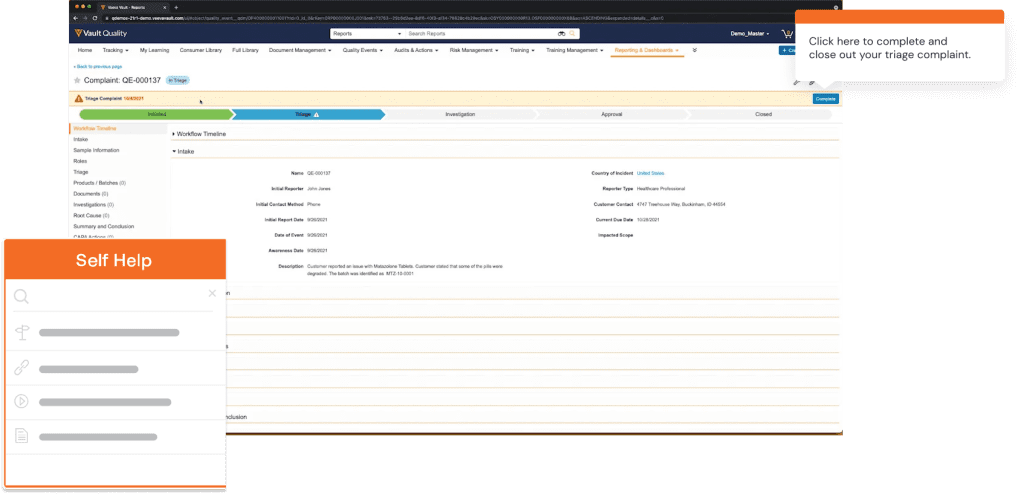
Self Help also connects your in-app guided Flows, Tours, and Smart Tips, helping to provide further guidance. End-users are presented with contextual recommendations based on where they are inside your QMS, as well as their role within your company.
7. Analyze QMS processes with end-user behavior analytics to optimize workflows and identify friction points
Like every piece of enterprise software, a quality management system is a dynamic, multi-purpose tool and your workforce will interact with it in different ways, modify it slightly to fit their workflows, build clever workarounds to evade issues they encounter, and generally customize it as much as possible without breaking the system.
Instead of trying to enforce strict adherence, what you need is to observe how your end-users interact with your QMS, find patterns in end-user usage behavior, and optimize your quality management system’s user interface to sync with your employees’ workflows.
A product analytics platform like Whatfix can help you understand how your end-users are engaging, using, and adopting your QMS with user behavioral analytics. This enables IT teams to map user flows, build the most efficient processes, identify end-user friction points, and extract data that provides actionable insights to make your QMS user experience and workflows as intuitive for users that enables them to maximize their productivity with the platform, regardless of their technical abilities.
How to Drive QMS End-User Adoption With Whatfix
At every stage of the QMS implementation process, your goal isn’t to improve technical efficiency and capability since most QMS platforms are state-of-the-art software. The bigger challenge for IT teams is to ensure your end-users are trained to extract maximum value from the QMS’s functionality through digital adoption.
Whatfix is a digital guidance and user engagement platform that enables enterprises to maximize ROI from software by enabling end-user adoption of complicated software tools and their custom-built processes through analyzing end-user behavior, creating in-app end-user guidance and real-time support, and engaging end-users with contextual information.
With Whatfix, IT teams can drive QMS adoption by:
- Enabling end-users with contextual in-app guidance with Flows and Task Lists: Whatfix provides a no-code editor to create in-app onboarding Task Lists that gamify the product education process and provide critical steps for end-users to work through. Flows provide end-users with guidance cues such as step-by-step interactive walkthroughs and product tours that mirror real-life usage and teach end-users at their own pace.
- Providing hands-on training in a sandbox: With Whatfix Mirror, create sandbox environments of your QMS to provide hands-on simulation training to prepare and train users before live workflows.
- Nudge and alert end-users with Smart Tips, Pop-Ups, and Beacons: Using our platform, you can embed UI aids such as non-intrusive pop-ups, flashing beacons, and smart tips that expand when users hover over them into your QMS.
- Highlight errors and data mismatches in your QMS UI with real-time Field Validation. Field validations enable end-users to enter data in the right format and fully complete open fields in your QMS, helping to deflect data entry errors, reduce compliance risks, and improve overall data quality.
- Provide end-users with on-demand support with Self Help: Whatfix enables you to embed Self Help, a self-help end-user wiki widget, right inside your QMS UI. End-users can search Self Help’s database that aggregates your internal wikis, pre-recorded videos, QMS process documentation, and help articles for any specific issue they encounter, all in one place.
- Collect end-user feedback with embedded surveys that can be as simple as a numeric scale or let users expand their opinions in a free text area.
- Analyze and improve QMS processes and end-user adoption with behavioral analytics. With Whatfix Analytics, track any custom end-user event, identify areas of friction or dropoff, map optimal paths and journeys for different types of end-users, improve end-user onboarding, conduct a cohort analysis, track specific actions (clicks, mouse hovers, page views, feature interactions, etc.), analyze user flows (e.g.How many clicks/steps it takes users to get to page X?), and more – enabling your IT team to drive QMS adoption and extract more value from the technology.