


Nearly all (97.4%) Fortune 500 companies use an applicant tracking system (ATS) to manage recruiting and hiring. Yet ATS implementation doesn’t mean value realization. Successful enterprise ATS adoption depends on whether recruiters and hiring teams are enabled to complete critical workflows effectively and if the investment drives its intended business outcomes.
ATS adoption barriers, whether it’s stubborn users that resist change, underprepared recruiters at system launch, a lack of in-the-flow work support, or high-friction workflows, are more often human factors instead of technical factors, which restrict value realization.
This guide provides a practical digital adoption playbook for ATS application owners, recruiting operations leaders, and recruiter workflow owners to improve adoption across the application lifecycle. You’ll learn how to build user readiness before go-live, stabilize workflow execution after launch, identify and resolve adoption friction points, and continuously improve how recruiters use the ATS to increase the software’s value over time.
What Is ATS Adoption?
ATS adoption measures how consistently recruiters, hiring managers, and other stakeholders complete required hiring workflows inside the platform. ATS implementation establishes the technical foundation through configuration, data migration, integrations, permissions, and testing. Adoption turns that foundation into repeatable behavior.
Successful ATS adoption is reflected in four operational signals:
- Critical workflows are completed end-to-end in the ATS.
- Required data, feedback, scorecards, and approvals are captured on time.
- Dependence on legacy systems is eliminated.
- Recruiting reports provide reliable data for planning and performance decisions.
The Operational Cost of Poor ATS Adoption
An ATS does not have to go unused to be a failed implementation. When users follow rogue processes or bypass them entirely, the enterprise effectively funds two hiring systems – the configured platform and a shadow process running through spreadsheets, inboxes, and manual follow-ups.
- Hiring cycles slow: Delayed requisition approvals, interview feedback, and offer decisions create bottlenecks and weaken the candidate experience.
- Recruiting data becomes unreliable: Missing fields, stale candidate stages, and incomplete scorecards reduce reporting accuracy and increase compliance risk.
- Support costs rise: Repeated questions, data corrections, and retraining consume application and HR support capacity.
- ROI becomes harder to prove: Automation, integrations, and licensed capabilities remain underused while expected productivity gains fail to materialize.
Why ATS Adoption Fails After Implementation
ATS adoption gaps often originate in how the platform is designed, introduced, and governed. Here are why ATS implementations fail to realize full adoption after application go-live:
- Workflows reflect an idealized process. Standard configurations often overlook regional requirements, delegated approvals, high-volume hiring, and exception scenarios encountered in production.
- Every role receives the same enablement. Recruiters, hiring managers, interviewers, and approvers use the ATS differently. Generic user training and software onboarding leave users unprepared for their specific responsibilities.
- Workarounds feel easier. Excessive steps, duplicate data entry, access issues, and missing integrations push users toward email, spreadsheets, and messaging tools. Edge-case scenarios cause workflow drift, leading to rework and dirty data.
- Training stops at feature education. Demonstrations and LMS courses introduce functionality but provide limited practice with real hiring workflows and exception paths.
- Ownership weakens after go-live. Implementation teams disband, and accountability for workflow performance, data quality, feature adoption, and remediation becomes unclear.
- Reporting masks local friction. Login rates and training completion provide limited insight into execution. Enterprise-wide averages can conceal user friction and workflow drop-offs within specific roles, regions, or business units.
- Releases create new adoption gaps. Changes to fields, approvals, automations, and policies disrupt established workflows when enablement and support fail to keep pace.
How to Drive ATS Adoption
Use this 7-step playbook to turn ATS adoption into a measurable operating discipline across roles, regions, and business units.
1. Prioritize business-critical workflows
Start with the workflows where poor execution creates the greatest risk to hiring speed, data quality, compliance, or candidate experience. Common priorities include:
- Creating and approving requisitions
- Moving candidates through defined stages
- Submitting interview scorecards and feedback
- Approving and issuing offers
- Closing roles and updating candidate outcomes
Define successful execution for each workflow. For example, interview feedback might need to be submitted in the ATS within 24 hours. Assign a business owner accountable for the outcome and an application owner responsible for resolving system friction.
2. Define adoption by role and cohort
Recruiters, hiring managers, interviewers, and approvers will use an ATS differently. Map each priority workflow to the user groups responsible for completing it.
Segment users by:
- Role and responsibilities
- Region or business unit
- Hiring volume and frequency of use
- User tenure or onboarding status
- Permission and compliance requirements
For each cohort, document the required tasks, expected frequency, and performance standard. This prevents low activity among occasional users from being mistaken for poor adoption and helps expose genuine execution gaps.
3. Remove process and system friction
Before expanding user training, review whether the approved process is practical to complete inside the ATS.
Look for:
- Duplicate data entry and off-system handoffs
- Unnecessary fields, stages, or approval steps
- Incorrect permissions and role configurations
- Missing integrations with email, calendars, assessment tools, or HR systems
- Regional requirements and exception paths excluded from the standard workflow
Classify each issue as a configuration, integration, process, knowledge, or behavioral problem. Configuration and access issues require system changes, while knowledge gaps require targeted enablement.
4. Build role-based proficiency
Prepare users for the tasks they are expected to perform. Use realistic scenarios to confirm that users can:
- Complete required tasks without facilitator assistance
- Enter accurate data and follow the approved process
- Handle common exceptions and approval paths
- Find support when they encounter an unfamiliar step
Measure recruiter readiness through workflow pass rate, completion time, errors, retries, and help requests.
5. Reinforce execution inside the ATS
Once users understand their workflows, provide contextual support while they perform them. Use in-app guidance such as walkthroughs, field-level instructions, checklists, policy reminders, and searchable self-help to reinforce proper workflow execution.
For example:
- Prompt hiring managers when interview feedback is overdue.
- Explain required fields during requisition creation.
- Surface approval policies before submitting an offer.
- Guide occasional users through unfamiliar workflows.
- Provide self-service support for common process questions.
Target guidance by role, workflow, and behavior. Review it after ATS releases and process changes so users always receive instructions that match the current experience.
6. Measure adoption with a workflow scorecard
Measure whether users are completing priority workflows accurately, consistently, and on time. A focused ATS adoption scorecard should include:
| Scorecard area | What to measure | What it reveals |
| Workflow completion | Percentage of priority workflows completed end-to-end in the ATS | Whether users follow the approved process |
| Timeliness | Feedback, stage updates, and approvals completed within agreed SLAs | Where delays are slowing hiring |
| Data quality | Required-field completion, stale records, and stage accuracy | Whether reports and forecasts can be trusted |
| Workflow friction | Drop-off steps, repeated errors, retries, and help requests | Where users struggle or abandon tasks |
| Capability usage | Adoption of approved automations, integrations, and key features | Whether the organization is realizing the configured value |
| Operational impact | Time between stages, manual follow-ups, and support tickets per active user | Whether adoption is improving efficiency |
Establish a baseline before a major software rollout or remediation effort, then set digital adoption targets for each priority workflow. Segment results by role, region, and business unit because enterprise-wide averages can conceal concentrated adoption problems.
7. Run a 30-60-90-day ATS adoption cadence
Use Day 1 as the launch of a new ATS, a major release, or a formal adoption-improvement initiative. Apply the scorecard through three phases:
- Days 1-30: Stabilize critical workflows. Review adoption weekly and resolve issues affecting access, permissions, integrations, and workflow completion. Prioritize severe blockers, rising support demand, delayed approvals, and incomplete candidate data.
- Days 31-60: Close cohort-level gaps. Compare performance across roles, regions, and business units. Simplify recurring friction points and provide targeted guidance or practice where specific cohorts remain below target.
- Days 61-90: Optimize and establish governance. Evaluate capability usage, data quality, workflow efficiency, and operational impact. Scale successful interventions and transition stable workflows to a monthly review.
For every intervention, record the root cause, action owner, target metric, and review date. Compare performance before and after the change to confirm its effect on adoption.
How Whatfix Accelerates ATS Adoption and Value Realization
Whatfix provides a unified digital adoption platform (DAP) across pre-go-live user readiness, live execution, self-service support, and continuous ATS workflow optimization. ATS owners and HR tech leaders can prepare users before production, guide users through critical tasks within the ATS, identify workflow friction, and measure whether adoption efforts improve hiring operations.
Let’s explore how Whatfix drives ATS adoption across the ATS lifecycle and empowers application owners to realize better hiring outcomes:
Prepare ATS users before they enter production
Whatfix Mirror creates interactive replicas of ATS workflows, allowing users to practice tasks without affecting the live application. Teams can build role-specific scenarios around requisition creation, candidate progression, interview feedback, offer approvals, and common exception paths.
AI roleplay pairs ATS workflow simulations with intelligent scenarios that help build recruiter confidence before go live.
AI performance assessments help application owners identify which roles or cohorts need additional preparation before they begin working with candidate and requisition data in production.

Guide critical ATS workflows in the flow of work
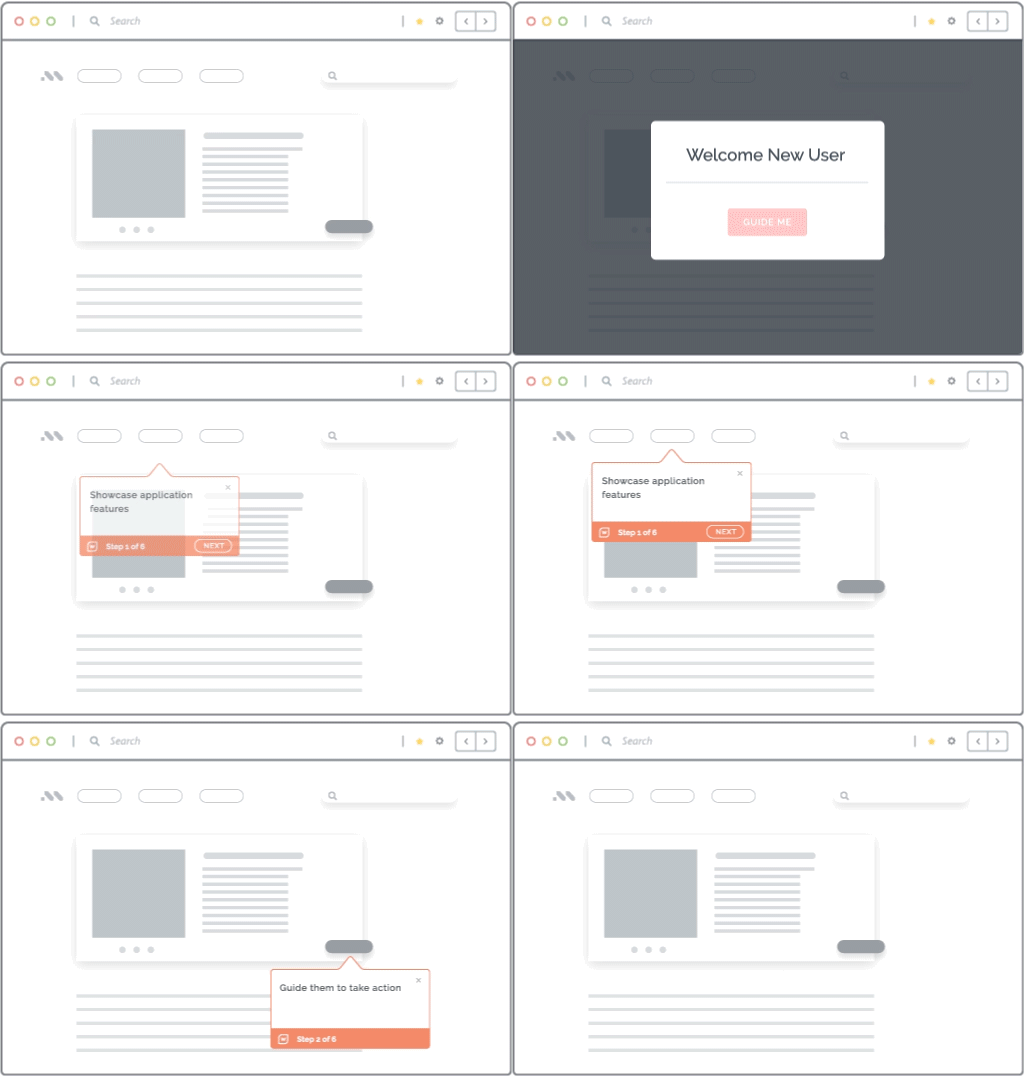
Whatfix DAP embeds contextual guidance and recruiter support directly within the live ATS, helping users complete tasks accurately while they work.
- Flows guide users through complex, multi-step hiring processes.
- Smart Tips clarify field requirements, policies, and next actions.
- Task Lists organize onboarding and process-adoption activities.
- Pop-Ups communicate releases, policy updates, and workflow changes.
Experiences can be targeted by role, region, business unit, or user behavior. Whatfix can also support workflows that extend across the ATS and connected applications, helping users follow the approved process through every handoff.
Provide self-service support and AI help at the moment of need
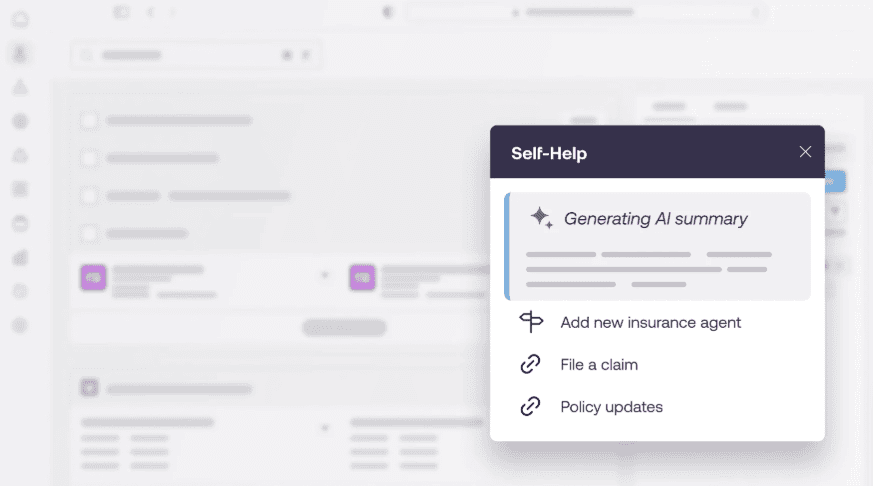
Whatfix Self Help brings SOPs, job aids, training resources, and support content into a searchable hub within the ATS. Users can find relevant answers or launch guided workflows without leaving the application. AI is connected to your digital workplace and knowledge repositories, allowing it to summarize best practices, provide recommendations, and enable recruiters and hiring managers in real-time.
This reduces reliance on trainers, subject matter experts, and ATS IT support teams for recurring support questions, while also providing recruiters and hiring managers with immediate help for unfamiliar or infrequent tasks.
Identify adoption gaps and target interventions
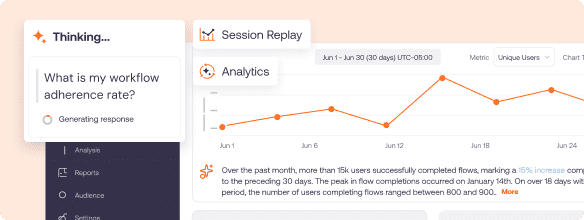
Whatfix Product Analytics captures user behavior through no-code event tracking, workflow funnels, cohorts, session replays, and in-app surveys. Application owners can see where users abandon workflows, repeat steps, encounter errors, or underuse key ATS capabilities.
These insights can be used to:
- Compare workflow performance across roles, regions, and business units.
- Identify the steps creating delays or data-quality issues.
- Deliver targeted guidance to affected user cohorts.
- Measure whether each intervention improves completion, accuracy, or efficiency.
This creates a continuous adoption loop in which teams analyze behavior, address friction inside the workflow, and tie ATS investments and workflow improvements back to operational impact and key business outcomes.
5 Examples of ATS Adoption Success Stories
Successful ATS adoption requires recruiters to become proficient in critical workflows, find support while working, adapt to process changes, and consistently enter the data that recruiting operations depend on.
These ATS adoption case study examples show how HR service and staffing organizations have improved recruiter readiness, workflow execution, self-service support, and business outcomes from their recruiting technology investments.
PageGroup Accelerated New Recruiter Time-to-Proficiency by 44%
PageGroup’s 5,500 recruiters use Customer Connect, its Salesforce-based ATS and CRM platform, to manage candidate and client relationships and move applicants through hiring workflows. The organization needed to onboard recruiters faster while maintaining consistent processes, data governance, and regional compliance requirements across a global workforce.
PageGroup’s ATS adoption strategy and impact
PageGroup combined Whatfix DAP and Product Analytics to identify adoption friction and deliver targeted guidance, Task Lists, Smart Tips, Self Help, and other support directly inside recruiter workflows. It reduced new recruiter time-to-proficiency from six weeks to four weeks and ATS readiness training from 17 hours to 9.5 hours. Recruiters also completed more than 12,500 Self Help searches over eight months, with 97% successfully resolving their questions.
Key takeaway from PageGroup’s ATS modernization
Recruiter onboarding and training should measure readiness to execute real workflows, not just training completion. Behavioral data and contextual guidance can help application owners identify struggling user cohorts, accelerate proficiency, and reinforce governed recruiting processes.
ManpowerGroup Supported Its Bullhorn Rollout With Guided Workflows and 92% Self-Service Resolution
When ManpowerGroup introduced Bullhorn as its new ATS, recruiters needed to learn how to document candidate data and execute processes spanning sourcing through placement. Traditional classroom training and external support resources were supplemented with contextual guidance so recruiters could access assistance directly while using Bullhorn.
Manpower’s ATS adoption strategy and results
With Whatfix, ManpowerGroup created 119 guided Flows for processes such as adding candidates and scheduling interviews, along with Smart Tips, Pop-Ups, and searchable Self Help. Its dedicated post-launch Hypercare help desk was able to close earlier than expected because support demand remained low, while 92% of recruiters using Self Help resolved their Bullhorn questions independently.
Key takeaway from Manpower’s ATS transformation
Go-live support should be designed into the ATS experience. In-app guidance and self-service resources can stabilize adoption during hypercare, reduce support dependency, and reinforce training as recruiters begin completing live workflows.
Partners Personnel Scaled Bullhorn Enablement Across 449 Recruiters
After rolling out Bullhorn, Partners Personnel needed to improve adoption across a nationwide recruiting organization while keeping recruiters current with changing processes. Training resources were spread across SharePoint, an LMS, guides, and other systems, making it difficult to provide one consistent source of support at the moment recruiters needed it.
Partner Personnel’s ATS adoption strategy and ROI
With Whatfix, Partners Personnel embedded Pop-Ups, Smart Tips, Flows, Launchers, and AI-powered Self Help within Bullhorn. Over five months, Smart Tips generated more than 59,000 recruiter interactions, while 1,155 Self Help queries saved an estimated 192 hours through support deflection. The organization also began using Product Analytics to understand ATS usage, identify workflow friction, and prioritize future enablement investments.
Key takeaway from Partner Personnel’s ATS adoption journey
Mature ATS adoption programs create a feedback loop between user behavior and enablement. Application owners can analyze where recruiters struggle, introduce targeted guidance or support, and continue measuring whether those interventions improve workflow execution.
Acorn by Synergie Reduced Recruiter Onboarding Time by 80%
Acorn by Synergie relied on Bullhorn for its core recruiting operations, but classroom training and static content created lengthy onboarding cycles and inconsistent knowledge retention. Incorrect workflow execution also created job-record errors that affected data integrity, compliance, and downstream invoicing.
Acorn by Synergie’s ATS adoption strategy and value realization
With Whatfix, Acorn introduced role-based Task Lists, guided Flows, Pop-Ups, corrective User Actions, and Self Help directly inside Bullhorn. New recruiters reached proficiency in two weeks instead of ten, an 80% reduction in onboarding time. Acorn also reported 84% knowledge retention, a 98% reduction in ATS training support queries, and 2,454 hours saved annually, while improving recruiter compliance and data accuracy.
Key takeaway from Acorn’s ATS adoption case study
Faster ATS onboarding can create measurable operational value when training is connected to actual recruiter workflows. Role-based guidance helps new hires build proficiency while also reinforcing the processes and data standards required for reliable recruiting operations.
Adecco Group Increased Enterprise Application Adoption by 40% Across Global Workforce Operations
The Adecco Group provides staffing and workforce solutions across more than 60 countries. As part of a broader technology transformation, Adecco consolidated fragmented contracting processes into an Icertis CLM environment embedded within Salesforce. The rollout needed to support different roles, regions, regulatory requirements, and business processes while protecting the quality of critical operational data.
Adecco Group’s ATS adoption strategy and business outcomes
Adecco embedded persona- and region-specific Whatfix guidance within its contract workflows to support users during creation, approval, and termination processes. The organization achieved a 40% increase in application adoption, 50% reduction in contract cycle time, 98% compliance with mandatory clauses, and approximately 40% fewer support queries per 100 users during the first 90 days.
Key takeaway from Adecco Group’s ATS adoption example
The same adoption principles extend across the broader recruiting and workforce technology ecosystem. Organizations realize more value when users receive contextual support, execute governed workflows correctly, enter reliable data, and can adapt as enterprise processes evolve.
ATS Adoption Clicks With Whatfix
Whatfix for staffing and recruiting teams helps accelerate ATS adoption for new rollouts, reduce training and support demand, improve recruiter execution across critical workflows, and maximize outcomes from enterprise ATS investments. With hands-on training, in-app guidance, self-service support, and product analytics, teams can prepare recruiters before go-live, support them in production, and continuously optimize ATS usage.
Request a Whatfix demo to see how Whatfix can improve ATS launch readiness, recruiter proficiency, workflow adoption, and value realization across your organization.