Implementing the full suite of Workday applications is an overwhelming task, especially if you don’t have a change management expert on your team. That’s what Workday implementation partners are for.
These companies are certified to offer support with adopting Workday and other enterprise HCM systems. They possess in-depth knowledge of the Workday platform and its various modules, assist Workday users with any goals or challenges on their way, and help IT with the complexities of an high-cost HCM implementation project.
Whether you’re a new Workday customer or looking to redesign your existing system, Workday partners will help you with it.
What are the best Workday implementation partners for enterprises in 2026?
- Whatfix
- Accenture
- Deloitte
- CloudRock Partners
- IBM Workday Consulting Services
- Hexaware
- OneSource Virtual
- Alight Solutions
- IJA Strategies
- Invisors
What Does Workday Implementation Involve?
Like an enterprise software implementation project, a Workday implementation is a complex process. This implementation process includes six major phases:
Project planning
The comprehensive nature of Workday’s functionalities can be overwhelming if not managed effectively. You need to accept that you can’t migrate all your data and operations in one day and go for phased execution.
Careful project planning involves breaking down the process into manageable stages and setting realistic expectations for your organization’s Workday journey.
Architecture
You need to design the structural framework of the Workday system. It starts with understanding the organization’s existing processes, data structures, and integration needs. Only then you can develop new standard operating procedures (SOPs) that will be facilitated by Workday.
Configuration
In the configuration phase, you tailor Workday to suit your specific business processes. This involves fine-tuning modules, designing intuitive workflows, and setting up integrations.
Testing
Testing serves as a critical checkpoint to validate the functionality of your configured Workday system. This process consists of multiple phases, including unit testing, end-to-end testing, and parallel testing.
Deployment
The deployment phase involves introducing the Workday to your organization, migrating data, finalizing system setup, and delivering user training. At this point, Workday gets integrated into your organization’s operations.
Continuous adoption
Workday implementation is an ongoing journey of refinement. You need to continue to monitor system usage, gather user feedback, and provide technology training to help every team successfully adopt new workflows and maximize the system’s value.
Types of Workday Partners
Workday offers four types of partners that help businesses maximize the value of the platform:
- Advisory Partners
- Global Payroll Partners
- Services Partners
- Software Partners
Advisory Partners
Workday Advisory Partners assist customers in identifying the optimal solutions for their unique requirements and navigating digital transformation. These partners offer guidance throughout various stages from digital acceleration strategy and planning to product selection and change management.
Global Payroll Partners
If you have payroll requirements that extend beyond the United States, Canada, the United Kingdom, or France, Workday partners make it easy to integrate with third-party payroll providers worldwide. In collaboration with Global Payroll Partners, Workday offers certified, prebuilt integrations with payroll solutions in over 100 countries.
Services Partners
Workday Services Partners represent a community of global systems integrators (GSIs) and regional firms that assist organizations with Workday deployment and ongoing adoption. These vetted companies go through rigorous training on Workday products and are equipped with the knowledge and experience to support you at every stage of your Workday journey.
Software Partners
Workday Software Partners represent a global ecosystem of companies that develop complementary solutions enhancing the functionality of the Workday platform. They provide applications, extensions, and add-ons that seamlessly integrate with Workday’s core offerings. Businesses turn to Workday Software Partners when they need to tailor the platform’s functionality to their business needs.
10 Best Workday Implementation Partners in 2026
In this section, you’ll find a list of Workday-certified partners and tools that facilitate software adoption.
1. Whatfix
G2 review: 4.6/5
Pricing: Schedule a demo
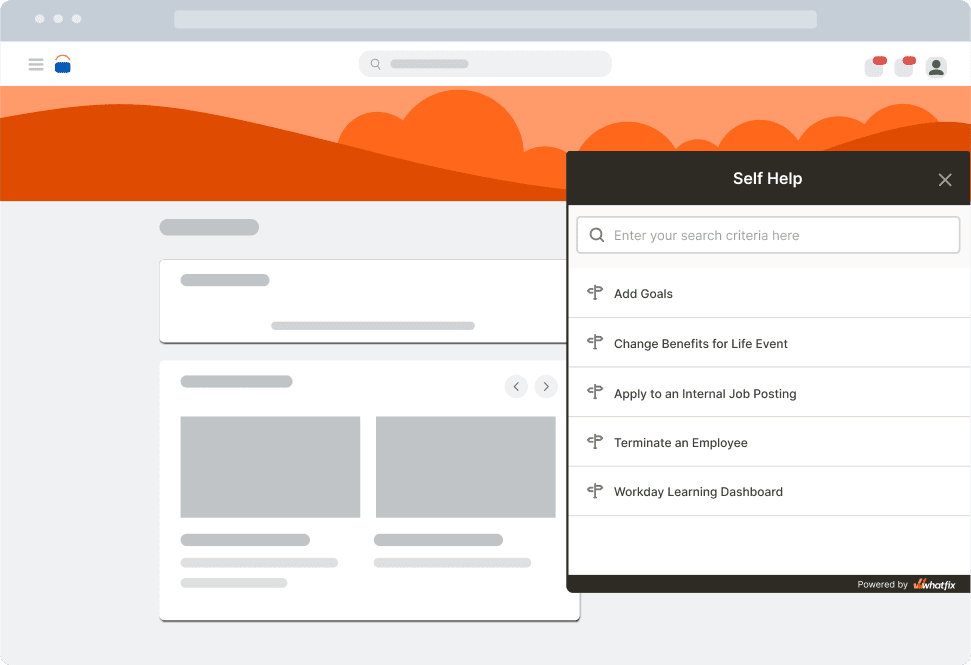
Whatfix is a digital adoption platform (DAP) that provides companies with a no-code editor to build in-app guidance and self-help user support content in the Workday interface.
While not a traditional Workday implementation partner, Whatfix drives tremendous value to Workday users by facilitating HCM platform training and self-help user support to drive adoption.

With Whatfix, companies can create interactive walkthroughs, tooltips, pop-ups, and other on-screen guidance to display directly within the Workday platform. This empowers users to learn different Workday processes by doing, reducing the learning curve and increasing user productivity.
Whatfix also connects with your knowledge repositories, as well as third-party documentation, to provide your Workday end-users with a self-help wiki that overlays on the application’s interface. By integrating Whatfix Self Help with your process documentation, intranet, LMS, and IT support portal – as well as Workday’s official help center and any third-party implementatio partner support content – you an enable your employees to fully adopt your Workday investment.
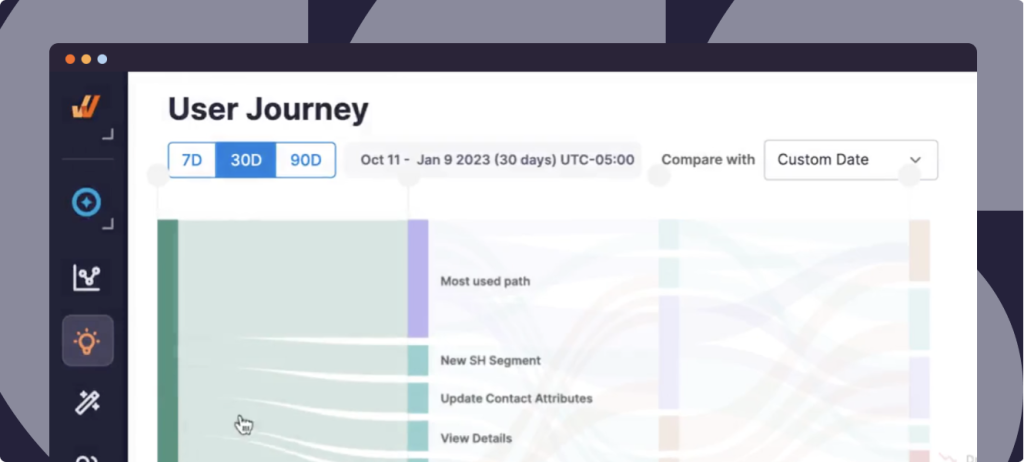
The platform also provides insights into user activity to help organizations refine their Workday implementation, tailor their training programs, identify user friction areas, provide better support for underadopted features and workflows, and address any barriers to adoption.
2. Accenture
G2 review: 4.2/5
Accenture is a globally recognized consulting and professional services firm known as a trusted Workday partner. In 2023, Workday granted Accenture three Partner Innovation Awards at once.
Accenture assists organizations in all aspects of their Workday journey, from initial planning and strategy to system implementation, configuration, testing, and deployment. They work closely with clients to understand their business objectives and align Workday functionalities to support those goals effectively.
In addition to implementation, Accenture offers comprehensive change management services to help organizations navigate the organizational and cultural shifts that come with adopting a new system like Workday.
The company also focuses on attracting the best HCM-certified consultants to provide world-class services to Workday users. “Accenture has one of the biggest certified talent pools, backed by continued investment in talent acquisition, motivation and retention,” shared Khalda De Souza, the former research director at HFS Research.

3. Deloitte
G2 review: 4.1/5
Deloitte is a professional services network providing audit and assurance, consulting, financial advisory, risk advisory, and tax services. The company offers transformation services to help IT, finance, HR, and analytics teams implement Workday solutions in internal operations.
Alongside Accenture, PwC, and KPMG, Deloitte made it to the list of Workday’s Initial Industry Accelerator partners. Through the program announced in September 2022, Workday expects to assist banking, healthcare, insurance, and technology companies in accelerating their enterprise cloud transformation. As a trusted partner, Deloitte should bring together its industry knowledge, proven solutions, and connections with other software providers to seamlessly integrate with Workday Enterprise Management Cloud.

4. CloudRock Partners
CloudRock Partners is a certified Workday implementation partner that offers a comprehensive range of services to help organizations maximize their Workday investment. As both a Workday advisory and AMS Services Partner, CloudRock specializes in pre- and post-implementation support and optimization.
They provide AMS Support, strategic reviews, health checks, and roadmap planning. With teams located in multiple countries, including the UK, Portugal, India, Australia, and the USA, CloudRock provides global reach combined with local expertise.

5. IBM Workday Consulting Services
G2 review: 4.3/5
IBM, a trusted Workday implementation partner, brings its leadership in finance and HR reinvention to help organizations go through their own transformative journeys. IBM combines its firsthand Workday experience with design thinking, agile methods, and AI capabilities to transform its clients’ organizational cultures.
With a focus on end-to-end solutions, IBM offers Workday-enabled HR and finance reinvention services that go beyond technology implementation. They understand the importance of aligning organizational culture with employee and customer experiences, enabling profound transformations that drive success.
Apart from consulting services, IBM also offers cognitive tools such as IBM Watson to enhance the capabilities of Workday’s cloud-based tool.

6. Hexaware
G2 review: 3.7/5
Hexaware is a leading provider of enterprise cloud solutions and a selected Workday Services Partner.
Through its partnership with Workday, Hexaware offers exclusive application support and maintenance services to ensure the smooth operation of Workday systems. With a global presence and expertise in various industries such as banking, financial services, retail, healthcare, insurance, and more, Hexaware has established itself as a leader in providing enterprise solutions.
The cost for ongoing Workday support by Hexaware starts at $4400/month.

7. OneSource Virtual
G2 review: 4.4/5
OneSource Virtual is an exclusive partner of Workday helping customers maximize value and maintain performance throughout the entire Workday lifecycle.
They offer a wide range of comprehensive services, starting from deployment and extending to various areas such as North American and global payroll, financial management, application management, and more.
Aside from advisory services, OneSource Virtual also offers digital products that integrate seamlessly with your payroll setup.

8. Alight Solutions
G2 review: 4.8/5
Alight Solutions is an information technology and consulting company helping organizations successfully adopt and optimize the Workday platform among other services.
Alight’s offerings include assistance with Workday financial management, HCM, adaptive planning, payroll, and testing initiatives.
Workday named Alight a winner in the 2023 Partner Innovation Awards for its Benefits Application Interface.
Together with Workday, Alight Solutions are planning to develop a solution to provide a simplified and unified payroll experience to HR and payroll professionals worldwide. Companies are bringing Alight Worklife and Workday Human Capital Management (HCM) together in a centralized platform that will help their customers manage the complexities of a multinational workforce.

9. IJA Strategies
G2 review: 5/5
IJA Strategies is an independent Workday consulting firm. The company holds Workday PRO, Workday HCM, Workday Payroll, and Workday Compensation certifications.
IJA Strategies takes a holistic approach, considering factors such as process improvement, change management, and user adoption to ensure that Workday is seamlessly integrated into the organization’s operations. They provide personalized guidance and support throughout the implementation journey, helping clients optimize their Workday usage and achieve long-term success.
The company takes pride in being an alternative to traditional Workday Partners claiming that their independence gives them an opportunity to provide unique perspective and expertise to Workday implementations. They also stress they offer the same services as their certified competitors but with a more affordable price tag.

10. Invisors
G2 review: 4.5/5
Invisors is a boutique Workday consulting firm. The company provides strategic consulting, system implementation, and ongoing optimization services to Workday users and those who are only considering Workday implementation.
Invisors takes a unique enablement approach throughout the deployment process, focusing on knowledge transfer to ensure organizations are well-oriented and equipped with the necessary skills to leverage the new Workday system.
With expertise in HCM, finance, planning, and analytics, Invisors helps organizations harness the power of data and adopt new routines to achieve business case objectives.

Drive adoption of Workday with Whatfix’s in-app guidance, self-help user support, and product adoption analytics
Implementing a platform like Workday is a complex undertaking for every organization, requiring specialized knowledge and resources. Engaging Workday implementation partners helps to streamline the implementation process and maximize the value of the platform.
But even with professional consultants guiding you and your employees through the transition, the process can last for months. Whatfix offers a comprehensive set of tools to speed up Workday implementation and adoption, including in-app guidance, self-help user support, and product adoption analytics.
Workday Implementation FAQs
What Can Workday Do For Your Organization?
Here are some key features and capabilities of Workday Enterprise Management Cloud:
- Financial management. Workday offers a comprehensive suite of financial management tools to provide real-time visibility into your company’s financial data. Its features include general ledger, accounts payable and receivable, financial reporting, budgeting, and expense management.
- Human capital management (HCM). Workday’s HCM module covers various aspects of HR management, from employee data management and payroll to talent acquisition and performance management.
- Supply chain management (SCM). Workday makes it easy to manage inventory, procurement processes, demand planning, and other supply chain processes.
- Analytics and reporting. Workday provides reports and dashboards for finance, HR, and supply chain metrics, and also allows users to create customized reports and visualizations to support data-driven decision-making.
Implementing an enterprise HCM like Workday enables organizations to streamline all critical business operations and manage them in one interface, helping to drive HR digital transformation.
How Long Does It Take to Implement Workday?
It can take from several months to a year or more to complete Workday implementation, depending on the scope of the project.
By dividing the implementation process into phases, you can adopt critical functionalities within the first few months and start enjoying the benefits early on.
How Much Does It Cost to Implement Workday?
Workday implementation is an expensive project, but these costs are justified by the long-term value and advantages that the platform brings to businesses.
On average, the cost of implementing a new HCM system ranges from $500 to $10,000 for most companies – and can reach $100,000 for enterprises.
What Is a Workday Partner?
Very few companies can handle the complex nature of the implementation process and effectively allocate internal resources to successfully undergo transformation. To help users navigate the change and ensure minimal disruption to their internal operations, Workday partners with a range of hand-picked companies that are ready to take over the entire implementation process for Workday users.
What are the top Workday implementation challenges?
Let’s dive into the most significant Workday HCM implementation challenges and some tips on how to resolve them.
- Poorly defined scope
- Selecting the right implementation partner
- Gaps in planning and stakeholder engagement
- Data migration and integration complexity
- Over-customization pitfalls
- Low user adoption and resistance to change
- Inadequate testing and QA cycles
- Lack of post-go-live support
- Updates during implementation
- Lack of proper documentation
Poorly defined scope
One of the most common and costly missteps in a Workday implementation is starting without a clearly defined and agreed-upon scope. Organizations often underestimate the complexity of their internal processes or overestimate how “out-of-the-box” Workday configurations can meet their needs.
A poorly defined scope typically leads to:
- Constant change requests mid-project, which drive up costs and delay timelines
- Misaligned expectations between HR, IT, implementation partners, and leadership
- Confusion over who owns what data, processes, or approvals
- Frustration among end users who find that key features they expected weren’t delivered
Workday is highly configurable, but it’s not infinitely flexible. Without clearly defining what’s in scope vs. what’s not, teams risk wasting time trying to set up functionality that wasn’t planned for or rolling out a system that doesn’t solve core business problems.
How to avoid scope misalignment:
- Bring HR, IT, finance, payroll, compliance, and key business units into initial discovery workshops to gather use cases and business requirements.
- Prioritize critical capabilities for go-live, and document anything that can be phased in later (post go-live enhancements).
- The scope must align with tangible business outcomes (e.g., reduction in onboarding time, increased payroll accuracy, improved reporting).
- Align all stakeholders on what’s included and have a formal process for managing out-of-scope requests.
- Partner with experienced consultants who can help you ask the right questions up front, validate your scope against industry benchmarks, and avoid common pitfalls.
Selecting the right implementation partner
Choosing the right Workday implementation partners can make or break your Workday deployment. While Workday provides the platform, it’s the partner you select that defines how well it’s configured, delivered, and adopted across your organization.
Many companies default to the biggest name on the vendor list or go with an existing partner without assessing whether they truly understand Workday, their business model, or their industry-specific needs. The result? Misalignment, miscommunication, and in some cases, a deployment that meets technical specs but fails to deliver business value.
Here’s how to select the right Workday implementation partner:
- Look for partners with proven experience in Workday deployments of similar size, complexity, and industry.
- Speak with organizations that have worked with the partner on similar rollouts. Ask what went well—and what didn’t.
- Assess their business process knowledge.
- Ask whether the people pitching the project are the same ones who’ll implement it. High team turnover mid-implementation is a red flag.
- Prioritize collaboration and communication.
- Choose a partner that offers strong support for post-implementation training, optimization, and overall Workday adoption.
Common gaps in planning and stakeholder engagement
One of the most common reasons Workday implementations stall or underdeliver is a lack of thorough planning and meaningful stakeholder engagement. While implementation teams often move quickly into system configuration and technical timelines, what’s frequently missing is a deep alignment across business functions on what the system is supposed to achieve and how it will support broader organizational goals.
When key stakeholders, especially outside of HR and IT, aren’t brought in early, the project suffers from blind spots. Critical use cases get missed, process owners feel left out of decisions, and there’s often a disconnect between what’s being built and what end users actually need. In some cases, this leads to late-stage rework, misaligned workflows, or even outright resistance from teams who feel the system was not built with them.
Here’s how to close planning gaps and engage the right stakeholders:
- Include stakeholders from HR, IT, finance, payroll, compliance, and business operations to ensure alignment across the enterprise.
- Clearly assign ownership for process decisions, data validation, testing, change management, and communication.
- Understand current workflows, pain points, and what success looks like for different teams. This ensures the system is built for real-world usage.
- Maintain regular stakeholder check-ins to keep the broader team informed, engaged, and invested throughout the implementation journey.
- Make sure stakeholders understand how Workday connects to larger goals such as operational efficiency, workforce visibility, or improving employee experience.
Data migration and integration complexity
HR and IT teams assume that transferring employee data from legacy systems will be straightforward, but in reality, it’s one of the most technically demanding and error-prone phases of the entire project.
Legacy systems typically hold years of employee information spread across multiple formats, inconsistent structures, and outdated processes. Cleaning, mapping, validating, and migrating this data into Workday can reveal quality issues that have been hiding for years. Even when data is technically migrated, it’s common to discover mismatches, missing fields, or logic errors.
At the same time, Workday doesn’t exist in isolation. To function fully, it must integrate with a range of other systems such as ERP, CRM, identity management, learning platforms, and more. These integrations can fail if not properly scoped, sequenced, or tested. Without clean data and reliable connections to surrounding systems, Workday can’t deliver the seamless, real-time experience organizations expect.
Here’s how to simplify data migration and integration from day one:
- Conduct a thorough data audit early in the project to identify gaps, duplicates, and outdated fields before migration begins.
- Define a clear data ownership model between HR, IT, and functional teams to ensure accountability.
- Use data mapping templates and validation checklists to standardize the migration process.
- Run iterative test migrations in sandbox environments and involve business users in validating migrated data.
- Don’t treat integrations as technical afterthoughts, rather include them in your project plan with enough time for end-to-end testing.
- Choose integration tools and partners that understand Workday’s architecture and can support both pre-built and custom connectors.
Over-customization pitfalls
To replicate their legacy systems or accommodate every internal preference, many organizations over-customize Workday far beyond what’s necessary.
This often stems from a desire to preserve “how things have always worked” rather than adapting to the best practices Workday was built around. However trying to recreate outdated workflows in a modern cloud system can lead to bloated configurations, unnecessary complexity, and longer implementation timelines. The result is a system that’s harder to maintain, more difficult to upgrade, and confusing for end users.
Here’s how to strike the right balance between configuration and customization:
- Challenge legacy processes early. Ask whether each workflow serves a strategic purpose or if it’s just a carryover from outdated systems.
- Align with Workday’s delivered functionality and best practices wherever possible. This ensures smoother updates and fewer long-term headaches.
- Use Workday’s configuration tools (e.g., condition rules, calculated fields) rather than custom code, unless absolutely necessary.
- Document every customization and require business justification and executive sign-off before adding complexity.
- Focus on outcomes, not exact replicas of old workflows. Opt for solutions that improve efficiency and user experience, even if they require process change.
- Partner with experienced consultants who can advise when configuration is sufficient and where customization introduces risk.
Low user adoption and resistance to change
Even the most well-planned Workday implementation can fail if employees don’t adopt the system. The issue isn’t always the system; it’s the change.
Workday introduces a significant shift in how employees interact with HR, payroll, and performance data. This means giving up long-standing habits and learning new processes with unfamiliar interfaces for many. If training is too generic, support is hard to access, or change communication is lacking, employees might show some resistance to change, leading to low adoption. When employees don’t use Workday as intended, the organization doesn’t see the operational efficiency, data accuracy, or engagement gains it was expecting.
Here’s how to drive user adoption and reduce resistance to change:
- Start change management early. Communicate the “why” behind Workday and what it will enable for employees and managers.
- Create role-based training journeys tailored to how different users will interact with the platform.
- Implement Digital Adoption Platforms (like Whatfix) to provide in-app, real-time guidance that supports users in the flow of work. This helps reduce support tickets and reinforces learning at the moment it’s needed most.
- Identify change champions/change agent across departments to reinforce usage, share success stories, and gather feedback.
- Offer multi-format training options—live sessions, on-demand modules, quick-start guides—to meet different learning preferences.
- Monitor adoption metrics post-go-live and proactively address areas where usage is low or workflows are breaking down.
Inadequate testing and QA cycles
With pressure to hit go-live deadlines, organizations may shorten or skip key stages of testing which lead to broken workflows, missing data, or misconfigured processes after launch.
Testing Workday isn’t just about confirming that the system works, it’s about ensuring it works for your organization, with your processes, your data, and your people. That means validating every integration, checking business logic across complex workflows, and pressure-testing how different roles will use the platform in real-world scenarios. If testing is treated as a checklist exercise, critical errors can go unnoticed until they become live issues that affect payroll, compliance, or employee experience.
Here’s how to strengthen your Workday testing and QA process:
- Allocate sufficient time in the project plan for unit testing, system integration testing (SIT), user acceptance testing (UAT), and end-to-end validation.
- Involve business users in UAT to surface real-world scenarios and usability gaps.
- Document test cases based on actual HR, payroll, and compliance processes.
- Test integrations with all connected systems under realistic data loads to ensure stability and accuracy.
- Use QA cycles as an opportunity to fine-tune user roles, approval flows, and self-service features before go-live.
- Create a feedback loop during testing to capture input from users and make iterative improvements.
Lack of post-go-live support
Many organizations treat go-live as the finish line when, in reality, it’s just the beginning. Once Workday is launched, employees are expected to navigate new systems, processes, and self-service functions often with limited ongoing support. Without a structured post-go-live plan, issues that weren’t caught during testing can surface, adoption may stall, and the HR team becomes overwhelmed with support requests and manual workarounds.
Workday is a dynamic platform, and users’ interactions with it evolve over time. New modules roll out, processes get updated, and business needs shift. The platform’s long-term value diminishes if organizations do not invest in continuous training, optimization, and user feedback loops. Worse, the momentum built during implementation can fade, and employees revert to old habits or disengage from the system entirely.
Here’s how to support users and sustain Workday value after go-live:
- Establish a formal post-go-live support plan that includes live support, knowledge base, and escalation paths.
- Designate Workday champions or power users within departments to provide peer-level guidance and surface ongoing issues.
- Continue delivering role-based, contextual training as new features or changes roll out.
- Leverage digital adoption platforms like Whatfix to offer in-app guidance and self-help overlays that reduce support ticket volume and help users complete tasks independently.
- Collect feedback regularly and use it to iterate on system configurations and training content.
- Monitor adoption metrics and user behavior to proactively identify areas of friction and optimize accordingly.
Updates during implementation
Workday operates on a continuous innovation model, delivering major updates twice a year. While this approach ensures the platform remains modern and responsive to evolving business needs, it can pose unexpected challenges for organizations in the middle of implementation.
A system update during the project timeline can affect configurations, integrations, testing scripts, and even training materials already in progress. Sometimes new features may replace or modify planned functionality, while others might require re-validation of security settings or user permissions. For teams already managing tight deadlines, these changes can introduce delays, rework, or confusion, especially if there’s no plan in place to assess and absorb release changes.
Here’s how to manage Workday updates during implementation:
- Assign a dedicated team member (or Workday partner) to track and assess upcoming releases and preview features.
- Subscribe to Workday’s release documentation and participate in community forums to stay informed of changes early.
- Build flexibility into the implementation timeline to allow for review and retesting when updates land mid-project.
- Coordinate with your implementation partner to identify which updates are relevant and whether they require adjustments to current configurations or testing plans.
- Update training content and change management materials to reflect any significant changes to workflows or user interfaces introduced in the release.
Lack of proper documentation
During the intensity of a Workday implementation, documentation is often deprioritized in favor of hitting deadlines and moving quickly through configuration. But when process decisions, system configurations, data mappings, and testing protocols aren’t properly documented, organizations might pay the price later during post-go-live support, audits, or future enhancements.
Without thorough documentation, internal teams struggle to understand how the system was set up, why certain decisions were made, or how to maintain and optimize configurations over time. This leads to increased reliance on external consultants, slower issue resolution, and knowledge silos that hinder agility. For global or multi-phase deployments, the lack of continuity across phases can introduce inconsistencies and rework.
More importantly, HR and IT teams lose the ability to scale or evolve Workday confidently when foundational documentation is missing.
Here’s how to ensure documentation is consistent, accessible, and valuable:
- Establish documentation as a formal workstream in your implementation plan, with clear ownership across configuration, data, integrations, and testing.
- Use standardized templates to capture key system decisions, workflows, and configuration rationales.
- Store documentation in a centralized, version-controlled repository that’s accessible to both HR and IT stakeholders.
- Maintain a living “Workday Knowledge Base” to support post-go-live changes, employee onboarding, and audit readiness.
- Ensure all documentation is updated post-UAT and post-go-live to reflect any last-minute changes made during testing or launch.
New and Emerging Challenges for Workday Admins
Here are some upcoming challenges leaders might face in 2026 and years to come.
Adapting Workday for a hybrid, AI-integrated workforce
The traditional employee lifecycle is being reshaped by hybrid work models and rapid AI adoption across roles and departments. Employees today work across time zones, switch between physical and digital environments, and increasingly rely on AI tools for decision-making, task automation, and communication.
As roles become more fluid and augmented by AI, rigid process flows, static role hierarchies and centralized approval chains in Workday can become barriers to productivity. Many organizations are finding that their original Workday configurations, designed for a pre-AI, in-office world, don’t fully support work’s flexible, tech-enabled nature in 2026.
To support hybrid work patterns and AI-driven collaboration, organizations must revisit their job architectures, security roles, and workflow configurations to reflect the realities of a flexible, tech-enabled workforce.
Navigating increased data privacy regulations
With data privacy laws expanding across geographies, from GDPR to CCPA and emerging AI regulations, Workday implementations now face stricter scrutiny around employee data handling, retention policies, and cross-border processing. This means navigating a maze of local and international compliance requirements for global organizations while ensuring Workday configurations don’t inadvertently expose sensitive data. A misstep in handling personally identifiable information (PII), even unintentionally, can lead to reputational damage and legal consequences.
As a best practice, organizations must embed privacy-by-design principles into system architecture, using role-based access, audit trails, and automated compliance checks across modules.
Higher expectations for personalization and self-service
As digital natives enter the workforce and hybrid models become the norm, static dashboards, and generic self-service portals will no longer meet user expectations. Without intuitive, role-specific experiences, users are more likely to disengage, leading to reduced adoption and increased reliance on HR for basic tasks. The future challenge isn’t just about functionality, it’s about delivering experiences that keep pace with rising digital expectations.
To keep up with upcoming trends, Workday teams must design experiences around user journeys, not just workflows, and leverage tools such as WhatfixDAP to guide and personalize at scale.
Demand for faster time-to-value and measurable ROI
As digital transformation matures, executive teams are no longer content with long, milestone-based implementations that only show value post go-live. Instead, they expect faster ROI and evidence that platforms like Workday are accelerating business performance. With AI, automation, and workforce analytics advancing rapidly, the pressure to unlock tangible value quickly will only intensify. Organizations that can’t demonstrate impact early risk losing momentum, stakeholder confidence, and future funding.
By aligning implementation goals with business KPIs from the outset and continuously tracking impact through adoption rates, efficiency gains, and real-time insights organizations can stay ahead of rising expectations for ROI and agility.
Workday Implementation Clicks Better With Whatfix
Implementing Workday is a major investment but unlocking its full potential depends on how effectively your employees use it. That’s where Whatfix digital adoption platform can make the difference. By enabling personalized, real-time guidance, Whatfix empowers teams to navigate Workday with confidence from day one.
Here’s how Whatfix enables Workday adoption:
- Accelerate onboarding and reduce time-to-proficiency with in-app guidance like Flows, Task Lists, and Smart Tips, helping users complete key tasks such as benefits enrollment, job requisitions, and time-off requests without relying on HR support.
- Deliver performance support at the moment of need, enabling HR admins, managers, and employees to complete Workday tasks with fewer errors, less friction, and higher confidence, thereby boosting data accuracy and HR service delivery.
- Power hands-on training with Whatfix Mirror, a simulated Workday environment for user testing and UAT, reducing go-live risk and building confidence through safe, real-world practice.
- Track adoption and uncover friction points with Whatfix Analytics—monitor user behavior, analyze Flow completion and drop-offs, and identify where users struggle to optimize processes and improve training content.
- Lower support ticket volumes and increase efficiency by enabling self-service across complex workflows, giving HR and IT teams more time to focus on strategic initiatives.
Customer Success Spotlight: Hedge Fund Company
A global hedge fund management company implemented Whatfix to improve Workday adoption across its finance and procurement teams. Before Whatfix, employees relied heavily on subject matter experts and legacy workarounds, leading to low system adoption and operational bottlenecks.
Post-implementation of Whatfix DAP, the company witnessed several key outcomes that significantly improved Workday adoption and operational efficiency:
- A surge in Workday adoption. Daily active users increased from 250 to 780 over two quarters.
- PDF guides from Whatfix Flows empowered users with self-serve support and simplified training.
- Time spent by SMEs assisting others dropped from 30–60 minutes a day to just 5–10 minutes, freeing them up for more strategic work.
- Finance and procurement efficiency improved, with fewer errors and faster task execution across key functions like supplier management and purchase orders.
This is the kind of impact Workday teams can unlock when they pair powerful technology with the right enablement tools.
Ready to drive faster adoption and maximize your Workday ROI? Schedule your free demo with Whatfix today!