






Many organizations still run mission-critical operations on legacy systems that support core workflows across finance, HR, sales, supply chains, and more. As these applications age, they become more expensive to maintain and are difficult to adapt to new business requirements.
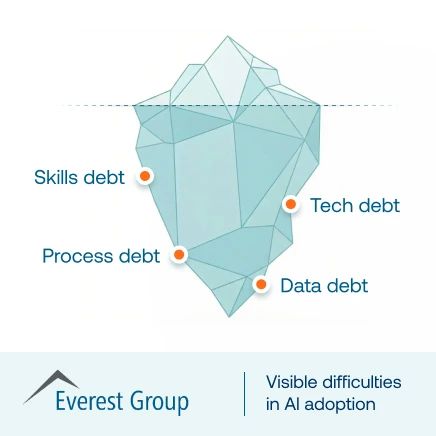
They also limit an organization’s ability to leverage AI, automation, and connected data. In fact, 81% of executives say technical debt is already constraining their AI initiatives.
To address these constraints, enterprises are modernizing core systems. These legacy system modernization projects require careful coordination across people, process, and technology to successfully transform critical systems without disrupting productivity, customer experience, or business continuity.
This guide covers when modernization becomes necessary, the major modernization approaches and common failure points, and how a human-led readiness and enablement strategy can prepare users before launch, accelerate adoption after go-live, and help enterprises realize value from modernized systems faster.
What Is Legacy Application Modernization?
Legacy application modernization is the process of updating, migrating, rebuilding, or replacing an outdated application to improve performance, security, scalability, interoperability, and alignment with current business needs. It can range from moving an existing system to modern infrastructure to replacing it with a new cloud enterprise application.
Modernization also changes how employees perform work, requiring a dedicated digital adoption strategy. New systems introduce redesigned workflows, interfaces, automation, data requirements, and user responsibilities, making user readiness, workflow enablement, and post-launch optimization critical to realizing value from the investment.
Signs It’s Time to Modernize a Legacy System
A legacy system does not need to be replaced simply because it is old. Modernization becomes necessary when the application poses growing operational risk, limits business agility, or prevents the organization from leveraging newer technologies and operating models.
Common signs that show it’s time to modernize core enterprise systems include:
- Maintenance costs and technical debt continue to rise: Aging infrastructure, custom code, specialized support, and recurring fixes consume resources without improving business capabilities.
- Vendor support or security risks are increasing: End-of-life platforms and unsupported software can create security, compliance, and business continuity concerns.
- The system limits AI, automation, analytics, or integration initiatives: Legacy architectures can make it difficult to connect data, automate workflows, or introduce new capabilities across the technology stack.
- Employees rely on manual workarounds: Spreadsheets, duplicate data entry, email approvals, and tribal knowledge often indicate that the application no longer supports how work needs to happen.
- The system cannot support future business requirements: Growth, new operating models, acquisitions, regulatory changes, and evolving customer expectations can exceed what the existing platform can accommodate.
Different Approaches to Legacy Application Modernization
Organizations can modernize legacy applications in several ways, depending on factors like system age, business requirements, risk profile, and future needs.
Here are seven common approaches to legacy system modernization:
| System modernization approach | What is it | When to use it |
| Encapsulate | Extend a legacy application through APIs or interfaces so it can connect with newer systems and services. | Applications that still perform valuable functions but have limited integration capabilities. |
| Rehost | Move an application to modern infrastructure with minimal changes to its code or functionality. | Stable applications running on aging or expensive infrastructure. |
| Replatform | Move the application to a newer platform while making targeted changes to improve performance, scalability, or maintainability. | Applications that still meet business needs but require a more modern technical foundation. |
| Refactor | Restructure or improve existing code while preserving the application’s core functionality. | Applications constrained by technical debt or difficult-to-maintain code. |
| Rearchitect | Redesign the application’s underlying architecture to support greater scalability, integration, and flexibility. | Systems whose existing architecture limits future development or business requirements. |
| Rebuild | Develop a new application around the capabilities and workflows the organization still requires. | Custom legacy applications whose existing foundations can no longer support business needs. |
| Replace | Retire the legacy application and move users and workflows to a modern commercial platform. | Organizations whose requirements can be met by modern enterprise software, such as migrating from SAP ECC to SAP S/4HANA or replacing a legacy CRM, EHR, or claims platform. |
How to Enable Users Through Legacy System Modernization Projects
Legacy system modernization reshapes how employees complete critical tasks, form workflows, roles, approvals, and data input. A human-led modernization strategy prepares users for those changes before, during, and after the system rollout.
Here are seven critical steps to take a human-led approach to core system modernization:
1. Map Critical Workflows and User Dependencies
Document how users complete high-value legacy workflows today, including handoffs, approvals, exception paths, integrations, workarounds, and undocumented business rules. This helps modernization teams preserve what works, remove unnecessary complexity, and identify where redesigned processes may create new friction.
2. Involve End Users and Workflow Owners Early
Bring application owners, process owners, frontline users, IT, enablement teams, and other stakeholders into the workflow design and validation process. Their input can surface requirements that technical documentation misses and help teams test whether redesigned workflows will work under real operating conditions.
3. Define User Readiness Before Go-Live
Set clear readiness criteria for each role and critical workflow. Measure whether users can successfully complete realistic tasks, navigate exceptions, and follow new processes without heavy assistance rather than relying only on training attendance or course completion.
4. Provide Hands-On Practice in a Safe Environment
Give employees opportunities to practice new workflows before they reach production with hands-on approaches to new system onboarding and training.
Application simulations and realistic training scenarios can help users build proficiency without affecting live data, customers, or business operations, and expose workflow and usability issues before launch.
5. Roll Out Changes by Workflow, Role, or Business Group
Take a phased approach to modernization, allowing teams to validate workflows, resolve friction points, identify bugs, and improve readiness before expanding deployment across the entire organization. Large programs such as SAP S/4HANA migrations often affect hundreds of workflows and thousands of employees across functions.
6. Reinforce New Workflows in the Flow of Work
Support users in the new system with a digital adoption platform (DAP) to reinforce workflows throughout the workflow. A DAP serves as an enablement layer, providing users with in-app resources such as contextual guidance, task assistance, policy reminders, and AI-powered help. This reduces dependence on memory, classroom training, and support teams as users encounter unfamiliar workflows during live work.
7. Measure Adoption, Friction, and Workflow Outcomes
Track how users move through critical workflows after launch, including completion rates, abandonment, errors, time to complete, support dependency, and continued use of legacy processes. Use those insights to identify where workflows, user training, guidance, or the application itself need improvement.
8. Continuously Optimize the Modernized Experience
Treat adoption as an ongoing part of modernization. As new features, process changes, and releases are introduced, use behavioral data and user feedback to refine workflows, launch targeted interventions, and improve the business outcomes tied to the modernization investment.
Common Legacy Application Modernization Challenges and Traps
Legacy modernization programs are complex IT projects that pose significant business risks, ranging from failed value realization to business downtime. Here are five core legacy IT system modernization challenges to prepare for:
1. Recreating Legacy Processes in the New System
Modernization projects can often preserve the same inefficient workflows, approvals, customizations, and workarounds that limited the legacy system. While some processes will be recreated, porting over large sets of processes into your new modern platform reduces the value of the investment and can make future optimization more difficult
2. Missing Hidden Workflow Dependencies
Legacy systems often contain years of embedded business logic, integrations, exception paths, and undocumented processes. Failing to identify these dependencies can lead to broken workflows, data issues, and operational disruptions after launch.
3. Treating Technical Readiness as User Readiness
A system can pass testing and still fail operationally if employees cannot confidently complete critical workflows and follow correct paths. Readiness should include role-based software onboarding to prove proficiency, realistic workflow testing, and validation that users can perform essential tasks before go-live.
4. Relying on One-Time Training
Modernization rollouts frequently rely on traditional training, such as classroom sessions, LMS courses, or process documentation, delivered prior to launch. Users may struggle to retain that knowledge once they begin working in the new system, especially when workflows continue changing after deployment.
5. Measuring Deployment Instead of Value Realization
Go-live, login rates, licenses provisioned, and training completion provide limited insight into the underlying success of system modernization projects. Application owners should measure workflow completion, errors, friction, support dependency, user proficiency, and the business outcomes the modernization program was designed to improve. These KPIs and metrics provide a digital adoption scorecard that can prove ROI and value realization to executives.
How Whatfix Accelerates Legacy System Modernization
Whatfix provides an enablement layer across the modernization lifecycle, helping enterprises prepare users before launch, guide execution in production, provide contextual support, and continuously improve adoption and workflow performance.
Let’s explore how Whatfix provides a unified system to drive adoption before go-live, during real workflows, and after launch:
1. Prepare Users and Test Workflows Pre-Launch With Whatfix Mirror
Whatfix Mirror creates interactive replicas of enterprise applications, allowing users to practice new workflows before entering production. Teams can build role-based simulations for critical tasks, exception scenarios, and assessments without exposing live systems, customer data, or business operations to risk.

Mirror can also combine application simulations with AI Roleplay, enabling employees to practice system workflows alongside realistic conversations with customers, employees, or stakeholders. This is particularly valuable for frontline teams, service agents, recruiters, sales teams, and other roles where application proficiency and human interaction happen together.
2. Guide Users in the Flow of Work
After go-live, Whatfix DAP provides contextual guidance inside the modernized application as users complete unfamiliar tasks. Flows, Smart Tips, Task Lists, Pop-Ups, and other in-app experiences can guide employees through new workflows, reinforce process changes, and reduce dependence on memorized training.
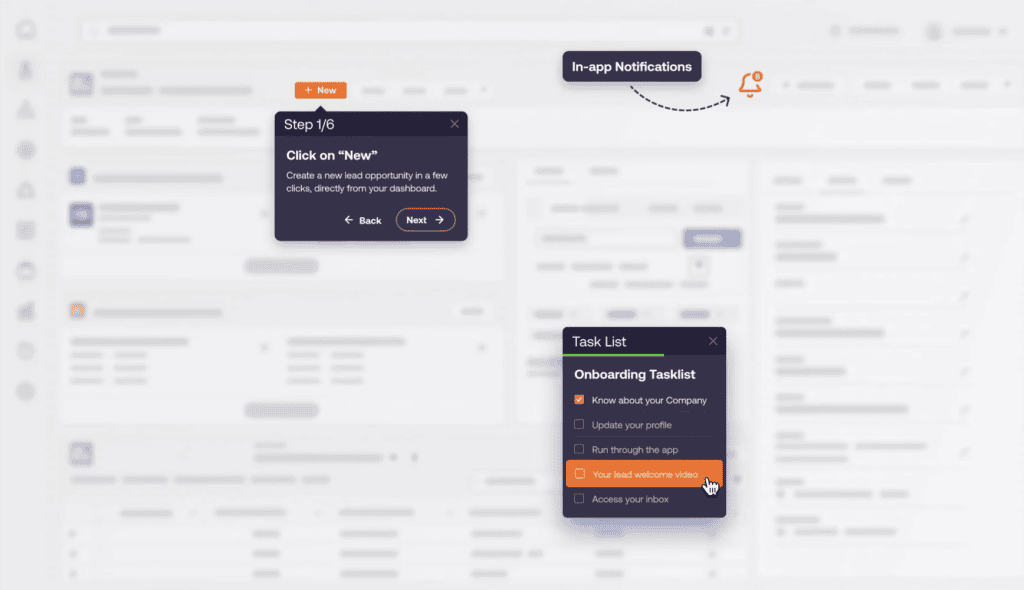
For large digital transformations and migration projects, this enables organizations to provide role- and workflow-specific support as users transition from familiar legacy processes into redesigned experiences.
3. Support Users With In-App AI Help
Whatfix provides users with contextual, self-service assistance directly within the applications where work happens. Employees can search for answers, access SOPs and support content, and receive AI-assisted help without leaving the workflow or immediately escalating to a support team.
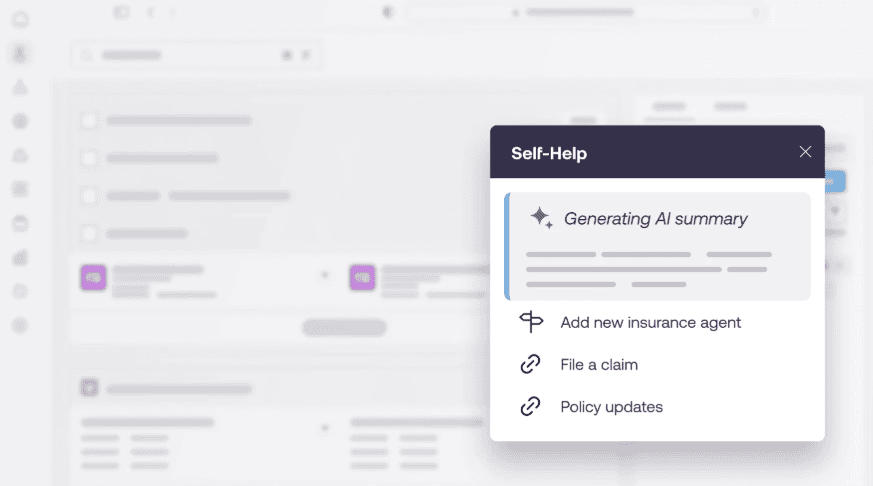
This reduces support dependency while giving end-users access to guidance at the moment they encounter an unfamiliar task, process, or system change.
4. Identify Friction, Launch Interventions, and Optimize Workflows
Whatfix Product Analytics helps application owners understand how users move through critical workflows, where they abandon processes, encounter friction, make errors, or underuse new functionality.
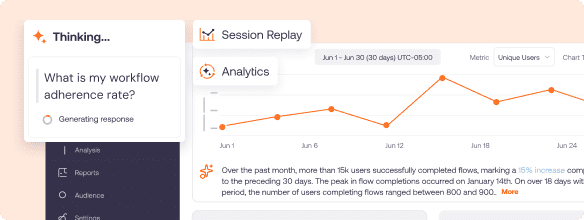
Teams can use those insights to identify the source of adoption gaps, launch targeted in-app interventions, and measure whether those changes improve execution. This creates a continuous improvement cycle of identifying friction, intervening in the workflow, measuring impact, and optimizing the modernized experience.
Examples of Human-Led Legacy System Modernization with Whatfix
Organizations across healthcare, life sciences, and travel technology have used Whatfix to prepare users for new systems and support adoption after launch.
| Organization | Modernization Initiative | How Whatfix Supported the Transition |
| FOX Rehabilitation | Transitioned more than 4,000 clinicians from a customized desktop EHR to a modern web-based environment. | Used Whatfix Mirror simulations before launch, then in-app guidance and Self Help to support clinicians as they transitioned into new workflows. |
| bioMérieux | Implemented Icertis to modernize contract lifecycle management across legal and purchasing teams. | Delivered role-based guidance and embedded support inside Icertis to help users navigate complex workflows and reduce recurring training needs. |
| Travelport | Rolled out Travelport+ as part of its transition away from legacy travel technology architecture. | Used workflow simulations, in-app guidance, Self Help, and behavioral insights to support different user groups as new capabilities and workflows were introduced. |
Ready to support your legacy system modernizations with a human-led approach? Schedule time with a Whatfix expert today!