


Rolling out new software creates value only when employees can use it confidently to complete the workflows their roles depend on. That makes employee onboarding and training a critical (and often overlooked) phase of software implementation, especially for enterprise systems where user errors, process deviations, productivity loss, and slow adoption can delay time-to-value long after go-live.
The strongest training programs focus on user proficiency and readiness, not course completion. They give employees role-based, hands-on practice before launch, assess whether users can perform critical workflows, reinforce learning with in-app guidance during real work, and use adoption analytics to identify friction and target additional support. This creates a continuous path from pre-go-live preparation to sustained software adoption and value realization.
The Importance of Training Employees on New Software
Here are the core ways onboarding and training employees on new enterprise software rollouts impacts digital transformation adoption:
- Accelerates new user time-to-proficiency and software value realization. Employees reach independent workflow execution faster, helping organizations shorten the learning curve and capture value from new technology investments sooner.
- Reduces employee errors and costly rework. Hands-on training helps users understand required fields, workflow steps, approvals, exceptions, and dependencies before mistakes create downstream problems.
- Protects productivity during software transitions. Effective onboarding reduces time spent searching for answers, asking colleagues for help, troubleshooting unfamiliar workflows, or correcting improperly completed tasks.
- Maintains business continuity during go-live. Preparing employees for critical workflows reduces operational disruption as teams transition from legacy systems and processes to new ways of working.
- Improves process compliance and data quality. Training employees on approved workflows helps reduce skipped steps, incomplete or inaccurate data, unauthorized workarounds, and inconsistent execution across teams.
- Reduces post-launch support demand. Better preparation and contextual support reduce repetitive how-to questions and reliance on managers, SMEs, trainers, and IT service desks after launch.
8 Steps to Onboard & Train Employees on New Systems
A successful software onboarding program should prepare employees before launch, support them as they begin working in the live system, and continuously improve enablement based on how users perform. Here are eight ways to onboard and train employees on new systems while building long-term proficiency and adoption.
1. Map Critical Workflows and Training Requirements
Start by identifying the workflows employees must perform in the new system rather than building training around every available feature. Prioritize the tasks that directly affect business operations, compliance, data quality, customer experience, or downstream processes.
Map training requirements across user roles, permissions, business units, and locations. Pay particular attention to high-risk workflows, new processes, exception paths, required approvals, and areas where employees will need to change established behaviors.
2. Define Role-Based Proficiency and Readiness Criteria
Define what successful software use looks like for each employee group before creating the training program. A sales representative, finance analyst, HR administrator, and manager may all use the same enterprise platform while completing entirely different workflows.
Set measurable user readiness criteria around outcomes such as:
- Completing required workflows independently
- Following the correct sequence of steps
- Entering accurate and complete data
- Handling common exceptions
- Following required approval or compliance processes
- Completing tasks within expected timeframes
3. Build Role-Based Training Journeys
Create training experiences around the workflows each role is responsible for performing. Avoid forcing employees through broad application training that includes features, processes, or functionality they are unlikely to use.
Role-based training can be segmented by department, job function, permission level, location, business process, or experience level. This keeps training relevant while making large enterprise rollouts easier to scale across different user populations.
4. Provide Hands-On Simulation Training Before Go-Live
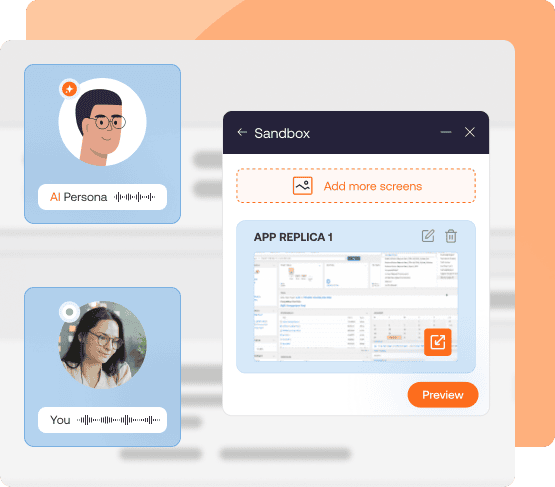
Employees need opportunities to practice new workflows before mistakes carry production risk. Simulation-based training gives users a realistic environment where they can repeat tasks, make mistakes, and build familiarity without changing live data or triggering real business processes.
For enterprise rollouts, simulated application environments can be especially useful when production systems contain sensitive data, complex integrations, or workflows that are difficult to reproduce safely. Whatfix Mirror enables teams to create realistic application simulations for guided practice, onboarding, process training, and pre-go-live preparation.
5. Assess User Readiness Before Employees Enter Production
Training completion does not prove that an employee can perform a critical workflow correctly. Assess users based on their ability to execute the tasks they will be responsible for once the new system goes live.
Measure workflow completion, accuracy, failed steps, repeated mistakes, assessment performance, and differences between user cohorts. Teams can then identify employees who are ready for production and provide additional practice to roles or groups that continue to struggle.
Whatfix Mirror can support this process by combining simulation-based practice with assessments and training analytics that provide visibility into user proficiency before launch.
6. Bridge Training Into Production With In-App Guidance and Support
The transition from training to live work is one of the most important stages of software onboarding. Employees may understand a process during training but still need reinforcement when they encounter real data, approvals, deadlines, exceptions, and unfamiliar scenarios.
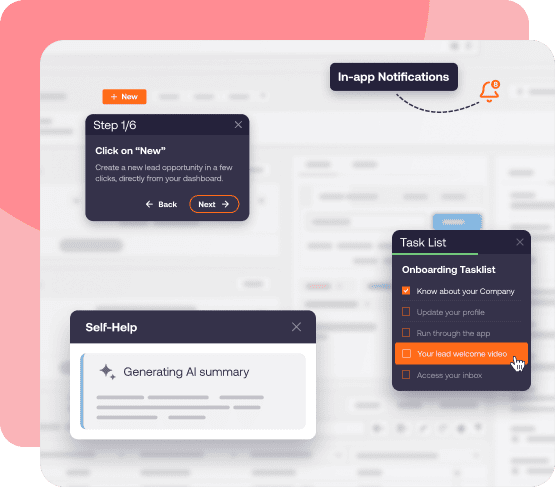
Provide contextual in-app guidance directly inside the new application so users can access help while completing their tasks. With Whatfix DAP, create in-app Flows, Smart Tips, Task Lists, field-level guidance, and a searchable Self Help to reinforce training at the moment employees need it, reducing their reliance on memory, documentation repositories, or support teams.
7. Monitor Software Adoption and Workflow Performance
After launch, monitor how employees actually use the new system. Adoption data can reveal whether users are following intended processes, completing critical workflows, using important features, or encountering friction that was not visible during training.
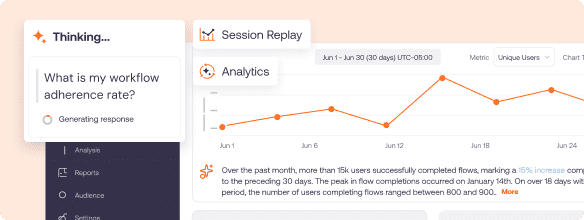
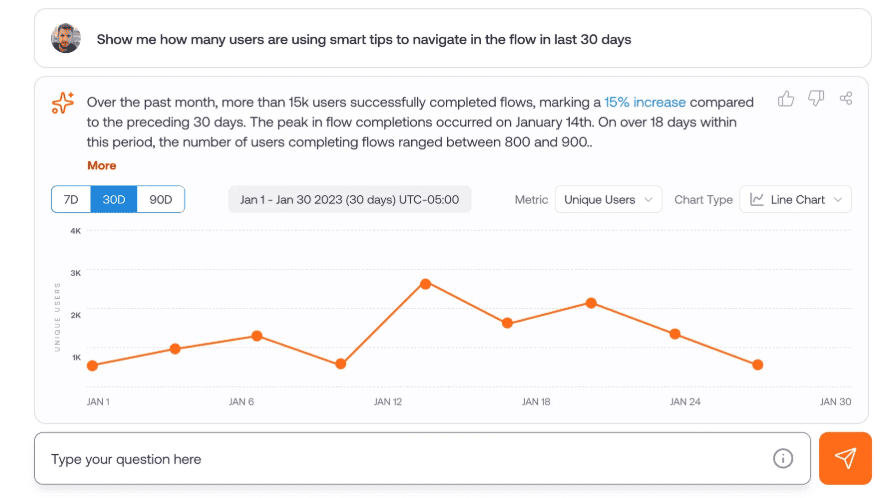
With Whatfix Product Analytics, track signals such as workflow completion, drop-off points, feature usage, help searches, guidance engagement, repeated errors, and differences between user cohorts. These digital adoption insights help application owners distinguish between successful digital adoption and surface-level system usage.
8. Identify Friction, Intervene, and Continuously Optimize
Use production behavior to continuously improve software training and onboarding. Repeated drop-offs, help searches, errors, support tickets, or process deviations can indicate that users need additional guidance, training content, workflow changes, or clearer instructions.
Create a continuous improvement loop: identify friction, determine its root cause, target the affected users with the appropriate intervention, and measure whether behavior improves. Whatfix Product Analytics and DAP can connect these activities by helping teams identify workflow friction, deliver targeted in-app guidance or support, and evaluate whether those interventions improve adoption and user performance.
Key Challenges to Training Employees on New Software
Training employees on new software becomes more difficult at enterprise scale, where different roles, workflows, systems, and business requirements create uneven readiness across the workforce. Common challenges include:
- Change fatigue and resistance to new behaviors. Employees may be adapting to several application, process, and organizational changes at once, while also falling back on familiar workflows, legacy systems, or workarounds when the new process feels unfamiliar.
- Scaling role-based training across diverse user groups. Enterprise applications support different workflows across roles, departments, regions, permissions, and business units, making generic training difficult to apply effectively.
- Balancing user training with day-to-day productivity. Employees need enough practice to build proficiency while continuing to meet existing responsibilities, deadlines, and performance expectations.
- Proving readiness before go-live. Attendance, course completion, and quiz scores provide limited evidence that employees can independently execute critical workflows accurately in the new system.
- Supporting employees once they enter production. Many questions and errors emerge only when users encounter real data, exceptions, approvals, and unfamiliar scenarios, creating a need for continued guidance and support after formal training ends.
Accelerate User Proficiency and Drive Software Adoption With Whatfix
Whatfix helps enterprises prepare employees for new software before launch, support them as they begin working in production, and continuously improve adoption based on real user behavior.
Together, Whatfix creates a continuous technology enablement model that connects training, readiness, performance support, and optimization across the software lifecycle, including the following capabilities:
1. Provide Hands-On Software Training With Whatfix Mirror
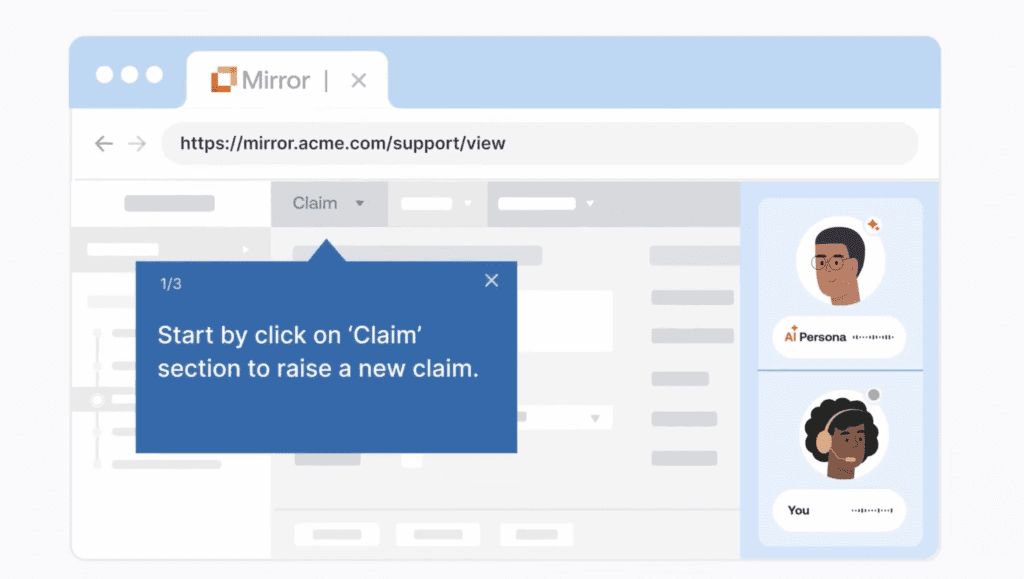
Whatfix Mirror enables teams to create realistic, no-code replicas of enterprise applications where employees can practice critical workflows without accessing production environments or affecting live data. Users can repeat tasks, make mistakes safely, and build familiarity with new processes before go-live.
Teams can use Mirror for new system onboarding, major software migrations, process changes, UAT support, and other transformation initiatives where users need practical experience before performing workflows in production.
Customer Example: FOX Rehab Prepares 4,000+ Clinicians With EHR Simulations
During its EHR transition, FOX Rehabilitation used Whatfix Mirror to create 39 interactive simulations across critical workflows such as scheduling, task training, patient messaging, and communication preferences. More than 4,000 clinicians could practice the new workflows before entering production without requiring FOX to provision and maintain a traditional training sandbox. By using Mirror as its hands-on training environment, FOX’s support and QA teams saved 640 hours over the four-month training period while giving clinicians repeatable practice ahead of go-live.
2. Assess User Proficiency and Readiness Before Go-Live
Training completion is a weak endpoint for enterprise software onboarding. Whatfix helps teams measure whether employees can successfully execute the workflows their roles require before production access begins.
With simulation assessments and training analytics, application owners, L&D teams, and transformation leaders can identify failed steps, repeated mistakes, completion gaps, and differences across user cohorts. These insights help teams determine who is ready for launch and where additional practice or intervention is required.
3. Prepare Employees for Complex Scenarios With AI Roleplay
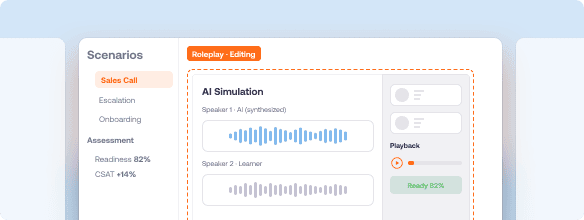
Certain roles require employees to combine application knowledge with conversations, judgment, decision-making, and process compliance. Whatfix AI Roleplay gives employees a controlled environment to practice these scenarios before encountering them during real work.
Teams can create realistic roleplay experiences for sales, customer service, healthcare, HR, compliance, and other roles where users need to practice how they respond to situations while following the correct business process and system workflow.
4. Guide Employees Through Live Workflows With Whatfix DAP
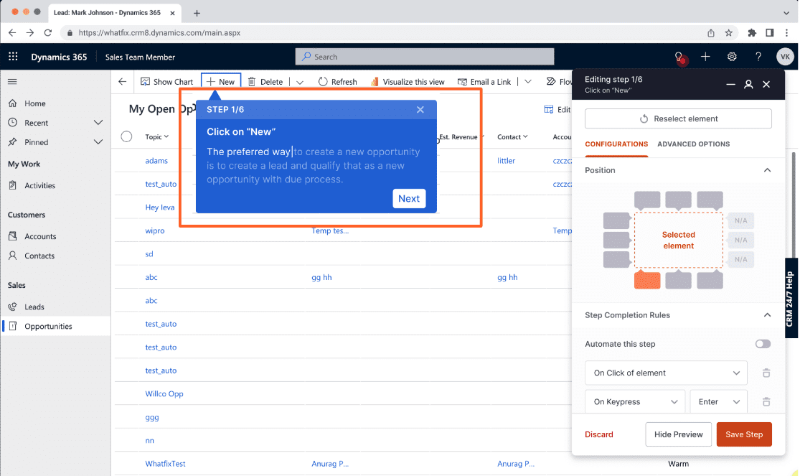
Once employees enter production, Whatfix DAP reinforces training directly inside the applications they use. Teams can create Flows that guide employees through multi-step processes, Smart Tips that clarify fields or policies, Task Lists that structure onboarding activities, and Pop-Ups or Tours that communicate changes and introduce new functionality.
This gives employees contextual assistance while completing real work and helps organizations standardize process execution across roles, regions, and business units.
Customer Example: REG Cut Time-to-Proficiency 50% with In-App Guidance
Renewable Energy Group (REG) used Whatfix DAP to provide employees with contextual, step-by-step guidance directly inside Salesforce and JD Edwards. Whatfix Flows helped users complete complex application tasks in the moment of need, while embedded Self Help gave employees access to answers without leaving their workflows.
By standardizing application training and support inside the flow of work, REG reduced time-to-proficiency from about six months to three months, a 50% improvement. It also reduced daily application-related support questions from as many as 30 to a maximum of five and reported fewer accounting errors from incorrect system use.
5. Provide On-Demand Support With Contextual Self Help
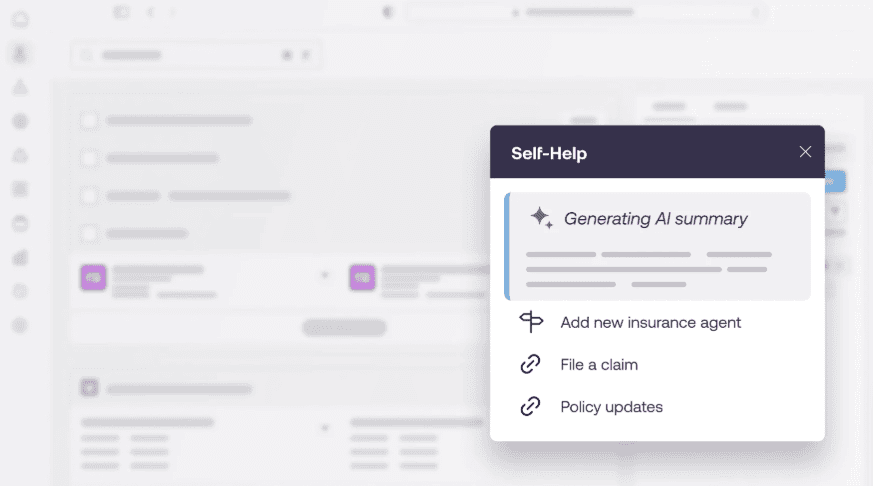
Whatfix Self Help gives employees access to relevant support content without requiring them to leave the application. Organizations can surface knowledge articles, SOPs, PDFs, videos, training resources, and other documentation directly within the context of the employee’s workflow.
This extends software onboarding beyond formal training and provides ongoing performance support during go-live, new hire onboarding, application releases, and process changes. It can also reduce repetitive how-to questions and reliance on IT service desks, managers, and subject matter experts.
Customer Example: Extra Space Storage Resolved 95% of Support Queries Across 7,500 Associates With In-App Self Help
Extra Space Storage used Whatfix Self Help and Guidance Agent to give 7,500+ store associates on-demand access to rental policy and process guidance directly inside its Breeze rental management system. Instead of leaving the application to search through more than 600 SharePoint articles and PDFs or asking managers for help, associates could ask questions in Self Help and receive AI-generated answers and next steps in the flow of work.
This approach delivered a 95% self-service resolution rate for process-related questions, deflected more than 2,500 support tickets, and saved an estimated 23 hours of employee time per day by helping associates resolve routine questions independently.
6. Identify Adoption Gaps and Workflow Friction With Product Analytics
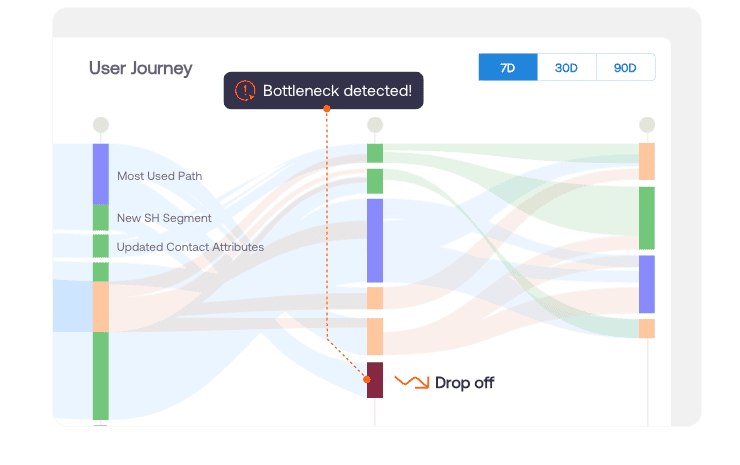
Whatfix Product Analytics helps application and process owners understand how employees actually use enterprise software after launch. Teams can analyze user journeys, funnels, cohorts, feature adoption, workflow drop-offs, and session behavior to identify where employees are struggling or deviating from intended processes.
These behavioral insights help teams separate training gaps from broader workflow problems and identify the users, processes, and application experiences that require additional support.
Customer Example: Vizient Reduced Contract Workflow Errors by 93%
Vizient identified recurring friction within its Icertis CLM workflows that was causing users to upload supporting documents into the wrong field, overwrite contract versions, and create significant downstream rework. Vizient then used Whatfix to address these workflow-level problems with targeted UX improvements, role-based Smart Tips and Pop-Ups, guided Flows, and embedded Self Help.
By intervening directly at these friction points, Vizient reduced contract workflow errors by 93% year over year, eliminated more than 600 hours of annual contract rework, and accelerated average contract cycle time from 33.5 days to 14 days. The example shows how identifying specific points of user friction and deploying targeted interventions can translate adoption insights into measurable process improvements.
7. Continuously Optimize Training and Adoption With Targeted Interventions
Whatfix connects behavioral insights with in-app enablement so teams can act on the friction they uncover. Application owners can identify a struggling cohort or workflow, deploy targeted guidance, Self Help, communications, or additional training, and then measure whether user behavior improves.
This creates a continuous optimization cycle across the software lifecycle: prepare users, assess readiness, guide employees in production, analyze behavior, intervene where friction occurs, and measure improvement. Over time, this helps organizations improve user proficiency, software adoption, process execution, and value realization from their enterprise technology investments.
Ready to get started with Whatfix? Schedule your demo today!