








What Is a Digital Adoption Platform?
A digital adoption platform (DAP) is the enablement and measurement layer that sits on top of applications to help users complete workflows correctly. In large organizations, DAP value appears in three places: guided execution within the application that accelerates time-to-proficiency and eliminates user errors, in-app self-service support that reduces tickets, and analytics that demonstrate adoption, workflow performance, and overall digital value realization.
While there are 95 DAPs listed on G2, only 6 have a enterprise-led market share, with most focusing on mid-market and SMBs. An enterprise DAP can drive measurable ROI across departments and use cases, having down-stream effects across the organizations. Its key outcomes center on accelerated time-to-proficiency, reduction of support tickets, elimination of user errors, faster task completion, and improved customer experience.
DAP Uses Cases & Fit Signals
The table below highlights different use cases by buyer type, including fit signals and outcomes tied to each DAP use case:
| Buyer | Fit Signal | DAP Use Case | Outcome |
| L&D and Enablement Teams | Employees need to learn critical systems quickly, but training is disconnected from the actual workflow. | In-app onboarding and guided learning in the flow of work | Faster time-to-proficiency |
| IT and App Owners | Support teams are flooded with repeat how-to questions after go-lives, upgrades, or policy changes. | In-app support, self-help, and AI-powered knowledge access | Ticket reduction |
| Operations and Process Owners | Critical workflows break down because users take inconsistent paths, skip steps, or struggle with process complexity across teams and regions. | Contextual guidance and journey optimization | Faster time-to-task completion |
| Quality and Compliance Teams | Errors, rework, and noncompliant behavior increase when users rely on memory, static SOPs, or outdated documentation. | Workflow governance and point-of-need guidance | Fewer errors |
| Support Teams | Agent performance varies widely, onboarding takes too long, and customer-facing teams struggle to handle live workflows with confidence. | In-app agent guidance and simulation-based practice | Improved CSAT and resolution time |
The Enterprise ROI of a Digital Adoption Platform
Despite massive investments in software, the expected business value remains elusive for large organizations. Ineffective digital adoption alone is costing mid-sized firms an average of $10.9M annually, according to Forrester’s recent Driving Digital Adoption For Impactful Transformation And Growth report. Additionally, the relentless pace of change creates persistent challenges for users, hindering the adoption and integration of enterprise platforms and tools.
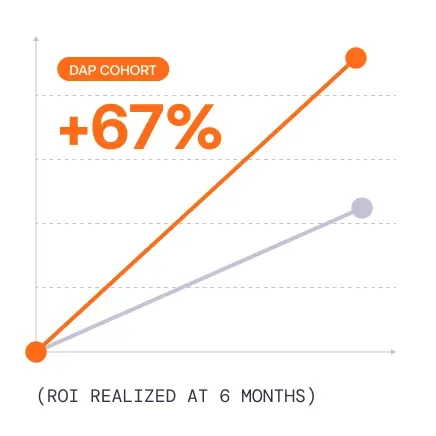
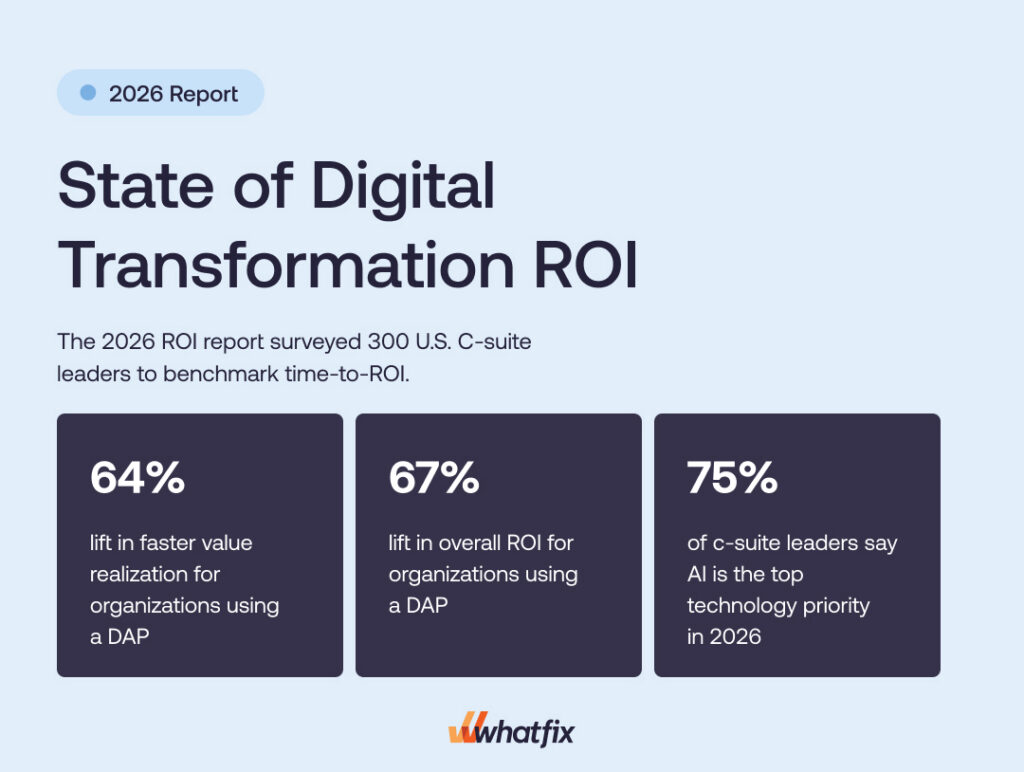
Our 2026 State of Digital Transformation ROI report quantified the impact of a DAP investment, comparing organizations that invest in a DAP to support their digital transformation goals vs. their peers who haven’t. The cohort that utilizes a DAP saw measurable improvements across the board vs the non-DAP cohort, including:
- 37.5% higher user proficiency after three months
- 64% faster time-to-value for digital transformation initiatives after six months
- 67% lift in overall ROI from digital transformation investments
To put this into perspective, for a $3M enterprise software investment, the average ROI (278%) would be $8,340,000. For those with a DAP, a 67% lift would drive that ROI to $13,980,000. And this is for one application deployment, with most modern digital enablement teams using a DAP like Whatfix across multiple high-value applications.
Features to Look For in an Enterprise-Grade Digital Adoption Platform
A true enterprise DAP goes far beyond simple walkthroughs. It includes multiple in-app experience types, like Flows, Smart Tips, Pop-Ups, Task Lists, and field-level guidance, that span complex cross-application workflows, adapt by role and behavior, and improve over time with AI-driven optimization.
Enterprise buyers also require disciplined, operationalized content lifecycle management capabilities that survive constant change. That means no-code authoring, governed draft-to-production workflows, auto-testing, version control, rollback, environment separation, content localization, and AI agents that help teams update guidance when workflows change, contextualize experiences for each user, and reduce the operating cost of keeping content current.
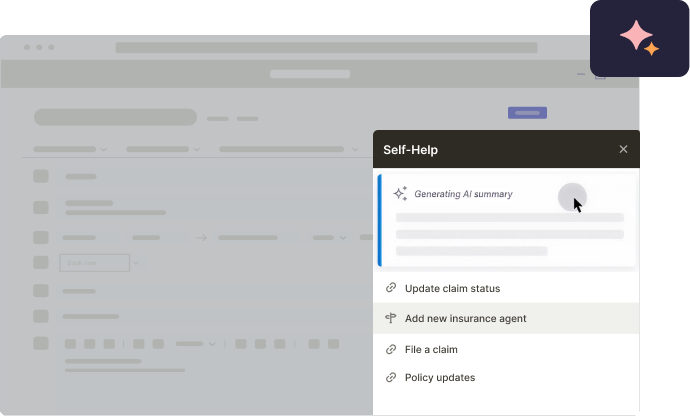
Self-service support is another core DAP category capability. An enterprise-grade DAP unifies help content and knowledge repositories, like SharePoint, Google Drive, SOPs, LMS courses, policies, and training assets, into an in-app help center where users can search without leaving the application, while AI summarizes results, recommends the most relevant resources, and guides users toward the right next step.
Comprehensive DAP platforms (like Whatfix) combine product analytics with adoption insights to surface friction points, drop-offs, and workflow bottlenecks. These insights are turned into targeted guidance, segmentation, and optimization actions inside underlying application, creating a closed-loop model for continuous improvement.
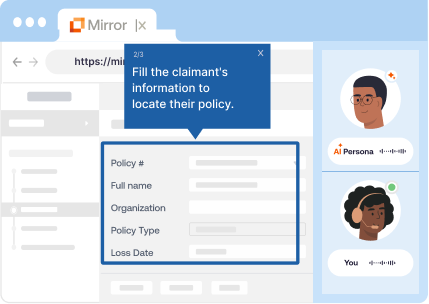
Whatfix pairs Mirror for pre-production simulation training and AI roleplay with in-workflow guidance, Self Help, content governance, and adoption analytics in one unified platform, giving enterprises a safer way to prepare users for regulated workflows, customer-facing interactions, and high-risk tasks before they ever enter live systems, and continue within live systems. This pre-production training, in-workflow guidance, and adoption analytics create a unified digital adoption layer powered by AI that measures business outcomes across the enterprise, and is how Whatfix separates itself from the rest of the DAP category.
What are the best digital adoption platforms for enterprise teams?
| Vendor | Best for |
| Whatfix | Enterprises in regulated industries that require governed content lifecycle operations across many apps, plus end-to-end platform for in-workflow guidance, pre-production simulation training, and adoption analytics. |
| WalkMe | Enterprise adoption programs with a focus on SAP-application ecosystem. |
| Userlane | Web-based application adoption programs with a focus on guided workflows and basic analytics, who are willing to trade more advanced features for a more cost-friendly solution. |
| Pendo | Product-led organizations are optimizing customer-facing onboarding and improving feature adoption with a robust product analytics solution. |
| Apty | Sales Ops-led process adherence programs inside browser-based business applications, with a focus on CRM adoption needs at upper mid-market companies. |
| Oracle Guided Learning | Oracle-centric organizations that need limited suite-native guidance for Oracle workflows. |
| SAP Enable Now | SAP-centric organizations that require a limited guidance library for SAP workflows. |
1. Whatfix
Details:
- Founded: 2014
- Similar to: WalkMe, Pendo
- Typical roles: Director of Enterprise Applications, Enterprise Application Owner, CIO staff, enablement lead, service desk manager
- Typical customers: 2,000+ employees, multi-region operations, mission-critical enterprise software, high-volume internal users, regulated industries with controlled or audited workflows
What Is Whatfix?
Whatfix DAP is an enterprise-grade digital adoption platform built to maximize ROI from mission-critical applications and accelerate digital transformation value realization. It drives measurable outcomes through contextual in-app guidance, self-service support, and adoption analytics tied to workflow performance.
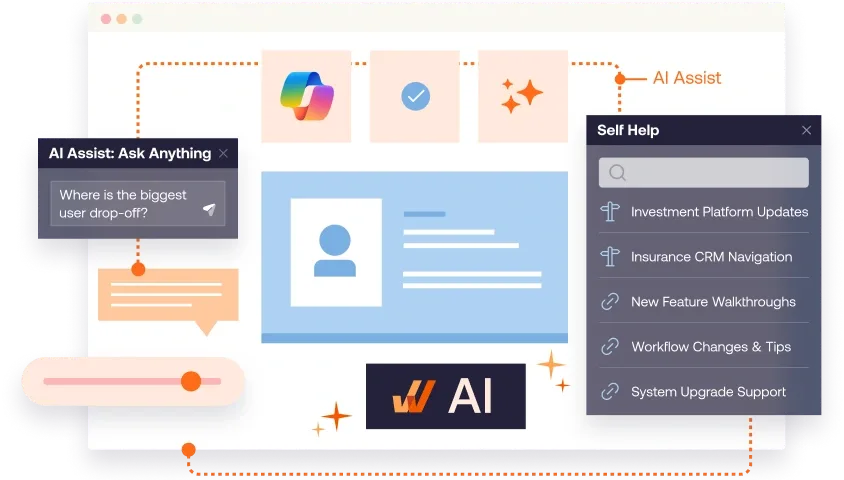
Whatfix provides comprehensive product analytics to enable a data-driven, closed-loop feedback approach to optimize workflows, new content creation, and adoption milestones. With Mirror simulation training and AI roleplay, Whatfix is the only end-to-end digital adoption solution for pre-production readiness, in-workflow guidance, and closed-feedback loop analytics.
Key Features
- Flows: Step-by-step guidance for completing critical workflows consistently, designed for repeatable execution patterns.
- Smart Tips: Field-level and UI-level contextual help that reduces errors during high-stakes transactions.
- Pop-Ups: Targeted in-app communications for go-lives, policy changes, and workflow updates.
- Task List: Role-based checklists that standardize onboarding and drive completion on priority workflows.
- Self Help: In-app self-service support that surfaces help content in the moment of need to reduce tickets during stabilization windows and uses AI for smart search, recommendations, and summarization.
- Mirror simulations: Risk-free practice environments for readiness validation and hands-on training before production exposure.
- Agentic AI agents plus Seek: AI-driven authoring, insights, contextual assistance, and task execution.
- Content lifecycle management: Governed draft-to-production controls for safe releases at scale.
What factors make Whatfix the best DAP for enterprise companies?
- Coverage across any application type: Supports web, desktop, mobile, and Citrix environments, so enterprises can run one adoption layer across mixed application estates and multi-app workflows.
- Vendor-neutral by design: Whatfix is not tied to a single ISV ecosystem, which makes it a stronger fit for enterprises running Oracle, SAP, Salesforce, Microsoft, custom apps, and other business-critical systems side by side.
- Enterprise-grade content lifecycle management: Governed releases, approvals, testing, rollback, localization, and change controls help teams scale adoption without adding rollout risk.
- One platform for readiness, execution, and optimization: Whatfix unifies pre-production simulation training, in-workflow support, and adoption analytics into a single platform for end-to-end user enablement.
- AI embedded across the full lifecycle: Whatfix integrates agentic AI across authoring, guidance, insights, and task execution, while also embedding GenAI into Self Help and AI roleplay to contextualize support and reduce content operations overhead.
Why do companies use Whatfix?
- Drive faster time-to-proficiency after ERP, CRM, HCM, or ITSM changes by guiding users through the highest-risk workflows.
- Reduce ticket spikes during stabilization by shifting common “how do I” questions into in-app self-service.
- Reduce user errors and improve compliance by guiding execution through approved task paths.
- Validate readiness before go-live using simulations, then reinforce execution in production with guidance and Self Help.
- Instrument workflow outcomes and prioritize interventions using adoption and drop-off signals segmented by role, region, and tenure.
TL;DR for Whatfix
- Best for: Enterprise adoption across many applications where governance, rollout safety, simulations, and measurable workflow outcomes drive buying decisions.
- Watch-outs: SMB or mid-market teams seeking a narrow overlay for one application may not need the full enterprise operating model.
- When Whatfix is the better fit: Multi-application programs with high change cadence and controlled workflows that require lifecycle discipline and outcome-grade measurement.
2. WalkMe
Details:
- Founded: 2011
- Similar to: Whatfix, Userlane
- Typical roles: CIO staff, enterprise application owners, transformation leaders, digital workplace teams
- Typical customers: Large enterprises standardizing adoption programs across multiple systems
What Is WalkMe?
WalkMe is a digital adoption platform used to deliver in-app guidance, onboarding, and adoption analytics across enterprise applications. It is commonly deployed as a cross-application overlay for guided experiences, change communications, and adoption programs.
Key Features
- In-app guidance: Walkthroughs and contextual prompts to support task completion.
- In-app communications: Messaging that supports change initiatives and rollouts.
- Segmentation and targeting: Audience targeting to tailor experiences by cohort.
- Adoption analytics: Insights into engagement and friction points.
Why do companies use WalkMe?
- Standardize onboarding and workflow execution across major enterprise tools.
- Support change programs with in-app guidance and communications.
- Use analytics to prioritize friction reduction.
TL;DR for WalkMe
- Best for: Enterprises building a broad adoption layer across many web-based applications.
- Watch-outs: Validate governance depth and operating model requirements early.
- When Whatfix is the better fit: Programs that prioritize simulations, lifecycle control, and outcome measurement across many apps.
3. Userlane
Details:
- Founded: 2015
- Similar to: WalkMe, Whatfix
- Typical roles: CIO staff, transformation leaders, enterprise application owners, enablement teams
- Typical customers: Enterprises driving adoption across many web-based applications
What Is Userlane?
Userlane is a no-code digital adoption platform used to improve software adoption through step-by-step in-app guidance and value realization reporting. It is often owned by IT and transformation teams aiming to standardize workflows inside web-based business applications.
Key Features
- In-app guides and tooltips: Step-by-step assistance inside applications.
- Announcements and engagement: In-app prompts that support change rollouts.
- Analytics: Reporting oriented around adoption and content performance.
- Value realization framing: Analytics models that support standardized reporting across apps.
Why do companies use Userlane?
- Improve task success inside business applications with guided workflows.
- Track adoption and content performance by role and application.
- Support multi-app transformation programs with a no-code delivery model.
TL;DR for Userlane
- Best for: Enterprises driving adoption across multiple web applications with structured measurement.
- Watch-outs: Validate complex workflow support, native mobile requirements, and depth for industry-specific and custom systems.
- When Whatfix is the better fit: Programs that require desktop and mobile coverage, simulations, and governed content operations at scale.
4. Pendo
Details:
- Founded: 2013
- Similar to: Product experience platforms, some DAP overlap
- Typical roles: Product teams, growth teams, digital product leaders
- Typical customers: Product-led organizations focused on customer-facing adoption and feature usage
What Is Pendo?
Pendo is a product experience platform that combines product analytics with in-app guides and feedback workflows, typically owned by product and digital teams. It is commonly selected when the adoption objective centers on improving customer-facing onboarding and feature adoption inside a digital product.
Key Features
- Product analytics: Behavioral measurement tied to feature usage.
- In-app guides: Onboarding and engagement experiences.
- Feedback collection: In-app surveys and sentiment signals.
- Targeting: Segmentation by user attributes and behavior.
Why do companies use Pendo?
- Improve onboarding and feature adoption inside customer-facing products.
- Run analytics-driven product optimization programs.
- Collect user feedback to guide roadmap decisions.
TL;DR for Pendo
- Best for: Product teams that want analytics-first adoption inside a digital product.
- Watch-outs: Employee-facing enablement across multiple enterprise systems requires a different operating model.
- When Whatfix is the better fit: Transformation programs that require governed guidance, simulations, and workflow outcome reporting.
5. Apty
Details:
- Founded: 2017
- Similar to: Whatfix, WalkMe
- Typical roles: Operations leaders, IT application owners, process governance teams, shared services
- Typical customers: Organizations focused on process adherence and consistent workflow execution inside web-based applications
What Is Apty?
Apty is a digital adoption platform positioned around improving software adoption and process compliance through in-app guidance and insights. It is often evaluated by teams that want to reduce errors, standardize workflows, and improve operational consistency inside browser-based applications.
Key Features
- In-app guidance: Workflow walkthroughs and contextual prompts.
- Process adherence support: Guidance patterns oriented around correct execution.
- Adoption insights: Visibility into usage and friction patterns.
- Operational enablement: Common fit for standardization and compliance initiatives.
Why do companies use Apty?
- Improve process consistency and reduce errors in high-volume workflows.
- Reduce support effort by guiding users through tasks.
- Drive adoption and compliance in operational systems.
TL;DR for Apty
- Best for: Teams prioritizing process adherence and operational enablement inside browser-based applications.
- Watch-outs: Validate cross-app governance, desktop and mobile requirements, and analytics depth for enterprise-wide programs.
- When Whatfix is the better fit: Enterprise adoption programs that require simulations, richer workflow support, and governed content operations at scale.
6. Oracle Guided Learning
Details:
- Founded: Oracle ecosystem product
- Similar to: Suite-native adoption tools, some DAP overlap
- Typical roles: Oracle application owners, transformation PMO, enablement teams
- Typical customers: Oracle-centric organizations rolling out Oracle Fusion and adjacent Oracle applications
What Is Oracle Guided Learning?
Oracle Guided Learning is Oracle’s in-app guidance layer designed to support user onboarding and task completion inside Oracle applications. It is commonly selected when Oracle applications are the primary adoption surface and Oracle packaging simplifies procurement and deployment.
Key Features
- In-app guidance inside Oracle: Guided prompts and task support for Oracle workflows.
- Oracle ecosystem alignment: Strongest fit in Oracle-first environments.
- Deployment simplicity: Easier to start when Oracle is already the standard stack.
- Usage visibility: Engagement reporting for guided content (validate depth needed for workflow outcomes).
Why do companies use Oracle Guided Learning?
- Speed adoption inside Oracle workflows during transformation programs.
- Reduce training effort by embedding guidance inside Oracle applications.
TL;DR for OGL
- Best for: Oracle-centric organizations that want suite-native in-app guidance.
- Watch-outs: Mixed stacks and cross-app analytics needs often require a broader DAP operating model.
- When Whatfix is the better fit: Enterprises standardizing adoption across Oracle plus non-Oracle systems with governed content operations.
7. SAP Enable Now
Details:
- Founded: SAP ecosystem product
- Similar to: Enterprise enablement and training platforms
- Typical roles: SAP transformation PMO, L&D, SAP program owners, application owners
- Typical customers: SAP-centric enterprises running large rollouts and ongoing enablement programs
What Is SAP Enable Now?
SAP Enable Now is a digital learning and enablement content platform used to create interactive learning content, guided tutorials, and documentation, especially in SAP environments. It is commonly selected when the adoption strategy emphasizes training content creation and distribution tied to SAP rollouts. After SAP’s acquisition of WalkMe, Enable Now will be reach the end of its maintenance lifecyle in November 2030.
Key Features
- Interactive training content creation: Tutorials, e-learning, and documentation.
- Content reuse: Multi-format outputs to support training distribution.
- SAP ecosystem alignment: Strong fit for SAP-centric program delivery.
- Repository approach: Centralized access to enablement content.
Why do companies use SAP Enable Now?
- Build standardized enablement content for SAP rollouts and upgrades.
- Create reusable learning assets across training modalities.
- Support role-based learning programs at scale.
TL;DR for SAP Enable Now
- Best for: SAP-centric organizations building a standardized enablement content program.
- Watch-outs: Enterprise-wide workflow execution support and cross-app measurement may require a DAP-focused platform. With SAP’s acquisition of WalkMe, Enable Now will also be retired in November 2030.
- When Whatfix is the better fit: Multi-application transformations where adoption needs governance, simulations, and measurable workflow outcomes.
Enterprise requirements for a DAP buyer scorecard
Enterprise adoption programs break down when a DAP is treated as a simple content authoring tool rather than an operating discipline. Large organizations have multiple business-critical applications, frequent workflow changes, and controlled processes that demand consistency. That requires governance, a release cadence, environment separation, and reporting that withstands executive scrutiny.
Modern enterprises require an adoption solution that’s more than in-context guidance, specifically pre-production simulation environments for hands-on training, adoption analytics that tie digital investments to business outcomes, and agentic AI that takes your content lifecycle management and governance to the next level.
To keep your DAP vendor evaluation honest and comparable, consider the following requirements for org-wide, multi-app adoption programs:
- Coverage across environments: web, desktop, VDI, and mobile requirements
- Governance and approvals: ownership model, review workflows, delegation, permissions
- Versioning and rollback: safe publishing, change control, revert paths
- Environment separation: dev, test, prod workflows and release discipline
- Readiness support: pre-production validation, training, simulations where needed
- Analytics depth: workflow completion, drop-off, segmentation, outcome reporting
- Scale across apps and teams: cross-application programs, global rollouts, localization support
- AI capabilities: reduce authoring and maintenance effort, improve guidance relevance, support task execution
Why Whatfix is the DAP built for enterprise teams
Enterprise digital adoption programs succeed when the platform can be operated with the same rigor as the systems it supports. Whatfix is built for large organizations that need governed rollout processes, support across complex application estates, and the ability to drive adoption outcomes that hold up to boardroom scrutiny. Here’s what sets it apart:
- Coverage across all application types: Whatfix supports web, desktop, mobile, and Citrix environments, allowing enterprise teams to standardize adoption across mixed application estates and complex cross-application workflows.
- ISV ecosystem independence: Whatfix is not locked to a single software vendor ecosystem, making it a stronger fit for enterprises running Oracle, SAP, Salesforce, Microsoft, custom applications, and other business-critical systems side by side.
- Enterprise-grade content lifecycle management: Whatfix gives enterprise teams the controls needed to manage in-app content safely at scale, including approvals, testing, rollback, localization, and change governance. That helps organizations release guidance faster without increasing rollout risk across regions, business units, or mission-critical workflows.
- One platform for readiness, execution, and optimization: Whatfix combines pre-production simulation training (Mirror), in-app guidance and Self Help (DAP), and adoption analytics (Product Analytics) in one platform. Teams can prepare users before go-live, support them in the flow of work after launch, and continuously improve adoption based on real workflow data.
- AI embedded across the full lifecycle: Whatfix applies AI across authoring, guidance, search, insights, and task execution to help teams create, maintain, and optimize digital adoption content more efficiently. It also brings GenAI into Self Help and AI roleplay to deliver more contextual support while reducing content operations overhead.
Did we mention we’re the #1 rated overall DAP on G2?
Explore the full capabilities of the Whatfix Digital Adoption Platform or schedule a demo now!