


An enterprise can successfully deploy a new business-critical application and not realize its expected value. Employees may actively use the system while continuing to make errors, rely on manual workarounds, or encounter workflow friction. Application owners may see adoption improving without corresponding gains in productivity, accuracy, or downstream operational performance.
A software value realization program gives enterprise teams a structured approach to closing these performance gaps. It establishes ownership for monitoring business outcomes, identifying opportunities for improvement, coordinating changes, and measuring whether those changes deliver results. This creates ongoing accountability for software ROI throughout the application lifecycle.
This guide explains how to establish an enterprise software value realization program, define ownership and success measures, conduct recurring value reviews, and continuously improve the business outcomes of core applications.
What Is a Software Business Value Realization Program?
A software value realization program is a structured, ongoing approach to measuring, improving, and sustaining the business outcomes delivered by enterprise applications. It brings together application owners, business process owners, IT, and enablement teams to identify performance gaps, prioritize improvements, and maintain accountability for realizing software value throughout the application lifecycle.
What Does Software Value Realization Programs Include?
An effective program connects four core activities:
- Business outcome ownership: Establish responsibility for application performance, critical workflows, and measurable business results.
- Continuous performance measurement: Monitor software adoption, workflow execution, operational KPIs, and financial outcomes to identify value realization gaps.
- Recurring value reviews: Evaluate performance findings, prioritize improvement opportunities, and authorize corrective actions.
- Coordinated improvement and enablement: Execute workflow changes, technical fixes, role-based training, and ongoing user support, then measure their impact.
Software value realization extends beyond implementation and initial digital adoption. An application can achieve high usage while employees continue struggling with critical workflows or fail to realize the expected operational improvements.
For example, a finance organization may achieve 95% adoption of a new ERP system while invoice exception rates and processing times remain unchanged. A value realization program helps application and process owners investigate the causes, introduce targeted improvements, and verify whether those changes improve financial operations.
Value realization also connects to enterprise software ROI. ROI measures financial returns relative to investment costs, while a value realization program coordinates the ongoing work required to achieve and sustain operational and financial benefits.
Roles and Responsibilities of Software Value Realization Programs
Enterprise application owners typically coordinate software value realization programs, while business process owners remain accountable for their application’s contextual operational outcomes.
This ownership model creates a clear relationship between software ROI, performance, and business accountability. Application owners coordinate improvements across technical, operational, and enablement teams, while process owners validate whether those improvements deliver the intended results.
Breakdown of software value realization ownership
| Role | Value Realization Responsibilities |
| Application owner | Coordinates the program, monitors application performance, facilitates value reviews, prioritizes improvements, and tracks execution. |
| Business process owner | Defines critical workflow requirements, owns operational KPIs, and validates whether improvements achieve business outcomes. |
| IT and application teams | Investigate technical issues, manage integrations and configuration, and implement approved system changes. |
| L&D and digital enablement teams | Assess user readiness, identify proficiency gaps, maintain in-app support, and coordinate training and change enablement. |
| Finance and procurement | Validate financial benefits, review software expenditures, and support business cases, renewals, and investment decisions. |
| Executive sponsor | Aligns strategic priorities, resolves cross-functional conflicts, and authorizes resources or investments beyond the application owner’s authority. |
For workflows spanning multiple enterprise applications, organizations should assign an end-to-end process owner who can coordinate decisions across individual application owners.
For example, an invoice-to-payment workflow may involve procurement software, ERP, and financial systems. The process owner is responsible for the end-to-end business outcome, while individual application owners coordinate the changes required within their platforms.
How to Build a Software Value Realization Program
An enterprise software value realization program should begin with a manageable set of applications and business workflows, then expand as the organization establishes reliable measurement, governance, and improvement processes.
The following five steps provide a practical framework for application owners building or formalizing a value realization program.
1. Prioritize Business-Critical Applications and Establish Ownership
Start by identifying the enterprise applications that support critical business processes, including ERP, CRM, HCM, ATS, and industry-specific platforms.
Prioritize applications where poor workflow performance, adoption gaps, or operational inefficiencies create measurable business consequences. Consider the number of affected employees, workflow complexity, application costs, support demand, and strategic importance.
Start with a single application
Begin with one application and a limited number of high-impact workflows. This allows the team to validate its measurement and improvement approach before expanding across additional applications.
To establish the initial program:
- Select priority applications and workflows: Identify essential business processes, affected roles, and cross-application dependencies.
- Assign accountable owners: Establish application and process ownership, supporting stakeholders, approval authority, and escalation paths.
- Document current challenges: Capture recurring support issues, workflow errors, process bottlenecks, and known adoption gaps.
- Define program governance: Establish responsibilities for reviewing performance, approving improvements, and allocating resources.
- Create a program charter: Document scope, business objectives, ownership, performance measures, and review expectations.
Build your value realization charter
A concise charter provides a shared reference as the program evolves. An example of an enterprise ERP value realization charter would look something like this:
| Program Element | Example |
| Application | Enterprise ERP and procurement platform |
| Priority workflow | Invoice approval and exception management |
| Business objective | Reduce invoice processing time and rework |
| Program coordinator | Enterprise ERP application owner |
| Business outcome owner | Accounts payable director |
| Supporting stakeholders | IT, procurement, finance, digital enablement |
| Success measures | First-pass accuracy, cycle time, support demand |
| Review cadence | Quarterly, with additional reviews triggered by significant performance changes |
| Improvement tracking | Shared backlog with accountable owners, deadlines, and expected results |
2. Define Business Outcomes, Baselines, and Value Realization KPIs
Establish what business value each application and workflow is expected to deliver. Work with process owners to define measurable outcomes and establish a reliable baseline before evaluating improvement opportunities.
Organize measurement across four levels:
- Application adoption: Are employees accessing and using the applications and features required for their roles? Track active users, feature adoption, and usage across employee cohorts.
- Workflow execution: Can employees complete critical business processes accurately and independently? Track task completion, abandonment, errors, and time-to-proficiency.
- Operational performance: Are workflows producing better business results? Measure processing times, transaction accuracy, rework, productivity, service levels, and support demand.
- Financial value realization: Are operational improvements producing verified financial benefits? Track validated cost reductions, released capacity, avoided expenses, and revenue improvements where attributable.
The distinction between these measures is essential. High feature adoption may indicate that employees are using the software, while operational KPIs show whether that usage improves business performance.
Examples of an ERP value realization scorecard
| Metric | Baseline | Target | Evidence Source |
| Invoice first-pass accuracy | 82% | 94% | ERP transaction records |
| Average invoice processing time | 8 days | 5 days | Finance operations reporting |
| Invoice-related support tickets | 45/week | 25/week | Service desk |
| Critical workflow completion rate | 76% | 90% | Instrumented workflow analytics |
| Monthly invoice rework | 350 hours | 200 hours | Operational time analysis |
The figures above are hypothetical examples of program targets, not industry benchmarks.
3. Connect Application Behavior With Operational Performance
Value realization programs need visibility into how employees execute business processes and where application behavior contributes to operational problems.
Bring together evidence from enterprise applications, workflow analytics, operational reporting, service desk records, and employee feedback.
Key user behavior and operational activities to track
- Analyze critical user journeys: Identify where employees abandon tasks, repeat steps, encounter errors, or rely on alternative workflows.
- Segment performance: Compare findings across roles, departments, regions, experience levels, and rollout cohorts.
- Connect behavior to business KPIs: Investigate whether workflow friction aligns with longer processing times, higher error rates, or recurring support requests.
- Identify root causes: Determine whether problems originate from user proficiency, unclear procedures, application configuration, integrations, or underlying process design.
- Document evidence gaps: Identify where additional instrumentation, operational reporting, or qualitative investigation is necessary.
Whatfix Product Analytics helps application owners analyze employee journeys, workflow completion, and behavioral friction within enterprise applications.
These insights can be combined with operational data to investigate why expected improvements are not materializing.
For example, if invoice processing times remain high despite widespread ERP adoption, application analytics may reveal that employees frequently abandon or repeat an exception-handling workflow. The process owner can investigate whether that behavior reflects unclear approval requirements, missing information, or technical limitations.
Establishing the cause allows teams to select an appropriate improvement instead of repeatedly retraining users or making unnecessary system changes.
4. Build a Continuous Workflow Improvement and Enablement Process
Once performance gaps are identified, application owners need a structured process for prioritizing and coordinating corrective actions across business and technical teams.
Maintain a shared improvement backlog connecting each issue to its supporting evidence, expected business outcome, proposed intervention, accountable owner, and delivery status.
Depending on the root cause, improvements may involve:
- Workflow redesign and standardization: Simplify inefficient processes, remove unnecessary steps, and clarify approvals or handoffs.
- Technical and configuration improvements: Resolve system defects, integration problems, performance issues, or missing capabilities.
- Role-based application training: Address proficiency gaps through targeted practice and application simulations before deploying new or significantly changed workflows.
- In-app guidance and self-service support: Help employees complete complex tasks, follow approved procedures, and resolve common questions while working.
- Change management and release enablement: Communicate updated workflows, prepare affected employees, and reinforce changes as enterprise applications evolve.
For significant application changes, include user readiness assessments, business-led testing, and updated training resources before deployment.
For example, a CRM value review may identify persistent data quality problems caused by employees selecting incorrect opportunity stages. Sales operations can clarify stage definitions, while application and enablement teams introduce targeted field guidance and process improvements.
Following implementation, teams should reassess data quality, recurring errors, and employee behavior to determine whether the intervention achieved its intended outcome.
5. Establish Review Cadence, Measure Results, and Expand the Program
Formalize how application owners and business stakeholders will review performance, authorize improvements, and determine whether those improvements deliver value.
The review cadence should reflect application maturity, workflow criticality, and operational risk. Newly deployed applications may require frequent reviews during stabilization, while mature applications can move to quarterly business value reviews.
Establish additional reviews when major releases, recurring performance issues, new business requirements, or investment decisions require attention.
As improvements are delivered:
- Validate operational results: Compare performance against the established baseline and expected improvement targets.
- Review completed interventions: Confirm whether changes resolved the original issue or introduced new dependencies.
- Report realized value: Document verified operational improvements, financial benefits, outstanding risks, and opportunities requiring additional investment.
- Refine the improvement backlog: Close successful initiatives, investigate underperforming interventions, and reprioritize unresolved issues.
- Expand to additional applications: Reuse effective governance, measurement, and enablement practices across other business-critical applications and workflows.
A phased approach helps enterprise teams establish repeatable value realization processes while adapting to the requirements of different applications, departments, and employee groups.
How to Run a Recurring Enterprise Software Value Review
An enterprise software value review is a structured, decision-focused meeting where application owners and business stakeholders evaluate application performance, investigate unrealized value, and authorize improvements.
The purpose of each review is to determine which actions will produce the greatest business impact, who is responsible for executing them, and how their effectiveness will be measured.
1. Prepare a Decision-Focused Performance Summary
Before the review, the application owner should prepare a concise summary covering:
- Performance against agreed business outcomes and KPIs.
- Application adoption, workflow friction, and relevant support trends.
- Progress on previously approved improvements.
- New or unresolved performance issues requiring attention.
- Proposed decisions, resource requirements, and expected business impact.
Focus the pre-read on material performance changes and decisions that require stakeholder input.
2. Validate Performance Gaps and Investigate Root Causes
Review operational results alongside application behavior and support evidence.
Determine whether underperformance is isolated to particular workflows, roles, teams, or application releases.
Separate confirmed causes from working hypotheses. Where evidence is incomplete, assign further investigation before authorizing a costly intervention.
For example, rising ERP invoice errors may result from unfamiliar procedures, incorrectly configured fields, incomplete source data, or integration defects. Each requires a different corrective action.
3. Evaluate Improvement Options and Prioritize Business Impact
Compare potential interventions based on expected operational benefit, implementation effort, urgency, risk, and delivery capacity.
Consider whether improvements require technical fixes, workflow redesign, additional training, in-app guidance, or changes in business responsibilities.
Prioritize issues affecting critical workflows, compliance, customer outcomes, or large employee populations.
4. Authorize Actions and Assign Accountability
Each review should result in a documented decision, approved intervention, request for investigation, or escalation.
Record:
- The issue and supporting evidence.
- The approved improvement or next action.
- Accountable business and delivery owners.
- Expected outcome and success criteria.
- Delivery commitment and review date.
Example: Enterprise Software Value Review Decision
| Review Element | Example |
| Performance gap | High invoice rejection rates in the ERP |
| Evidence | Repeated field errors and recurring AP support tickets |
| Proposed action | Clarify field requirements and pilot contextual in-app guidance |
| Business owner | Accounts payable director |
| Delivery owners | ERP application and digital adoption teams |
| Success measure | Reduction in preventable invoice rejections |
| Follow-up | Compare results after the pilot with the established baseline |
5. Verify Improvements and Determine the Next Action
At the next review, confirm whether approved actions were completed and whether performance improved.
Evaluate the effect on relevant operational KPIs, user behavior, and support demand. When results are inconclusive, determine whether additional observation, investigation, or changes are required.
Successful interventions can become standardized practices or be extended to other employee groups and workflows.
The review should produce a clear record of decisions, outcomes, unresolved issues, and next steps. This creates continuity across reviews and gives program stakeholders visibility into how improvement initiatives contribute to business value.
Enterprise Software Value Realization Example: How ManpowerGroup Expanded Digital Adoption Across Applications
Global workforce solutions company ManpowerGroup provides an example of how enterprise software enablement can begin with one critical application and expand into a broader, multi-application improvement initiative.
ManpowerGroup initially partnered with Whatfix to support its Bullhorn ATS transformation in North America. The organization needed to prepare recruiters to execute essential hiring workflows while reducing reliance on traditional training resources and post-launch support.
With Whatfix, ManpowerGroup embedded contextual guidance and searchable Self Help within Bullhorn. Its initial implementation included 119 guided Flows supporting recruiter workflows, including candidate management and interview scheduling.
As its digital adoption initiative matured, ManpowerGroup expanded enablement across European Bullhorn deployments and additional business applications, including Microsoft Dynamics 365, Oracle Financial Cloud, and its proprietary Next Platform.
The broader initiative enabled ManpowerGroup to apply contextual support and workflow improvements across different business functions while adapting its approach to the requirements of each application and employee population.
In its published Bullhorn case study, ManpowerGroup reported:
- 119 in-app Flows supporting recruiters through essential ATS workflows.
- 92% Self Help resolution rate among recruiters using Whatfix to answer ATS-related questions.
- Earlier closure of its temporary Hypercare help desk due to lower-than-expected support demand.
ManpowerGroup’s phased expansion illustrates how an enterprise can establish application enablement capabilities through an initial deployment, then extend those practices across its software portfolio.
For application owners, the case highlights a scalable approach: begin with a business-critical application, demonstrate operational improvements, and expand enablement and optimization practices as new requirements emerge.
How Whatfix Supports Enterprise Software Value Realization
Enterprise software value realization requires organizations to continuously prepare employees, support workflow execution, and identify opportunities to improve application performance.
Whatfix connects application simulation training, digital adoption, and product analytics to help enterprise teams address performance gaps throughout the software lifecycle.
Prepare Employees for Critical Workflows With Whatfix Mirror
Whatfix Mirror enables organizations to create simulated enterprise application environments where employees can practice role-specific tasks before entering production.
Teams can use guided simulations and proficiency assessments to identify readiness gaps, reinforce complex workflows, and prepare employees for system deployments, application updates, and process changes.

Support Workflow Execution With Whatfix DAP
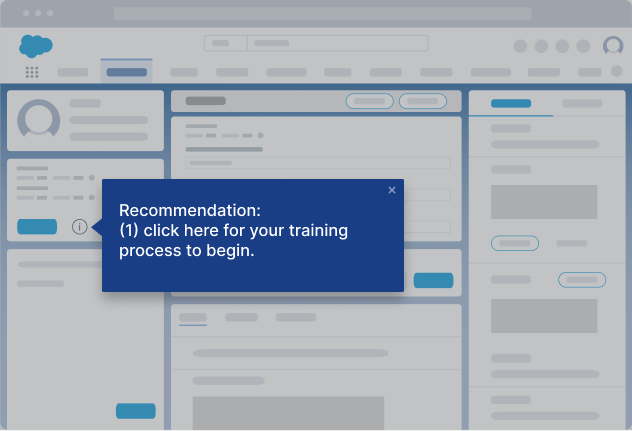
Whatfix Digital Adoption Platform provides contextual guidance, task-level assistance, and self-service support directly within enterprise applications.
Interactive Flows, Smart Tips, Self Help, and Field Validations help employees navigate unfamiliar tasks, follow standardized procedures, and reduce avoidable execution errors as processes evolve.
Identify Friction and Optimize Application Performance With Whatfix Product Analytics
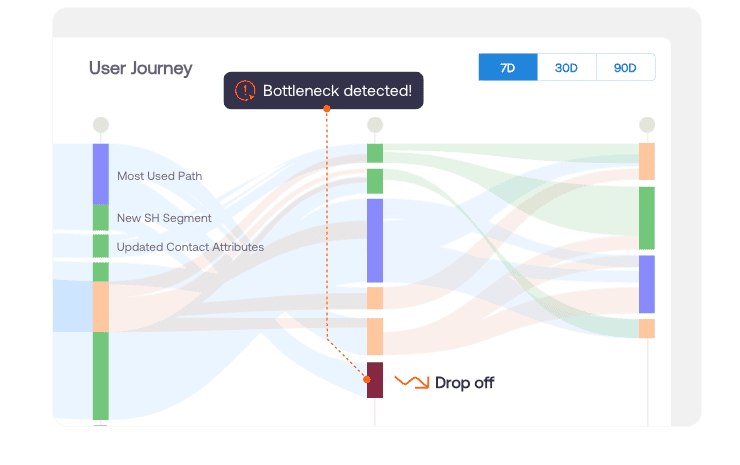
Whatfix Product Analytics helps application owners investigate user journeys, workflow drop-offs, feature adoption, and behavioral patterns across enterprise applications.
These insights support recurring value reviews by helping teams identify adoption gaps, prioritize targeted interventions, and evaluate changes in user behavior after improvements are deployed.
Together, Whatfix Mirror, DAP, and Product Analytics support a continuous cycle of user readiness, workflow enablement, performance analysis, and improvement.
Improve application adoption, optimize critical business workflows, and maximize the value of your enterprise software investments. Request a Whatfix demo to learn how Whatfix supports software value realization across your application portfolio.