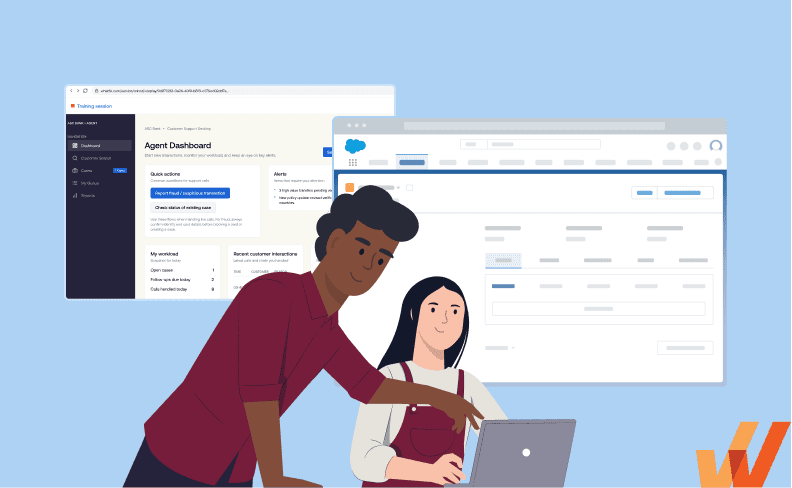


Choosing the right application simulation training tool helps enterprise teams improve software proficiency, accelerate user adoption, and maximize ROI from digital transformation initiatives. These platforms provide L&D, enablement, and performance teams a solution for hands-on training in a safe environment and hyper-realistic, immersive experiences that replicate real tasks to strengthen knowledge retention and understanding.
In this guide, we explore software simulation tools for enterprise software training and how to evaluate the best application simulation tools you determine which solution best fits your organization’s readiness training and performance requirements.
What Is Application Simulation Training Software?
Application simulation training software helps employees build readiness for real work by practicing essential tasks, workflows, and processes in a safe, realistic replica of the live application. Learners complete hands-on exercises, respond to common scenarios, and work through errors or exceptions without affecting production systems, customer data, or business operations. These platform provide in-the-moment feedback to end-users, track performance, and assess whether each learner is prepared for live systems and real work.
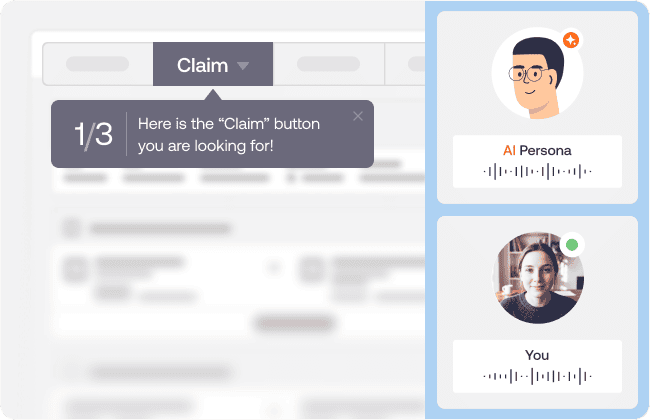
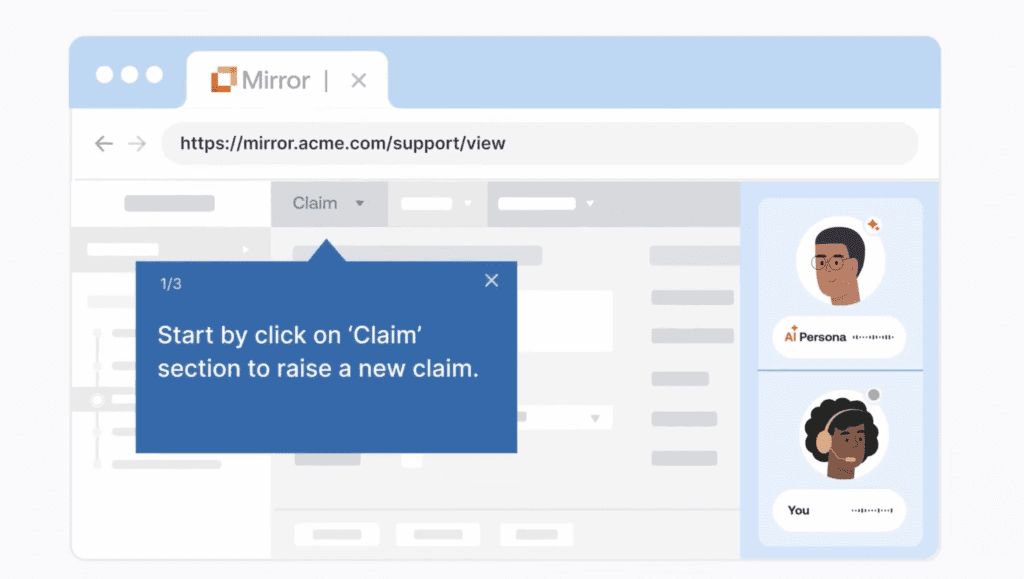
Above: Example of a simulated claims agent workflow with Whatfix Mirror
Features of application simulation tools for user readiness training include:
The five core features of application simulation training software are:
- Create application training sandbox: Easily replicates enterprise software interfaces and their workflows without technical dependencies.
- Hands-on workflow practice and training: Provides safe space for learners to complete real tasks, make decisions, enter data, and navigate multi-step processes.
- Scenario-based training: Simulates common situations, exceptions, errors, and branches decision paths based on the learner’s actions.
- In-the-moment guidance and feedback: Provides prompts, hints, corrections, and explanations as learners move through each task.
- Readiness assessments and analytics: Measures task accuracy, completion rates, time, errors, and proficiency to identify whether employees are ready for live work.
Best Simulation Training Software for Enterprise Training
Now that we’ve outlined core capabilities of application simulation platforms, let’s examine the leading software vendors for simulation training and readiness:
1. Whatfix Mirror
Whatfix Mirror is an application simulation training platform that creates realistic replicas of enterprise software for hands-on practice, workflow testing, and readiness assessment. It supports application-based simulations and AI-powered customer conversations, enabling employees to practice both system tasks and real-world interactions before working in live environments.
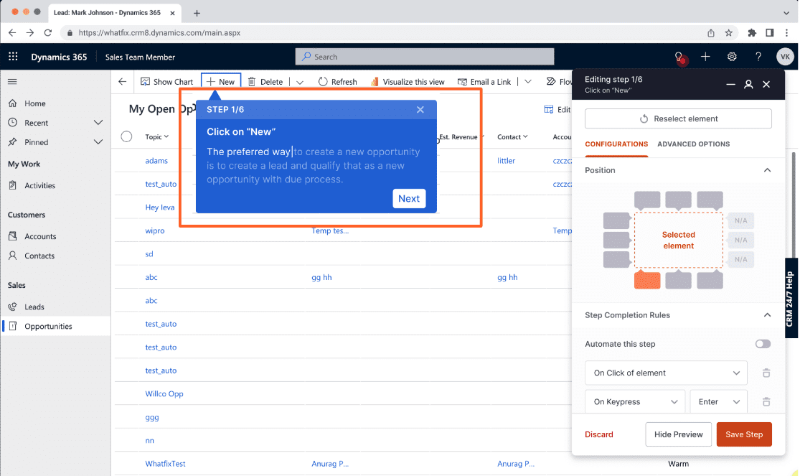
Key Mirror capabilities and features
- Creates realistic replicas of enterprise applications without production access
- Supports guided practice, independent exercises, and readiness assessments
- Simulates multi-step workflows, errors, exceptions, and decision points
- Use AI to generate guided workflows by simply watching a subject matter expert complete processes and tasks correctly.
- Provides AI voice and chat roleplay for customer-facing scenarios
- Tracks learner accuracy, completion, proficiency, and readiness
- Supports training across CRM, ERP, HCM, CLM, EHR, and custom applications
- It continues to support users in real production environments, through in-app communication, guided workflows, AI self-help, and workflow analytics.
Additional Mirror details
- Best for: Enterprise application readiness, workflow training, and customer-facing roleplay
- Choose Whatfix Mirror if: You need one platform for application simulations, AI roleplay, guided practice, and measurable readiness.
- Pricing: Starts at $10,000/year per application. You can request custom pricing here.
Ready to get started with Whatfix Mirror? Request your demo today!
2. Assima
Assima is a systems training platform for creating highly realistic and editable simulations of complex enterprise applications. Its object-level cloning technology lets authors modify screen elements, datasets, interfaces, and workflows without repeatedly capturing the application.
Key Assima capabilities and features
- Creates highly interactive simulations instead of static screenshot sequences
- Allows object-level editing of fields, buttons, text, and screen elements
- Updates repeated content across multiple screens and lessons
- Anonymizes sensitive information across training materials
- Creates localized lessons without recording every workflow again
- Tracks learner actions down to individual clicks and input fields
Additional Assima details
- Best for: High-fidelity training for complex, customized enterprise systems
- Choose Assima if: Maximum simulation realism and detailed object-level editing are your primary requirements
- Pricing: Custom enterprise pricing; organizations must contact Assima for a quote.
3. SAP Enable Now
SAP Enable Now is a digital enablement and content-authoring platform managed by SAP for its suite of tools for producing software tutorials, simulations, e-learning, documentation, and role-based guidance. It is particularly relevant for organizations delivering training before and after SAP implementations, migrations, and application updates. Note: Only compatible with SAP products and is being decommissioned after SAP’s recent acquisition of WalkMe.
Key SAP Enable Now capabilities and features
- Creates interactive e-learning and guided software tutorials
- Produces reusable documentation and learning content from one source
- Delivers role-based guidance before and after go-live
- Integrates with SAP Cloud ALM and process management solutions
- Supports centrally managed and customizable training materials
- Uses AI-assisted authoring for summaries, introductions, and instructions
Additional SAP Enable Now details
- Best for: SAP-centered transformations, especially SAP S/4HANA programs
- Choose SAP Enable Now if: You are looking for a simple, SAP training solution is closely tied to the SAP application ecosystem.
- Pricing: Licensing is available through SAP sales and the SAP Store and varies by deployment and user requirements.
4. uPerform
uPerform is a just-in-time training and performance-support platform that centralizes software learning content for enterprise applications. It has a particularly strong healthcare focus, delivering role-based learning and embedded support for EHR platforms such as Epic.
Key uPerform capabilities and features
- Records workflows to accelerate training-content creation
- Produces role-based software learning and support materials
- Embeds relevant assistance within enterprise applications
- Centralizes documents, courses, videos, and other training resources
- Manages editorial reviews, versions, and content governance
- Supports EHR, ERP, HCM, and other mission-critical applications
Additional uPerform details
- Best for: Healthcare organizations delivering EHR training and point-of-work support
- Choose uPerform if: Embedded EHR support and centralized training-content management are your only priorities.
- Pricing: Custom subscription pricing; organizations must request a demo and quote.
5. ClickLearn
ClickLearn automates the creation of documentation, e-learning, videos, presentations, and in-application assistance from recorded enterprise workflows. It is designed for teams that need to produce and maintain consistent training materials across applications, formats, and languages.
Key ClickLearn capabilities and features
- Records processes that span multiple enterprise applications
- Produces learning content in seven different formats
- Supports content delivery across more than 45 languages
- Updates training materials through its Replay technology
- Provides in-application assistance through the User eXperience Panel
- Publishes SCORM-compliant materials for LMS and knowledge systems
Additional ClickLearn details
- Best for: Automated documentation and multilingual training-content production
- Choose ClickLearn if: You need to generate several content formats from the same recorded workflow.
- Pricing: Tailored pricing based on selected platforms, applications, and business requirements.
6. Zenarate
Zenarate is an AI simulation, sales coaching, and learning platform built primarily for customer service, sales, contact center, and other frontline teams. It combines conversation simulation, software practice, AI avatars, digital lessons, performance analysis, and an integrated learning experience platform.
Key Zenarate capabilities and features
- Simulates customer conversations using AI
- Provides software and back-office workflow simulations
- Supports AI avatar scenarios and video analysis
- Delivers personalized coaching based on performance
- Includes SCORM content and digital learning paths
- Connects training data with quality and KPI analysis
Additional Zenarate details
- Best for: Contact centers combining conversational training with software practice
- Choose Zenarate if: You need an integrated learning and performance ecosystem for frontline interactions.
- Pricing: Custom enterprise pricing; organizations must schedule a demo for a quote.
7. SymTrain
SymTrain is an AI roleplay training and coaching platform focused on contact center, customer service, and sales performance. It converts real calls, chats, emails, quality reviews, and training materials into targeted practice scenarios with automated feedback.
Key SymTrain capabilities and features
- Creates AI roleplay simulations from real customer interactions
- Provides prebuilt templates and drag-and-drop authoring
- Converts quality issues and performance gaps into training scenarios
- Delivers personalized feedback and coaching
- Exports SCORM content and integrates with existing LMS platforms
- Connects simulations with quality and performance management systems
Additional SymTrain details
- Best for: High-volume contact centers with coaching and conversation practice needs
- Choose SymTrain if: Rapidly creating roleplay scenarios from real contact center data is your priority.
- Pricing: Custom pricing; organizations must contact SymTrain for a demonstration and quote.
8. Adobe Captivate
Adobe Captivate is a desktop e-learning authoring tool for building interactive courses, quizzes, demonstrations, and software simulations. It suits instructional designers who need software training as one component within a broader collection of custom learning content.
Key Adobe Captivate capabilities and features
- Records software workflows in demonstration, training, and assessment modes
- Creates responsive courses for different screen sizes
- Includes quizzes, interactions, widgets, and drag-and-drop activities
- Uses generative AI for text, images, avatars, voices, and transcripts
- Publishes SCORM, AICC, and xAPI-compatible course packages
- Includes access to Adobe Captivate and Captivate Classic
Additional Adobe Captivate details
- Best for: Instructional designers creating custom e-learning and software demonstrations
- Choose Adobe Captivate if: You need flexible course authoring with lightweight software simulations and interactive content.
- Pricing: Individual subscriptions cost $39.99 per month, with separate volume plans for teams and enterprises.
9. Articulate 360
Articulate 360 is an e-learning authoring suite that includes Storyline for custom interactive courses and software simulations. It is widely suited to L&D teams creating general workplace training, assessments, scenario-based courses, and screen-recorded application walkthroughs.
Key Articulate 360 capabilities and features
- Records screens for demonstrations, guided practice, and assessments
- Converts recordings into step-by-step software simulations
- Uses triggers, states, layers, and conditions for custom interactions
- Includes quizzes, question banks, scoring, and feedback
- Publishes to SCORM, xAPI, cmi5, AICC, web, PDF, and video
- Provides collaboration, review, AI authoring, and course localization tools
Additional Articulate 360 details
- Best for: L&D teams producing broad e-learning portfolios and lightweight simulations
- Choose Articulate 360 if: You need highly customizable employee training software with course authoring across many workplace training topics.
- Pricing: Articulate 360 AI costs $1,449 per personal user annually or $1,749 per Teams user annually. A 30-day trial is available.
Comparing Software Simulation Tools for User Readiness Training
Now that we’ve broken down each platform in detail, here is a consolidated, head-to-head comparison for each software simulation platform for user readiness training needs:
| Product | Best fit | Why it stands out | Not a good fit for / things to consider |
|---|---|---|---|
| Whatfix Mirror | Enterprise workflow readiness across core applications and customer-facing roles | Combines realistic application replicas, guided practice, assessments, analytics, and AI voice or chat roleplay. | Basic screen recording, generic course authoring, or basic training requirements. |
| Assima | High-fidelity training for complex, heavily customized enterprise systems | Creates highly realistic, editable clones that closely replicate live application behavior. | Teams prioritizing lightweight content creation and rapid deployment. |
| SAP Enable Now | SAP-led transformations needing simulations, training content, and guidance | Provides SAP-aligned authoring for simulations, tutorials, quizzes, animations, and user enablement. | SAP-only platform. Non-SAP organizations will need a different vendor. |
| uPerform | Healthcare organizations delivering EHR training and in-workflow support | Centralizes role-based training and support for Epic, Oracle Health, and other mission-critical applications. | Programs centered on immersive sandbox testing or advanced conversational AI roleplay. |
| ClickLearn | Generating multilingual documentation and training from recorded workflows | Automatically converts captured processes into seven formats and more than 45 languages. | Programs prioritizing adaptive scenarios, conversational practice, or detailed readiness assessment. |
| Zenarate | Contact centers combining conversation practice, software simulation, and coaching | Unifies AI conversations, application practice, personalized coaching, analytics, and an LXP. | Application training outside of customer service, sales, and other frontline roles. |
| SymTrain | High-volume contact centers scaling AI roleplay and coaching | Supports self-service scenario creation using existing materials, call recordings, and AI. | Enterprise system training requiring production-like replicas of complex application workflows. |
| Adobe Captivate | Instructional designers building standalone simulations and e-learning courses | Supports software simulations in demonstration and assessment modes. | Enterprise-wide readiness programs requiring managed replicas, workflow analytics, and AI roleplay. |
| Articulate 360 | L&D teams creating custom courses and lightweight software simulations | Combines screen recordings with interactive learning, quizzes, and custom course design. | Complex, frequently changing simulations that must mirror multiple enterprise applications at scale. |
When to Use Application Simulation Training Software
Software simulation tools are most valuable when users need to practice high-impact workflows before they perform them in live systems or customer-facing environments, including the following examples:
| Use case | What users need to practice | Why simulation helps |
| Enterprise software rollouts | Critical workflows, data entry, approvals, exception paths, and role-specific tasks | Users build proficiency before production exposure |
| User acceptance testing | Test scripts, critical workflows, data validation, role permissions, integrations, exception paths, and defect reporting | Teams validate workflow readiness and identify process or usability gaps before go-live |
| Frontline and service agent onboarding | Customer conversations, documentation, policy decisions, escalations, and system updates | Agents rehearse live scenarios before customer impact |
| Product-knowledge training | Product features, use cases, demo flows, troubleshooting steps, customer questions, and system workflows | Users learn how to apply product knowledge in realistic scenarios before live customer or user interactions |
| Sales and support enablement | Product conversations, objection handling, troubleshooting, CRM updates, and case workflows | Teams practice both conversation quality and system execution |
| Regulated workflow training | Disclosures, approvals, documentation rules, policy steps, and exception handling | Teams reinforce consistent execution and readiness proof |
| Course-based software training | Tutorials, quizzes, walkthroughs, and LMS-delivered simulations | L&D teams convert procedural training into interactive practice |
Examples of application simulation training use cases by team
An application simulation training tool can be leveraged by enterprise teams to provide hands-on practice for high-risk tasks and workflows before completing them in a live system. Simulation training use cases include:
- CRM sales training: Identify an upsell opportunity, update the deal accurately, and respond to common buyer objections.
- Manufacturing ERP training: Resolve a material shortage by reviewing inventory, production demand, and open purchase orders.
- Finance teams using an ERP: Investigate an invoice mismatch and route the exception without delaying payment.
- Contract training for procurement or legal teams: Create a contract, select approved clauses, and route exceptions through the correct approval path.
- Frontline associates using a transaction system: Complete a complex return involving discounts, multiple payment methods, and replacement products.
- Insurance claims adjusters: Document a first notice of loss, confirm coverage, and route the claim based on liability or fraud indicators.
- Customer service agents: Resolve a billing dispute, apply the correct adjustment, and escalate policy exceptions
How to Evaluate Software Simulation Tools for Training
When comparing software simulation tools, look beyond basic screen recording or course creation. The strongest platforms help users practice realistic work, measure readiness, and carry training into live adoption.
- Realistic application practice: Look for tools that replicate the workflows, screens, decisions, and task paths users will encounter in live systems. For complex enterprise applications, basic screen recordings alone create limited workflow confidence.
- Safe hands-on training before production: Users should be able to make mistakes, repeat tasks, and practice exception paths without touching production data, live transactions, or real customer interactions.
- AI roleplay and scenario variation: For frontline, sales, support, healthcare, and contact center teams, the platform should support realistic roleplay scenarios where users can practice conversations, decisions, and system actions together.
- Readiness assessments and analytics: The tool should measure more than completion. Look for task accuracy, first-pass completion, attempts, weak steps, scenario performance, and readiness by user, role, or cohort.
- Ease of creation and maintenance: Training teams should be able to create, update, and govern simulations as workflows, interfaces, policies, and release requirements change.
- Connection to post-go-live support: The strongest simulation training programs continue after go-live. Look for tools that connect pre-live readiness with in-app guidance, Self Help, support deflection, and adoption analytics after users enter production.
Whatfix Is the All-In-One Platform for AI Simulation Training & Digital Adoption
Whatfix Mirror helps enterprise teams move software training from content completion to user readiness. Users can practice real workflows, complete AI scenarios and roleplay training, and prove proficiency before they enter live systems.
Practice real workflows safely before production
With Whatfix Mirror, teams can create replicated application environments where users practice complex workflows without touching production data or live transactions. This gives employees a safe space to complete role-based tasks, follow required steps, handle exceptions, and build confidence before go-live.
Prove readiness with assessments and analytics
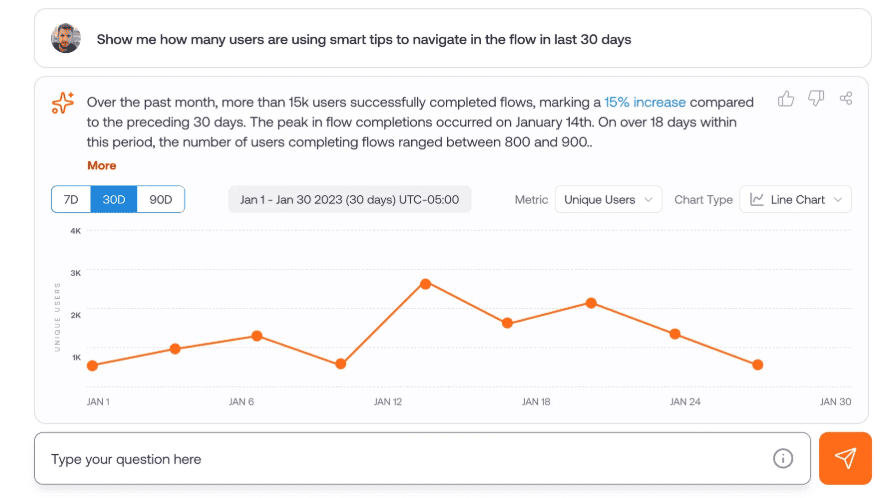
Mirror helps training teams measure whether users are ready for live work. Teams can track readiness scores, repeated attempts, weak steps, cohort performance, and remediation needs. This helps L&D leaders, application owners, and transformation teams identify where users are confident and where they need more practice before production.
Prepare frontline teams with AI roleplay
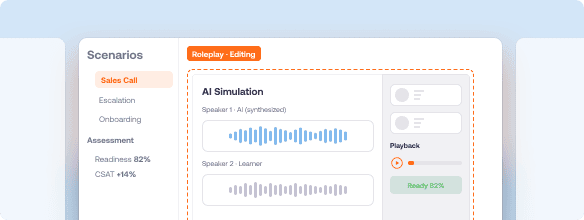
For sales, support, service, contact center, and partner-facing teams, readiness depends on both conversation quality and system execution. Whatfix Mirror supports AI roleplay scenarios where users can practice customer conversations, objection handling, escalation paths, compliance language, and the system actions needed to complete the workflow.
Carry readiness into live adoption
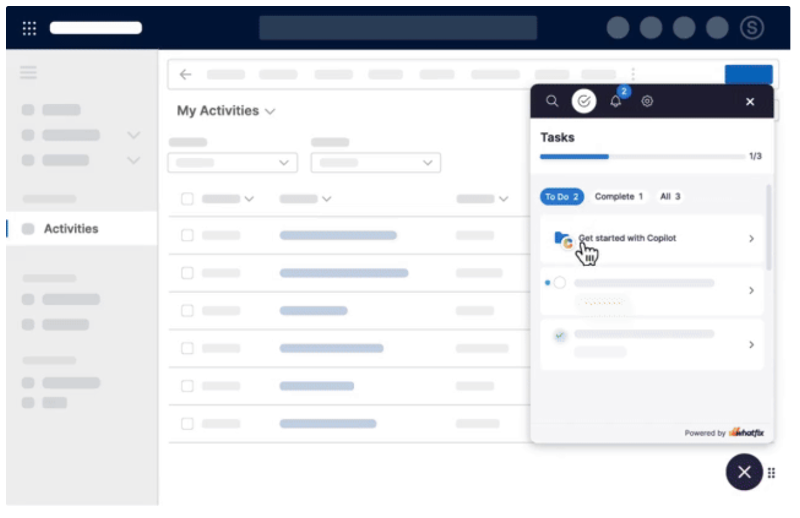
Whatfix connects pre-live training to post-go-live performance. Mirror helps users practice before live work. Whatfix DAP supports users inside production applications with in-app guidance, Self Help, and contextual support. Product Analytics helps teams identify workflow friction, adoption gaps, and improvement opportunities after go-live.
See how Whatfix Mirror helps enterprises build software readiness before go-live. Request a demo.