


An enterprise software rollout is only the start of your application journey. It’s a milestone, but it doesn’t prove that users can consistently complete critical workflows, adopt the right features, follow approved processes, or deliver the business outcomes the system was meant to deliver.
Many organizations celebrate when a new system is launched, but fail to provide the right hypercare and release-schedule roadmap to optimize workflows and enable users through frequent releases. It’s why many enterprise applications underperform after launch and fail to achieve their original goals and outcomes.
Users may still rely on workarounds, move slowly through unfamiliar workflows, fail to learn new features post-updates, or depend on SMEs for support. Leaders may see system activity, but still lack clear proof that adoption is improving workflow performance, process consistency, or ROI.
Post-go-live system optimization gives transformation leaders and application owners a structured way to close that gap. While hypercare support focuses on stabilizing early support issues after launch, post-go-live system optimization focuses on improving long-term system usage, workflow execution, feature adoption, and measurable value realization through continuous improvement.
This article provides a practical 30, 60, and 90-day roadmap, and beyond, for recently launched core systems, including what to measure, what to improve, who should own each area, and how to turn live usage signals into continuous improvement across the application lifecycle.
What Is Post-Go-Live System Optimization?
Post-go-live system optimization is the ongoing process of improving how users adopt, navigate, and get value from an enterprise application after launch. It focuses on turning live usage data, workflow behavior, user feedback, support query trends, and other adoption signals into targeted improvements.
For transformation leaders and application owners, the goal is to improve workflow completion, user proficiency, feature adoption, process compliance, and overall system ROI after a new core system is in production, and through changes across its lifecycle.
Post-go-live optimization differs from hypercare in the sense that hypercare focuses on stabilizing the launch period by resolving blockers and managing early support demand in the days following a release. Post-go-live optimization is continuous and focuses on its lifecycle, improving long-term system usage, increasing user proficiency, and proving that the application is creating measurable business value (and more).
The Post-Go Live Optimization Roadmap for New Systems
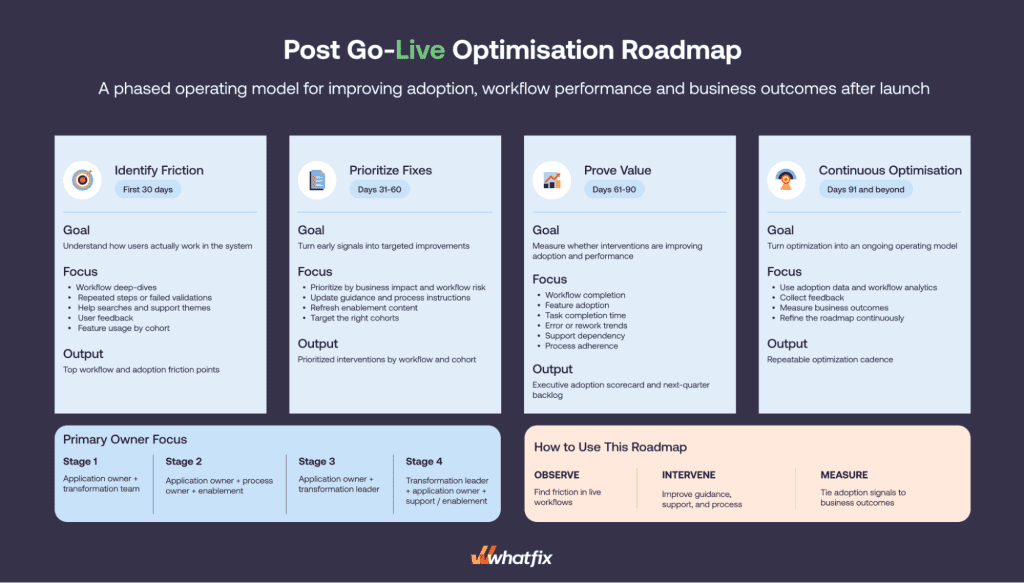
Once a new system is live, optimization must move in phases. The first 90 days should help teams understand how users work in production, fix the highest-impact friction points, and prove whether the system is moving adoption and business outcomes in the right direction.
First 30 Days Post-Launch: Identify Friction and Stabilize Usage
Goal: Understand how users are actually working in the system.
In the first month, application owners and transformation teams should look beyond basic login data and analyze how different roles, regions, and business units complete priority workflows.
Review signals such as:
- Workflow drop-offs
- Repeated steps or failed validations
- Help searches and support themes
- User feedback
- Feature usage by cohort
Output: A clear list of the top adoption and workflow friction points affecting system performance.
Days 31 to 60: Prioritize Fixes and Reinforce Adoption
Goal: Turn early signals into targeted improvements.
The next phase should focus on the issues with the highest business impact, user volume, workflow risk, or connection to transformation goals. Some gaps may require product or configuration changes, but many can be improved through better guidance, clearer process instructions, refreshed content, or role-based enablement.
For example, if regional managers drop off during an approval workflow, the response may include guided walkthroughs, field-level tips, updated process guidance, and targeted communication for that cohort.
Output: A prioritized set of interventions mapped to specific workflows, user cohorts, and business outcomes.
Days 61 to 90: Prove Value and Build the Next Optimization Backlog
Goal: Measure whether interventions are improving digital adoption and workflow performance.
By the third month, teams should build an executive adoption scorecard that connects usage signals to business outcomes. This helps leaders see whether the system is becoming easier to use, more consistently adopted, and more aligned with the business case.
Track metrics such as:
- Workflow completion
- Feature adoption
- Task completion time
- Error or rework trends
- Support dependency
- Process adherence
- Cohort-level performance
Output: A next-quarter optimization backlog covering workflow improvements, enablement updates, feature adoption priorities, process fixes, and reporting needs.
Days 91 and Beyond: Continuous Optimization and Closing the Feedback Loop
Goal: Turn optimization into an ongoing operating model.
After the first 90 days, teams should continue using adoption data, workflow analytics, feedback, and business performance metrics to decide what to improve next. This creates a closed feedback loop where teams identify friction, prioritize the right intervention, support users in the flow of work, measure impact, and refine the roadmap.
Output: A repeatable optimization cadence for improving adoption, productivity, compliance, and software ROI over time.
What to Optimize and Measure After Go-Live
Post-go-live teams need a shared scorecard that connects adoption signals to business outcomes. Use the application optimization framework below to decide what to monitor, who owns it, and which improvements to add to the optimization backlog.
| Use case | What to improve | Metrics to track | Owner |
| New user adoption | Whether the right users complete priority workflows correctly | Active usage, workflow completion, feature adoption, error rate | Application owner, change enablement lead |
| Workflow performance | Where tasks slow down, repeat, or break | Drop-offs, task completion time, error rate, rework | Process owner, application owner |
| Process compliance | Whether users follow approved workflows | Required field completion, policy adherence, exception rate | Process owner, compliance owner |
| Support dependency | Whether users resolve common issues in the flow of work | Tickets per active user, Self Help usage, repeat issues | Support lead, application owner |
| Value realization | Whether the system improves business outcomes | Cycle time, productivity gain, cost reduction, ROI contribution | Transformation leader, CIO office |
This scorecard should guide the optimization backlog, helping teams prioritize guidance updates, process fixes, training refreshes, feature campaigns, and configuration changes with the greatest impact on adoption and business value.
How Whatfix Helps Enterprises Optimize Systems After Go-Live
A post-go-live roadmap for application optimization only works when teams can move quickly from insight to intervention, while taking a continuous approach to closing the feedback loop.
Whatfix helps transformation leaders and application owners identify where users struggle, guide them through priority workflows, reinforce adoption by cohort, and measure whether each improvement is moving the system closer to its intended business outcomes.
Here is how Whatfix unifies post-go-live optimization for core systems:
1. Identify Workflow Friction & Targeted Interventions With Product Analytics
Teams need visibility into how users actually work within live core systems, whether that is how users engage with new systems in the first 30 days of launch or how users interact years into the implementation.
Whatfix Product Analytics helps teams see how users move through key workflows after launch and throughout the application lifecycle. Application owners can identify where users drop off, repeat steps, abandon tasks, or behave differently across roles, regions, and business units.
These insights help teams move from assumption-based optimization to evidence-based action. Teams can see the exact workflow moments that need better guidance, process clarification, training reinforcement, or configuration improvements. This also enables product owners to take a continuous approach to process improvement and operational excellence.

2. Guide Users in the Flow of Work
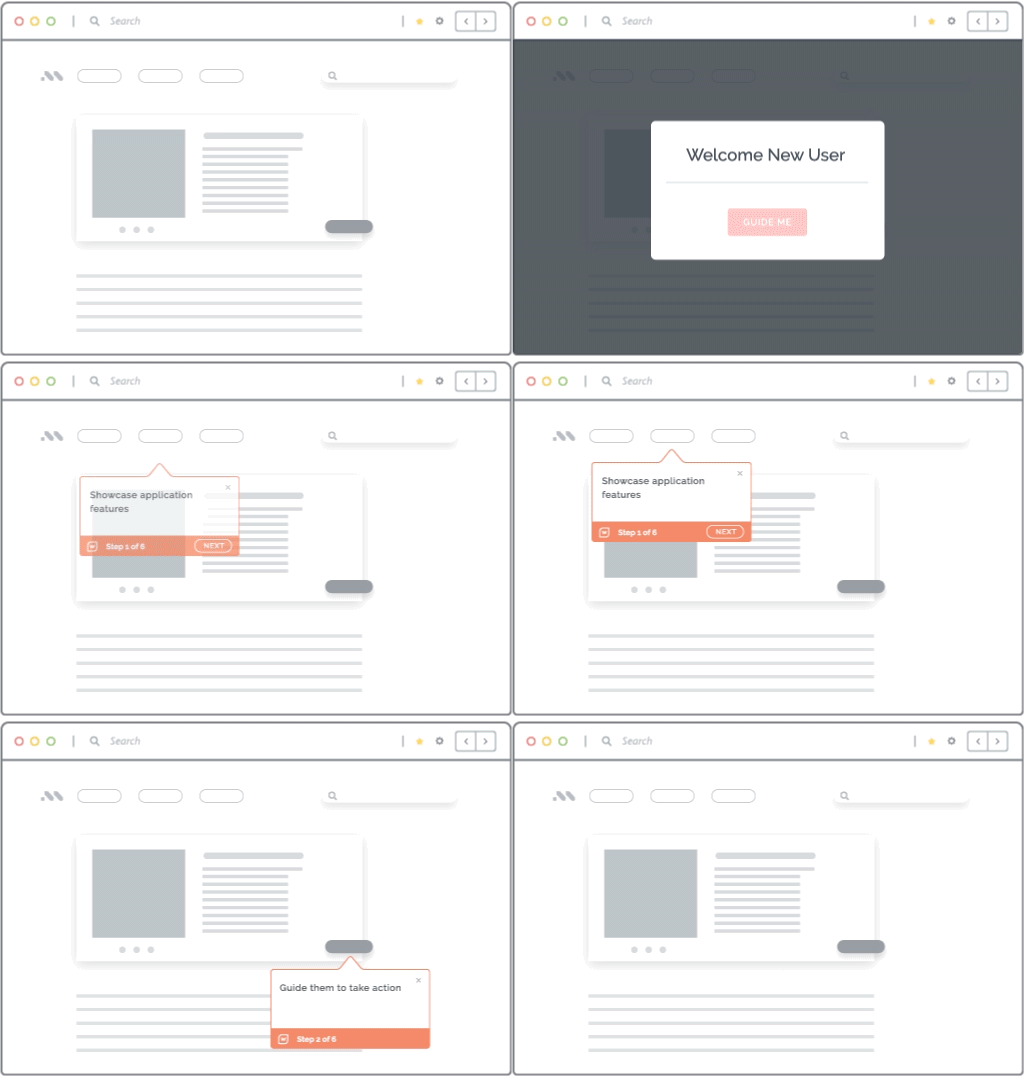
Once teams know where friction occurs, Whatfix DAP helps them support users directly inside the application. Flows, Smart Tips, Task Lists, field validation, Launches, and contextual guidance help users complete priority workflows without leaving their work environment.
This is especially useful for workflows with multiple steps, required fields, approvals, policy rules, or exception paths. Users get guidance when they need it, while application owners can reinforce the intended process across roles and cohorts.
3. Reduce Support Dependency With Self Help
Whatfix Self Help gives users contextual answers inside the application, reducing their dependency on static documentation, SMEs, and support channels. Instead of searching through separate knowledge bases or asking colleagues for help, users can access relevant guidance in the flow of work.
For application owners, this creates a more scalable support model after launch. Common questions can be addressed through in-app help, while support and enablement teams can focus on higher-value improvements that move adoption and workflow performance forward.
4. Reinforce Adoption With Targeted Communication and Feedback
Post-go-live optimization often requires different interventions for different user groups. A finance approver, sales manager, HR business partner, and regional admin may experience the same system in very different ways.
With Whatfix, teams can use targeted launches, surveys, and segmented guidance to reinforce adoption by role, region, business unit, or workflow. This helps teams communicate changes, gather user feedback, and deliver relevant support without treating every user cohort the same way.
5. Prepare Users for Advanced Workflows With Mirror’s Simulation Training
Some workflows need more than in-app guidance after launch. High-risk, complex, customer-facing, and compliance-sensitive processes may require hands-on practice before users can complete them confidently in production.
Whatfix Mirror helps teams create simulated application environments where users can practice workflows safely. This is useful for advanced workflows, new feature rollouts, role changes, and process updates where errors in production can affect compliance, data quality, or business continuity.

6. Use AI to Accelerate Content Creation and Continuous Optimization
Continuous optimization requires teams to update guidance, analyze adoption patterns, refresh content, and respond to user friction quickly. Whatfix AI helps accelerate this work through AI-assisted authoring, insight discovery, content updates, and optimization recommendations.
Human governance remains central. Application owners, process owners, and enablement teams can review recommendations, approve workflow guidance, and ensure that every intervention reflects the right process, policy, and business context.
Post-go-live optimization is where enterprise teams turn system usage into measurable business value. Request a demo to see how Whatfix helps organizations improve adoption, workflow execution, user proficiency, and software ROI after launch.