



Modern enterprise applications involve more decisions, exceptions, and procedural requirements than employees can reasonably memorize during initial training. An insurance claims adjuster may need to interpret a state-specific policy requirement. A clinician may encounter an unfamiliar EHR documentation workflow. A pharmaceutical employee may need to follow a revised procedure when investigating a quality deviation.
These situations expose a persistent challenge with enterprise software adoption. Training prepares employees for expected scenarios, while live systems introduce edge cases, changing processes, and decisions that require immediate access to accurate information. In regulated industries, incorrect execution can create processing delays, rework, compliance exposure, and operational risk.
Performance support enables employees to access the knowledge, instructions, and guidance they need to complete tasks correctly, directly in the flow of work.
As organizations modernize business-critical applications and introduce AI-enabled workflows, performance support plays an increasingly important role in sustaining employee proficiency, standardizing process execution, and realizing value from enterprise software investments.
Types of Performance Support
Performance support can include checklists, job aids, standard operating procedures (SOPs), decision trees, contextual knowledge articles, and interactive walkthroughs embedded within enterprise applications.
An electronic performance support system (EPSS) delivers these resources digitally, often directly within the tools employees use. Modern in-app performance support systems can provide guidance tailored to an employee’s application, role, workflow, and immediate task.

For example, a claims adjuster processing a policy endorsement may need to identify required documentation based on the policy type and jurisdiction. An in-app performance support system can surface the relevant procedure, explain required fields, and guide the adjuster through the approved workflow.
The objective is accurate and efficient task execution, particularly when employees encounter unfamiliar workflows, complex decisions, or infrequently performed procedures.
What Makes Performance Support So Effective?
Effective performance support reduces the effort required to locate and apply information in real work. Three key characteristics distinguish it.
On-Demand
Employees can access guidance whenever they encounter an unfamiliar task, exception, or question. This is especially valuable for procedures performed infrequently or long after initial training.
Contextual
Guidance reflects the employee’s role, application, and current workflow. A procurement specialist processing an invoice exception receives instructions specific to that transaction without having to navigate a general ERP knowledge base.
Intelligent
AI-powered performance support can interpret questions, retrieve information from approved knowledge sources, and deliver concise, task-relevant answers. Context-aware systems can further improve relevance by considering the application screen, user role, or workflow being performed.
Below is an example of in-app performance support over a fictional insurance claims system, helping agents review and file a first notice of loss claim:
How Performance Support Complements Traditional Training
Training develops foundational knowledge and prepares employees to perform new responsibilities. Performance support reinforces that knowledge during actual work, particularly when employees must execute unfamiliar tasks, resolve exceptions, or adapt to process changes.
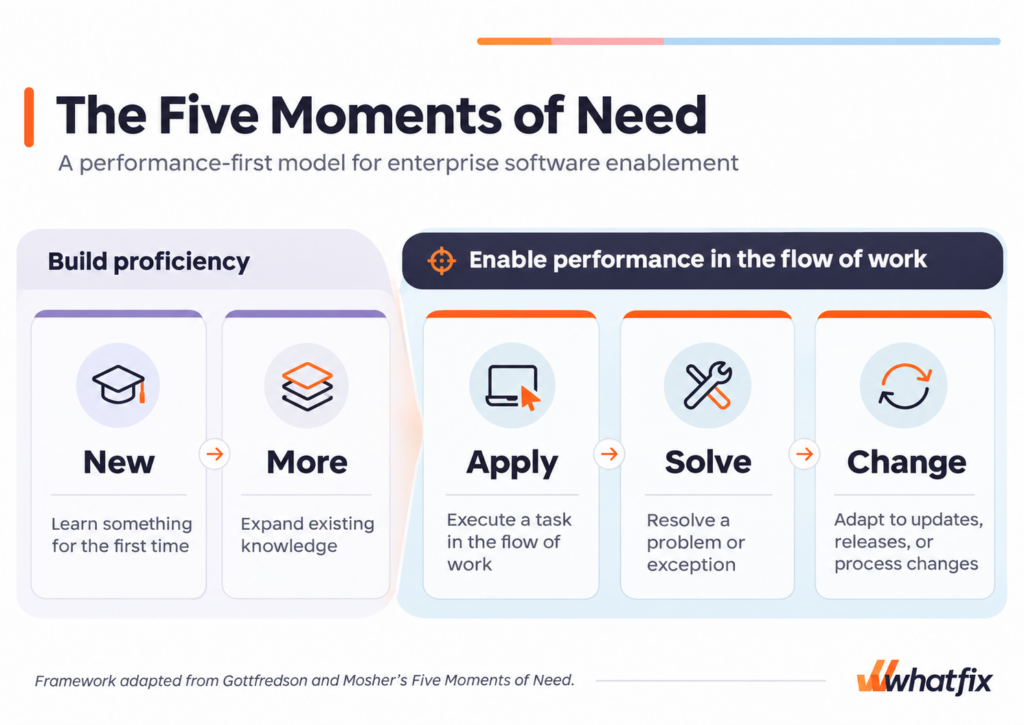
This distinction aligns with Conrad Gottfredson and Bob Mosher’s Five Moments of Need, an established performance-first learning framework that identifies five situations in which employees require knowledge or assistance.
The five moments are:
- New: Learning something for the first time.
- More: Expanding existing knowledge or proficiency.
- Apply: Using knowledge to execute tasks.
- Solve: Resolving problems or unexpected situations.
- Change: Adapting when procedures, systems, or requirements evolve.
The first two moments primarily emphasize building knowledge and capability. The final three emphasize supporting performance while employees execute their responsibilities.
For enterprise software programs, these needs can be addressed through a combination of structured learning, realistic practice, and contextual support.
| Traditional training | Performance support | |
| Primary objective | Build knowledge and demonstrate proficiency | Enable correct execution during work |
| When it is used | Before go-live, during onboarding, and before major process changes | During live workflow execution |
| Typical formats | Instructor-led training, eLearning, simulated workflows, proficiency assessments | In-app walkthroughs, Smart Tips, contextual knowledge, AI assistance |
| Best suited for | Learning unfamiliar systems and practicing expected scenarios | Applying knowledge, resolving exceptions, and following current procedures |
| Success metrics | Readiness scores, assessment results, time-to-proficiency | Task completion, error rates, processing time, support dependency |
Consider an employee learning to process insurance claims in a new policy administration system.
Before go-live, the employee practices claims intake, documentation, and approval procedures in a simulated application environment. Training assessments establish whether the employee can complete those workflows independently.
Once working in production, the employee may encounter a coverage exception requiring additional documentation or approval. Contextual performance support provides access to the approved procedure and relevant instructions without disrupting the claims workflow.
This combination is increasingly important to support digital transformation rollouts. In Whatfix’s 2026 State of Enterprise Digital Transformation ROI research, which surveyed 300 U.S. enterprise leaders, 35% identified additional user training as something they would change about their previous transformation project, while 29% would invest more resources in post-deployment support.
The findings highlight the need to prepare employees before deployment and sustain their ability to execute critical processes afterward.
How to Deliver Performance Support in the Flow of Work
Enterprise performance support should be designed around the tasks employees need to execute correctly and the consequences of mistakes.
Organizations should begin by identifying workflows with high operational value, frequent support requests, complex decisions, or compliance requirements. These are often the processes where contextual assistance can have the greatest impact.
1. Embed Guided Workflows and Field-Level Assistance
Interactive walkthroughs help employees complete multistep business processes directly within enterprise applications. Contextual instructions can explain unfamiliar fields, required inputs, approval rules, and the next step in a workflow.
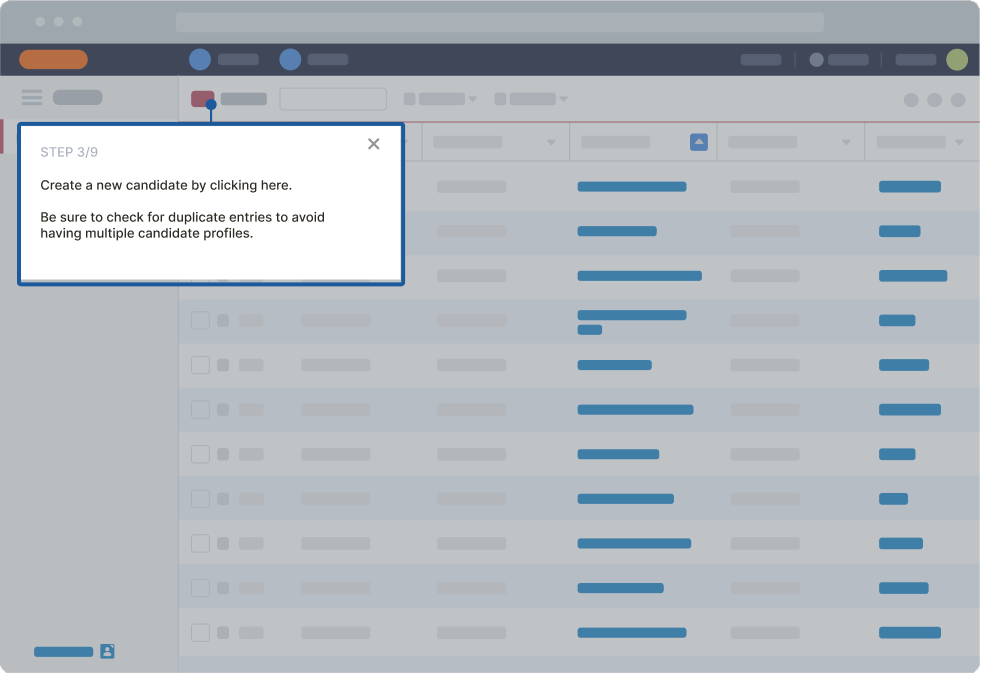
For example, an employee submitting a purchase requisition in SAP S/4HANA may need help selecting the correct purchasing category, entering a cost center, and following procurement approval requirements.
Embedded in-app guidance can support those decisions at the relevant step, helping employees complete transactions accurately without relying on external process documentation.
This is particularly useful for complex, high-volume, or infrequently performed workflows.
2. Make Approved Knowledge Accessible Within Applications
Enterprise knowledge is often distributed across learning management systems, SharePoint repositories, SOP libraries, internal wikis, and user support documentation.
Employees may know that a procedure exists but struggle to locate the current version while completing a task.
In-app knowledge discovery connects employees to relevant instructions without requiring them to leave their application.
For example, a customer service representative handling an unusual billing request can access the appropriate policy, troubleshooting instructions, and escalation requirements directly from the customer record.
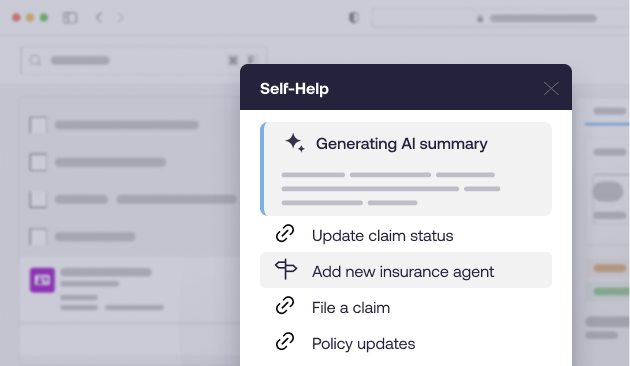
Effective in-app knowledge support requires clear content ownership, appropriate permissions, and governance to ensure that employees receive current, approved information.
3. Support Complex Decisions and Compliance-Required Workflows
Performance support becomes particularly valuable when task execution depends on transaction attributes, business policies, jurisdictional requirements, or regulatory procedures.
A bank employee onboarding a commercial customer may need to identify the appropriate KYC documentation. A pharmaceutical quality specialist investigating a deviation may need to follow specific classification, evidence-collection, and approval requirements.
Contextual instructions, decision trees, and access to approved digital SOPs can help employees consistently navigate these requirements.
For regulated workflows, performance support should reinforce required controls, approvals, and escalation procedures. Sensitive decisions must remain subject to appropriate organizational oversight, and access to guidance should follow the user’s permissions.
4. Use AI to Deliver Context-Aware Performance Support
AI is expanding the capabilities of digital performance support systems.
Employees can increasingly ask questions in natural language and receive answers synthesized from approved enterprise knowledge sources. Context-aware AI can further tailor assistance based on the application, screen, or task being performed.
Consider an insurance agent using a policy administration system. Rather than searching for a guide on mortgage changes, the agent could ask an AI assistant how to process the transaction and receive a concise explanation linked to the approved procedure.
AI can also help employees understand unfamiliar terminology, summarize complex documentation, and locate relevant guidance during workflow execution.
However, AI performance support is only as reliable as the knowledge, context, and governance behind it. Enterprises should evaluate the accuracy of retrieved information, role-based permissions, content freshness, escalation behavior, and the controls surrounding regulated decisions.
5. Measure Workflow Performance and Continuously Improve Support
Performance support must evolve as enterprise applications and business processes change.
Application behavioral analytics can reveal which tasks generate repeated assistance requests, where employees abandon workflows, and which processes produce recurring errors.
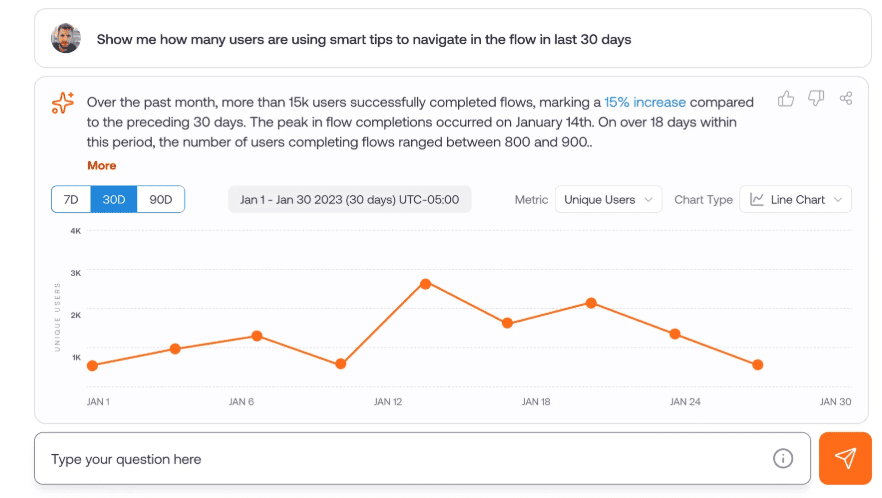
Organizations can use these insights to improve guidance, simplify workflows, or address underlying application design problems.
For example, repeated help requests during contract approval may indicate an unclear policy, a confusing interface, or an unnecessarily complicated approval process. Each requires a different response.
Performance support metrics to track
A performance support measurement framework should prioritize operational outcomes, including:
- Employee efficiency: Time-to-completion and transactions processed.
- Workflow quality: Errors, rework, and rejected transactions.
- Support dependency: Help desk tickets, recurring questions, and self-service resolution.
- Process adherence: Completion of required steps and exception frequency.
- Business performance: Processing costs, throughput, and time-to-value.
This measurement discipline is particularly important during digital transformation.
In our 2026 State of Digital Transformation ROI research, 61% of surveyed enterprise leaders reported relying on qualitative feedback alone to measure transformation success.
Connecting performance support engagement to workflow outcomes provides a more reliable basis for identifying friction, evaluating interventions, and demonstrating the business value of software adoption.
How Whatfix Delivers Performance Support Across Enterprise Applications
Whatfix Digital Adoption Platform enables organizations to embed contextual guidance, knowledge, and self-service support directly within enterprise applications.
This helps employees execute complex workflows, resolve questions independently, and follow standardized procedures without leaving their systems.
Whatfix also connects performance support to the broader application adoption lifecycle, helping organizations prepare users before go-live, guide execution during work, and continuously improve user performance.
Prepare Employees With Whatfix Mirror
Whatfix Mirror provides realistic application simulations for hands-on training before employees enter production systems.

Organizations can replicate critical workflows, provide guided practice, and assess whether employees can complete required tasks independently.
This helps identify readiness gaps before deployment and establishes a baseline of employee proficiency.
Guide Employees in the Flow of Work With Whatfix DAP
Whatfix DAP provides embedded performance support across business-critical applications through:
- Flows: Step-by-step assistance for complex transactions and processes.
- Smart Tips: Contextual field explanations and procedural reminders.
- Self Help: In-app access to knowledge resources, SOPs, and troubleshooting content.
- Task Lists: Structured guidance for onboarding and required activities.
- Pop-Ups: Timely communication about application changes, policy updates, and operational issues.
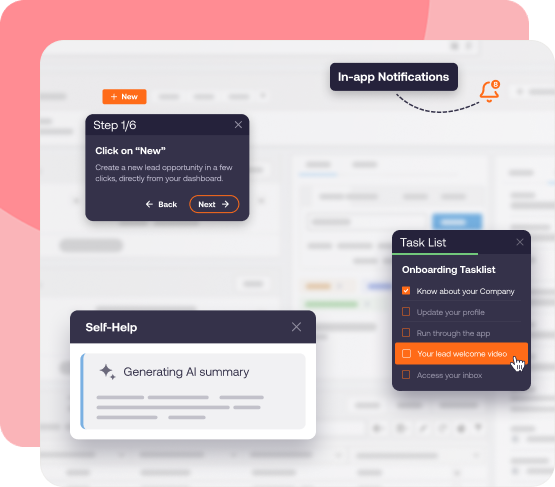
Whatfix AI extends these capabilities with intelligent assistance. Its Guidance Agent helps employees access contextual information and summarize relevant documentation, while AI-assisted authoring helps teams create and maintain guidance as applications evolve.
Optimize Performance With Whatfix Product Analytics
Whatfix Product Analytics helps organizations examine user journeys, task completion, workflow drop-offs, and adoption patterns.
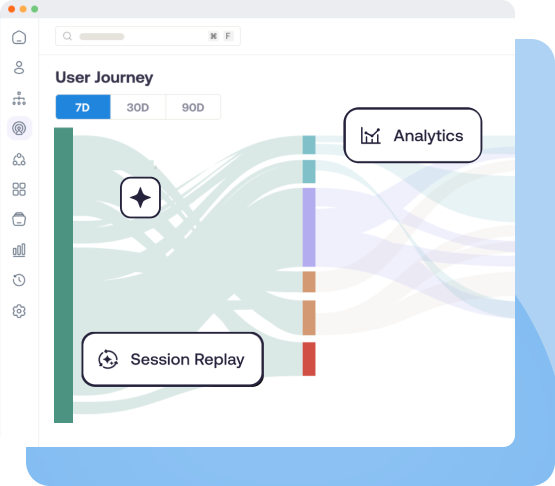
These insights help application owners identify friction, prioritize support interventions, and evaluate whether changes to guidance or workflows are improving performance.
Together, Mirror, DAP, and Product Analytics support a continuous approach to enterprise software enablement: prepare users, guide execution, and measure improvement.
Customer Examples: Performance Support in Action
Organizations across industries use Whatfix to reduce support dependencies, improve workflow execution, and help employees access relevant knowledge during work.
| Customer and application | Performance support approach | Reported business outcome |
| Extra Space Storage | AI-powered Self Help and in-app guidance provide frontline store associates with rental policy answers and transaction assistance in its Breeze Rental Management System | 95% Self Help resolution rate, deflecting more than 2,500 support tickets; 50% faster rental transactions for new associates. |
| Windward Risk Managers | Embedded Flows, Smart Tips, Self Help, and contextual notifications help insurance agents navigate policy workflows and find approved guidance within Duck Creek’s Claim Management System | Self Help search success increased from 61% to 87%, reducing reliance on centralized support. |
| bioMérieux | Role-specific Flows, embedded Self Help, and contextual guidance support contract creation, review, approval, and governance within Icertis CLM. | 1,293 hours saved through in-app guidance and self-service support, with 88% user adoption of its Icertis environment. |
These examples demonstrate the operational value of performance support across different environments: frontline customer transactions, insurance policy processing, and regulated enterprise contract management.
They also illustrate the importance of measuring performance support against specific outcomes, such as transaction speed, self-service resolution, user adoption, and employee hours saved.
Connect Performance Support to Digital Transformation Value
Enterprise software investments create value when employees can consistently execute the processes those systems were implemented to support.
Performance support helps sustain that capability as organizations introduce new applications, modernize workflows, and adapt to changing operational requirements.
Whatfix connects the preparation, guidance, and measurement necessary to improve employee proficiency and reduce adoption friction throughout the application lifecycle.
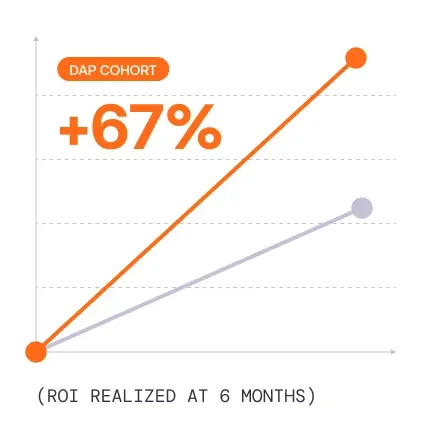
In our 2026 State of Digital Transformation ROI research, organizations using digital adoption platforms were 64% more likely to report measurable ROI within six months than those without a DAP.
For enterprise IT and transformation leaders, a sustainable performance support strategy should prioritize workflow accuracy, employee independence, operational efficiency, and measurable business outcomes.
Explore Whatfix Digital Adoption Platform to see how in-app guidance, AI-powered Self Help, and behavioral analytics can support employees in the flow of work.