


Standard operating procedures help organizations with regulated, frontline, or complex workflows improve efficiency, ensure consistent quality, and support better decisions.
Now with modern technologies like AI, organizations are transforming their SOPs from static documents in knowledge repositories into searchable, embedded help experiences that deliver instructions, alerts, and recommendations in the flow of work.
This article explains how process owners and application managers can build intelligent digital SOPs that improve process adherence at the point of need.
What Are Digital Standard Operating Procedures?
Digital standard operating procedures, or digital SOPs, are electronic instructions that help employees consistently complete a process or task. A basic digital SOP may be a PDF or a knowledge base article that employees can search and interpret. An in-app SOP delivers approved guidance within the application where work occurs, helping employees apply the procedure correctly while the controlled source remains in its existing repository.
What does a digital SOP include?
A digital SOP includes:
- Step-by-step workflow guidance that leads employees through complex or unfamiliar tasks.
- Field-level explanations and validation that clarify requirements and flag missing or incorrectly formatted information.
- Role- or location-specific instructions that reflect differences across teams, regions, permissions, or business units.
- Exception and escalation guidance that helps employees respond when a process moves beyond its standard path.
- Embedded policy and knowledge access with AI-powered answers grounded in approved organizational content.
- Process-change notifications that alert affected employees when procedures, policies, or application workflows change.
- Simulation training that prepares employees for sensitive or infrequent workflows before production.
- Execution analytics that reveal completion patterns, friction points, support demand, and differences across user cohorts.
Traditional SOPs vs. Digital SOPs vs. In-App SOPs
For most large enterprises, digitizing SOPs is well underway. Procedures now live as PDFs or knowledge articles across shared drive, LMS, and QMS. Access has improved, yet employees still have to leave the application and find the right content. They must then translate those instructions into action.
In-app SOPs close this execution gap by surfacing approved guidance at the relevant workflow step. The experience adapts to the user’s role and context. It can also provide immediate support when errors or exceptions occur.
| Dimension | Traditional SOP | Digital SOP | In-App SOP |
| Format | Printed procedure or manual | PDF, document, slide deck, or knowledge article | Guided workflow, contextual tip, validation prompt, embedded help, or AI-powered answer |
| Delivery | Stored in binders or distributed as printed copies | Stored in SharePoint, Google Drive, an LMS, a QMS, or another repository | Delivered inside the enterprise application at the relevant workflow stage |
| Execution | Employees read and remember the procedure before performing the task | Employees search for the document, interpret it, and apply the steps in another system | Employees receive step-level support while completing the task |
| Personalization | Usually written for a broad audience | Access may vary by role or permission | Guidance can adapt by role, region, business unit, application, workflow stage, or user behavior |
| Errors and exceptions | Written warnings explain what employees should avoid | Checklists and reference material help employees resolve known issues | Contextual alerts, field validation, and exception guidance help employees respond during execution |
| Maintenance and governance | Updates require manual revision and redistribution | The document owner maintains a controlled and versioned source | The controlled SOP remains the source while process and application owners review and update the in-app experience |
| Measurement | Limited visibility into whether employees follow the procedure | Repositories may track views, downloads, or acknowledgements | Analytics reveal guidance use, search behavior, workflow completion, drop-offs, friction, and cohort differences |
Where Digital SOPs Improve Enterprise Workflow Performance
Digital SOPs improve workflow performance by helping employees execute critical tasks correctly and consistently at the point of work.
Increase first-pass workflow completion
Employees are more likely to complete a workflow correctly when they receive the required information before submitting a transaction. Digital SOPs, like contextual prompts embedded within the workflow, can clarify a field or decision, while validation flags missing or incorrect inputs early. Fewer transactions are returned, reducing delays and rework.
Reinforce process compliance and quality controls
Process adherence can break down when required controls sit outside the workflow. Digital SOPs surface approval criteria, evidence requirements, and exception paths at the point they apply. This helps employees follow the approved process and reduces variation that can affect quality. The underlying QMS, ERP, or validated system remains the formal source for process compliance records.
Standardize execution across roles and regions
A single procedure may apply differently across roles, regions, or business units. In-app SOPs preserve one governed source while presenting the relevant steps to each user. A requester can receive submission guidance, for example, while an approver sees the criteria required to make a decision. This reduces local workarounds and creates more consistent execution across the enterprise.
Reduce search time, support dependency, and time-to-proficiency
Repository-based SOPs force employees to pause the task, locate the correct document, interpret the instructions, and work out how to apply them. If they still need help, a manager or experienced colleague must step away from other work. In customer-facing workflows, these interruptions also extend customer wait times. Embedded SOPs surface relevant instructions and answers within the task, helping employees resolve routine questions independently, complete work faster, and build proficiency.
Identify where procedures and workflows break down
Digital SOPs give process and application owners visibility into where execution breaks down. If a particular role repeatedly stalls at the same step or searches for the same answer, teams gain a specific signal about the source of friction. They can then improve the guidance, provide additional practice, adjust the application, or revise the underlying process.
Support More Targeted Coaching and Employee Development
Digital SOP analytics can show which employees consistently master new procedures, where individuals need additional practice, and how effectively different teams adapt when a workflow changes. Managers can use these patterns to target coaching, assign relevant development opportunities, and make readiness conversations more evidence-based.
In my conversation with industry expert Brian Byrne, he put it this way: “I wouldn’t want analytics making promotion decisions, but I could absolutely see them helping managers identify employees who may be ready for development opportunities.”
Workflow data should remain one input alongside observed performance, role outcomes, manager judgment, and employee context. Appropriate access and workforce-data governance are also essential.
SOP Digital Transformation: How to Modernize from Static Documents to In-App Workflow Guidance
SOP modernization starts by focusing on workflows, risks, and employee decisions to embed guidance directly into daily work.
1. Prioritize High-Impact Workflows
Begin with processes where inconsistent execution creates measurable cost, delay, or risk. Document length offers little insight into transformation value. A short approval process with frequent errors may have greater impact than a detailed procedure used twice a year.
Score each candidate workflow from one to three across five factors:
- How often is the workflow completed, and how many users or teams perform it?
- Where do errors, rework, abandonment, or support requests occur?
- What is the financial, regulatory, operational, or customer impact of incorrect execution?
- How many decisions, exceptions, handoffs, or application changes affect the workflow?
- Which measurable result would improve if employees completed the process correctly?
Select three to five high-scoring workflows for the first phase. Each should have an accountable process owner, an application owner, and a baseline metric such as first-pass completion, rework rate, task time, or support volume.
2. Map the Approved SOP to the Actual User Journey
The approved SOP shows how the process should work. The user journey shows what happens when employees perform it across applications, roles, and handoffs. Mapping both views exposes where documented instructions lose context during execution.
Ask an experienced employee or SME to demonstrate the workflow in a sandbox or controlled environment. Record the trigger, required steps, decisions, approvals, exceptions, and intended outcome. Then compare the demonstration with application data, support tickets, and feedback from employees who perform the task.
The final map must identify five elements at every important stage:
- The role responsible for the step
- The application or screen where the action occurs
- The decision, control, or evidence required
- The error or workaround that commonly appears
- The guidance or support the employee needs
3. Convert the SOP Into In-Workflow Guidance
Use the approved SOP as the source, then break it into the moments where employees need help. Surface only the information required for the current action or decision. Employees can still access the complete procedure when they need broader policy context.
Match each execution need with an appropriate form of support:
- Use guided workflows for complex sequences that must be completed in a specific order.
- Use field-level explanations and validation for inputs that frequently cause errors or rework.
- Use contextual tips for decisions, policies, and best practices tied to a particular screen.
- Use alerts when a policy, procedure, or application workflow changes.
- Use simulation practice for sensitive or infrequent procedures that employees should rehearse before production.
- Use embedded escalation guidance when an exception requires approval or specialist support.
4. Provide Teams with an In-App Help Center
Embed approved SOPs, policies, and workflows into a searchable help experience within the enterprise application so employees can access guidance without leaving the task.
Use AI to surface relevant content, summarize procedures, and explain decisions, while grounding responses in approved sources and linking back to full documents when needed. Ensure permissions are consistently applied.
Search behavior provides an additional signal. Repeated searches can reveal a confusing process step, while unsuccessful searches may indicate missing content or unclear terminology. Use these patterns to improve both the help experience and the underlying SOP.
5. Establish Ownership and Change Governance
Clear ownership ensures the in-app SOP stays aligned with process and application changes.
Assign four key roles:
- Process owner: approves the procedure and controls
- Digital content owner: maintains in-app guidance and help content
- Application owner: ensures alignment with system releases and UI changes
- Compliance reviewer: validates regulatory and control requirements
Each digital SOP should have a single source of truth with basic metadata: version, application, owner, approver, and review date.
Any change to the SOP or application should trigger a review of the related guidance and workflows.
6. Measure Execution and Improve Continuously
Establish a baseline before publishing the in-app SOP. Track first-pass completion as the primary metric, supported by completion time, errors, rework, and support requests.
Segment results by workflow step, role, region, or user group to identify where friction is concentrated.
Use these patterns to determine the appropriate response:
- Repeated difficulty for one employee may indicate a need for targeted coaching or additional practice.
- Similar problems across a role, region, or team may point to a training, access, or role-specific guidance gap.
- Friction affecting multiple user groups at the same workflow step may indicate unclear instructions, poor application design, or a problem with the underlying process.
Pilot the digital SOP with a small user group, refine the guidance based on these findings, and scale once performance stabilizes.
Examples of Digital SOPs
These examples show how enterprises use in-app guidance and embedded help to operationalize SOPs across complex workflows.
Adecco Group Guided Teams Through Contract Creation and Execution
Adecco consolidated region-specific contracting processes into Icertis embedded within Salesforce. Static training lacked the context required to support different roles, languages, and regulatory requirements. Adecco used persona-based in-app guidance across contract creation, approval, and termination workflows. The program increased CLM adoption by 40%, reduced contract cycle time by 50%, and achieved 98% compliance with mandatory contract clauses.
Extra Space Storage Embedded Policy and Process Help Into Customer Transactions
More than 7,500 Extra Space Storage associates relied on Breeze to manage rental transactions, while deeper process guidance remained spread across over 600 SharePoint articles and PDFs. Extra Space Storage embedded guided Flows and AI-powered Self Help into Breeze so associates could find approved policy answers during customer interactions. The program achieved a 95% self-service resolution rate, deflected more than 2,500 tickets, and reduced complex rental transaction time by 50% for new associates.
Windward Risk Managers Embedded SOP Support Into Policy Workflows
Windward’s 5,500 agents previously moved between Duck Creek, external knowledge repositories, and the agent portal to resolve claims and policy questions. Windward embedded Flows, Self Help, Pop-Ups, PDF guides, and contextual tips within Duck Creek. Its “Processing a Mortgage Change” Flow received nearly 800 plays, while claims and policy-related support queries fell by 87% within two months.
How Whatfix Operationalizes Approved SOPs in the Flow of Work
Whatfix operationalizes approved SOPs across enterprise applications by turning controlled procedures in QMS, DMS, LMS, or knowledge repositories into contextual in-app guidance, searchable support, hands-on practice, and measurable workflow experiences.
Create and Maintain In-App Guided Flows at Scale
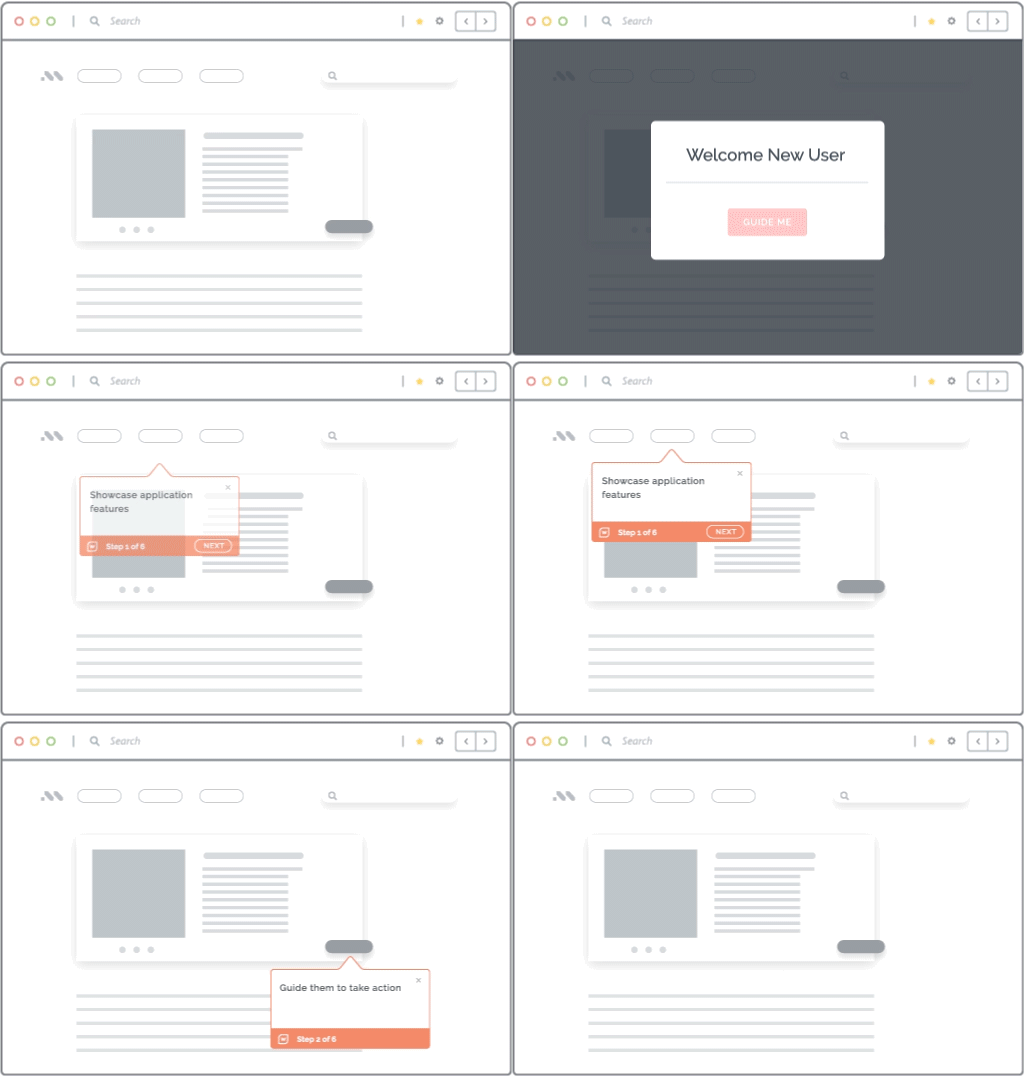
Whatfix enables content owners to convert relevant SOP steps into interactive in-app Flows that guide employees through workflows in the correct sequence. Each instruction connects to the relevant field, button, or page element, delivering contextual support during execution. Teams can build Flows with the no-code editor, use Authoring Agent to generate content, or use Quick Capture to turn an SME walkthrough into an editable Flow.
Teams can target each Flow by role, region, behavior, or workflow stage. When an SOP or application changes, content owners can update and republish the affected Flows. Reusable templates and version history help maintain consistent, current guidance across applications and user groups.
Empower Teams With AI-Powered Self-Service Help Embedded Over Their Workplace Apps
Whatfix Self Help embeds an AI-powered help center inside enterprise applications. It surfaces approved SOPs and supporting resources from repositories such as SharePoint, Confluence, and Zendesk. Employees can ask questions in natural language, search connected content, launch a guided Flow, or open the source document within their workflow.
Whatfix Guidance Agent uses application context and user intent to retrieve relevant knowledge, summarize procedures, and recommend supporting content. Its answers are grounded in connected sources, helping employees resolve procedural questions with less dependence on SMEs or support teams.

Prepare Employees and Support Workflow Execution
Whatfix Mirror creates realistic application sandbox environments where employees can practice SOP-driven workflows before entering production. Guided simulations and assessments measure completion, accuracy, and failure points so teams can identify where individuals or cohorts need further practice.
During live work, Whatfix DAP reinforces the approved process with Flows and Task Lists for multistep procedures. Smart Tips clarify decisions, Field Validation flags input errors, and Pop-Ups communicate process changes at the point of work.

Measure Execution and Continuously Improve the Digital SOP
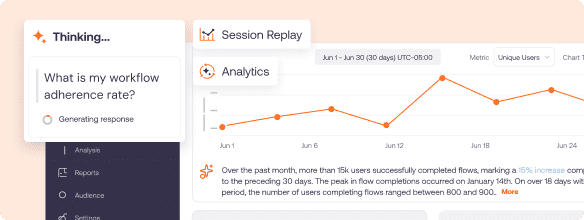
Whatfix Guidance Analytics measures how employees use and complete Flows, Task Lists, Smart Tips, and Self Help. Whatfix Product Analytics reveals how they perform the underlying application workflow through funnels, user journeys, cohorts, and session replay. AI Insights helps teams identify patterns and areas of friction.
Process and application owners can respond with updated guidance, targeted practice, an application change, or a process revision. They can then measure the effect on workflow completion, errors, rework, and support demand. Formal compliance records remain within the organization’s validated systems.
Request a Whatfix demo to see how your organization can turn approved SOPs into guided, measurable workflows across enterprise applications.