


Policies, SOPs, and user training define how employees should complete regulated workflows and support them when exceptions occur. Process compliance depends on whether those requirements are followed during live task execution.
This article breaks down why process compliance is critical for modern enterprise work, as well as how teams can build controls into core workflows, reinforce required actions at the point of work, and detect deviations before they create rework, audit findings, or regulatory risk.
What Is Process Compliance?
Business process compliance means executing workflows according to applicable regulations, industry standards, internal policies, and approved controls. Compliance is demonstrated by the steps completed, data captured, approvals obtained, exceptions handled, and evidence retained during execution.
Process Compliance vs. Regulatory Compliance
The two concepts address different layers of compliance.
- Regulatory compliance defines what an organization must do. It covers obligations established by laws, regulations, and mandatory standards.
- Process compliance determines how those obligations are fulfilled during daily work. It covers workflow steps, decisions, data, approvals, exceptions, ownership, and execution evidence.
For example, KYC regulations define the required identity checks. Process compliance verifies that employees complete those checks, follow the correct approval path, and retain the required evidence.
Core Benefits of Effective Process Compliance
Effective process compliance helps organizations:
- Reduce errors, and therefore eliminate rework, by reinforcing required actions during execution.
- Improve data quality by ensuring required fields, approvals, and evidence are completed consistently.
- Identify deviations earlier and limit compliance incidents and remediation effort.
- Give process owners evidence that controls are operating as intended.
- Strengthen audit readiness through reliable records of workflow execution.
Why Process Compliance Fails
Process compliance breaks during execution when employees struggle to apply requirements from their user readiness training and process documentation to specific fields, decisions, approvals, and exception paths. Here are key reasons why those failure happens during live work:
Lack of Hands-On Practice Before Real Work
Policy training explains requirements without giving employees hands-on practice in the workflow. Facing unfamiliar steps and exceptions for the first time in production increases the risk of skipped controls and incorrect decisions.
Instructions Live Outside the Workflow
Policies and SOPs often sit outside the application and fall out of sync with process or system changes. Users must leave the workflow to find and interpret current guidance, increasing reliance on memory and judgment.
Approved Workflows Miss Real-World Exceptions
Approved workflows often cover only the standard path, while live work includes incomplete information, urgent requests, and regional requirements. Without a defined exception path, employees improvise and produce inconsistent outcomes.
Control Friction Makes Workarounds Easier
Duplicate data entry, unclear approvals, and unnecessary handoffs make the compliant path difficult to complete. Under productivity or SLA pressure, employees may bypass controls or use offline workarounds, reducing traceability.
How to Build an Effective Compliance Management Process
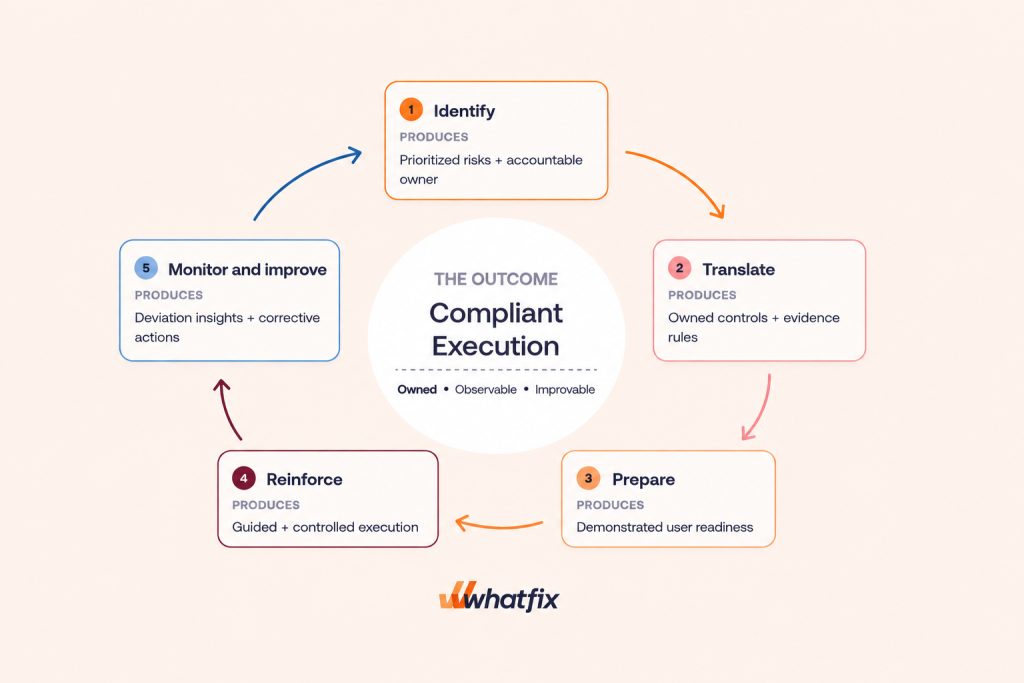
An effective workflow compliance management strategy has five core components – risk identification, owned workflow controls, user preparation, in-workflow reinforcement, and continuous monitoring. Let’s break down each:
1. Identify Requirements, Risks, and Current Gaps
Start with workflows where failure could create the greatest regulatory, financial, safety, or data exposure.
- Map the workflow including applicable requirements, participating roles, systems, the standard path, and common exceptions.
- Compare design with execution to uncover missing, ineffective, or outdated controls.
- Prioritize and assign ownership based on the likelihood and potential impact of each gap.
2. Translate Requirements Into Owned Workflow Controls
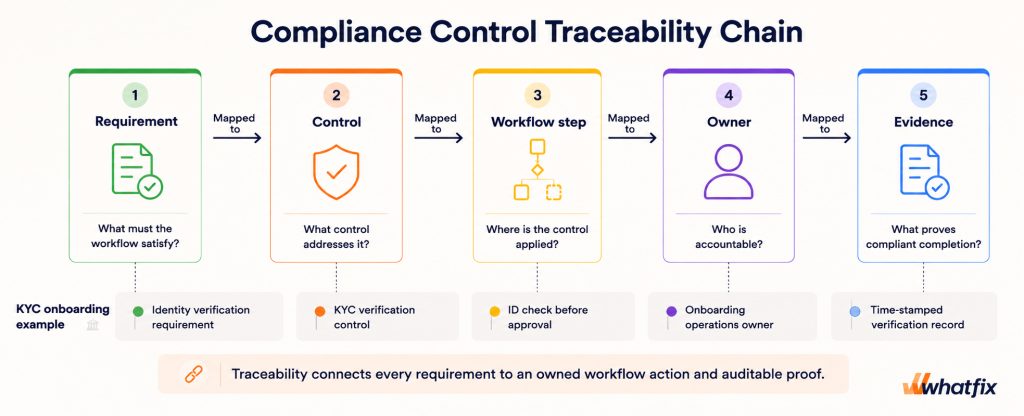
Convert each requirement into an executable and traceable control.
- Define the control as a workflow step, decision, approval, data rule, or evidence requirement.
- Document the approved path and identify which exceptions are permitted.
- Assign a control owner responsible for its operation and effectiveness.
- Specify the evidence required to demonstrate compliant completion.
3. Prepare Users Before Execution
Build user readiness for the roles responsible for high-risk workflow steps.
- Provide hands-on practice with standard workflows and realistic exceptions through application simulation training and roleplay scenario exercises.
- Measure readiness through required-step completion, decision accuracy, and exception handling.
- Set proficiency thresholds for critical roles and workflows.
- Address readiness gaps with additional practice, guidance, or role-specific remediation.
4. Reinforce Compliant Actions During Execution
Match the execution control to the type of risk involved.
- Automate predictable rules that can be completed or enforced by the system.
- Validate required inputs before users can proceed.
- Provide contextual in-process guidance when decisions require human judgment.
- Route high-risk exceptions through documented approval paths.
5. Monitor, Test, and Improve the Process
Use workflow data to determine whether controls operate as intended.
- Define monitoring rules including metrics, thresholds, owners, and review cadence.
- Segment deviations by role, team, location, or workflow step to identify recurring patterns.
- Correct the root cause by updating the workflow, control, guidance, or readiness program.
- Verify improvement by measuring the same execution signal after the change.
- Review affected controls whenever regulations, policies, or applications change.
How to Measure Process Compliance
Process compliance is measured by comparing actual workflow execution with the approved process. Govern workflow adherence by whether employees complete required steps and approvals, follow approved exception paths, and retain the necessary evidence.
Process Compliance Metrics to Track
Leading indicators reveal execution risks before they produce confirmed compliance failures. Lagging indicators measure the operational or regulatory consequences that have already occurred. Here are common leading and lagging metrics to track and measure process compliance:
| Metric | What it measures | Indicator type |
| Compliant workflow completion rate | Percentage of workflows that follow every required step or an approved exception path | Leading |
| Required data completion rate | Percentage of transactions containing complete and valid required data | Leading |
| Approval compliance rate | Percentage of transactions that receive the correct approvals | Leading |
| Exception and override rate | Frequency of deviations from the standard workflow path | Leading |
| First-pass completion rate | Percentage of transactions completed correctly without correction or resubmission | Leading |
| Control evidence completeness | Percentage of transactions containing all required approvals, records, attestations, and supporting evidence | Leading |
| Rework or rejection rate | Percentage of transactions returned, corrected, or rejected due to compliance errors | Lagging |
| Audit findings and CAPA performance | Number and severity of findings, along with corrective action closure time | Lagging |
| Compliance incident rate | Frequency and impact of confirmed compliance failures | Lagging |
How to Create a Process Compliance Improvement Cycle
Use compliance metrics to run a four-step improvement cycle.
- Detect deviations: Compare actual execution with the approved workflow and segment recurring issues by role, team, location, or process step.
- Diagnose the cause: Determine whether the deviation comes from workflow friction, an ineffective control, unclear guidance, insufficient practice, or an undefined exception path.
- Apply the correction: Assign an owner and update the relevant workflow, control, guidance, or training.
- Verify the result: Monitor the same metric after the change to confirm whether the deviation decreases.
What Does Process Compliance Look Like for Regulated Workflows?
In regulated workflows, process compliance means completing required steps, approvals, exception paths, and evidence at the correct point in the workflow.
- KYC onboarding: Process compliance means completing every required identity and verification check before approval, with exceptions authorized and recorded. Mandatory fields, verification gates, completion rates, override records, and verification logs help enforce and demonstrate compliance.
- Insurance claims adjudication: Process compliance means completing the required reviews and approvals before resolving a claim, with exceptions following a documented path. Approval routing, review records, exception rates, and rework show whether the workflow was followed.
- QMS deviation handling: Process compliance means correctly categorizing the deviation, completing the investigation, and documenting any required corrective action. Categorization rules, required fields, record completeness, CAPA volume, and closure time provide execution evidence.
- EHR order entry: Process compliance means entering complete clinical information and completing required confirmations before submitting an order. Field validation, confirmation records, correction rates, and incomplete-record rates reveal whether documentation requirements were met.
- Source-to-pay approval: Process compliance means obtaining authorization from the correct approver before a purchase or invoice proceeds, with exceptions documented. Approval routing, approval records, rejected invoices, and exception records demonstrate adherence.
Which Types of Software Support Process Compliance?
Different software categories support different parts of process compliance.
- GRC platforms manage requirements, risks, controls, ownership, evidence, and audits.
- Process mining tools compare actual workflow execution with approved processes to identify deviations.
- BPM and workflow automation tools automate rules, route approvals, enforce controls, and create audit trails.
- Digital adoption platforms guide users, reinforce policies, validate actions, and analyze behavior within applications.
Use automation for predictable, rules-based steps and in-app guidance for decisions and exceptions. Regulated workflows often require both.
How Whatfix Reinforces Process Compliance During Execution
Whatfix helps enterprises prepare users for compliant execution, support required actions during work, and identify where workflows break down.
- Before execution with Whatfix Mirror: Employees practise critical workflows and exception paths in an interactive application replica. Assessments identify readiness gaps before users enter production.
- During execution with Whatfix DAP: Role-based walkthroughs, Smart Tips, field validation, policy reminders, and Self Help deliver guidance at the point of action.
- After execution with Whatfix Product Analytics: Workflow data reveals drop-offs, repeated attempts, guidance engagement, and friction across user cohorts. Process owners can use these insights to improve workflows, controls, guidance, or training.
Customer story – Vizient embedded Whatfix Smart Tips, Pop-Ups, Self Help, and guided workflows into Icertis to prevent contract-processing errors. The company reduced workflow errors by 93%, eliminated over 600 hours of annual rework, and shortened average contract execution time from 33.5 to 14 days.
“Whatfix helps us ensure compliance across contract start and end dates with in-app guidance & interactive smart triggers…” – Tracy Jones, Director of Contract Services at Vizient
To learn more about Whatfix, schedule a demo with us!