


As enterprise workflows scale, they become harder to manage due to the complexity of teams, applications, and policies. This often leads to “task drift,” where users bypass required fields, ignore approval paths, or handle exceptions inconsistently.
Deloitte’s 2024 Future of Controls report found that only 39% had advanced or mature process governance controls regarding digital transformation efforts, highlighting the difficulty of maintaining disciplined execution at scale.
This article explains what workflow governance means for enterprise application owners, why it matters, how task drift develops, and how to build an effective governance model. It also covers how Whatfix helps process owners reinforce approved workflows inside core business systems, identify friction and deviations, govern workflow changes, and continuously improve execution.
What Is Workflow Governance?
Workflow governance is the framework for managing how critical digital processes are designed, owned, changed, executed, and measured within enterprise applications. It defines workflow ownership, approved paths, required controls, change processes, user guidance, and performance monitoring across core systems, like a CRM or ERP.
What Workflow Governance Helps Process Owners Clarify
Workflow governance provides process owners with a clear operating model for how critical workflows should run within enterprise applications. By connecting process rules to the actual screens, fields, approvals, exceptions, and user decisions within those systems, workflow governance helps process owners ensure work is executed consistently across teams, roles, and system changes.
At a practical level, workflow governance helps process owners clarify:
- Who owns the workflow: The person or team accountable for workflow performance, approvals, exceptions, and continuous improvement. This may include a process owner, application owner, operations leader, compliance stakeholder, or enablement owner.
- What the approved path is: The standard steps, roles, fields, handoffs, decision points, and exceptions users should follow to complete the workflow correctly.
- Which controls apply: The approvals, validations, access rules, required documentation, audit trails, and compliance checkpoints needed to protect workflow quality and reduce risk.
- How changes are approved: The process for reviewing, approving, communicating, and tracking updates to workflow steps, system configurations, SOPs, guidance content, and exception paths.
- How users are guided: The in-app guidance, SOP reinforcement, self-service support, and training that help users follow the approved workflow in the flow of work.
- How performance is measured: The metrics used to track workflow adherence, errors, rework, completion time, support tickets, drop-offs, guidance usage, and audit exceptions.
How Workflow Governance Drives Outcomes From Enterprise Processes
Workflow governance improves enterprise outcomes by reducing unnecessary variation, establishing clear accountability, and giving process owners a consistent way to measure and improve execution. Gartner calls workflow governance a requirement of enterprise business process management and links end-to-end process ownership to stronger standardization and continuous improvement.
Here are the key positive impacts of strong workflow governance in enterprise settings:
1. Identifies and reduces workflow drift
Workflow drift occurs when users gradually move away from an approved workflow by skipping steps, following outdated instructions, creating workarounds, or applying inconsistent procedural practices across different teams. It signals that workflow ownership, controls, guidance, or change management are no longer supporting consistent execution. Tracking these errand behaviors helps process owners find where the compliant workflow and actual user process steps diverge.
Common causes include:
- Outdated SOPs and a lack of software user training
- Local workarounds and undocumented exceptions
- Unclear ownership and escalation paths
- Weak communication after workflow or system changes
- Missing field-level instructions and decision support
- Limited analytics into errors, abandonment, or help searches
2. Standardizes execution across teams
Workflow governance defines a repeatable path for completing work across roles, regions, departments, and application environments. Effective standards cover both the expected workflow and approved exception paths, allowing necessary flexibility while limiting unmanaged variation.
Consistent execution also gives process owners a reliable basis for comparing teams, identifying performance gaps, and scaling improvements across the organization. Gartner identifies accountability and decision-making as foundational elements of effective process governance and change.
3. Reduces errors, rework, and workflow delays
Incomplete data, missed approvals, incorrect routing, and unclear decisions create downstream correction work and longer cycle times. Workflow governance reduces these issues by defining required steps, embedding controls, providing contextual guidance, and identifying where errors repeatedly occur.
Process owners can use these insights to improve workflows such as team member onboarding, claims processing, procurement requests, contract approvals, and IT service delivery.
4. Strengthens compliance and audit readiness
Workflow governance translates policies and regulatory requirements into required fields, approval checkpoints, access controls, documentation rules, and governed exception processes. This helps teams address compliance during workflow execution and maintain a clearer record of completed steps, approvals, and deviations.
A stronger audit trail allows process owners to demonstrate how work was completed, who authorized key decisions, and whether required controls were followed.
5. Reduces workflow-related support demand
Repeated support questions often reveal unclear steps, confusing fields, missing information, or broken workflow handoffs. Process owners can analyze these patterns and address their root causes through clearer instructions, in-app guidance, searchable support, workflow redesign, or updated training.
Reducing recurring points of confusion lowers support dependency and helps users complete governed workflows without leaving the application.
6. Gives process owners measurable control
Workflow governance extends process ownership from documented procedures to actual execution. Process owners can monitor workflow completion, errors, deviations, cycle time, support demand, friction, and user behavior using product analytics tools to understand how the process performs in practice.
These measures create a continuous feedback loop for refining workflows, updating controls, improving guidance, and validating whether changes produce better outcomes.
Core Workflow Governance Capabilities for Enterprise Application Owners
Enterprise workflow governance should combine system controls, clear accountability, user guidance, and performance visibility. Together, these capabilities help process owners protect workflow integrity, reinforce approved execution, and identify where processes break down.
Essential workflow governance capabilities include:
- Role-based access and permissions: Controls who can design, run, approve, and modify workflows, reducing the risk of unauthorized changes.
- Approval hierarchies and segregation of duties: Separate request, review, and approval responsibilities to strengthen internal controls and reduce fraud risk.
- Audit logs and traceability: Records workflow actions, approvals, exceptions, and changes to support compliance reviews, investigations, and reporting.
- Change management and version control: Track workflow updates, approvals, release dates, and prior versions to prevent unapproved changes from affecting critical processes.
- Exception management: Defines how nonstandard cases are routed, approved, documented, and resolved without bypassing required controls.
- Policy and SOP alignment: Connects workflows with current policies, procedures, and documentation so users can access approved guidance during execution.
- Role-based in-app guidance: Uses guided walkthroughs, Smart Tips, field-level instructions, and validations to help users follow the correct workflow based on their role and context.
- Workflow change communication: Delivers targeted in-app alerts and guidance when a process, policy, field, or approval path changes.
- Embedded self-service support: Gives users searchable access to SOPs, help content, and process guidance without requiring them to leave the application.
- Workflow analytics and monitoring: Tracks user paths, completion rates, errors, drop-offs, repeated actions, and help searches so process owners can identify task drift and improve execution.
How to Build a Workflow Governance Model: 8 Best Practices
Process owners can build a workflow governance model by defining which workflows require oversight, documenting approved execution paths, assigning decision rights, embedding controls and guidance, and measuring performance. The model should connect process design with how users complete work inside enterprise applications.
Step 1. Prioritize critical workflows
Start with workflows where inconsistent execution creates the greatest operational, financial, or compliance risk. Prioritize processes that are high-volume, high-friction, heavily regulated, or dependent on accurate data and timely approvals.
Common examples include:
- Purchase requisitions and invoice exceptions
- Vendor and team member onboarding
- Opportunity updates and quote approvals
- Contract review and approval
- Claims intake and adjudication
- IT service request fulfillment
Use transaction volume, error rates, cycle time, support demand, audit findings, and business impact to determine which workflows to govern first.
Step 2. Map current and approved workflow paths
Document how users complete the workflow today and compare it with the approved process. This exposes skipped steps, unofficial workarounds, delayed approvals, broken handoffs, inconsistent exceptions, and points where users seek support.
The workflow map should capture:
- Required and optional steps
- Roles and handoffs
- Decisions and approvals
- Data requirements
- Standard exception paths
- Controls and escalation points
- Common errors and support triggers
Maintain the approved workflow map as a version-controlled source of truth for process, application, compliance, training, and support teams.
Step 3. Assign ownership and decision rights
Name one process owner who is accountable for the workflow outcome, then define who can approve changes to the process, application configuration, controls, documentation, and user guidance.
Decision rights should cover:
- Workflow design and system changes
- Access and permission updates
- Control and approval changes
- SOP and policy updates
- In-app guidance and training content
- Exception and escalation paths
A RACI or similar responsibility model can prevent ownership from becoming fragmented across process teams, application owners, IT, compliance, enablement, and support.
Step 4. Apply controls based on workflow risk
Define the guardrails needed to protect data quality, process integrity, compliance, and auditability without adding unnecessary friction.
Common controls include:
- Required fields and validation rules
- Role-based access
- Approval thresholds and hierarchies
- Segregation of duties
- Exception documentation
- Audit logs
- Escalation paths
- Release communication requirements
Match the level of control to the workflow’s risk. Regulated or financially sensitive workflows may require stricter approvals and traceability, while lower-risk processes may rely on contextual guidance, reminders, and monitoring.
Step 5. Reinforce approved workflows inside the application
Translate SOPs and policies into in-workflow guidance users can access while completing the task, as needed. This reduces reliance on memory, external process documentation, and help desk teams.
With a digital adoption platform like Whatfix DAP, process owners can use:
- Flows to guide users through approved task sequences
- Smart Tips to explain fields, requirements, and decisions
- Field Validations to prevent incorrect or incomplete entries
- Task Lists to manage longer, multi-step processes
- Pop-Ups to communicate policy, process, and release changes
- Self Help to provide searchable access to SOPs and support content
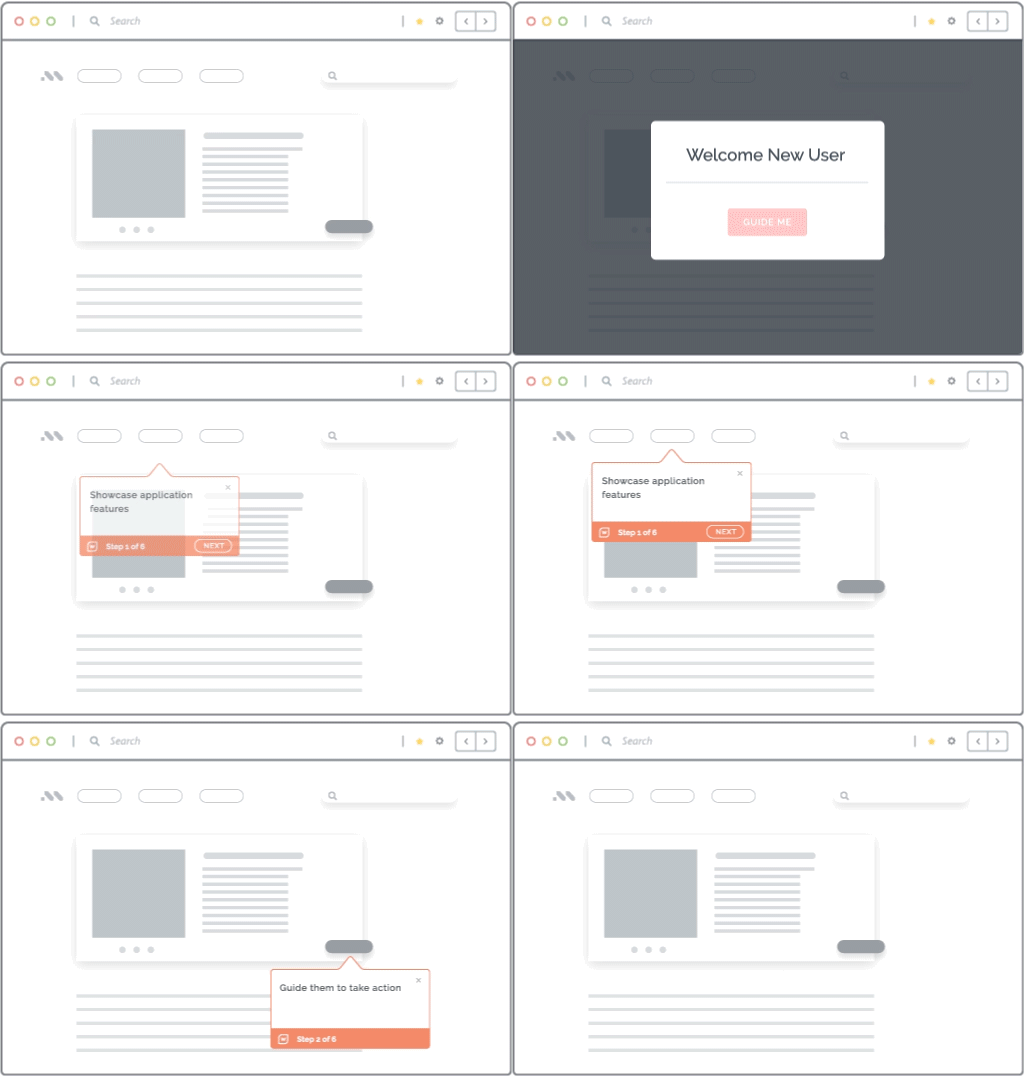
Guidance can be targeted by role, application, workflow stage, and user context, so employees receive instructions relevant to the task they are completing.
Step 6. Establish a workflow change approval process
Create a controlled process for reviewing and releasing workflow changes. The review should account for every affected layer, including process design, system configuration, controls, documentation, guidance, training, and communications.
A typical change management process for software workflows includes:
- Submit and document the change request.
- Assess the operational and user impact.
- Review process, technical, and compliance requirements.
- Update configurations, controls, SOPs, and guidance.
- Test the workflow with affected roles.
- Approve and communicate the release.
- Monitor adoption and performance after launch.
This process gives teams a consistent record of what changed, who approved it, and how the change affected execution.
Step 7. Define workflow governance metrics
Measure whether users follow the approved path and whether the workflow produces the intended operational outcome. Establish a baseline before making changes so improvements can be quantified.
Useful governance metrics include:
- Process adherence rate: Percentage of users or transactions following the approved path
- Task completion time: Time required to complete an individual workflow task
- End-to-end cycle time: Total time from workflow initiation to completion
- Error rate: Percentage of incorrect, incomplete, or failed transactions
- Rework rate: Percentage of tasks returned or repeated for correction
- Required-field completion: Rate at which users provide necessary workflow data
- Exception rate: Frequency of approved and unapproved deviations
- Workflow drop-off rate: Percentage of users who abandon the process
- Support tickets by workflow: Volume and type of requests connected to the process
- Guidance and Self Help usage: In-app content users access while completing work
- Audit exceptions: Instances where required controls or procedures were not followed
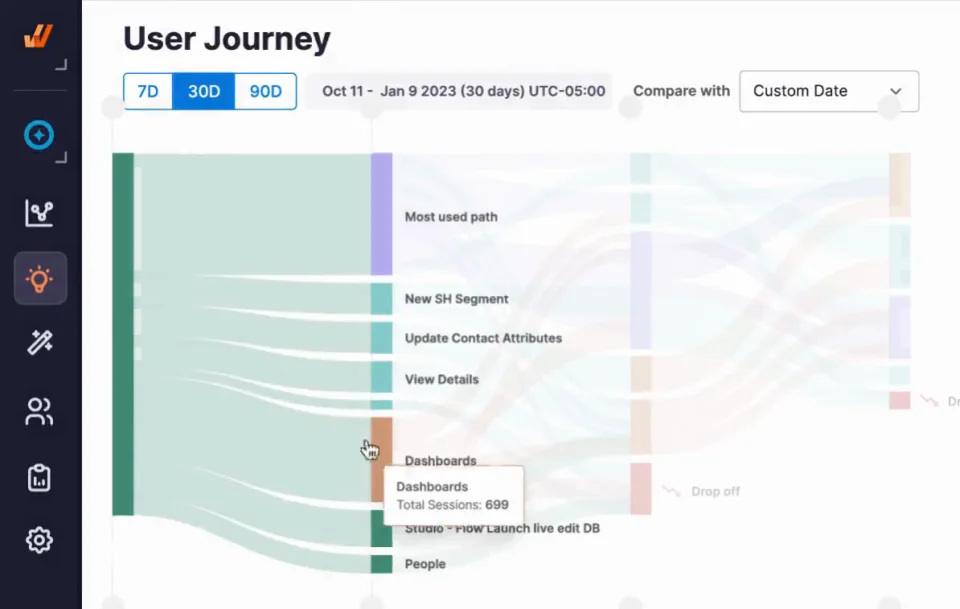
With Whatfix Product Analytics, capabilities like Funnels, Journeys, and Session Replay can help process owners see where users deviate, hesitate, repeat actions, abandon tasks, or encounter friction.
Step 8. Review and improve workflows regularly
Set a review cadence based on workflow risk and rate of change. High-risk or frequently updated workflows may require monthly reviews, while stable processes may be reviewed quarterly.
Governance reviews should evaluate:
- Deviations from the approved workflow
- Repeated errors, rework, and abandonment
- Increasing support demand
- Outdated SOPs and in-app guidance
- Regional or team-level performance differences
- Controls that add unnecessary friction
- Results from recent workflow changes
- Opportunities for automation or process redesign
Document decisions, assign owners, and track corrective actions through the next review cycle. This creates an ongoing improvement process rather than a one-time governance exercise.
Workflow Governance Examples Across Enterprise Apps
Workflow governance looks different across enterprise applications, but the goal is the same – define the approved path, apply the right controls, guide users through execution, and measure whether the workflow is improving.
| Enterprise workflow | Governance problem | Governance controls to apply | Outcome to track |
| Procurement in ERP | Users create incomplete requisitions or bypass preferred suppliers | Required fields, approval paths, supplier selection guidance, and exception handling | Requisition-to-PO cycle time, compliant approvals, and invoice exception rate |
| Opportunity management in CRM | Sales reps use inconsistent stage criteria or leave critical fields incomplete | Stage definitions, required fields, forecast guidance, and manager review checkpoints | Required field completion, forecast accuracy, and stage conversion rate |
| Employee onboarding in HCM | Managers miss onboarding tasks or follow inconsistent steps | Role-based task lists, policy guidance, deadline reminders, and completion tracking | New hire task completion rate, onboarding ticket volume, and manager task completion rate |
| Contract approvals in CLM | Contracts stall, miss review steps, or require repeated rework | Approval routing, clause guidance, review checklists, escalation paths | Contract cycle time, rework rate, and approval SLA adherence |
| Claims processing | Agents handle exceptions inconsistently or miss compliance steps | Guided decision paths, compliance checkpoints, and documentation prompts | First-pass accuracy, exception rate, audit findings |
| IT service requests in ITSM | Users open incomplete, duplicate, or misrouted tickets | Self-service guidance, request form tips, routing rules, deflection content | Ticket deflection, first-contact resolution, tickets per active user |
| team member access requests in ITSM or IAM | Users receive incorrect, excessive, or delayed access to business systems | Role-based approvals, identity verification, access checks, audit trails, and offboarding triggers | Access request cycle time, access exceptions, and audit violations |
Case Study: How Vizient reduced contract workflow errors by 93% with Whatfix
Vizient used Whatfix DAP to embed guidance and self-help into its Icertis CLM workflows, helping legal and procurement users follow the right contract steps, avoid critical upload errors, and access SOPs without leaving the application.
With Smart Tips, Pop-Ups, a prebuilt NDA Flow, and integrated SharePoint documentation, Vizient reduced contract workflow errors by 93% year over year, saved 618 hours by deflecting L1 support questions, and accelerated average contract execution from 33.5 days to 14 days.
How Whatfix Supports Workflow Governance in Enterprise Apps
Workflow governance works best when approved processes are reinforced where users actually complete work. Whatfix enables this by helping teams guide users through critical workflows, surface contextual help, measure friction, and continuously improve execution across enterprise applications.
Reinforce approved workflows with in-app guidance
Whatfix DAP helps teams translate approved workflow paths into in-app guidance that appears directly inside enterprise applications. Flows, Smart Tips, Task Lists, Pop-Ups, Tours, and field-level guidance can guide users through required steps, explain what data to enter, remind users of policy-sensitive actions, and help them complete tasks accurately.
For workflow governance, this helps standardize execution across roles, teams, and regions. Instead of relying only on SOPs or one-time training, teams can reinforce the approved path inside the workflow itself.
Turn SOPs and process documentation into contextual support
Governed workflows often depend on SOPs, policy documents, job aids, and process instructions. With Whatfix Self Help, teams can surface this support inside the application so users can find answers without leaving the workflow or raising a ticket.
This is especially useful for workflows with frequent exceptions, compliance requirements, or role-specific instructions. Users can access the right guidance at the moment of need, while process and application teams reduce dependency on static documentation, SMEs, and support queues.
Govern process changes during releases
Workflow governance also depends on how well teams manage process and system updates. When workflows change, Whatfix helps teams communicate updates in-app, guide users through new steps, and reinforce new requirements with contextual messages and task-level guidance.
For process owners and application teams, this creates a more controlled release process. Guidance, documentation, and user communication can be updated alongside workflow changes, reducing confusion after launches, upgrades, policy changes, or application updates.
Whatfix also supports enterprise content lifecycle management, helping teams manage guidance updates with approvals, QA, version control, staging, localization, and controlled rollouts so workflow guidance stays aligned with system and process updates. For high-risk workflow changes, teams can also use Whatfix Mirror to let users practice new or updated workflows in a simulated application environment before those changes affect live operations.
Reduce task drift and workflow errors
Task drift often shows up when users take different paths, skip required steps, or complete fields inconsistently. Whatfix helps reduce task drift by providing users with contextual guidance within the systems they already use.
Role-based guidance, Smart Tips, Pop-Ups, and Flows can support required steps, correct data entry, exception handling, and policy reinforcement. This helps teams improve workflow consistency, reduce avoidable errors, and support better data quality across critical processes.
Use analytics to find where governance breaks
Workflow governance needs visibility into how users actually move through enterprise applications. Whatfix Product Analytics helps teams understand user behavior by capturing clickstream data, feature usage, session paths, and engagement metrics across the tech stack. It helps identify adoption patterns, friction points, and workflow outcomes tied to software investments.
Teams can use these insights to spot where users drop off, where errors repeat, which cohorts need additional support, and which workflows need better guidance. Whatfix also supports funnel and cohort analysis, helping teams identify users who complete or drop off from specific workflow steps and target follow-up interventions accordingly.
Continuously improve governed workflows
Workflow governance should not stop once a workflow is documented or guidance is launched. Whatfix enables a closed-loop approach that identifies friction, guides users in the moment of work, measures workflow behavior, and refines guidance or process design based on real usage data.
This helps teams continuously improve governed workflows by updating SOPs, optimizing in-app guidance, reducing support tickets, improving completion rates, and strengthening compliance over time. For process owners, this creates a measurable way to show whether workflow governance is improving execution, reducing friction, and supporting better business outcomes.
See how Whatfix helps process owners govern workflows inside enterprise applications. Request a demo with us!