

User errors in enterprise workflows lead to incorrect data, skipped approvals, policy deviations, incomplete handoffs, and costly rework across systems.
To reduce user errors, teams must combine workflow automation and error-proofing controls with user readiness, contextual in-app guidance, and continuous measurement. This article explains how process owners and application managers can identify where errors occur, address their causes, and improve workflow accuracy at scale.
What Causes User Errors in Enterprise Workflows?
User errors often originate in the conditions surrounding workflow execution, including how processes are designed, learned, supported, updated, and measured.
Workflow Design Creates Error Opportunities
Enterprise workflows create error opportunities when users must re-enter data across systems, interpret ambiguous fields, choose among too many options, or navigate complex handoffs with limited validation. These risks increase across decision points and exception paths, especially when workflows are designed without testing with representative users.
Users Enter Production Without Verified Readiness
Users who enter production without verified user readiness may encounter complex decisions, exceptions, and recovery paths for the first time in a live environment. Course completion provides limited evidence that they can execute these workflows accurately. Without hands-on proof, incorrect selections and skipped steps may surface during live work, increasing rework and support requests.
Guidance Is Missing During Execution
Critical or infrequent workflows become harder to execute when users must recall each step or search external documentation. Missing role-based guidance at complex fields and decision points increases incorrect selections, skipped actions, and support dependence, especially in workflows that span applications or change frequently.
Process and Application Changes Create Execution Drift
Application and policy changes can quickly leave existing SOPs, user training, and in-app guidance out of sync with current workflows. When new requirements lack reinforcement during execution, users may continue following familiar procedures or develop inconsistent workarounds across roles, regions, and business units.
Disconnected Workflow Data Allows Errors to Repeat
When step-level product analytics, error events, support tickets, help searches, feedback, and digital adoption metrics sit across separate systems, process owners lose visibility into where errors cluster and what drives them. Interventions arrive late, allowing unclear steps, outdated guidance, and unapproved workarounds to continue affecting users.
The Business Impact of User Errors
User errors affect more than individual workflow attempts. Their consequences can spread across downstream processes, support operations, compliance controls, and financial performance.
- Increased rework: Employees and operations teams spend additional time correcting records, resubmitting requests, reversing transactions, and resolving downstream issues.
- Longer workflow completion times: Incorrect entries, missed approvals, and failed handoffs create delays as workflows are returned, rerouted, or restarted.
- Dirty and incomplete data: Incorrect, inconsistent, or missing information reduces the reliability of reporting, automation, forecasting, and business decisions.
- Higher workflow-related support burden: Recurring errors generate support tickets, repeated questions, and escalation requests that consume IT and application support capacity.
- Compliance risk: Skipped controls, inaccurate records, and unapproved process deviations can weaken audit trails and increase exposure to policy or regulatory violations.
- Revenue leakage: Errors in pricing, billing, order management, renewals, and approvals can lead to underbilling, duplicate payments, missed revenue, and delayed transactions.
How to Prevent User Errors in Enterprise Workflows
Reducing user errors requires teams to identify high-risk error points, diagnose their causes, and apply the right combination of automation, workflow controls, readiness support, and in-app guidance.
1. Prioritize Critical Workflows and Define Error Conditions
Rank workflows by error frequency, business consequence, and reach. For each priority workflow
- Define the actions that qualify as errors
- Identify where user friction occurs
- Separate approved exceptions from unapproved paths
- Identify the affected cohorts and accountable workflow owner
2. Establish a Baseline and Locate Error Hotspots
Start by establishing baseline performance across error rate, first-pass completion, rework hours, completion time, process deviations, and support demand.
Then use workflow funnels, validation and audit logs, help searches, and user feedback to pinpoint recurring error steps and understand what users experience. Segment the findings where differences across roles, regions, tenure, business units, or application versions can guide a more targeted response.
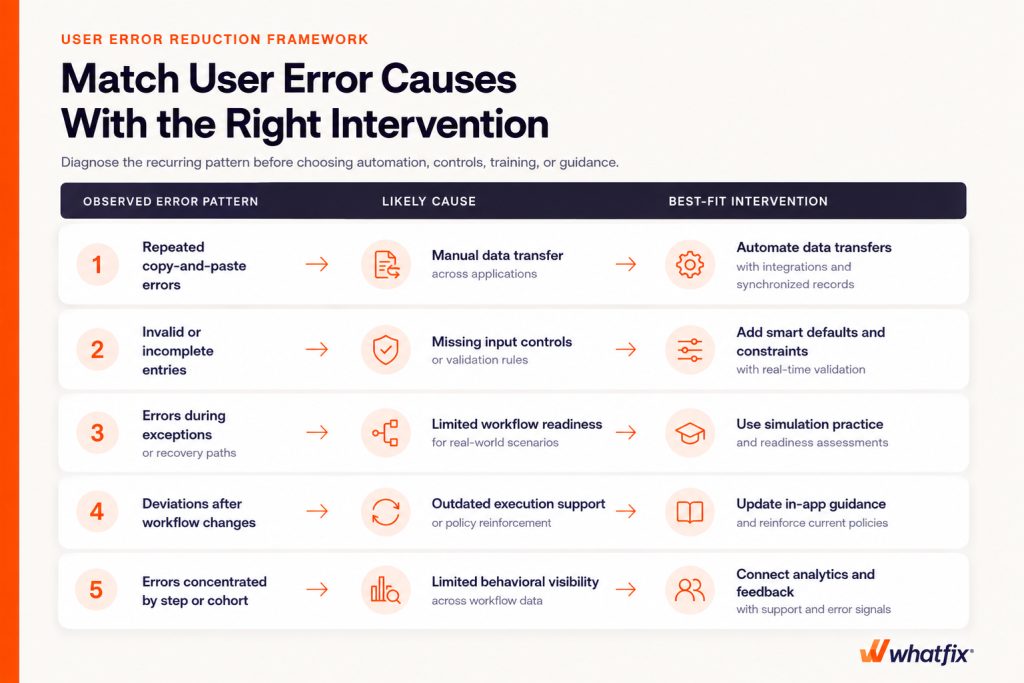
3. Diagnose Why the Errors Occur
The same error can have different causes, so confirm what is driving it before selecting an intervention. Separate application, integration, and data-transfer failures from errors involving workflow design, user readiness, in-workflow support, or policy reinforcement.
For example, repeated invalid entries may point to unclear fields or missing validation, while errors concentrated among new users may indicate limited practice. If users complete the workflow correctly but the data fails to transfer, the issue requires a technical fix rather than additional training.
4. Automate and Error-Proof High-Risk Workflow Steps
Use workflow automation to eliminate repetitive actions and manual handoffs where errors frequently occur. Add validation and guardrails to the user-led steps that remain.
- Automate data capture and transfer through integrations, synchronized records, pre-populated fields, and smart defaults
- Automate rules-based routing, approvals, reminders, calculations, and handoffs
- Constrain inputs with dropdowns, input masks, conditional fields, and progressive disclosure
- Validate entries in real time and block incomplete, duplicate, or invalid submissions
- Protect consequential actions with permissions, required sequences, warnings, and confirmation checkpoints
- Preserve user input and provide clear correction, exception, and recovery paths
Prioritize automation for stable processes with predictable rules. Pair judgment-based decisions and exceptions with contextual guidance and clear escalation paths.
5. Validate Workflows and Prove User Readiness Before Rollout
Pre-rollout validation exposes error points before they affect live transactions. Test core and exception paths, automation rules, integrations, permissions, data transfers, and recovery flows with representative users. Observe where they hesitate, make incorrect selections, request help, or abandon the workflow.
Use hands-on practice and simulation training to verify that each role cohort can complete critical workflows accurately. Set readiness thresholds by workflow risk and target additional practice toward cohorts below them, reducing execution errors when users enter production.
6. Guide Correct Execution in the Flow of Work
Embed guidance where users make decisions or commonly encounter errors. Use walkthroughs for complex or infrequent workflows, field-level guidance for input requirements, and decision support at branching points.
Reinforce policies and workflow changes before relevant actions, and provide contextual self-service for recurring questions. Target each intervention by role, workflow step, and application version to keep it relevant.
7. Measure User Error Reduction and Continuously Optimize
Compare results with the baseline by workflow step and user cohort. Focus on metrics that show accuracy, efficiency, and adherence.
- User error rate measures the percentage of workflow attempts containing a defined error.
- First-pass completion rate shows how often users complete the workflow correctly without rework.
- Rework hours quantify the productivity cost of correcting errors.
- Median completion time indicates the speed of successful workflow execution.
- Support-ticket rate shows how often users need assisted support.
- Process deviation rate tracks attempts that follow unapproved paths.
Evaluate rates alongside workflow volume, and assess completion time with accuracy and adherence metrics. Use recurring patterns across workflow analytics, support tickets, and feedback to refine automation, workflow design, training, or guidance.
How Whatfix Helps Enterprises Reduce User Errors at Scale
Whatfix connects in-app guidance, contextual support, and behavioral analytics that gives process and application owners a unified way to prevent errors before production, support accurate execution, and improve workflows over time.
Validate Workflows and Prove Readiness Before Production
Whatfix Mirror replicates enterprise application workflows in a risk-free environment where users can practice core tasks, exceptions, and recovery paths. Role-based simulations and assessments expose recurring failure points, measure proficiency, and identify cohorts that need further practice before production access.

Guide Users Through High-Risk Workflows
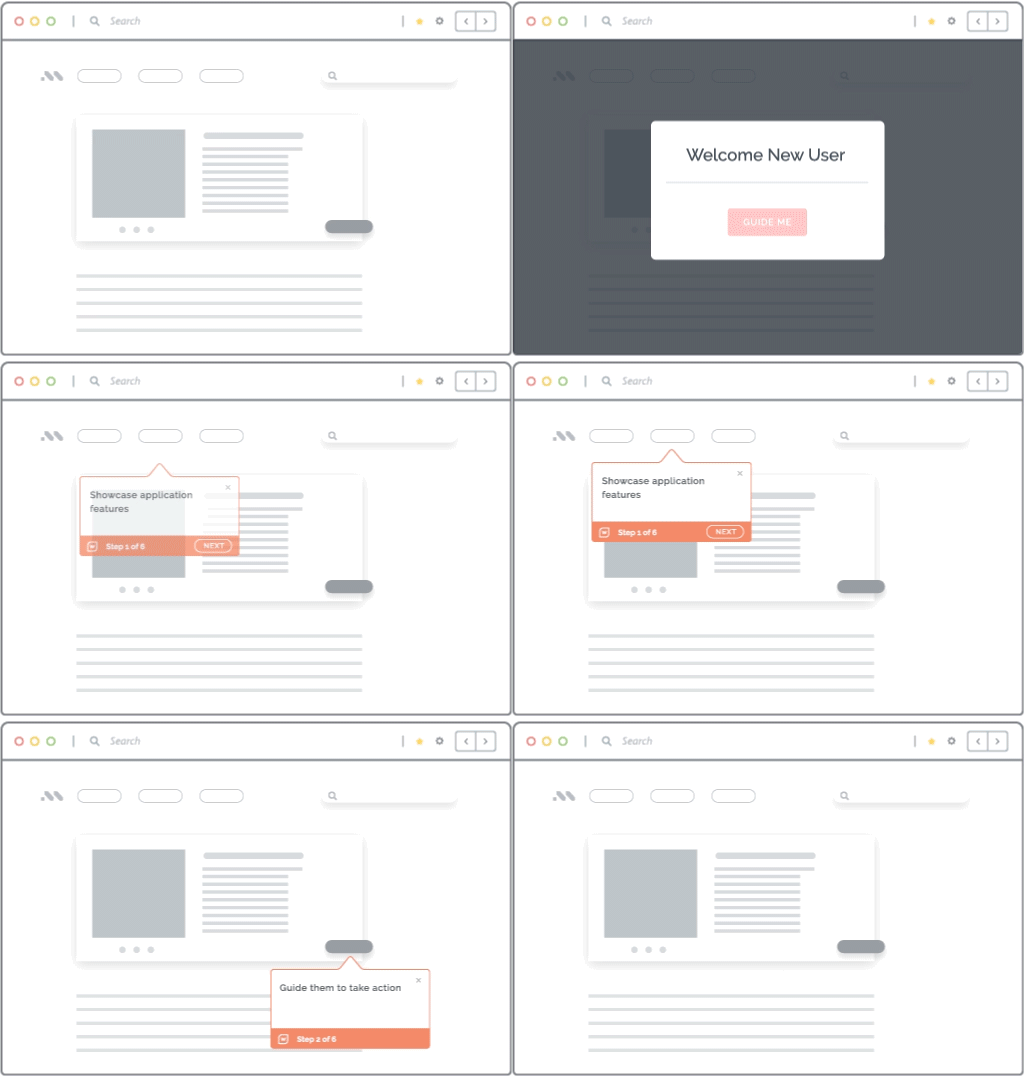
Whatfix DAP uses Flows, Smart Tips, Pop-Ups, and Task Lists to guide users through complex workflows, clarify input requirements, and reinforce policies at critical steps. Guidance can extend across applications, helping prevent skipped actions, incorrect selections, process deviations, and avoidable support requests.
Provide Contextual Answers During Execution
Whatfix Self Help gives users in-app access to approved SOPs, documentation, and contextual answers. Users can resolve unfamiliar scenarios without leaving the application, reducing context switching, workflow delays, and dependence on assisted support.

Identify Error Hotspots and Verify Improvement
Whatfix Product Analytics reveals workflow drop-offs, repeated actions, and friction across specific steps and user cohorts. Combined with in-app surveys and AI-powered insights, teams can connect user behavior with feedback, compare performance before and after an intervention, and determine where workflows, training, or guidance need refinement.

See how Whatfix helps enterprises identify workflow friction, prepare users, guide accurate execution, and continuously reduce errors across critical business applications. Schedule a demo with us!