

Large enterprises accumulate hundreds of business applications through years of departmental investments, regional expansion, and technology modernization.
According to SAP LeanIX research, enterprises with more than $1 billion in annual revenue have an average of 650 applications, while the largest 10% of organizations average over 3,400. Managing these large application portfolios requires understanding which applications remain valuable, which need improvement, and which introduce unnecessary costs, complexity, or business risk.
Application rationalization provides a structured approach to evaluating these investments before committing to modernization, consolidation, or replacement projects.
This guide explains the benefits of application rationalization, how to evaluate enterprise applications, and five potential rationalization strategies, along with a practical decision tree to determine the most appropriate path forward.
What Is Application Rationalization?
Application rationalization is the process of evaluating an organization’s application portfolio to determine which systems should be retained, modernized, consolidated, replaced, or retired. It considers each application’s business value, functional capabilities, technical health, total cost of transformation, dependencies, user adoption, and operational performance to recommend the most appropriate future state.
Application rationalization helps enterprise IT and business leaders make evidence-based decisions about existing software investments. It establishes which applications meet current and future business requirements, where improvements are justified, and which systems may require modernization or retirement.
Application Rationalization vs. Application Portfolio Management vs. Consolidation
These disciplines are closely related but support different decisions within enterprise technology management.
| Discipline | Primary Objective | Typical Outcome |
| Application portfolio management (APM) | Evaluate costs, risks, business requirements, and investment priorities across the enterprise application portfolio. | Portfolio priorities, funding decisions, and an IT roadmap. |
| Application rationalization | Evaluate specific applications or overlapping systems to determine their most appropriate future state. | Recommendations to retain, improve, consolidate, replace, or retire applications. |
| Application consolidation | Reduce redundant applications or instances by migrating users, workflows, and data to fewer strategic platforms. | A smaller, standardized application environment with retired systems and migrated workflows. |
Application rationalization frequently precedes enterprise legacy application modernization projects. An application may be retained with targeted improvements, replaced with a modern platform, or consolidated with an existing system. The assessment establishes the rationale and conditions for that decision.
For organizations pursuing application consolidation, rationalization helps determine whether consolidation is appropriate and which business capabilities, integrations, and operational requirements must be preserved.
Benefits of Application Rationalization
The value of business app rationalization should be measured through outcomes such as validated cost savings, reduced application risks, better workflow performance, and more effective allocation of IT resources.
The key benefits of application rationalization initiatives include:
- Reduce unnecessary technology costs: Identify redundant licenses, underutilized capabilities, overlapping vendor contracts, and applications whose ongoing maintenance costs no longer justify their business value.
- Improve application performance and utilization: Identify applications that remain strategically valuable yet underperform due to user friction, insufficient user proficiency, configuration issues, or inefficient business processes.
- Reduce technical debt and operational risk: Evaluate aging infrastructure, unsupported software, security vulnerabilities, integration complexity, and application dependencies that create continuity risks.
- Make better modernization investments: Determine where targeted improvements are sufficient and where significant application changes, replacements, or retirement are justified.
- Improve business process and data consistency: Identify fragmented capabilities, disconnected workflows, duplicate data, and inconsistent processes that may benefit from standardization or architectural improvements.
- Create a stronger foundation for future transformation: Establish which applications can support new business requirements, automation, AI capabilities, and enterprise growth, and which require further investment before those opportunities become feasible.
How to Conduct an App Rationalization Review
An application rationalization review evaluates whether enterprise software should be retained, improved, consolidated, replaced, or retired. Start with business-critical systems, applications with overlapping capabilities, or those approaching major renewal or modernization decisions. The following six steps help turn application assessments into actionable recommendations.
1. Define Rationalization Scope and Business Requirements
Start by identifying the applications under review and the business requirements they must support. Focus on core systems such as ERP, CRM, HCM, and industry-specific platforms, particularly where capabilities overlap or operating costs are increasing.
Work with application owners, enterprise architects, and process owners to establish:
- Business capabilities: Critical workflows, functions, and controls each application supports.
- Affected users: Business units, roles, and regions that depend on the system.
- Functional requirements: Essential features, integrations, approvals, and exception handling.
- Strategic requirements: Future capabilities, scalability, and architecture standards.
- Evaluation scope: Applications, processes, and decisions included in the review.
For example, two ERP systems may both support procurement, but one might handle specialized manufacturing processes or regulatory requirements. Identifying these differences helps determine whether consolidation is feasible without losing critical functionality.
2. Build an Application Inventory and Map Dependencies
Create an inventory of the applications under review, documenting their purpose, ownership, technical characteristics, costs, and dependencies. This provides a consistent foundation for comparing systems and identifying potential duplication.
For each application, capture:
- Application details: Vendor, version, deployment model, and business and technical owners.
- Business usage: Supported capabilities, workflows, and user groups.
- Financial commitments: Licensing, maintenance, support costs, and renewal dates.
- Technical health: Vendor support status, security requirements, and known limitations.
- Dependencies: Connected applications, data exchanges, integrations, and downstream workflows.
Pay particular attention to systems that appear redundant but support specialized reporting, historical data, or critical integrations. For example, retiring an ERP application could disrupt accounts payable workflows that depend on its supplier records or approval processes.
3. Assess Business Fit, Software Adoption, and Workflow Performance
Evaluate whether each application meets business requirements and delivers the expected operational outcomes. A system may have the necessary capabilities but still underperform because employees struggle with workflows, encounter errors, or rely on manual workarounds.
Assess four areas: functional fit, software adoption, workflow execution, and operational outcomes. Use existing evidence to distinguish missing capabilities from problems that could be resolved through configuration changes, process improvements, or employee enablement.
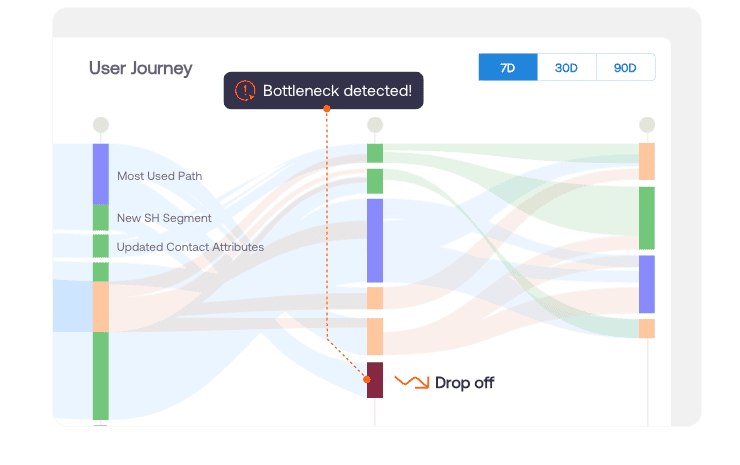
Whatfix Product Analytics can help application owners investigate user behavior, feature adoption, and workflow friction. Combined with operational KPIs and support data, these insights can inform whether an application needs improvement or further evaluation. Low utilization alone shouldn’t justify retirement, particularly when a system supports infrequent but critical business processes.
4. Evaluate Technical Health, Total Cost, and Modernization Feasibility
Assess whether the application remains technically and financially viable. Consider vendor support, system stability, security risks, technical debt, and the costs of maintaining or modernizing the application.
Compare the total cost of ownership with the estimated costs of feasible alternatives, including licensing, infrastructure, maintenance, integrations, internal IT resources, and potential transition expenses. Account for dependencies and business continuity risks before recommending significant changes.
For example, a legacy claims management system may still meet operational requirements but rely on technology approaching end of support. The review should determine whether upgrading the existing platform or replacing it offers the better combination of business value, cost, and manageable risk. Keep projected productivity gains separate from validated financial savings.
5. Use Gartner’s TIME Framework to Compare Rationalization Options
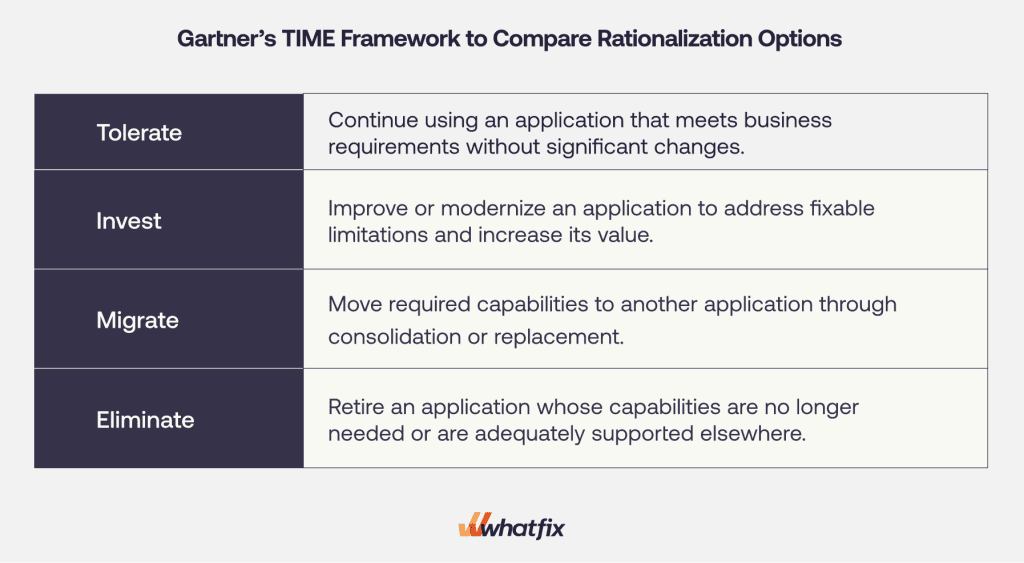
Gartner’s TIME framework helps organizations classify applications based on business value, technical fit, and investment needs. Use the findings from previous assessments to identify the most appropriate strategy:
- Tolerate: Continue using an application that meets business requirements without significant changes.
- Invest: Improve or modernize an application to address fixable limitations and increase its value.
- Migrate: Move required capabilities to another application through consolidation or replacement.
- Eliminate: Retire an application whose capabilities are no longer needed or are adequately supported elsewhere.
Compare feasible alternatives against business requirements, costs, dependencies, and operational risks. An underutilized application may still support critical work, while overlapping applications may serve distinct requirements that justify retaining both.
6. Document Recommendations and Establish Execution Requirements
Record the recommended strategy in an application decision record that explains the supporting evidence, alternatives considered, and conditions required before execution. This gives application owners and decision-makers a shared basis for reviewing the proposed action.
Include the following information:
- Application and requirements: Systems under review, affected business units, and essential workflows.
- Recommended strategy and rationale: Selected option, supporting findings, and reasons for rejecting alternatives.
- Evidence and dependencies: Relevant costs, performance findings, technical constraints, and unresolved assumptions.
- Accountable owners: Application and process owners, along with the authority responsible for approval.
- Execution conditions and status: Outstanding validations, business continuity requirements, user readiness, and approval status.
Submit the recommendation through the appropriate governance or investment review process. Approval should remain separate from execution, particularly when consolidation, replacement, or retirement requires further dependency validation or transition planning.
Application Rationalization Decision Tree
An application rationalization decision tree helps enterprise application owners systematically evaluate business requirements, application fitness, and opportunities for improvement before recommending a future-state strategy.
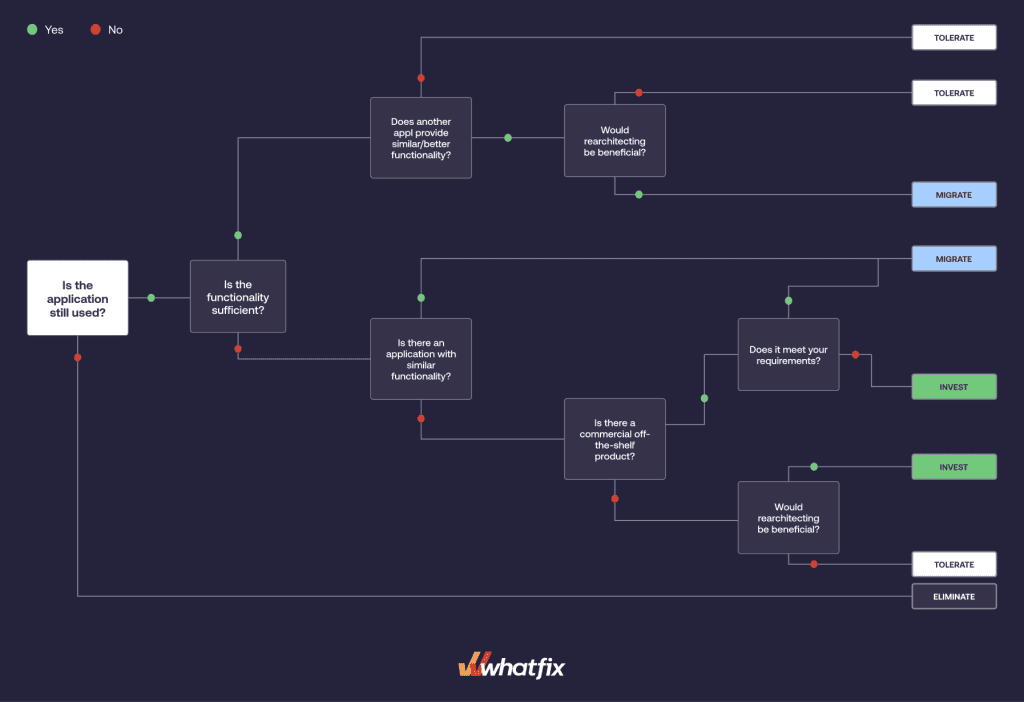
The decision tree provides a preliminary recommendation. Before approving execution, validate the underlying business requirements, technical dependencies, financial assumptions, data obligations, and employee readiness requirements.
Common Application Rationalization Challenges
Enterprise application rationalization becomes more difficult when systems support multiple business units, connected workflows, and complex technical environments. Several recurring challenges can undermine the accuracy of assessments and the feasibility of recommended changes.
- Incomplete application inventories and ownership: Organizations may lack reliable information about application versions, costs, users, dependencies, or business owners. Establish authoritative inventory records and validate findings with application and process owners before making decisions.
- Unclear application overlap and business requirements: Applications with similar functionality may support different regulatory requirements, regional processes, or critical integrations. Map the underlying business capabilities and workflows before recommending consolidation or retirement.
- Limited software utilization and outcome visibility: License inventories and application logs may reveal usage patterns without explaining whether employees complete workflows effectively or achieve expected results. Combine behavioral analytics with operational KPIs, support data, and employee feedback.
- Conflicting business and IT priorities: IT may prioritize reduced costs and technical complexity, while process owners prioritize continuity, specialized functionality, or employee productivity. Establish shared evaluation criteria and accountable decision-making authority.
- Underestimated transition and change costs: Replacement, consolidation, and retirement can require data migration, integration remediation, workflow redesign, employee training, and extended parallel operations. Account for the full transition lifecycle before approving an option.
Successful rationalization depends on the quality of the supporting evidence and the organization’s ability to turn recommendations into coordinated, financially defensible decisions.
How a Digital Adoption Platform Supports Rationalization Outcomes
Application rationalization helps enterprises determine which systems to retain, improve, consolidate, replace, or retire. A digital adoption platform (DAP) supports the outcomes of those decisions by helping teams address adoption and workflow challenges in existing applications, prepare employees for system changes, and improve how software is used after deployment.
Whatfix brings together behavioral analytics, in-app guidance, and application simulation training to help enterprises improve the performance of existing systems and support successful transitions to new ones.
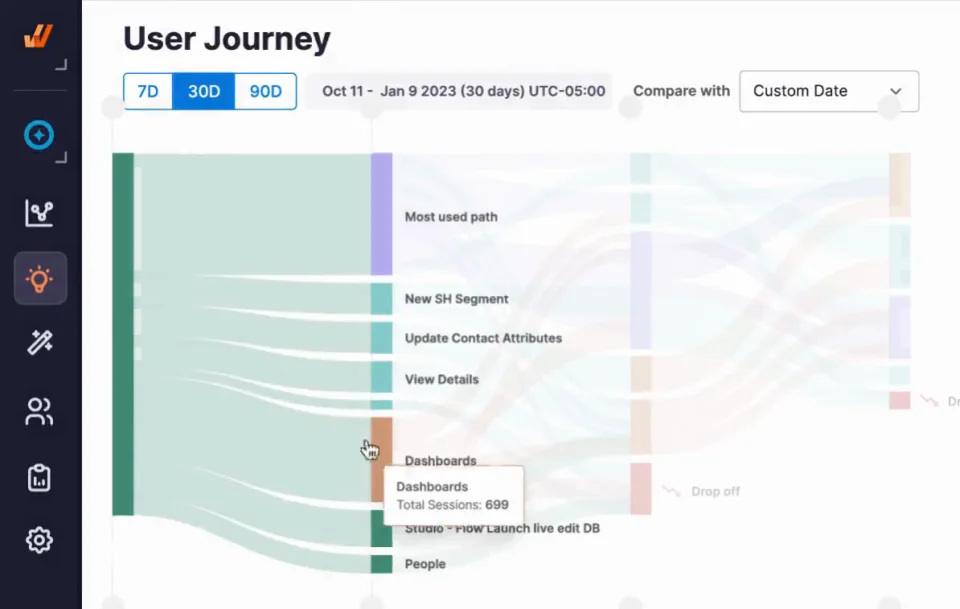
Identify Adoption and Workflow Performance Gaps With Whatfix Product Analytics
When an application is underperforming, Whatfix Product Analytics helps application owners investigate whether user behavior and workflow friction are contributing to the problem.
By analyzing feature adoption, user journeys, funnels, and workflow drop-offs, teams can identify where employees struggle, abandon tasks, or rely on inefficient processes. Combined with operational performance data, these insights help determine where targeted improvements may be appropriate.
These findings give application owners a stronger basis for addressing adoption-related problems before considering more disruptive application changes.
Improve Existing Applications With Whatfix DAP
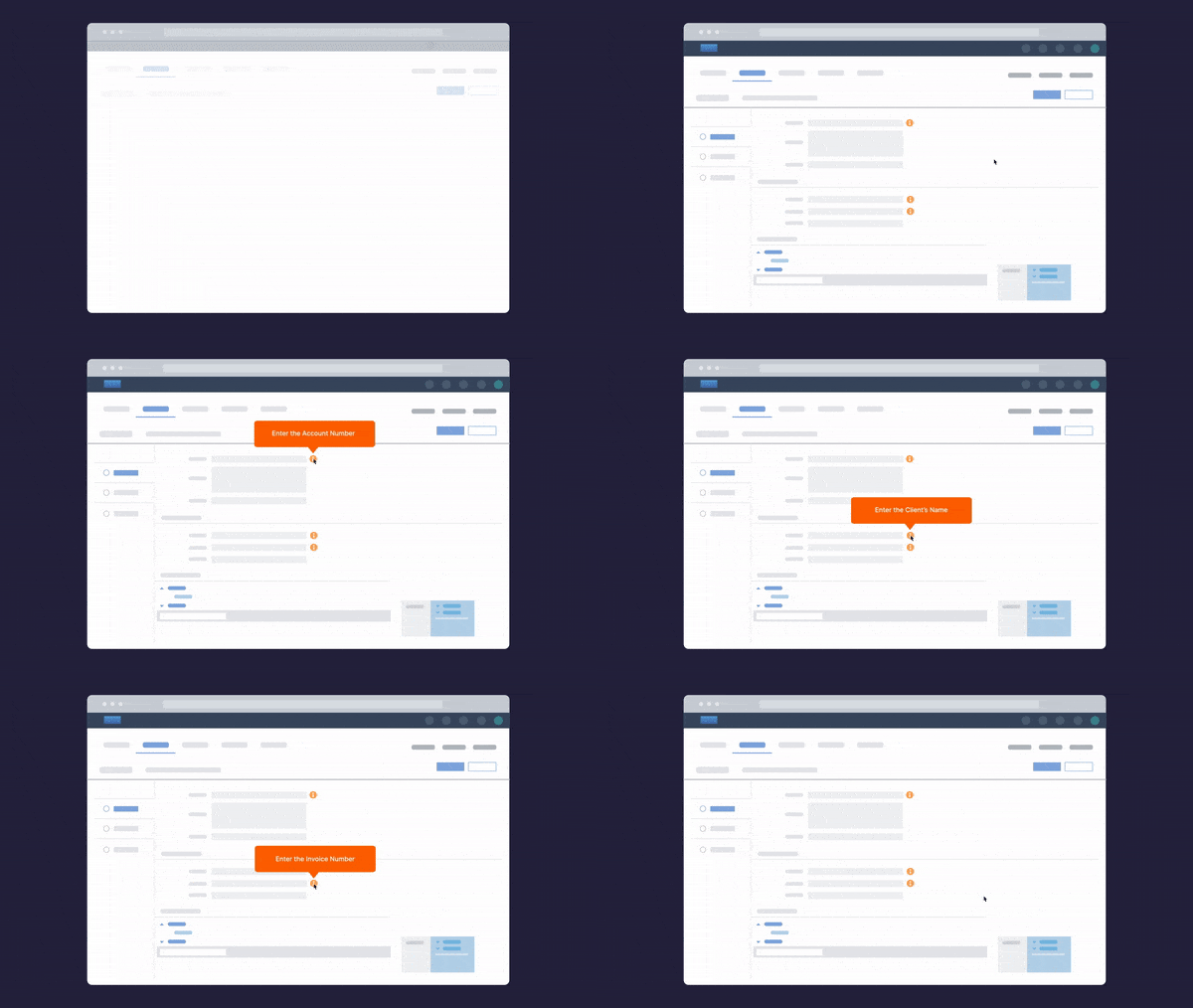
When rationalization identifies an application worth retaining or improving, Whatfix DAP helps teams address execution challenges that limit its value.
Application owners can use behavioral insights to target interventions, then deploy interactive Flows, Smart Tips, Field Validation, and Self Help directly within the application. These capabilities help employees complete critical workflows, follow approved processes, and resolve questions without leaving their work.
Teams can then monitor adoption and workflow performance to evaluate whether the interventions are reducing friction and improving outcomes, helping extend the value of existing software investments.
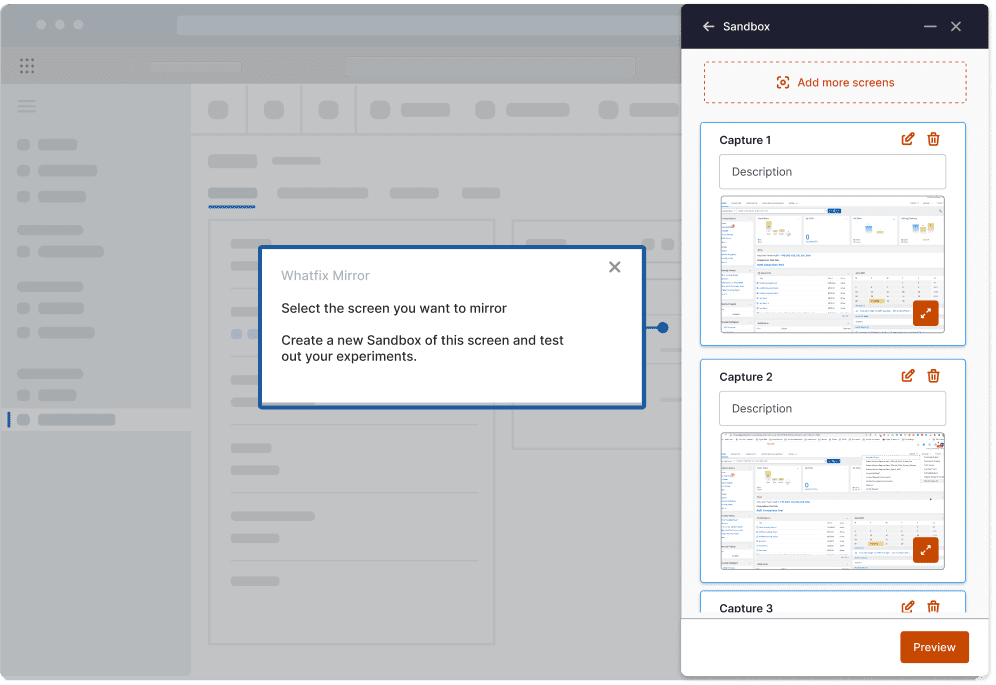
Prepare Employees for Application Changes With Whatfix Mirror
When rationalization leads to consolidation, modernization, or replacement, successful outcomes depend on employees being prepared to work effectively in the selected system.
Whatfix Mirror enables employees to practice new workflows in realistic application simulations before go-live. Role-based training and proficiency assessments help teams identify readiness gaps and prepare users for changes to interfaces, processes, and responsibilities.
Once the new or updated application goes live, Whatfix DAP provides contextual guidance and support within employees’ workflows. Whatfix Product Analytics helps teams track adoption, identify recurring friction, and prioritize improvements as users adjust to the change.
Together, these capabilities connect pre-launch readiness, in-workflow support, and continuous optimization, helping enterprises realize the intended value of their application rationalization decisions.
Request a Whatfix demo to see how Whatfix helps you improve existing applications and support users through enterprise software changes.