

For CIOs and application owners, the cost of digital transformation extends far beyond the initial technology investment. Modernizing enterprise applications requires internal IT resources, system integration, data migration, readiness assessment, employee training, change management, ongoing support, and post-launch system optimization. These expenses often overlap during the transition, as organizations continue to maintain legacy systems, prepare employees for new workflows, and work to stabilize operations after go-live.
Digital transformation initiatives often begin with an immediate business need, such as replacing legacy technology, reducing operational costs, or modernizing inefficient processes. However, the broader investment can also create opportunities for automation, AI, and business growth that existing systems cannot support. Building a financially defensible business case requires accounting for the full investment lifecycle while distinguishing near-term returns from longer-term opportunities.
This guide breaks down the total cost of digital transformation, explores commonly overlooked expenses and budget risks, and provides a practical framework, worked example, and interactive total cost estimator to help enterprise leaders build realistic transformation budgets.
How Much Does Digital Transformation Cost?
The cost of digital transformation varies significantly depending on the initiative’s scope, enterprise technology stack, integration complexity, number of users, and implementation timeline. A departmental CRM modernization may require a relatively limited investment, while a global ERP transformation spanning multiple business units, workflows, and legacy systems can involve substantially greater costs.
What is the total cost of digital transformation?
To calculate a realistic budget, organizations must account for the total cost of transformation, which includes technology acquisition and implementation, as well as additional expenses that may not typically be included in surface-level transformation budgeting, like internal IT and support resources, employee readiness, transitional support, and ongoing application management like IT support coverage, continuous change management, and post-launch system optimization.
One frequently underestimated expense is the transition period between technical go-live and full business value realization. During this period, organizations may still be using both legacy systems and the new modernized applications simultaneously while employees learn new workflows, IT teams resolve issues, and additional support resources help stabilize operations in this hypercare time period. These overlapping costs can persist until users reach proficiency and the organization can retire legacy systems.
Digital transformation total cost categories
The following table outlines the primary cost categories enterprise leaders should account for when budgeting for digital transformation.
| Cost Category | What It Includes | Cost Timing |
| Technology and infrastructure | Software licenses, SaaS subscriptions, cloud infrastructure, security, and integration platforms | Initial (yet recurring based on contract) |
| Implementation and migration | External consultants, application configuration, system integrations, data migration, testing, and deployment | One-time for launch, Recurring for new releases and updates |
| Internal IT and business resources | Internal technical teams, application owners, project managers, business SMEs, and ongoing administration | Recurring |
| Employee readiness and change management | Role-based user training, application simulations, employee practice time, change communications, etc. | Recurring. Required readiness and training at launch, but will need support for new hire training, re-training, and after new releases and updates. |
| Transition and hypercare | Parallel system operations, temporary support, employee productivity disruption, in-app guidance, and workflow stabilization | Temporary, but may extend longer than anticipated. |
| Ongoing operations and optimization | Application maintenance, user support, release change management, behavioral analytics, and continuous workflow improvements | Recurring |
What factors affect digital transformation total costs?
Several factors determine the size and complexity of an enterprise digital transformation budget:
- Transformation scope and scale: The number of applications, business units, users, geographic regions, and workflows included in the initiative.
- Legacy architecture and integration complexity: Existing technical debt, customizations, integration dependencies, and requirements for connecting modern and legacy systems.
- Data migration and governance requirements: The volume and quality of existing data, migration complexity, security requirements, and regulatory obligations.
- Employee readiness and organizational change: The number of affected roles, complexity of new workflows, training requirements, and internal capacity available to support implementation.
- Rollout duration and operational dependencies: The length of implementation, required parallel operations, application stabilization, and timelines for retiring legacy systems.
How to calculate the total cost of digital transformation projects
Calculate digital transformation costs over a defined planning period, such as three years, to capture implementation expenses alongside transitional and recurring operational costs.
You can use this formula as a starting point for forecasting a more accurate total cost of digital transformation initiatives:
Total Transformation Cost = Implementation Costs + Transition Costs + Recurring Operating Costs + Continuous Improvement Costs + Risk Allowance
For a financially defensible business case, compare total transformation costs against the projected cost of maintaining the existing environment. This establishes the incremental investment required and provides the foundation for forecasting financial returns, payback periods, and business value realization.
Why Digital Transformation Costs Often Exceed Initial Estimates
Digital transformation budgets often exceed initial estimates because organizations often view digital transformation as a binary, one-off cost and underestimate the total, “all-hands-on-deck” support, resources, IT dependencies, user training and enablement, and time required to transition from legacy systems to new ways of working.
Implementation delays, proficiency gaps, resistance to change, clunky workflows, and prolonged hypercare support period can increase expenditures while postponing expected business benefits.
Here are five common reasons digital transformation total costs often exceed initial budgets:
- Underestimated technical complexity: Legacy integrations, data quality issues, application customizations, and cross-functional workflow dependencies require additional development, user testing, and remediation work that were not included in the original project scope.
- Greater internal resource requirements: IT teams, business process owners, operational SMEs, support, and L&D/enablement teams spend more time on configuration, testing, troubleshooting, training, and rollout coordination than initially planned. This can increase labor costs, require temporary backfill, and divert resources from other priorities.
- Longer employee productivity recovery: Employees may complete standard new system training but still require additional practice and assistance to execute new workflows independently. Extended time-to-proficiency increases support needs, workflow errors, and productivity losses during the transition.
- Extended parallel operations and hypercare: Organizations may need to maintain legacy systems, duplicate infrastructure, temporary support teams, and manual workarounds until critical workflows stabilize. Delays in retiring legacy applications prolong these overlapping costs.
- Delayed or unrealized business benefits: Slower software adoption, inefficient workflows, and incomplete process modernization can postpone expected productivity gains, cost reductions, and revenue improvements, weakening the transformation’s financial return even when implementation spending remains on budget.
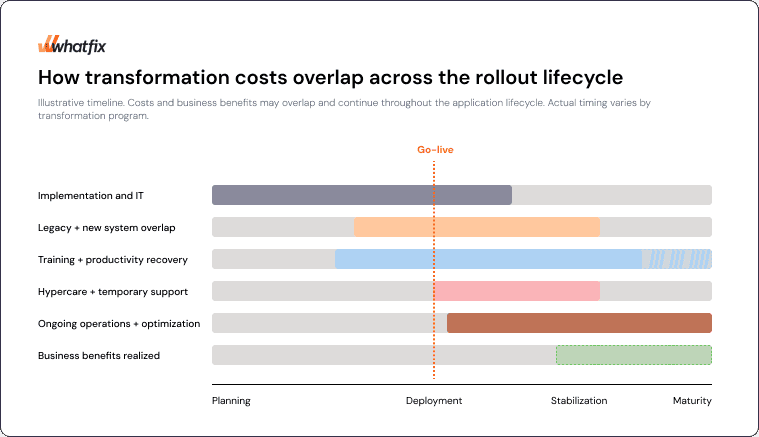
How transformation costs overlap across the rollout lifecycle
While go-live is viewed as the major milestone in software rollouts, implementations are a more complex project that tends to overlap across multiple stages and should be treated as a rollout lifecycle instead of a one-time milestone event.
This further complicates the cost estimation process with overlapping commitments blending across rollout lifecycle stages, form implementation, system overlap, productivity recovering period, temporary hypercare, and ongoing operations, with go-live and value realization both being milestone events.
Financial risk extends beyond cost overruns. McKinsey research found that organizations captured a median ROI of just 31% of the potential revenue benefits and 25% of the potential cost benefits from their recent digital transformations.
These findings underscore the importance of budgeting across rollout lifecycle phases, from employee training and readiness, hypercare stabilization, and post-launch optimization while establishing realistic timelines for realizing business value.
How to Build a Realistic Digital Transformation Budget
A financially defensible digital transformation total cost budget should account for the full investment lifecycle, from initial rollout and implementation, employee readiness and enablement, to ongoing operations and business value realization. It should also make the underlying total cost assumptions, expected returns, financial risks, and funding responsibilities clear to stakeholders.
Follow these seven steps to build a realistic enterprise digital transformation total cost budget.
1. Define the Business Problem and Long-Term Transformation Opportunity
Start by identifying the immediate business need driving the transformation. Common catalysts include legacy applications approaching end of support, rising maintenance costs, inefficient workflows, regulatory requirements, or technology limitations that prevent the business from scaling.
Evaluate the broader capabilities the investment could enable over time. For example, an ERP modernization may initially address outdated infrastructure and inefficient financial processes, while creating opportunities for automated procurement, integrated supply-chain operations, predictive analytics, and AI-enabled workflows.
Separate the transformation’s expected value into three categories:
- Immediate business value: Measurable improvements the initial rollout is expected to deliver, such as lower operating costs, faster processing times, or reduced technical debt.
- Planned expansion opportunities: Additional applications, workflows, regions, or business units included in the approved transformation roadmap.
- Future business potential: New automation capabilities, AI use cases, and operational opportunities enabled by modernized infrastructure that may require additional investment.
This distinction helps organizations establish a credible initial business case while accounting for the potential value of future expansion. Use conservative, evidence-based assumptions for projected returns and treat unapproved opportunities separately from committed benefits.
2. Establish Current Technology Costs and Operational Performance Baselines
Document the existing costs of maintaining legacy technology and executing the business processes targeted for modernization. This creates a financial and operational baseline for comparing transformation scenarios and calculating the incremental investment required.
Include:
- Technology costs: Existing software licenses, infrastructure, maintenance contracts, integrations, and support expenditures.
- Internal resource costs: IT administration, application management, manual troubleshooting, and ongoing technical maintenance.
- Operational inefficiencies: Employee hours spent on manual entry, reconciliation, duplicate work, and inefficient workflow handoffs.
- Application performance: Current workflow completion rates, error rates, processing times, employee productivity, and support demand.
- Legacy retirement opportunities: Applications, contracts, infrastructure, and maintenance resources that could be eliminated or consolidated.
For example, an organization modernizing its accounts payable processes should establish its current invoice processing cost, average processing time, exception rate, and employee effort before forecasting improvements from a new ERP system.
Use this baseline to model the expected cost of maintaining the existing environment over the same planning period. This provides a consistent comparison for evaluating the transformation’s financial benefits and potential ROI.
3. Estimate Implementation Costs Across Rollout Stages
Develop a detailed cost estimate based on the applications, workflows, business units, and deployment phases included in the transformation.
Account for both external vendor expenditures and internal resources required for discovery, implementation, testing, and deployment.
Key implementation expenses include:
- Technology acquisition and configuration: Software licenses, infrastructure, cloud services, security requirements, and application setup.
- System integration and data migration: Legacy integration remediation, data cleansing, migration, validation, and cross-application testing.
- External implementation services: Consultants, systems integrators, technical specialists, and third-party project support.
- Internal IT and business resources: Project management, application owners, technical teams, business SMEs, and employee participation in user acceptance testing.
- Deployment and rollout activities: Pilot programs, phased migrations, cutover planning, operational readiness assessments, and contingency preparations.
Map these expenditures across the planned implementation timeline, ideally using a three-year forecast that identifies costs by year, deployment phase, and responsible budget owner.
Include dependencies that could extend implementation, such as data remediation, integration requirements, regulatory approvals, or business-critical workflows that must be validated before launch.
4. Budget for Employee Readiness, Adoption, and Transition Costs
Technology implementation budgets frequently underestimate the financial commitment required to prepare employees, maintain productivity, and stabilize operations after deployment.
Estimate the costs of employee enablement across the rollout lifecycle, including:
- Role-based training and application simulations: Training development, simulation training, instructional resources, employee practice time, and proficiency assessments.
- Employee productivity recovery: Temporary reductions in productivity as employees learn new systems, adapt to changed responsibilities, and become proficient in critical workflows.
- Change management: Communications, manager enablement, change impact assessments, and employee engagement activities.
- Post-go-live hypercare and support: Temporary support teams, elevated help desk demand, user troubleshooting, and additional operational assistance.
- Continuous digital enablement: In-app guidance, self-service support, new-hire onboarding, and change enablement for future application releases.
Forecast for time-to-proficiency, not training completion
Employees may complete formal training before go-live but require additional time to perform changed workflows independently, accurately, and at expected productivity levels.
For example, estimate the number of employees affected, average training hours, loaded labor costs, and expected productivity recovery period for each rollout cohort. Use readiness assessments, pilot results, and operational data to refine these assumptions.
This allows organizations to forecast how employee readiness affects transition expenditure, support demand, and the timeline for realizing expected business improvements.
5. Forecast Ongoing Operating Costs and Business Value Realization
Digital transformation investments continue after deployment through application administration, maintenance, security, vendor contracts, employee support, release management, and continuous workflow optimization.
Forecast recurring expenditures alongside the operational and financial benefits the transformation is expected to generate.
Connect each expected benefit to a measurable business KPI and a realistic value realization timeline. For example:
- Invoice processing time decreases from 12 days to 6 days after the ERP rollout stabilizes.
- Manual reconciliation effort declines by 20% following workflow automation.
- Employee time-to-proficiency improves across successive deployment cohorts.
- Legacy application maintenance costs decline after confirmed decommissioning.
- Customer service productivity improves as employees adopt standardized CRM workflows.
Account for when each benefit is expected to begin. Productivity improvements may develop gradually as employees become proficient, while legacy cost savings may depend on retiring existing applications and infrastructure.
Distinguish between cash-releasing savings, such as eliminated software contracts or reduced external support expenditure, and capacity improvements, such as employee hours recovered and reassigned to higher-value work.
For multi-year business cases, work with finance to calculate expected ROI, payback periods, and the timing of net financial benefits using consistent assumptions.
6. Stress-Test Budget Assumptions and Account for Financial Risk
Evaluate how changes in implementation timelines, employee adoption, vendor costs, and expected business outcomes could affect the total investment and projected returns.
Develop at least three financial scenarios:
- Base case: The most likely implementation costs, rollout timeline, employee proficiency ramp, and expected business benefits.
- Accelerated value realization: Faster employee adoption, reduced transition support needs, earlier legacy retirement, or stronger operational improvements supported by credible assumptions.
- Delayed or higher-cost scenario: Extended implementation, integration challenges, additional internal resource requirements, slower productivity recovery, or delayed business benefits.
Identify which assumptions have the greatest influence on the financial case. For example, extending parallel ERP operations by six months could increase licensing, infrastructure, and support expenditures while delaying projected savings.
The U.S. Government Accountability Office’s Cost Estimating and Assessment Guide provides a useful framework for developing reliable cost estimates, emphasizing comprehensive cost identification, documented assumptions, sensitivity analysis, risk assessment, and regular updates using actual expenditures.
Use comparable project data and quantified risks to establish an appropriate contingency allowance. Document the assumptions behind that allowance and revisit the estimate as implementation progresses.
7. Establish Funding Checkpoints and Financial Accountability
Assign responsibility for transformation spending, operational outcomes, and value realization before approving the budget.
IT and application owners should manage technical delivery and software-related costs, while business process owners remain accountable for operational improvements. Finance should validate financial assumptions, investment forecasts, and reported returns.
Establish funding and performance checkpoints at critical stages:
- Pilot validation: Confirm technical feasibility, employee readiness, workflow performance, and initial cost assumptions before expanding.
- Production deployment: Review implementation spending, unresolved risks, support capacity, and go-live readiness.
- Post-launch stabilization: Evaluate workflow errors, employee proficiency, productivity recovery, and whether temporary support can be reduced.
- Rollout expansion: Verify that earlier deployments are delivering expected outcomes before funding additional applications, regions, or business units.
- Ongoing value reviews: Compare actual expenditures and realized benefits against the approved business case, then prioritize further improvements or investments.
At each checkpoint, reassess the remaining costs, expected financial returns, unresolved risks, and evidence supporting additional investment.
Maintaining this financial governance throughout the transformation helps organizations adjust spending, address underperformance, and prioritize investments based on measurable business value.
Digital Transformation Budget Example: A Three-Year Enterprise ERP Rollout
Consider a large organization modernizing its legacy ERP, with goals of improving financial operations, standardizing procurement workflows, and supporting future automation.
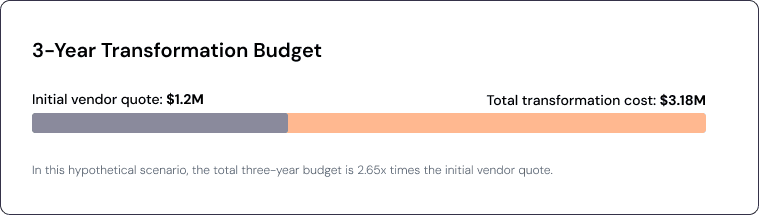
The organization plans a phased, three-year rollout across multiple business units and subsidiaries. It receives an initial vendor quote of $1.2 million covering software licensing and external implementation services.
However, the vendor quote excludes several expenses necessary to complete the transformation and realize its expected business value. Internal IT resources, employee training, temporary operational support, and ongoing application optimization must also be accounted for.
3-Year ERP Transformation Rollout Breakdown
The following example illustrates how the initial technology investment could translate into a significantly larger three-year transformation budget.
| Cost Category | Estimated Cost |
| Vendor software and implementation quote | $1,200,000 |
| Internal IT and business resources | $480,000 |
| Employee readiness and change enablement | $360,000 |
| Legacy overlap, transition, and hypercare | $300,000 |
| Ongoing application support and optimization | $600,000 |
| Risk and contingency allowance | $240,000 |
| Total three-year transformation budget | $3,180,000 |
These figures are hypothetical and illustrate a three-year enterprise transformation budget, not industry averages or benchmark costs. Each expense is assumed to be counted once, with the contingency held as a reserve rather than committed spending.
In this example, the initial $1.2 million vendor quote represents approximately 38% of the total transformation budget. The remaining $1.98 million accounts for internal delivery, employee enablement, operational transition, ongoing support, and financial risk.
The timing of these expenditures also matters. Implementation costs may be concentrated in the first year, while employee readiness, hypercare, and parallel operations extend across rollout phases. Recurring application costs and continuous optimization continue as the organization stabilizes workflows and expands adoption.
Understanding Total Cost vs. Incremental Investment
When evaluating the financial viability of a transformation, enterprise leaders should distinguish three financial measures:
- Total program cost: All expenditures associated with the transformation over the defined planning period, including implementation, transition, operations, and contingency.
- Incremental investment: The additional cost of pursuing the transformation compared with maintaining the existing technology and operating environment over the same period.
- Net business value: The incremental financial benefits generated by the transformation minus its incremental costs, accounting for when costs and benefits occur.
For example, the ERP modernization may eliminate legacy licensing and maintenance costs while reducing manual invoice processing and reconciliation work. These benefits should be evaluated against the transformation investment using documented baselines and realistic value realization timelines.
A complete financial business case should also distinguish actual cost savings from recovered employee capacity and future opportunities that may require additional investment.
Digital Transformation Total Cost Estimator
Estimate your own three-year digital transformation costs using the interactive calculator below. Adjust the assumptions for technology expenditures, internal resources, employee training, productivity recovery, parallel operations, and ongoing support to understand how your total investment compares with the initial vendor quote.
How Whatfix Reduces Digital Transformation Total Costs and Accelerates ROI
Digital transformation costs continue accumulating after technology deployment as employees adapt to new workflows, support teams manage recurring issues, and business owners work to realize expected operational improvements. Reducing these costs requires a unified approach for preparing employees before launch, enabling accurate task execution, and continuously optimizing workflows.
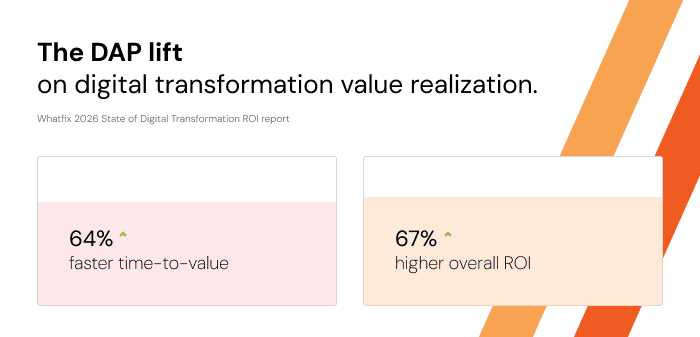
According to Whatfix’s 2026 State of Enterprise Digital Transformation ROI Report, organizations using a digital adoption platform (DAP) reported 64% faster time-to-value and 67% higher ROI on enterprise software investments compared with peers.
Here is how Whatfix helps enterprise teams address critical cost drivers across five stages of the digital transformation lifecycle:
1. Reduce Employee Training Costs and Accelerate User Readiness With Mirror
Traditional enterprise software training often requires significant IT resources to provision and maintain training environments, develop materials, and prepare employees for new workflows.
Whatfix Mirror enables organizations to create simulated application environments for hands-on, role-based training without requiring employees to access production systems. Guided practice, realistic workflow scenarios, and proficiency assessments help teams identify readiness gaps before go-live.

This reduces training environment overhead, limits retraining requirements, and accelerates employee time-to-proficiency while reducing the risk of errors during production rollout.
2. Accelerate Workflow Migration and Reduce Legacy System Overlap
During enterprise modernization, organizations may maintain legacy and modern applications simultaneously until employees can reliably execute critical workflows in the new environment. Delayed user readiness, continued reliance on legacy processes, and unresolved execution issues can extend this costly transition period.
Whatfix combines pre-launch simulation training with contextual in-app guidance to prepare users and support the adoption of standardized workflows in the new system. Application owners can monitor adoption and workflow completion to identify which roles or processes still require intervention.
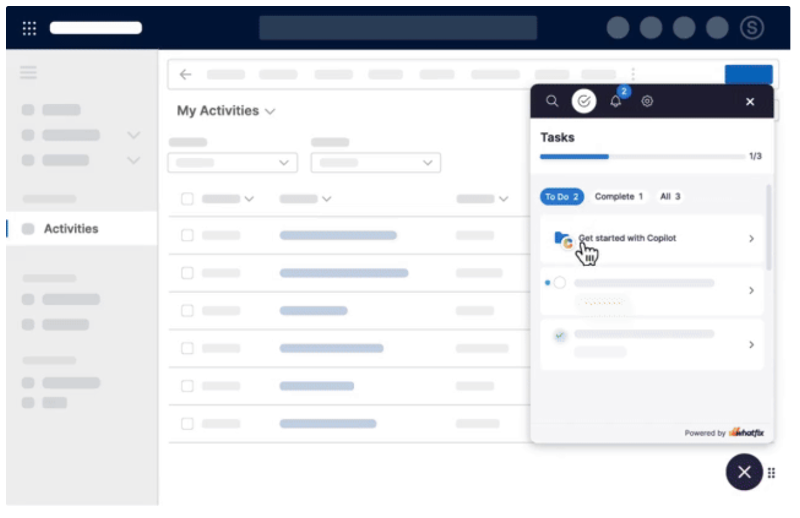
Accelerating user proficiency and workflow migration can help organizations satisfy the adoption requirements for retiring legacy applications sooner, reducing the duration of overlapping licensing, infrastructure, and support expenses once technical and operational dependencies are resolved.
3. Reduce Post-Go-Live Hypercare and Support Costs
Following deployment, unfamiliar workflows, recurring user errors, and incomplete process knowledge can drive elevated help desk demand and extend temporary hypercare arrangements.
Whatfix Digital Adoption Platform delivers contextual Flows, Smart Tips, Field Validations, and searchable Self Help directly within enterprise applications. Employees can access guidance, complete unfamiliar tasks, and resolve procedural questions while working, reducing their dependence on IT support teams and experienced colleagues.
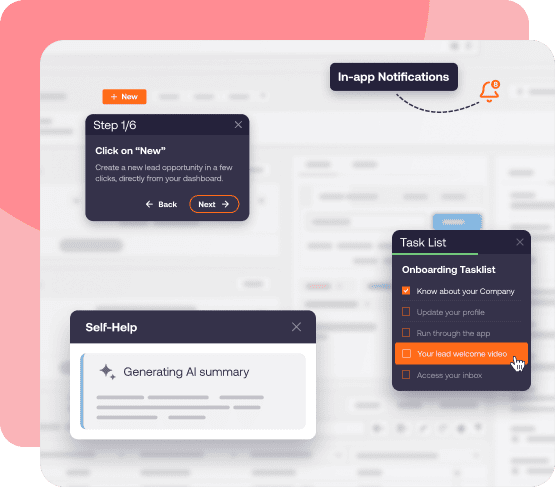
By reducing avoidable errors and routine support requests, organizations can help stabilize operations faster, improve employee productivity, and reduce the resource commitments required for post-launch support.
4. Lower Ongoing Change Management and Employee Enablement Costs
Enterprise applications continue evolving through feature releases, workflow redesigns, policy updates, and new employee onboarding. Without scalable enablement, each change can introduce additional training, support, and productivity costs.
Whatfix enables application owners and digital adoption teams to deliver targeted in-app communications, update contextual guidance, and provide self-service support as workflows change. Employees can receive relevant instructions within their applications without relying exclusively on repeated classroom training or static documentation.
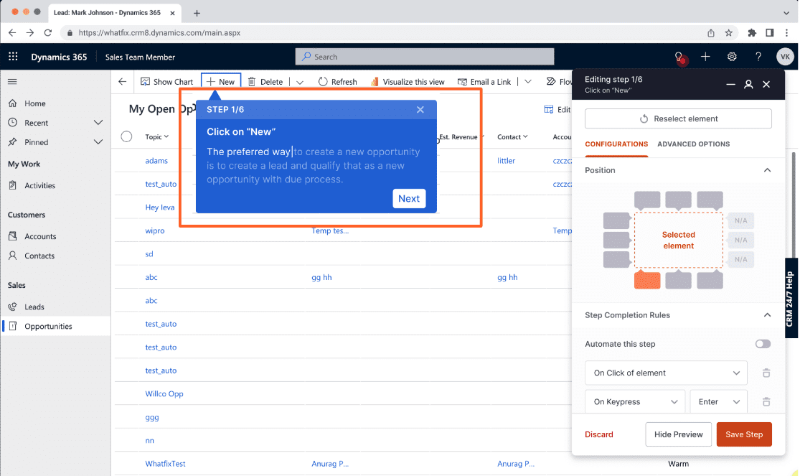
This helps organizations scale ongoing change enablement, reinforce standardized processes, and support employee proficiency as new workflows and capabilities are introduced.
5. Maximize Software Value Through Behavioral Analytics and Workflow Optimization
Long-term transformation ROI depends on whether employees use enterprise applications effectively and whether those workflows deliver the expected operational improvements.
Whatfix Product Analytics helps application owners analyze user journeys, feature adoption, workflow drop-offs, and behavioral friction. These insights can be combined with operational KPIs to identify inefficient processes, prioritize improvements, and evaluate changes in user behavior following an intervention.
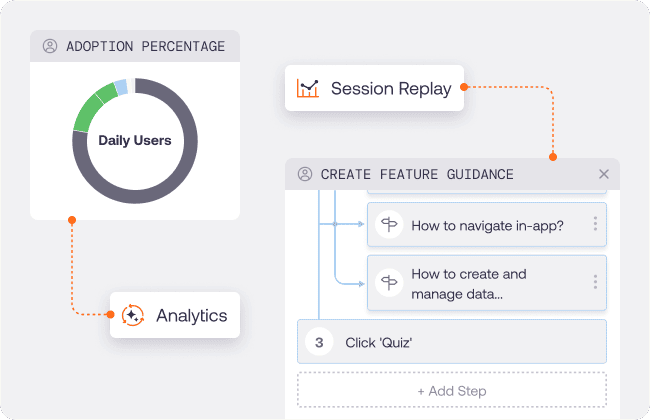
By continuously identifying opportunities to improve workflow execution, reduce errors, and increase adoption of valuable capabilities, organizations can improve software utilization and extend the business value of their technology investments.
Together, Whatfix Mirror, Digital Adoption Platform, and Product Analytics support workforce readiness, workflow execution, and continuous improvement throughout the transformation lifecycle.
Request a Whatfix demo to see how Whatfix can help reduce adoption-related transformation costs, accelerate time-to-value, and maximize the return on enterprise software investments.