

Modern sales, service, and customer operations teams run on enterprise software. CRMs, claims systems, contact center platforms, EHRs, loan origination platforms, billing systems, and so on, are now the foundational operating layer for real critical back-office tasks and customer interactions that power business outcomes.
While the technology provides the infrastructure for this work to happen, it requires users to understand how to utilize systems, engage with processes, and correctly complete tasks. This presents a user readiness challenge for L&D teams and application owners.
Employees are often expected to perform correctly on day one, even though they have had limited opportunity to rehearse the workflows, exceptions, compliance steps, and customer scenarios they will face in production. Traditional training like LMS courses and instructor-led sessions, can introduce the system, but readiness depends on whether each user can complete the work accurately, independently, and under realistic conditions.
For L&D and enablement teams, this shifts the go-live readiness goal for new systems launches and onboarding new users. The objective is to demonstrate that users are prepared to perform critical tasks before mistakes affect customer satisfaction, compliance, support volume, revenue, or downstream operations.
An effective user-readiness program provides employees with a safe, simulation training environment to practice role-specific workflows, respond to realistic roleplay scenarios, receive targeted AI coaching, and demonstrate proficiency before real work begins.
In this article, we’ll explain what user readiness means, why traditional training signals fall short, and how L&D and enablement teams can prepare employees for production through application simulation, AI roleplay, readiness assessments, and adaptive remediation with Whatfix.
What Is User Readiness?
User readiness is the ability of an employee or role-based cohort to perform the workflows, make decisions, enter data, follow policy steps, and handle exceptions required for their role before they enter a live production environment.
It is measured by applied performance, not training completion. A user is ready when they can complete the appropriate workflow, follow the approved process, make the right decisions, and handle realistic scenarios without relying on a trainer, manager, or subject-matter expert.
User readiness is especially important for workflows that are:
- Customer-facing
- Compliance-sensitive
- High-volume
- Error-prone
- Tied to revenue, claims, billing, approvals, or support SLAs
For L&D and enablement teams, readiness connects training to job performance. It helps teams move from asking whether employees finished training to proving whether they can do the work correctly.
User Readiness vs. Training Completion
Training completion shows whether employees participated in a learning activity. User readiness shows whether they can perform the work correctly.
| Training completion measures | User readiness measures |
| Whether someone attended training | Whether they can complete the workflow |
| Whether they viewed a course | Whether they can perform without SME support |
| Whether they passed a quiz | Whether they can handle realistic exceptions |
| Whether a cohort finished onboarding | Whether each user is prepared for production scenarios |
Training completion is useful for tracking participation. User readiness is more useful for understanding whether employees can apply what they have learned to the systems, workflows, and scenarios they will encounter on the job.
Common User Readiness Use Cases
User readiness matters most when employees must complete high-risk workflows in complex systems before they have built real production experience.
| Use Case | What readiness means | Readiness goal |
| Sales Teams | Sales teams need readiness for customer-facing scenarios such as objection handling, upselling, product knowledge training, and the use of core CRM and sales systems. That includes tasks like CRM opportunity creation, opportunity updates, quote generation, discount approvals, forecast hygiene, renewal workflows, upsell motions, and buyer conversation practice. | A ready seller can update Salesforce correctly, follow pricing rules, respond to buyer objections, and maintain pipeline accuracy without creating forecast risk or revenue process gaps. |
| Customer Service & Contact Centers | Customer service and contact center teams need readiness for case intake, customer verification, refunds, returns, cancellations, escalation routing, complaint handling, and approved response language. | A ready service rep can navigate the contact center application while staying calm, following policy, and responding correctly during live customer interactions. |
| Insurance Claims and Policy Teams | Insurance claims and policy teams need readiness for claims intake, FNOL workflows, policy updates, coverage verification, escalation to adjusters, and documentation requirements. | A ready claims agent can capture the right information, follow the required steps, route the case correctly, and avoid errors that delay claim resolution or create audit gaps. |
| Banking and Financial Services Teams | Banking and financial services teams need readiness for fraud reporting, loan application workflows, KYC checks, identity verification, account servicing, dispute resolution, and regulated disclosure language. | A ready banking employee can verify the customer, follow compliance steps, complete the required workflow, and route the case correctly while protecting the customer experience. |
| Healthcare and Revenue Cycle Teams | Healthcare and revenue cycle teams need readiness for patient intake, insurance billing, prior authorization, claims submission, EHR documentation, coding, and reimbursement workflows. | A ready billing specialist, clinical user, or revenue cycle employee can complete the workflow accurately and avoid denials, rework, patient confusion, or compliance risk. |
| HR & Shared Services Teams | HR and shared services teams need readiness for employee onboarding, benefits enrollment, case management, payroll changes, manager approvals, and policy-sensitive employee requests. | A ready HR or shared services employee can complete requests consistently, apply policy correctly, and reduce dependency on managers, trainers, or subject matter experts for routine work. |
What User Readiness Gaps Cost the Business
User readiness fails when organizations treat training as a content delivery problem. For frontline and application-heavy teams, readiness is a performance problem.
Employees must prove they can complete core, essential workflows and properly handle the scenario that follows before being asked to do so with a real customer, record, claim, payment, or case.
When readiness is weak, the impact shows up quickly across the business in terms of:
- Slower time-to-proficiency. Employees may complete training, but still need days or weeks of support before they can work independently. Leaders see this in slow task completion, repeated handholding, stalled onboarding, and users who hesitate when workflows move beyond the happy path.
- More early workflow errors. Day-one and week-one mistakes often manifest as missing fields, incorrect routing, skipped policy steps, incomplete documentation, approval errors, or confusion during exceptions. These errors create rework before teams have a clear view of where users are struggling.
- Higher support and SME dependency. Underprepared users rely on managers, trainers, subject-matter experts, and support teams to complete routine tasks. The signals are spotted in the form of repeat questions, informal shadow coaching, manager escalations, rising tickets, and users pausing work until someone confirms the next step.
- Inconsistent workflow execution. Enterprise workflows depend on users following the approved path across roles, regions, and business units. Weak readiness creates variability in how teams complete the same process, making it harder to maintain data quality, process control, and operational consistency.
- Greater customer and compliance risk. In customer-facing and regulated workflows, poor readiness creates risk beyond productivity loss. A service rep may give the wrong response, a claims agent may miss required documentation, a banking employee may skip a verification step, or a healthcare user may enter incomplete information that creates billing, reimbursement, or compliance issues.
For L&D and enablement teams, readiness should be demonstrated before production, especially for workflows that affect customer experience, compliance, support volume, revenue, or downstream operations.
How to Build an Effective User Readiness Program
A user readiness program helps L&D and enablement teams move from training delivery to performance proof. The goal is to confirm that employees can complete the workflows, decisions, data inputs, and scenarios required for their role before they handle real customers, records, transactions, cases, or policy-sensitive tasks.
Here are the key steps to building a readiness program that enables users before live system usage and during the flow of real work:
1. Map readiness to role-specific job performance
Start by identifying what each role needs to do in real work. A sales rep, claims agent, billing specialist, service rep, and HR shared services employee may use the same enterprise system in very different ways.
Readiness should reflect those role-specific responsibilities. Instead of building broad training paths around every feature, focus on the workflows, decisions, and scenarios that define successful job performance.
2. Prioritize workflows where users need practice before real work
Focus the readiness program on workflows where poor execution creates operational risk. These are usually workflows that affect customers, compliance, revenue, claims, billing, approvals, service levels, or downstream teams.
Prioritize workflows that are:
- Customer-facing
- Compliance-sensitive
- High-volume
- Exception-heavy
- New or recently changed
- Tied to revenue, claims, billing, approvals, or support SLAs
This keeps the program focused on the work that matters most. L&D teams can invest effort where readiness has the highest impact on performance, risk reduction, and user confidence.
3. Create realistic practice paths for critical workflows
Once the priority workflows are clear, give users a safe way to practice them before real work begins. Simulated application environments allow employees to complete realistic tasks without affecting live customers, records, payments, claims, approvals, or downstream teams.
The practice path should reflect the actual workflow as closely as possible. Users should see the same screens, fields, decisions, validations, and process steps they will face in real work.
With Whatfix Mirror, teams can create replicated IT sandbox training environments where users practice critical workflows, complete guided tasks, and build confidence before they work with real customers, records, or transactions.

4. Add scenario practice for customer-facing judgment calls
For customer-facing teams, system readiness is only part of the challenge. Sales reps, service agents, claims teams, banking employees, healthcare teams, and CSMs also need to respond to unpredictable conversations while completing the right workflow.
AI roleplay helps users practice scenarios where judgment, tone, process accuracy, and policy adherence matter together. This can include objection handling, escalations, complaints, fraud reports, billing disputes, claim updates, or policy-sensitive questions.
The goal is to evaluate whether the employee can make the right decision, use approved language, follow escalation rules, and protect the customer experience while completing the required system task.
With Whatfix Mirror, blend AI roleplay scenarios directly within your simulated application experience to provide an added layer of realism and immersion.
For example, an insurance carrier can create a voice-based AI roleplay scenario of an incoming policyholder call after a car accident to submit a claim. A user is asked to practice calming down the caller, while also collecting the right information from them and correctly following the workflow procedure within their claims application.
5. Use assessment results to assign targeted remediation
A readiness program becomes more valuable when assessment results turn into specific next steps. Instead of assigning the same retraining to every user, L&D teams can identify the exact workflow, step, field, policy, or scenario where someone struggled.
A strong remediation model connects each readiness gap to a focused follow-up action.
| Readiness gap | Targeted remediation |
| Wrong workflow path | Assign guided simulation replay |
| Missed required field | Add field-level cue and re-test |
| Failed compliance step | Assign policy scenario and assessment |
| Slow completion | Provide repeated workflow practice |
| Poor customer response | Assign AI roleplay coaching |
| High help dependency | Add contextual guidance or in-flow support |
| Cohort-wide failure | Fix training content, workflow design, or process clarity |
This makes readiness improvement more precise. Users get the practice they need, managers see where coaching is required, and enablement teams can identify whether the problem is user knowledge, training design, workflow complexity, or unclear process guidance.
With Whatfix Mirror, AI monitors how users interact with workflows, enter data, complete tasks, and engage with voice and chat-based AI roleplay scenarios. This allows it to provide adaptive assessments that are tailored to every unique end-user.

6. Reinforce readiness when users move into real work
Readiness should continue once employees begin real work. L&D and enablement teams should monitor where users still need support, which workflows create repeated confusion, and which cohorts need additional coaching.
Useful signals include:
- Workflow completion rate
- Time-to-complete
- Tickets per active user
- Self Help searches
- Error or exception rate
- QA score
These signals help teams reinforce readiness through contextual guidance, manager coaching, refresher practice, updated content, or workflow improvements. Whatfix Product Analytics helps teams identify friction points, cohort differences, and workflow patterns so readiness can improve over time.
Once the program is in place, the next step is to measure whether each user is ready to perform the workflows assigned to their role.
With Whatfix DAP, your in-app guidance, Self Help, and workflow assessment and analytics move into real workflows and tasks. Guide users through core steps and proactively identify where missteps are happening and errors are occurring.
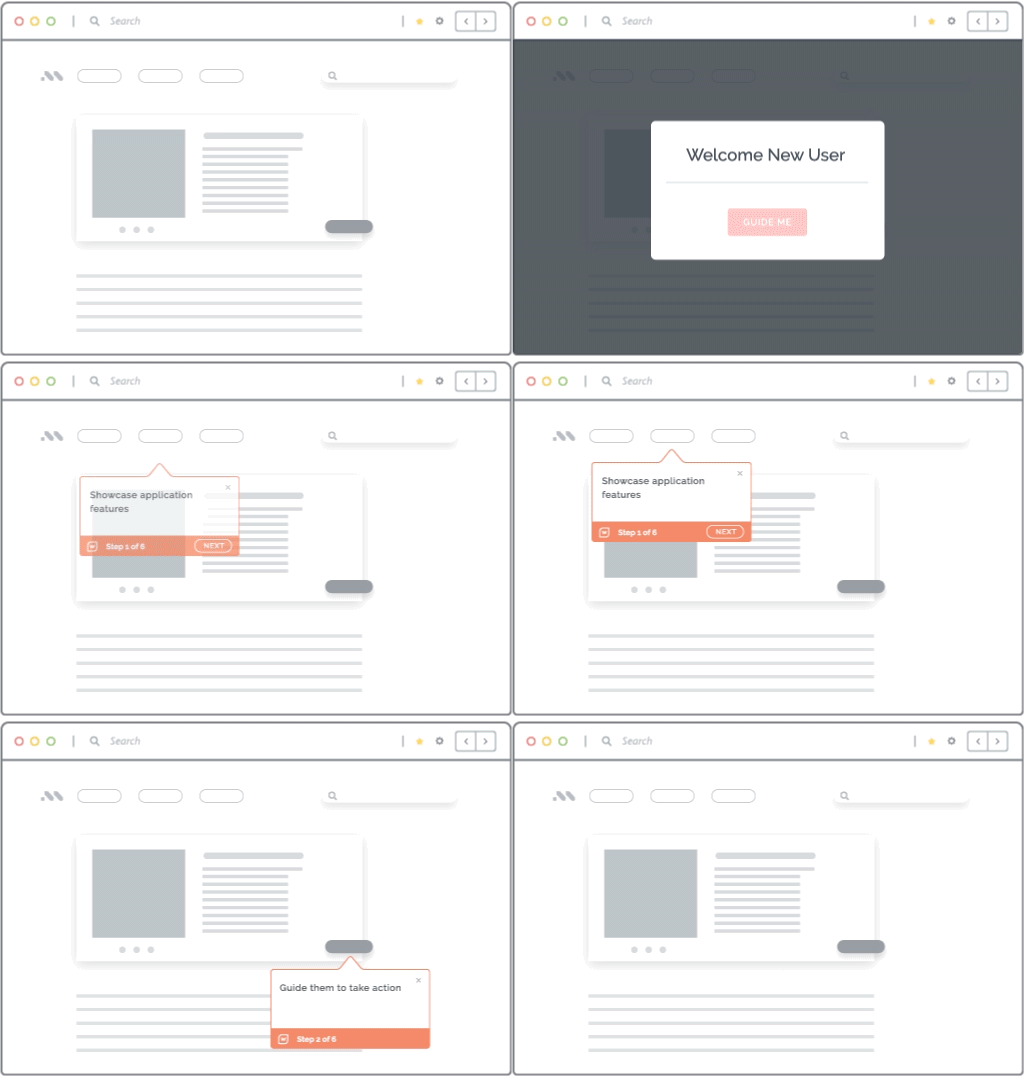
Whatfix is the only platform to unify pre-production simulation training and AI roleplay with in-the-flow-of-work enablement to empower users and drive business outcomes.
How to Measure User Readiness at the Individual Level
Once the readiness program is designed, L&D teams need a consistent way to measure whether each employee is ready. This means scoring users on workflow performance, scenario handling, and independence rather than general system knowledge.
1. Define pass criteria for each workflow
Each critical workflow should have clear pass criteria. These criteria define what successful performance looks like and give L&D teams a consistent way to evaluate users across roles and cohorts.
A user may be considered ready when they can:
- Complete the approved workflow path
- Enter required fields correctly
- Follow required policy steps
- Select the correct decision or escalation
- Avoid critical compliance errors
- Complete the task within an acceptable time range
- Perform without trainer, manager, or SME intervention
For high-risk workflows, the most important readiness signal is critical workflow pass rate. This shows whether the user can complete the workflow correctly from start to finish under realistic conditions.
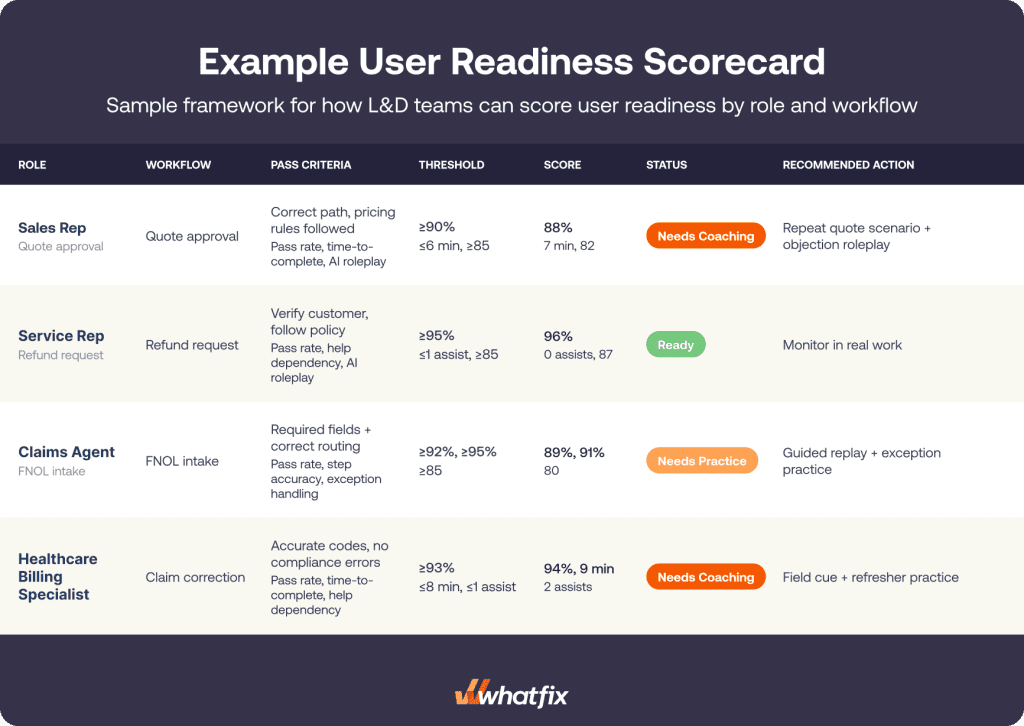
2. Score users on readiness metrics
Readiness scores should show more than whether a user passed or failed. They should reveal where the user struggled, how much support they needed, and whether they can perform at the standard required for real work.
Useful readiness metrics include:
- Critical workflow pass rate measures whether the user can complete the workflow correctly from start to finish.
- Step-level accuracy shows where the user makes mistakes inside the workflow.
- Attempts before pass shows how much practice the user needs before reaching the readiness standard.
- Time-to-complete indicates whether the user can perform at the expected pace.
- Help dependency shows whether the user can complete the workflow without trainer, manager, or SME support.
- Exception handling measures whether the user can respond correctly when the workflow moves beyond the happy path.
- AI roleplay score shows whether the user can handle high-variance conversations, customer responses, policy-sensitive language, or escalation decisions.
- Cohort variance helps identify which roles, regions, tenure groups, or risk segments need additional coaching or remediation.
These metrics help L&D teams move from completion tracking to readiness evidence. They also make coaching more targeted because teams can see the exact workflow, step, or scenario that needs improvement.
A user readiness scorecard helps L&D teams connect workflow performance, readiness thresholds, current scores, and recommended next actions in one view.
3. Segment readiness by role, tenure, region, and risk level
Aggregate readiness scores can hide risk. A team may look ready overall while a specific role, region, tenure group, or workflow still shows gaps.
Segment readiness data across groups such as:
- New hires and tenured employees
- Sales, service, claims, billing, and support teams
- Regions with different policies or process variations
- High-volume and low-volume workflow groups
- Regulated and non-regulated tasks
- Customer-facing and back-office roles
This helps L&D and enablement teams identify where readiness gaps are concentrated. A new hire cohort may need more workflow repetition. A regional team may need localized policy guidance. A customer-facing team may need more scenario practice. A regulated workflow may need stricter assessment before users handle live cases.
4. Decide who is ready, who needs coaching, and what needs improvement
The value of readiness measurement is the decision it supports. Each score should help L&D teams decide whether a user is ready for real work, needs targeted coaching, or should repeat a specific workflow or scenario.
At a program level, readiness scores also show where the training experience needs improvement. If many users fail at the same step, the issue may be unclear instruction, workflow complexity, policy confusion, or a poorly designed practice path.
At the individual level, readiness measurement answers the question training completion cannot answer on its own. Can this employee perform the required workflow correctly, independently, and consistently in the conditions they will face on the job?
How Whatfix Helps L&D Teams Prove and Improve User Readiness
User readiness is difficult to prove when training, practice, assessment, and production support happen in disconnected systems. Whatfix gives L&D and enablement teams a unified way to prepare users before real work, support them in the flow of work, and measure whether readiness translates into performance.
Whatfix Mirror helps users practice critical workflows before real work begins
Whatfix Mirror enables teams to create replicated application environments where employees can practice critical workflows without affecting live customers, records, payments, claims, approvals, or downstream operations.
L&D teams can use Mirror to build realistic practice paths for CRM, contact center, claims, EHR, HCM, ERP, ITSM, billing, and other enterprise applications. Users can complete guided tasks, repeat workflows, and build confidence before they are expected to perform in live systems.
For readiness programs, this gives teams a safer way to prepare employees for role-specific work and reduce uncertainty before users handle real customers, records, or transactions.
AI roleplay prepares teams for customer-facing judgment calls
For sales, service, contact center, claims, banking, healthcare, and customer success teams, readiness depends on more than system navigation. Employees also need to respond to objections, complaints, escalations, policy-sensitive questions, billing disputes, fraud reports, and other high-variance scenarios.
Whatfix AI roleplay helps users practice these conversations through voice or chat-based scenarios. Teams can assess whether employees use approved language, make the right decision, follow escalation rules, apply policy correctly, and protect the customer experience while completing the required workflow.
This helps L&D teams prepare customer-facing employees for the moments where judgment, tone, process accuracy, and system execution need to happen together.
AI assessments turn readiness into measurable proof
Whatfix helps teams move beyond training completion by assessing readiness at the user, workflow, and cohort level. L&D teams can identify where users struggle, which workflow steps create errors, and which employees need more practice before they are ready for real work.
AI assessments can support readiness scoring across critical workflows, scenario performance, decision quality, and completion accuracy. This helps teams identify failure patterns, recommend targeted remediation, and re-test users after additional practice.
Instead of relying on attendance, quiz scores, or manager confidence, L&D teams can build readiness evidence tied to the actual work each role needs to perform.
Whatfix DAP reinforces the right behavior in the flow of work
Readiness does not end once employees move into real work. Even prepared users need reinforcement when processes change, exceptions appear, or workflows become more complex.
Whatfix DAP supports employees in the flow of work with step-by-step Flows, Smart Tips, Task Lists, Pop-Ups, Field Validation, and contextual Self Help. Teams can reinforce the same workflow paths users practiced during readiness training and reduce dependency on managers, trainers, SMEs, or support teams.
This helps employees stay on the approved path, find help in context, and complete tasks correctly inside the applications they use every day.
Product Analytics shows whether readiness translates into real performance
After users begin real work, L&D and enablement teams need to know whether readiness holds up in production. Whatfix Product Analytics helps teams understand how users move through workflows, where they drop off, which cohorts struggle, and which processes create friction.
Teams can track workflow completion, time-to-complete, help usage, error patterns, cohort differences, and other readiness signals. These insights help teams identify where to add guidance, update training content, assign coaching, or improve the workflow itself.
Together, Mirror, AI roleplay, AI assessments, DAP, and Product Analytics create a continuous readiness loop where users practice before real work, receive support during execution, and give teams the behavioral insights needed to keep improving readiness over time. See how Whatfix helps L&D and enablement teams prove user readiness, reduce production risk, and improve workflow performance across enterprise applications. Schedule a demo today.