


This guide explains how to map enterprise business workflows, document current-state execution, identify workflow friction, and improve workflow consistency, speed, compliance, and adoption.
What Is Workflow Mapping?
Workflow mapping is the process of visually documenting how work moves from start to finish, including each task, decision, handoff, system, and person involved. By creating a shared view of how a workflow operates, teams can clarify ownership, identify bottlenecks and redundant steps, reduce errors, strengthen compliance, and uncover opportunities for automation and process improvement.
Workflow Mapping vs. Workflow Design
Workflow mapping and workflow design are closely related, but they serve different purposes. Workflow mapping visualizes how work moves across tasks, roles, applications, decisions, controls, and handoffs. Workflow design defines how a workflow should be structured, governed, supported, or improved to achieve a specific business outcome.
| Attribute | Workflow Mapping | Workflow Design |
| Primary goal | Visualize how a workflow operates today or how it should operate in the future | Define or redesign how the workflow should operate |
| Core question | What does the workflow look like across tasks, roles, systems, decisions, and handoffs? | What needs to change to achieve the intended outcome? |
| Typical focus | Workflow steps, ownership, handoffs, applications, decisions, controls, exceptions, and friction | Future-state structure, business rules, ownership, controls, automation, guidance, and enablement |
| When used | During discovery, documentation, validation, analysis, and future-state communication | During workflow creation, redesign, standardization, transformation, or optimization |
| Common inputs | Interviews, observation, SOPs, application data, support tickets, analytics, and stakeholder feedback | Current-state findings, root causes, business requirements, user needs, policies, and success metrics |
| Output | A current-state or future-state workflow map, such as a flowchart, swimlane, or cross-functional diagram | An approved workflow model, improvement requirements, implementation plan, or operating approach |
In an improvement initiative, teams usually map the current state first, use those findings to design a better workflow, and then create a future-state map to communicate the proposed way of working.
Key Elements of a Workflow Map
Workflow maps use shapes, labels, swimlanes, and connecting lines to show how work moves across tasks, people, systems, decisions, and handoffs. While the notation may vary by technique, most enterprise workflow maps include these core elements:
- Tasks: Actions that must be completed, such as submitting a request, reviewing a record, or updating an application. Tasks are typically shown as rectangles.
- Decisions: Points where the workflow branches based on an approval, rule, condition, or validation. These are often shown as diamonds with paths such as “approved,” “rejected,” or “requires review.”
- Roles and owners: The people, teams, or departments responsible for completing tasks, making decisions, or approving work. Swimlanes often group activities by role or function.
- Applications and systems: The platforms where work is completed, information is stored, or records are updated. System labels help teams see where workflows move across ERP, CRM, HCM, ITSM, CLM, or other enterprise applications.
- Inputs and outputs: The data, documents, or records required to complete a step and the result produced when that step is finished.
- Handoffs: Transfers of responsibility between users, teams, departments, or systems. These reveal where ownership becomes unclear or work slows down.
- Data movement: The movement of information between workflow steps or applications. Mapping this can expose duplicate entry, missing information, and integration gaps.
- Exception paths: Alternate routes followed when a request is incomplete, rejected, urgent, non-standard, or outside policy.
- Controls: Required approvals, validations, policy checks, segregation-of-duties requirements, or compliance checkpoints that govern how the workflow proceeds.
- Friction points: Delays, errors, rework, workarounds, or support dependencies highlighted through notes or callouts on the map.
Common Workflow Mapping Symbols
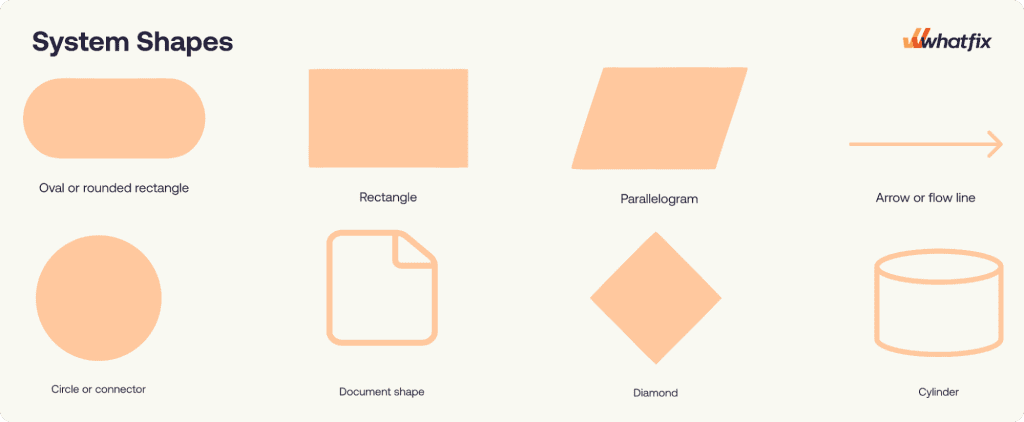
Process and workflow mapping use a small set of standard flowchart symbols, including:
| Symbol | Meaning |
| Oval or rounded rectangle | Marks the start or end of a workflow. |
| Rectangle | Represents a task, activity, or process step. |
| Diamond | Shows a decision point that creates two or more possible paths. |
| Arrow or flow line | Indicates the direction and sequence of work. |
| Parallelogram | Represents an input or output, such as data entered or a result produced. |
| Document shape | Shows a document, form, report, or record used or created during the workflow. |
| Circle or connector | Links workflow steps when the map continues elsewhere or becomes visually complex. |
| Cylinder | Represents a database, system, or stored data source. |
Why Workflow Mapping Matters for Enterprise Teams
Workflow mapping helps enterprise process owners and product managers maximize the outcomes of core workflows. The biggest benefits include:
Identify execution gaps that documentation may not reveal
SOPs describe the approved process, but they may not reflect skipped steps, informal approvals, workarounds, system dependencies, or undocumented exception paths. A current-state workflow map helps teams compare the intended process with how work is actually completed across users, systems, and handoffs.
Prioritize improvement efforts on high-impact workflows
Enterprise teams cannot investigate or redesign every workflow at once. Workflow mapping helps teams focus on workflows where errors, delays, user friction, or inconsistent execution create the greatest operational impact, especially in high-risk, high-volume, compliance-sensitive, or customer-facing processes.
Standardize execution across teams and systems
The same workflow may be completed differently across regions, teams, or user groups. Mapping clarifies the approved sequence, ownership, decision criteria, controls, application handoffs, and exception paths, helping teams standardize processes for consistent execution.
Target application and enablement improvements more precisely
Workflow maps show where users encounter unclear fields, confusing approvals, missing information, system switching, or unsupported task paths. Application owners and enablement teams can use these findings to improve configuration, integrations, in-app guidance, documentation, and user training at the exact points where users need help.
Measure and sustain workflow improvement
A validated current-state map provides the baseline for improvement, while a future-state map shows how the workflow is expected to operate after changes are introduced. Process teams can then track cycle time, errors, rework, completion, process adherence, and support demand, and update the map as applications, policies, controls, and business requirements evolve.
Types of Workflow Maps
The right workflow map depends on what process owners need to achieve. Here are the most common types of process maps and workflow mapping techniques:
Basic Flowchart
A basic flowchart shows a workflow as a sequence of tasks, decisions, and directional arrows. It works best when the workflow has a clear start and end point, limited roles, and only a few decision branches.
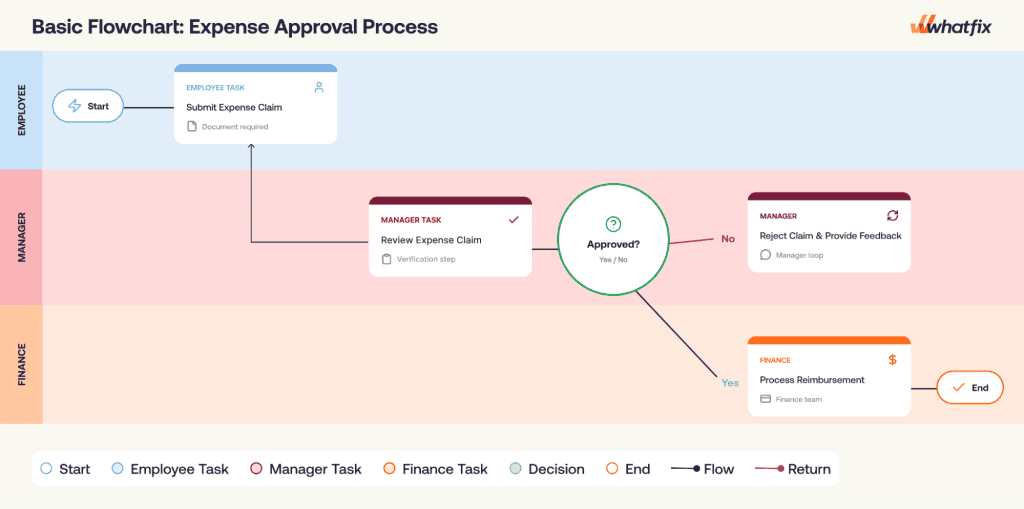
Best for: Simple, sequential workflows with limited handoffs or exception paths.
Common enterprise use cases: Simple approval workflows, basic access requests, document reviews.
Swimlane or Cross-Functional Workflow Map
A swimlane or cross-functional workflow map shows how work moves across roles, departments, business functions, or enterprise applications. Each lane represents an owner, team, function, or system, making it easier to see who performs each step and where handoffs occur.
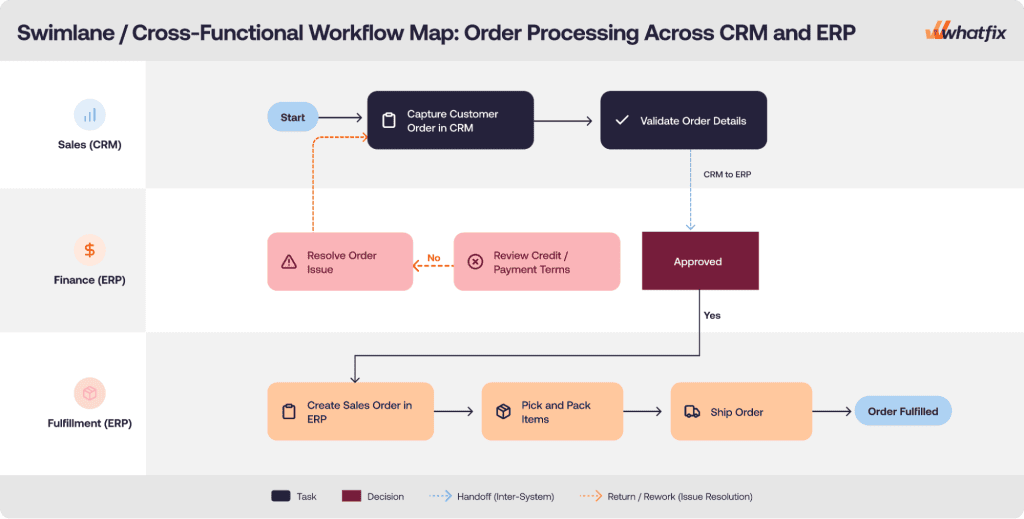
Best for: Workflows involving multiple teams, systems, or ownership changes.
Common enterprise use cases: Purchase requisition approval, order processing across CRM and ERP, incident management
SIPOC Diagram
A SIPOC diagram provides a high-level view of a workflow by identifying suppliers, inputs, major process stages, outputs, and customers. It is most useful before detailed mapping begins because it helps teams define scope, stakeholders, and the intended workflow outcome.
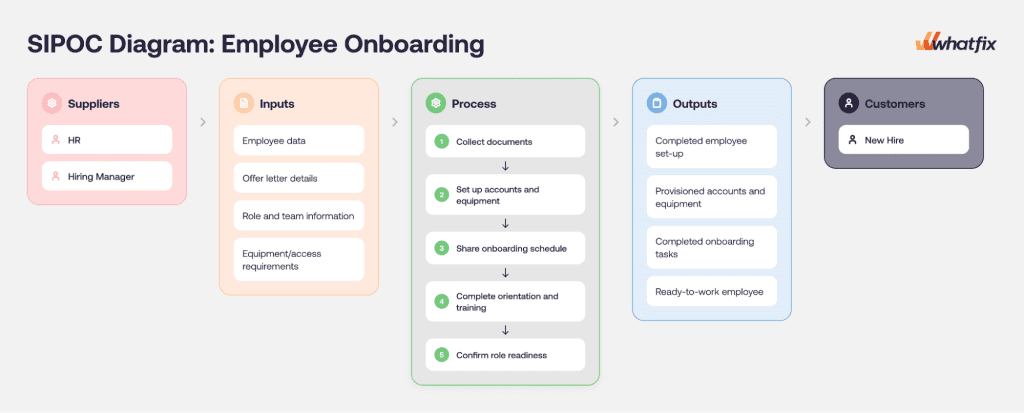
Best for: Defining workflow boundaries before building a detailed map.
Common enterprise use cases: Process discovery workshops, workflow redesign initiatives, employee onboarding
Value Stream Map
A value stream map combines workflow steps with performance data such as processing time, waiting time, rework, and value-added activity. It helps teams understand where time, effort, and delays are concentrated across an end-to-end workflow.
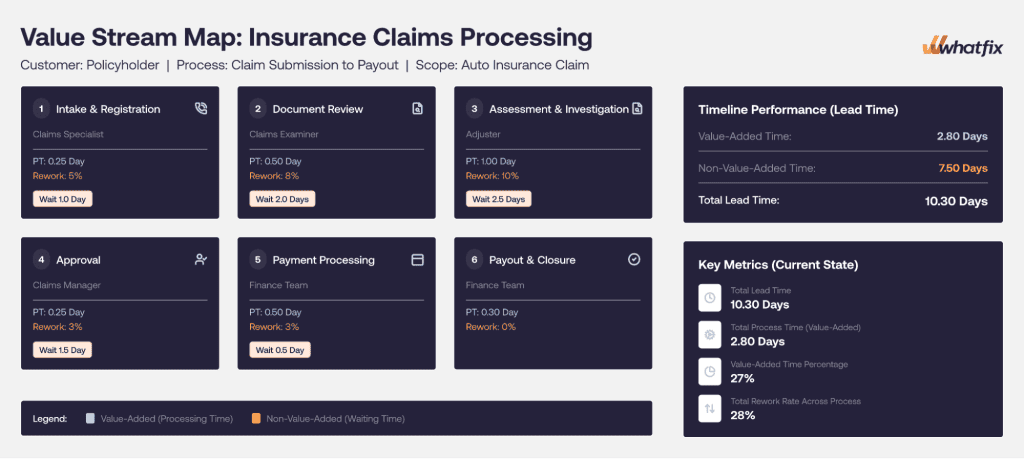
Best for: Identifying delays, waste, rework, and non-value-added activity.
Common enterprise use cases: Manufacturing operations, supply-chain workflows. insurance claims processing
Current-State and Future-State Workflow Maps
Current-state and future-state workflow maps are used together during workflow improvement initiatives. The current-state map shows how work operates today, including delays, workarounds, exceptions, controls, and system dependencies. The future-state map shows the proposed execution model after steps are simplified, ownership is clarified, controls are strengthened, or supporting technology is introduced.
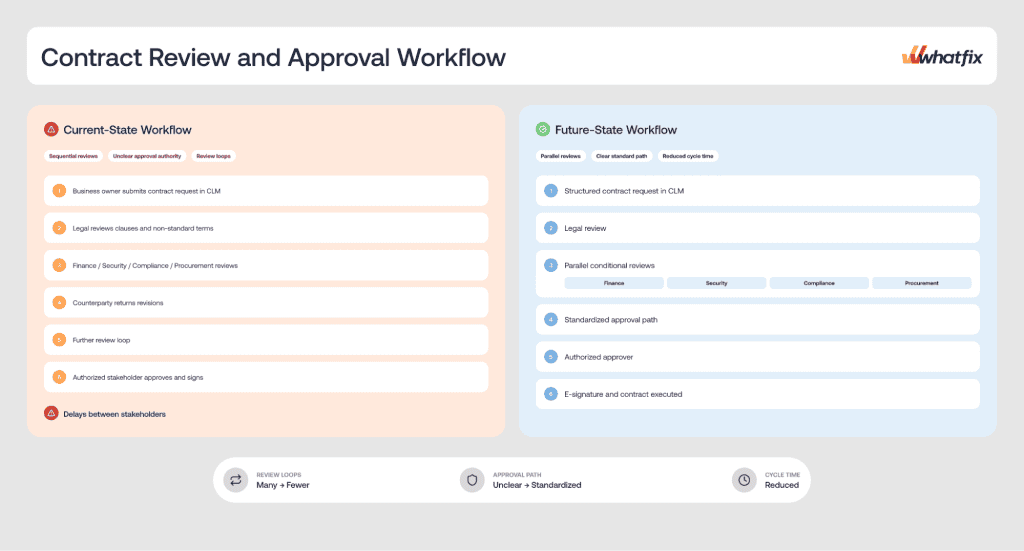
Best for: Comparing existing execution with a proposed improved workflow.
Common enterprise use cases: ERP implementations and migrations, CRM optimization, process standardization
How to Create a Workflow Map
The following steps provide a structured approach for mapping and improving workflows across enterprise applications, teams, and business functions.
Step 1: Select and Prioritize the Workflow
If several workflows compete for attention, start by comparing them based on four criteria. If the workflow has already been selected, use the same criteria to confirm its priority and build the business case for mapping it:
- Risk: Could errors create financial, compliance, security, safety, data-quality, or reputational consequences?
- Volume: How frequently is the workflow completed, and how many users or transactions does it affect?
- Friction: Does it generate delays, errors, support tickets, manual entry, workarounds, or frequent system switching?
- Business impact: Does its performance affect revenue, customer experience, service delivery, reporting, or strategic outcomes?
Score each criterion on a consistent scale, such as 1 to 5, and select the workflow with the strongest combination of operational impact and documented execution problems.
Step 2: Define the Workflow Scope and Success Criteria
Set clear boundaries before documenting individual tasks. Identify the workflow owner, triggering event, starting point, endpoint, participating roles, applications involved, and the outcome the workflow is expected to produce.
Define how success will be measured. Relevant metrics may include:
- Workflow completion time
- First-pass completion rate
- Error or rework rate
- Task abandonment
- Support-ticket volume
- Process adherence
- Cost per transaction
- SLA performance
Step 3: Gather Information from the People and Systems Involved
Collect information from the people who own, perform, support, and monitor the workflow. Interview process owners and product managers, observe users completing tasks, and review existing SOPs, training materials, policies, and process documentation.
Use operational evidence to validate what participants describe. Relevant sources may include:
- Application and workflow analytics
- Support tickets
- Error logs
- Audit findings
- Transaction records
- User feedback
- Search queries and help-content usage
Step 4: Document and Validate the Current-State Workflow
Map the workflow as it operates today. At this stage, the goal is not to redesign the workflow, but to capture how work actually moves across users, systems, decisions, controls, and exception paths.
A complete current-state workflow map should include:
| Workflow element | What to capture |
| Tasks and activities | The actions required to move the workflow forward |
| Roles and teams | Who performs, reviews, approves, or receives work |
| Applications and systems | Where activities occur and records are created or updated |
| Inputs and outputs | The data, documents, or records required and produced |
| Decisions and controls | The rules, approvals, validations, and compliance checks that determine the next step |
| Handoffs | Transfers of responsibility between users, teams, or systems |
| Exceptions and alternate paths | How incomplete, rejected, urgent, or uncommon cases are handled |
| Friction points | Delays, errors, duplicate effort, workarounds, support dependencies, and rework |
| Baseline performance | Current results for the success measures selected in Step 2 |
Review the completed map with users, workflow owners, application owners, and relevant control stakeholders. Walk through a standard case and common exceptions to confirm that the map reflects actual execution before moving into analysis.
Step 5: Analyze the Workflow and Identify Improvement Opportunities
Review the current-state map step by step and determine where the workflow creates avoidable delay, risk, effort, or user difficulty. Use the evidence gathered earlier to understand both the visible problem and its underlying cause.
Look for:
- Delays and bottlenecks: Approval queues, long wait times, or work concentrated with overloaded roles
- Errors and rework: Missing information, failed validations, repeated corrections, or duplicate reviews
- Unclear ownership: Activities without an accountable owner or handoffs that regularly stall
- Application friction: Confusing fields, excessive system switching, duplicate data entry, or weak integrations
- Process variation: Teams or regions following inconsistent or unsupported execution paths
- Control gaps: Missing approvals, incomplete audit evidence, weak validations, or informal exception handling
- Unnecessary effort: Activities that add little value or repeat checks already completed elsewhere
- Support dependencies: Tasks that repeatedly require assistance from IT, operations, or subject-matter experts
Step 6: Design the Future-State Workflow
Define the improved workflow first, then create a future-state map that shows how the workflow should operate after the identified problems are addressed. Preserve required controls and decision points while simplifying the path users follow to complete the task.
Potential improvements include:
- Removing redundant steps
- Simplifying approval chains
- Clarifying role ownership
- Standardizing exception paths
- Automating routing and notifications
- Integrating data across applications
- Adding field validations
- Providing contextual guidance
- Updating training or process documentation
- Strengthening audit and compliance controls
Connect every proposed change to a specific friction point and success metric. This gives stakeholders a clear rationale for the future-state design.
Step 7: Validate the Future-State Workflow with Stakeholders
Review the proposed workflow with the people responsible for its outcome, execution, technology, and controls. This includes process owners, application owners, operations teams, IT, compliance, support teams, and representative end users.
Validate the workflow against:
- A standard case
- Common exceptions
- High-risk scenarios
- Regional or role-based variations
- Technical constraints
- Policy and compliance requirements
- Operational capacity
Document unresolved decisions, dependencies, and ownership questions before approving the future state.
Step 8: Implement, Measure, and Continuously Improve
Translate the approved future-state workflow into an implementation plan. Break the design into defined actions, assign accountable owners and supporting teams, establish target dates, and track dependencies and delivery status.
After implementation, compare current performance with the baseline and targets defined earlier. Review whether the workflow has improved completion time, first-pass success, error and rework rates, process adherence, support demand, SLA performance, and other agreed outcomes.
Once the future-state workflow is implemented, update the map to reflect actual execution and continue revising it as systems, controls, roles, policies, or business requirements change.
Free Enterprise Workflow Mapping and Improvement Template
Workflow Mapping Examples Across Enterprise Applications
The following examples show how enterprise teams can use different workflow map types:
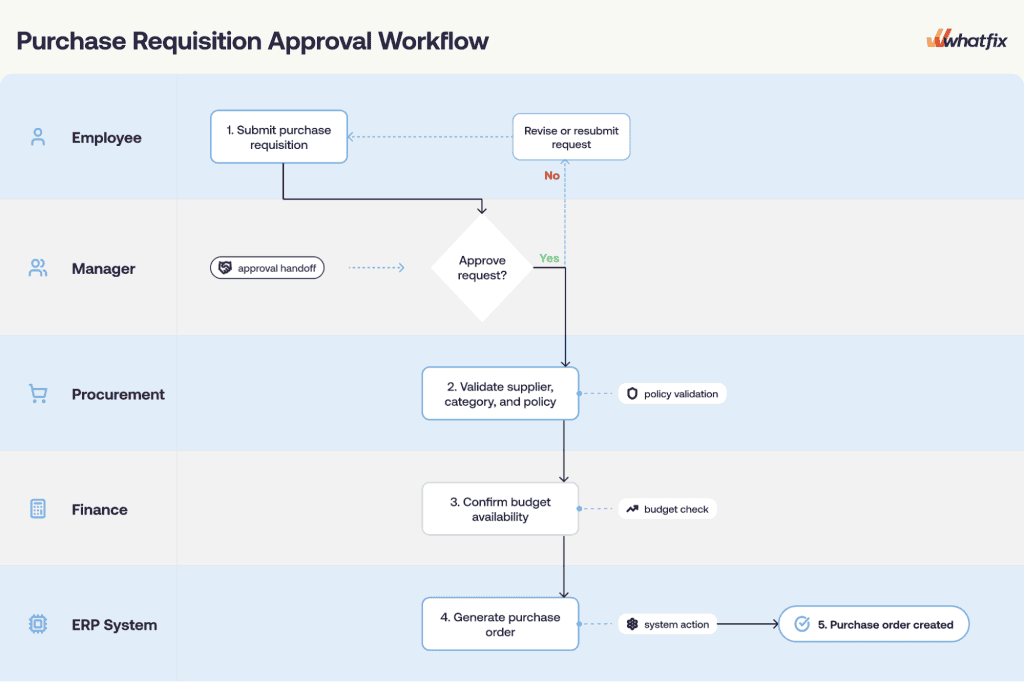
1. Purchase Requisition Approval Workflow
Purchase requisition approval is a high-volume, compliance-sensitive workflow involving employees, managers, procurement, finance, and ERP system actions. A swimlane workflow map works well here because it shows ownership, approval handoffs, and system updates across each role.
A typical flow may include:
- An employee submits a purchase requisition in the ERP or procurement platform.
- The employee’s manager reviews and approves or rejects the request.
- Procurement validates the supplier, purchasing category, and policy requirements.
- Finance confirms that the budget is available.
- The ERP generates a purchase order after all required approvals are complete.
2. Contract Review and Approval Workflow
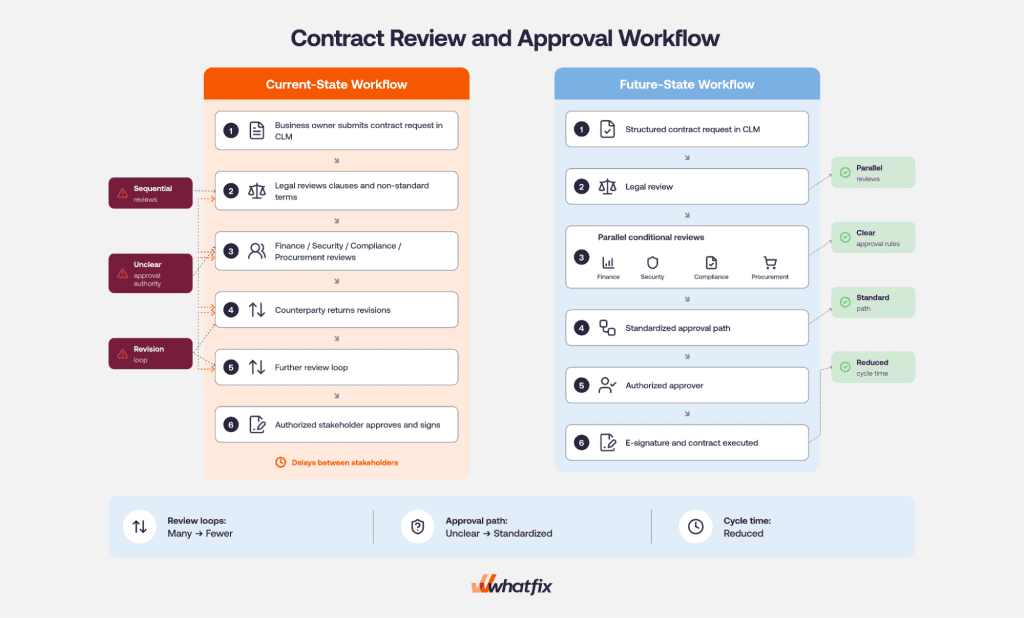
Contract review and approval is a high-risk, high-value workflow because delays, missed reviews, or unclear approval authority can create legal, financial, security, and compliance exposure. A current-state and future-state workflow map works well here because teams often need to compare the existing review path with a redesigned approval model.
A typical flow may include:
- A business owner submits a contract request in the CLM platform.
- Legal reviews clauses, proposed terms, and deviations from standard language.
- Finance, security, compliance, or procurement completes conditional reviews based on contract value, data access, vendor risk, or non-standard terms.
- The counterparty returns revisions for further review.
- An authorized stakeholder approves and signs the final agreement.
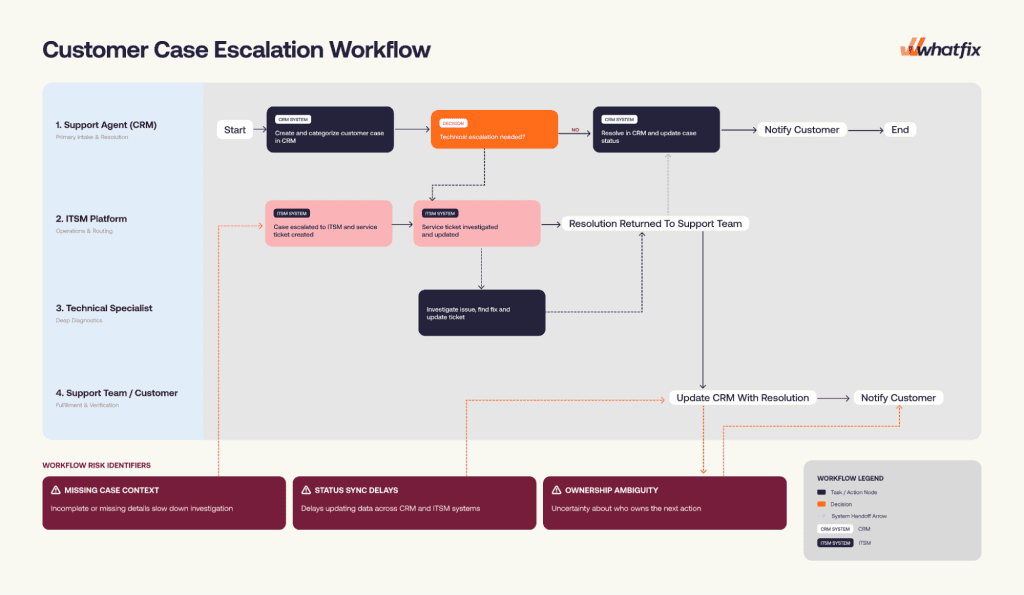
3. Customer Case Escalation Workflow
Customer case escalation is a high-friction workflow because it often moves between support teams, technical specialists, and multiple applications. A cross-functional workflow map works well here because it shows how context, ownership, and status updates move between CRM and ITSM systems.
A typical flow may include:
- A support agent creates and categorizes a customer case in the CRM.
- Complex technical issues are escalated to an ITSM platform.
- A specialist investigates the issue and updates the service ticket.
- The resolution is returned to the support team.
- The CRM case is updated, and the customer is notified.
Workflow Mapping Best Practices
Effective workflow maps should be accurate enough to support analysis and simple enough for stakeholders to use. Follow these practices to keep the mapping exercise focused, credible, and actionable.
- Map the current state before redesigning the workflow: Capture how the workflow operates today before proposing changes, including workarounds, exceptions, handoffs, and system interactions.
- Focus on high-impact workflows first: Prioritize workflows where delays, errors, compliance exposure, support demand, or inconsistent execution create meaningful business consequences.
- Involve the people who perform the work: Include frontline users and subject-matter experts because they often understand informal steps, practical constraints, and recurring friction better than process documentation does.
- Keep workflow maps simple and actionable: Use enough detail to clarify ownership, decisions, systems, controls, and friction without turning the map into an unreadable diagram. For complex workflows, create separate maps for subprocesses or exception paths.
- Assign ownership and keep maps current: Give each critical workflow map a named owner and update it when applications, policies, roles, integrations, controls, or operating requirements change.
Common Workflow Mapping Mistakes to Avoid
Even well-structured mapping exercises can produce an incomplete or misleading view of execution. Avoid these common mistakes:
- Mapping the documented process instead of actual execution: SOPs may not reflect skipped steps, informal approvals, workarounds, or system dependencies. Validate the map with user observation, system data, support tickets, and exception records.
- Ignoring exceptions and workarounds: A map that only shows the standard path can miss where risk, rework, and delays actually occur. Capture rejected, incomplete, urgent, and non-standard paths alongside the main workflow.
- Adding too much detail to one map: Overloaded maps become difficult to read and maintain. Keep the main workflow clear, and document complex subprocesses or exception paths separately.
- Excluding frontline users: Process owners and application owners may know the intended workflow, but the people performing the work often know the informal steps, recurring blockers, and practical constraints.
- Redesigning before validating the current state: Future-state changes should be based on a confirmed view of actual execution, not assumptions about how the workflow works.
- Treating the future-state map as final too early: Validate the proposed workflow with process owners, application owners, IT, compliance, support teams, and representative users before implementation.
- Failing to assign ownership: Critical workflow maps need a named owner responsible for validation, approval, updates, and workflow governance.