


Learn how workflow standardization helps process owners and application managers create consistent execution across teams, roles, and enterprise apps, allowing processes and workflows to drive the outcomes they’re expected to.
What Is Workflow Standardization?
Workflow standardization is the practice of defining and reinforcing one approved way to complete a recurring workflow across teams, roles, regions, and enterprise applications. It translates broader business process standards into consistent tasks, data requirements, decisions, handoffs, controls, and approved exceptions that users follow during execution.
Workflow standardization vs. business process standardization
Process standardization defines how an end-to-end business process should operate across the organization. Workflow standardization applies that model to the specific tasks, data, decisions, approvals, and handoffs users complete inside enterprise applications.
For example: Process standardization defines the procure-to-pay operating model, while workflow standardization defines how users create, review, approve, and route a purchase requisition in an ERP.
What Is the Cost of Inconsistent Workflow Execution?
Common consequences of poor, inconsistent workflow execution include:
- Errors and rework: Missing data, skipped steps, and incorrect routing force teams to correct or repeat work.
- Longer cycle times: Inconsistent approvals, handoffs, and exception handling slow workflow completion.
- Poor data quality: Different interpretations of fields and requirements weaken reporting, forecasting, and decision-making.
- Compliance exposure: Undocumented deviations and inconsistent controls make adherence harder to prove.
- Higher support costs: Users rely on SMEs and help desks to complete routine tasks.
- More complex workflow changes: Local variants require separate updates to systems, in-app guidance, process documentation, and user training.
Why Documented Workflow Standards Break Down in Practice
Documented workflow standards often break down when they become disconnected from execution, fall out of date, vary across teams, or allow off-system practices to develop.
- Distance: The standard lives in an SOP, LMS, or knowledge portal, away from the application where users do their actual work.
- Decay: Frequent application releases, policy updates, and role changes make workflow documentation outdated or incomplete.
- Drift: Teams, regions, and managers gradually introduce their own unapproved paths, shortcuts, and interpretations (this is called workflow drift).
- Shadow execution: Spreadsheets, informal handoffs, undocumented exceptions, and tribal knowledge become part of how work is completed without visibility for process owners.
How Workflow Standardization Drives Outcomes
Workflow standardization creates a repeatable path that improves accuracy, speed, compliance, and scalability, allowing process owners to achieve outcomes through workflow operationalization. These downfunnel workflow outcomes include:
- Higher first-pass accuracy: Consistent steps, data requirements, and validations help users complete work correctly the first time.
- Less rework and faster cycle times: Clear handoffs, approval paths, and completion criteria prevent delays caused by missing information or skipped steps.
- Stronger process compliance: Workflow governance like standard controls and approved exception paths make required procedures easier to follow and audit.
- Faster time-to-proficiency: New and infrequent users can complete workflows with less reliance on memory, peers, or SMEs.
- Comparable performance across teams: Shared workflow definitions and metrics help process owners identify variations by role, region, or department.
- Easier change at scale: A common understanding of what the standard workflow path is makes it easier for owners to update controls, guidance, documentation, and training when processes change and evolve.
How to Standardize Enterprise Workflows
Here are eight steps to help application managers and process owners standardize their workflows, from pre-launch workflow readiness to continuous optimization:
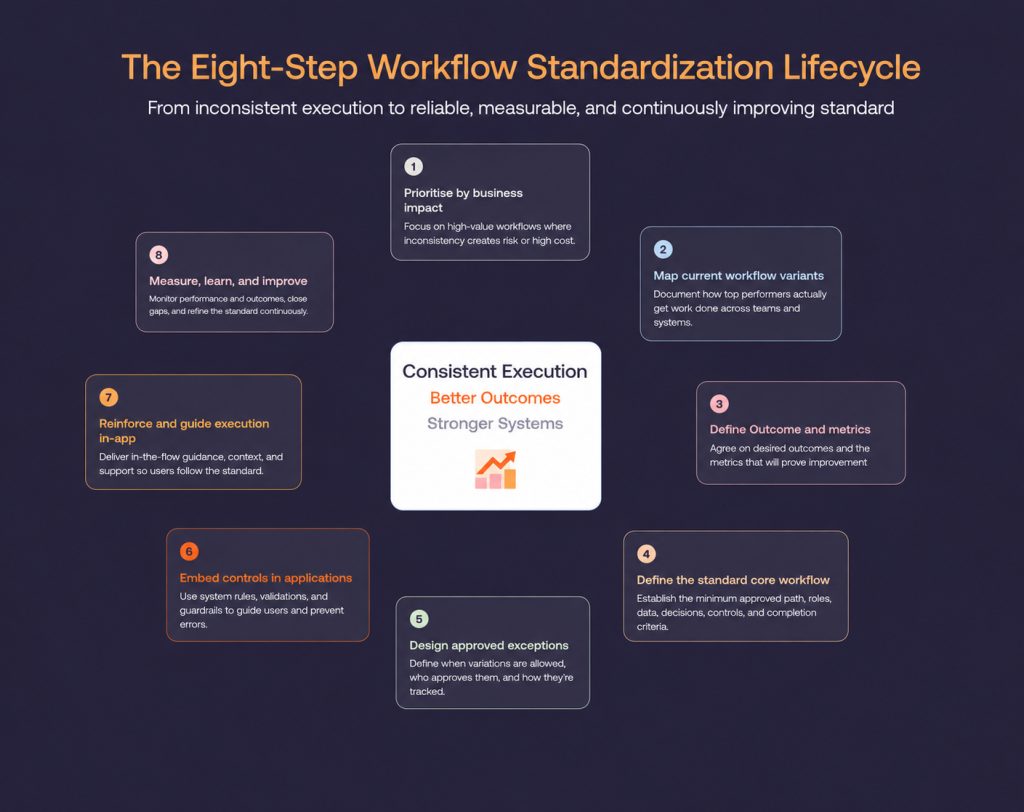
Step 1: Prioritize workflows by business impact
Start with workflows where inconsistent execution creates the greatest operational, financial, or compliance impact.
Evaluate each workflow based on:
- Transaction volume and business criticality
- Error, rework, and support burden
- Compliance and control risk
- Variation across teams or regions
- Downstream business impact
Step 2: Map current workflow variants
Create a current-state workflow map for each major team, role, region, or business unit that performs the process differently. Plot the steps, decisions, handoffs, applications, and approvals from start to completion.
Compare the maps to identify:
- Steps shared across every variant
- Differences in sequencing, ownership, or approvals
- Local tools and manual handoffs
- Unofficial shortcuts and workarounds
- Variants linked to higher errors, delays, or support demand
Step 3: Define target outcomes and standardization metrics
Agree on the business outcome the standardized workflow should improve, such as faster approvals, fewer errors, stronger compliance, or more reliable data.
Establish the current baseline and select metrics such as:
- Workflow conformance rate
- First-pass accuracy
- Error and rework rates
- Task and end-to-end cycle time
- Required-field completion
- Exception and abandonment rates
- Workflow-related support tickets
- Audit exceptions
Step 4: Define the standard core workflow
Define the minimum approved path every relevant user or transaction should follow. This is where workflow governance becomes important too, as it defines who owns the standard, who can approve changes, and how exceptions and controls are managed.
The core workflow should specify:
- Required steps
- Roles and handoffs
- Data requirements
- Decision and approval rules
- Control points
- Completion criteria
Step 5: Design approved exceptions and local variations
Define where variation is permitted so users can handle legitimate regional, regulatory, customer, or risk-based requirements without creating unofficial alternatives.
For each approved variation, specify:
- When it applies
- Who can use it
- Which approvals are required
- What evidence must be recorded
- How the transaction returns to the core workflow
- How the exception will be monitored
Step 6: Embed the standard in application controls
Translate the approved workflow into application configuration so required data, decisions, approvals, and control points are supported within the system.
Relevant controls may include:
- Required fields and validation rules
- Standardized values and templates
- Approval routing
- Role-based permissions
- Default values
- Escalation rules
- Audit trails
Step 7: Reinforce the workflow with in-app guidance
Application controls establish guardrails, but users may still need help understanding what to do, why a requirement matters, or how to handle an unfamiliar scenario.
Provide contextual support such as:
- In-app guidance like interactive walkthroughs, task lists, tooltips, and field validations.
- In-app support like self-service help centers and AI assistants.
- SOPs and knowledge libraries
- Policy documents, methods of procedures, and well-documented best practices.
- Workflow change communication
Step 8: Measure process adherence and continuously improve
Process adherence measures whether users follow the standardized workflow during actual execution. Pilot the workflow with representative users and scenarios before scaling it across the organization, testing the core path, approved exceptions, system handoffs, and high-risk decisions.
After rollout, application managers and process owners should monitor user behavior like:
- Adherence to the approved path
- Deviation points and recurring workarounds
- Differences across teams, roles, and regions
- Workflow abandonment and support demand
- Controls that create unnecessary friction
- Progress against baseline metrics and intended business outcomes
Real-World Examples of Workflow Standardization
These examples show how enterprise teams reinforce standardized workflows in-app to improve consistency, speed, and accuracy.
Extra Space Storage cut rental transaction time by 50% with AI help
With 7,500 frontline associates across 4,000 stores, Extra Space Storage needed a solution to help their people follow consistent rental processes in its rental management system, with processes like:
- Renting out a new storage space.
- Adding insurance to a storage contract.
- Canceling a rental storage contract.
- Plus dozens of edge cases that happen for frontline team members.
By embedding 87 Whatfix Flows and AI-powered Self Help, it reduced complex rental transaction time by 50% for new hires, resolved 95% of rental-related process questions, and deflected more than 2,500 support tickets.
Windward Risk Managers reduced policy-related support queries by 87%
Windward Risk Managers needed 5,500 agents to navigate complex claims and policy workflows in Duck Creek without leaving the application for help. By embedding Whatfix Flows, Smart Tips, Pop-Ups, and Self Help at key friction points, it increased Self Help search success from 61% to 87% and reduced claims- and policy-related support queries by 87% within two months
Vizient eliminated contract workflow errors by 93% with in-app guidance
Vizient’s legal and procurement teams faced contract errors, rework, and delays in Icertis CLM. With Whatfix guidance and Self Help, it reduced workflow errors by 93%, saved 618 support hours, and shortened average contract execution from 33.5 to 14 days.
Common Workflow Standardization Challenges
Workflow standardization can be difficult to scale across complex applications, teams, and operating environments. Common challenges include:
- Standardizing an inefficient workflow: Existing bottlenecks, redundant approvals, and unnecessary handoffs can become embedded across the organization.
- Balancing consistency with valid variation: Regional regulations, customer requirements, and risk levels may require approved alternatives to the core workflow.
- Aligning multiple workflow owners: Process, application, compliance, and operations teams may have different priorities, responsibilities, and decision rights.
- Working within application constraints: Legacy or highly customized systems may lack the controls, integrations, or contextual support needed to reinforce the standard.
- Keeping standards current: System releases, policy updates, and role changes can quickly make workflow configurations, documentation, and guidance outdated.
Workflow Standardization Clicks With Whatfix
Whatfix helps process and application owners reinforce standardized workflows where users complete their work, while providing visibility into friction and execution gaps.
- Prepare users for real work before live application usage: With Whatfix Mirror, clone your core workflows to create sandbox training environments that provide application simulation training. Pair this with AI roleplay for customer-facing scenarios and guided workflows for immersive training.
- Reinforce approved workflow paths: With Whatfix DAP, create Flows, Smart Tips, Task Lists, Pop-Ups, and field-level guidance that target specific users to help them follow required steps, enter the correct information, and reinforce best practices.
- Support approved variations and exceptions: Guidance can be targeted by role, region, application context, or workflow stage to support valid differences without creating unmanaged variants.
- Provide AI-powered support directly inside your workflows: With Whatfix DAP’s Self Help, end-users can surface SOPs and process guidance directly with their workflows, without leaving the application. Analytics show search trends and whether its support improved completion, accuracy, and consistency.
- Identify workflow variation and friction: Whatfix Product Analytics helps teams analyze user paths, drop-offs, repeated actions, and differences across roles or cohorts.
Ready to get started? Request a Whatfix demo today!