


Enterprise workflows can only drive consistent outcomes when end users complete processes correctly, with minimal friction. Workflow analysis helps organizations understand how work actually moves across systems, identify bottlenecks and trouble spots, detect where users deviate from approved processes, and uncover the root causes behind user errors, delays, and incomplete tasks
This guide covers common analysis methods, warning signs, a seven-step process, corrective interventions, and tools for improving workflow performance.
What Is Workflow Analysis?
Workflow analysis is the systematic evaluation of the tasks, decisions, handoffs, and user interactions that produce a business outcome. It compares the intended workflow with the actual execution to identify bottlenecks, delays, errors, and deviations, and then determines the appropriate improvement.
How Do Workflow Inefficiencies Impact Enterprise Teams?
Process bottlenecks and workflow inefficiencies have a large negative impact on enterprises, including:
- Limited scalability and higher operating costs: HFS Research’s 2025 Pulse Study found that enterprise leaders connected process inefficiency to limited scalability (41%), higher operational costs (38%), lower customer satisfaction and retention (34%), slower time to market (31%), and missed innovation and process-improvement opportunities (25%).
- Lower employee performance and wasted time: According to Gartner data, two-thirds of employees constantly face inefficiencies that interrupt how work gets done, spending hours each day on unnecessary or frustrating activities. Gartner identified outdated processes, difficulty finding information, and misalignment between strategy and workflows as common sources of friction, with high-friction employees demonstrating lower performance and effort.
Common Workflow Analysis Methods
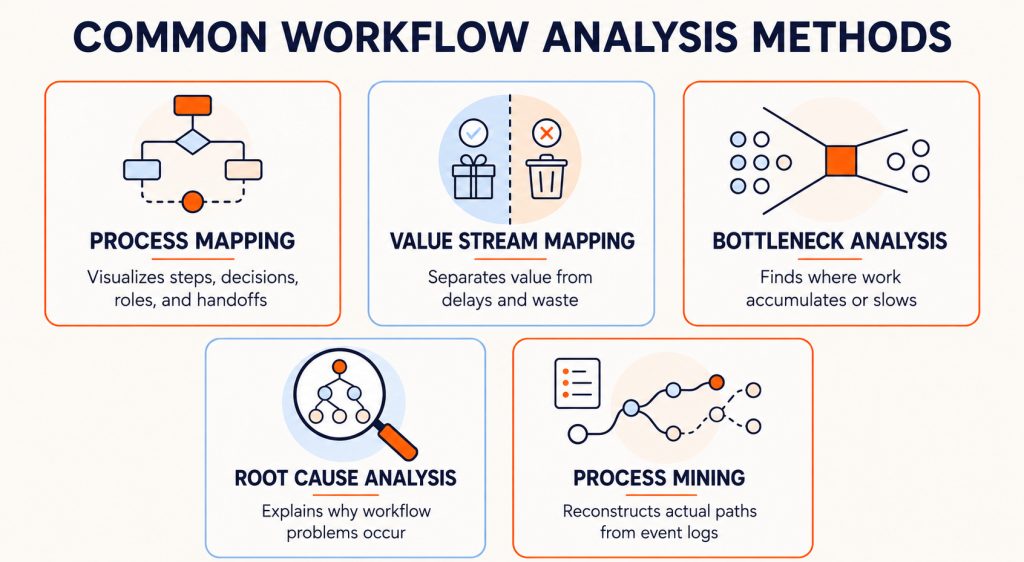
Organizations use different workflow analysis methods to visualize processes, locate constraints, measure waste, and diagnose underlying problems.
- Process mapping: Visualizes workflow steps, decisions, roles, and handoffs to show how work moves from start to finish.
- Value stream mapping: Separates value-adding work from delays, waste, and unnecessary activity across the workflow.
- Bottleneck analysis: Identifies steps where work accumulates, slows down, or exceeds available capacity.
- Root cause analysis: Investigates why a workflow problem occurs using techniques such as the Five Whys or cause-and-effect analysis.
- Process mining: Uses event logs from enterprise applications to reconstruct actual workflow paths, variations, and deviations.
10 Workflow Signals That Require Analysis
Workflow analysis is most valuable when workflow performance, consistency, or compliance begins to deteriorate. Common warning signs include:
- Longer cycle times: Tasks take longer to complete or regularly miss SLAs.
- Frequent errors and rework: Transactions are repeatedly corrected, rejected, or returned.
- Workflow abandonment: Users start critical tasks but fail to complete them.
- Recurring support demand: Questions and tickets cluster around the same workflow steps.
- Significant workflow drift: Workflow drift is the gradual divergence between an organization’s approved workflow and the way users actually execute it.
- Compliance deviations: Users skip required fields, approvals, or control points.
- Uneven performance: Results vary significantly by role, region, team, or experience level.
- Operational change: A new application, integration, feature, or policy disrupts established workflows.
- Outdated documentation: Documented processes no longer reflect how work is performed.
- Underperforming automation: An automated workflow has not produced the expected improvements in speed, accuracy, cost, or capacity.
How to Conduct a Workflow Analysis
Workflow analysis should start with a defined workflow and owner and end with a measurable improvement.
1. Select the Workflow and Assign an Owner
Choose one specific workflow with a clear trigger and outcome. Prioritize workflows with high transaction volume, cost, risk, or compliance exposure.
Define:
- Where the workflow starts and ends
- Which roles, teams, and applications it involves
- Which transaction types and exceptions are included
- Who is accountable for its performance
Also assign an owner with the authority to coordinate changes across process, application, operations, and enablement teams.
Output: A clearly scoped workflow and accountable owner.
2. Define the Intended Outcome and Success Metrics
Specify what successful execution should produce. Replace broad goals such as “improve efficiency” with a measurable operational outcome.
For example, the objective might be to reduce requisition approval time without increasing rejection rates or noncompliant approvals.
Select:
- A primary metric tied to the intended outcome
- A guardrail metric that confirms the improvement does not increase errors, risk, or compliance deviations
- A consistent calculation method and source of truth
Output: A defined outcome, primary metric, and guardrail.
3. Map the Intended Workflow
Document how the workflow is expected to operate from initiation to completion. Capture:
- Tasks and their sequence
- Roles and responsibilities
- Decisions and approval rules
- Application and system handoffs
- Required information and documents
- Compliance controls
- Standardize workflows and exception paths
Output: An approved workflow map showing the expected path, controls, and exceptions.
4. Collect Workflow Execution Data
Combine multiple data sources (including leading and lagging indicators) to understand the workflow’s current operational state, including:
- Operational data: Transaction volume, cycle time, wait time, error rates, rejections, rework, SLA performance, and compliance exceptions
- IT Support trends: Downtime, resolution time, and ticket queries
- Behavioral data: Workflow starts, completions, step-level drop-offs, session replays, repeated actions, validation failures, and application path deviations
- System event data: Timestamps, status changes, handoffs, and event logs that reveal actual workflow paths and variations
- Cohort data: Role, business unit, region, experience level, permission level, rollout wave, or training cohort
- Qualitative evidence: Support tickets, surveys, interviews, audit findings, and frontline observations
Output: A reliable performance baseline and measurable improvement target.
5. Identify and Prioritize Performance Gaps
Compare the intended workflow with actual execution data through three steps:
- Locate the gap: Identify slow steps, drop-offs, rework, handoff delays, deviations, and recurring support demand.
- Determine the scope: Establish which transactions, paths, teams, or user groups are affected.
- Prioritize the findings: Focus on gaps with the greatest impact on volume, cost, quality, risk, or compliance.
Summarize each priority finding as: [Workflow step or path] experiences [observed issue], affecting [users or transactions] and resulting in [operational impact].
Output: A prioritized, evidence-based performance gap.
6. Diagnose the Root Cause and Select an Intervention
Determine whether the issue comes from:
- Process design: Redundant steps, excessive approvals, unclear ownership, or poorly designed exception paths.
- Technology: Application configuration, integration delays, usability issues, or system performance.
- Data or access: Missing information, incorrect permissions, or disconnected data sources.
- User proficiency: Unclear instructions, limited practice, or difficulty completing infrequent tasks.
- Policy and workflow governance: Conflicting procedures, outdated documentation, unclear controls, or inconsistent enforcement.
Use workflow data, user evidence, and stakeholder input to validate the root cause. Then select an intervention that directly addresses it, such as process redesign, automation, application changes, in-app guidance, targeted user training, or stronger controls.
Output: A validated root cause and corresponding intervention.
7. Test, Measure, and Standardize the Improvement
Pilot the selected intervention with a defined user group, transaction type, or workflow path. Run the pilot for a representative period or transaction volume and compare results with the baseline. Use an unaffected comparison group where practical.
Measure the primary metric and guardrail first. Supporting metrics may include:
- Flow: Completion, drop-off, cycle time, wait time, and throughput
- Quality and compliance: Errors, rework, process adherence, and first-pass yield, which is the percentage of transactions completed correctly without rework
- Operational impact: Support volume, cost, productivity, and capacity
Scale the intervention only when it meets the improvement target without weakening the guardrail. Otherwise, refine the intervention, reassess the root cause, or test a different approach.
When results are sustained, update the workflow map, application configuration, documentation, guidance, training, and controls. Continue monitoring performance and repeat the analysis when applications, policies, transaction volumes, or user behavior change.
Output: A validated improvement that can be standardized and continuously monitored.
How to Fix the Workflow Problems Your Analysis Uncovers
The right intervention depends on the root cause. A workflow may require process changes, technology fixes, user enablement, or a combination of these approaches.
Redesign Workflows With Unnecessary Steps or Handoffs
Redesign the workflow when delays are built into the process itself. Remove redundant tasks, consolidate approvals, clarify ownership, and simplify exception paths without weakening necessary controls.
Test and Validate Workflows Before Go-Live
Test redesigned or newly configured workflows with representative users before releasing them into production. Use application simulation tools such as Whatfix Mirror to create replica application environments where teams can run beta tests across critical workflows, validate task completion, identify usability issues, uncover readiness gaps, and refine guidance or process steps before go-live.
Automate Repetitive and Rules-Based Tasks
Automate necessary, high-volume activities that follow predictable rules, such as data entry, routing, notifications, status updates, and standard approvals. Simplify the workflow before automating it, and retain human review for exceptions and decisions requiring judgment.
Resolve Application and Integration Friction
Involve application owners and IT when problems result from poor configuration, incorrect permissions, unavailable data, slow performance, or disconnected systems. Address the underlying technical issue and improve how information moves between applications.
Add In-App Guidance Where Users Struggle
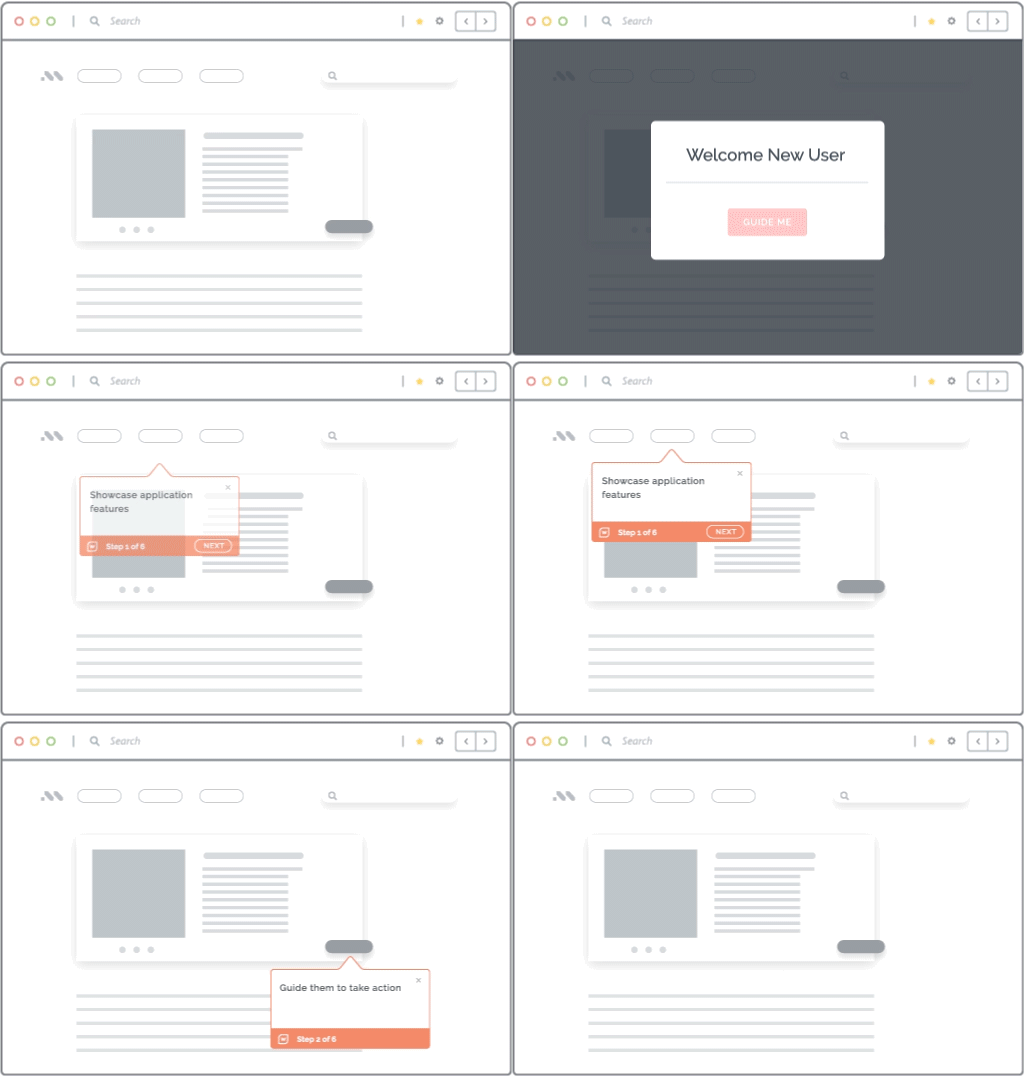
Enable users with contextual in-app guidance for critical workflow that users struggle to execute correctly. Provide interactive walkthroughs, field-level instructions, validation, and self-service support at the point of need, targeted to the affected step or user group.
With a digital adoption platform like Whatfix DAP, process owners and application managers can identify where errors occur, and then target those friction points with role-based walkthroughs, tooltips, and other help content.
Provide Targeted Training for Proficiency Gaps
Use role-based training when errors are concentrated among new, infrequent, or reassigned users. Focus practice on difficult decisions, exceptions, and high-risk tasks, then measure whether users can complete them accurately without assistance.
Strengthen Controls When Workflows Deviate From Policy
Reinforce compliance with required fields, approval rules, role-based permissions, governed instructions, and documented exception procedures. Review controls regularly to ensure they reduce risk without creating unnecessary delays.
Workflow Analysis Tools
Workflow analysis tools address different layers of the problem, from process mining and workflow automation to user behavior analytics and in-app enablement. Choose a platform based on whether you need to discover, diagnose, redesign, or improve execution.
- Whatfix: Whatfix helps teams find where users struggle in workflows performed inside enterprise applications. Teams can analyze drop-offs and inefficient paths, segment problems by user group, deliver targeted in-app guidance, and measure whether the intervention improves completion, accuracy, and productivity.
- Pendo: Pendo combines product analytics, session replay, user feedback, and in-app guides. Teams can analyze how users navigate workflows, investigate drop-offs, compare segments, and provide guidance inside web, mobile, and supported third-party applications.
- Amplitude: Amplitude uses event-based analytics to examine user journeys, funnels, cohorts, retention, and workflow completion. Session replay, guides, surveys, and experimentation help teams investigate friction and test changes to digital workflows.
- FullStory: Fullstory combines session replay, product analytics, heatmaps, autocaptured interaction data, and AI-generated session summaries. It is useful when workflow metrics reveal a problem but teams need visual evidence of the user behavior causing it.
- Celonis: Celonis uses event data from enterprise systems to reconstruct how processes actually run. It helps organizations identify process variations, bottlenecks, compliance deviations, and improvement opportunities across workflows such as procure-to-pay, order-to-cash, and service management.
- Kissflow: Kissflow enables teams to build, automate, manage, and analyze workflows in one low-code platform. Its workflow analytics track cycle time, SLA performance, approval rates, exceptions, throughput, and step-level bottlenecks.
- Nintex: Nintex supports process capture, mapping, modeling, documentation, and workflow automation. It helps teams standardize processes, clarify ownership, monitor workflow health, and move suitable manual activities into governed automation.
- Apromore: Apromore combines process mining, task mining, process modeling, simulation, and monitoring. Teams can reconstruct workflows from system data, identify bottlenecks and SLA violations, simulate potential interventions, and monitor results after implementation.
How Whatfix Turns Workflow Analysis Into Targeted Workflow Enablement
Workflow analysis creates value when findings lead to better execution. Whatfix helps enterprises prepare users for critical workflows, support them while they work, and measure whether performance improves. It works across enterprise applications alongside existing BPM and process mining tools.
Prepare Users Before Touching Real Systems
Whatfix Mirror creates realistic replicas of enterprise applications where users can practice workflows without affecting production. Guided simulations and assessments help teams build and validate readiness before application rollouts, process changes, or role transitions.

Guide Users and Govern Workflow Execution
Whatfix DAP embeds contextual guidance and support inside live workflows. Flows, Smart Tips, Field Validation, Self Help, Pop-Ups, and Task Lists help users complete approved steps correctly, while content governance supports QA, version control, localization, and controlled releases.
Analyze and Continuously Improve Workflow Outcomes
Whatfix Product Analytics shows how users move through workflows, where they drop off, and which roles or cohorts experience friction. Guidance Analytics measures engagement with Whatfix content. Together, these insights help teams refine interventions and track changes in completion, errors, support demand, compliance, and productivity.

Vizient found that users were uploading documents to the wrong fields in Icertis, causing contract errors, rework, delays, and compliance risks. It embedded Whatfix Smart Tips, Pop-Ups, Flows, and Self Help into the workflow to guide users through critical tasks. This reduced contract workflow errors by 93% year over year, shortened the average contract cycle from 33.5 to 14 days, and saved 618 hours spent addressing support requests.
Turn your workflow findings into measurable improvements. Request a Whatfix demo to see how targeted analytics and in-app enablement can improve your enterprise workflows.