

After go-live, the challenge shifts from rolling out a new system to stabilizing how people use it in live work. Users are now completing approvals, validations, handoffs, exceptions, and role-specific tasks under real operating pressure. Any confusion, access gaps, unclear rules, or broken workflow steps quickly show up in the support queue.
That is how post-go-live ticket spikes build. A few repeat issues start turning into dozens or hundreds of tickets. Tier 1 teams answer the same questions again and again, application owners chase blockers without a clear pattern, and business teams lose confidence when critical workflows take longer than expected.
Post-go-live hypercare provides service desk, ITSM, and application teams with a focused operating model to stabilize that demand. It helps teams identify workflow moments that create repeat tickets, deflect safe questions with self-service and in-app guidance, escalate access or configuration blockers to the right owner, and prove when support volume is moving toward business-as-usual.
This article breaks down how to build a post-go-live support plan that contains ticket spikes, improves Tier 1 deflection, and moves critical workflows toward business-as-usual support.
What Is Post-Go-Live Hypercare Support?
Post-go-live hypercare is the period of heightened support and stabilization following a new application launch, such as an ERP rollout, a new CRM release, an HCM update, or a major workflow change. It gives support, ITSM, application, and process teams a focused window to help users work through live production issues before they turn into recurring support demands.
The purpose of hypercare is to keep critical workflows moving while users adjust to the new system. Support teams need a faster way to classify repeat issues, application owners need visibility into workflow friction, and business teams need confidence that approvals, handoffs, validations, and exception paths are working in production.
A strong hypercare model usually includes issue triage, escalation of ownership, user support, communication of known issues, self-service content, workflow monitoring, stabilization metrics, and clear criteria for handing support back to business-as-usual teams.
Without that structure, the same issues keep returning to the queue. Hypercare turns early post-launch friction into a managed stabilization process, where teams can contain ticket spikes, resolve blockers, and build user confidence in the new way of working.
What Causes Ticket Spikes After Go-Live
A post-go-live ticket spike usually shows where live workflows are breaking. The visible problem is ticket volume, but the underlying pattern is often concentrated in a few changed steps, user cohorts, access groups, or exception paths.
Most repeat demand comes from a small set of user friction points:
- Changed workflow steps where users struggle with new fields, approvals, navigation, or task sequences.
- Access and permission gaps where users cannot view, submit, approve, delegate, or complete assigned work.
- Exception-path failures where users get stuck after rejected submissions, failed uploads, or unclear recovery steps.
- Policy or compliance confusion where users need help applying validation rules, required fields, or controlled process steps.
- Missing in-flow support where users leave the application to search for help or open a ticket.
- Unclear escalation ownership where support teams do not know whether an issue belongs to IT, the application owner, process owner, access team, or compliance team.
This is why hypercare should treat tickets as workflow signals. Once teams map repeat tickets to the steps and cohorts behind them, the spike becomes easier to contain through targeted guidance, self-service content, routing updates, and owner-led fixes.
Hypercare Plan for Post-Go Live Support Ticket Containment
The first two weeks of hypercare are the most important window for containing repeat ticket demand. During this 14-day period, support and IT teams need a shared operating rhythm for classifying issues, deflecting repeat questions, escalating blockers, and proving that support demand is stabilizing.
Use this checklist to keep hypercare focused on ticket containment and workflow recovery.
1. Define the hot path workflows before go live
Start by identifying the 5 to 10 workflows that must stay stable after launch. These are usually the workflows with the highest business impact, highest user volume, or highest risk if users get stuck.
Examples include submitting a purchase request, approving an invoice exception, completing a manager task in HCM, updating an opportunity stage, or resolving a service request.
For each hot path, define the workflow owner, affected user cohorts, likely failure points, support risk, and success metrics.
2. Assign issue ownership and escalation paths
Before ticket volume starts, every team must know what they own.
Support teams must know how to classify and route incoming issues. Application teams must know which workflow blockers they own. Process owners must approve guidance for policy, validation, and exception questions. Access and security teams must have a clear path for permission issues.
At minimum, assign ownership for:
- Ticket classification and tagging
- Access and permission issues
- Workflow defects or configuration blockers
- Process guidance and approved answers
- Known issue communication
- User facing support content
- Hypercare metrics and reporting
The goal before is to remove ambiguity before ticket volume starts.
3. Create the first hypercare issue catalog
Within the first 48 hours after go-live, support teams must identify the top ticket drivers and map them to the workflow steps that drive them. This prevents the queue from filling with broad labels like “training issue” or “user error,” which hide the actual source of friction.
Create the first version of a hypercare issue catalog with:
- Workflow: The process affected by the ticket
- Step where it breaks: The exact point where users get stuck
- Affected cohort: Role, region, business unit, location, or access group
- Likely root cause: Confusion, access, validation, defect, policy, or routing issue
- Action: Deflect, escalate, monitor, or fix
- Owner: Support, ITSM, application, process, access, security, or compliance
- Metric to watch: Repeat ticket rate, MTTR, Tier 1 deflection, backlog aging, or workflow completion rate
By the end, the team must know the top three ticket drivers and the workflow steps behind them.
4. Run a daily hypercare triage rhythm
During the first two weeks, run a short daily review focused on the highest volume issues and the workflows they affect.
Each review must answer:
- Which ticket category grew fastest since the last review
- Which workflow step or user cohort is creating repeat demand
- Which issues can be deflected through guidance, Self Help, macros, or in app messages
- Which issues need escalation to the application owner, process owner, access team, or compliance team
- Which user communication needs to go out today
- Which metric should move before the next review
This keeps hypercare from becoming a passive support queue. Every day should produce a decision, an owner, and a measurable action.
5. Deflect repeat procedural questions
Repeat procedural questions must move out of the Tier 1 queue as quickly as possible. These are issues users can resolve safely when the right guidance is available at the right moment.
Good candidates for deflection include:
- Navigation questions
- Field guidance
- Document upload rules
- Approval step guidance
- Standard recovery steps
- Known workarounds
- “How do I” questions tied to stable workflow steps
Deflection assets can include Self Help content, in app guidance, known issue messages, macros, contextual tips, and cohort-specific communication.
6. Escalate blockers through a separate path
Workflow blockers need a different path from repeated procedural questions. These issues affect execution, configuration, access, compliance, or business rules, and require an owner’s decision.
Escalate issues such as:
- Access failures
- Incorrect permissions
- Configuration defects
- Broken integrations
- Missing approval routing
- System errors
- Compliance-sensitive questions
- Policy decisions that require process owner approval
Separating deflection from escalation helps support teams protect Tier 1 capacity while making sure critical blockers reach the right owner quickly.
7. Monitor ticket stabilization metrics
Track a small set of metrics that show whether support demand is stabilizing and repeat issues are moving out of the queue.
- Ticket volume per active user: Shows whether support demand is moving toward a normal level relative to system usage
- Repeat ticket rate: Shows whether the same issues are continuing to return to the queue
- Tier 1 deflection rate: Shows whether users are resolving safe, repeat questions without agent support
- Backlog aging: Shows whether unresolved tickets are accumulating or clearing
- MTTR by issue category: Shows whether high volume issues are being resolved faster
- Misrouting rate: Shows whether tickets are reaching the right support or business owner
- Self-service usage: Shows whether users are finding and using available support content
- Hot path workflow completion rate: Shows whether users are completing the workflows that matter most after go-live
Ticket stabilization means repeat issues are shrinking, Tier 1 demand is moving into self-service where appropriate, backlog aging is under control, and critical blockers have clear ownership.
8. Define when hypercare can end
Hypercare should end when support demand is stable enough for business-as-usual teams to own the remaining work.
A launch is ready to move out of hypercare when:
- Top ticket categories are declining
- Escalation routing is clear
- Backlog aging is within an acceptable threshold
- Tier 1 deflection is holding
- Critical workflow blockers have named owners and due dates
- Hot path workflows are stable enough for normal operations
- Support assets that should remain live are documented
- Remaining issues are captured in an improvement backlog
The handoff should leave BAU teams with a clear view of stabilized workflows, open risks, active support assets, and remaining owner-led fixes.
How Whatfix Helps Teams Stabilize Tickets During Hypercare
Hypercare teams need to turn ticket patterns into user support quickly. Whatfix helps service desk, ITSM, and application teams move from reactive ticket handling to in-flow support, targeted communication, and workflow-level stabilization.
Guide Users Through Changed Workflow Steps
Many post-go-live tickets come from users encountering a changed step for the first time. They may be unsure where to find a new approval action, which field is required, what value to select, or how to complete a task in the right sequence.
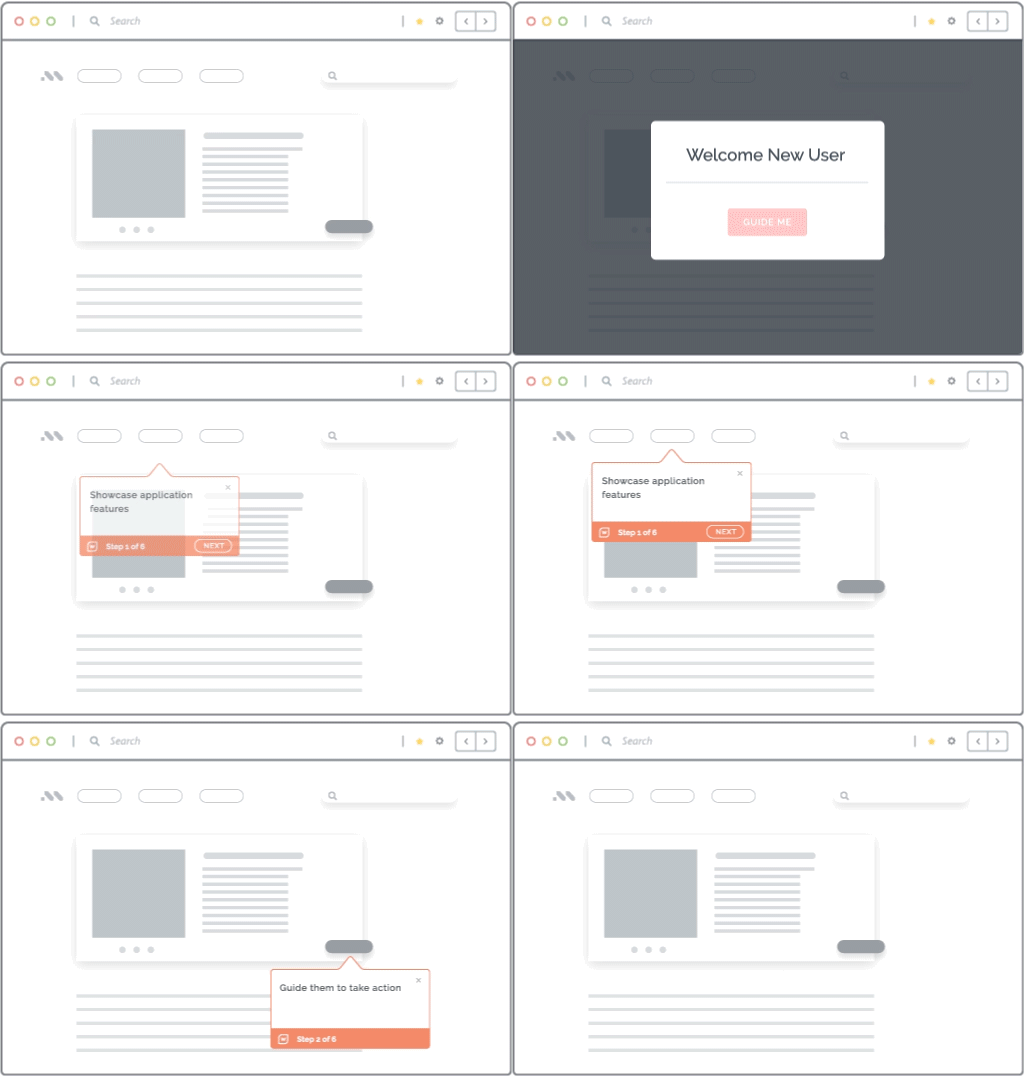
With Whatfix DAP, teams can add in-app guidance in the form of Flows, Smart Tips, Task Lists, and field-level support directly inside the application. This gives users guidance at the moment of friction and reduces repeat tickets tied to high-risk workflow steps.
Deflect Repeat Tier-1 Questions in the Flow of Work
Support spikes often include repeat questions that have clear, safe answers. These questions should move out of the Tier 1 queue quickly so agents can focus on access issues, defects, and true workflow blockers.
Whatfix Self Help brings contextual support into the application, so users can find answers in the flow of work. Teams can connect help content to specific pages, tasks, and issue categories, making it easier to deflect common questions while keeping escalation paths clear.
Communicate Known Issues and Changes In-App
During hypercare, users need timely updates on changed workflows, known issues, workarounds, and next steps. Broad emails often miss the moment when users actually need that information.
With Whatfix, teams can deliver targeted in-app communication by role, region, cohort, workflow, or release impact. This helps users understand what changed, what to do next, and when to escalate an issue instead of opening avoidable tickets.
Use Analytics to Prioritize the Next Stabilization Fix
Ticket volume shows what users are asking about. It may miss where the workflow is breaking.
Whatfix Product Analytics helps teams identify drop-offs, repeated attempts, cohort differences, and friction points across critical workflows. When support data and product analytics point to the same step, teams can prioritize the guidance update, workflow fix, or escalation that will have the biggest impact on stabilization.

Prepare Users Before Production With Simulation Training
Some workflows create too much risk when users learn them for the first time in production. This is especially true for financial approvals, compliance steps, customer-impacting workflows, and complex exception handling.
Whatfix Mirror gives teams a safe simulation training environment where users can practice high-risk workflows before go-live. This reduces avoidable Day 1 confusion and gives application owners stronger go-live readiness proof before users enter the live system.

Create Support Content Faster With AI and Human Governance
Hypercare teams need to move quickly as ticket patterns emerge. Whatfix AI can help draft support content, summarize recurring issue themes, and accelerate updates to guidance, Self Help, and in-app messages.
Human governance stays with the right owners. Application owners, process owners, and compliance teams should review workflow instructions, controlled language, escalation paths, and regulated process guidance before content goes live.
Request a demo to see how Whatfix helps enterprise teams contain ticket spikes during hypercare, deflect repeat Tier 1 questions, and guide users through critical workflows in the flow of work. Whatfix helps teams move from reactive post-go-live support to measurable ticket stabilization across applications, roles, and frequent release cycles.