



What Is a Digital Adoption Platform?
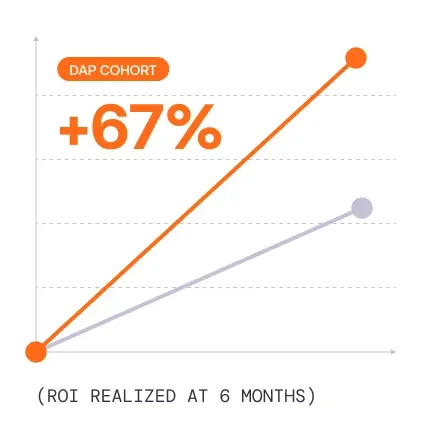
A digital adoption platform (DAP) is software that integrates with business applications to provide contextual in-app guidance, self-service support, and user behavior analytics. It helps end-users (employees, customers, etc.) learn to use applications, complete workflows correctly, and adopt new processes, while enabling organizations to measure software usage, identify friction points, and improve business outcomes.
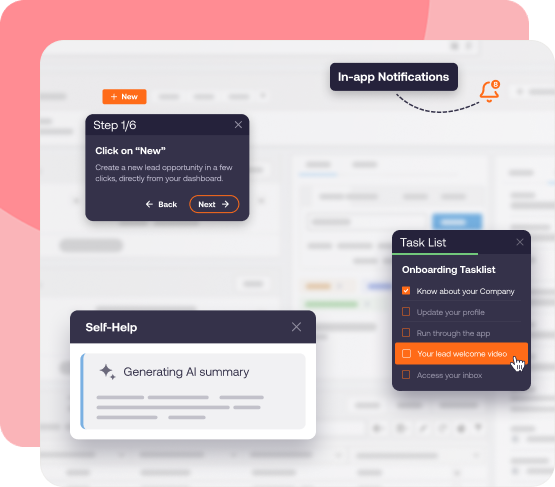
Digital adoption platforms typically operate as an enablement layer across enterprise applications such as Salesforce, SAP, Oracle, Workday, Microsoft Dynamics, and other vertical software or custom-built systems.
Unlike traditional training resources that employees must access separately, DAPs provide assistance directly within the application where work happens.
How Does a Digital Adoption Platform Work?
A digital adoption platform connects three core capabilities:
- Guide users: Deliver interactive walkthroughs, field-level instructions, onboarding checklists, and contextual support within live applications, in the flow of real work.
- Measure adoption: Track application usage, feature adoption, workflow completion, and user behavior to identify adoption barriers.
- Optimize performance: Use adoption insights to refine guidance, reduce friction, reinforce new processes as applications evolve, and streamline workflows.
For example, an organization implementing a new ERP system can use a DAP to guide procurement teams through purchase-order creation, explain required approval fields, and provide access to internal policies. Application owners can then monitor workflow completion and identify where users encounter errors or abandon transactions.
Enterprise digital adoption programs may also incorporate application simulation training before go-live, preparing employees to execute critical workflows before accessing production systems.
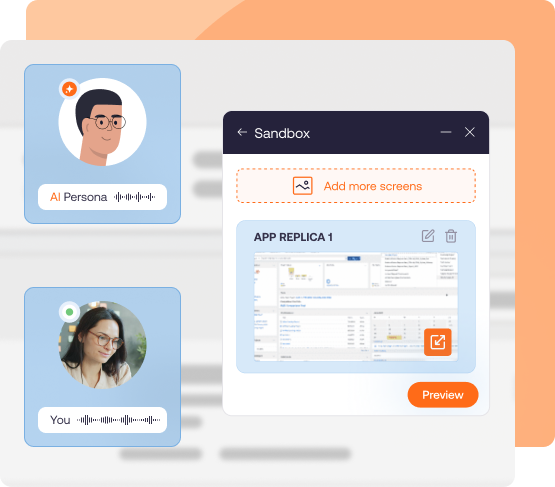
The result is a continuous approach to employee enablement that supports software rollouts, new-hire onboarding, workflow changes, and ongoing optimization.
Benefits of Digital Adoption Platforms
The business value of a digital adoption platform comes from improving how employees use enterprise applications and execute critical processes.
Organizations typically build a DAP business case around five operational benefits:
- Accelerated employee proficiency: Reducing the time required for new and existing employees to independently execute workflows.
- Lower training and support costs: Reducing repetitive instruction, manual assistance, and avoidable support tickets.
- Improved workflow accuracy: Helping users complete transactions correctly and follow established procedures.
- Faster software adoption: Increasing successful use of critical application features and processes.
- Stronger value realization: Connecting improvements in user behavior and workflow performance to business outcomes.
DAP Buyer Fit Signals
The following signals help identify when a digital adoption platform investment is the right decision and how it can deliver business value.
| Buyer | Fit signal | Expected outcome |
| L&D and Enablement Leaders | Employees struggle to become proficient in critical applications, and training requires repeated manual support. | Faster time-to-proficiency |
| IT and Application Owners | Business application support teams receive recurring how-to questions, particularly after releases and system changes. | Fewer support tickets |
| Digital Transformation Leaders | Applications are deployed successfully, but employee adoption and workflow performance lag behind implementation milestones. | Faster time-to-value |
| Operations and Process Owners | Employees take inconsistent paths, skip required steps, or struggle with complex workflows. | Higher task completion and process adherence |
| HR and Employee Experience Teams | Frequent onboarding and role changes create recurring software training requirements. | Faster employee onboarding |
| Quality and Compliance Leaders | Manual data entry, inconsistent procedures, and changing policies create errors or compliance exposure. | Fewer errors and reduced rework |
| Customer Support Leaders | Agents struggle with complex systems and need assistance during live customer interactions. | Faster resolution and improved service quality |
Key Features of a Digital Adoption Platform
An effective digital adoption platform provides the capabilities required to guide users, support business processes, and measure application adoption.
For enterprises, these capabilities must also operate across complex technology environments, distributed employee populations, and frequently changing business workflows.
Core Digital Adoption Platform Features
| DAP feature | What it does | Enterprise benefit |
| In-app guidance and interactive walkthroughs | Guides users through application tasks with step-by-step instructions, tooltips, and contextual prompts. | Accelerates workflow proficiency and reduces errors. |
| Self Help and AI-powered user assistance | Surfaces relevant knowledge articles, SOPs, and answers within applications. | Reduces repetitive support requests and employee interruptions. |
| No-code content authoring | Enables business teams to create and maintain guidance without extensive engineering support. | Accelerates content creation and reduces maintenance costs. |
| Personalization and user segmentation | Targets guidance by role, department, behavior, location, or application context. | Delivers relevant assistance to different employee groups. |
| User behavior and digital adoption analytics | Tracks feature engagement, usage patterns, workflow completion, and friction. | Identifies adoption gaps and prioritizes improvement opportunities. |
| Change and release communications | Delivers targeted announcements, reminders, and guidance for updated workflows. | Helps employees adapt to software releases and process changes. |
| Content lifecycle management and governance | Provides controls for content ownership, approvals, testing, versioning, and localization. | Supports controlled deployments across enterprise teams. |
| AI-assisted guidance and optimization | Uses AI to support content creation, contextual assistance, and identification of adoption opportunities. | Helps scale digital adoption operations and maintain relevant content. |
The most important features depend on the organization and its business requirements.
For example, an enterprise implementing SAP S/4HANA may prioritize workflow guidance, multilingual support, and content governance. A sales organization managing Salesforce adoption may focus on contextual assistance, workflow completion, and behavioral analytics.
Below is an example of in-app performance support over a fictional insurance claims system, helping agents review and file a first notice of loss claim:
Advanced Capabilities for Enterprise Digital Adoption Platforms
Organizations with complex application portfolios may also evaluate complementary capabilities that extend the value of a traditional DAP.
- Application simulation training enables employees to practice realistic workflows before entering production environments. These simulations can support role-based training, pre-go-live readiness assessments, and recurring new-hire onboarding.
- AI-powered assistance can help users find answers, understand procedures, and receive recommendations based on their application context. AI-assisted authoring and analysis can also reduce the effort required to maintain guidance as workflows change.
- Workflow analytics and optimization provide deeper visibility into how employees complete business processes. Funnels, journeys, cohorts, and session replay can help application owners identify friction and evaluate targeted interventions.
- Workflow automation can reduce repetitive user actions or, where supported, assist with multistep tasks, although automation capabilities vary significantly across platforms.
Enterprise buyers should evaluate these capabilities separately from core DAP functionality and confirm whether they are included in the standard platform or offered through additional products.
Best Digital Adoption Platforms Compared
With over 150 digital adoption platform vendors in the category, it’s difficult to find the right solution for your use case. For enterprise buyers, there are only a few solutions that provide the application coverage, guidance capabilities, analytics, AI functionality, and governance required for large organizations with regulated workflows
Some DAPs specialize in adoption across large enterprise application portfolios. Others focus on product analytics, browser-based applications, or guidance within a specific software ecosystem.
The following comparison highlights the seven best digital adoption platforms for enterprise teams, their primary use cases, key differentiators, and considerations when researching:
| Vendor | Best for |
| Whatfix | Enterprises in regulated industries that require governed content lifecycle operations across many apps, plus end-to-end platform for in-workflow guidance, pre-production simulation training, and adoption analytics. |
| WalkMe | Enterprise adoption programs with a focus on SAP-application ecosystem. |
| Userlane | Web-based application adoption programs with a focus on guided workflows and basic analytics, who are willing to trade more advanced features for a more cost-friendly solution. |
| Pendo | Product-led organizations are optimizing customer-facing onboarding and improving feature adoption with a robust product analytics solution. |
| Apty | Sales Ops-led process adherence programs inside browser-based business applications, with a focus on CRM adoption needs at upper mid-market companies. |
| Oracle Guided Learning | Oracle-centric organizations that need limited suite-native guidance for Oracle workflows. |
| SAP Enable Now | SAP-centric organizations that require a limited guidance library for SAP workflows. |
7 Best Digital Adoption Platforms for Enterprise Teams
Here are the best digital adoption platforms for enterprise application owners, with an overview of each vendor’s primary capabilities, ideal use cases, and buying considerations.
Editorial methodology: This comparison considers publicly documented product capabilities, application coverage, guidance and analytics features, and enterprise deployment requirements. Vendor information should be reviewed against current documentation and demonstrations before procurement.
1. Whatfix
Details:
- Founded: 2014
- Similar to: WalkMe, Pendo
- Typical roles: Director of Enterprise Applications, Enterprise Application Owner, CIO staff, enablement lead, service desk manager
- Typical customers: 2,000+ employees, multi-region operations, mission-critical enterprise software, high-volume internal users, regulated industries with controlled or audited workflows
What Is Whatfix?
Whatfix DAP is an enterprise-grade digital adoption platform built to maximize ROI from mission-critical applications and accelerate digital transformation value realization. It drives measurable outcomes through contextual in-app guidance, self-service support, and adoption analytics tied to workflow performance.
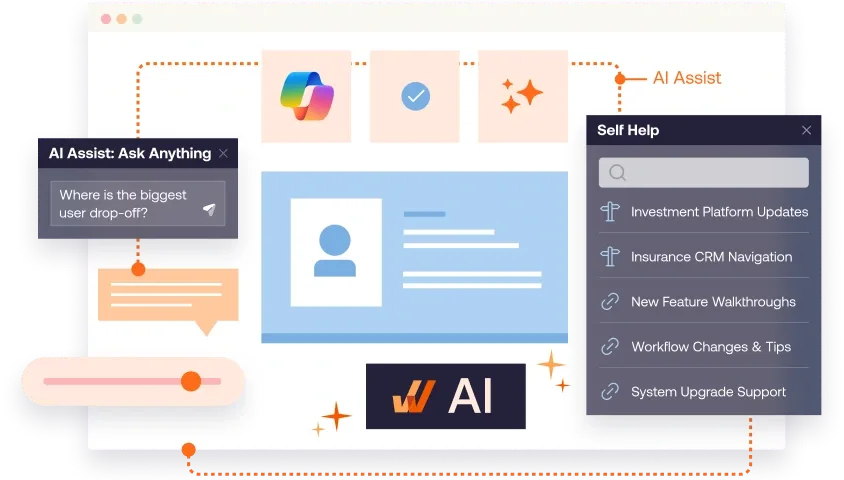
Whatfix provides comprehensive product analytics to enable a data-driven, closed-loop feedback approach to optimize workflows, new content creation, and adoption milestones. With Mirror simulation training and AI roleplay, Whatfix is the only end-to-end digital adoption solution for pre-production readiness, in-workflow guidance, and closed-feedback loop analytics.
Key Features
- Flows: Step-by-step guidance for completing critical workflows consistently, designed for repeatable execution patterns.
- Smart Tips: Field-level and UI-level contextual help that reduces errors during high-stakes transactions.
- Pop-Ups: Targeted in-app communications for go-lives, policy changes, and workflow updates.
- Task List: Role-based checklists that standardize onboarding and drive completion on priority workflows.
- Self Help: In-app self-service support that surfaces help content in the moment of need to reduce tickets during stabilization windows and uses AI for smart search, recommendations, and summarization.
- Mirror simulations: Risk-free practice environments for readiness validation and hands-on training before production exposure.
- Agentic AI agents plus Seek: AI-driven authoring, insights, contextual assistance, and task execution.
- Content lifecycle management: Governed draft-to-production controls for safe releases at scale.
What factors make Whatfix the best DAP for enterprise companies?
- Coverage across any application type: Supports web, desktop, mobile, and Citrix environments, so enterprises can run one adoption layer across mixed application estates and multi-app workflows.
- Vendor-neutral by design: Whatfix is not tied to a single ISV ecosystem, which makes it a stronger fit for enterprises running Oracle, SAP, Salesforce, Microsoft, custom apps, and other business-critical systems side by side.
- Enterprise-grade content lifecycle management: Governed releases, approvals, testing, rollback, localization, and change controls help teams scale adoption without adding rollout risk.
- One platform for readiness, execution, and optimization: Whatfix unifies pre-production simulation training, in-workflow support, and adoption analytics into a single platform for end-to-end user enablement.
- AI embedded across the full lifecycle: Whatfix integrates agentic AI across authoring, guidance, insights, and task execution, while also embedding GenAI into Self Help and AI roleplay to contextualize support and reduce content operations overhead.
Why do companies use Whatfix?
- Drive faster time-to-proficiency after ERP, CRM, HCM, or ITSM changes by guiding users through the highest-risk workflows.
- Reduce ticket spikes during stabilization by shifting common “how do I” questions into in-app self-service.
- Reduce user errors and improve compliance by guiding execution through approved task paths.
- Validate readiness before go-live using simulations, then reinforce execution in production with guidance and Self Help.
- Instrument workflow outcomes and prioritize interventions using adoption and drop-off signals segmented by role, region, and tenure.
TL;DR for Whatfix
- Best for: Enterprise adoption across many applications where governance, rollout safety, simulations, and measurable workflow outcomes drive buying decisions.
- Watch-outs: SMB or mid-market teams seeking a narrow overlay for one application may not need the full enterprise operating model.
- When Whatfix is the better fit: Multi-application programs with high change cadence and controlled workflows that require lifecycle discipline and outcome-grade measurement.
2. WalkMe
Details:
- Founded: 2011
- Similar to: Whatfix, Userlane
- Typical roles: CIO staff, enterprise application owners, transformation leaders, digital workplace teams
- Typical customers: Large enterprises standardizing adoption programs across multiple systems
What Is WalkMe?
WalkMe is a digital adoption platform used to deliver in-app guidance, onboarding, and adoption analytics across enterprise applications. It is commonly deployed as a cross-application overlay for guided experiences, change communications, and adoption programs.
Key Features
- In-app guidance: Walkthroughs and contextual prompts to support task completion.
- In-app communications: Messaging that supports change initiatives and rollouts.
- Segmentation and targeting: Audience targeting to tailor experiences by cohort.
- Adoption analytics: Insights into engagement and friction points.
Why do companies use WalkMe?
- Standardize onboarding and workflow execution across major enterprise tools.
- Support change programs with in-app guidance and communications.
- Use analytics to prioritize friction reduction.
TL;DR for WalkMe
- Best for: Enterprises building a broad adoption layer across many web-based applications.
- Watch-outs: Validate governance depth and operating model requirements early.
- When Whatfix is the better fit: Programs that prioritize simulations, lifecycle control, and outcome measurement across many apps.
3. Userlane
Details:
- Founded: 2015
- Similar to: WalkMe, Whatfix
- Typical roles: CIO staff, transformation leaders, enterprise application owners, enablement teams
- Typical customers: Enterprises driving adoption across many web-based applications
What Is Userlane?
Userlane is a no-code digital adoption platform used to improve software adoption through step-by-step in-app guidance and value realization reporting. It is often owned by IT and transformation teams aiming to standardize workflows inside web-based business applications.
Key Features
- In-app guides and tooltips: Step-by-step assistance inside applications.
- Announcements and engagement: In-app prompts that support change rollouts.
- Analytics: Reporting oriented around adoption and content performance.
- Value realization framing: Analytics models that support standardized reporting across apps.
Why do companies use Userlane?
- Improve task success inside business applications with guided workflows.
- Track adoption and content performance by role and application.
- Support multi-app transformation programs with a no-code delivery model.
TL;DR for Userlane
- Best for: Enterprises driving adoption across multiple web applications with structured measurement.
- Watch-outs: Validate complex workflow support, native mobile requirements, and depth for industry-specific and custom systems.
- When Whatfix is the better fit: Programs that require desktop and mobile coverage, simulations, and governed content operations at scale.
4. Pendo
Details:
- Founded: 2013
- Similar to: Product experience platforms, some DAP overlap
- Typical roles: Product teams, growth teams, digital product leaders
- Typical customers: Product-led organizations focused on customer-facing adoption and feature usage
What Is Pendo?
Pendo is a product experience platform that combines product analytics with in-app guides and feedback workflows, typically owned by product and digital teams. It is commonly selected when the adoption objective centers on improving customer-facing onboarding and feature adoption inside a digital product.
Key Features
- Product analytics: Behavioral measurement tied to feature usage.
- In-app guides: Onboarding and engagement experiences.
- Feedback collection: In-app surveys and sentiment signals.
- Targeting: Segmentation by user attributes and behavior.
Why do companies use Pendo?
- Improve onboarding and feature adoption inside customer-facing products.
- Run analytics-driven product optimization programs.
- Collect user feedback to guide roadmap decisions.
TL;DR for Pendo
- Best for: Product teams that want analytics-first adoption inside a digital product.
- Watch-outs: Employee-facing enablement across multiple enterprise systems requires a different operating model.
- When Whatfix is the better fit: Transformation programs that require governed guidance, simulations, and workflow outcome reporting.
5. Apty
Details:
- Founded: 2017
- Similar to: Whatfix, WalkMe
- Typical roles: Operations leaders, IT application owners, process governance teams, shared services
- Typical customers: Organizations focused on process adherence and consistent workflow execution inside web-based applications
What Is Apty?
Apty is a digital adoption platform positioned around improving software adoption and process compliance through in-app guidance and insights. It is often evaluated by teams that want to reduce errors, standardize workflows, and improve operational consistency inside browser-based applications.
Key Features
- In-app guidance: Workflow walkthroughs and contextual prompts.
- Process adherence support: Guidance patterns oriented around correct execution.
- Adoption insights: Visibility into usage and friction patterns.
- Operational enablement: Common fit for standardization and compliance initiatives.
Why do companies use Apty?
- Improve process consistency and reduce errors in high-volume workflows.
- Reduce support effort by guiding users through tasks.
- Drive adoption and compliance in operational systems.
TL;DR for Apty
- Best for: Teams prioritizing process adherence and operational enablement inside browser-based applications.
- Watch-outs: Validate cross-app governance, desktop and mobile requirements, and analytics depth for enterprise-wide programs.
- When Whatfix is the better fit: Enterprise adoption programs that require simulations, richer workflow support, and governed content operations at scale.
6. Oracle Guided Learning
Details:
- Founded: Oracle ecosystem product
- Similar to: Suite-native adoption tools, some DAP overlap
- Typical roles: Oracle application owners, transformation PMO, enablement teams
- Typical customers: Oracle-centric organizations rolling out Oracle Fusion and adjacent Oracle applications
What Is Oracle Guided Learning?
Oracle Guided Learning is Oracle’s in-app guidance layer designed to support user onboarding and task completion inside Oracle applications. It is commonly selected when Oracle applications are the primary adoption surface and Oracle packaging simplifies procurement and deployment.
Key Features
- In-app guidance inside Oracle: Guided prompts and task support for Oracle workflows.
- Oracle ecosystem alignment: Strongest fit in Oracle-first environments.
- Deployment simplicity: Easier to start when Oracle is already the standard stack.
- Usage visibility: Engagement reporting for guided content (validate depth needed for workflow outcomes).
Why do companies use Oracle Guided Learning?
- Speed adoption inside Oracle workflows during transformation programs.
- Reduce training effort by embedding guidance inside Oracle applications.
TL;DR for OGL
- Best for: Oracle-centric organizations that want suite-native in-app guidance.
- Watch-outs: Mixed stacks and cross-app analytics needs often require a broader DAP operating model.
- When Whatfix is the better fit: Enterprises standardizing adoption across Oracle plus non-Oracle systems with governed content operations.
7. SAP Enable Now
Details:
- Founded: SAP ecosystem product
- Similar to: Enterprise enablement and training platforms
- Typical roles: SAP transformation PMO, L&D, SAP program owners, application owners
- Typical customers: SAP-centric enterprises running large rollouts and ongoing enablement programs
What Is SAP Enable Now?
SAP Enable Now is a digital learning and enablement content platform used to create interactive learning content, guided tutorials, and documentation, especially in SAP environments. It is commonly selected when the adoption strategy emphasizes training content creation and distribution tied to SAP rollouts. After SAP’s acquisition of WalkMe, Enable Now will be reach the end of its maintenance lifecyle in November 2030.
Key Features
- Interactive training content creation: Tutorials, e-learning, and documentation.
- Content reuse: Multi-format outputs to support training distribution.
- SAP ecosystem alignment: Strong fit for SAP-centric program delivery.
- Repository approach: Centralized access to enablement content.
Why do companies use SAP Enable Now?
- Build standardized enablement content for SAP rollouts and upgrades.
- Create reusable learning assets across training modalities.
- Support role-based learning programs at scale.
TL;DR for SAP Enable Now
- Best for: SAP-centric organizations building a standardized enablement content program.
- Watch-outs: Enterprise-wide workflow execution support and cross-app measurement may require a DAP-focused platform. With SAP’s acquisition of WalkMe, Enable Now will also be retired in November 2030.
- When Whatfix is the better fit: Multi-application transformations where adoption needs governance, simulations, and measurable workflow outcomes.
How to Choose an Enterprise Digital Adoption Platform
Selecting the right digital adoption platform requires evaluating how effectively it can support your application portfolio, employee populations, governance requirements, and expected business outcomes.
Enterprise buyers should prioritize capabilities that support current software investments and scale as applications and workflows evolve.
Use the following eight criteria to evaluate DAP vendors:
- Application and environment coverage: Evaluate support for web, desktop, mobile, virtual desktop, and custom applications. Confirm compatibility with the systems your employees use and the workflows that span multiple applications.
- In-app guidance and user assistance: Assess the platform’s ability to deliver interactive walkthroughs, contextual instructions, task lists, embedded Self Help, and targeted communications. Test guidance against complex, role-specific workflows.
- Behavioral analytics and measurement: Look for visibility into feature adoption, task completion, workflow friction, and user behavior. Prioritize capabilities that connect adoption data to productivity, accuracy, support demand, and business KPIs.
- Content creation and maintenance: Evaluate how easily teams can create, update, test, and publish in-app experiences. Consider no-code authoring, AI-assisted content creation, localization, and the maintenance effort required after application changes.
- Enterprise governance and security: Assess role-based administration, approval workflows, staging environments, versioning, rollback, security controls, and compliance requirements.
- User readiness and training capabilities: Determine whether the platform supports role-based onboarding and hands-on workflow practice. For critical implementations, consider complementary application simulation and proficiency assessment capabilities.
- AI-powered assistance and optimization: Evaluate contextual AI support, knowledge retrieval, authoring automation, adoption recommendations, and any workflow execution capabilities relevant to your use cases.
- Scalability and total cost of ownership: Consider pricing models, implementation requirements, the number of applications and users supported, administration effort, and the cost of maintaining the platform across regions and business units.
Before selecting a platform, evaluate it against one of your organization’s actual workflows. Ask vendors to demonstrate content creation, role-specific guidance, contextual support, analytics, and how guidance is maintained after an application change.
For complex enterprise deployments, include application owners, L&D, IT, business process leaders, and security teams in the evaluation.
Digital adoption success stories, powered by Whatfix
Organizations use Whatfix to accelerate employee proficiency, reduce workflow errors, and improve application performance.
| Customer | Digital adoption use case | Reported outcome |
| Renewable Energy Group | Standardized training and in-app support across Salesforce CRM and Oracle JD Edwards ERP. | 50% faster time-to-proficiency and 83% fewer daily application-related support inquiries. |
| Extra Space Storage | Supported frontline associates with guided transaction workflows and AI help for resolving issues in its rental management system. | 50% faster transactions for new hires and deflecting 95% of rental-related support tickets via Self Help. |
| City of Bakersfield | Guided Oracle ERP and HCM workflows, including procurement and invoice processing. | Over 50% fewer rejected invoices and 73% user engagement with Whatfix guidance. |
| Experian | Delivered role- and region-specific Salesforce guidance to global sales teams. | 72% year-over-year increase in seller productivity and 55% fewer Salesforce IT support tickets. |
| Acorn Recruitment | Accelerated recruiter onboarding and standardized Bullhorn ATS workflows. | 80% reduction in onboarding time and 98% fewer training support queries. |
These customer-reported outcomes illustrate how contextual guidance and employee enablement can contribute to measurable improvements across different enterprise applications and business processes.
Explore Whatfix’s Digital Adoption Platform or request a personalized demo.