Most organizations know how to manage launch activity. They can schedule training, send communications, and coordinate stakeholders. Those actions help, but they do not determine whether an enterprise software change succeeds in production. Success is decided when users are under pressure, support queues start rising, and a process that looked clean in the project plan becomes clumsy in a live workflow.
That is why enterprise software change management must be treated as an operating discipline, not viewed as a project management stream. Strong teams use it to prepare users before launch, support them in the flow of work after go-live, and improve the workflow as real behavior reveals friction points. When executed well, it protects compliance, improves time-to-proficiency, reduces support strain, and helps organizations capture the value their software was supposed to deliver in the first place.
In this guide, we’ll break down what enterprise software change management means in practice, why so many rollout efforts underperform, which best practices separate stable programs from reactive ones, and how Whatfix helps application owners run software changes with more control across readiness, execution, support, and optimization.
Who Owns Change Management in Enterprise Applications?
Enterprise change projects almost always involve a PMO, enablement leads, service desk teams, business process owners, app admins, security stakeholders, and regional leaders. That cross-functional model is necessary. It is not a substitute for ownership.
In most enterprise environments, the named owner should be the Enterprise Application Owner, Transformation Program Lead, or another operator directly accountable for how the system performs after launch.
That person owns both change milestones and business outcomes. Their scorecard should include time-to-proficiency, support burden, workflow continuity, process adherence, and the business value the software change was supposed to unlock.
The surrounding team still matters. L&D may support role-based readiness. Service desk teams may monitor recurring support themes. Process owners define the approved path. Security and compliance teams govern controls and exceptions. But none of those groups should carry ambiguous responsibility for the whole motion.
How Change Management in Enterprise Applications Drives Value
The value of software change management is easy to underestimate because the work often looks preventive. When it is done well, the result feels almost uneventful. The rollout stabilizes faster. Users adapt without friction, support tickets are contained, and errors do not multiply.
That calm is valuable.
Here are the core ways change management in enterprise applications drives business value:
| Benefit | Overview and business outcome | Example |
|---|---|---|
| Accelerates time-to-proficiency | Helps users reach working competence faster, reduces manager hand-holding, and shortens the gap between go-live and actual productivity. Business outcomes include faster onboarding, quicker employee ramp time, and stronger software value realization across complex application environments. | Renewable Energy Group reduced time-to-proficiency across Salesforce CRM and Oracle JD Edwards by 50%, cut daily application-related IT support tickets by 83%, and shortened new employee ramp time by 3 months. |
| Contains IT support tickets | Reduces the flood of repetitive support requests that often follows poorly managed software change. By giving users answers in the flow of work, enterprises free up app owners, SMEs, and help desks to focus on higher-value work rather than serving as manual support layers. Business outcomes include lower support volume, improved operational efficiency, and less dependency on informal support channels. | Windward Risk Managers streamlined policy change management by enabling agents in the flow of work and achieved an 87% reduction in claims and policy-related support queries with Self Help in just two months. |
| Improves workflow completion and process adherence | Drives value by helping users complete workflows correctly and consistently inside the application. Business outcomes include better process standardization, fewer errors, stronger compliance, improved data quality, less rework, and faster task completion. | Vizient used embedded workflow guidance to reduce contract workflow errors by 93% year over year, save 618 hours by addressing L1 support queries with in-app guidance and Self Help, and accelerate contract execution from 33.5 days to 14 days. |
| Enables application owners with adoption visibility | Gives application owners visibility into where users drop off, which teams or roles are lagging, where workarounds emerge, and whether rollout efforts are improving process performance. Business outcomes include better rollout governance, earlier issue detection, and more informed optimization decisions. | bioMérieux accelerated contract transformation ROI by enabling users in the flow of work, protecting 12,000 contacts with guided CLM workflows and saving 1,293 total hours between January 2024 and February 2025 through in-app guidance and embedded performance support. |
Why Enterprise Rollouts Stall Even When Training and Communications Exist
Training is necessary. Communications are necessary. Neither is built to carry the full weight of enterprise software change.
The weakness in many programs is simple. They prepare people to hear about the change, but they do not do enough to help people perform the changed work when the moment arrives. That gap is where user adoption slips, support costs rise, and rollout optimism runs into operational reality.
Experian is a good example of the underlying problem. Its traditional training methods (LMS courses and video library) could not keep pace with the scale and speed of change in a heavily customized Salesforce environment.
With Whatfix, Experian cut training content creation costs by 48%, reduced Salesforce IT support tickets by 55%, and increased seller productivity by 72% year over year. The lesson is bigger than one customer story: modern enterprise change moves too fast for static training assets to carry the load on their own.
That is why training completion is such a weak success metric. A user can finish a course and still get lost inside a changed approval flow. A team can attend launch sessions and still create workarounds on day two. A business unit can acknowledge a release notice and still flood support with questions when a familiar task suddenly behaves differently.
Communications build awareness. Training builds familiarity. Production support, reinforcement, and measurement determine whether the change actually sticks.
Common Challenges in Enterprise Software Change Projects
The symptoms of weak change management are remarkably consistent across systems, industries, and rollout types.
A release goes live. Support volume rises. Some teams adapt quickly while others lag. Users start asking colleagues for help instead of following the approved path. Workarounds form. Errors cluster around the same few workflow steps. Regional variation appears. Business leaders hear that training is complete, but app owners can still see the process wobbling in production.
Underneath these symptoms, the root causes tend to repeat across enterprise software rollouts. The problem usually is not user resistance alone. It is weak operational ownership, generic enablement, and a lack of in-app support and visibility.
| Root issue | Business impact / potential risks |
|---|---|
| No clear owner for adoption and workflow performance | Accountability is scattered across IT, L&D, app owners, and business teams, creating execution gaps. Key risks include slow adoption, inconsistent process ownership, unresolved friction points, and weaker software ROI. |
| Too much dependence on one-time training | Users forget what they learned after training ends, especially when they only encounter key tasks days or weeks later. Risks include low retention, process errors, slower ramp time, and employees reverting to old ways of working. |
| Too little support inside the application | When users cannot get help at the moment of need, they leave the workflow to search for answers or submit tickets. Risks include workflow abandonment, longer task completion times, more support requests, and lower confidence in the application. |
| Weak segmentation by role, region, or workflow risk | A generic change approach fails because different users face different tasks, rules, and risk levels. Risks include irrelevant training, poor user experience, compliance gaps, and inconsistent adoption across teams or geographies. |
| Limited visibility into where friction is concentrated | Teams cannot improve what they cannot see. Without clear insight into drop-off points, confusion areas, and behavior patterns, change efforts become guesswork. Risks include unresolved bottlenecks, wasted enablement efforts, and persistent workflow inefficiencies. |
| Reactive release support instead of a repeatable operating model | Support becomes a scramble after every rollout, update, or policy change, rather than a structured discipline. Risks include inconsistent launch quality, overburdened SMEs and help desks, slower stabilization after go-live, and rising support costs. |
| No closed loop between support signals, workflow behavior, and intervention design | Organizations collect tickets, complaints, and usage signals but fail to translate them into better guidance or process fixes. Risks include recurring user issues, duplicated support effort, poor continuous improvement, and stalled change programs after launch. |
Large enterprises feel these problems more sharply because their environments are more complex. They run multiple mission-critical systems, support distributed users, manage frequent change cycles, and often operate inside controlled or regulated workflows where small errors have outsized consequences.
The Operational Cost of Poor Enterprise Software Change Management
When software change management doesn’t providing the readiness and support required for mission-critical workflows and enteprirse applications, the damage spreads across four areas.
- Productivity drops first. Work takes longer. Users hesitate, backtrack, or ask for help. Teams spend time recovering from confusion that should have been designed out of the workflow.
- Support comes next. Service desks absorb repetitive tickets. SMEs get pulled into routine guidance. App owners spend their time troubleshooting preventable issues instead of improving the system.
- Then quality starts to slip. Errors, rework, missed approvals, incomplete data, and policy exceptions begin showing up in the workflow. In controlled environments, that quickly becomes a process governance problem.
- Financial cost surfaces. The software is live, but the value tied to the investment is delayed. The license is active, the implementation budget is already spent, and the business outcomes are still not moving at the pace leadership expected.
That is the real cost of weak software change management. The rollout looks complete on paper, while the workflow is still unstable where it matters most.
Best Practices for Managing Enterprise Software Change
The best enterprise teams do not treat software change as a collection of isolated launch tasks. They run it as a system. The model is practical: define the workflow, assign the owner, validate readiness, support execution, stabilize the rollout, then improve based on evidence.
1. Start with the workflow
The cleanest way to improve software change is to stop organizing it around announcements and start organizing it around work.
Identify the workflows most affected by the change. Define the business objective behind each one. Map the steps, handoffs, approvals, and likely failure points. Decide where change resistance and user friction is most likely to occur and what the downstream consequences will be if it does.
That approach keeps the program honest. It forces teams to plan around execution, not optics.
2. Assign one owner and make the decision rights explicit
A rollout needs one operator who can answer basic questions without delay: Which workflows matter most? Who signs off on readiness? Who owns support escalation? Which metrics matter most in week one? Which issues trigger intervention?
Those decisions cannot stay vague until the release is already live.
3. Segment users by risk, role, and context
Enterprise software change rarely lands evenly. A field team, a finance approver, a vendor, a new manager, and a regional operations lead may all use the same system in different ways. One group may need light reinforcement. Another may need guided execution. A third may need structured practice before go-live.
Better segmentation leads to better interventions. It also leads to less wasted effort.
4. Validate readiness before production
Readiness should be proven, not assumed. For critical workflows, that means hands-on practice, role-based validation, scenario testing, and clear sign-off standards before the change reaches production.
Application owners should create a sandbox of their enterprise application before go-live. This provides a safe environment to test and validate workflows and provide hands-on training to users before production.
The City of Baltimore offers a strong example of that principle in action. With Whatfix, the city reduced time-to-proficiency for its Oracle rollout by 63 percent, resolved 98 percent of Oracle IT support tickets with Self Help, and achieved 100 percent completion of guided onboarding. That kind of result does not come from launch messaging alone. It comes from treating readiness and in-workflow support as part of one connected operating model.
5. Support users in the flow of work
Users should not have to leave the application, search three systems, and ask a teammate to complete a changed task correctly. That design choice is one of the main reasons change efforts create so much drag.
The point of in-app support is simple: show the right help where the work is happening. Guide the user through the changed step. Reinforce required inputs. Surface the policy reminder at the point of risk. Make self-service useful enough that people actually use it.
6. Run hypercare like an intervention loop
Hypercare has a bad reputation because too many teams treat it as a waiting room for unresolved issues. The better model is tighter and faster. Prioritize the hot-path workflows, review recurring issues by workflow step, identify the handful of friction points doing the most damage, and update interventions quickly.
Stabilization improves when the feedback loop is short.
7. Measure outcomes, not activity
If a scorecard centers on email opens, training attendance, and generic content views, the rollout is probably being measured from too far away.
The stronger product adoption metrics are operational: time-to-proficiency, workflow completion, error or rework rates, tickets per active user, self-service resolution, and adherence to critical process steps. Those are the measures that tell app owners whether the workflow is stabilizing.
8. Embrace traditional change principles
Organizations must rely on established change management models and proven frameworks to provide structure, guide decision-making, and improve the likelihood of successful software implementation.
Each model is designed with different change scenarios in mind, whether you’re leading a cultural shift, implementing a new enterprise technology, going through organizational restructuring, or supporting individuals through transitional periods.
Below is a comparative table of the most widely utilized change management models, along with a quick overview and ideal use cases for each:
| Model | Overview | Best Used For |
| Lewin’s Change Management Model | A three-stage model: Unfreeze → Change → Refreeze. Emphasizes preparing the organization before change, managing the transition, and solidifying the new state. | Simple, linear changes like new policy implementation or minor system rollouts. |
| McKinsey 7-S Model | Focuses on aligning seven elements (Strategy, Structure, Systems, Shared Values, Skills, Style, and Staff) to ensure holistic change. | Complex organizational change that requires cross-functional alignment, such as a digital transformation or company reorg. |
| Nudge Theory | Based on behavioral economics; encourages subtle, positive reinforcement to influence behavior change. | Situational or cultural changes where resistance is high and employee behavior must evolve organically — e.g., compliance adoption or sustainability initiatives. |
| ADKAR Model | A people-centered model focused on five key outcomes: Awareness, Desire, Knowledge, Ability, and Reinforcement. | Individual-level adoption of tools or processes — ideal for software implementations, new workflow rollouts, or training initiatives. |
| Kübler-Ross Change Curve | Based on the five stages of grief: Denial → Anger → Bargaining → Depression → Acceptance. Helps manage emotional response to change. | Highly disruptive changes, such as layoffs, restructuring, or leadership changes where emotional support is critical. |
| Bridges’ Transition Model | Focuses on people’s psychological transitions during change: Ending → Neutral Zone → New Beginning. | Changes that require profound mindset shifts, such as culture change, brand repositioning, or mission shifts. |
| Satir Change Model | Emphasizes performance dips during change: Late Status Quo → Resistance → Chaos → Integration → New Status Quo. | Team-level or departmental change where productivity temporarily drops, such as adopting a new sales methodology or CRM. |
| Kotter’s 8-Step Change Model | A structured, top-down model for leading change, with steps including creating urgency, building coalitions, and anchoring change. | Large-scale, enterprise-wide changes that require executive leadership and organization-wide communication. |
| Maurer’s 3 Levels of Resistance and Change Model | Identifies three types of resistance (I don’t get it, I don’t like it, I don’t like you) and strategies to overcome each. | Use when facing stakeholder resistance — ideal for projects with political, relational, or emotional pushback. |
| Deming Cycle (PDCA) | A continuous improvement model: Plan → Do → Check → Act. Focuses on iterative change and learning. | Ongoing process optimization and task improvement projects like Agile retrospectives, A/B testing, or operational efficiency changes. |
The Metrics That Matter Most in Software Change Management
For enterprise application owners, one metric deserves top billing: time-to-proficiency.
It is one of the few measures that works across major rollouts, releases, policy changes, role changes, and system modernization. It answers a straightforward question: how long does it take for a user or cohort to perform a changed workflow correctly and independently at the expected standard?
That should be supported by a smaller group of outcome measures:
- workflow completion rate
- error or rework rate
- tickets per active user
- self-service resolution rate
- process adherence
- cohort confidence, where useful
Then come the early warning signals. Step-level drop-offs, repeated help searches, ticket clusters around the same task, or friction concentrated in one region or user group often tell the story before a monthly review ever does.
The best scorecards are not large. They are useful.
The Operating Cadence That Keeps Change on Track
Enterprise software change gets stronger when it runs on a rhythm instead of reacting to each release from scratch.
- A weekly operating review should focus on friction, support themes, and intervention priorities. A monthly governance review should look at KPI movement, escalation patterns, and whether the next wave of change is actually ready.
- A quarterly optimization review should address workflow issues, retire stale content, tighten release discipline, and apply lessons learned to prevent the same problems from recurring.
That cadence may sound simple. It is also where many organizations set themselves apart. Stable change programs do not rely on heroic effort at go-live. They build a repeatable management rhythm around the work.
Why Whatfix Is the Execution Layer for Enterprise Software Change
Whatfix is most useful when it is understood as the execution layer for enterprise software change.
That matters because most organizations already have some version of training, communications, support, and analytics. The problem is not the existence of those functions. The problem is that they often operate as separate motions. Users feel the seams. App owners inherit the fallout.
Whatfix closes those seams by helping teams prepare users before production, guide them during live workflows, contain support demand after launch, and measure whether the intervention actually improved adoption outcomes over time.
Before go-live: prove readiness
For high-risk workflows and customer-facing teams, Whatfix Mirror lets teams create realistic practice environments so users can rehearse tasks before they touch production. That is especially useful when the change affects approvals, revenue workflows, procurement, regulated tasks, or any process where mistakes are expensive.
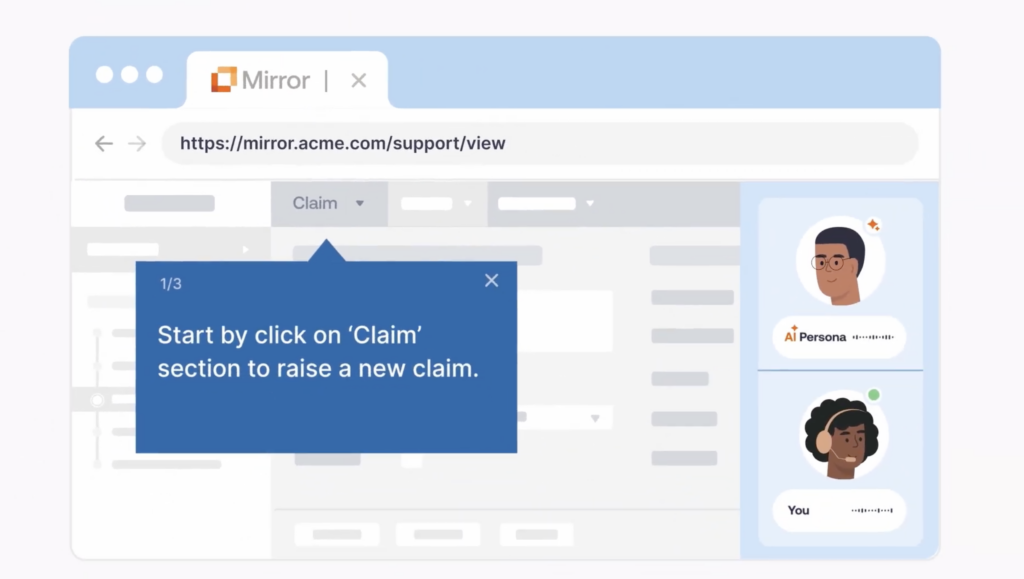
With Mirror, create replicate versions of your software and its workflows, providing end-users with an interactive sandbox to gain hands-on experience before real usage. Paired with AI roleplay and guided experiences, it provides an immersive learning experience that accelerates proficiency before a user ever enters production.
During rollout: guide execution where the work happens
Whatfix DAP helps IT teams deploy contextual guidance and user support directly inside the application through Flows, Smart Tips, Task Lists, Launches, Pop-Ups, Field Validation, and Self Help. For enterprise app owners, that means less reliance on memory, less hunting for documentation, and more control over how critical workflows are actually completed.
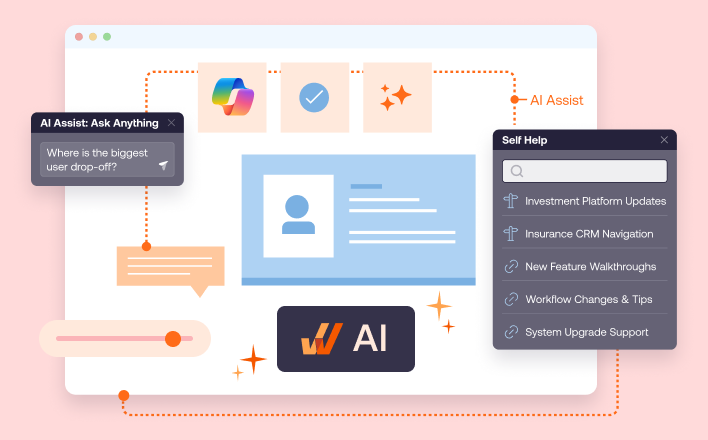
This becomes a continuous effort, with guided workflows evolving as your software and policies change. Your guidance in the flow of work becomes a performance support mechanism that employees use to maximize their efficiency and application owners use to govern workflows, reduce errors, and optimize cycle times.
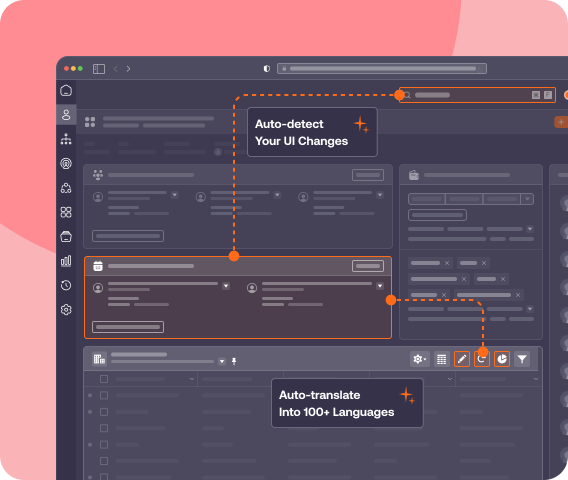
With Whatfix AI, application owners can scale content authoring and lifecycle management for guidance optimization.
- Authoring Agent accelerates in-app guidance creation and content management.
- Guidance Agent delivers contextual knowledge and real-time assistance in the flow of work.
- Insights Agent reveals adoption friction and builds an action plan with AI-driven insights.
After launch: contain support demand and improve the system
Self-service support matters most after the change is already live. With Whatfix DAP, organizations contain IT support tickets and eliminate the dependencies on subject matter experts by embedding an in-app help center directly within the application UI. This integrates with your knowledge repositories and uses AI to find, summarize, and suggest documentation and help content based on every end-user’s role, behavior, and contextual workflow.
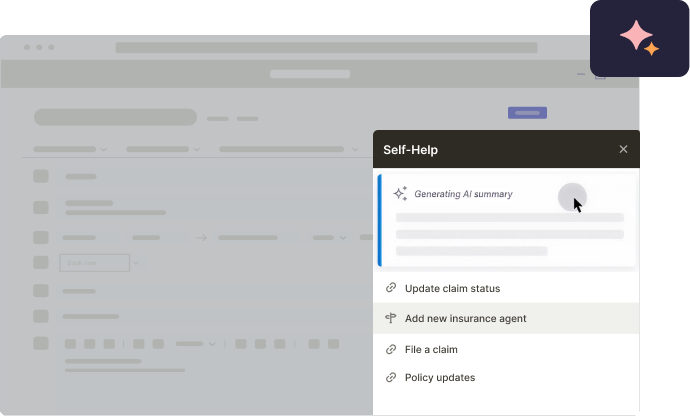
At Old Mutual, Whatfix helped reduce advisor IT support tickets by 33% year over year, while Self Help achieved an 88% successful resolution rate. That is the kind of outcome that makes support leaders pay attention because it protects team capacity while also improving the advisor experience.
Over time, measure the real outcome
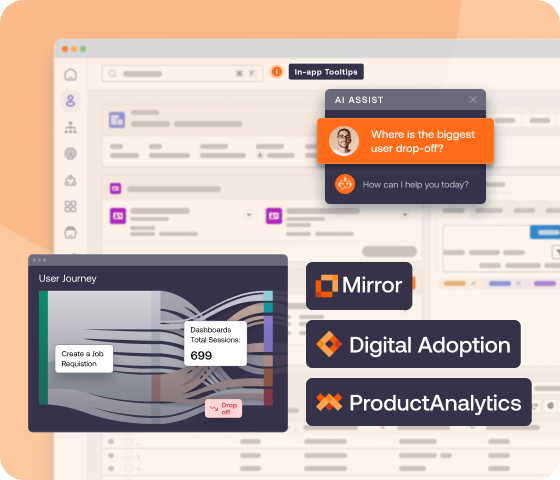
Whatfix Product Analytics gives application owners a way to see where users get stuck, which cohorts are lagging, how workflows perform over time, and whether the guidance in place is actually moving the right metric. That is what turns change management from a launch discipline into an optimization discipline.
The broader business case is harder to ignore. Our 2026 State of Digital Transformation ROI report revealed that organizations using a DAP:
- Achieve 64% faster time-to-value on new enterprise rollouts.
- Experienced a 37% lift in user proficiency at the three-month mark
- Experienced 67% lift in overall value realization from digital transformation investments.
Additionally, a 2026 Forrester study found that a mid-sized organization of roughly 1,000 employees lose an estimated $10.9 million annually because of poor digital adoption practices
Enterprise software change deserves a more serious operating model than most organizations give it.
Project plans are useful. Communications are useful. Training is useful.
None of them can carry the weight of an enterprise software rollout on their own. The teams that realize real value from their application change rollouts run software change as an operation: with defined ownership, workflow-level planning, readiness validation, in-app execution support, tight feedback loops, and metrics that reflect what is happening in production.
That is the standard enterprise application owners should aim for.
When teams manage change that way, users ramp faster, support stays under control, workflows stabilize sooner, and the software begins producing the business value it was supposed to produce in the first place. When they do not, the costs quickly manifest as delays, errors, tickets, workarounds, and lost ROI.
Ready to realize full digital adoption excellence? Request a Whatfix demo today!