








What Is a Digital Adoption Platform?
A digital adoption platform (DAP) is a software layer that overlays existing software applications to provide contextual in-app guidance, on-demand performance support, workflow assistance, and user behavior analytics. It enables users to learn and navigate software, complete business processes correctly, and access relevant support directly in the flow of work.
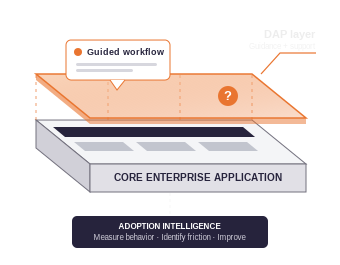
Enterprises use digital adoption platforms to support software rollouts, accelerate new-hire proficiency, drive adoption of process and application changes, reduce demand for IT support, continuously optimize business-critical workflows, and measure the business impact of digital transformation investments through digital adoption.
DAPs work across enterprise application use cases, including ERP, CRM, HCM, ITSM, and industry-specific software. Advanced enterprise DAPs also provide capabilities such as AI-powered assistance, field-level validation, content governance controls, cross-application guidance, application simulations, AI roleplay, and behavioral analytics.
Benefits of Digital Adoption Platforms
The business value of a digital adoption platform comes from improving how employees use enterprise applications and execute critical processes.
Organizations typically build a DAP business case around five operational benefits:
- Accelerated employee proficiency: Reducing the time required for new and existing employees to independently execute workflows.
- Lower training and support costs: Reducing repetitive instruction, manual assistance, and avoidable support tickets.
- Improved workflow accuracy: Helping users complete transactions correctly and follow established procedures.
- Faster software adoption: Increasing successful use of critical application features and processes.
- Stronger value realization: Connecting improvements in user behavior and workflow performance to business outcomes.
Types of Digital Adoption Platforms
Digital adoption platforms fall into three primary categories based on their intended users, application coverage, and business objectives: enterprise employee-facing DAPs, customer-facing DAPs, and suite-native adoption tools.
1. Enterprise DAPs for Employees
Enterprise digital adoption platforms provide contextual walkthroughs, field-level guidance, on-demand performance support, and adoption analytics across the business-critical applications employees use to perform their jobs.
- Goals: Accelerate enterprise software adoption, maximize digital transformation value, govern business processes, reduce workflow errors, improve employee productivity, and improve service delivery.
- Buyers include: CIOs, digital transformation leaders, L&D teams, employee enablement teams, IT, application owners, and business operations leaders.
- Best suited for: Organizations managing complex enterprise software environments, large-scale application rollouts, recurring process changes, and cross-application workflows.
- Examples: Whatfix, WalkMe, Userlane, Apty
2. DAPs for Customer-Facing Applications
Customer-facing digital adoption platforms provide in-app onboarding, interactive product tours, contextual messaging, and behavioral analytics to help customers discover features, adopt functionality, and realize value from a company’s digital product.
- Goals: Accelerate user activation, reduce customer churn, increase feature adoption, improve customer retention, and reduce customer support demand.
- Buyers include: Product management, product growth, customer success, and customer onboarding teams.
- Best suited for: SaaS companies and digital product teams looking to improve customer onboarding, product engagement, and self-service experiences.
- Examples: Pendo, Appcues, UserGuiding, UserPilot
3. Suite-Native Adoption Tools
Suite-native adoption tools are application-specific guidance and enablement solutions offered by enterprise software providers to help users learn, navigate, and complete workflows within their respective software ecosystems.
- Goals: Accelerate application-specific adoption, improve user proficiency, reinforce standardized processes, and support software releases and configuration changes.
- Buyers include: Enterprise application owners, IT teams, system administrators, and software implementation leaders.
- Best suited for: Organizations with adoption requirements concentrated within a specific enterprise application or software ecosystem.
- Examples: SAP Enable Now, Oracle Guided Learning, Salesforce In-App Guidance
Key Features of a Digital Adoption Platform
An effective digital adoption platform provides the capabilities required to guide users, support business processes, and measure application adoption.
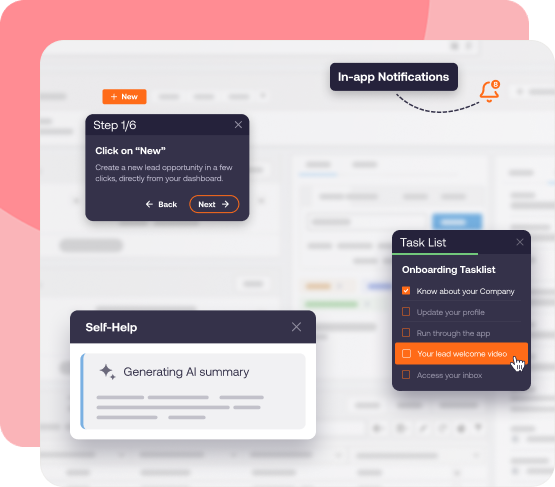
For enterprises, these capabilities must also operate across complex technology environments, distributed employee populations, and frequently changing business workflows.
Core Digital Adoption Platform Features
| DAP feature | What it does | Enterprise benefit |
| In-app guidance and interactive walkthroughs | Guides users through application tasks with step-by-step instructions, tooltips, and contextual prompts. | Accelerates workflow proficiency and reduces errors. |
| Self Help and AI-powered user assistance | Surfaces relevant knowledge articles, SOPs, and answers within applications. | Reduces repetitive support requests and employee interruptions. |
| No-code content authoring | Enables business teams to create and maintain guidance without extensive engineering support. | Accelerates content creation and reduces maintenance costs. |
| Personalization and user segmentation | Targets guidance by role, department, behavior, location, or application context. | Delivers relevant assistance to different employee groups. |
| User behavior and digital adoption analytics | Tracks feature engagement, usage patterns, workflow completion, and friction. | Identifies adoption gaps and prioritizes improvement opportunities. |
| Change and release communications | Delivers targeted announcements, reminders, and guidance for updated workflows. | Helps employees adapt to software releases and process changes. |
| Content lifecycle management and governance | Provides controls for content ownership, approvals, testing, versioning, and localization. | Supports controlled deployments across enterprise teams. |
| AI-assisted guidance and optimization | Uses AI to support content creation, contextual assistance, and identification of adoption opportunities. | Helps scale digital adoption operations and maintain relevant content. |
Advanced Capabilities for Enterprise Digital Adoption Platforms
Organizations with complex application portfolios may also evaluate complementary capabilities that extend the value of a traditional DAP.
- Application simulation training enables employees to practice realistic workflows before entering production environments. These simulations can support role-based training, pre-go-live readiness assessments, and recurring new-hire onboarding.
- AI-powered assistance can help users find answers, understand procedures, and receive recommendations based on their application context. AI-assisted authoring and analysis can also reduce the effort required to maintain guidance as workflows change.
- Workflow analytics and optimization provide deeper visibility into how employees complete business processes. Funnels, journeys, cohorts, and session replay can help application owners identify friction and evaluate targeted interventions.
- Workflow automation can reduce repetitive user actions or, where supported, assist with multistep tasks, although automation capabilities vary significantly across platforms.
Enterprise buyers should evaluate these capabilities separately from core DAP functionality and confirm whether they are included in the standard platform or offered through additional products.
When to Invest in a Digital Adoption Platform
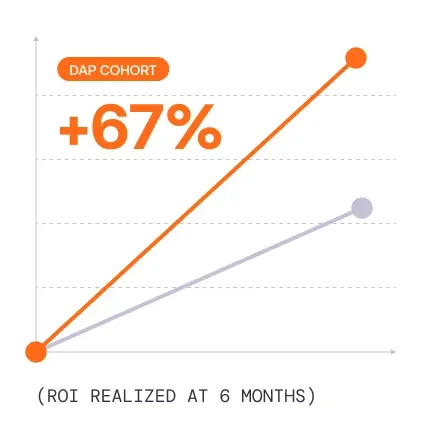
Enterprise organizations invest millions in business-critical enterprise software applications, yet the value of these investments depends on whether employees can use them effectively. Forrester estimates that large organizations lose $10.9M annually to poor digital adoption due to complex workflows, insufficient training, frequent application changes, and limited visibility into user behavior, which delays proficiency, increases support costs, and undermines software ROI.
Enterprises should invest in a digital adoption platform to overcome these common digital adoption challenges when supporting major software projects, such as:
- Introducing new business-critical systems
- Modernizing core enterprise applications
- Consolidating software following mergers and acquisitions
- Standardizing business processes across their technology ecosystem.
These initiatives require employees to learn new interfaces, adopt unfamiliar workflows, and maintain operational performance throughout periods of change. A DAP helps enterprises manage this transition, accelerate employee proficiency, and sustain adoption as applications, business processes, and workforce requirements continue to evolve.
Enterprise DAP fit signals
The following organizational challenges, technology initiatives, and operational requirements indicate when an enterprise can benefit from a digital adoption platform.
| Buyer | Fit signal | Expected outcome |
| L&D and Enablement Leaders | Employees struggle to become proficient in critical applications, and training requires repeated manual support. | Faster time-to-proficiency |
| IT and Application Owners | Business application support teams receive recurring how-to questions, particularly after releases and system changes. | Fewer support tickets |
| Digital Transformation Leaders | Applications are deployed successfully, but employee adoption and workflow performance lag behind implementation milestones. | Faster time-to-value |
| Operations and Process Owners | Employees take inconsistent paths, skip required steps, or struggle with complex workflows. | Higher task completion and process adherence |
| HR and Employee Experience Teams | Frequent onboarding and role changes create recurring software training requirements. | Faster employee onboarding |
| Quality and Compliance Leaders | Manual data entry, inconsistent procedures, and changing policies create errors or compliance exposure. | Fewer errors and reduced rework |
| Customer Support Leaders | Agents struggle with complex systems and need assistance during live customer interactions. | Faster resolution and improved service quality |
Digital Adoption Platform Comparison Matrix
Digital adoption platforms vary in their intended users, application coverage, guidance capabilities, analytics, content governance, deployment requirements, and licensing models. Enterprise buyers should evaluate these differences against their technology environment, digital adoption objectives, and long-term enablement strategy.
First, use the comparison matrix below to explore how leading digital adoption platforms differ across nine evaluation criteria. Select an individual criterion or expand a vendor’s response to review additional capability and implementation details.
7 Best Digital Adoption Platforms for Enterprise Teams
Enterprise digital adoption platforms differ in their application coverage, intended users, workflow guidance capabilities, analytics, governance, and deployment models. Selecting the right DAP requires evaluating how each platform aligns with your organization’s technology environment, adoption objectives, and operational requirements.
The following profiles explore seven of the best digital adoption solutions, including enterprise-wide platforms, product-focused adoption tools, and software ecosystem-specific offerings.
Editorial methodology: We evaluated publicly documented vendor capabilities across ten criteria: DAP type, application coverage, in-app guidance, self-help, adoption analytics, content governance, deployment model, AI capabilities, guided simulations, and pricing model. Sources include vendor product documentation, published pricing information, and third-party software review resources.
Note: Whatfix is both the publisher of this guide and a vendor included in the comparison. The profiles reflect documentation-based research rather than independent hands-on product testing.
1. Whatfix
Whatfix is an enterprise digital adoption platform that helps organizations prepare employees for software transformation, support correct workflow execution within live applications, and measure adoption to continuously improve business performance.
Its product portfolio combines digital adoption, application simulation training, and behavioral analytics to support users throughout the enterprise application lifecycle.
Best for: Enterprise-wide digital adoption programs, mission-critical software rollouts, regulated workflows, and continuous workflow optimization.
Primary use case: Enterprise software adoption, digital transformation, employee onboarding and training, in-workflow performance support, process governance, and workflow optimization.
Application coverage: Web, native desktop, mobile, supported Citrix and virtual desktop environments, and custom-built enterprise applications.
Core capabilities:
- Contextual in-app guidance through Flows, Smart Tips, Task Lists, and Pop-Ups.
- Embedded Self Help with searchable enterprise knowledge and AI-powered assistance.
- Field validation, user segmentation, and cross-application workflow guidance.
- Behavioral analytics, including events, funnels, journeys, cohorts, and Session Replay.
- Application simulation training, guided practice, readiness assessments, and AI roleplay through Whatfix Mirror.
- ScreenSense-powered AI agents for content authoring, contextual guidance, and adoption insights.
- Content lifecycle management, including staging, versioning, approvals, localization, and publishing controls.
Strengths: Whatfix DAP brings together pre-production employee readiness, in-production guidance and support, and continuous adoption measurement within one vendor portfolio. Its broad application coverage and content governance capabilities make it particularly relevant to enterprises managing complex software portfolios, business-critical processes, and regulated workflows.
Buying considerations: Whatfix offers multiple products and subscription plans, with pricing based on a flat fee and user licensing. Enterprises should confirm which DAP, Product Analytics, Mirror, and AI capabilities are included in their proposed subscription, alongside application-specific compatibility, deployment requirements, implementation services, and ongoing content ownership.
2. WalkMe
WalkMe, an SAP company, is an enterprise digital adoption platform that combines in-app guidance, analytics, automation, and contextual AI assistance to help organizations improve software adoption and employee productivity.
Best for: Large-scale enterprise adoption programs requiring cross-application guidance, workflow automation, and application usage intelligence.
Primary use case: Enterprise application adoption, digital transformation, workflow automation, employee enablement, and identification of digital friction.
Application coverage: Web, supported desktop applications including SAP GUI, native and hybrid mobile applications, and certain virtual desktop environments.
Core capabilities:
- Smart Walk-Thrus, SmartTips, Launchers, and ShoutOuts.
- WalkMe Menu for on-demand guidance and support resources.
- Workflow automation through ActionBot and other automation capabilities.
- WalkMe Insights, including behavioral events, funnels, paths, and application usage analytics.
- AI-powered content authoring, analytics, and contextual assistance through the Action Bar.
- Content management, role-based permissions, and environment-specific publishing.
- Interactive recorded simulations, courses, and assessments through WalkMe Learning Arc.
Strengths: WalkMe offers a broad enterprise adoption platform with substantial workflow automation, behavioral analytics, and AI assistance capabilities. Its integration with the SAP ecosystem is particularly relevant for organizations undertaking SAP modernization or managing extensive SAP application portfolios.
Buying considerations: WalkMe uses quote-based pricing. Buyers should assess the administrative expertise required to build and maintain complex guidance and automations, along with implementation services, feature availability across application environments, and separate Learning Arc licensing. Organizations with mixed software portfolios should validate compatibility across their SAP and non-SAP applications.
Recommended: Compare Whatfix vs. WalkMe
3. Userlane
Userlane is a digital adoption platform that combines visibility into enterprise software usage with contextual guidance and assistance to help employees overcome application friction and improve productivity.
Best for: Browser-based employee adoption programs focused on application intelligence, contextual assistance, and software utilization.
Primary use case: Employee-facing software adoption, application utilization, in-app support, workflow enablement, and software portfolio optimization.
Application coverage: Browser-based enterprise applications, including ERP, CRM, HCM, financial systems, and compatible custom-built web applications.
Core capabilities:
- Interactive walkthroughs and contextual guidance.
- Userlane Assistant for on-demand user support.
- In-app announcements and data validation.
- HEART analytics for measuring software adoption.
- Application intelligence and cross-application portfolio insights.
- License utilization and optimization capabilities.
- AI-assisted guidance and integrations with external AI assistants.
Strengths: Userlane combines application usage intelligence with contextual interventions, helping organizations identify underused software, investigate adoption barriers, and deliver targeted assistance. Its application, department, and organization packages accommodate different levels of adoption program maturity.
Buying considerations: Userlane offers application-based and consumption-based pricing models. Buyers should assess how each model scales across their application portfolio and user base. Enterprises requiring native desktop or mobile guidance, dedicated application simulation environments, or formal content approval and rollback workflows should validate these requirements directly with Userlane.
Recommended: Compare Whatfix vs. Userlane
4. Pendo
Pendo is a software experience management platform that combines product analytics, in-app guidance, user feedback, and behavioral insights. While its core positioning centers on digital product experience, Pendo also supports employee-facing adoption programs through its browser-based deployment options.
Best for: Product-led organizations and enterprise teams prioritizing behavioral analytics, customer onboarding, feature adoption, and digital product experience optimization.
Primary use case: Customer onboarding, feature adoption, product engagement, user retention, product discovery, and employee-facing software adoption.
Application coverage: Web applications, native and hybrid mobile applications, and compatible third-party employee-facing web applications through the Pendo Launcher browser extension.
Core capabilities:
- In-app guides, tooltips, onboarding experiences, and contextual messaging.
- Product analytics, including events, funnels, paths, and retention analysis.
- Session Replay for investigating user behavior and friction.
- Resource Center for on-demand help content.
- User feedback collection and sentiment measurement.
- AI-powered product insights, guide creation, and behavioral analysis.
- Multi-application journey orchestration and segmentation.
Strengths: Pendo brings together behavioral analytics, user feedback, and in-app engagement. This combination is particularly valuable for product teams that need to understand feature utilization, identify friction within digital experiences, and improve customer onboarding and retention.
Buying considerations: Pendo pricing is based on monthly active users and selected product functionality. Buyers should evaluate the cost of scaling across large user populations and which modules are included in their plan. Enterprises prioritizing native desktop and VDI guidance, off-production application simulation, or regulated workflow validation should confirm support for those requirements.
Recommended: Compare Whatfix vs. Pendo
5. Apty
Apty is a digital adoption platform focused on helping organizations improve software utilization and business process execution through contextual guidance, workflow validation, automation, and adoption analytics.
Best for: Enterprise business process adoption programs prioritizing standardized workflow execution, data quality, and process adherence.
Primary use case: Enterprise software adoption, business process compliance, workflow standardization, employee productivity, and data quality improvement.
Application coverage: Web-based enterprise applications, including CRM, ERP, HCM, ITSM, and compatible custom-built business applications.
Core capabilities:
- Contextual walkthroughs, tooltips, announcements, and checklists.
- Real-time field and workflow validation.
- Rule-based guidance and contextual interventions.
- Cross-application guidance and task automation.
- Application usage, content engagement, and process analytics.
- AI-powered recommendations and content assistance.
- Centralized knowledge resources and self-service support.
Strengths: Apty’s emphasis on business process execution makes it relevant to organizations seeking to reduce incorrect data entry, reinforce standard operating procedures, and improve consistency across structured enterprise workflows. Its validation and rule-based guidance capabilities support process-oriented adoption initiatives.
Buying considerations: Apty uses customized pricing based on deployment scope and organizational requirements. Buyers should assess compatibility with their application portfolio, the depth of behavioral analytics and content governance, and the availability of native desktop guidance, mobile support, and dedicated application simulation capabilities.
6. Oracle Guided Learning
Oracle Guided Learning (OGL) is a cloud-based digital adoption and learning solution that provides contextual information, step-by-step guidance, and training experiences within web-based business applications.
Best for: Oracle-centric enterprises seeking contextual guidance and employee enablement, particularly for Oracle Fusion Cloud applications.
Primary use case: Oracle application adoption, employee onboarding, business process guidance, software release enablement, and contextual performance support.
Application coverage: Oracle Fusion Cloud applications, other supported Oracle applications, and compatible non-Oracle web applications.
Core capabilities:
- Process Guides for step-by-step workflow guidance.
- Smart Tips, contextual messages, and task lists.
- Embedded Help Panel for accessing guidance and learning resources.
- Guide consumption and application interaction analytics.
- Content publishing, revision management, and environment controls.
- Interactive, screenshot-based training simulations.
- Generative AI assistance for content creation, refinement, and translation.
Strengths: Oracle Guided Learning benefits from its alignment with the Oracle application ecosystem. Organizations adopting or modernizing Oracle Fusion Cloud applications can evaluate its available embedded guidance and preconfigured learning content alongside their broader Oracle implementation strategy. Certain eligible Oracle customers may already have access to base capabilities through their existing subscription.
Buying considerations: Available capabilities depend on the customer’s Oracle subscription and Guided Learning account. Buyers should confirm entitlements for simulations, non-Oracle applications, premium functionality, and broader deployment requirements. Organizations operating diverse application portfolios should assess whether OGL can adequately support workflows spanning their Oracle and non-Oracle systems.
7. SAP Enable Now (Legacy)
SAP Enable Now is a legacy digital learning and application enablement solution that allows organizations to create software training materials, recorded simulations, documentation, and contextual user assistance.
Following SAP’s acquisition of WalkMe, SAP announced the transition of its digital adoption and learning offering. SAP stopped initiating new SAP Enable Now contracts on April 22, 2025, with mainstream maintenance scheduled to end November 30, 2030.
Best for: Existing SAP Enable Now customers maintaining established software training content and planning their transition to a new adoption platform.
Primary use case: SAP software training, simulation-based learning, business process documentation, and contextual application enablement within existing deployments.
Application coverage: SAP application environments and supported third-party applications for recorded software training content. Live contextual guidance depends on the existing product edition and application integration.
Core capabilities:
- Recorded software demonstrations and interactive simulations.
- Guided practice and assessment modes.
- Business process documentation and learning content creation.
- Contextual assistance through SAP Companion in supported editions.
- Centralized content management, versioning, and publishing.
- Learning activity and assessment reporting.
Strengths: SAP Enable Now remains relevant for existing organizations with substantial investments in recorded training simulations, documentation, and SAP-specific learning content. Its established authoring and content management capabilities can support continuity while organizations plan their transition.
Buying considerations: SAP Enable Now is no longer available through new standalone contracts. Existing customers should assess their maintenance timelines, content migration requirements, contractual entitlements, and transition options. Enterprises initiating new digital adoption programs should evaluate currently available platforms, including WalkMe and other enterprise DAP vendors.
Technical Considerations for DAP Buyers
A digital adoption platform operates within an organization’s existing application ecosystem, making technical compatibility, deployment flexibility, security, and scalability critical evaluation criteria. Enterprise IT leaders should assess how a DAP integrates with their technology stack, delivers contextual guidance, collects behavioral data, and maintains content as underlying applications evolve.
| Technical consideration | What to evaluate |
| Deployment and integration | Available deployment methods, including browser extensions, embedded JavaScript, desktop clients, and mobile SDKs, as well as centralized deployment through enterprise IT management tools. |
| Application compatibility and coverage | Support for web, desktop, mobile, and VDI environments, including commercial enterprise software, custom-built applications, and legacy systems. |
| Contextual awareness and user segmentation | Ability to recognize application elements, identify workflow context, and personalize guidance based on user roles, attributes, and behaviors. |
| Cross-application workflow support | Ability to deliver consistent guidance and measure user interactions across business processes that span multiple applications. |
| Content lifecycle management and application resilience | Ability to maintain guidance through application updates, detect broken content, manage versions, test in staging environments, and govern publishing permissions. |
| Data security, privacy, and hosting | Security certifications, data collection practices, sensitive data protection, hosting options, data residency, access controls, and AI governance. |
| Performance, scalability, and IT administration | Impact on underlying application performance, centralized administration, localization, content maintenance requirements, and the ability to scale across applications, business units, and geographies. |
Use the interactive DAP Technical Evaluation Worksheet below to assess shortlisted vendors against 18 technical criteria, document vendor responses, identify capability gaps, and export your findings as an editable Word document to share with your enterprise buying committee.
Whatfix Digital Adoption Case Studies
From modernizing core enterprise systems and accelerating new-hire proficiency to governing critical workflows and reducing IT support demand, organizations use Whatfix to translate digital adoption into measurable business outcomes. Explore how enterprises across industries enable employees, optimize business processes, and maximize the value of their software investments.
 FOX Rehabilitation
Hours saved during a four-month EHR transition
FOX Rehabilitation prepared and supported its clinicians throughout its Raintree modernization with hands-on simulations and in-app guidance.
 Extra Space Storage
Reduction in rental transaction time for new hires
Extra Space Storage enabled 7,500 frontline associates with guided rental workflows and AI-powered self-service support.
 Sentry Insurance
Saved in training, support, and productivity
Sentry scaled employee onboarding and contextual performance support across eight business-critical applications.
 Renewable Energy Group
Faster time-to-proficiency
REG standardized employee training and in-app support across its enterprise CRM and ERP applications.
 City of Bakersfield
Fewer rejected invoices
Bakersfield guided city employees through Oracle procurement and invoice workflows, reducing errors and administrative rework.
 Experian
Year-over-year increase in seller productivity
Experian delivered role- and region-specific Salesforce guidance to its global sales workforce.
 Acorn Recruitment
Reduction in recruiter onboarding time
Acorn accelerated new recruiter readiness and standardized critical applicant tracking workflows with role-based in-app training.
 bioMérieux
User adoption of its contract management platform
bioMérieux supported its legal and procurement teams with role-based Icertis guidance and embedded performance support.